Cowork and plugins for teams across the enterprise
Admins can now create private plugin marketplaces, with better control over plugins, connectors, and skills. We've also added new plugins and connectors across more departments.
Today, we're introducing updates to Cowork and plugins that help enterprises customize Claude to how you work. Plugins turn Claude into specialized agents for every role and department. Now, you can build private marketplaces to distribute them across your organization.
This release also makes plugins easier to build and customize, gives admins more control over marketplaces and connectors, and adds new plugins and connectors across a wider range of job functions. Claude can also now orchestrate across Excel and PowerPoint, working end-to-end and passing context between apps.
Silvern Capital is a fictional company. Most teams in the demo are working in Cowork, with the legal team working in Thomson Reuters CoCounsel Legal — a purpose-built legal agent, reimagined from the ground up using the Claude Agent SDK.
Upgrading the plugin experience
Today we're launching a suite of updates that make it easier to create, use, and manage plugins across your organization.
Admins can now set up plugins from starter templates or build them from scratch, with Claude guiding you through setup by asking questions to tailor skills, commands, and connectors (MCPs) to your company. All of this lives in a new unified menu called 'Customize,' which consolidates plugins, skills, and connectors so admins can see and manage everything in one place.
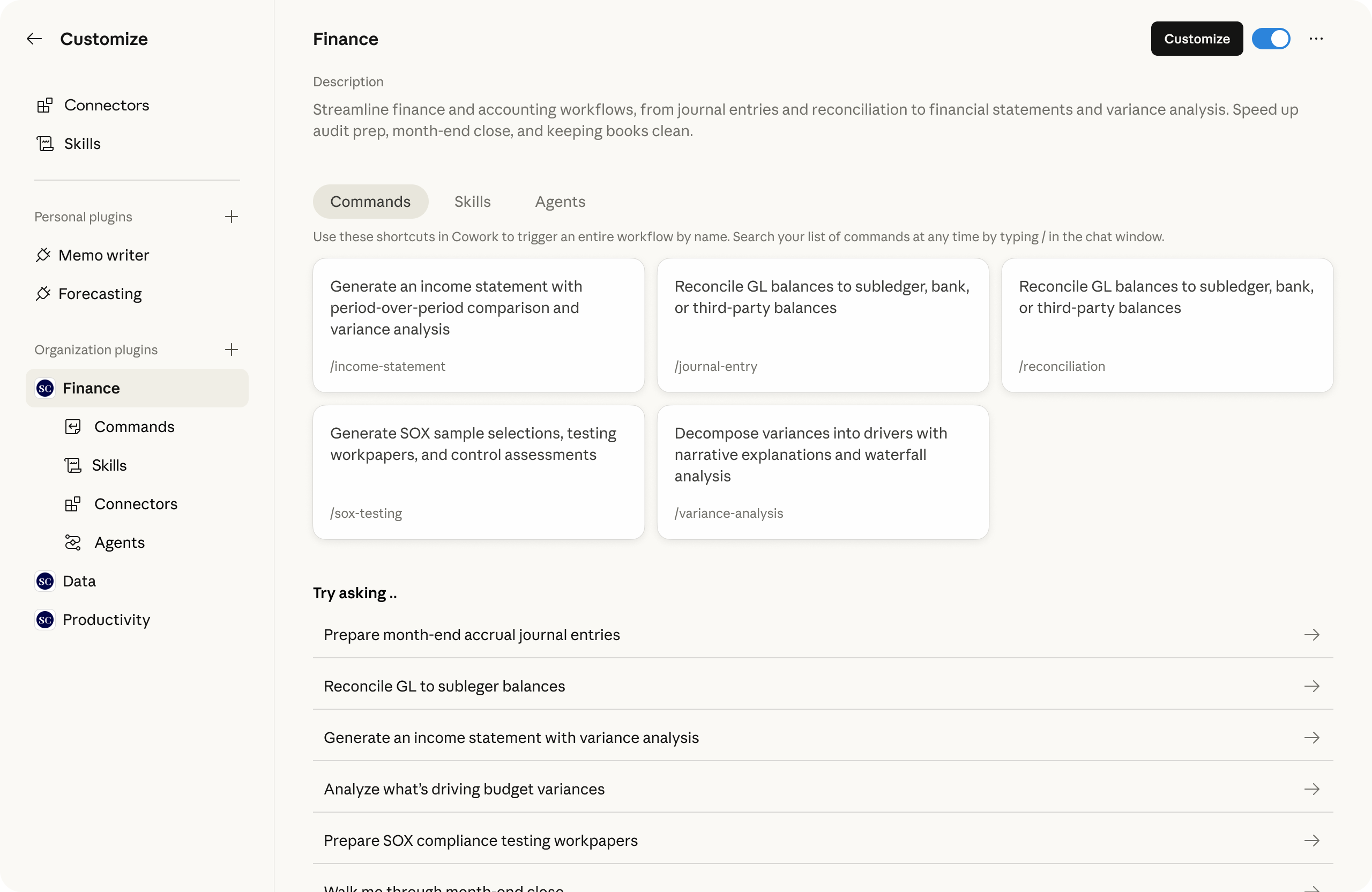
The connector experience has been overhauled too, with an improved directory, streamlined admin controls, and easier management of which connectors are bundled into plugins. Admins also get more control over what plugins their teams can access, including org-specific marketplaces, private GitHub repositories as plugin sources (in private beta), per-user provisioning, and auto-install.
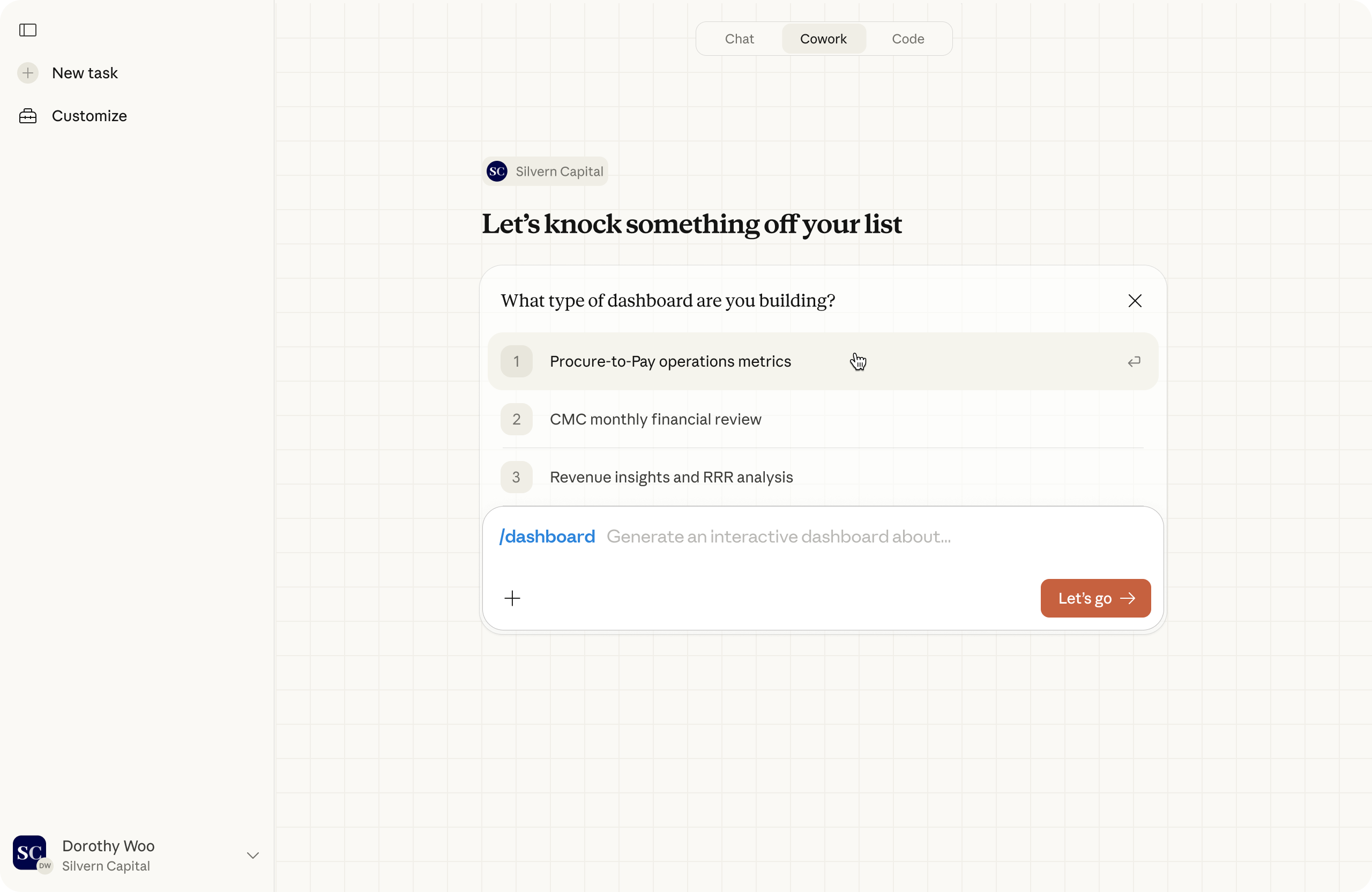
On the user side, slash commands now launch with structured forms, so running a workflow like 'generate report' or 'dashboard' feels as intuitive as filling out a brief. And Cowork now features company branding throughout, including a redesigned home experience tailored to your organization.
Additionally, we're adding OpenTelemetry support, letting admins track usage, costs, and tool activity across their teams.
New connectors and plugins
Cowork handles complex tasks best when connected to the tools you already use. Connectors bring Claude closer to where your work lives—helping you move faster across tools, not replace the expertise or software you rely on.
New connectors from popular enterprise software providers are now available, including Google Workspace (Calendar, Drive, Gmail), Docusign, Apollo, Clay, Outreach, Similarweb, MSCI, LegalZoom, FactSet, WordPress, and Harvey. And companies like Slack by Salesforce, LSEG, S&P Global, Apollo, Common Room, and Tribe AI (see below) have also built plugins for joint customers to explore.
We're also expanding the library of pre-built plugin templates so more knowledge workers can find value in Cowork. Each was designed with practitioners in the relevant field, so workflows, terminology, and outputs reflect how that work actually gets done. New plugins include:
- HR: Support people operations across the employee lifecycle, from drafting offer letters and building onboarding plans to writing performance reviews and running compensation analyses.
- Design: Accelerate design workflows by generating critique frameworks, drafting UX copy, running accessibility audits, and structuring user research plans.
- Engineering: Streamline day-to-day engineering workflows like writing standup summaries, coordinating incident response, building deploy checklists, and drafting postmortems.
- Operations: Manage core business operations including process documentation, vendor evaluations, change request tracking, and runbook creation.
- Brand voice (by Tribe AI): Analyze your existing documents, marketing materials, and conversations to distill your brand's voice into clear, enforceable guidelines.
- Financial analysis: Support the baseline workflows every finance analyst needs, from market and competitive research to financial modeling and PowerPoint template creation and quality checking.
- Investment banking: Accelerate deal workflows including reviewing transaction documents, building comparable company analyses, and preparing pitch materials.
- Equity research: Streamline research workflows like parsing earnings transcripts, updating financial models with new guidance, and drafting research notes.
- Private equity: Support deal sourcing and diligence by reviewing large document sets, extracting standardized financial data, modeling scenarios, and scoring opportunities against investment criteria.
- Wealth management: Help advisors analyze portfolios, identify drift and tax exposure, and generate rebalancing recommendations at scale.
Plugins are simple, portable file systems that you own. They work across Cowork and anything built on the Claude Agent SDK, making it easy to create private plugin marketplaces across teams and with industry experts.
““Three waves have reshaped professional work: productivity tools, cloud and search, and now agentic AI. PwC is partnering with Anthropic to bring enterprise-grade agents into the office of the CFO — making finance teams an even more strategic and valuable function by giving every team member the tools to do more ambitious work, make better decisions, and grow the business in ways that weren't possible before.” - Sanjay Subramanian, Anthropic Alliance Leader, PWC”
““For two years, the market has been hyping us up about AI agents like they would be digital employees that work around the clock on a specific, discrete workflow. What Anthropic built is so much better.” - Mark Hines, COO, Blank Metal”
Working across apps
Claude can now also handle multi-step tasks end-to-end across Excel and PowerPoint. Claude can use and pass context from one Office add-in to the other, which makes it possible to assign Claude larger projects, like running an analysis in Excel and turning it into a presentation in PowerPoint. It's an early research preview that points toward Claude working across apps just like we do.
Getting started
All user experience updates for plugins are available to all Cowork users. Team and Enterprise admins can access company branding, provisioning, and MCP controls.
Claude working across Excel and PowerPoint is now available in research preview for all paid plans on Mac and Windows. Download the add-in for Claude in Excel and Claude in PowerPoint to get started.
To learn more about Cowork and plugins for financial services, see our companion blog post.