Cowork and plugins for finance
New plugins built for how finance actually works, plus cross-app workflows that move with you from Excel to PowerPoint to final deliverable.
Today we’re announcing updates to Cowork, including new plugins, so teams across the enterprise can mold Claude to how they want to work. As part of this, we're continuing to build on recent updates to expand what Claude can do for financial services.
Claude now works across Excel and PowerPoint — carrying context between apps to complete multi-step finance tasks end to end. We're also introducing five new finance plugins, new MCP connectors for FactSet and MSCI, and partner-created plugins from LSEG and S&P Global.
For finance professionals, this means that an end-to-end workflow — performing research across market data providers through to updating a model and building the deck — can now happen in a single session, without switching tools or losing context along the way.
From data to deliverable
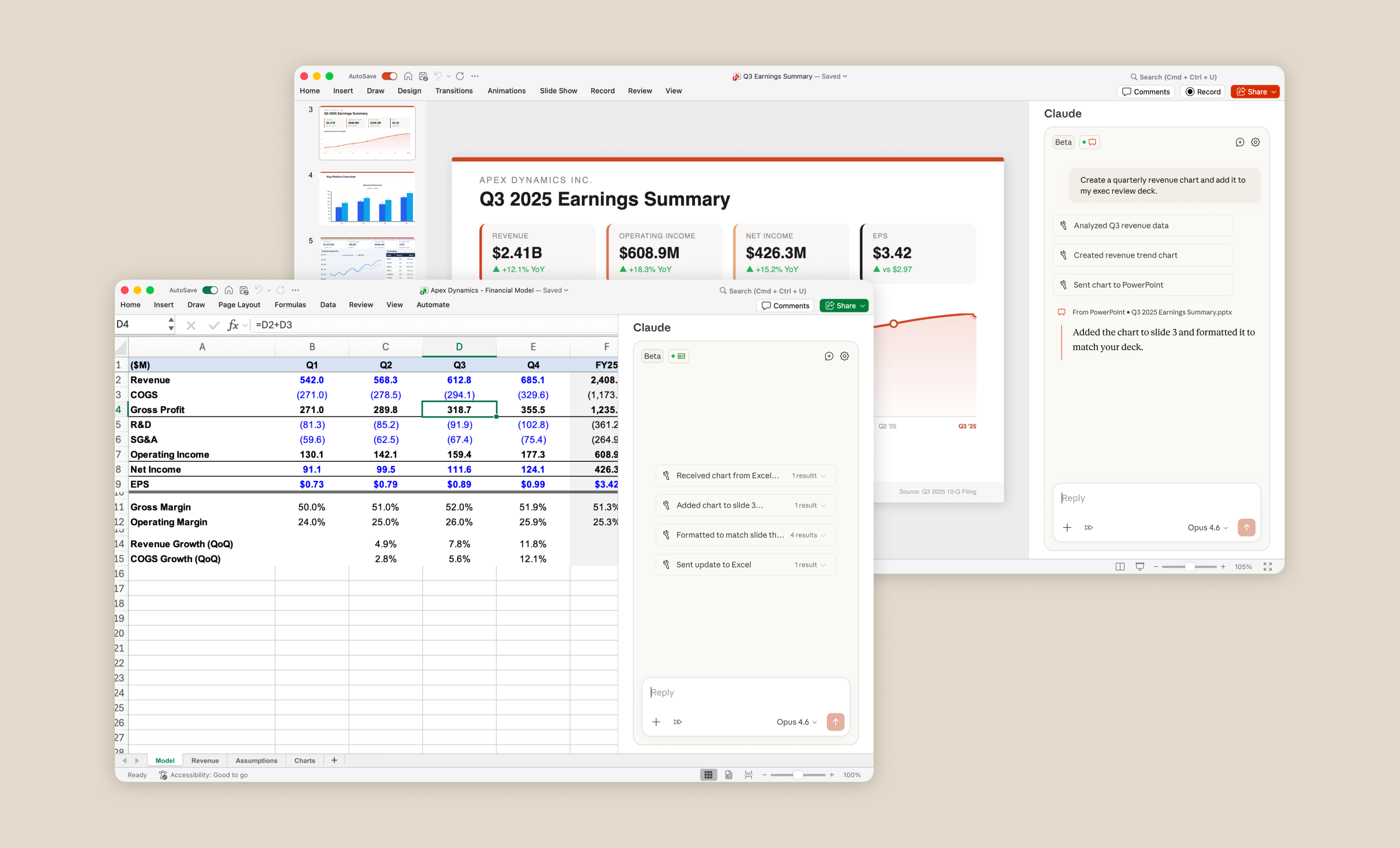
The work around finance lives in many different places. A deal memo pulls from a model, a model pulls from data, and data feeds back into a presentation. Claude can now move between Excel and PowerPoint without losing context – retrieving data, updating models, and building deliverables as a single continuous task.
An equity analyst can ask Claude to analyze earnings, update a financial model, and build a summary slide – all without switching tools. When inputs change, Claude automatically updates the rest of the workflow.
Claude working across Excel and PowerPoint is now available in research preview for all paid plans across Mac and Windows.
New finance plugins
We’re introducing five new Anthropic-built plugins, and several plugins built by partners. Each brings the domain expertise, expected output quality, and workflow patterns relevant to how that function actually operates.
The 5 Anthropic-developed plugins are all available now in our public repository.
- First, the financial analysis plugin supports baseline workflows all finance analysts need, across market and competitive research, financial modeling, and powerpoint template creation and quality checking.
Additional plugins support workflows specific to key finance functions:
- Investment banking helps bankers with deal workflows: reviewing transaction documents, building comparable company analyses, and preparing pitch materials.
- Equity research accelerates research workflows—parsing earnings transcripts, updating financial models with new guidance, and drafting research notes.
- Private equity is built for deal sourcing and diligence. Claude can review large document sets, extract standardized financial data, model scenarios, and score opportunities against investment criteria.
- Wealth management helps advisors analyze portfolios, identify drift and tax exposure, and generate rebalancing recommendations at scale.
Beyond these five plugins, finance professionals also rely on proprietary data and specialized platforms that no general-purpose plugin can replicate. Our partners have built their own connectors and plugins that bring institutional data directly into Claude’s context, so user workflows are grounded in the exact sources their teams already trust.
Partner-led connectors and plugins
In addition to existing financial MCP connectors we already support, two new MCP connectors give Claude direct access to institutional data platforms.
- The FactSet connector brings real-time market data, fundamental analysis, earnings estimates, and research insights into Claude, to enhance users’ financial analysis and investment research workflows with trusted, institutional-quality data.
- The MSCI connector brings MSCI’s trusted index data into Claude, enabling users to access MSCI’s proprietary index data and quickly gain insights into index performance, exposures, constituents and methodologies.
Several partners are also launching their own plugins, which can be found in the same financial services plugins repository above.
- The S&P Global plugin brings Capital IQ Pro into Claude’s context. Skills include company tear sheets, industry transaction summaries, and earnings calls previews.
- The LSEG plugin gives financial professionals direct access to LSEG’s market data and analytics from within Claude. Build DCF models with live yield curves, draft morning notes with real-time news, rebalance portfolios with current cross-asset pricing, and analyze deals with actual financing economics. Available for users with active LSEG data entitlements.
Getting started
All Anthropic-developed plugins – financial analysis, investment banking, equity research, private equity, and wealth management – are available today and can be found in our public finance plugin repository, as are the partner-developed plugins from LSEG and S&P Global. You can install them directly or use them as a starting point to customize for your firm’s specific workflows, terminology and needs.
To connect Claude to FactSet, MSCI, or your other enterprise data sources, visit the connector directory in Claude’s settings. From there, admins can authorize connections and bundle them into plugins for their teams.
To get started with Claude working across Excel and PowerPoint, download the add-in for Claude in Excel and Claude in PowerPoint. For a broader look at Cowork and plugin updates across every function, see the companion blog post.