企業全体のチームに向けた Cowork とプラグイン
管理者は、プライベートなプラグインマーケットプレイスを作成し、プラグイン、コネクタ、スキルをより細かく管理できるようになりました。より多くの部門で使える新しいプラグインとコネクタも追加しました。
本日Anthropic は、エンタープライズがそれぞれの働き方に合わせて Claude をカスタマイズできるようにする、Cowork とプラグインのアップデートをご紹介しますプラグインにより、Claude はあらゆる役割や部門に対応する専門エージェントになります。これにより、組織全体に配布するためのプライベートなマーケットプレイスを構築できるようになりました。
今回のリリースでは、プラグインの構築やカスタマイズがより容易になり、管理者はマーケットプレイスやコネクタをより細かく管理できるようになります。あわせて、より幅広い職種に対応する新しいプラグインとコネクタも追加されます。さらに、Claude は Excel と PowerPoint をまたいで連携できるようになり、アプリ間でコンテキストを引き継ぎながら、一連の作業をエンドツーエンドで進められます。
Silvern Capital は架空の会社です。デモではほとんどのチームが Cowork を利用しており、法務チームは Thomson Reuters CoCounsel Legal を利用しています。これはClaude Agent SDK を用いてゼロから再構築された、法務向けに特化したエージェントです。
プラグイン体験の強化
本日、組織全体でのプラグインの作成・利用・管理をより簡単にする一連のアップデートを公開されます。
管理者は、スターターテンプレートをもとにプラグインを設定することも、ゼロから構築することもできます。設定時には、Claude が質問を通じて案内しながら、スキル、コマンド、コネクタ(MCP)を各社の環境に合わせて調整できるようにします。これらの機能はすべて、「カスタマイズ」と呼ばれる新しい統合メニューに集約され、管理者はプラグイン、スキル、コネクタを 1 か所で確認・管理できます。
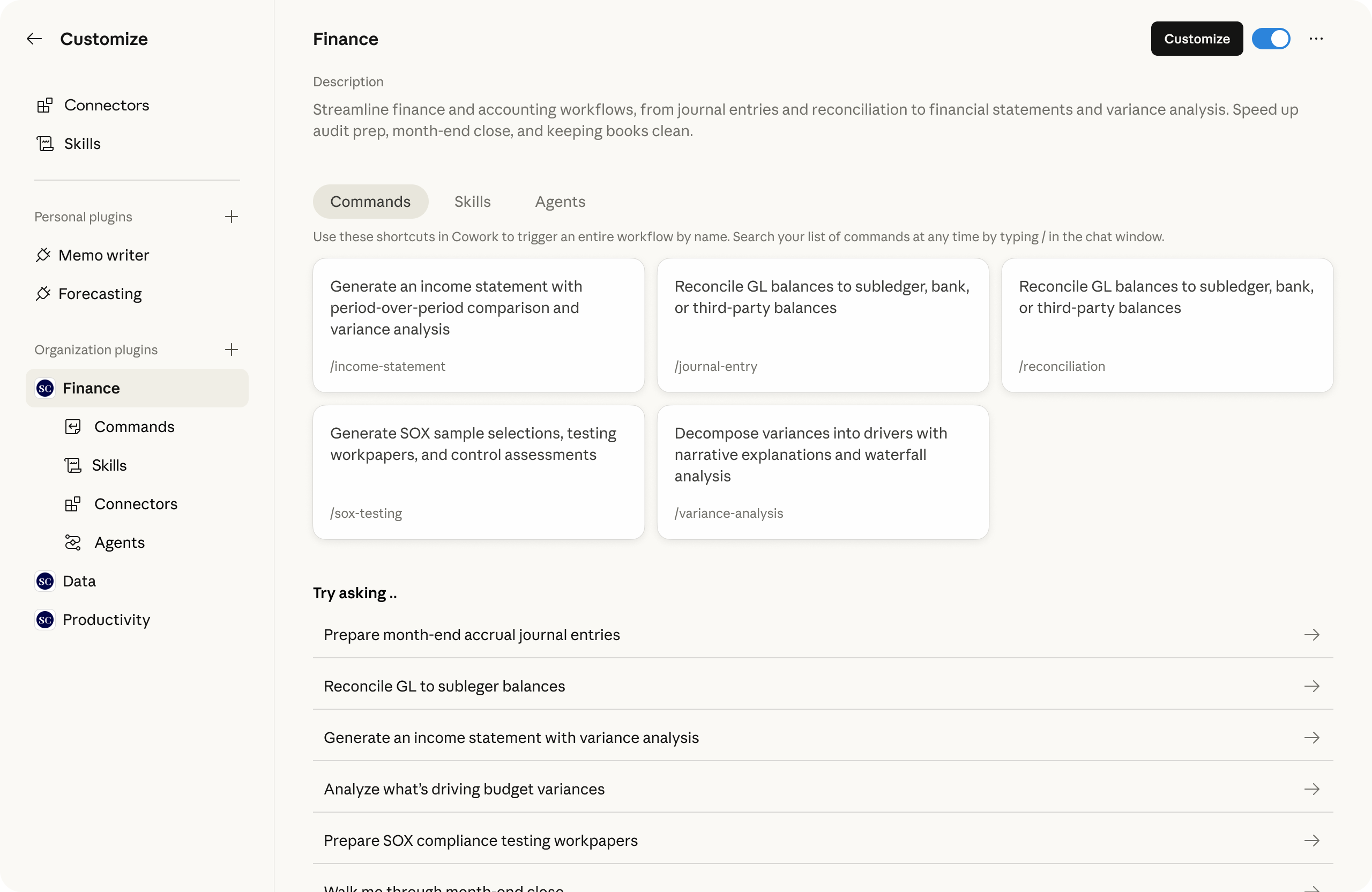
コネクタまわりの機能も刷新し、ディレクトリの改善や管理者向け操作の簡素化に加え、どのコネクタをプラグインに組み込むかをより簡単に管理できるようになっています。管理者は、チームが利用できるプラグインについても、より細かな制御が可能になります。これには、組織専用のマーケットプレイス、プラグインのソースとして使える非公開 GitHub リポジトリ(非公開ベータ)、ユーザー単位のプロビジョニング、自動インストールが含まれます。
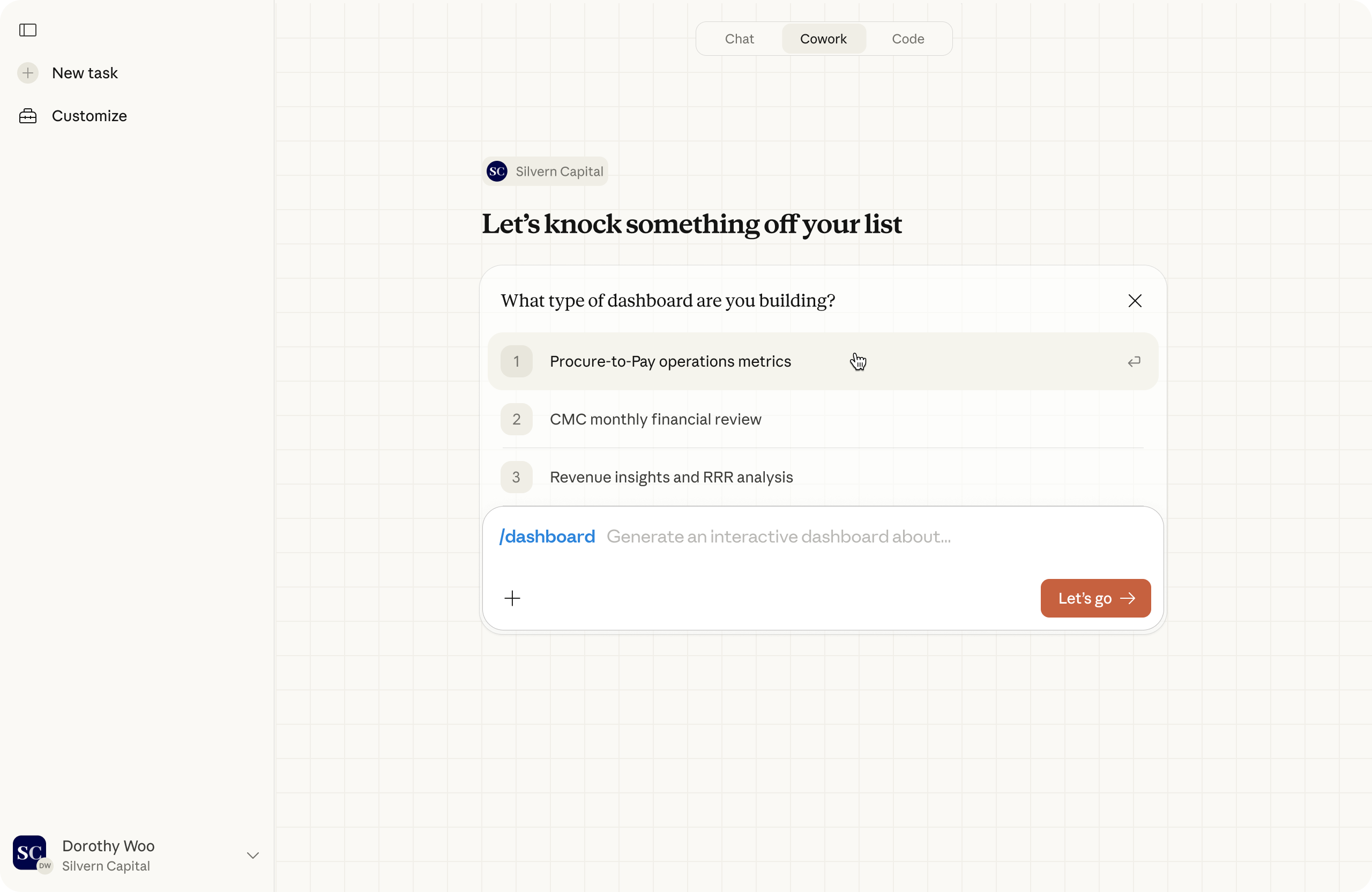
ユーザー向けには、スラッシュコマンドが構造化されたフォームで起動するようになり、「レポートを生成」や「ダッシュボード」といったワークフローも、簡単なフォームに入力する感覚で直感的に実行できるようになります。また、Cowork 全体に企業ブランディングを反映できるようになり、組織に合わせて再設計されたホーム画面も利用できます。
さらに、OpenTelemetry のサポートも追加し、管理者がチーム全体の利用状況、コスト、ツールのアクティビティを追跡できるようにしました。
新しいコネクタとプラグイン
Cowork は、日常的に使っているツールと接続されることで、複雑なタスクをより効果的に処理できます。コネクタによって Claude は業務に使うツールとより密接に連携し、頼りにしている専門知識やソフトウェアを置き換えることなく、ツールをまたいだ作業をよりすばやく進められるようになります。
Google Workspace(Calendar、Drive、Gmail)、Docusign、Apollo、Clay、Outreach、Similarweb、MSCI、LegalZoom、FactSet、WordPress、Harvey など、主要なエンタープライズソフトウェアプロバイダーによる新しいコネクタが利用可能になりました。また、Slack by Salesforce、LSEG、S&P Global、Apollo、Common Room、Tribe AI(以下参照)などの企業も、共同顧客が活用できるプラグインを構築しています。
また、事前構築済みのプラグインテンプレートも拡充し、より多くの知識労働者が Cowork を活用できるようにしています。各テンプレートは該当分野の実務担当者とともに設計されており、ワークフロー、用語、出力は、実際の業務の進め方を反映しています。新たなプラグインには次のものがあります。
- HR・人事:オファーレターの作成、オンボーディング計画の構築、パフォーマンスレビューの作成や報酬分析の実行に至るまで、従業員のライフサイクル全体での人事業務をサポートします。
- デザイン:デザインレビューの観点整理、UX ライティングの下書き作成、アクセシビリティ監査の実施、ユーザー調査計画の整理などによりデザイン業務を加速します。
- エンジニアリング:スタンドアップミーティングの要約作成、インシデント対応の調整、デプロイチェックリストの作成、ポストモーテムの下書き作成など、日々のエンジニアリングワークフローを効率化します。
- 事業運営・オペレーション:業務プロセスの文書化、ベンダー評価、変更依頼の追跡、運用手順書の作成など、中核的な事業運営を支援します。
- ブランドボイス(Tribe AI 提供):既存の文書、マーケティング資料、会話内容を分析し、ブランドのトーンや言葉づかいを明確で運用可能なガイドラインとして整理します。
- 金融分析:市場研究および競合研究から、財務モデリングおよび PowerPoint テンプレート作成と品質チェックに至るまで、すべての金融アナリストが必要とするベースラインワークフローをサポートします。
- 投資銀行業務:取引関連文書のレビュー、類似企業分析の構築、提案資料の準備など、ディールワークフローを加速します。
- 株式調査:決算のトランスクリプトの解析、新しいガイダンスによる財務モデルの更新、調査ノートの草案作成などのリサーチワークフローを合理化できます。
- プライベートエクイティ:大量の文書セットのレビュー、標準化された財務データの抽出、シナリオのモデリング、投資基準に基づく案件のスコアリングにより、案件のソーシングとデューデリジェンスを支援します。
- ウェルスマネジメント:ポートフォリオ分析、ドリフトや税務エクスポージャーの特定、大規模なリバランス提案の作成の際にアドバイザーを支援します。
プラグインは、手元で完全に管理できる、シンプルでポータブルなファイルシステムです。Cowork と、Claude Agent SDK 上に構築されたあらゆる環境の両方で動作し、チーム全体や業界の専門家と連携したプライベートなプラグインマーケットプレイスを簡単に構築できます。
“「プロフェッショナルの仕事を変えてきた波は 3 つあります。生産性向上ツール、クラウドと検索、そしていまのエージェント型 AI です。「PwC は Anthropic と提携し、エンタープライズレベルのエージェントを CFO のオフィスに導入することにしました。これによりチームの各メンバーが、より大きく挑戦的な業務に取り組み、より良い意思決定を行い、これまで不可能だった形で事業成長に貢献するためのツールを手にできるようになり、財務チームはさらに戦略的で価値ある存在になります。」- PwC Anthropic Alliance Leader、Sanjay Subramanian 氏”
“「この 2 年市場では、AI エージェントは特定の個別ワークフローを 24 時間体制でこなすデジタル従業員のようなものだと盛んに語られてきました。Anthropic が構築したものは、それをはるかに上回るものです。」- Blank Metal COO、Mark Hines 氏”
複数のアプリをまたいだ作業
Claude は、Excel と PowerPoint をまたぐ複数ステップのタスクも、エンドツーエンドで処理できるようになりました。Claude は一方の Office アドインで使ったコンテキストをもう一方のアドインに引き継げるため、たとえば Excel で分析を行い、その内容を PowerPoint のプレゼンテーションにまとめるといった、より大きなプロジェクトも任せることが可能です。これは初期段階の研究プレビュー版ですが、Claude が人と同じようにアプリをまたいで作業できる将来を示すものです。
ご利用にあたって
プラグインに関するすべてのユーザー体験アップデートは、すべての Cowork ユーザーが利用できます。Team および Enterprise の管理者は、企業ブランディング、プロビジョニング、MCP 管理機能にアクセスできます。
Excel と PowerPoint をまたいで動作する Claude は、現在、Mac 版および Windows 版のすべての有料プランで、研究プレビュー版でご利用いただけます。Claude in Excel と Claude in PowerPoint のアドインをダウンロードして始めましょう。
Cowork および金融サービス向けプラグインの詳細については、こちらの関連ブログ記事をご覧ください。