Common workflow patterns for AI agents—and when to use them
Practical guidance on how to structure agent tasks using three common workflow patterns, with tradeoffs and benefits for each.
AI agents make decisions autonomously, and workflows are how you bring structure to that autonomy. They establish execution patterns that channel agent capabilities toward complex problems requiring coordinated steps, predictable outcomes, and orchestrated timing.
When you need multiple agents working together, the real decision is which pattern fits your problem.
We've worked with dozens of teams building AI agents, and in production, three patterns cover the vast majority of use cases: sequential, parallel, and evaluator-optimizer.
Each solves different problems, and picking the wrong one costs you in latency, tokens, or reliability. This piece breaks down all three, with guidance on when each fits and how to combine them.
How workflows and agents work together
If you've managed a team, you already understand workflows.
Think of a manufacturing assembly line: each station has a skilled worker making decisions about their specific tasks, but the overall flow is designed ahead of time—even when individual steps involve dynamic decisions like routing or retries.
Agent workflows operate the same way.
Understanding workflows vs. autonomous agents
Workflows don't replace agent autonomy; they shape where and how agents apply it.
A fully autonomous agent decides everything: which tools to use, what order to execute tasks, and when to stop.
A workflow provides structure: it establishes the overall flow, defines checkpoints, and sets boundaries for how agents operate at each step, while still allowing dynamic behavior within those boundaries.
Each step in a workflow can still leverage an agent's reasoning and tool use, but the overall orchestration follows a defined path. A workflow pattern gives you agent intelligence within each step, and a predictable process flows across the entire task.
Agent workflow patterns
In production, we see three workflow patterns come up most often. Think of these as building blocks rather than rigid templates—you'll often combine or nest them as your requirements evolve:
- Sequential workflows — for executing tasks in a fixed order
- Parallel workflows — for running independent tasks across agents simultaneously
- Evaluator-optimizer workflows — for outputs that need iterative refinement
Each workflow type solves specific problems and comes with clear tradeoffs around complexity, cost, and performance.
| Problem it solves | When to use | Tradeoff | Benefit | |
|---|---|---|---|---|
| Sequential | Tasks have dependencies: step B needs step A's output | Multi-stage processes, data pipelines, draft-review-polish cycles | Adds latency (each step waits for the previous one) | Can improve accuracy by letting each agent focus on one thing |
| Parallel | Tasks are independent but doing them one at a time is slow | Evaluations across multiple dimensions, code review, document analysis | Costs more (multiple concurrent API calls) and requires an aggregation strategy | Can lead to faster completion and separation of concerns across engineering teams |
| Evaluator-optimizer | First-draft quality isn't good enough | Technical documentation, customer communications, code generation against specific standards | Multiplies token usage and adds iteration time | Can generate better outputs through structured feedback loops |
Start with the simplest pattern that solves your problem. Default to sequential. Move to parallel when latency is the bottleneck and tasks are independent and add evaluator-optimizer loops only when you can measure the quality improvement.
Sequential workflows
Sequential workflows execute tasks in a predetermined order.
Agents at each stage process inputs, make decisions, make tool calls as needed, then pass results to the next stage. The result is a clear chain of operations where outputs flow linearly through the system.
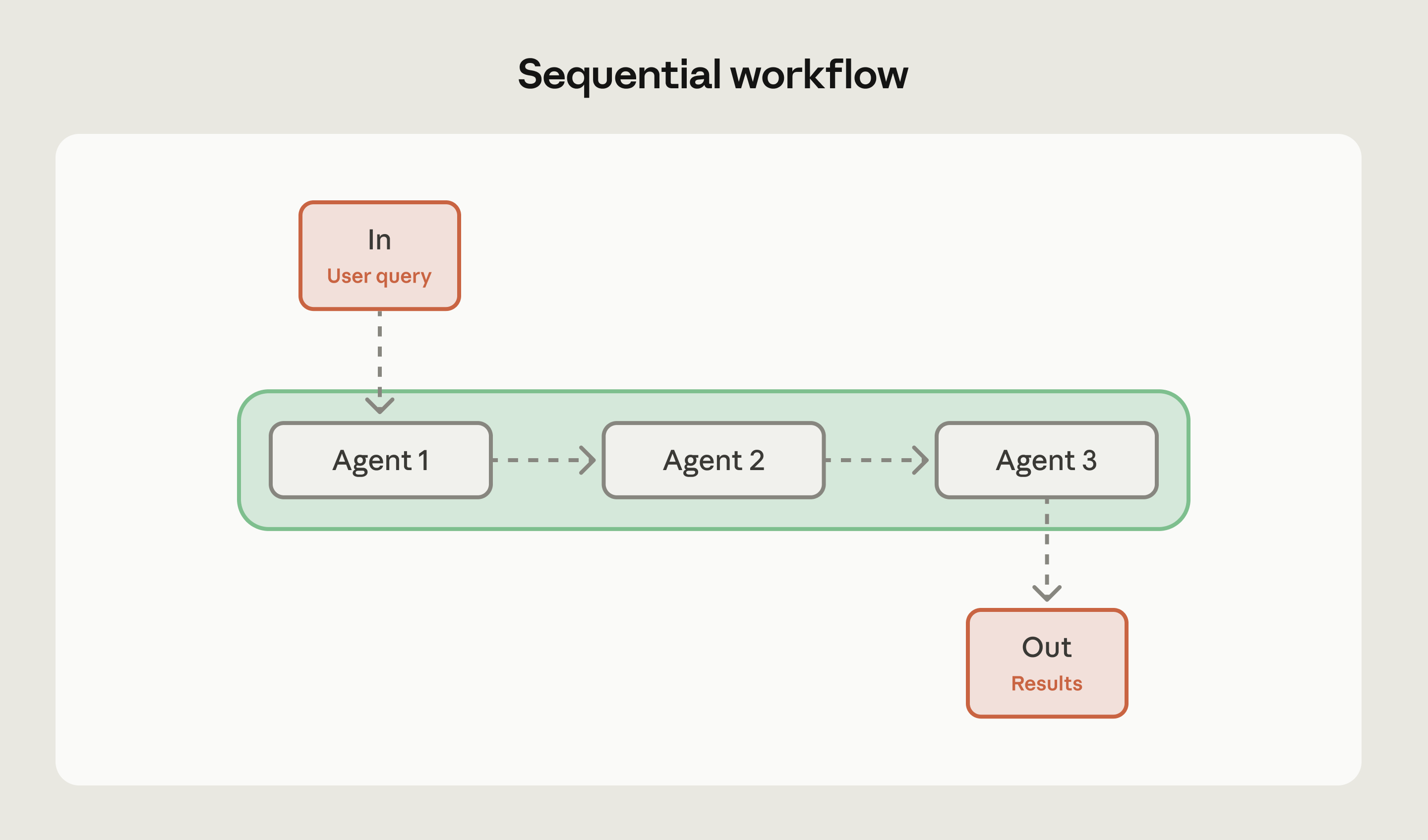
When to use: Sequential workflows excel when tasks naturally break down into distinct stages with clear dependencies. You're trading some latency for higher accuracy by focusing each agent on a specific subtask instead of trying to handle everything at once.
Use sequential workflows when there are:
- Multi-stage processes where each step depends on the previous output
- Data transformation pipelines where each stage adds specific value
- Tasks that can't be parallelized due to inherent dependencies
- Iterative improvement cycles like draft-review-polish cycles
When to avoid: Skip sequential workflows when a single agent can handle the entire task effectively, or when agents need to collaborate rather than hand off work sequentially. If you're forcing a task into sequential steps when it doesn't naturally fit that structure, you're adding unnecessary complexity.
Example: Sequential workflows work well when each step involves genuinely different work:
- Generating marketing copy, then translating it into multiple languages—or extracting data from documents, validating it against a schema, and loading it into a database
- Content moderation pipelines also work well sequentially: extract content, classify it, apply moderation rules, then route appropriately
Pro tip: First try your pipeline as a single agent, where the steps are just part of the prompt. If that's good enough, you've solved the problem without additional complexity. Only split into a multi-step workflow when a single agent can't handle it reliably.
Parallel workflows
Parallel workflows distribute independent tasks across multiple agents that execute simultaneously. Instead of waiting for one agent to finish before starting the next, you run multiple agents at once and merge their results.
This pattern can deliver speed improvements when tasks don't depend on each other.
The approach resembles the fan-out/fan-in pattern from distributed systems. You send the same or related work to multiple agents, each processes independently, then you aggregate or synthesize their outputs.
Agents don't hand off work to each other—they operate autonomously and produce results that contribute to the overall task.
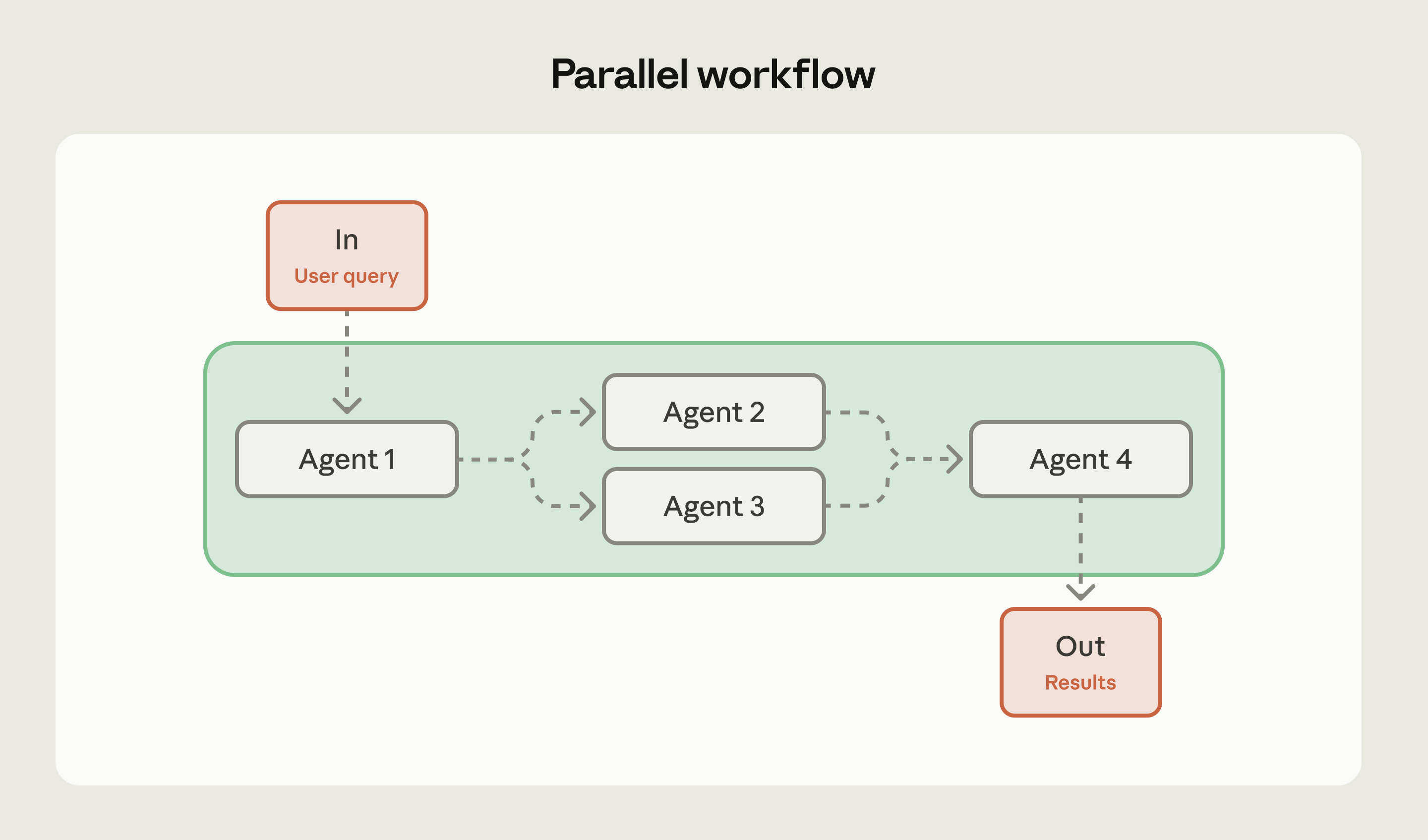
When to use: Parallelization makes sense when you can divide work into independent subtasks that benefit from simultaneous processing, or when you need multiple perspectives on the same problem. It also enables separation of concerns: different engineers can own and optimize individual agents independently without their work interfering with each other. For complex tasks, handling each consideration with a separate AI call often outperforms trying to juggle everything in one call.
Consider parallel workflows for:
- Sectioning approaches where different agents handle different aspects (like one processing queries while another screens for safety issues)
- Evaluation scenarios where each agent assesses different quality dimensions
- Voting patterns where multiple agents analyze the same content and you aggregate their assessments
When to avoid: Don't use parallel workflows when agents need cumulative context or must build on each other's work. Skip this pattern when resource constraints like API quotas make concurrent processing inefficient, or when you lack clear strategies for handling contradictory results from different agents. If result aggregation becomes too complex or degrades output quality, parallelization isn't worth it.
Example: Parallel workflows work well for:
- Automating evaluations (each agent checks different quality metrics) or code review (multiple agents examine different vulnerability categories)
- Document analysis is another strong use case: parallelize extraction of key themes, sentiment analysis, and factual verification, then combine the insights
Pro tip: Design your aggregation strategy before implementing parallel agents. Will you take the majority vote? Average confidence scores? Defer to the most specialized agent? Having a clear plan for synthesizing results prevents you from collecting conflicting outputs with no way to resolve them.
Evaluator-optimizer workflows
Evaluator-optimizer workflows pair two agents in an iterative cycle: one generates content, another evaluates it against specific criteria, and the generator refines based on that feedback. This continues until the output meets your quality threshold or hits a maximum iteration count.
The key insight is that generation and evaluation are different cognitive tasks. Separating them lets each agent specialize—the generator focuses on producing content, the evaluator focuses on applying consistent quality criteria.
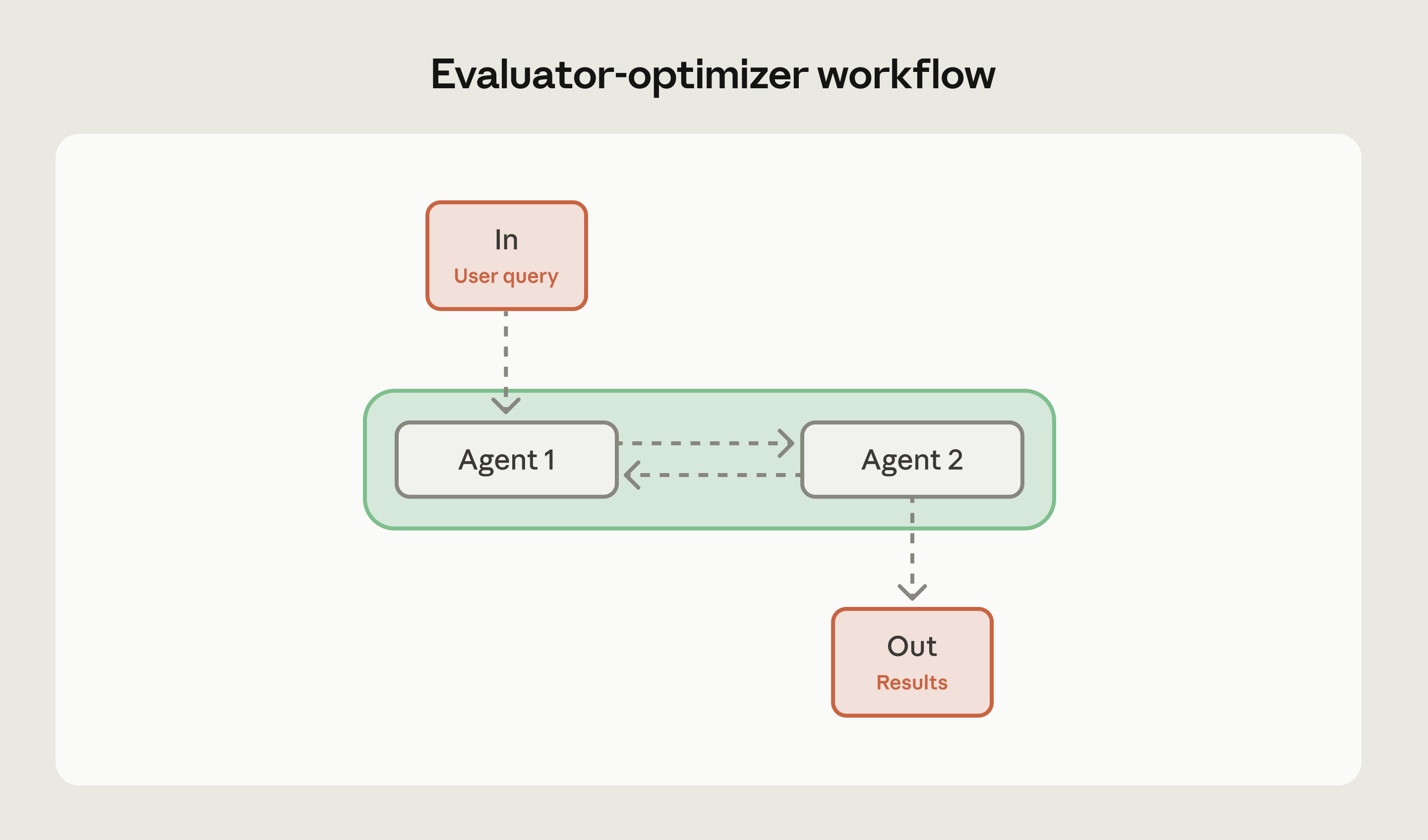
When to use: This pattern works when you have clear, measurable quality criteria that an AI evaluator can apply consistently, and when the gap between first-attempt and final quality is meaningful enough to justify the extra tokens and latency.
Consider evaluator-optimizer workflows for:
- Code generation with specific requirements (security standards, performance benchmarks, style guidelines)
- Professional communications where tone and precision matter
- Any scenario where first-draft quality consistently falls short of requirements
When to avoid: Skip evaluator-optimizer workflows when first-attempt quality already meets your needs—you're burning tokens on unnecessary iterations. Don't use this pattern for real-time applications requiring immediate responses, simple routine tasks like basic classification, or when evaluation criteria are too subjective for an AI evaluator to apply consistently. If deterministic tools exist (like linters for code style), use those instead. Also avoid this pattern when resource constraints outweigh quality improvements.
Example: Evaluator-optimizer workflows work well for:
- Generating API documentation (generator writes docs, evaluator checks for completeness, clarity, and accuracy against the codebase)
- Creating customer communications (generator drafts email, evaluator assesses tone and policy compliance)
- Producing SQL queries (generator writes query, evaluator checks for efficiency and security issues)
Pro tip: Set clear stopping criteria before you start iterating. Define maximum iteration counts and specific quality thresholds. Without these guardrails, you can end up in expensive loops where the evaluator keeps finding minor issues and the generator keeps tweaking, but quality plateaus well before you stop iterating. Know when good enough is good enough.
Choosing the right workflow pattern
The right workflow pattern depends on your task structure, quality requirements, and resource constraints.
Before choosing a pattern, try the task as a single agent call first. If that meets your quality bar, you're done. If not, identify where it falls short—that tells you which pattern to reach for.
Here are a few questions to help you decide:
- Can a single agent handle this task effectively? If yes, don't use workflows at all.
- Does the task have clear sequential dependencies? Use sequential workflows.
- Can subtasks be processed independently and simultaneously, and would faster completion help? Consider parallel workflows.
- Does quality improve meaningfully with iterative refinement? Consider evaluator-optimizer patterns.
Once you've selected a pattern, consider:
- Failure handling: Define fallback behavior and retry logic for each step.
- Latency and cost constraints: These determine how many agents you can run and how many iterations you can afford.
- Measuring improvement: Set a baseline with a single agent so you can tell whether the workflow actually helps.
Combining patterns: These patterns aren't mutually exclusive. You can nest them as complexity demands.
- An evaluator-optimizer workflow might use parallel evaluation where multiple evaluators assess different quality dimensions simultaneously.
- A sequential workflow might include parallel processing at certain stages where multiple independent operations happen before moving to the next step.
The key is matching pattern complexity to actual requirements. Don't add parallel processing because you can—add it when concurrent execution provides clear benefits. Don't implement evaluator-optimizer loops unless they improve output quality in a way you can measure.
Evolve your workflows thoughtfully
Our best advice: start with the simplest pattern that works. If a sequential workflow handles your use case, don't add parallelization. If first-attempt quality is good enough, skip the evaluator-optimizer loop.
These three patterns give you clear upgrade paths as requirements change. A sequential workflow can incorporate parallel processing at bottleneck stages. An agentic approach can add evaluation when quality standards tighten, and because these patterns are modular, you won't need complete rewrites.
For implementation guidance, detailed examples, and advanced patterns including hybrid approaches, check out our full white paper:Building effective AI agents: architecture patterns and implementation frameworks.
Build on the Claude Developer Platform today.