Working with Claude Fable 5 in Claude Cowork
Claude Fable 5 can carry long, complex work on its own. Here’s how to get the most out of it in Claude Cowork, starting with as little as an idea and getting to finished work.
Claude Fable 5 is Anthropic’s most capable generally available model, built for long-running, complex and asynchronous work. Claude Fable 5 is particularly effective carrying out multi-step workflows (such as conducting deep research that it incorporates in a first-draft memo, performing due diligence before generating board presentations, or going through a folder to redline multiple contracts, to name a few) on its own for extended periods of time, testing and evaluating its results as it goes.
Maximizing the model’s capabilities requires a change in how you work with it. As models improve over time, we've refined our recommendations for getting more out of Claude, including prompting best practices, providing context, and building skills that capture repeatable processes like weekly team updates, sales call prep, or customer feedback analysis. Those practices still matter with Claude Fable 5, in fact, the model performs even better with them in place.
Claude Fable 5 applies your context, preferences, and skills across entire tasks, even those that take days to complete, while previous models may have lost track over long stretches and needed reminding. Working with it resembles working with a highly capable colleague: you explain the situation, agree on what a strong final result looks like, and let your colleague work. Less of your time goes to checking each step, so more of it can go to deciding what the work should be.
Our prompting guide for Claude Fable 5 provides a detailed list of capability improvements and recommended behavior and prompting changes. In this article, we cover how some of those apply to Claude Cowork, Anthropic’s agentic AI system for knowledge work.
How Claude Fable 5 complements Claude Cowork
Claude Cowork is built for creating finished work. Give it an objective, and it manages the rest, even when the task is large and complex. A big job gets broken into parts that run at the same time, each with its own subagent, a separate instance of Claude that takes one part of the job to complete and reports back. That is how Claude gets through large amounts of information quickly. Claude also manages large tasks by setting a plan at the start, and it can check its own results against it as it goes.
Claude Fable 5 has a wide lead over our other models on long, complex tasks and Claude Cowork tasks are often exactly that, with dozens of steps, each building on the last. Take a project like building next year’s budget based on this year’s actuals. Claude gets access to and reads the spreadsheets, pulls the run rates, projects each line, reconciles the projections against targets, and writes the summary. If it misreads a run rate early, the error will flow into each projection after it. Claude Fable 5 plans the workflow before starting and checks results as it goes, so it can catch the misread number while the job runs and correct it.
Decide when to use Claude Fable 5
Claude Fable 5 isn’t the default model in Claude Cowork; you need to select it. As of the time of publication, the default is Claude Sonnet 5, and it is the right choice for everyday tasks you yourself would handle in quick passes. Claude Opus is a dependable choice for deep work with a clear shape, where you know what the end result looks like. Claude Fable 5 is for the projects that feel the most complex or ambiguous, and may have been out of reach for prior models. It spends more time thinking and more of your usage limits, but that may be worth it on work that’s time-consuming or costly to get wrong. We recommend that you reserve Claude Fable 5 for your most important work, especially jobs that use multiple tools and require a series of judgment calls.
You can further tune your choice with Claude’s effort setting. At higher effort, Claude Fable 5 plans more before it kicks off a job and checks in more throughout its run. Keep effort higher for complex or multi-step projects you expect Claude to complete from beginning to end. At lower effort, you’ll get a faster response, while still taking advantage of Claude Fable 5 intelligence. Consider using it for tasks that still need frontier judgement, but not deep explorations, such as agentic runs made of many easy steps or work where the result is easy for Claude to check. In our testing, Claude Fable 5 at lower effort often matched or exceeded the performance of earlier models at their highest effort levels. For a more detailed look under the hood, we explain how model choice and effort interact in Claude Code.
It’s also worth noting that Claude Fable 5 comes with a new set of classifiers: separate AI systems that detect potential misuse in requests related to cybersecurity or to biology and chemistry. When they trigger, the response is automatically handled by Claude Opus 4.8 instead, and users are informed whenever this occurs. Opus 4.8 is a highly capable model in its own right, and the chat stays on Opus from there; start a new one to get back to Claude Fable 5. We tuned these safeguards conservatively so we could release a Mythos-class model for general use both safely and quickly, so they'll sometimes catch harmless requests, including phrases in Claude Cowork that only touch on related topics. We're working to reduce these false positives as we refine the safeguards.
Start with as little as an idea
When you kick off a task, you don't always know what you're trying to accomplish. That early stretch is where Claude Fable 5 can be a powerful thought partner, and in Claude Cowork it works from your skills, tools, and knowledge.
For example, if you see a news announcement relevant to your industry or company, you can ask Claude: "Here's the announcement, tell me what changes for us, considering everything you know about my organization." You read the output and as you start to develop a strategy, Claude builds a plan to produce the assets that you need, starting in the same conversation in Claude Cowork where the brainstorming happened.
Brainstorming in Claude Cowork gives the model your real material to think with: it can read the files you've shared and use the tools you've connected while you talk, so it can offer relevant suggestions. It notices gaps in an idea while the idea is still easy to change, and it shows you directions you hadn't considered. And when the task begins in the same conversation, Claude Fable 5 already carries the goal you settled on, the constraints you named, and the decisions you made along the way.
For example, a data scientist at Anthropic came to Claude Cowork with an idea for a new analytics dashboard while the team was still figuring out what it should show. Because Claude Fable 5 could read the team's usage data during the conversation, it knew which problems take weeks to get noticed, and it ranked the metrics that would have caught them sooner. By the end of the conversation, the data scientist had a shortlist of metrics worth adding and a clickable prototype.
Here are two prompts that can help you evolve your idea into an output:
- Ask Claude to interview you: “Before you start, ask me everything you need to know to get this right.”
- Ask for directions: “Here is roughly what I want. Give me three ways you could take it, with a quick sample of each.”
Provide context with your constraints
Context is the information Claude works from, and in Claude Cowork that means your prompt, whatever files and folders you’ve shared, and any tools you’ve connected, such as Asana, Hubspot, Jira, Slack, or others.
When you give Claude Fable 5 a task in Claude Cowork, think of how you'd brief a colleague on a report. You wouldn't hand them a list of rules, but chances are you'd tell them who it's for, when it's needed, and what it has to accomplish, and trust them to make good decisions from there. Claude Fable 5 works the same way.
Constraints are still useful: "keep it under two pages and use plain language" is a fine instruction. But a constraint only tells Claude what not to do. Context tells it what the work is for, so it can make the right call in situations your constraints didn't anticipate.
Claude Fable 5 handles long, multi-step tasks well partly because of this context: when a question or decision point comes up while it works, it looks for the answer in the context you shared. It also uses that context to check its own work as it goes, so give it something concrete to judge against, such as an early draft of a report and the final version, and Claude will work out what your standards are based on what changed between the two.
Context also gives Claude an understanding of your situation, so it can infer or find details you never specified in the prompt. Sharing additional context lets Claude search through a wider base of knowledge than you could fit in a prompt.
One thing to note about chats with lots of context: in order to stay caught up, Claude reads the whole conversation again with every new message you send, so a long conversation may use more of your usage. It helps to start new tasks in a fresh conversation. Scheduled tasks count towards your limit too, so check yours occasionally and turn off any you no longer need.
Delegate larger, more complex jobs to Claude Fable 5
You may be used to breaking a task into parts and prompting Claude for each one. Claude Fable 5 needs far fewer of those intermediate prompts, so you can delegate complete jobs in Claude Cowork.
You should still write out the steps yourself when the process matters to you, for example if a metric has to be calculated the exact same way each time. But if the outcome is what matters, describe the goal and let Claude do the rest. A step-by-step prompt can also limit it to the steps you thought of; a goal gives it room to find a better path.
Delegating in Claude Cowork means handing Claude a decision you would normally make yourself. Here are three ways you can do that:
- Delegate the approach: Give Claude the material and describe the outcome you want, for example, "Here is last quarter's customer feedback. Find out why cancellations rose and what we should change." There may be several reasonable ways through that folder, and the right one depends on what's in the feedback. That's a choice Claude Fable 5 makes well: it reads everything, picks an approach, and checks its conclusion against the feedback before bringing it to you. You can judge the answer without needing to specify the details of how it gets there.
- Delegate the procedure: A skill teaches Claude a procedure your team uses—how you build a report, format a deck, run an analysis. You don't need to say which skills to use or in what order. Say "put together the quarterly review the way we always do it," and Claude Fable 5 picks the right skills at the right moment.
- Delegate the timing: For work you want repeated, describe the outcome and Claude will set up the schedule and turn it into a recurring task: "I want to start every Monday knowing what changed in the pipeline and what needs a decision."
Bring Claude Fable 5 harder work than you're used to giving AI, even work you assumed wasn't possible. Even if the work is messy or unclear, or could take hours or days to finish. Describe it and see whether the model can work at that level. Pick an outcome you're responsible for and say how you'd judge it, then let Claude propose the steps to get there. Some of this work may turn into a scheduled task that runs on its own. Claude can save the procedure as a skill and put it on a schedule, working through the tools you're already connected to.
Review Claude’s thought process
Part of what lets Claude Fable 5 carry long work is that it knows how to set and follow a plan well. In Claude Cowork, you can see that plan while Claude works: the panel beside the conversation lists what it intends to do, then the files it's reading and writing and the tools and skills it's using.
That panel is your chance to catch problems and redirect early. A mistake you'd otherwise find in the finished output instead shows up as one wrong step in the plan. You can correct the plan in one sentence and Claude adjusts without starting over.
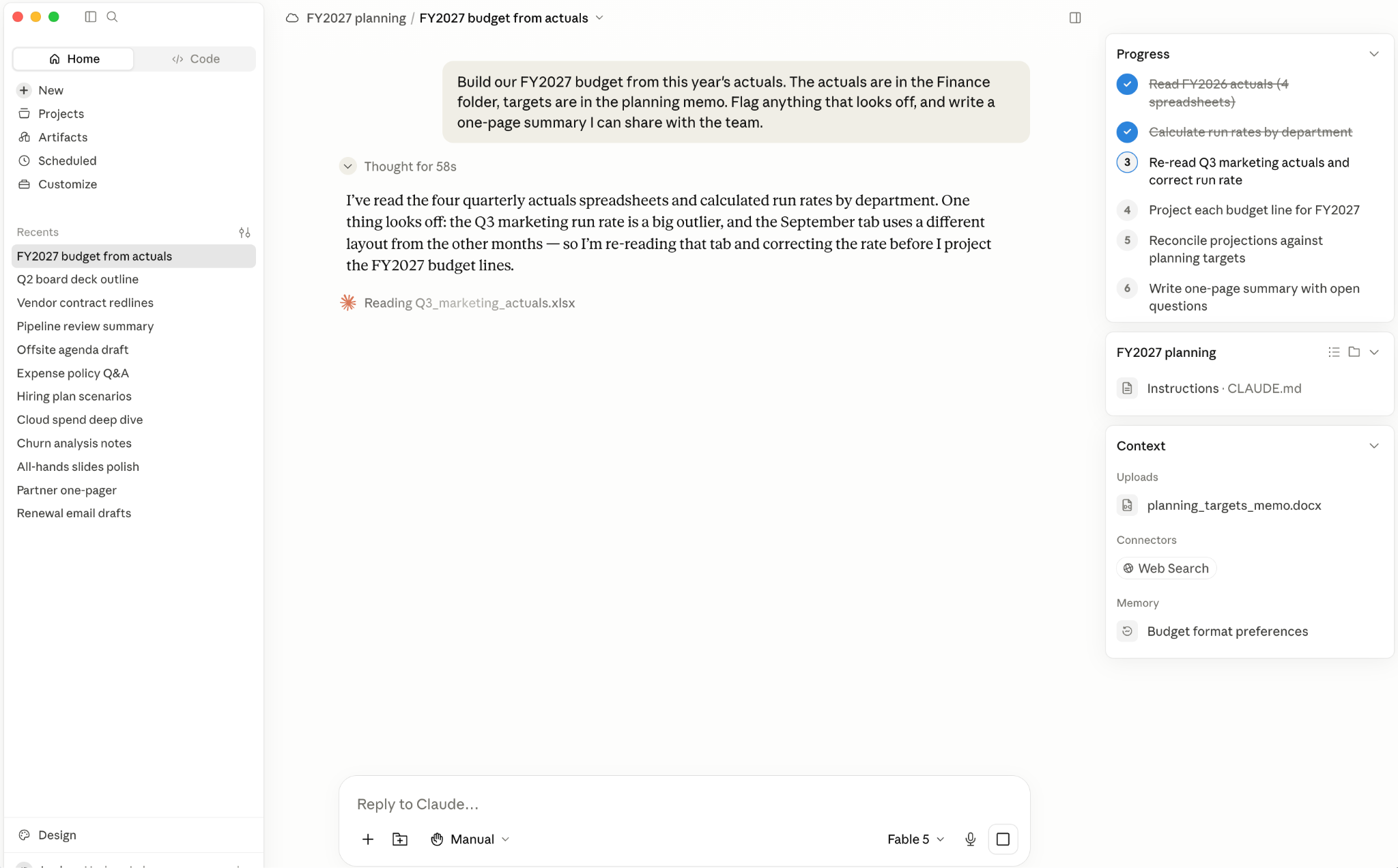
When the work is finished, review it the way you would a colleague's: open the files Claude produced and read them. If something appears off, the record of the run is still in the conversation. Scroll back through the steps Claude listed as it worked, including the files it read and the tools it used, and expand its thinking to see the reasoning behind a decision. Or ask directly: "Where did this figure come from?" and Claude will point you to the source.
Start with work you know how to verify, like the first draft of next quarter’s plan for your team. If you know the priorities well, you can quickly tell if Claude’s pass holds up. Delegate bigger jobs as the results prove reliable.
Invest in your Claude Cowork setup
A more capable model raises the value of each connection you’ve made, from the folders you’ve shared to the tools your team works in. Here are our recommendations for giving Claude Fable 5 the context it needs to do its best work:
- Connect your tools: Connect Claude to the tools you use daily first, like your email, calendar, documents, or your team's chat. Each connection widens what Claude can do without you copying things in. Claude Fable 5 is good at deciding when a tool is worth using: with your tools connected, it notices when the answer is in your calendar or a chat thread and goes to get it, instead of waiting to be pointed there.
- Tune the writing to your voice: Each new model arrives with its own writing defaults: voice, length, and phrases it reaches for first in its outputs. You may notice Claude Fable 5 has certain defaults, such as more terse or hard to follow writing style in longer sessions. Voice, tone, and style can easily be customized; you can tailor them to your preferences by prompting or adding them to your project instructions. For example, you can add something like "use plain, straightforward, direct language." If you use memory, check occasionally what Claude has saved about your writing preferences. For documents where you want a specific voice, use connectors or existing files to have Claude read through your past writing and save what it finds as a skill it can call on the next time you do similar work. We've found Claude Fable 5 follows standing instructions more closely than earlier models, and is better at using saved material when needed.
- Revisit what you set up for earlier models: Saved instructions, like Skills and memory files, written for an earlier model often carry corrections that model needed. Carried forward, old corrections can constrain a new model. Ask Claude Fable 5 to do an audit: 'Go through my skills and saved memory. Which still fit, and which were written for an older model?'
What comes next
As frontier intelligence continues to evolve, Claude Cowork will become increasingly capable, enabling even longer running work and unlocking additional knowledge work use cases. Learning how to prompt, manage context, check Claude’s work, and delegate tasks will help you take advantage of all Claude Fable 5 and future models have to offer.
This article was written by Josefina Albert on Anthropic’s Education team.
Get started with Claude Cowork today.