A harness for every task: dynamic workflows in Claude Code
Claude Code can now write and orchestrate its own multi-agent harness on the fly. Here's how dynamic workflows work, and the patterns that get the most out of them.
Last week, we released dynamic workflows in Claude Code. Claude can now write its own harness on the fly, custom-built for the task at hand.
While the default Claude Code harness is built for coding, it is also useful for many other types of tasks because, as it turns out, many tasks resemble coding tasks. But there are certain classes of tasks where we have had to build custom harnesses on top of Claude Code to achieve peak performance such as Research, security analysis, agent teams, or Code Review.
Workflows allow you to dynamically create harnesses built on top of Claude Code that enable Claude to solve all of those problems more natively. You can also share and reuse these workflows with others.
In this article, I’ll cover my initial workflows experiences and learnings so you can best take full advantage. Keep in mind, best practices are still developing: dynamic workflows often use more tokens and are best suited for complex, high value tasks.
Example prompts
Before diving into the technical details, I’d like to start with several example prompts to get you thinking about the possibilities with workflows:
"This test fails maybe 1 in 50 runs. Set up a workflow to reproduce it. Form competing theories about the race, and don't stop until one theory survives the evidence."
"Using a workflow, go through my last 50 sessions and mine them for corrections I keep making and turn the recurring ones into CLAUDE.md rules"
“Use a workflow to dig through #incidents in Slack for the past six months and find recurring root causes where nobody has filed a ticket."
"Take my business plan and run a workflow where different agents tear it apart from an investor's, a customer's, and a competitor's perspective."
"Here's a folder of 80 resumes, use a workflow to rank them for the backend role and double-check the top ten. Interview me using the AskUserQuestion tool for a rubric."
"I need a name for this CLI tool. Use a workflow to brainstorm a bunch of options and run a tournament to pick the top 3."
"Use a workflow to rename our User model to Account everywhere."
“Go through my blog post draft and verify every technical claim against the codebase using a workflow, I don't want to ship anything wrong."
How dynamic workflows work
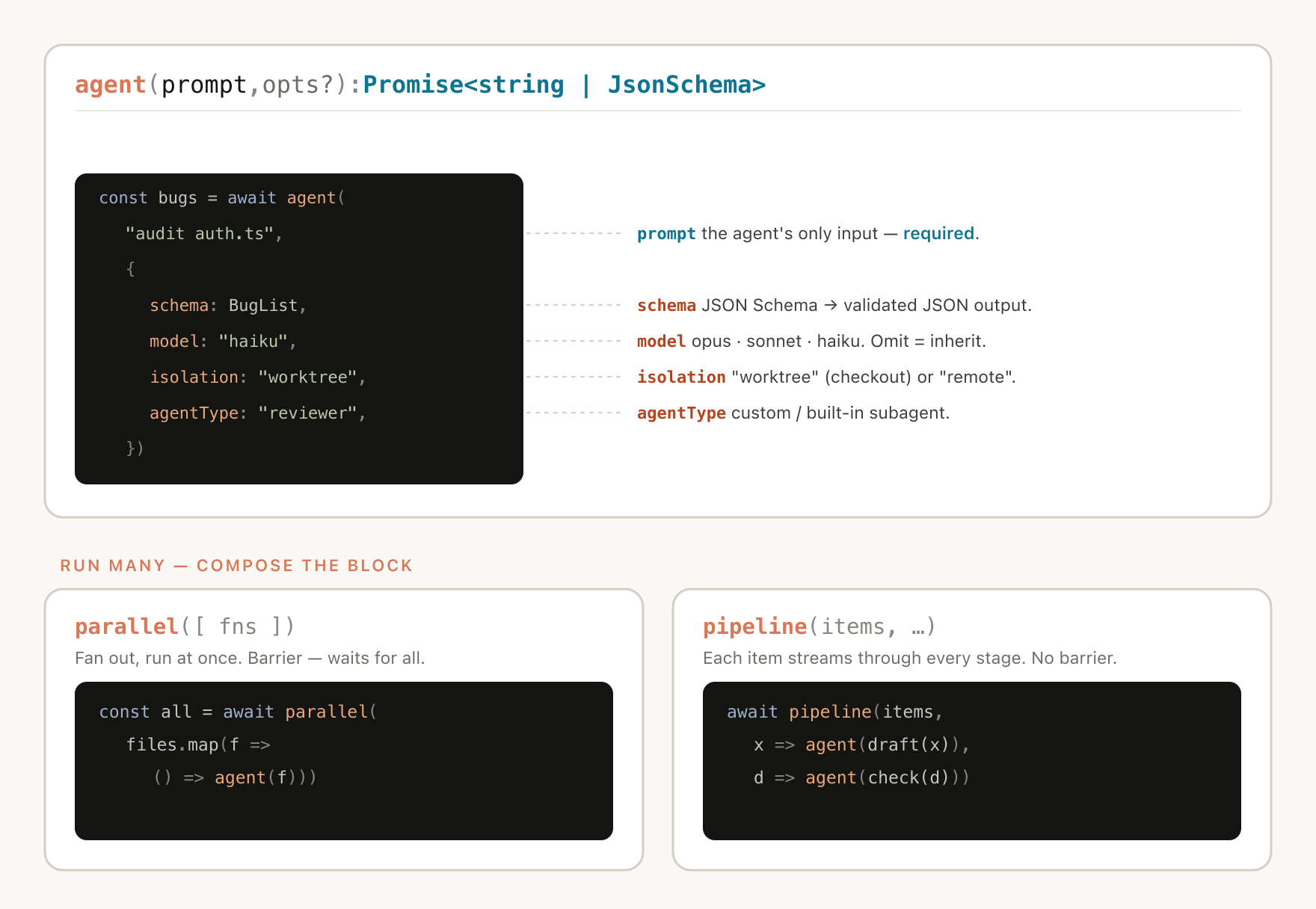
Dynamic workflows execute a javascript file with a few special functions that help spawn and coordinate subagents:
Dynamic workflows also include standard JavaScript functions like JSON, Math, and Array, to help process data.
It’s particularly useful to know that dynamic workflows can decide which models an agent uses and whether subagents are run in their own worktree, allowing Claude to choose the intelligence level and isolation needed.
If a workflow is interrupted, for example by user action or quitting the terminal, resuming the session will allow the workflow to pick up where it left off.
Why dynamic workflows
When you ask the default Claude Code harness to do a task, it needs to both plan and execute in the same context window. For many coding tasks, this is highly effective, but it can break down over long-running, massively parallel, highly structured and/or adversarial tasks.
This is because the longer Claude works on a complex task in a single context window, the more it becomes susceptible to a few specific failure modes:
Agentic laziness refers to when Claude stops before finishing a particularly complex, multi-part task and declares the job done after partial progress, for example addressing 35 of the 50 items in a security review.
Self-preferential bias refers to Claude’s tendency to prefer its own results or findings, especially when asked to verify or judge them against a rubric.
Goal drift refers to the gradual loss of fidelity to the original objective across many turns, especially after compaction. Each summarization step is lossy, and details like edge-case requirements or "don't do X" constraints can get lost.
Creating a workflow helps combat these by orchestrating separate Claude subagents with their own context windows and focused, isolated goals.
Dynamic vs static workflows
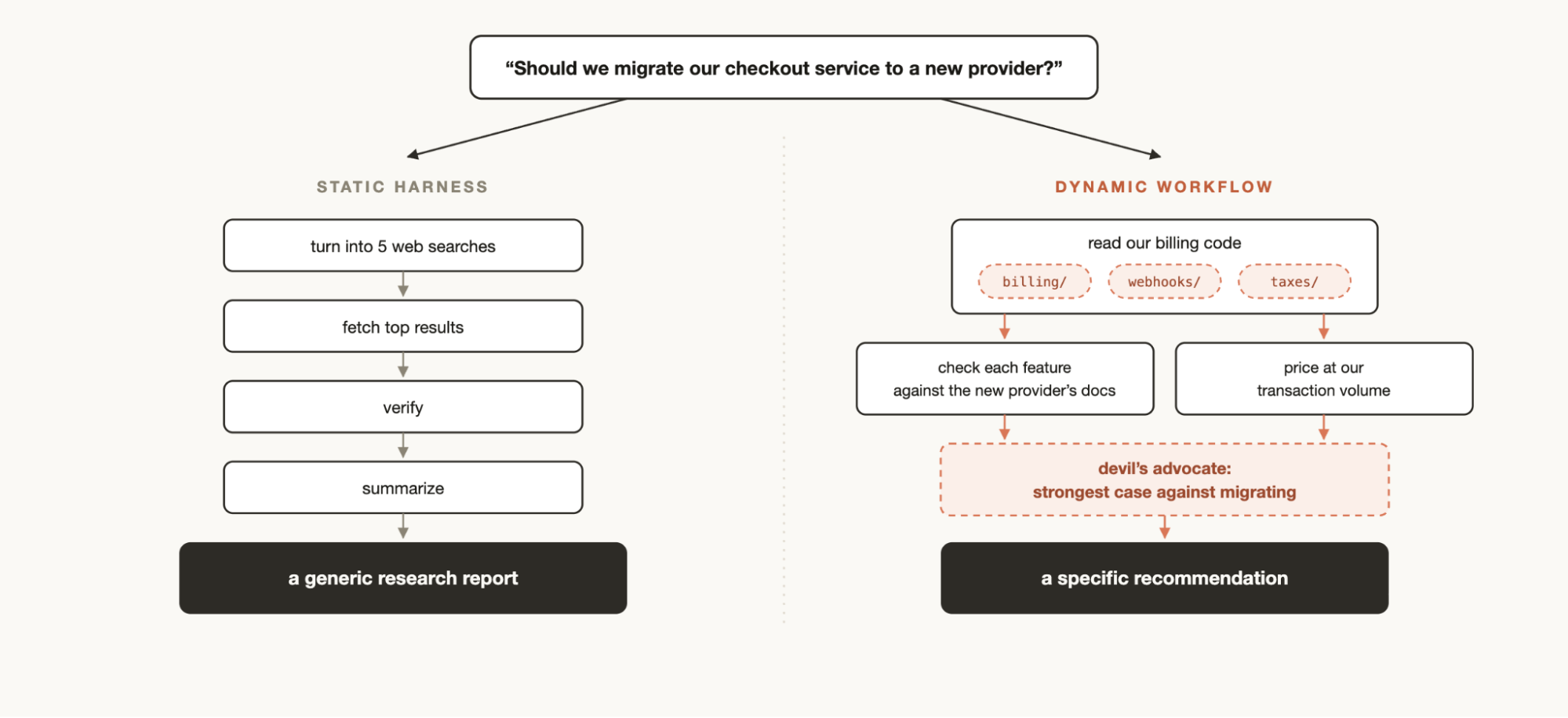
You may have previously created a static workflow using the Claude Agent SDK or claude -p to coordinate multiple instances of Claude Code together.
But because static workflows need to work for all edge cases, they are usually more generic. With Claude Opus 4.8 and dynamic workflows, Claude is now intelligent enough to write a custom harness tailor-made for your use case.
Helpful patterns when using dynamic workflows
You can start using dynamic workflows just by asking Claude to make one, or by using the trigger word “ultracode” to ensure that Claude Code creates a workflow.
But building a mental model for how dynamic workflows work will help you understand when to use them and how you might nudge Claude via prompts.
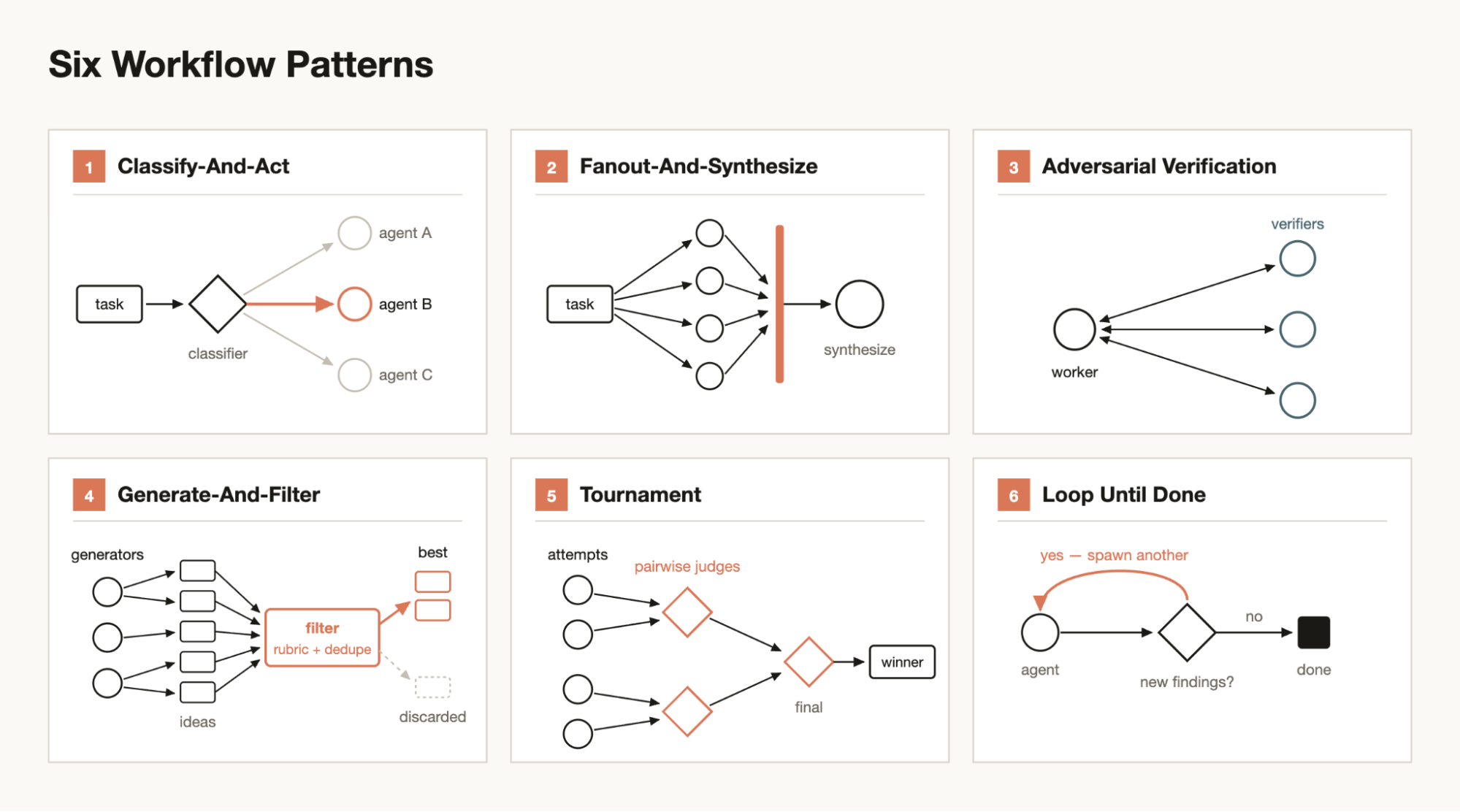
There are a few common patterns that Claude might use and compose together when building workflows:
Classify-and-act
Use a classifier agent to decide on the type of task, and then route to different agents or behavior based on the task. Or, use a classifier at the end to determine output.
Fan-out-and-synthesize
Split up a task into many smaller steps, run an agent on each step and then synthesize those results. This is particularly useful for when there are a large number of smaller steps, or when each step benefits from its own clean context window so they don't interfere or cross-contaminate. The synthesize step is a barrier—it waits for all the fan-out agents, then merges their structured outputs into one result.
Adversarial verification
For each spawned agent, run a separate spawned agent to adversarially verify its output against a rubric or criteria.
Generate-and-filter
Generate a number of ideas on a topic and then filter them by a rubric or by verification, dedupe duplicates and return only the highest quality, tested ideas.
Tournament
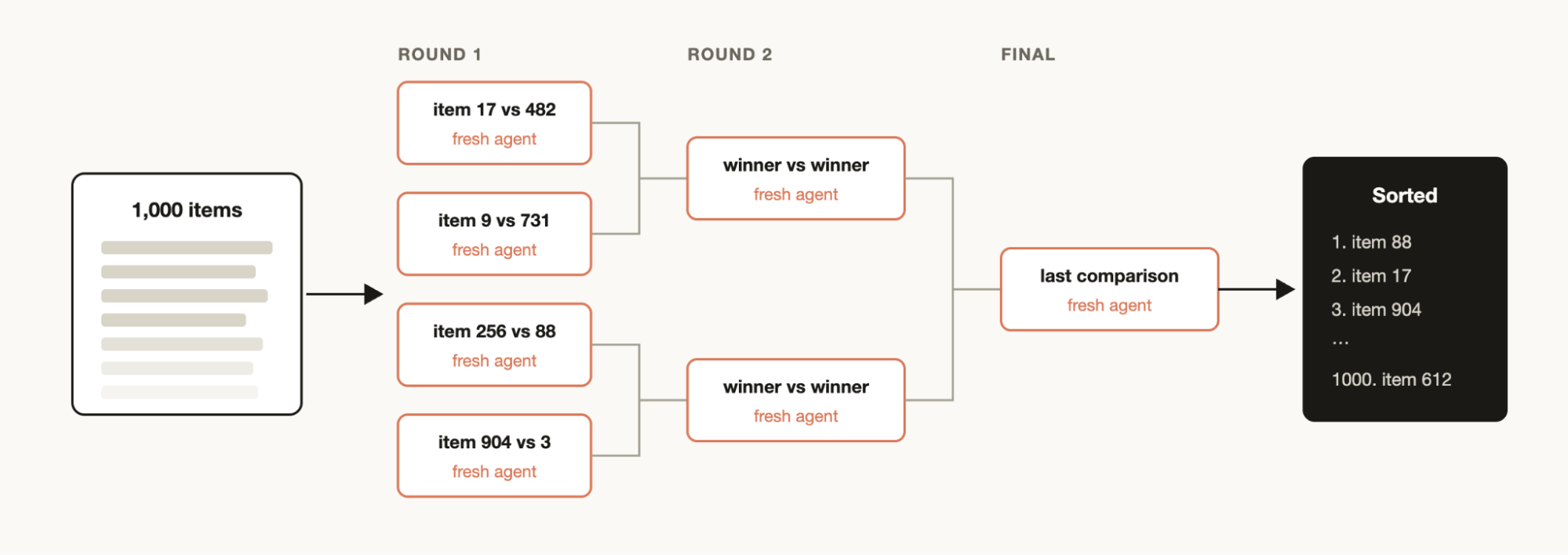
Instead of dividing the work, have agents compete on it. Spawn N agents that each attempt the same task using different approaches. Prompts or models then judge the results in a pairwise fashion using a judging agent until you have a winner.
Loop until done
For tasks with an unknown amount of work, loop spawning agents until a stop condition is met (no new findings, or no more errors in the logs) instead of a fixed number of passes.
Use cases
Think creatively of when and how to ask Claude Code to make dynamic workflows. I’ve found that workflows are sometimes even more useful for non-technical work.
Migrations and refactors
Bun was rewritten from Zig to Rust using workflows. You can read more about how that was done in Jarred’s X thread or see how we run AI code migrations across million-line codebases.
The key is to break down the task into a series of steps that need to be operated on for example callsites, failing tests, modules, etc. Spin off a subagent for every fix in a worktree to make the fix, then have another agent adversarially review, and merge them. Consider telling the agent not to use resource intensive commands so that you can maximally parallelize without running out of resources on your machine.
Deep research
We published a deep research skill (/deep-research) inside Claude Code that uses dynamic workflows. Specifically, it fans-out web searches, fetches sources, adversarially verifies their claims, and synthesizes a cited report.
But you may do this sort of research for more than just web searches. For example, asking Claude to compile a status report from context in Slack or to research how a feature works by exploring a codebase in-depth.
Deep verification
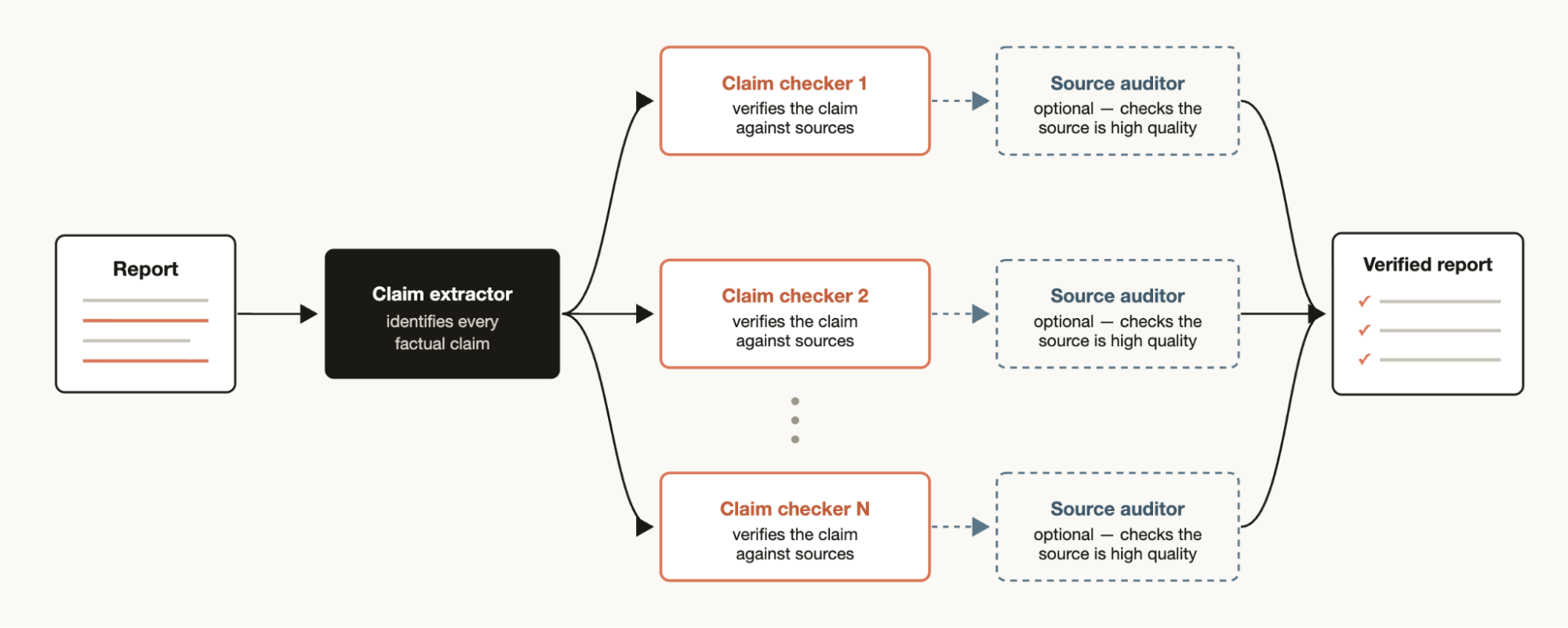
On the other hand, if you have a report where you want to check and source every factual claim that it references you may want to generate a workflow which has one agent identify all of the factual claims and then spin off a subagent to check each one in-detail. You could also have a verification agent check the source subagent to make sure its source is high quality.
Sorting
You may have a list of items that you want to sort by some qualitative measurement that you believe that Claude Code is good at evaluating, for example: support tickets sorted by severity of the bug. But if you try to sort 1000+ rows in one prompt, quality degrades and it won't fit in context. Instead run a tournament, a pipeline of pairwise-comparison agents (comparative judgment is more reliable than absolute scoring), or bucket-rank in parallel then merge. Each comparison is its own agent, so the deterministic loop holds the bracket and only the running order stays in context.
Memory and rule adherence
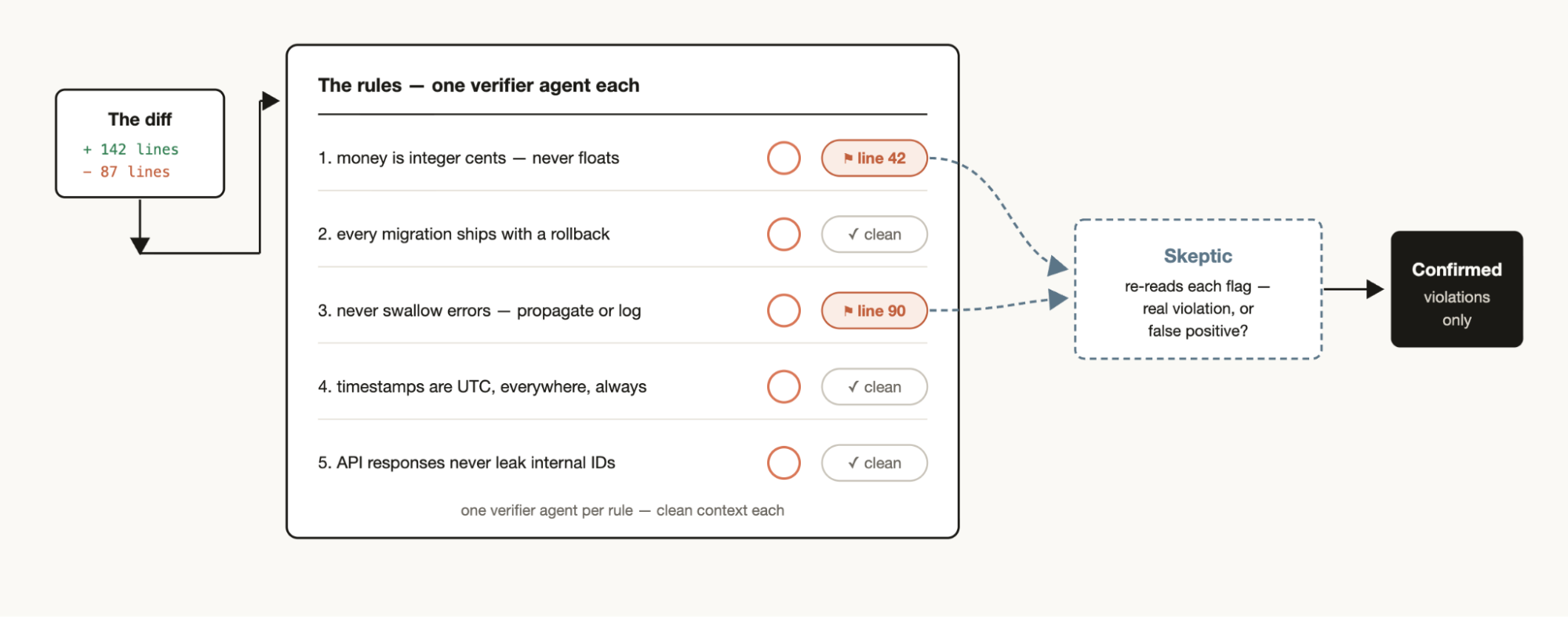
If you have a particular set of rules that you find Claude misses or struggles with, even when put into the CLAUDE.mds, create a workflow with a list of rules that must be checked by verifier agents—one verifier per rule. Creating a skeptic persona subagent to review the rules to make sure they are in line will help avoid too many false positives.
The reverse direction works too: mine your recent sessions and code review comments for corrections you keep making, cluster them with parallel agents, adversarially verify each candidate (would this rule have prevented a real mistake?), and then distill the survivors back into a CLAUDE.md.
Root-cause investigation
Debugging works best when you come up with several independent hypotheses and test them, but if you’re only using one context window, Claude can run into self-preferential bias
A workflow can structurally prevent this by spinning up agents to generate hypotheses from disjoint evidence. For example, separate agents for logs, files, and data. Each hypothesis can then face a panel of verifiers and refuters.
This isn't just for code. Workflows can be used for sales (why did sales drop in March?), data engineering (why did this pipeline fail?), or any post-mortem exercise.
Triaging at scale
Every team has a support queue, bug reports, or some other backlog that cannot be fully processed by humans.
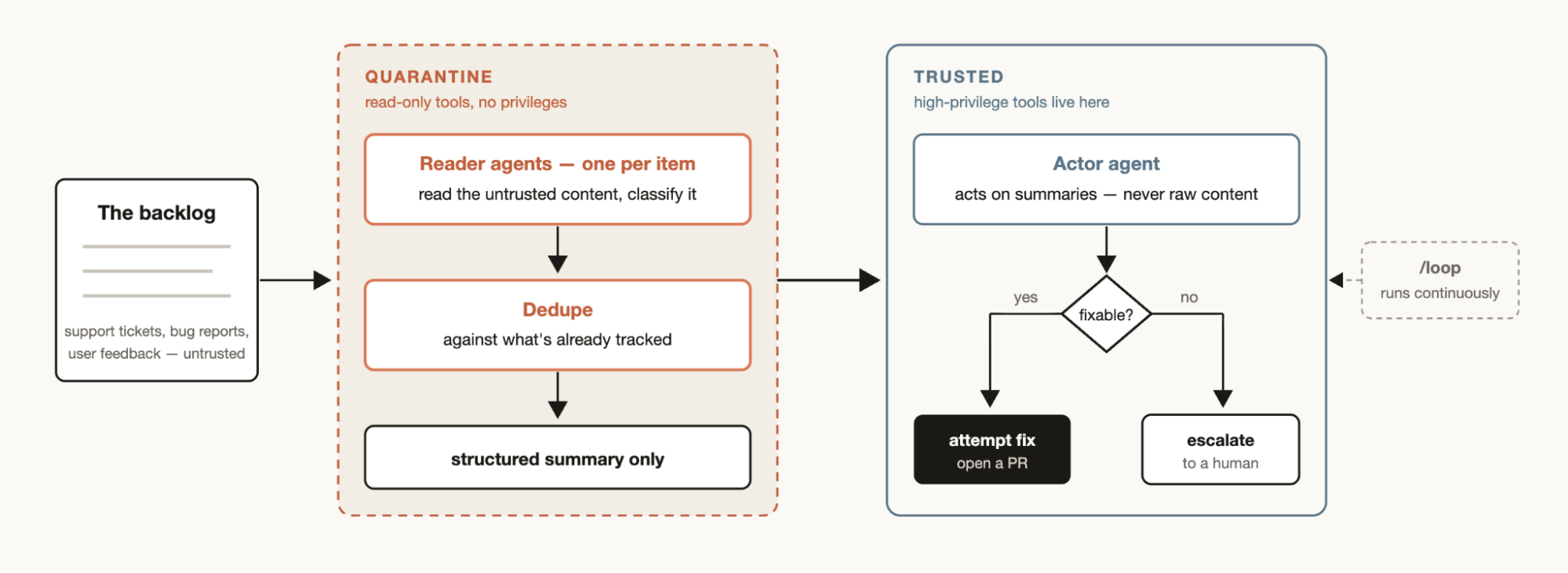
A triage workflow classifies each item, dedupes against what's already tracked, and takes action. This could mean attempting the fix or escalating to a human user.
A useful pattern for triage workflows is quarantine. This involves barring the agents that read untrusted public content from taking high-privilege actions, which are instead done by the agents in charge of acting on the information.
Pair triage workflows with /loop to have Claude do this continuously.
Exploration and taste
Workflows can be useful when exploring different approaches to a solution, especially when it is taste based, like design or naming, and would benefit from a rubric.
Try asking Claude to explore a bunch of solutions, and give a review agent a rubric for what a good solution looks like. The task is complete when the review agent feels like it has met the criteria. Solutions can also be ordered or selected via a tournament based on the rubric.
Evals
You can run lightweight evals for particular tasks by spinning off separate agents in a worktree and then spinning off comparison agents to compare and grade the specific outputs against a rubric. For example, evaluating and then refining a skill you’ve created against a particular criteria.
Model and intelligence routing
Create a classifier agent tuned to your tasks that decides which model to use. This can be helpful when your task will involve many tool calls and conducting research prior to execution can identify the best model for the job.
For example, the best model for the task “explain how the auth module works” depends on how many files in the auth module there are and the shape of the codebase. A classifier agent can do this research and then route to Sonnet or Opus based on the expected complexity of the task.
When not to use dynamic workflows
Workflows are new. While there are many use cases where it will create outsized results, they are not needed for every task and may end up using significantly more tokens.
It’s best to use workflows creatively to push Claude Code in ways that you haven’t previously. For regular coding tasks, try and ask yourself: does it really need more compute? For example, most traditional coding tasks do not need a panel of 5 reviewers.
The same judgment applies one level up, at the architecture layer: the multi-agent vs single agent decision follows similar logic — parallelism and specialization have to earn their coordination cost.
Tips for building dynamic workflows
Prompting
Detailed prompting, using the specific techniques we described above, for dynamic workflows creates the best results.
Workflows are not just for large tasks. You can prompt the model to use a “quick workflow.” For example, you can create a quick adversarial review of an assumption.
Combine with /goal and /loop
When using workflows that can be repeated, for example triage, research, or verification, pair them with /loop to be run at regular intervals, and /goal to set a hard completion requirement.
Token usage budgets
You can set explicit token usage budgets for dynamic workflows to limit how many tokens a task uses. You can prompt it with a budget like: “use 10k tokens,” which will set the cap.
Saving and sharing dynamic workflows
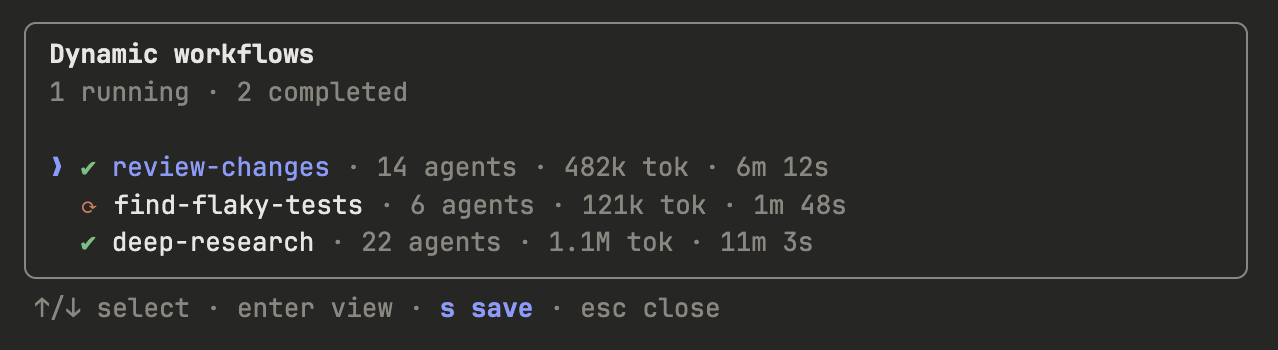
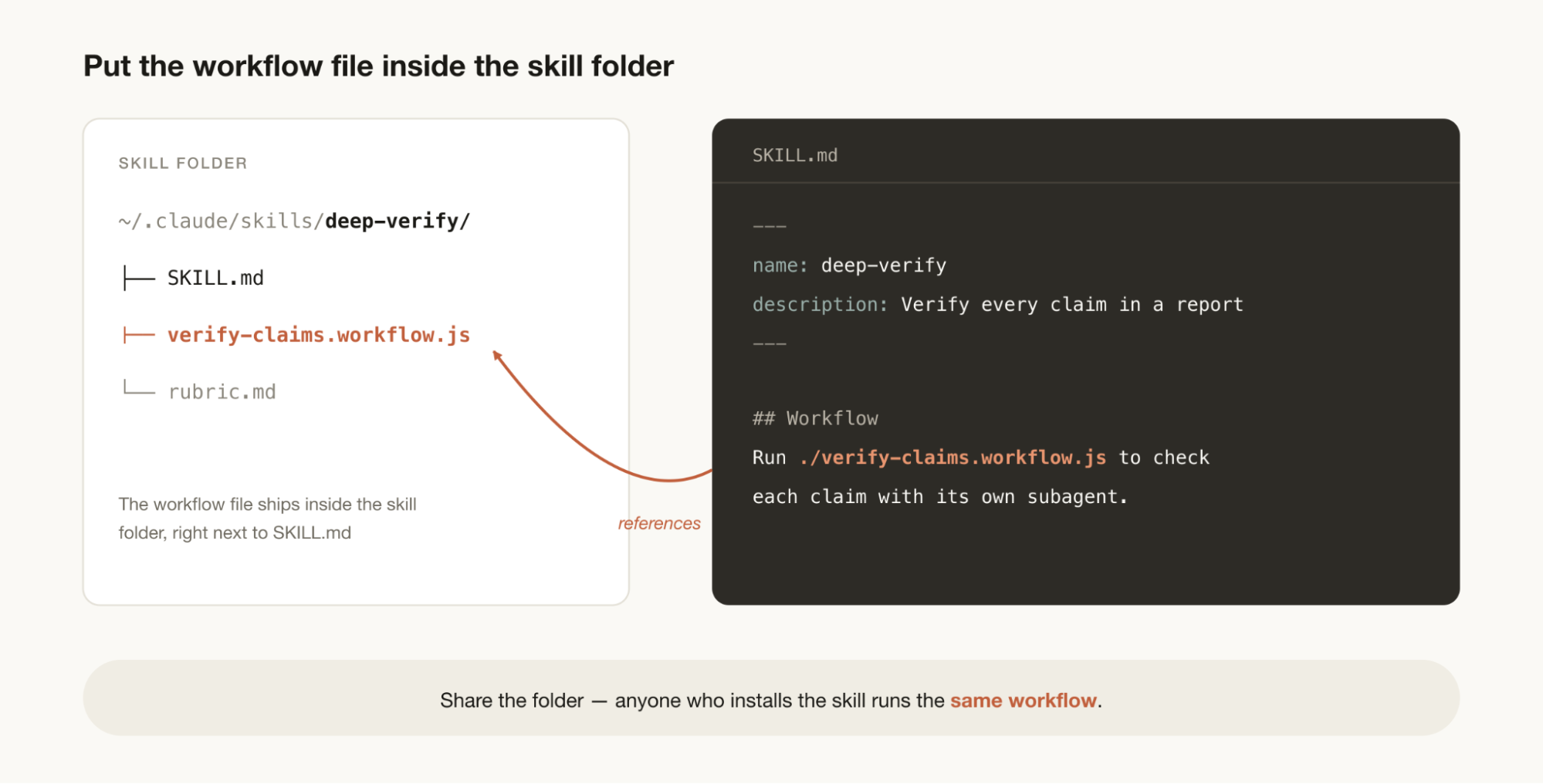
You can save workflows by pressing “s” in the workflow menu. You can check these into ~/.claude/workflows or distribute them via a skill.
To share them via a skill, put your JavaScript workflow files in the skill and folder and reference them in the SKILL.MD. To allow for more flexibility, you may want to prompt Claude to think of the workflows in the skill as a template instead of a script that needs to be run verbatim.
A new starting point for discovery
Workflows are a helpful new way to extend Claude Code. I encourage you to think of them as a starting point to explore new ways to use Claude to help accomplish your tasks. There is still much to discover in how to use them best. Let me know what you find.
For principles on what belongs in a harness in the first place, see our three harness design patterns for building with Claude.
This article was written by Thariq Shihipar and Sid Bidasaria, members of technical staff at Anthropic working on Claude Code.