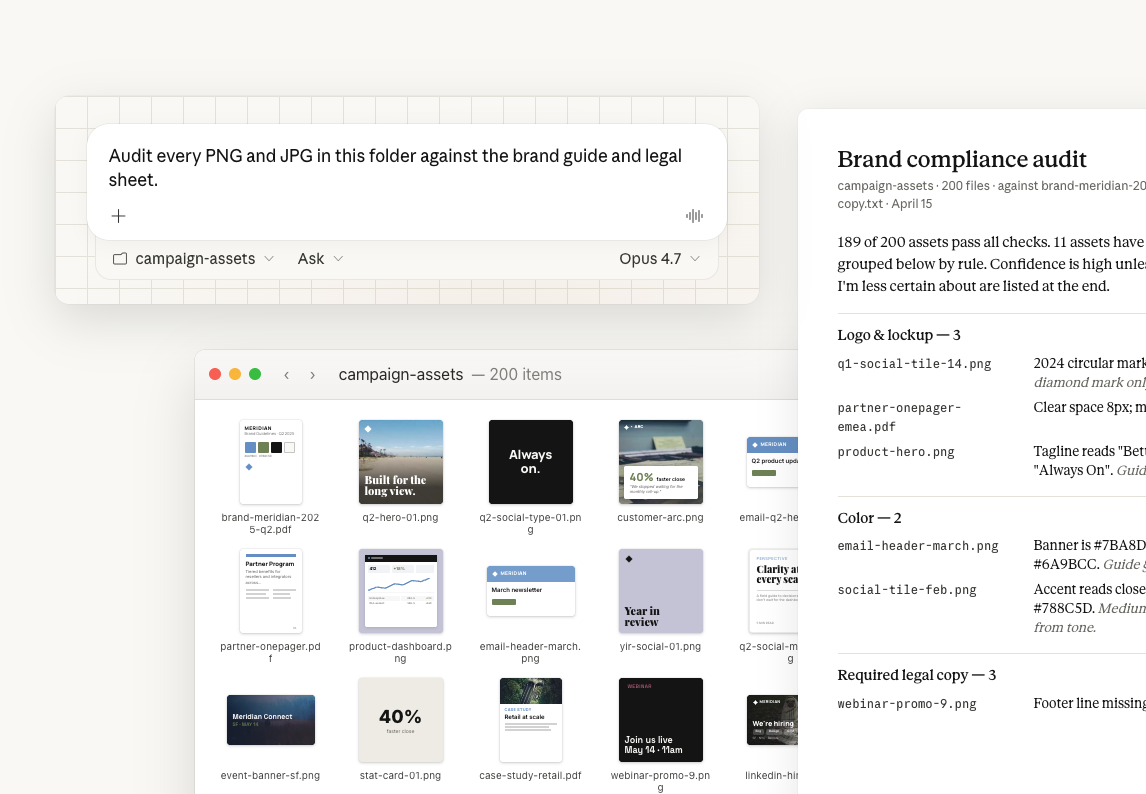
With Claude Opus 4.7, any folder of images can be checked against a written set of rules — brand guidelines for marketing assets, accessibility rules for UI screenshots, a style guide for a batch of design exports.
Opus 4.7 reads images at higher resolution than prior Claude models, so the small details that decide a match — a hex value, a logo version, a line of legal text — come through clearly. It can hold the rules document and the images together and check one against the other across the whole folder.
Here, a folder of live marketing assets gets checked against a brand-guidelines PDF and a legal-compliance sheet.
Audit every PNG and JPG in this folder against brand-meridian-2025-q2.pdf and legal-required-copy.txt.
Flag:
Group by violation type. For each one give me filename, issue, guideline value, asset value, and confidence. End with how many assets passed all checks.
In Claude Cowork, point your project at the folder that holds the brand-guidelines PDF, the legal sheet, and the asset exports.
Make sure Opus 4.7 is selected in the model picker. Opus 4.7 has improved vision which helps while reading small text in the guide and matching it against the same detail across hundreds of images.
Claude reads the guide and the legal sheet, then checks every asset in the folder against them. You get a grouped violation list (filename, issue, guideline vs asset value, confidence per item), a compliant count, and a short "less certain" block for the items worth opening yourself.
Audited 200 PNG/JPG files against brand-meridian-2025-q2.pdf and legal-required-copy.txt.
Logo & lockup — 3 violations
Color — 2 violations
Typography — 2 violations
Required legal copy — 3 violations
Unapproved claims — 1 violation
Compliant: 189 assets pass all checks.
Less certain: the gold on social-tile-feb.png may be a JPG compression shift rather than the old hex; partner-deck-asia.pptx uses a green not in the guide, possibly an approved regional variant.
Want me to file the 10 high-confidence items as Asana tasks, or save the full report to the folder?
The exports are one step removed from what customers see. With Claude in Chrome, Claude can open the live pages and run the same checks against what's rendering there — catching cases where the file was fixed but the page still shows the old version.
For each high-confidence violation, open the live page listed in asset-urls.csv in Chrome and tell me whether the published version has the same issue or has already been corrected.
Create an Asana task in the Brand Compliance project for every high-confidence violation, assigned to the asset owner, with the filename, the guideline, and the corrected value in the description.
When the rules and grouping are right, save them as a skill so the check is one line. Then set that skill as a scheduled task in Claude Cowork — every Friday, Claude runs the same audit on whatever is new in the folder and posts the result to Slack, with the rules already written down.
Save this as a skill called brand-compliance-audit, then schedule it to run every Friday at 2pm and post the summary to #brand-ops.
Tell Claude how to group the findings (Logo, Color, Legal, Claims) and what to return per item (filename, issue, guideline value, asset value, confidence). Opus 4.7 follows a format instruction like that closely, so you get a structured list you can act on rather than prose.
The high-resolution reading is a property of the model. Claude Cowork is what gives the model the entire folder — assets and reference documents together — and the working context to process all 200 in one task. You'd get the same reading quality on a handful of uploads in a claude.ai chat with Opus 4.7 selected; Claude Cowork is what makes it practical at folder scale and lets you schedule it.
If legal copy is non-negotiable but a hex within a few points is acceptable, say so in the prompt or the project instructions. Opus 4.7 will weight legal violations as high priority and near-miss colors as lower, and your output will already be sorted the way you'd triage it.