Adapt a standard textbook page to every reading level
Opus 4.7 reads a single source page in detail and returns a finished file for each audience that needs it. Here, one textbook spread becomes a slide deck and reading handouts at three levels.
Opus 4.7 reads a photographed or scanned page closely enough to pick up the small text, diagram labels, and captions, and produces several versions of the materials the way you describe. That applies whether it's a lesson at three reading levels, a training doc for different experience levels, onboarding guides for different roles, or customer docs for different audiences. And Opus 4.7 is stronger at producing and reviewing its own document and slide output, so the files come back more complete and correct on the first pass.
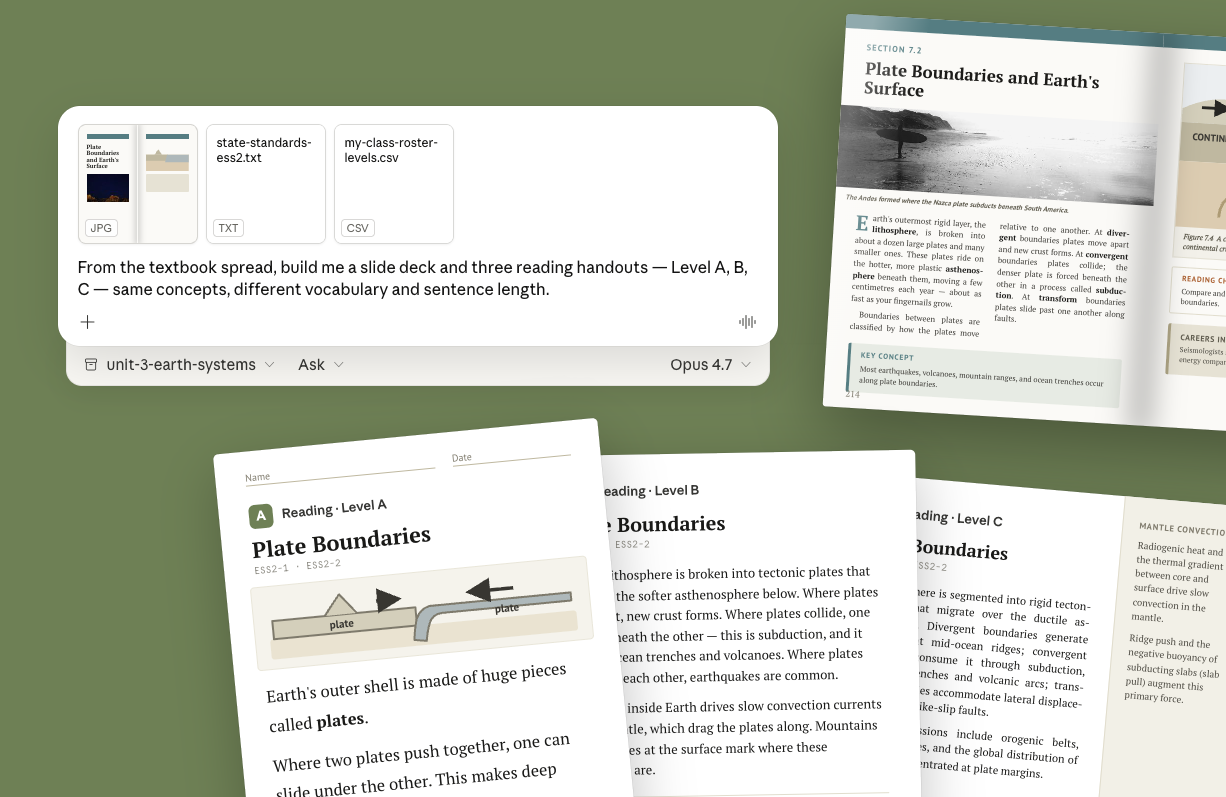
Here, a single textbook spread on plate tectonics becomes a slide deck and three reading handouts for one class period.
I've attached:
From the textbook spread, build me:
Keep every version on the same concepts and the same standard. List the vocabulary you simplified for Level A.
Attach the page as a photo or scan, the standards or learning objectives it needs to map to, and your rules for each version. Opus 4.7 reads the small text and diagram labels reliably at this resolution, so the full spread works without cropping to the section you want.
Make sure the model picket is set to Opus 4.7. With file creation, the deck and handouts come back as real .pptx and .docx files.

Claude reads the page, including the diagram and any sidebar text, and builds the materials the way you described. You get a slide deck, the three reading handouts as separate .docx files, and the exit ticket — each mapped to the standard you named. A short note lists what vocabulary was simplified at each level and anything from the page that didn't fit.
Built from tectonics-textbook-p214-215.jpg, mapped to ESS2-1 and ESS2-2.
Attached: tectonics-slides.pptx (9 slides) · tectonics-reading-A.docx · tectonics-reading-B.docx · tectonics-reading-C.docx · tectonics-exit-ticket.docx
All three handouts cover: plate boundaries (convergent, divergent, transform), what drives plate motion, two surface results (mountains, trenches). Level C adds the mantle-convection sidebar; A and B leave it out.
Vocabulary simplified for Level A: lithosphere → "Earth's outer shell" · asthenosphere → "the softer layer below" · subduction → "one plate slides under another." Sentence length kept under 15 words.
Left out of all versions: the textbook's "Careers in Geology" box (not part of the standard you named).
The diagram on slide 4 is a simplified redraw — three boundary types, labeled, no extra annotation. The original's small inset map didn't reproduce clearly enough to include.
The rules for each version are already stated, so adding a fourth is one line. Opus 4.7 keeps to your earlier rules while adding the new version.
Add a Level A-EL version: same as Level A, with a glossary box of the five key terms in both English and Spanish, and one labeled-diagram question instead of question 3.
When the slides need to lead with a different idea, ask for the reorder. The file output stays complete on the rebuild.
Rebuild the slide deck so it opens with the surface results (mountains, trenches, earthquakes) and gets to boundary types second. Keep it to 9 slides.
In claude.ai chat, you upload the page and restate your rules in each new conversation. In a Cowork project, Claude reads from a folder on your computer and the rules sit in project instructions. Point the project at the unit's folder, write the standards and version rules into project instructions once, and every page in that folder is one short prompt away from the full set of files.
Build the deck, three reading handouts, and exit ticket for tectonics-textbook-p218-219.jpg. Use the standards and version rules in project instructions.
Match the model to the work
Opus models are built for tasks that need close reading and a finished file at the end, like this one. Sonnet models are the everyday choice for drafting, planning, and back-and-forth on a lesson idea. Haiku models are the quick option for a fast answer or a simple rewrite. Here, the input is a dense page image and the output is a set of documents, so Opus 4.7 is the fit.
For more than one lesson, point a Cowork project at the folder
In claude.ai you attach one page at a time. In Claude Cowork, a project can read a whole folder on your computer. Put your standards and version rules in project instructions, drop each unit's source pages into the folder, and the same prompt produces the deck and handouts for every page.
Ask Claude to list its changes alongside the output
Whenever Claude is rewriting, simplifying, or adapting something you gave it, add a line to the prompt asking for a list of what it changed and what it left out. That list is what you review. You check the decisions Claude made rather than comparing every output to the original yourself.