Running a small business means working across a lot of tools — your books, your payments, your CRM, your inbox. The answers you need usually live across all of them.
With the Claude for Small Business plugin installed and set up in Claude Cowork, a short prompt can help run a multi-step workflow for your business.
Below are four examples: what each prompt runs, what Claude does at each step, and what you have when it's done.
Tip: To set up the plugin that enables the workflows below and see the full inventory of skills, visit How to install and use the Claude for Small Business plugin
To learn more: see Customize Claude Cowork and Customizing plugins in Claude Cowork
Get a pulse on your business
Help me build a Monday morning brief every week in Slack. Pull my cash position from QuickBooks, incoming settlements from PayPal, pipeline movement from HubSpot, and what's on my calendar this week. Tell me the three things that need my attention today.
This prompt starts the
/monday-brief skill, which gives Claude instructions for reading every connected business tool and writing a single page you can scan in a minute. After
customizing the plugin, Claude leads with what matters most for your business.
1
Claude reads every connected tool
Accounting for cash and receivables, payment processor for sales trend, CRM for pipeline, calendar for the week, email for anything urgent.
2
Claude writes a section per connected tool
With one tool you get one section; each tool you add fills in another. The skill notes which tools it read from so you can verify any number at its source.
3
Claude ranks what most needs you
A short list of things to act on first, with the reason each one made the list.
Outcome
A one-page brief saved to your folder, ready every Monday morning if you put it on a schedule.
Run your next campaign
Find my weakest revenue month from last year and plan a promo to address it. Draft the strategy, generate the campaign assets in Canva, segment my list in HubSpot, and stage the send. Show me everything before anything goes out.
This prompt starts the
/run-campaign skill, which gives Claude instructions for finding your slow season, drafting an offer, building the assets, and staging the send. After
customizing the plugin, Claude works with your tone and your audience.
1
Claude finds when sales usually dip
Reads your sales by month, spots when revenue typically drops, and drafts the offer, audience, and a posting calendar to fill it.
→
You approve the plan
Decide whether the offer is right and who it's for.
2
Claude builds the assets
Generates social designs from your brand templates and drafts the captions and email copy.
3
Claude builds the audience
Reads your CRM, segments the list, and stages the email as a draft.
→
You approve before anything publishes
Designs are in your design tool, the email is staged, the segment is built. Nothing posts or sends until you approve.
Outcome
A campaign plan, the designs, the copy, and a staged send — built across the tools where you'd edit them and waiting for your approval.
Close the month with fewer errors
Close out March for me. Reconcile my QuickBooks transactions against PayPal settlements, flag anything that doesn't match, and write the P&L narrative as a document I can send straight to my accountant.
This prompt starts the
/close-month skill, which gives Claude instructions for reconciling your books, flagging anything that doesn't line up, and writing a close packet for your accountant. After
customizing the plugin, Claude follows your category conventions and the flags you care about.
1
Claude reconciles accounting against payments
Compares what each system recorded, matches by amount and date, and lists what doesn't line up — missed settlements, missed deposits, fee mismatches.
2
Claude flags what needs a second look
Uncategorized transactions, likely duplicates, expenses without a receipt.
→
You sort the flags
Tell Claude what each one is — “the Coastline charge is packaging, cost of goods” — and it updates the spreadsheet.
3
Claude writes the close packet
A reconciliation spreadsheet with every transaction matched or flagged, plus a one-page plain-English summary you can forward to your accountant.
Outcome
The close packet saved to your folder, ready for your accountant to work from. Claude prepares the reconciliation; the call on what to change in your books stays with you and your accountant.
Plan payroll with confidence
Get me ready for payroll on the 15th. Pull my cash position from QuickBooks, my incoming PayPal settlements, and any overdue invoices. Show me whether the next 30 days covers payroll, then draft a reminder for each overdue customer matched to how they've paid before. Show me the drafts before anything sends.
This prompt starts the
/plan-payroll skill, which gives Claude instructions for forecasting the next 30 days of cash and drafting reminders for overdue invoices. After
customizing the plugin, Claude knows your team and how each customer pays.
1
Claude reads cash and builds the forecast
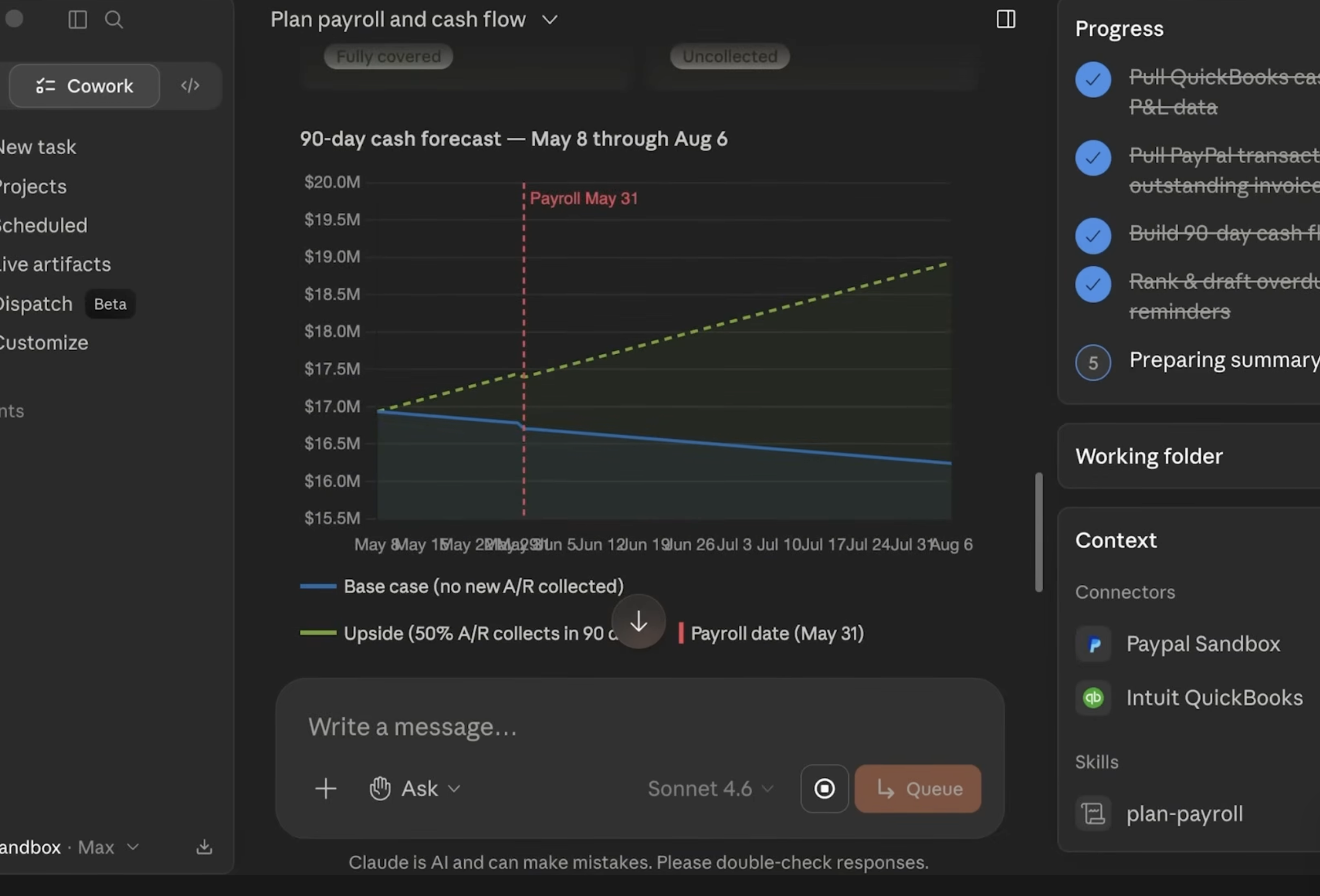
Reads your bank balance, open invoices, bills due, and incoming settlements, and builds a 30-day cash view with the low point and payroll dates marked.
→
You review the forecast and decide whether to chase
Chase what's overdue, or skip ahead to the next payroll.
2
Claude ranks overdue and drafts the reminders
Reads each overdue invoice, scores the customer on how they've paid before, and drafts a reminder calibrated to that history — friendly for someone who pays on time, firmer for a repeat late payer.
→
You read each draft, change what you want, and approve
Nothing sends until you say so.
Outcome
A 30-day cash chart, a ranked overdue list with payment history, a reminder for each one ready to send, and a clear read on whether payroll is covered.
Things to note
- You approve before anything sends, posts, or pays — skills draft, propose, and stage. Nothing goes out until you say so.
- The big decisions stay with you — Claude prepares the work and shows you what it found, but the calls that matter — what to charge, what to sign, what to send your accountant — are yours and your professionals' to make.
- The skills update when you correct them — tell
/invoice-chase you chase at 15 days, tell /monday-brief what to lead with, and the change is saved for the next run. The pattern is in How to customize plugins in Cowork. - Your existing permissions hold — Claude reads what your account in each tool can read. It can't see data you don't already have access to.
- Anthropic doesn't train Claude on your business data — the full policy is in the Trust Center.
Learn more
Tip: To set up the plugin that enables the workflows below and see the full inventory of skills, visit: How to install and use the Claude for Small Business plugin.
To learn more, see Customize Claude Cowork and Customizing plugins in Claude Cowork
Get a pulse on your business
Help me build a Monday morning brief every week in Slack. Pull my cash position from QuickBooks, incoming settlements from PayPal, pipeline movement from HubSpot, and what's on my calendar this week. Tell me the three things that need my attention today.
This prompt starts the
/monday-brief skill, which gives Claude instructions for reading every connected business tool and writing a single page you can scan in a minute. After
customizing the plugin, Claude leads with what matters most for your business.
1
Claude reads every connected tool
Accounting for cash and receivables, payment processor for sales trend, CRM for pipeline, calendar for the week, email for anything urgent.
2
Claude writes a section per connected tool
With one tool you get one section; each tool you add fills in another. The skill notes which tools it read from so you can verify any number at its source.
3
Claude ranks what most needs you
A short list of things to act on first, with the reason each one made the list.
Outcome
A one-page brief saved to your folder, ready every Monday morning if you put it on a schedule.
Run your next campaign
Find my weakest revenue month from last year and plan a promo to address it. Draft the strategy, generate the campaign assets in Canva, segment my list in HubSpot, and stage the send. Show me everything before anything goes out.
This prompt starts the
/run-campaign skill, which gives Claude instructions for finding your slow season, drafting an offer, building the assets, and staging the send. After
customizing the plugin, Claude works with your tone and your audience.
1
Claude finds when sales usually dip
Reads your sales by month, spots when revenue typically drops, and drafts the offer, audience, and a posting calendar to fill it.
→
You approve the plan
Decide whether the offer is right and who it's for.
2
Claude builds the assets
Generates social designs from your brand templates and drafts the captions and email copy.
3
Claude builds the audience
Reads your CRM, segments the list, and stages the email as a draft.
→
You approve before anything publishes
Designs are in your design tool, the email is staged, the segment is built. Nothing posts or sends until you approve.
Outcome
A campaign plan, the designs, the copy, and a staged send — built across the tools where you'd edit them and waiting for your approval.
Close the month with fewer errors
Close out March for me. Reconcile my QuickBooks transactions against PayPal settlements, flag anything that doesn't match, and write the P&L narrative as a document I can send straight to my accountant.
This prompt starts the
/close-month skill, which gives Claude instructions for reconciling your books, flagging anything that doesn't line up, and writing a close packet for your accountant. After
customizing the plugin, Claude follows your category conventions and the flags you care about.
1
Claude reconciles accounting against payments
Compares what each system recorded, matches by amount and date, and lists what doesn't line up — missed settlements, missed deposits, fee mismatches.
2
Claude flags what needs a second look
Uncategorized transactions, likely duplicates, expenses without a receipt.
→
You sort the flags
Tell Claude what each one is — “the Coastline charge is packaging, cost of goods” — and it updates the spreadsheet.
3
Claude writes the close packet
A reconciliation spreadsheet with every transaction matched or flagged, plus a one-page plain-English summary you can forward to your accountant.
Outcome
The close packet saved to your folder, ready for your accountant to work from. Claude prepares the reconciliation; the call on what to change in your books stays with you and your accountant.
Plan payroll with confidence
Get me ready for payroll on the 15th. Pull my cash position from QuickBooks, my incoming PayPal settlements, and any overdue invoices. Show me whether the next 30 days covers payroll, then draft a reminder for each overdue customer matched to how they've paid before. Show me the drafts before anything sends.
This prompt starts the
/plan-payroll skill, which gives Claude instructions for forecasting the next 30 days of cash and drafting reminders for overdue invoices. After
customizing the plugin, Claude knows your team and how each customer pays.
1
Claude reads cash and builds the forecast
Reads your bank balance, open invoices, bills due, and incoming settlements, and builds a 30-day cash view with the low point and payroll dates marked.
→
You review the forecast and decide whether to chase
Chase what's overdue, or skip ahead to the next payroll.
2
Claude ranks overdue and drafts the reminders
Reads each overdue invoice, scores the customer on how they've paid before, and drafts a reminder calibrated to that history — friendly for someone who pays on time, firmer for a repeat late payer.
→
You read each draft, change what you want, and approve
Nothing sends until you say so.
Outcome
A 30-day cash chart, a ranked overdue list with payment history, a reminder for each one ready to send, and a clear read on whether payroll is covered.
Things to note
- You approve before anything sends, posts, or pays — skills draft, propose, and stage. Nothing goes out until you say so.
- The big decisions stay with you — Claude prepares the work and shows you what it found, but the calls that matter — what to charge, what to sign, what to send your accountant — are yours and your professionals' to make.
- The skills update when you correct them — tell
/invoice-chase you chase at 15 days, tell /monday-brief what to lead with, and the change is saved for the next run. The pattern is in How to customize plugins in Cowork. - Your existing permissions hold — Claude reads what your account in each tool can read. It can't see data you don't already have access to.
- Anthropic doesn't train Claude on your business data — the full policy is in the Trust Center.
Learn more