Best practices for using @Claude
How to work with @Claude across your org: setting up where it has context, writing a task that goes well, and moving from one-off requests to work it runs on its own.
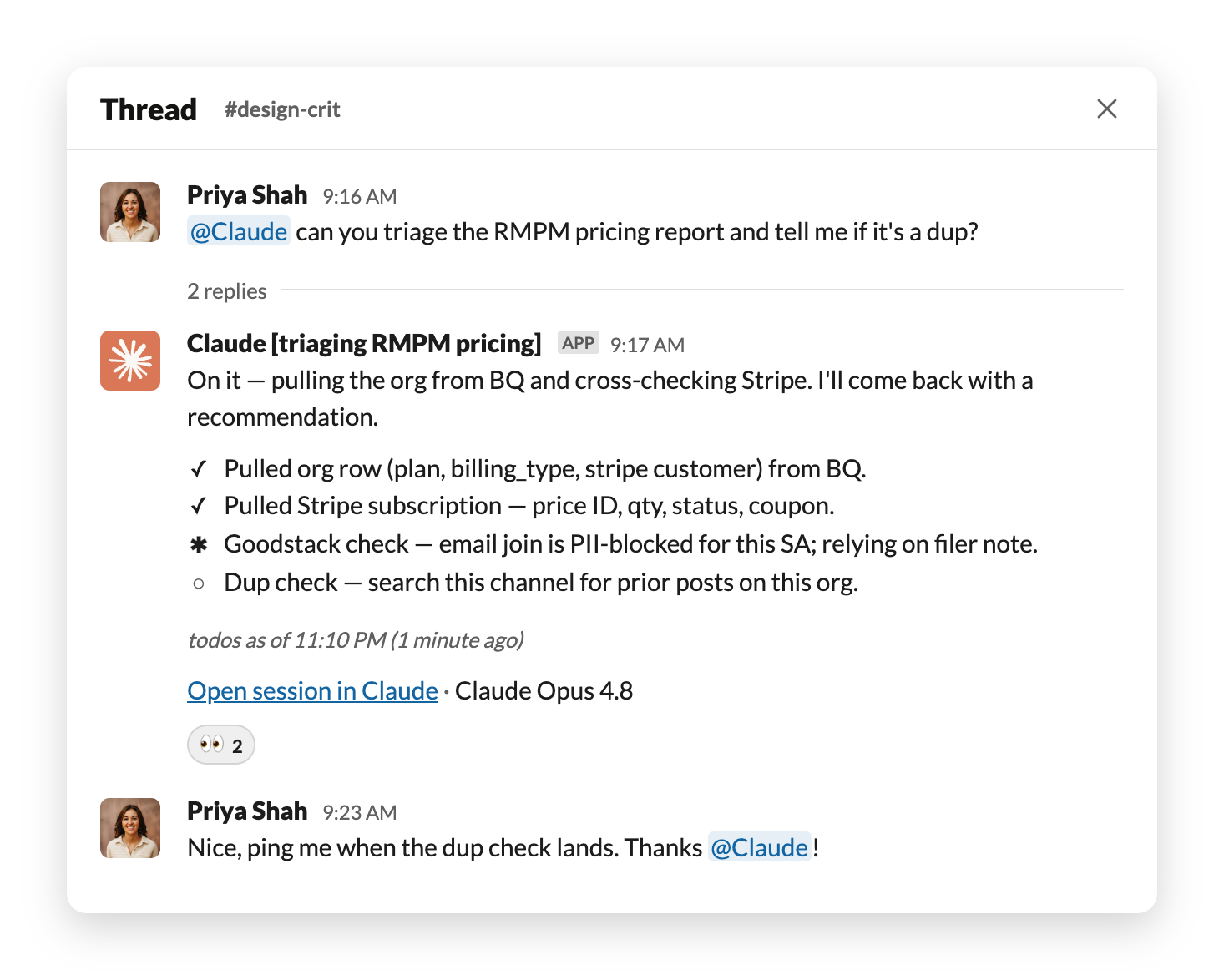
Claude now works alongside your team, under its own account, in the places you already work together. Tag @Claude with a task and it takes it on. The work happens in the thread where everyone can see it, and it keeps going after you've closed your laptop, coming back to you when it's done or when a decision needs you.
This guide covers how to set up your channels, how to write a task that goes well, and how to move from giving @Claude tasks to handing it work that runs on its own.
You may have used Claude in a chat box, or have automations running in your workspace that each handle a specific job. This Claude is different in a few ways:
In a channel, Claude works with the connections your admin set up (your docs, your code, your data, whatever has been connected) plus the channel's own history. Anyone in the channel can continue a task someone else started, and the tools and context are shared.
In your DM, it's just you and Claude. Your personal connections like your calendar and email work there, and only there. In channels Claude uses its own admin-managed accounts, so nothing from your inbox can end up in a channel by accident.
Memory follows the same boundaries. What Claude learns in a public channel is available across your workspace, and what it learns in a private channel or a DM stays in that conversation.
Connections to tools help expand what Claude can do. A couple of connections and Claude is answering questions; connect most of what your team uses and Claude is completing the work. If you're not sure what it can use where you are, ask it: "@Claude what can you access from this channel?" If something you need isn't connected, ask your admin to add it.
Do team-relevant work in public channels rather than DMs, when you can. Claude works from the channel's history, so months of decisions, corrections, and examples are available to it before you've given it the first task. Working in public also helps beyond that channel: your teammates can find and reuse what you did, and so can Claude when it's working elsewhere in the workspace.
A channel about one kind of work gives Claude a clear focus. The history and corrections in that channel are what it learns from, so it gets good at exactly that channel's work and your requests get shorter. You stop pasting the doc back in or starting with "for context," because Claude was reading along when the context happened, and you can delegate the tasks specific to your role there.
By default, Claude in a channel responds when someone tags it. It doesn't act on its own unless you've told it to. That's the right place to start: you tag Claude in with a task, and Claude works on it in the thread.
Set Claude's level of proactivity: you can change how active Claude is in a given channel by telling it in plain words. "Only reply here when someone tags you" or "watch this channel and answer any question you can." A busy feedback channel might want Claude answering everything, because a wrong answer gets corrected and a missed question doesn't. A planning channel might want it quiet except for a scheduled update. If proactive replies aren't available in your channel, your admin can turn them on.
Schedule tasks: when you find yourself tagging Claude for the same thing on the same day each week, tell it to run that on a schedule instead. "Post a digest of decisions and open items every Monday at 9am." Claude runs that in the channel each week without anyone tagging it.
Have it follow up on its own: you're not the only one who can start the conversation. Ask Claude to check back in three days on whether a fix held, or to say something when a thread it's watching goes quiet, and it posts the follow-up without anyone tagging it.
A task goes well when it has three things: inputs Claude can reach, a goal you've stated, and a result someone can check.
For a first task, pick something Claude can do from what's already in the conversation: catch you up on the channel since Monday, or pull out who owns the open threads. You'll get a result fast and you can check it yourself. See more use cases of what @Claude can do.
Brief Claude the way you'd brief a capable new teammate: the goal, why it matters, and where to look. Name the doc, the thread, or the date range if a specific one matters, and ask Claude to link its sources. Leave the steps to Claude; it can read the channel, search the workspace, and use whatever tools are connected.
Claude reacts to your message, posts a short note that it's started, and keeps a checklist updated in the thread. It keeps working without you, and if you're working in a channel, anyone in it can jump in to add context or adjust Claude's plan.
Editing a message you already sent has no effect; send a new reply instead. And a new top-level message starts a new task, so to keep going on this one, stay in its thread, though what Claude remembers about the channel applies in every thread.
Read Claude's work before you use it, in proportion to what's at stake: skim a summary, read carefully anything going to a customer or changing a system. When something's wrong, say what specifically and ask for the revision in the thread. For anything analytical, ask Claude to take a second pass looking for errors in its first answer. If the same miss keeps happening, open Claude's session to see the steps it took, then tell Claude what to do differently. Claude remembers the correction for the channel, so the next person doesn't hit it.
To get started, tag @Claude in a channel where real work happens and ask it something a teammate would normally answer. If you want a low-stakes place to try things first, make a channel just for that (naming it “your name” and “Claude” works). And if you're not sure what to ask, ask Claude what it can help with where you are.
Once Claude is reliably doing a few things, the next step is widening its responsibility, in addition to one-off tasks. What that looks like in practice:
A few things run underneath all of the above, and they're worth knowing because they're what makes it safe to hand Claude real work.
Coming from claude.ai: You can stop collecting all the context yourself. You don't need to paste in the background or re-explain the project each time. Name the thread, the doc, or the channel, and let Claude read it there. And where an answer in chat might hand the work back to you, with @Claude, it can take the next step itself, like opening the draft PR, filing the ticket, or tagging in a teammate, and report back in the thread.
Coming from the earlier Claude app for Slack: @Claude works under its own account with the access your admin sets per channel, remembers corrections for the channel, and takes on multi-step tasks rather than single replies. The FAQ covers the differences, and the Help Center covers what happens to the earlier app.