
Lessons from building Claude Code: How we use skills
What we learned building and scaling hundreds of skills internally at Anthropic.
What we learned building and scaling hundreds of skills internally at Anthropic.
Skills have become one of the most used extension points in Claude Code. They’re flexible, easy to make, and easy to distribute.
But this flexibility also makes it hard to know what works best. What type of skills are worth making? How do you structure a skill? When do you share them with others?
We've been using skills in Claude Code extensively at Anthropic with hundreds of them in active use. These are the lessons we've learned about using skills to accelerate our development.
Skills are folders of instructions, scripts, and resources that agents can discover and use to do things more accurately and efficiently. This blog post assumes familiarity with skills basics; if you’re new, start with our Introduction to agent skills course on Skilljar.
A common misconception we hear about skills is that they are “just markdown files.” They’re actually folders that can include scripts, assets, data, etc. that the agent can discover, explore and manipulate.
In Claude Code, skills also have a wide variety of configuration options including registering dynamic hooks.
We’ve found that some of the most effective skills in Claude Code use these configuration options and folder structure effectively.

After cataloging all of our internal skills at Anthropic, we noticed they cluster into nine categories. The best skills fit cleanly into one; the ones that try to do too much straddle several and confuse the agent. This isn't a definitive list, but it is a useful framework for identifying gaps in your own skills library.
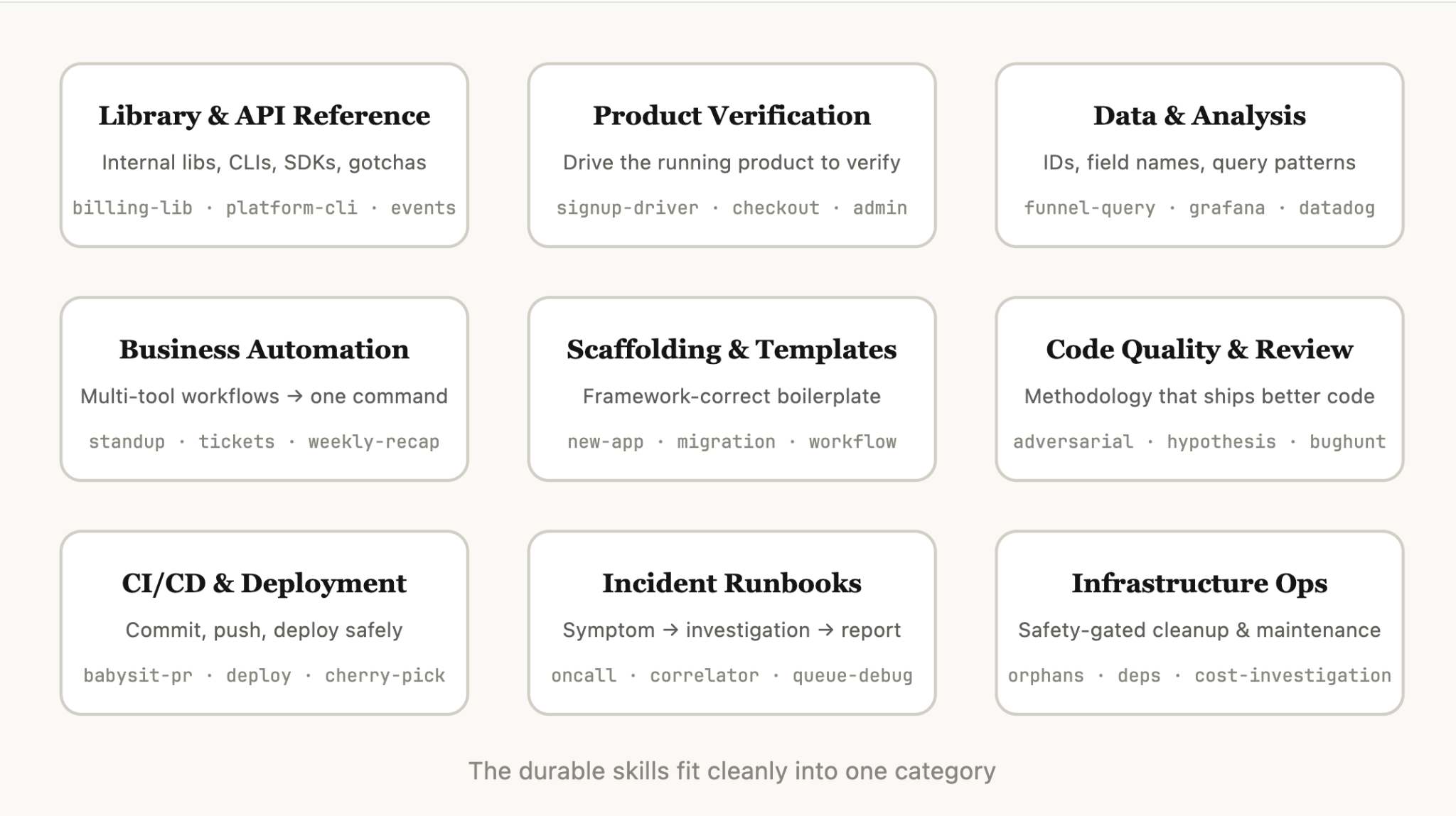
These are skills that explain how to correctly use a library, CLI, or SDKs. They could be both for internal libraries or common libraries that Claude Code sometimes struggles to handle. These skills often included a folder of reference code snippets and a list of gotchas for Claude to avoid when writing a script.
Examples include:
billing-lib — your internal billing library: edge cases, footguns, etc.internal-platform-cli — every subcommand of your internal CLI wrapper with examples on when to use them.sandbox-proxy — configuring your org's egress gateway for dev work: which hosts are reachable, how to debug "connection refused" errors, how to add an allowlist entry.These are skills that describe how to test or verify that your code is working. They are often paired with playwright, tmux, or other external tools for verification.
Verification skills have had the most measurable impact on Claude’s output quality internally. It can be worth having an engineer spend a week just making your verification skills excellent.
Consider techniques like having Claude record a video of its output so you can see exactly what it tested, or enforcing programmatic assertions on state at each step. These are often done by including a variety of scripts in the skill.
Examples include:
signup-flow-driver — runs through signup → email verify → onboarding in a headless browser, with hooks for asserting state at each stepcheckout-verifier — drives the checkout UI with Stripe test cards, verifies the invoice actually lands in the right statetmux-cli-driver — for interactive CLI testing where the thing you're verifying needs a TTYThese are skills that connect to your data and monitoring stacks. These skills might include libraries to fetch your data with credentials, specific dashboard ids, etc., as well as instructions on common workflows or ways to get data.
Examples include:
funnel-query — "which events do I join to see signup → activation → paid" plus the table that actually has the canonical user_idcohort-compare — compare two cohorts' retention or conversion, flag statistically significant deltas, link to the segment definitionsgrafana — datasource UIDs, cluster names, problem → dashboard lookup tabledatadog — field reference (@request_id vs trace_id), service list, metric prefix conventionsThese are skills that automate repetitive workflows into one command. These skills are usually fairly simple instructions but might have more complicated dependencies on other skills or MCPs. For these skills, saving previous results in log files can help the model stay consistent and reflect on previous executions of the workflow.
Examples include:
standup-post — aggregates your ticket tracker, GitHub activity, and prior Slack → formatted standup, delta-onlycreate-<ticket-system>-ticket — enforces schema (valid enum values, required fields) plus post-creation workflow (ping reviewer, link in Slack)weekly-recap — merged PRs + closed tickets + deploys → formatted recap postThese are skills that generate framework boilerplates for a specific function in a codebase. You might combine these skills with scripts that can be composed. They are especially useful when your scaffolding has natural language requirements that can’t be purely covered by code.
Examples include:
new-<framework>-workflow — scaffolds a new service/workflow/handler with your annotationsnew-migration — your migration file template plus common gotchascreate-app — new internal app with your auth, logging, and deploy config pre-wiredThese are skills that enforce code quality inside of your org and help review code. These can include deterministic scripts or tools for maximum robustness. You may want to run these skills automatically as part of hooks or inside of a GitHub Action.
adversarial-review — spawns a fresh-eyes subagent to critique, implements fixes, iterates until findings degrade to nitpickscode-style — enforces code style, especially styles that Claude does not do well by default.testing-practices — instructions on how to write tests and what to test.These are skills that help you fetch, push, and deploy code inside of your codebase. These skills may reference other skills to collect data.
Examples include:
babysit-pr — monitors a PR → retries flaky CI → resolves merge conflicts → enables auto-mergedeploy-<service> — build → smoke test → gradual traffic rollout with error-rate comparison → auto-rollback on regressioncherry-pick-prod — isolated worktree → cherry-pick → conflict resolution → PR with templateThese are skills that take a symptom (such as a Slack thread, alert, or error signature), walk through a multi-tool investigation, and produce a structured report.
Examples include:
<service>-debugging — maps symptoms → tools → query patterns for your highest-traffic servicesoncall-runner — fetches the alert → checks the usual suspects → formats a findinglog-correlator — given a request ID, pulls matching logs from every system that might have touched itThese are skills that perform routine maintenance and operational procedures, some of which involve destructive actions that benefit from guardrails. These make it easier for engineers to follow best practices in critical operations.
Examples include:
<resource>-orphans — finds orphaned pods/volumes → posts to Slack → soak period → user confirms → cascading cleanupdependency-management — your org's dependency approval workflowcost-investigation — "why did our storage/egress bill spike" with the specific buckets and query patternsOnce you've decided on the skill to make, how do you write it? These are some of the Claude Code team’s best practices, tips, and tricks for making skills
Claude already knows how to code and can read your codebase. A skill that restates what Claude would do by default adds context without adding value. If you’re publishing a skill that is primarily about knowledge, focus on information that pushes Claude out of its normal way of thinking.
The frontend design skill is a great example; it was built by an engineer at Anthropic by iterating with customers on improving Claude’s design taste, avoiding classic patterns like the Inter font and purple gradients.
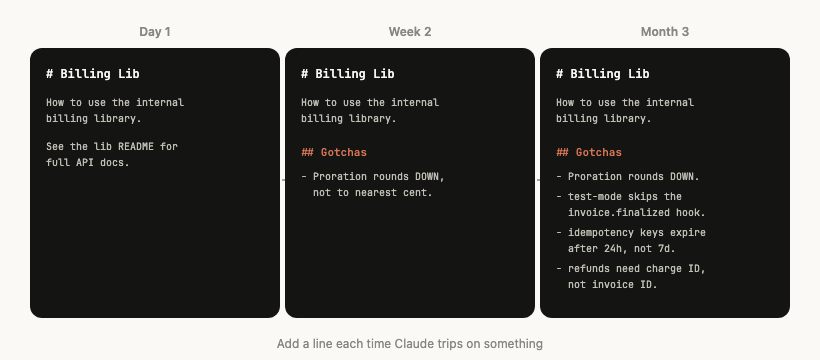
The highest-signal content in any skill is the Gotchas section. These sections should be built up from common failure points that Claude runs into when using your skill. Ideally, you will update your skill over time to capture these gotchas.
For example:
"The subscriptions table is append-only. The row you want is the one with the highest version, not the most recent created_at." "This field is called @request_id in the API gateway and trace_id in the billing service. They're the same value." "Staging returns 200 even when the Stripe webhook didn't actually process. Check payment_events for the real state."
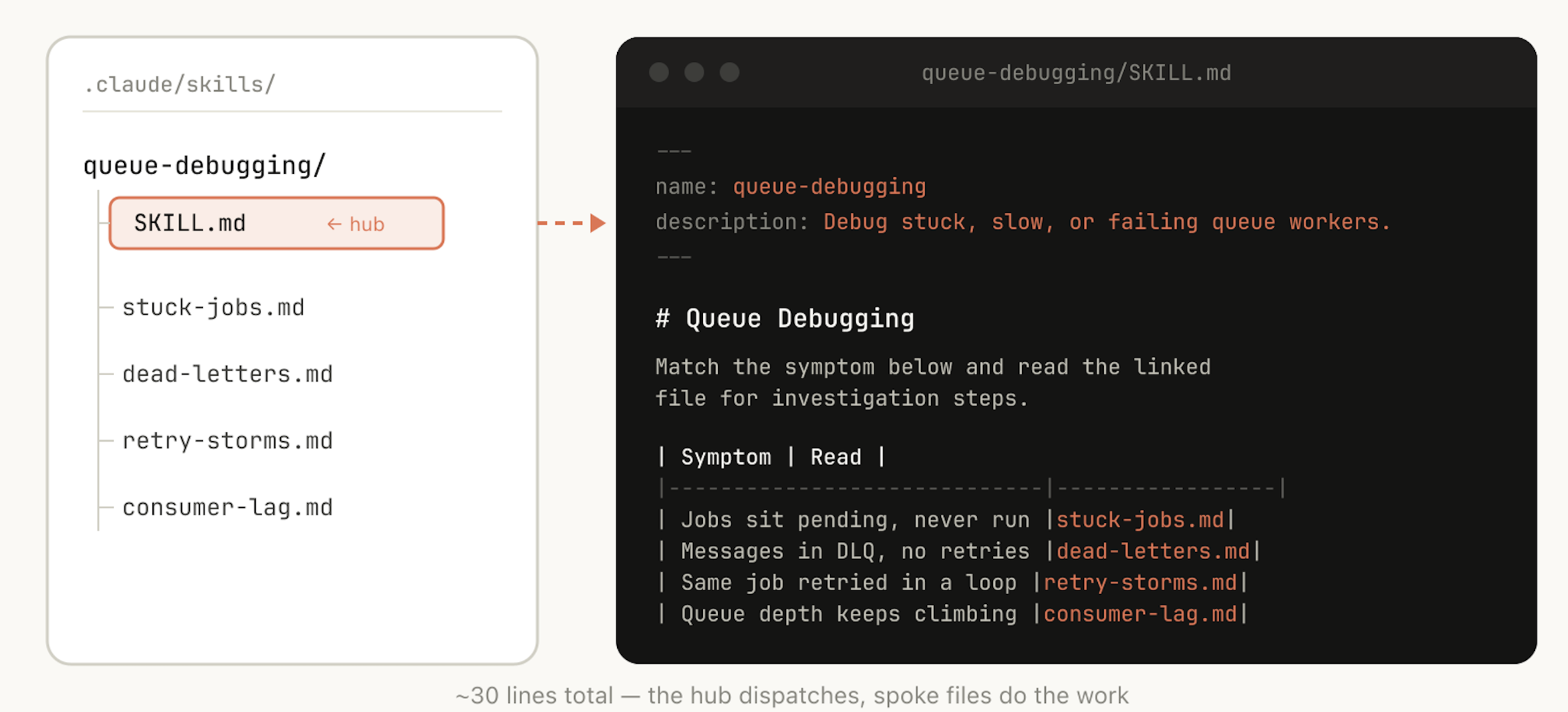
Like we said earlier, a skill is a folder, not just a markdown file. You should think of the entire file system as a form of context engineering and progressive disclosure. Tell Claude what files are in your skill, and it will read them at appropriate times.
The simplest form of progressive disclosure is to point to other markdown files for Claude to use. For example, you may split detailed function signatures and usage examples into references/api.md.
Another example: if your end output is a markdown file, you might include a template file for it in assets/ to copy and use.
You can have folders of references, scripts, examples, etc., which help Claude work more effectively.
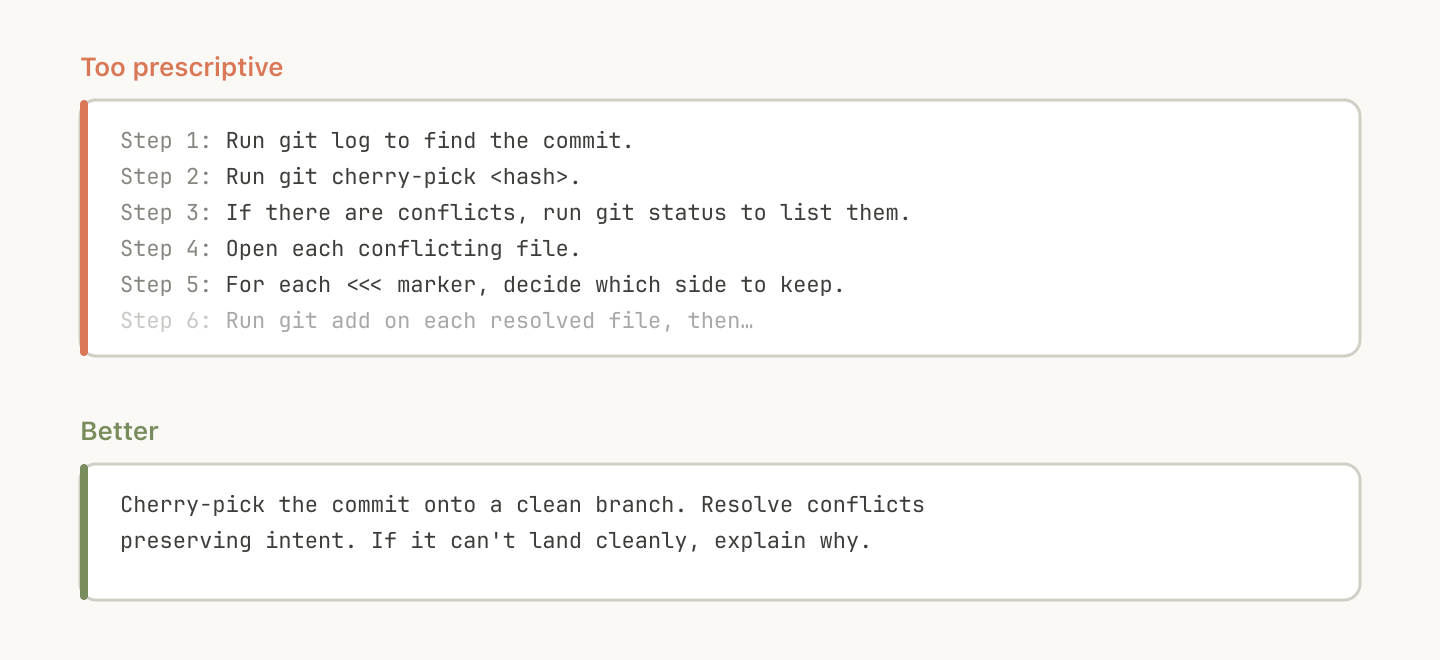
Claude will generally try to stick to your instructions, and because skills are so reusable you’ll want to be careful of being too specific in your instructions. Give Claude the information it needs, but give it the flexibility to adapt to the situation.
For example:
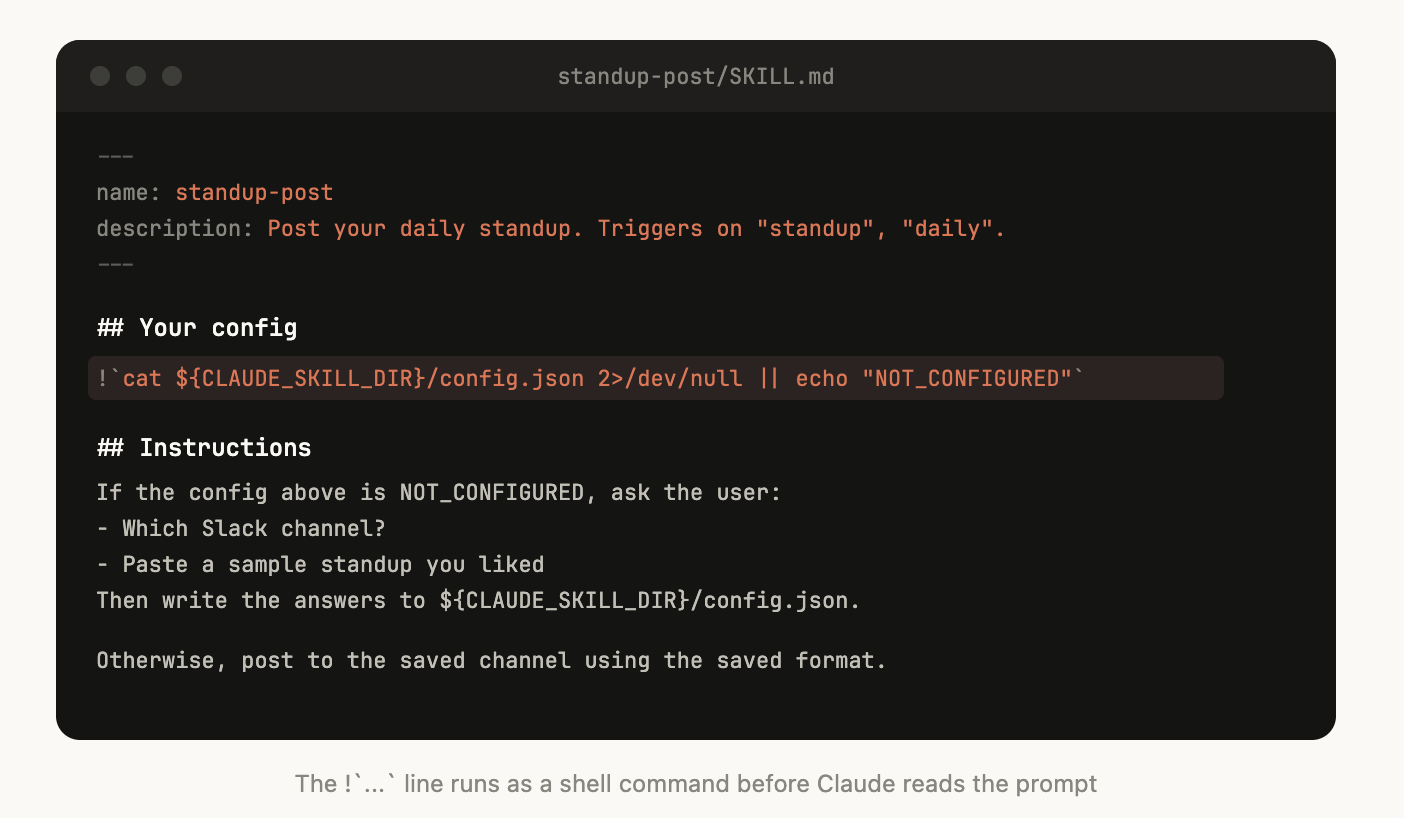
Some skills may need to be set up with context from the user. For example, if you are making a skill that posts your standup to Slack, you may want Claude to ask which Slack channel to post it in.
A good pattern to do this is to store this setup information in a config.json file in the skill directory like the above example. If the config is not set up, the agent can then ask the user for information.
If you want the agent to present structured, multiple choice questions you can instruct Claude to use the AskUserQuestion tool.
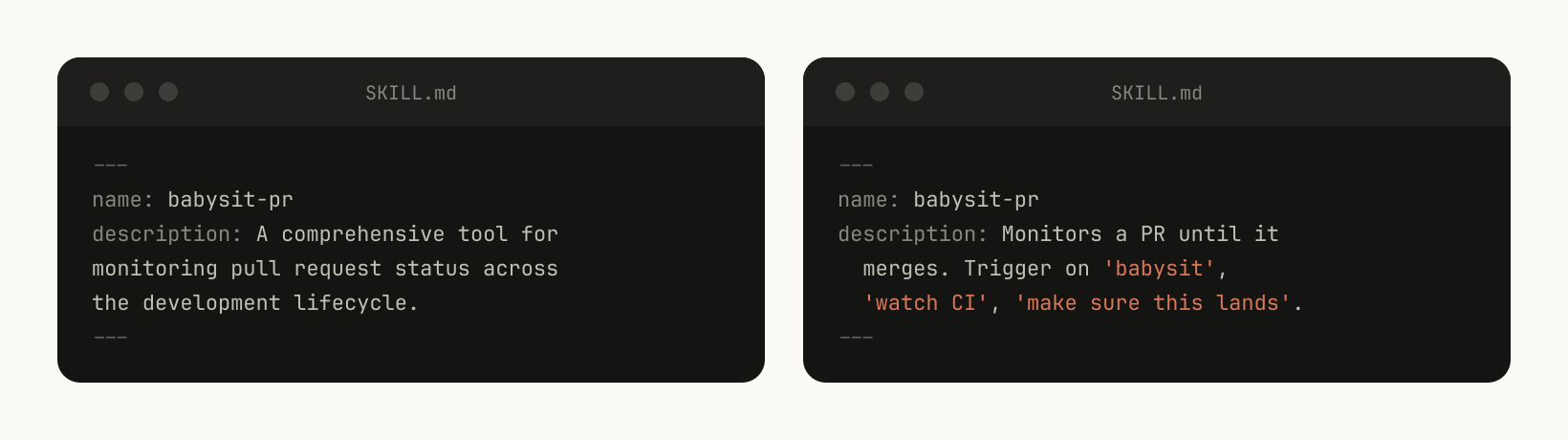
When Claude Code starts a session, it builds a listing of every available skill with its description. This listing is what Claude scans to decide "is there a skill for this request?" Which means the description field is not a summary, it's a description of when to trigger this skill.
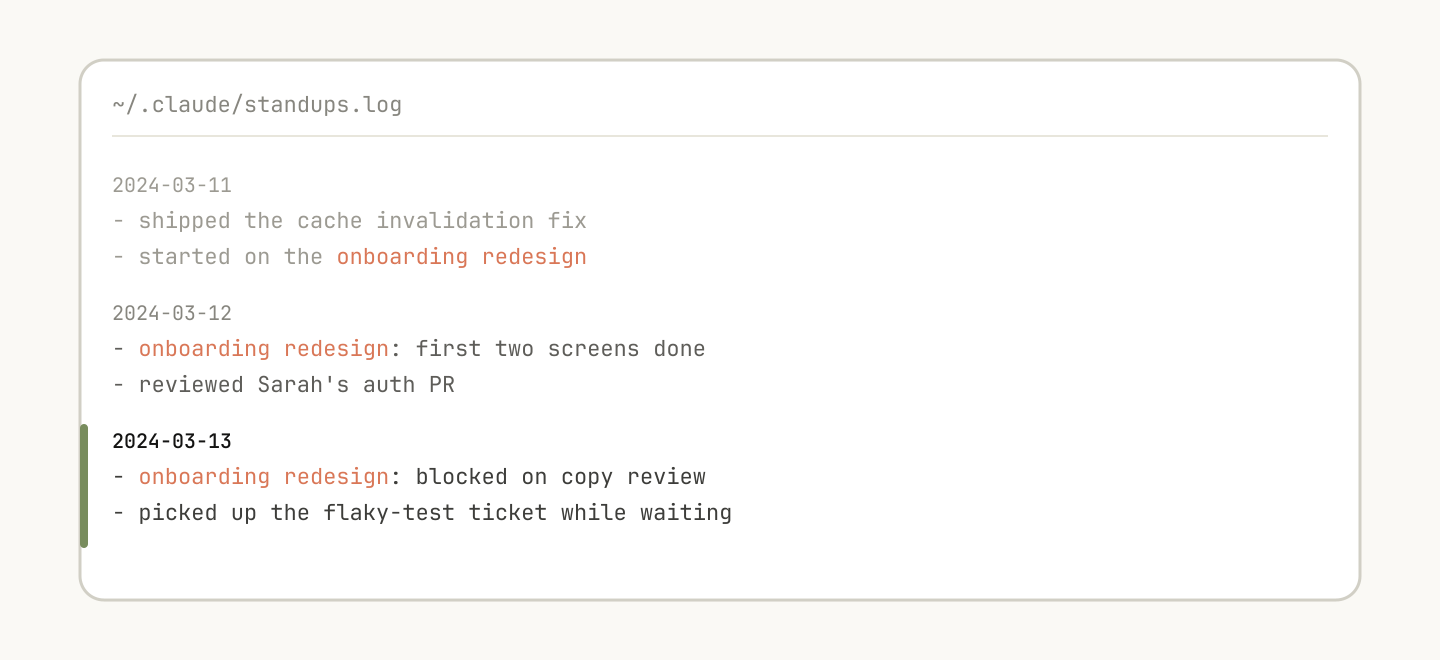
Some skills can include a form of memory by storing data within them. You could store data in anything as simple as an append only text log file or JSON files, or as complicated as a SQLite database.
For example, a standup-post skill might keep a standups.log with every post it's written, which means the next time you run it, Claude reads its own history and can tell what's changed since yesterday.
You can use the env variable ${CLAUDE_PLUGIN_DATA} to get a stable directory where you can store data, read more persisting data in skills here: https://code.claude.com/docs/en/plugins-reference#persistent-data-directory.
One of the most powerful tools you can give Claude is code. Giving Claude scripts and libraries lets Claude spend its turns on composition, deciding what to do next rather than reconstructing boilerplate.
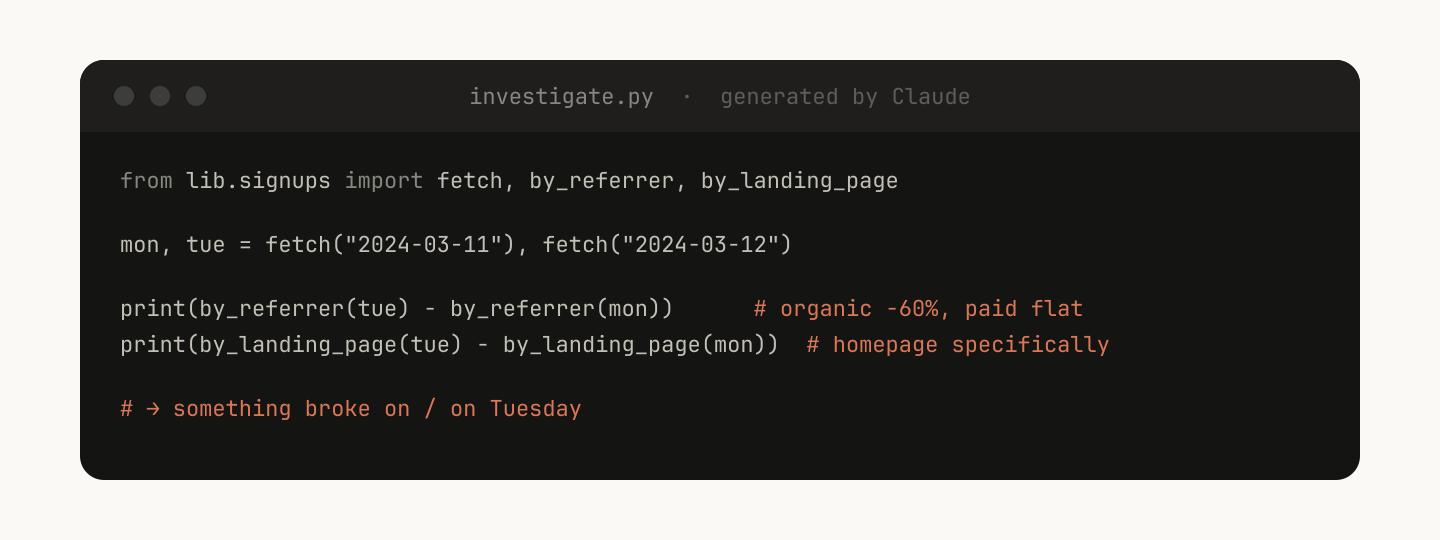
For example, in your data-science skill you might have a library of functions to fetch data from your event source. In order for Claude to do complex analysis, you could give it a set of helper functions like this:
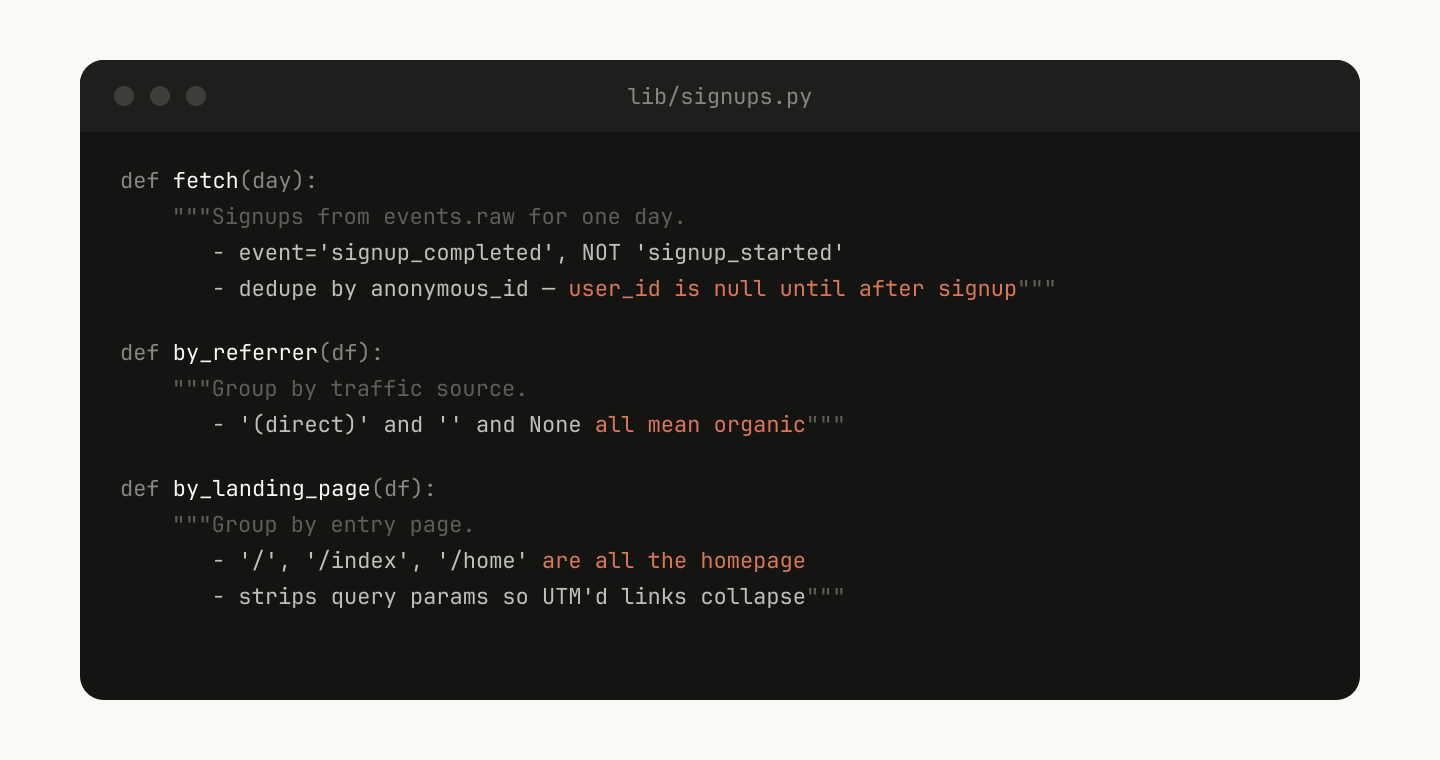
Claude can then generate scripts on the fly to compose this functionality to do more advanced analysis for prompts like “What happened on Tuesday?”
Skills can include hooks that are only activated when the skill is called, and that only last for the duration of the session. Use this for more opinionated hooks that you don’t want to run all the time, but are extremely useful sometimes.
For example:
/careful — blocks rm -rf, DROP TABLE, force-push, kubectl delete via PreToolUse matcher on Bash. You only want this when you know you're touching prod — having it always on would drive you insane./freeze — blocks any Edit/Write that's not in a specific directory. Useful during debugging: "I want to add logs but I keep accidentally 'fixing' unrelated code.”One of the biggest benefits of skills is that you can share them with the rest of your team.
There are two ways you might want to share skills with others:
./.claude/skills)For smaller teams working across relatively few repos, checking your skills into repos works well. But every skill that is checked in also adds a little bit to the context of the model. As you scale, an internal plugin marketplace allows you to distribute skills and let your team decide which ones to install, as well as include a setup flow.
How do you decide which skills go in a marketplace? How do people submit them?
At Anthropic, we don't have a centralized team that decides; instead we try to find the most useful skills organically. If someone has a skill that they want people to try out, they can upload it to a sandbox folder in GitHub and point people to it in Slack or other forums.
Once a skill has gotten traction (which is up to the skill owner to decide), they can put in a PR to move it into the marketplace.
You may want to have skills that depend on each other. For example, you may have a file upload skill that uploads a file, and a CSV generation skill that makes a CSV and uploads it. This sort of dependency management is not natively built into marketplaces or skills yet, but you can just reference other skills by name, and the model will invoke them if they are installed.
To understand how a skill is doing, we use a PreToolUse hook that lets us log skill usage within the company (example code here). This means we can find skills that are popular or are undertriggering compared to our expectations.
Skills best practices are still evolving. Most of our best skills began as a few lines and a single gotcha, then got better because people kept adding to them as Claude hit new edge cases.
The best way to understand skills is to get started, experiment, and see what works for you.
This article was written by Thariq Shihipar, a member of technical staff at Anthropic, working on Claude Code.
Get the developer newsletter
Product updates, how-tos, community spotlights, and more. Delivered monthly to your inbox.

