How Claude Code works in large codebases: Best practices and where to start
The most successful Claude Code deployments share a set of recognizable patterns across configurations, tooling, and org structure. This article is part of Claude Code at scale, a new series covering best practices for engineering organizations building with Claude Code at enterprise scale.
Claude Code is running in production across multi-million-line monorepos, decades-old legacy systems, distributed architectures spanning dozens of repositories, and at organizations with thousands of developers. These environments present challenges that smaller, simpler codebases don’t, whether that’s build commands that differ across every subdirectory or legacy code spread across folders with no shared root.
This article covers the patterns we've observed that have led to successful adoption of Claude Code at scale. We use “large codebase” to refer to a wide range of deployments: monorepos with millions of lines, legacy systems built over decades, dozens of microservices across separate repositories, or any combination of the above. That also includes codebases running on languages that teams don't always associate with AI coding tools, such as C, C++, C#, Java, PHP. (Claude Code performs better than most teams expect it to in those cases, particularly as of recent model releases.) While every large codebase deployment is shaped by its specific version control, team structure, and accumulated conventions, the patterns here generalize across them and are a good starting point for teams considering adopting Claude Code.
How Claude Code navigates large codebases
Claude Code navigates a codebase the way a software engineer would: it traverses the file system, reads files, uses grep to find exactly what it needs, and follows references across the codebase. It operates locally on the developer’s machine and doesn’t require a codebase index to be built, maintained, or uploaded to a server.
RAG-powered AI coding tools work by embedding the entire codebase and retrieving relevant chunks at query time. At large scale, those systems can fail because embedding pipelines can’t keep up with active engineering teams. By the time a developer queries the index, it reflects the codebase as it previously existed weeks, days, or even hours before. Retrieval then returns a function the team renamed two weeks ago, or references a module that was deleted in the last sprint, with no indication that either is out of date.
Agentic search avoids those failure modes. There's no embedding pipeline or centralized index to maintain as thousands of engineers commit new code. Each developer's instance works from the live codebase.
But the approach has a tradeoff: it works best when Claude has enough starting context to know where to look. This means the quality of Claude's navigation is shaped by how well the codebase is set up, layering context with CLAUDE.md files and skills. If you ask it to find all instances of a vague pattern across a billion-line codebase, you’ll hit context-window limits before the work begins. Teams that invest in codebase setup see better results.
The harness matters as much as the model
One of the most common misconceptions about Claude Code is that its capabilities are solely defined by the model used. Teams focus on a model’s benchmarks and how it performs on test tasks. In practice, the ecosystem built around the model—the harness—determines how Claude Code performs more than the model alone.
The harness is built from five extension points—CLAUDE.md files, hooks, skills, plugins, and MCP servers—each serving a different function. The order in which teams build them matters, as each layer builds on what came before. Two additional capabilities, LSP integrations and subagents, round out the setup. Below, we explain what each of these components and capabilities do:
CLAUDE.md files come first. These are context files that Claude reads automatically at the start of every session: root file for the big picture, subdirectory files for local conventions. They give Claude the codebase knowledge it needs to do anything well. Because they load in every session regardless of the task, keeping them focused on what applies broadly will prevent them from becoming a drag on performance.
Hooks make the setup self-improving. Most teams think of hooks as scripts that prevent Claude from doing something wrong, but their more valuable use is continuous improvement. A stop hook can reflect on what happened during a session and propose CLAUDE.md updates while the context is fresh. A start hook can load team-specific context dynamically so every developer gets the right setup for their module without manual configuration. For automated checks like linting and formatting, hooks enforce the rules deterministically and produce more consistent results than relying on Claude to remember an instruction.
Skills keep the right expertise available on-demand without bloating every session. In a large codebase with dozens of task types, not all expertise needs to be present in every session. Skills solve this through progressive disclosure, offloading specialized workflows and domain knowledge that would otherwise compete for context space and loading them only when the task calls for it. For example, a security review skill loads when Claude is assessing code for vulnerabilities, while a document processing skill loads when a code change is made and documentation needs to be updated.
Skills can also be scoped to specific paths so they only activate in the relevant part of the codebase. A team that owns a payments service can bind their deployment skill to that directory, so it never auto-loads when someone is working elsewhere in the monorepo.
Plugins distribute what works. One challenge with large codebases is that good setups can stay tribal. A plugin bundles skills, hooks, and MCP configurations into a single installable package, so when a new engineer installs that plugin on day one, they will immediately have the same context and capabilities as those who have been using Claude already. Plugin updates can be distributed across the organization through managed marketplaces.
For example, a large retail organization we work with built a skill connecting Claude to their internal analytics platform so that business analysts could pull performance data without leaving their workflow. They distributed it as a plugin before the broad rollout to the business.
Language server protocol (LSP) integrations give Claude the same navigation a developer has in their IDE. Most large-codebase IDEs already have an LSP running, powering "go to definition" and "find all references." Surfacing this to Claude gives it symbol-level precision: it can follow a function call to its definition, trace references across files, and distinguish between identically named functions in different languages. Without it, Claude pattern-matches on text and can land on the wrong symbol. One enterprise software company we worked with deployed LSP integrations org-wide before their Claude Code rollout, specifically to make C and C++ navigation reliable at scale. For multi-language codebases, this is one of the highest-value investments.
MCP servers extend everything. MCP servers are how Claude connects to internal tools, data sources, and APIs that it can't otherwise reach. The most sophisticated teams built MCP servers exposing structured search as a tool Claude can call directly. Others connect Claude to internal documentation, ticketing systems, or analytics platforms.
Subagents split exploration from editing. A subagent is an isolated Claude instance with its own context window that takes a task, does the work, and returns only the final result to the parent. Once the harness is in place, some teams spin up a read-only subagent to map a subsystem and write findings to a file, then have the main agent edit with the full picture.
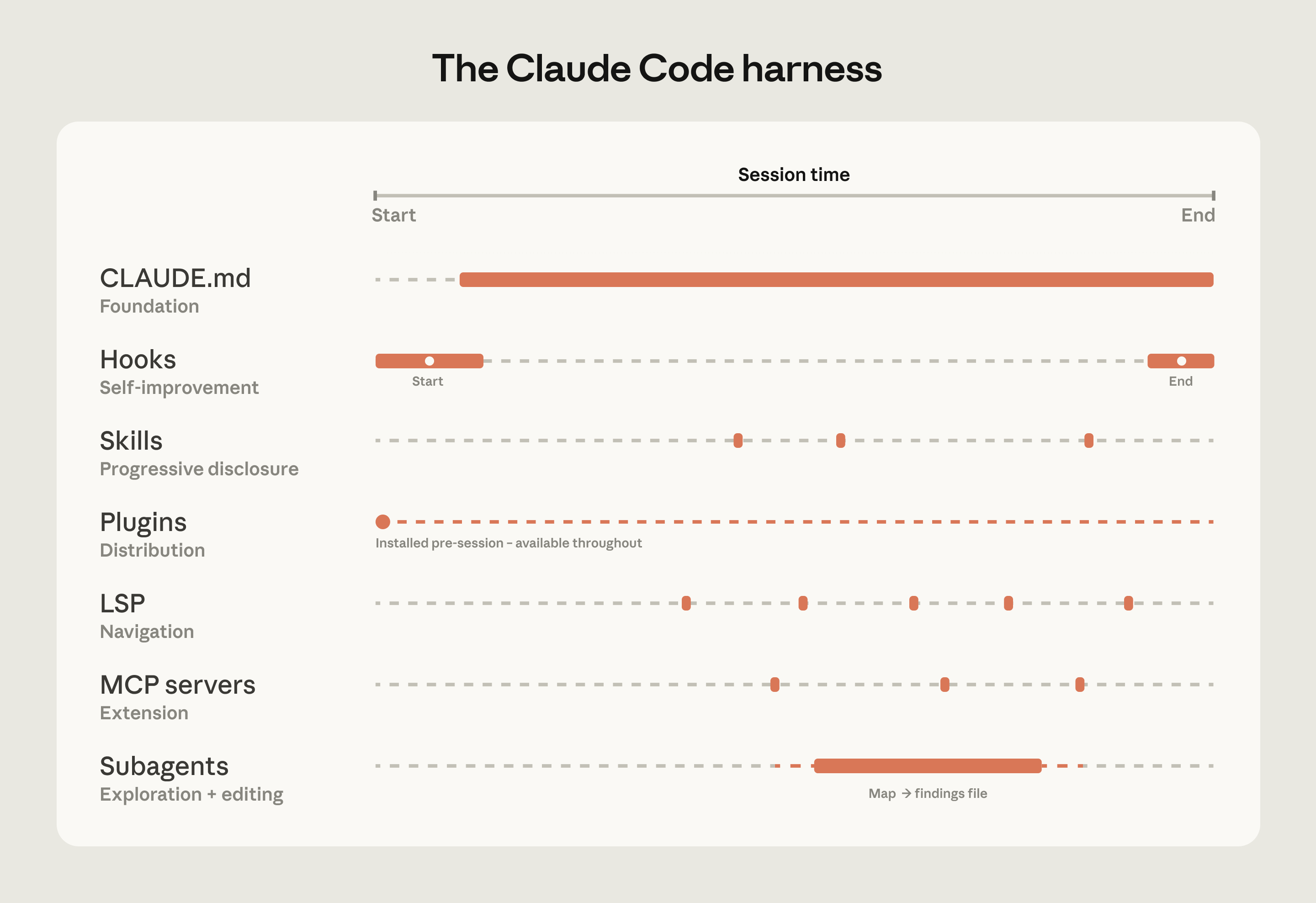
The table below summarizes what each component does, when it loads, and the most common mistakes we see with each:
| Component | What it is | When it loads | Best for | Common confusion |
|---|---|---|---|---|
| CLAUDE.md | Context file Claude reads automatically | Every session | Project-specific conventions, codebase knowledge | Using it for reusable expertise that belongs in a skill |
| Hooks | Scripts that run at key moments | Triggered by events | Automating consistent behavior, capturing session learnings | Using prompts for things that should run automatically |
| Skills | Packaged instructions for specific task types | On demand, when relevant | Reusable expertise across sessions and projects | Loading everything into CLAUDE.md instead |
| Plugins | Bundled skills, hooks, MCP configs | Always available once configured | Distributing a working setup across the org | Letting good setups stay tribal |
| Language server protocol (LSP)* | Real-time code intelligence via language specific servers | Always available once configured | Symbol-level navigation and automatic error detection in typed languages | Assuming that it's automatic |
| MCP servers | Connections to external tools and data | Always available once configured | Giving Claude access to internal tools it can't otherwise reach | Building MCP connections before the basics are working |
| Subagents* | Separate Claude instances for specific tasks | When invoked | Splitting exploration from editing, parallel work | Running exploration and editing in the same session |
| *LSP is accessed through the plugin layer. Subagents are a delegation capability rather than a configured extension point. |
Three configuration patterns from successful deployments
How you configure Claude Code for a large codebase depends heavily on how that codebase is structured. Still, three patterns appeared consistently across the deployments we observed.
Making the codebase navigable at scale
Claude’s ability to help in a large codebase is bounded by its ability to find the right context. Too much context loaded into every session degrades performance, while too little context leaves Claude to navigate blind. The most effective deployments invest upfront in making the codebase legible to Claude. A few patterns appear consistently:
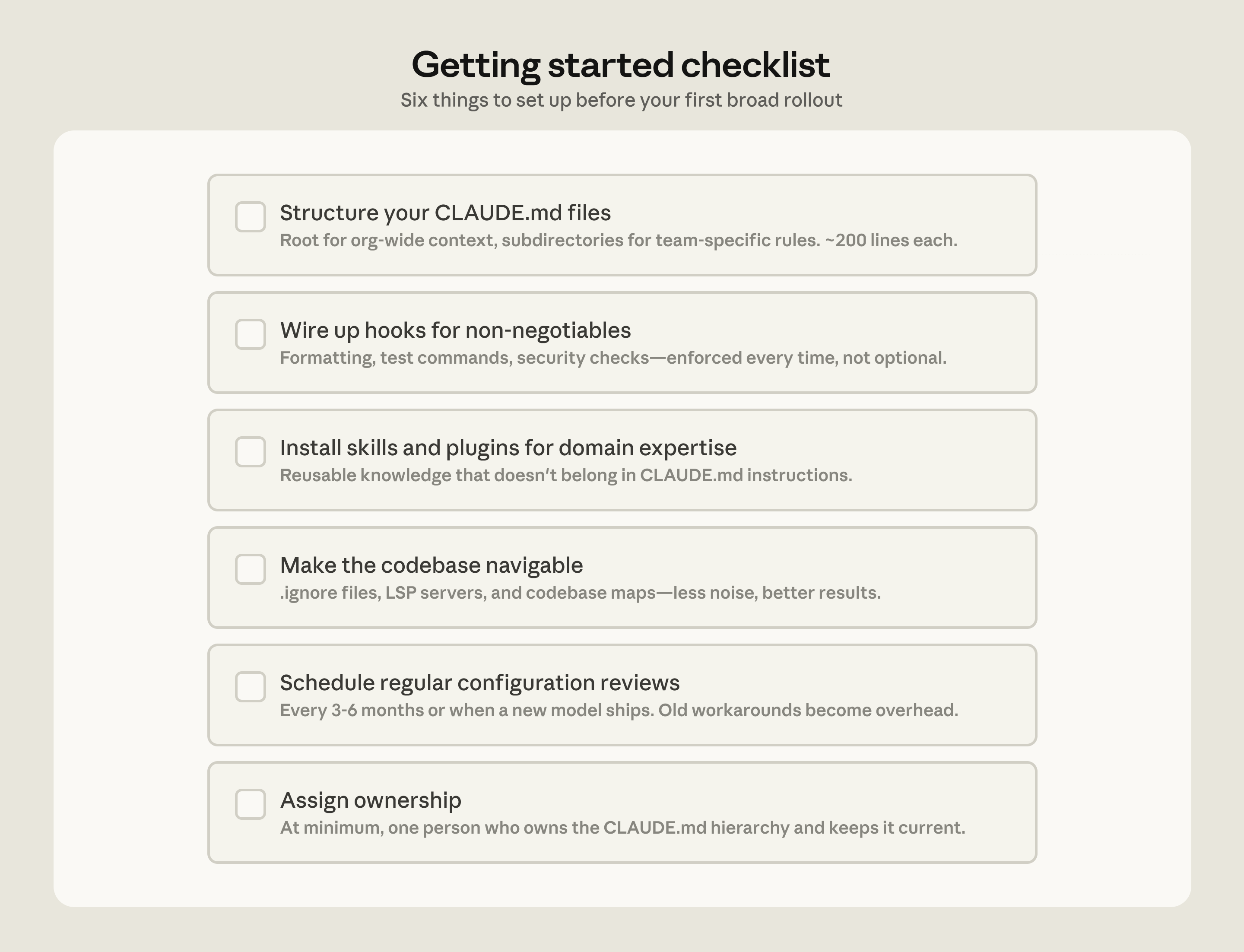
- Keeping CLAUDE.md files lean and layered. Claude loads them additively as it moves through the codebase: root file for the big picture, subdirectory files for local conventions. The root file should be pointers and critical gotchas only; everything else drifts into noise.
- Initializing in subdirectories, not at the repo root. Claude works best when it's scoped to the part of the codebase that's actually relevant to the task. In monorepos, this can feel counterintuitive because tooling often assumes root access, but Claude automatically walks up the directory tree and loads every CLAUDE.md file it finds along the way, so root-level context is never lost.
- Scoping test and lint commands per subdirectory. Running the full suite when Claude changed one service causes timeouts and wastes context on irrelevant output. CLAUDE.md files at the subdirectory level should specify the commands that apply to that part of the codebase. This works well for service-oriented codebases where each directory has its own test and build commands. In compiled-language monorepos with deep cross-directory dependencies, per-subdirectory scoping is harder to achieve and may require project-specific build configurations.
- Using
.ignorefiles to exclude generated files, build artifacts, and third-party code. Committingpermissions.denyrules in.claude/settings.jsonmeans the exclusions are version-controlled, so every developer on the team gets the same noise reduction without configuring it themselves. In some codebases, generated files are themselves the subject of development work. Developers who work on code generators can override project-level exclusions in their local settings without affecting the rest of the team. - Building codebase maps when the directory structure doesn’t do the work. For organizations where code isn’t consolidated in a conventional directory structure, a lightweight markdown file at the repo root listing each top-level folder with a one-line description of what lives there gives Claude a table of contents it can scan before opening files. For codebases with hundreds of top-level folders, this works best as a layered approach: the root file describes only the highest-level structure, and subdirectory CLAUDE.md files provide the next level of detail, loading on demand as Claude moves through the tree. For simpler cases, @-mentioning the specific files or directories Claude should reference can do the same job.
- Running LSP servers so Claude searches by symbol, not by string. Grep for a common function name in a large codebase returns thousands of matches and Claude burns context opening files to figure out which matters. LSP returns only the references that point to the same symbol, so the filtering happens before Claude reads anything. Setting this up requires installing a code intelligence plugin for your language and the corresponding language server binary; the Claude Code documentation covers the available plugins and troubleshooting.
One caveat: there are edge cases where even the hierarchical CLAUDE.md approach breaks down, for example codebases with hundreds of thousands of folders and millions of files, or legacy systems on non-git version control. We will address their challenges in future installments of this series. For legacy estates see how AI is breaking the cost barrier to COBOL modernization.
Actively maintaining CLAUDE.md files as model intelligence evolves
As models evolve, instructions written for your current model can work against a future one. CLAUDE.md files that guided Claude through patterns it used to struggle with may either become unnecessary or actively constraining when the next model ships. For example, a CLAUDE.md rule that tells Claude to break every refactor into single-file changes may have helped an earlier model stay on track but would prevent a newer one from making coordinated cross-file edits it handles well.
Skills and hooks built to compensate for specific model limitations, whether in the model’s reasoning or in Claude Code’s own tooling, become overhead once those limitations no longer exist. A hook that intercepted file writes to enforce p4 edit in a Perforce codebase, for example, became redundant once Claude Code added native Perforce mode.
Teams should expect to do a meaningful configuration review every three to six months, but it's also worth doing one whenever performance feels like it's plateaued after major model releases.
Assigning ownership for Claude Code management and adoption
Technical configuration alone doesn't drive adoption. The organizations that got it right invested in the organizational layer, too.
The rollouts that spread fastest had a dedicated infrastructure investment before broad access. A small team, sometimes even just one person, wired up the tooling so Claude already fit developer workflows when they first touched it. At one company, a couple of engineers built a suite of plugins and MCPs that were available on day one. At another, an entire team focused on managing AI coding tools had the infrastructure in place before the rollout began. In both cases, developers' first experience was productive rather than frustrating, and adoption spread from there.
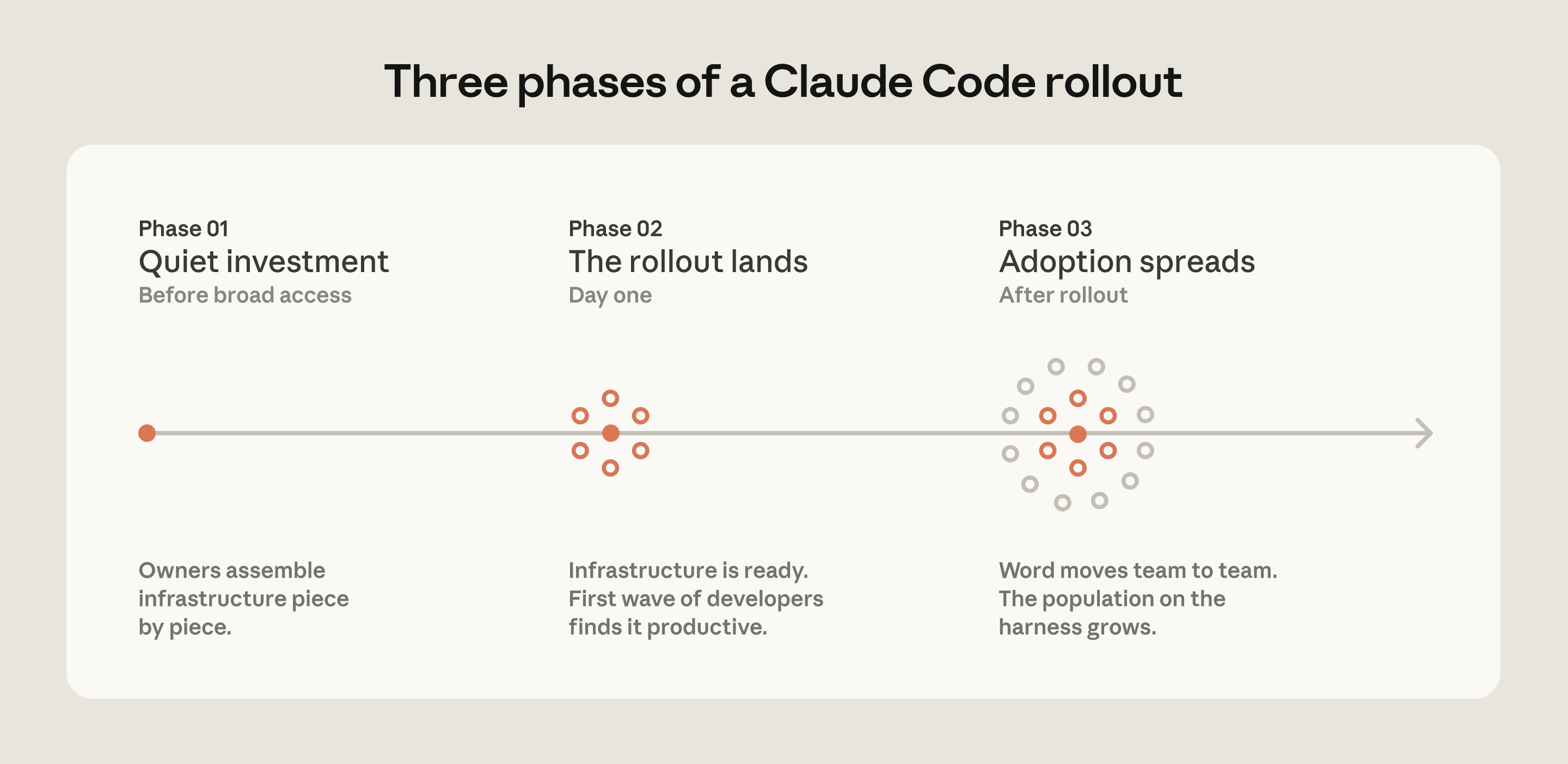
The teams doing this work today tend to sit under developer experience or developer productivity, which is typically the function responsible for onboarding new engineers and building developer tooling. An emerging role in several organizations is an agent manager: a hybrid PM/engineer function dedicated to managing the Claude Code ecosystem. For organizations without a dedicated team, the minimum viable version is a DRI: one person with ownership over the Claude Code configuration, the authority to make calls on settings, permissions policy, the plugin marketplace, and CLAUDE.md conventions, and the responsibility to keep them current.
Bottoms-up adoption generates enthusiasm but can fragment without someone to centralize what works. You need to have an individual or a team assemble and evangelize the right Claude Code conventions (such as a standardized CLAUDE.md hierarchy or a curated set of skills and plugins). Without that work, knowledge will stay tribal and adoption will plateau.
In large organizations, especially those in regulated industries, governance questions come up early, such as: who controls which skills and plugins are available, how do you prevent thousands of engineers from independently rebuilding the same thing, how do you make sure AI-generated code goes through the same review process as human-generated code? To address these early on, we suggest starting with a defined set of approved skills, required code review processes, and limited initial access, and expand as confidence builds.
We’ve observed the smoothest deployments at organizations that establish cross-functional working groups early by bringing together engineering, information security, and governance representatives to define requirements together and build a rollout roadmap.
Applying these patterns to your organization
Claude Code is designed around conventional software engineering environments where engineers are the primary codebase contributors, the repo uses Git, and code follows standard directory structures. Most large codebases fit this mold, but non-traditional setups such as game engines with large binary assets, environments with unconventional version control, or non-engineers contributing to the codebase require additional configuration work. Our guidance assumes a conventional setup and the patterns we’ve described have worked across many of our customers. Any remaining complexity requires judgment specific to your codebase, tooling, and organization. That's where Anthropic's Applied AI team works directly with engineering teams to translate these patterns into your organization’s specific requirements.
Get started with Claude Code for Enterprise.
Acknowledgements: Special thanks to Alon Krifcher, Charmaine Lee, Chris Concannon, Harsh Patel, Henrique Savelli, Jason Schwartz, Jonah Dueck and Kirby Kohlmorgen from Anthropic’s Applied AI team for sharing their experience deploying Claude Code at scale, and to Amit Navindgi at Zoox for providing feedback on this article.