Best practices for using Claude Opus 4.7 with Claude Code
Learn how to use recalibrated effort levels, adaptive thinking, and new defaults to optimize your Claude Code setup with Opus 4.7.
Opus 4.7 is our strongest generally available model to date for coding, enterprise workflows, and long-running agentic tasks. It handles ambiguity better than Opus 4.6, is much more capable at finding bugs and reviewing code, carries context across sessions more reliably, and can reason through ambiguous tasks with less direction.
In our launch announcement, we noted that two changes—an updated tokenizer and a proclivity to think more at higher effort levels, especially on later turns in longer sessions—impact token usage. As a result, when replacing Opus 4.6 with Opus 4.7, it can take some tuning to achieve the best performance. A few tweaks to prompts and harnesses can make a big difference.
This post walks through what’s changed and how to most effectively use Opus 4.7 in Claude Code.
Structuring interactive coding sessions
Opus 4.7’s token usage and behavior can differ depending on whether you’re deploying more autonomous, asynchronous coding agents with a single user turn or more interactive, synchronous coding agents with multiple user turns. In interactive settings, it reasons more after user turns: this improves its coherence, instruction following, and coding quality over long sessions, but it also tends to use more tokens.
To get the most out of Opus 4.7 in Claude Code, we’ve found it’s helpful to treat Claude more like a capable engineer you’re delegating to than a pair programmer you’re guiding line by line:
- Specify the task up front, in the first turn. Well-specified task descriptions that incorporate intent, constraints, acceptance criteria, and relevant file locations give Opus 4.7 the context it needs to deliver stronger outputs. Ambiguous prompts conveyed progressively across many turns tend to reduce both token efficiency and, sometimes, overall quality.
- Reduce the number of required user interactions. Every user turn adds reasoning overhead. Batch your questions and give the model the context it needs to keep moving.
- Use auto mode when appropriate. For tasks where you trust the model to execute safely without frequent check-ins, auto mode cuts cycle time. It’s an especially good fit for long-running tasks where you’ve provided full context up front. Auto mode is now available in research preview for Claude Code Max users—you can toggle it on using Shift+Tab.
- Set up notifications for completed tasks. Ask Claude to play a sound when it’s done with a task, and it can create its own hook-based notifications.
Recommended effort settings for Opus 4.7
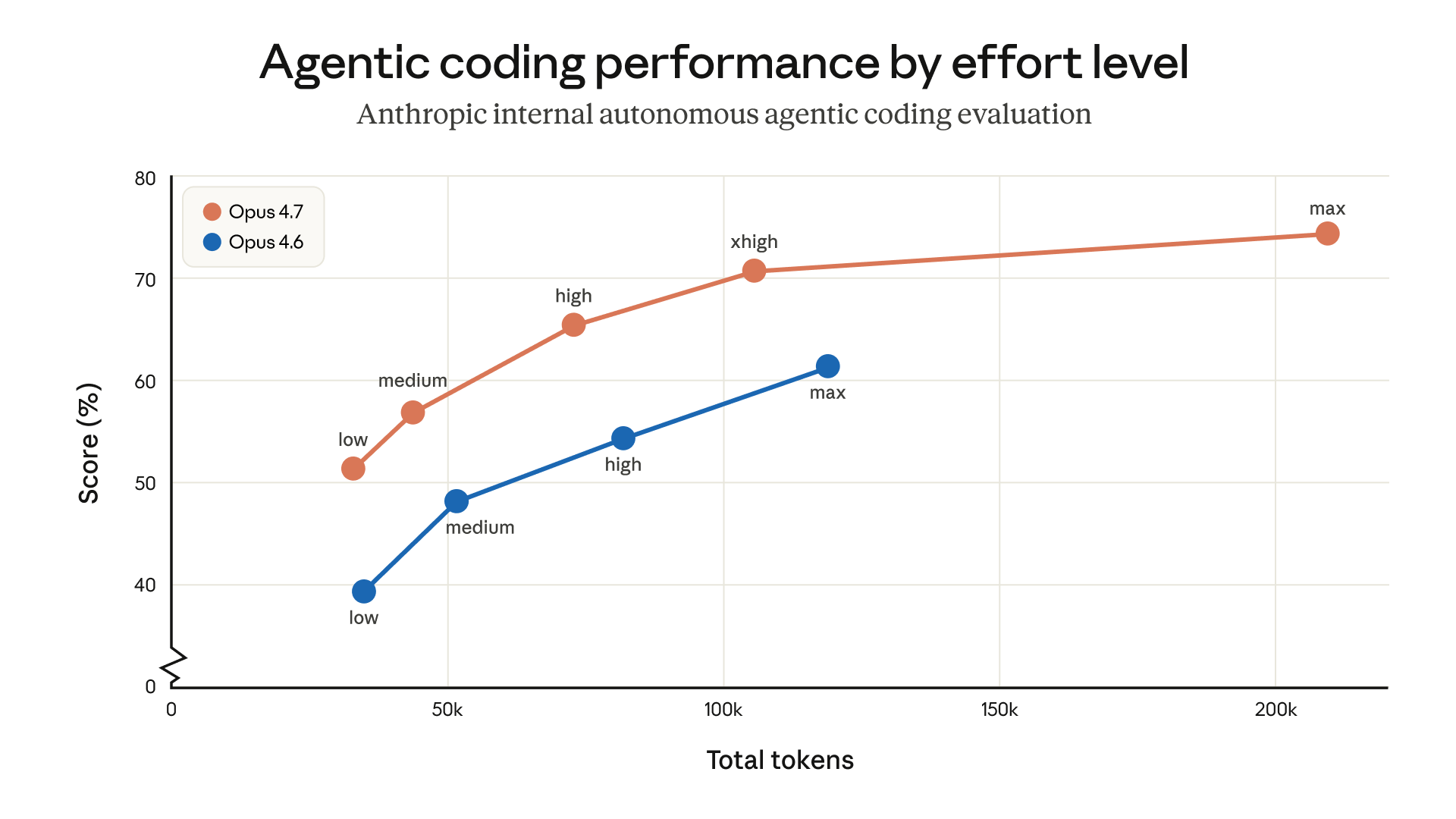
The default effort level for Opus 4.7 in Claude Code is now xhigh. This is a new effort level between high and max that gives users more control over the tradeoff between reasoning and latency on hard problems. We recommend xhigh for most agentic coding work, especially for intelligence-sensitive tasks like designing APIs and schemas, migrating legacy code, and reviewing large codebases.
Here’s some additional guidance for each effort level:
mediumandlow: Available for cost-sensitive, latency-sensitive, or tightly scoped work. The model will be less capable on harder tasks than it would be at higher effort levels, but it still outperforms Opus 4.6 running at the same effort level—sometimes with fewer tokens.high:: Balances intelligence and cost. Choose high if you’re running concurrent sessions or want to spend less without a large quality drop.xhigh(default, recommended): The best setting for most coding and agentic uses. It has strong autonomy and intelligence without the runaway token usage that max can produce on long agentic runs.max: Squeezes out additional performance on genuinely hard problems, but shows diminishing returns and is more prone to overthinking. Use it deliberately for tasks like testing the model’s maximum ceiling in evals and for extremely intelligence-sensitive and non-cost-sensitive uses.
If you’re upgrading to the new model, we recommend experimenting with effort rather than just porting over an old setting. You can toggle between effort levels during the same task to more effectively manage token usage and reasoning.
We’ve set the default effort level for Opus 4.7 to xhigh because we believe it’s the best setting for most coding tasks. If you’re an existing Claude Code user but you haven’t manually set your effort level, you’ll be upgraded to xhigh automatically. You can still adjust your effort manually.
Working with adaptive thinking
Extended Thinking with a fixed thinking budget is not supported in Opus 4.7. Instead, Opus 4.7 offers adaptive thinking. This makes thinking optional at each step and allows the model to decide when to use more thinking based on context. It can respond to simple queries quickly, skip thinking when a step doesn’t benefit from it, and invest its thinking tokens where they’re most likely to be useful. Over an agentic run, this can add up to faster responses and a better user experience.
Adaptive thinking has improved meaningfully in this release—in particular, Opus 4.7 is less prone to overthinking.
If you want more control over the thinking rate, prompt for it directly:
- If you want more thinking, try something like, “Think carefully and step-by-step before responding; this problem is harder than it looks.”
- If you want less thinking, try something like, “Prioritize responding quickly rather than thinking deeply. When in doubt, respond directly.” You’ll save tokens but may lose some accuracy on harder steps.
Behavior changes worth knowing
A handful of default behaviors have changed between Opus 4.6 and 4.7 and are worth knowing about if you’ve carefully tuned your prompts or harnesses for the older model.
Response length is calibrated to task complexity. Opus 4.7 isn’t as default-verbose as Opus 4.6. You can expect shorter answers on simple lookups and longer ones on open-ended analysis. If your use case relies on a specific length or style, state that explicitly in your prompt. We find that positive examples of the voice you want work better than negative “Don’t do this” instructions.
The model calls tools less often and reasons more. This produces better results in many cases. If you want more tool use (say, more aggressive search or file reading during agentic work), provide guidance that explicitly describes when and why the tool should be used.
It spawns fewer subagents by default. Opus 4.7 tends to be more judicious about when to delegate work to subagents. If your use case benefits from parallel subagents (for example, fanning out across files or independent items), we recommend spelling that out. For example:
Do not spawn a subagent for work you can complete directly in a single response (e.g., refactoring a function you can already see). Spawn multiple subagents in the same turn when fanning out across items or reading multiple files.
What to try next
Opus 4.7 performs better on long-running tasks than prior models. This makes it a good fit for tasks where supervision used to be the bottleneck, like complex multi-file changes, ambiguous debugging, code review across a service, and multi-step agentic work.
We recommend keeping effort at xhigh and seeing how far your first turn takes you.
Learn more in our Opus 4.7 prompting guide and our article on context and session management in Claude Code.