Using Claude Code: session management and 1M context
How you manage sessions, context, and compaction in Claude Code shapes your results more than you might expect. Here's a practical guide to making the right call at every turn.
We released /usage, a new slash command to help you understand your usage with Claude Code. This feature was informed by a number of conversations with customers.
What came up again and again in these calls is that there is a lot of variance in how users manage their sessions, especially with our new update to 1 million context in Claude Code.
Do you only use one session or two sessions that you keep open in a terminal? Do you start a new session with every prompt? When do you use compact, rewind or subagents? What causes a bad compact or bad session?
There’s a surprising amount of detail here that can really shape your experience with Claude Code and almost all of it comes from managing your context window.
A quick primer on context, compaction and context rot
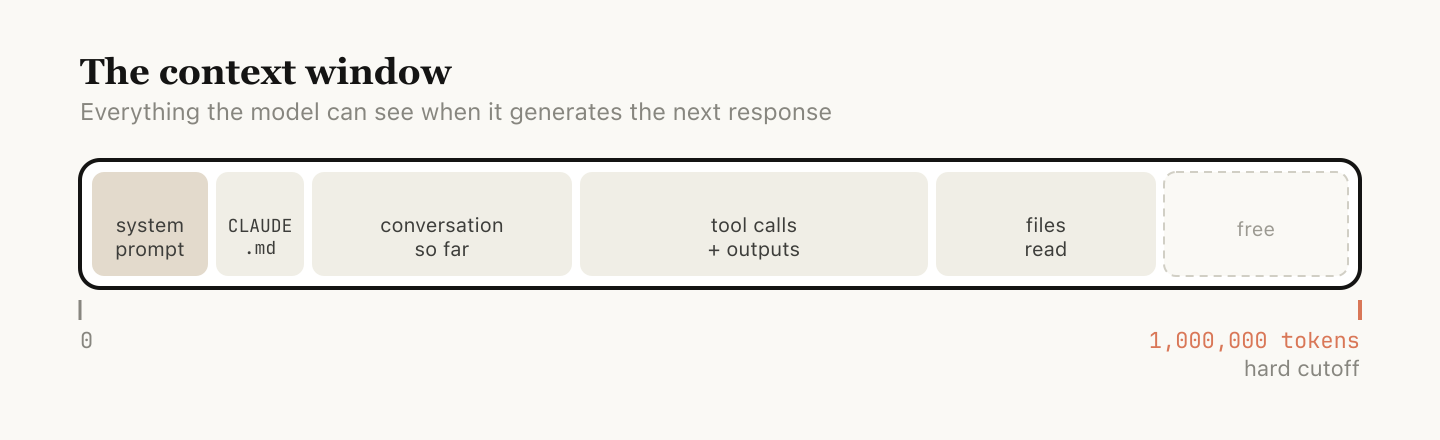
The context window is everything the model can "see" at once when generating its next response. It includes your system prompt, the conversation so far, every tool call and its output, and every file that's been read. Claude Code has a context window of one million tokens.
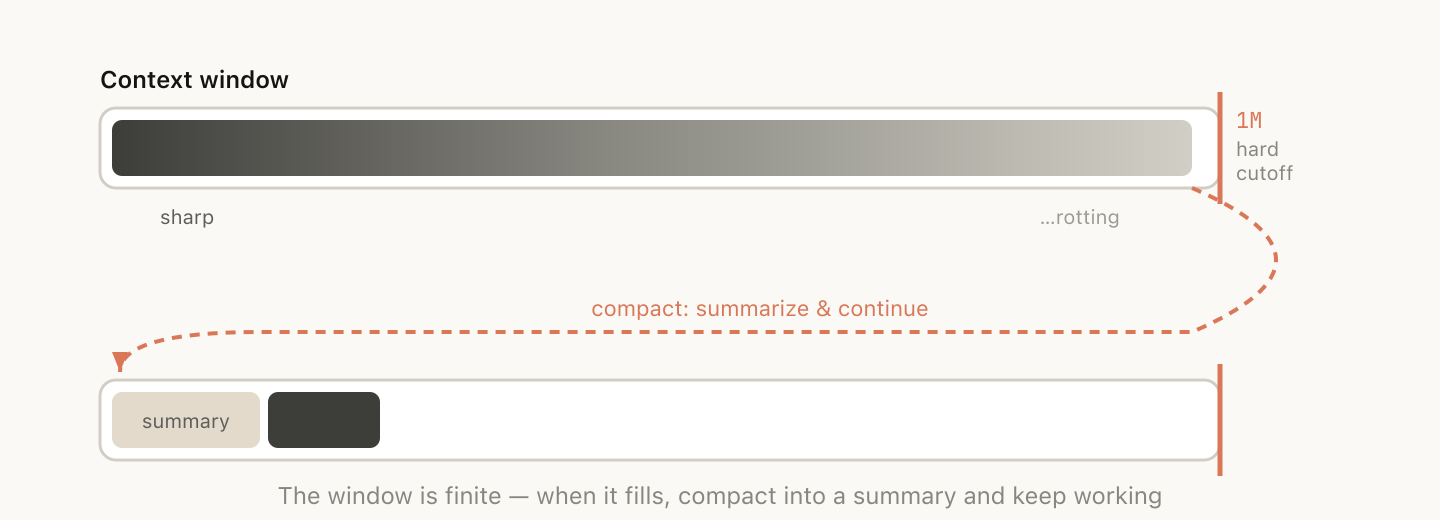
Unfortunately, using context has a slight impact on performance, which is often called context rot. Context rot is the observation that model performance degrades as context grows because attention gets spread across more tokens, and older, irrelevant content starts to distract from the current task.
Context windows are a hard cutoff, so when you’re nearing the end of the context window, the task you’ve been working on is automatically summarized into a smaller description and the model continues the work in a new context window. We call this compaction. You can also trigger compaction yourself.
Every turn as a branching point
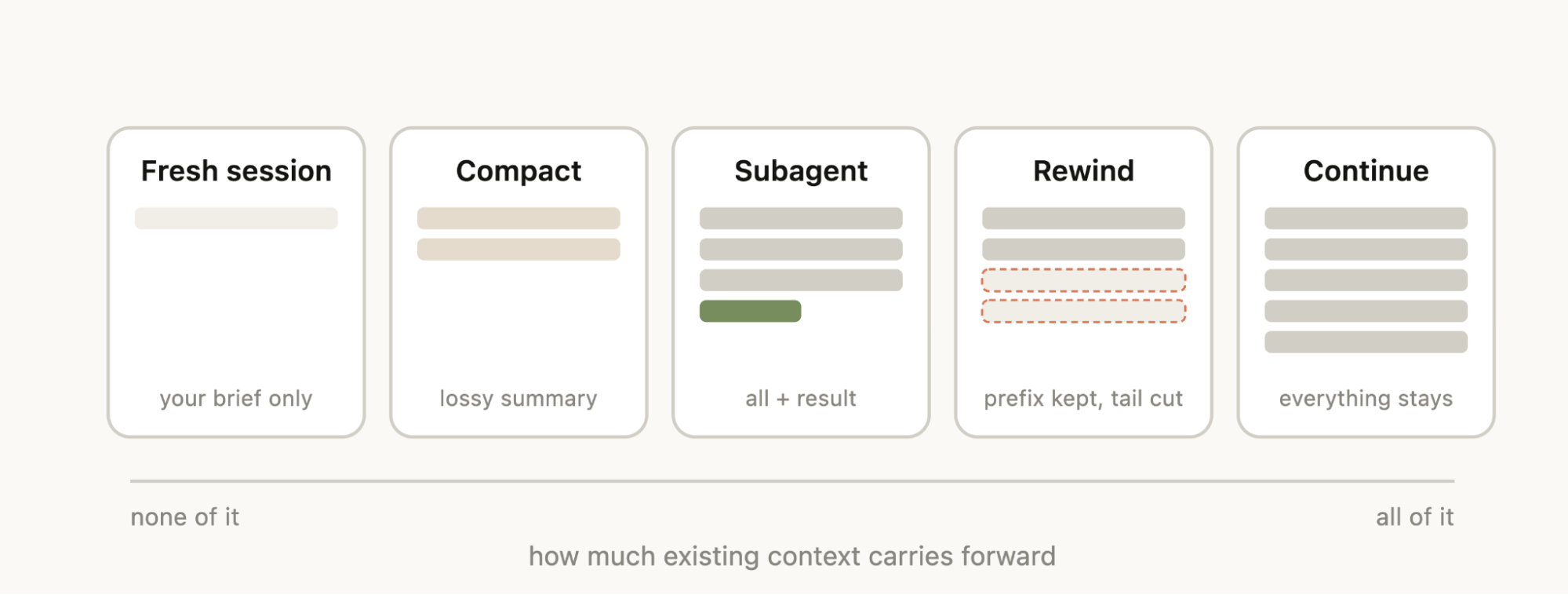
Say you've just asked Claude to do something and it's finished—you’ve now got some information in context (tool calls, tool outputs, your instructions) and you have a surprising number of options for what to do next:
- Continue — send another message in the same session
/rewind(esc esc) — jump back to a previous message and try again from there/clear— start a new session, usually with a brief you've distilled from what you just learned- Compact — summarize the session so far and keep going on top of the summary
- Subagents — delegate the next chunk of work to an agent with its own clean context, and only pull its result back in
While the most natural course is just to continue, the other four options exist to help manage your context.
When to start a new session
When do you keep a long running session vs starting a new one? Our general rule of thumb is when you start a new task, you should also start a new session.
While 1M context windows mean that you can now do longer tasks more reliably, for example building a full-stack app from scratch, context rot may occur.
Sometimes you may do related tasks where some of the context is still necessary, but not always. For example, writing the documentation for a feature you just implemented. While you could start a new session, Claude would have to reread the files that you just implemented, which would be slower and more expensive.
Rewinding instead of correcting
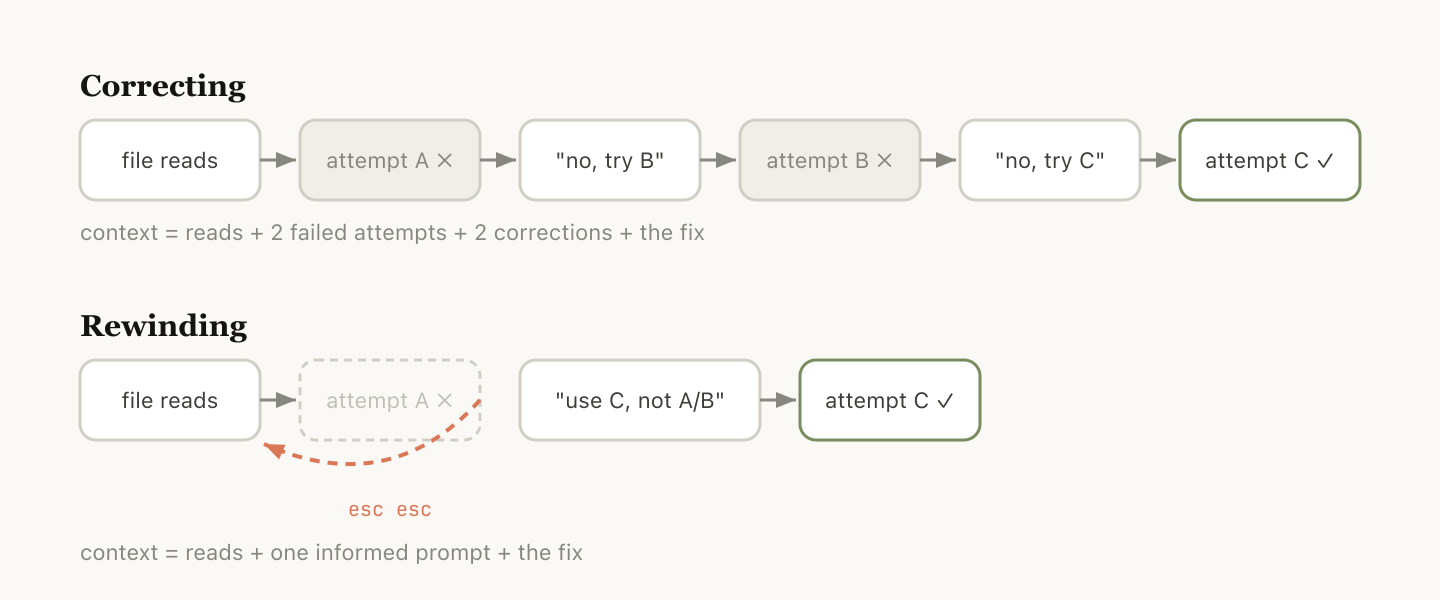
In Claude Code, double-tapping Esc (or running /rewind) lets you jump back to any previous message and re-prompt from there. The messages after that point are dropped from the context.
Rewind is often the better approach to correction. For example, Claude reads five files, tries an approach, and it doesn't work. Your instinct may be to type "that didn't work, try X instead." But the better move may be to rewind to just after the file reads, and re-prompt with what you learned. "Don't use approach A, the foo module doesn't expose that—go straight to B."
You can also use “summarize from here” or the /rewind slash command to have Claude summarize its learnings and create a handoff message, kind of like a message to the previous iteration of Claude from its future self that tried something and it didn’t work.
Compacting vs. launching a fresh session
Once a session gets long, you have two ways to shed extraneous context: /compact or /clear (and start fresh). They feel similar but behave very differently.
Compact asks the model to summarize the conversation so far, then replaces the history with that summary. It's lossy, but you didn't have to write anything yourself and Claude might be more thorough in including important learnings or files. You can also steer it by passing instructions (/compact focus on the auth refactor, drop the test debugging).
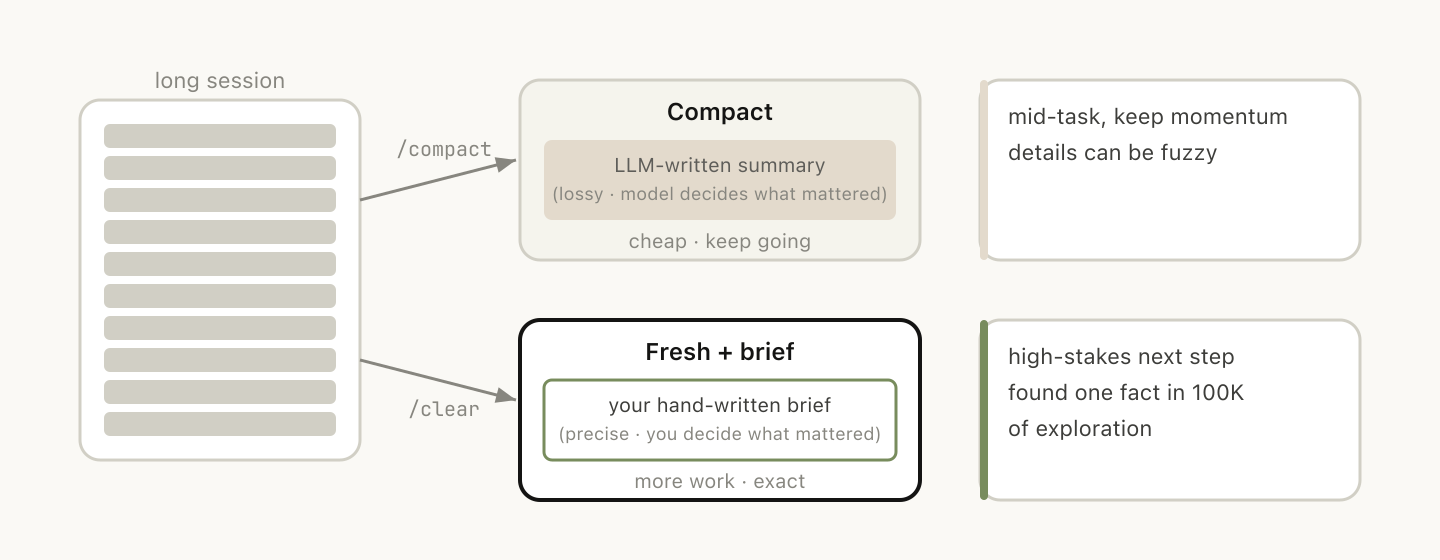
With /clear you write down what matters ("we're refactoring the auth middleware, the constraint is X, the files that matter are A and B, we've ruled out approach Y") and start clean. It's more work, but the resulting context is what you decided was relevant.
What causes a bad autocompact?
If you run a lot of long-running sessions, you might have noticed times in which compacting might be particularly bad. In this case we’ve often found that bad compacts can happen when the model can’t predict the direction your work is going.
In the example above, autocompact fires after a long debugging session and summarizes the investigation and your next message is "now fix that other warning we saw in bar.ts."
But because the session was focused on debugging, the other warning might have been dropped from the summary.
This is particularly difficult, because due to context rot, the model is at its least intelligent point when compacting. With one million context, you have more time to /compact proactively with a description of what you want to do.
Subagents and fresh context windows
Subagents tend to work well when you know in advance that a chunk of work will produce a lot of intermediate output you won't need again.
When Claude spawns a subagent via the Agent tool, that subagent gets its own fresh context window. It can do as much work as it needs to, and then synthesize its results so only the final report comes back to the parent.
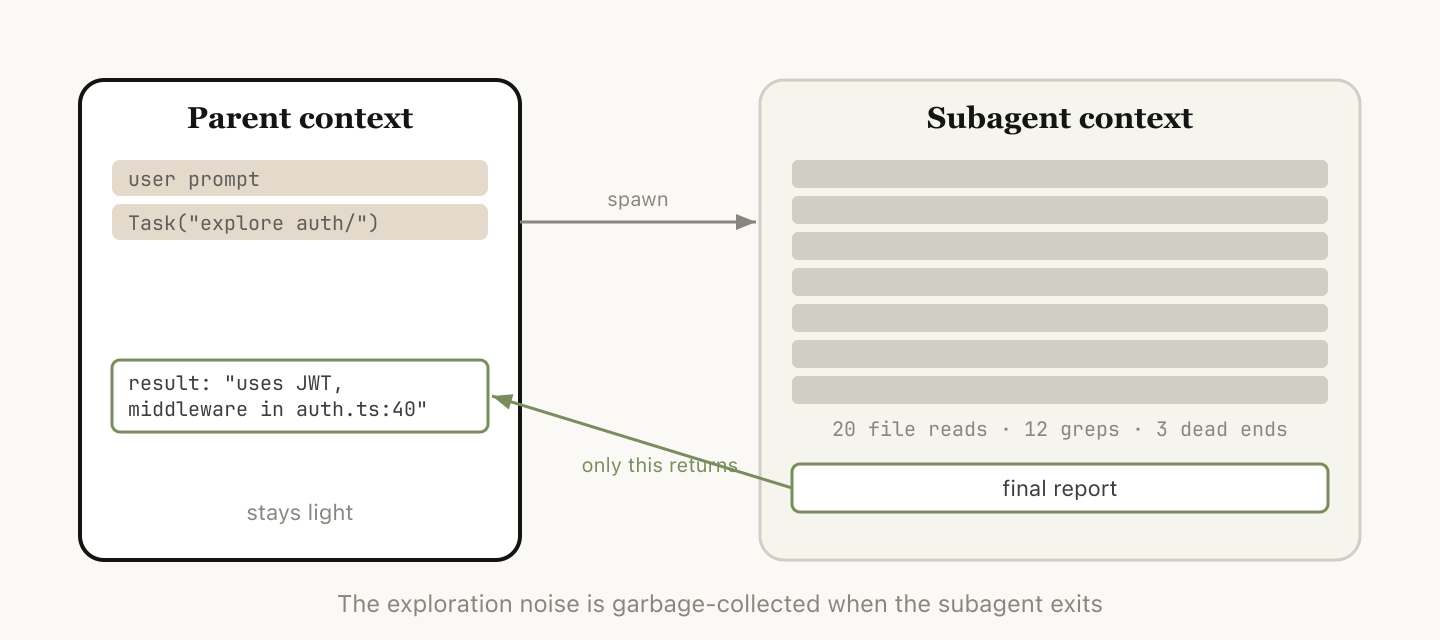
The mental test we use at Anthropic: will I need this tool output again, or just the conclusion?
While Claude Code will automatically call subagents, you may want to tell it to explicitly do this. For example, you may want to tell it to:
- “Spin up a subagent to verify the result of this work based on the following spec file”
- “Spin off a subagent to read through this other codebase and summarize how it implemented the auth flow, then implement it yourself in the same way”
- “Spin off a subagent to write the docs on this feature based on my git changes”
Putting it together
To help you choose which context management feature to use, we put together this helpful table that outlines common situations, what tool to reach for, and why.
| Situation | Consider reaching for | Why |
|---|---|---|
| Same task, context is still relevant | Continue | Everything in the window is still load-bearing; don't pay to rebuild it. |
| Claude went down a wrong path | Rewind (double-Esc) | Keep the useful file reads, drop the failed attempt, re-prompt with what you learned. |
| Mid-task but the session is bloated with stale debugging/exploration | /compact <hint> | Low effort; Claude decides what mattered. Steer it with instructions if needed. |
| Starting a genuinely new task | /clear | Zero rot; you control exactly what carries forward. |
| Next step will generate lots of output you'll only need the conclusion from (codebase search, verification, doc writing) | Subagent | Intermediate tool noise stays in the child's context; only the result comes back. |
We look forward to seeing what you build.
Get started with Claude Code today.
About the author: Thariq Shihipar is a member of technical staff at Anthropic, working on Claude Code.