Education
Custom visuals
Custom visuals

Work through grant options in chat with Claude

Claude plots every funder in one view — odds, award, deadline, effort — and you filter, test scenarios, ask for a prioritization, narrow down together. For decisions where no single sort order shows the full picture.
Try in Claude
  • Author
    Anthropic
  • Category
    Education
  • Model
    Sonnet 4.6
  • Features
    Custom visuals
  • Share
    Copy link
    https://claude.com/resources/use-case/work-through-grant-options-in-chat-with-claude
1

Describe the task

Some decisions have more dimensions than any one view can show — every sort order surfaces one thing and hides the rest. You ask Claude in chat, and the chart appears as part of its answer with all the tradeoffs visible at once. You work through it together, filtering and testing scenarios until a shortlist takes shape.

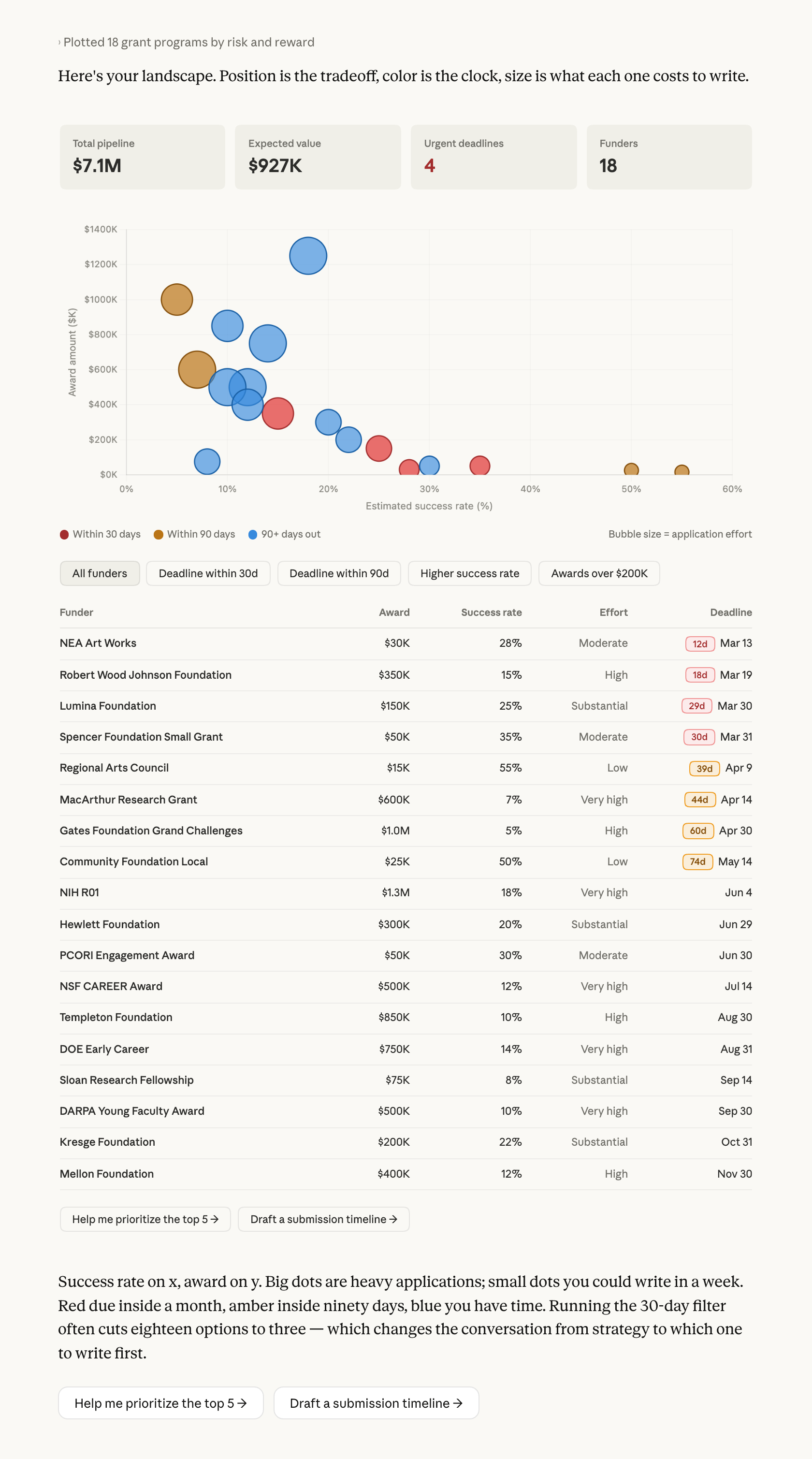
Here a researcher has a long list and needs to decide which few to write. Claude plots them on a risk-reward scatter with filters that narrow chart and table together, and buttons that turn the picture into a ranked shortlist.

I'm planning grant submissions for next year and there are a lot of funders to choose between. Can you show me the tradeoffs in a way I can actually see — like, which ones are long shots for big money versus safer bets for smaller awards? Flag anything with a deadline coming up soon.

Next
Ask Claude
2

Give Claude context

If you have a spreadsheet with amounts, rough success rates, and deadlines, attach it. If not, describe the landscape and Claude can populate from what it knows about the major programs.

Required context

Nothing strictly required. For a chart grounded in your actual pipeline, attach the sheet.

No items found.

Optional context

If the pipeline lives in a Google Sheet, connecting Google Drive lets Claude read it directly. A Project means you can come back mid-season, add a new RFP, and ask for a re-plot without re-uploading.

No items found.
3

What Claude creates

Claude folds four spreadsheet columns into position, size, and color on one chart — so all the tradeoffs are in view at once. Long shots cluster upper-left, safe bets lower-right, and the distance between those corners is where your strategy sits. The expected-value card at the top is the one number that accounts for realism, and the gap between that and the raw total tells you how much of your list is lottery tickets.

From Claude
4

Follow up prompts

Continue the conversation with Claude to refine, expand, or explore further.

Click a point on the chart to see the full profile

Click any point on the chart and Claude expands it below — the chart stays, the profile opens beneath.

The NSF CAREER dot — open it up. Deadline, page limits, what makes an application competitive.

Next
Ask Claude

Ask Claude to write a schedule from the chart

Claude writes a week-by-week schedule using the deadlines from the chart, with start dates calculated backward from each submission date.

Turn the next-90-days grants into a submission timeline. Work backwards from each deadline and tell me when to start each one.

Next
Ask Claude

Tell Claude what's changed and it redraws the chart

Claude redraws the chart with your update — the submitted grant moves to in-progress, the remaining dots re-rank.

I submitted the R03 yesterday. Redraw with that one marked as in-progress and re-rank what's left.

Next
Ask Claude
5

Tricks, tips, and troubleshooting

How you word your prompt shapes what you get

"Long shots for big money versus safer bets" names the tension directly — that's what gets a chart where the tradeoff is spatial, with every dimension visible at once. Works on any decision where you're holding several variables: staffing, roadmap priority, anything that doesn't sort cleanly by one column.

Check the visual against your own understanding

Ran this without a sheet, so Claude filled in the numbers? The success rates are roughly right for major federal mechanisms, less certain for foundations that don't publish. The chart shows the shape of the decision; the program page confirms any single dot before you write the application.

What to do with the visual next

Save as Artifact lets you come back mid-season — submit one, tell Claude, redraw with the new landscape. Or ask Claude to turn the deadlines into a schedule you keep. The chart is a working surface you return to as the season goes.

Ready to try for yourself?

Try it on the decision you've been re-sorting — describe the tradeoffs you're trying to hold at once, and let Claude give the decision a shape. Hover over the chart for options: copy an image, or save it as an Artifact if you want to revisit.
Try in Claude
Open artifact in new window