Claude on call: How Claude Tag serves as Anthropic’s first responder for CI/CD failures
An engineer on our Continuous Integration team walks through the agent he built that powers CI incident response at Anthropic.
Set up your own Claude on-call with our setup kit.
AI incident response for CI/CD: Claude on call at Anthropic
A few weeks ago, I was on-call and my colleague Slacked me a message at 10pm: roughly 44 tests on a new service weren’t firing.
In the past, I would have stopped what I was doing, sat down with my laptop, sighed wearily, and began an hour-long investigate-and-fix process. But now, my workflow is entirely different: I pull in @Claude, and ask what it sees.
In this case, Claude found the tests disappeared when a feature flag got turned on that morning, and also that it would be safe to revert. I asked my colleague to revert the flag. Claude pinged me on Slack 3 minutes later to verify the skip rules had indeed been removed and the error rate was back to baseline.
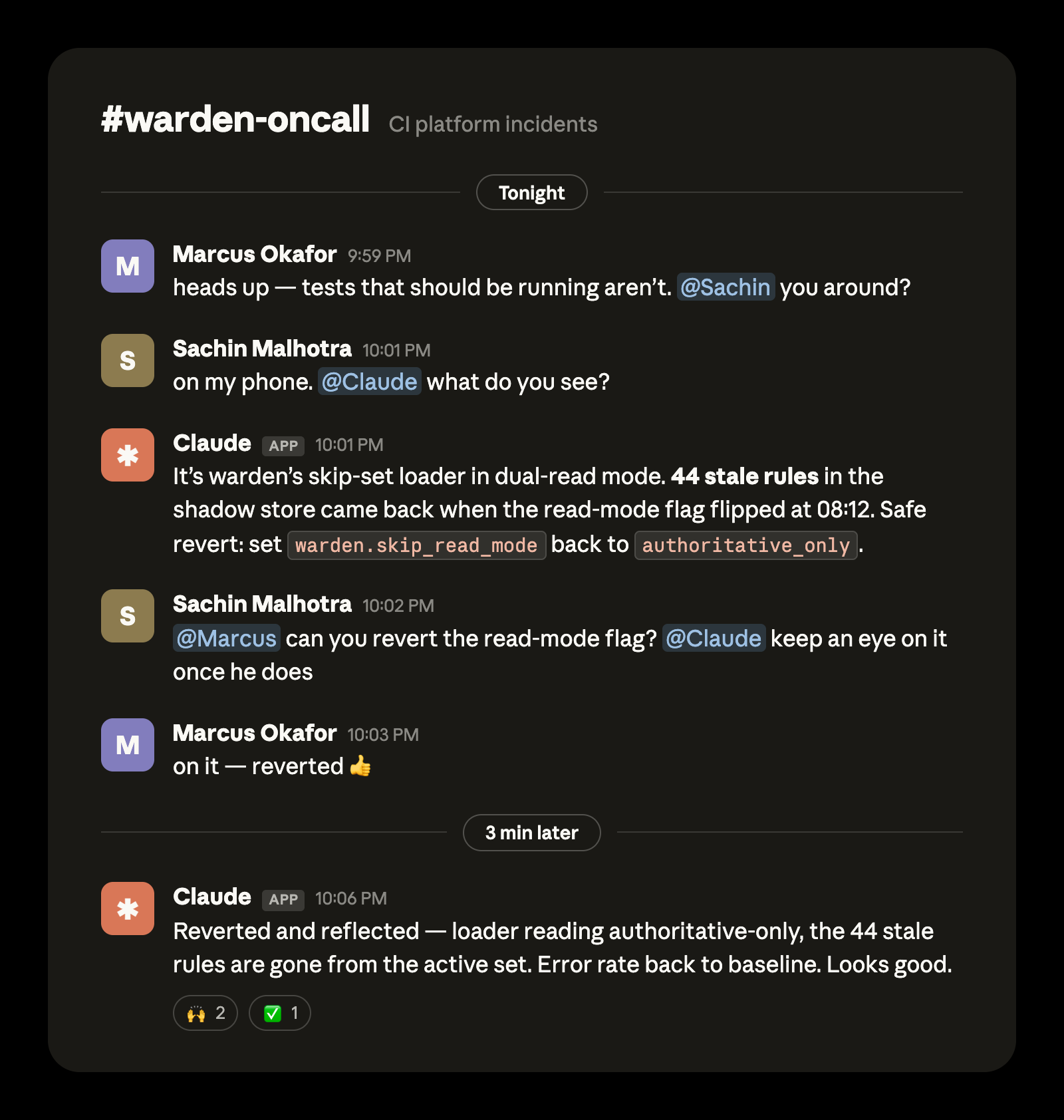
For the last several months Claude Tag has been the on-call first responder for CI/CD failures at Anthropic. Not only has this helped with our social lives, it has given every CI incident an instant first responder: Claude authored the first situation report in every recent incident that had one, typically publishing its first analysis within 15 minutes.
In this article we’ll walk through what we built and how it works so you can build it yourself and stop dreading your turn in the rotation.
Our Claude on call setup
Before we go into each stage of the incident response process, I’ll provide a general overview of our setup here so you have the big picture in mind as we fill in the details.
An on-call agent needs memory so it remembers what’s been done; connections and access so it can investigate, understand, and act; schedules so it knows when to get back to work; and instructions so it knows what to do.
Claude Tag is the backbone of our on-call agent. Claude Tag holds memory across our on-call Slack channel and the interface to provide per-turn instructions during an incident. Claude also acts in real time to events in the on-call channel and others. The scheduling of routines, or the regular actions Claude takes, happens on this channel as well with natural language prompts like “run CI handoff every Monday at 9:00am EST.”
Claude Tag has its own service account and access to the tools an Anthropic CI engineer needs such as Datadog or Grafana. This was set up one time by an administrator for the channel (here’s how).
In addition to the on-call channel, we set up Claude to watch other relevant channels that also have Claude Tag as a member so it can get additional context like service alerts, configuration changes, or updates on PRs.
Standing instructions are in markdown files as skills, committed in a GitHub repository. This way multiple teammates can iterate on them and we can manage changes just like we do code. It also includes key information like routing instructions, policies, and a log of lessons learned as part of a self-improvement loop.
This setup took us hours, not days. We created a generalized on-call setup kit in GitHub that can help get you started with a similar agent. It transforms your team's own incident history into triage playbooks and leaves you with a read-only Claude in your incident channel that diagnoses, escalates, and learns. You can watch it run against a fictional team's history in about ten minutes.
To summarize the steps TL;DR fashion
- You’ll need a Claude Team or Claude Enterprise plan
- The organization owner needs to add Claude to the on call Slack channel via Claude Tag
- The org owner also needs to help connect Claude in the on-call Slack channel to the appropriate connectors, GitHub repo, and set up Claude Code Remote.
- Add Claude to your incident channel and instruct it to monitor for incidents and immediately triage
Now, let’s dive into the details of what this transformation looks like at each step of an incident.
Detection
Claude doesn’t just transform how you respond to incidents, it transforms how you detect them in the first place. Previously, there were two major failure modes for detecting incidents.
It's hard for humans to have the foresight to set perfect rules with perfect thresholds all the time. It's especially difficult when you don't have enough data to analyze traffic patterns.
To address this, we have Claude analyze the data and incoming alerts for the first few days of a new service to suggest additional rules and to fine-tune any that are overly broad or narrow.
The second major failure mode for detecting incidents was alert fatigue: checking and vetting every alert that fires is tedious. However, Claude doesn’t get fatigued the same way a human does.
Claude monitors every relevant alert in each alert channel and goes through the criteria in the root oncall.md file to determine if it can wait until the morning or if the on-call needs a page. For example, once tuned from analyzing the data, a rule in the file could be, “If the error rate is greater than 2% for longer than 5 minutes AND it's not a known deploy window, page the on-call otherwise write it to lessons.md.”
There are two other ways the Claude on-call alert process can trigger:
- A member of the CI team can report an issue in the on-call channel, as was the case in the opening example of 44 missing tests; or
- Anyone in the company can open an incident through an internal page. If it’s marked as a CI infrastructure incident then a Slack channel is provisioned for that incident and our on-call Claude picks it up.
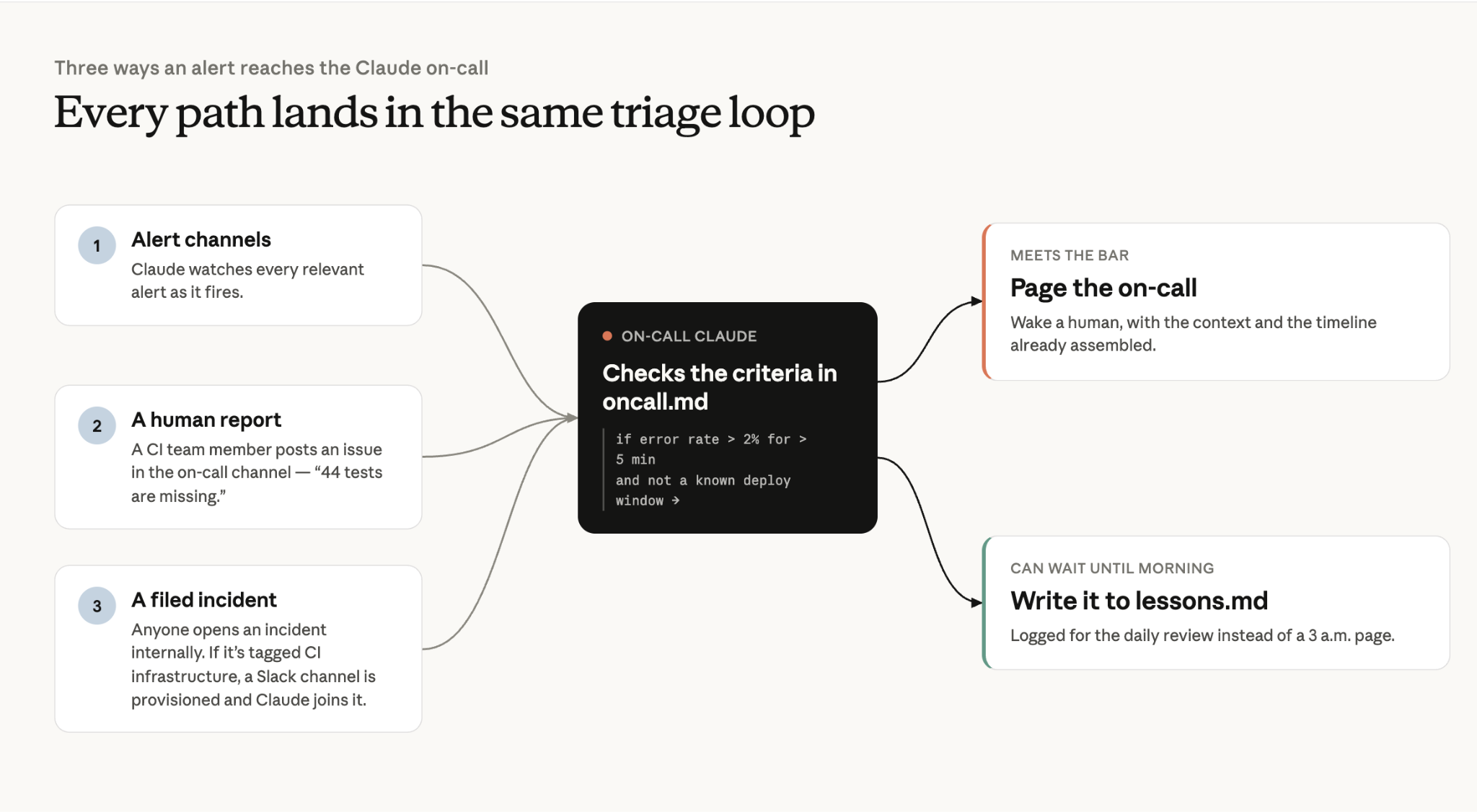
The key takeaway here is that the alerting process is deterministic, while on-call escalation has both deterministic and agentic paths.
Triage
It's one thing to have Claude filter through the alert noise, but the real savings comes from the investigation. Claude posts its first evidence-grounded analysis a median of 14 minutes after an incident opens, and in the fastest cases names the root cause within 4 minutes in its first report.
When an alert has been escalated to an incident, Claude is often ready in our Slack channel with a hypothesis grounded in evidence that we can review. Claude Tag kicks off a dynamic workflow with an orchestration agent that spins up executor subagents to investigate each dependency and source of truth.
For us that’s Grafana, our log store, PagerDuty, GitHub, Kubernetes and Slack incident channels–all wired up via MCP Connectors. Claude can chase multiple leads in parallel, helping to reduce MTTR (mean time to resolution).
Executors report the findings back to the orchestration agent which synthesizes and surfaces the information in a coherent SITREP.
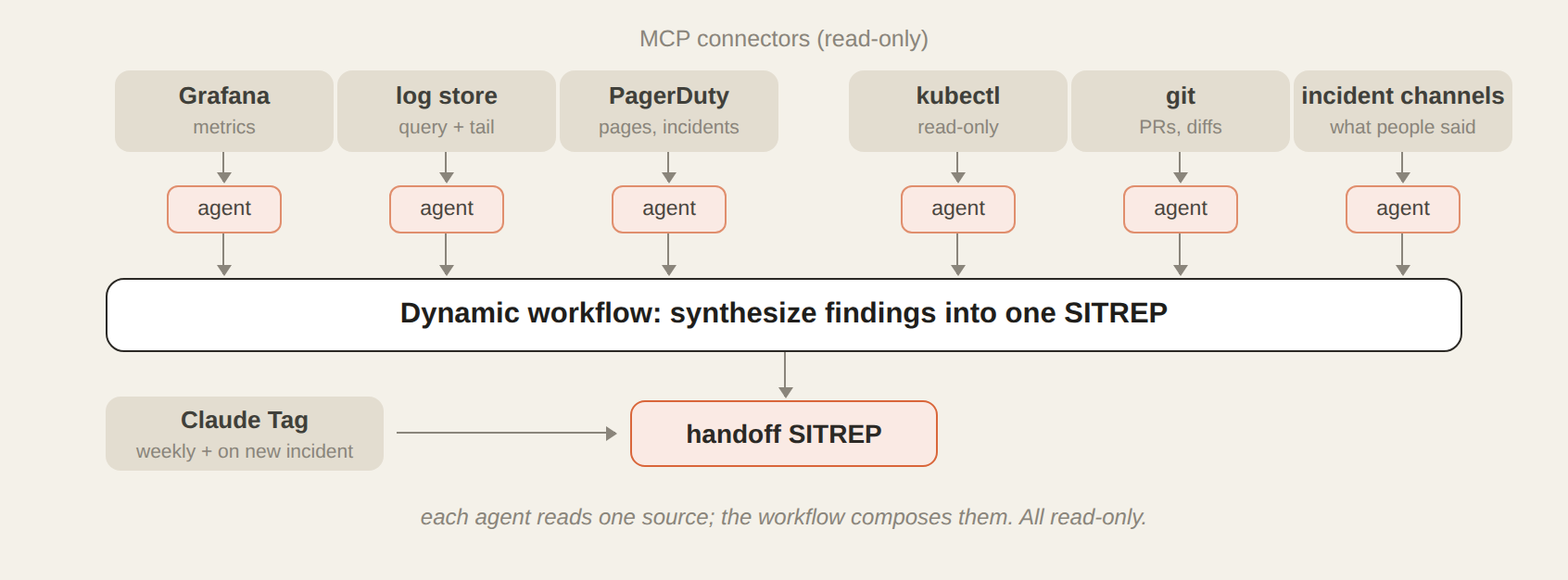
The orchestrator and executor agents aren’t searching blind. They are guided by an investigation skill with more detailed reference markdown files for each bug class.
For example, a 617 line investigation skill for shadow divergence bugs encodes every step I take during a typical investigation. I built it by troubleshooting with Claude turn-by-turn during one of the incidents and then had it create the file from that experience.
Lessons.md also guides Claude’s troubleshooting. This markdown file is a running log of every incident we've resolved: what happened, the root cause, the fix, and the gotcha worth remembering. Claude appends to it on its own automatically. Every new investigation starts by reading it, so Claude's first hypothesis starts with what has happened recently.
If the same pattern shows up enough times, we promote it into the investigation skill itself. My favorite entry is one Claude wrote about me. I'd made an assumption from a config file before checking the metrics, and the lessons.md file now states, "query the data first, then theorize. Config tells you what could go wrong; metrics tell you what did."
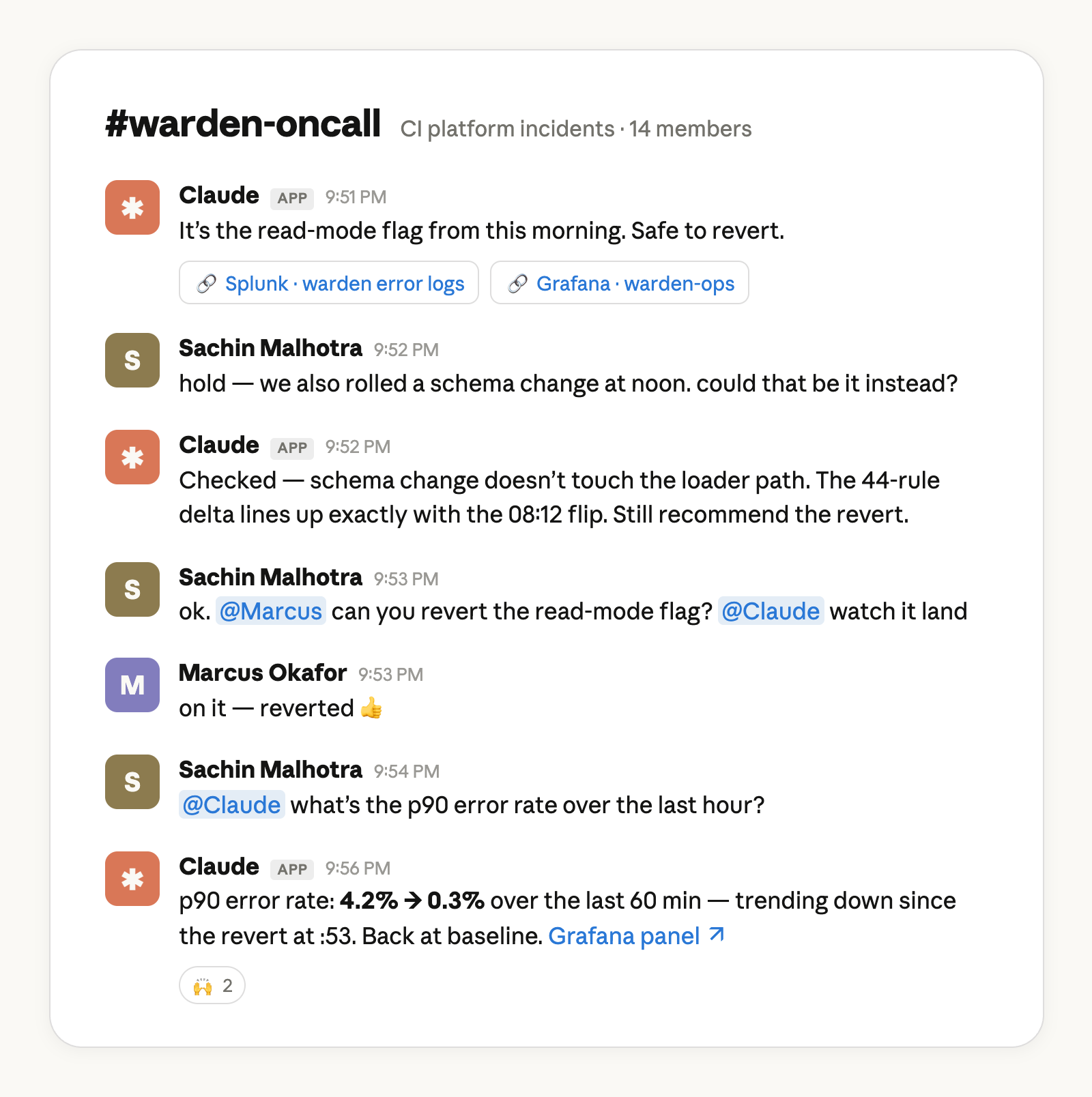
Even with these tools and context, Claude doesn’t always get it right the first time. Human intuition and experience matter. Claude Tag allows the team to troubleshoot incidents in multi-player mode. Either of us can steer the investigation or add a hypothesis in real-time, together.
Resolution
If Claude can escalate and troubleshoot alerts, can it fix them too? The answer to this question will vary from team to team, but here’s how we do it.
Most deployments within our team happen behind a feature flag. I have created a separate agent in Claude Code, with my permissions, capable of progressive deployment behind each of these feature flags.
The first stage of our rollout process usually involves Claude managing canary traffic, monitoring for issues, and automatically ramping a given feature flag up or down. This could be an entirely separate article, so I won't go into more detail here.
Other resolution paths that Claude Tag helps my team with are:
- Letting us know if we need to drain or cordon off certain sections of our Kubernetes cluster;.
- Giving us instructions on how to scale up some of our infrastructure in responses to demand-surges (this is rare but it’s very helpful when Claude comes back with exactly what we can do for mitigation); and, most frequently,
- Fixes in the form of a PR that the on-call can review, merge, and then deploy for a swift resolution.
Verification, communication, and handoff
Claude uses many of the same MCP Connectors and tools that it did for its investigation to verify the fix worked as intended. As part of the standing instructions in oncall.md, it writes a post-mortem to lessons.md and for the handoff SITREP.
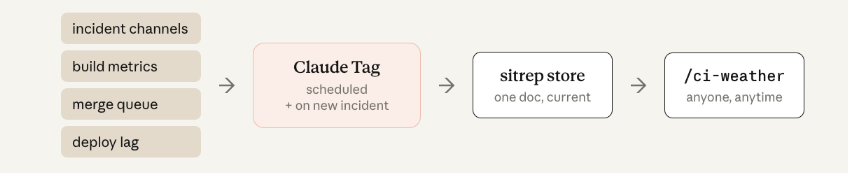
To communicate the full picture across multiple incidents, we created an agent called ci-weather. It compiles information from each incident Slack channel, build metrics, merge queue stats, and deploy lag. Then it posts a newsroom-style report to one public channel anyone in the company can read. Now, our engineers can reference that channel rather than pinging us when they are trying to determine if they should hold their merges or if they’re trying to answer “what’s wrong with CI?”.
One honest note: we needed to iterate the report format several times. Claude can one-shot a skill that generates a status report, but what makes it readable is team-specific taste. It's human communication, not plumbing.
Finally, while Claude keeps a journal for itself in lessons.md, we also want to produce handoff reports for humans as well every Monday. Claude produces daily and weekly summaries so one member of the team can pick up where the other left off.
From monitoring incidents to monitoring an incident response system
Our software engineers on average ship 8x as much code per quarter as they did from 2021 to 2025. And while we have kept the quality bar high (every PR has a named human owner, every change requires approval to merge, every change goes through the same set of CI gates), the only way to keep up with agentic coding is agentic CI.
Claude has absorbed the tedious parts of my job, the after-hours disruptions and the incident comms, while allowing me to focus on the medium and long term architectural changes that truly move the needle for system reliability.
The best part of what we have built is that it doesn’t feel scattered. Our on-call processes live in Slack, but now Claude has joined the channel.
How to get started:
- You’ll need a Claude Team or Claude Enterprise plan
- The organization owner needs to add Claude to the on call Slack channel via Claude Tag
- The org owner also needs to help connect Claude in the on-call Slack channel to the appropriate connectors, GitHub repo, and set up Claude Code Remote.
- Add Claude to your incident channel and instruct it to monitor for incidents and immediately triage
Set up your own Claude on-call with our setup kit.
This article was written by Sachin Malhotra, technical member of Anthropic staff with contributions from Michael Segner, Anthropic staff.