Claude Design by Anthropic Labs is a powerful tool for product designers and product managers who need to move fast from concept to working prototype. This guide covers workflows specific to product work – rapid prototyping, connecting your codebase for production-aware designs, iterating on features with real components, and handing off to engineering through Claude Code.
Claude Design by Anthropic Labs is a powerful tool for product designers and product managers who need to move fast from concept to working prototype. This guide covers workflows specific to product work – rapid prototyping, connecting your codebase for production-aware designs, iterating on features with real components, and handing off to engineering through Claude Code.
Product design workflows
Rapid feature prototyping
The most common product use case: you have a feature idea and need to make it tangible before committing engineering resources. Claude Design lets you go from concept to interactive prototype in a single conversation.
Example prompts for feature prototyping:
"Design a new settings page for our SaaS app with sections for account, billing, notifications, and integrations. Include a sidebar nav and make each section expandable."
"Create an onboarding flow for a new user — 5 screens that walk them through connecting their data source, configuring their first dashboard, and inviting teammates."
"Prototype a search experience with filters, faceted results, and a detail panel that slides in from the right when you click a result."
"Build an approval workflow UI where managers can review, comment on, and approve or reject submitted requests in a queue."
Design reviews and stakeholder alignment
Before committing to a direction, you often need to get feedback from stakeholders who think better when they can see and interact with something. Claude Design is fast enough that you can generate 2–3 alternative approaches and present them side by side.
Example prompts:
"Show me three different layouts for a user profile page — one card-based, one with a left sidebar, and one with a top tab navigation."
"Create two versions of this checkout flow — one single-page and one multi-step wizard — so I can compare them in a design review."
User flow mapping
You can use Claude Design to prototype complete user flows, not just individual screens. Walk Claude through the journey and it will generate each screen in context.
Example prompt:
"Map out the flow for a user who wants to upgrade from a free plan to a paid plan. Start from the dashboard where they see the upgrade prompt, through the plan comparison page, payment form, confirmation, and the updated dashboard with premium features unlocked."
Internal tools and admin panels
Product teams often need internal tools quickly — admin dashboards, content moderation panels, ops workflows. These are great candidates for Claude Design because speed matters more than pixel perfection.
Example prompts:
"Design an admin panel for managing user accounts — searchable table with filters for plan type and status, with a detail drawer that shows account history and lets you modify permissions."
"Create a content moderation queue where reviewers can see flagged items, view context, and take action (approve, reject, escalate) with keyboard shortcuts."
Connecting your codebase
For product teams, connecting your codebase to Claude Design is where the tool gets significantly more useful. Instead of generic prototypes, Claude generates designs using your actual components, styling, and architecture.
Why It matters for product work
Prototypes use your real components: When Claude can see your component library, it designs with the buttons, cards, modals, and layouts that already exist in your codebase. No more "this looks great but we don't have that component" during handoff.
Architectural consistency: Claude analyzes your styling patterns (CSS modules, Tailwind, styled-components, etc.), spacing scale, color system, and layout conventions. New designs stay aligned with what's already shipped.
Faster handoff: Since the prototype is already built with your real patterns, the gap between "prototype" and "shippable code" shrinks dramatically.
How to connect a codebase
Claude Design allows you to both import from Github and attach via local directories via the Import button.
Once linked, your codebase becomes part of the project context. You can reference specific components by name in your prompts — "use the ProductCard component" or "follow the same layout pattern as the settings page."
What Claude understands from your code
Claude analyzes your linked codebase to understand:
Component structure — Your UI building blocks and how they compose together
Styling and theming — Your color system, spacing scale, typography, and CSS approach
Framework patterns — State management, hooks, data flow, and other conventions
File organization — How you name and structure components and directories
Performance considerations
Linking very large repositories can cause lag or browser stability issues. If your codebase is a monorepo or if you’re working on a codebase with more than 100 people actively contributing, we recommend linking the specific package or directory that contains the relevant components rather than the entire repo.
We’ve also noticed that Chrome doesn’t handle attaching huge file trees well. You can avoid this by attaching folders within your repo, such that you do not include the .git folder, node_modules/ folder, etc., which may contain very large numbers of files.
Hand off to Claude Code
When a prototype is ready for implementation, Claude Design can hand off to Claude Code – preserving the design intent, component choices, and architectural decisions so engineers can build on your work instead of reinterpreting it.
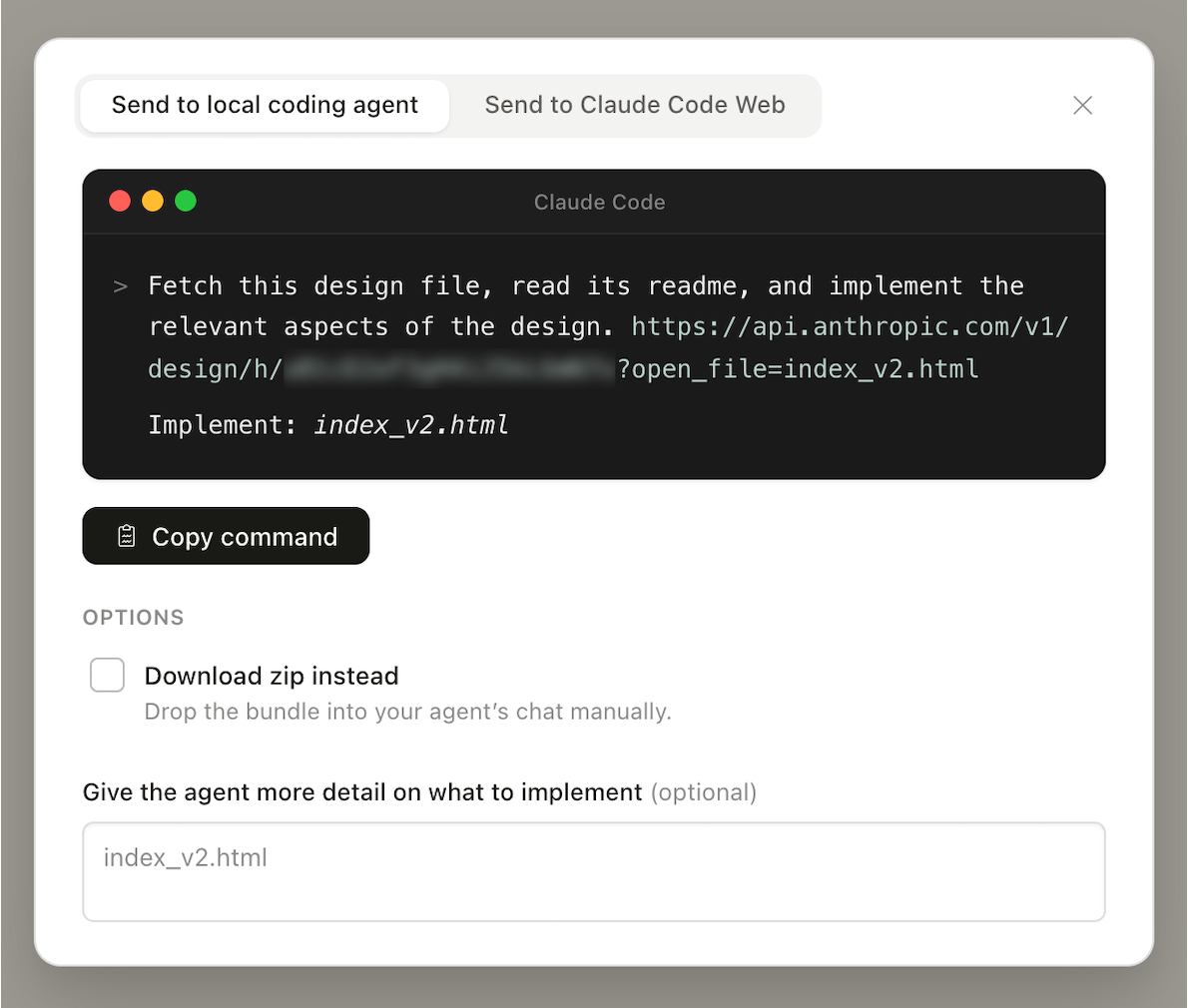
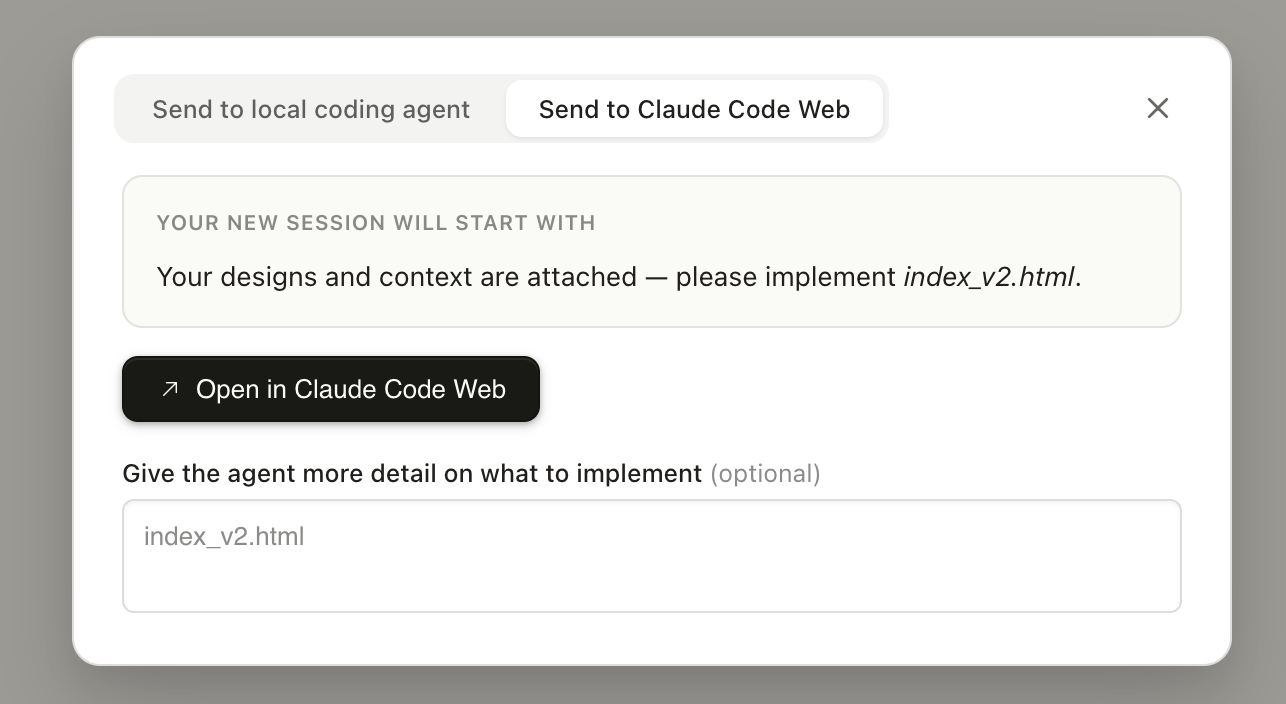
Click “Export” and “Hand off to Claude Code” to get started. By default, we bundle the project’s design files, chat, and a README which tells the model to interpret the designs for download, and give you a prompt you can paste into local Claude Code (or coding agent of your choice) that includes the bundle’s URL.
You’ll also have an option to hand off to Claude Code Web.
This handoff is especially valuable when your codebase is linked, because Claude Code already understands the components and patterns the prototype was built with. As one design lead put it: "Including design intent in Claude Code handoffs has made the jump from prototype to production seamless."
Tips for a clean handoff
Name things clearly in the prototype. If you've referred to components by specific names during the design conversation, those names carry through to the handoff.
Document decisions in the chat. When you make a design decision during iteration ("we went with tabs instead of a sidebar because users need to see all sections at once"), that reasoning becomes context for implementation.
Flag edge cases. Before handing off, ask Claude to show how the design handles empty states, error states, loading states, and different data volumes. This gives engineering a more complete picture.
Example: End-to-end product design workflow
Here's how a product team might use Claude Design from idea to implementation:
PM writes a prompt describing a new feature — e.g., a notification center with preferences, filtering, and bulk actions
Claude generates an initial prototype using the org's design system and linked codebase components
Designer iterates using inline comments and chat — adjusts layout, refines interactions, ensures accessibility
PM shares the prototype with the team via a link for async design review
Team discusses and iterates — Claude generates alternative approaches for the parts that aren't working
Design lead validates that the prototype uses real components and patterns correctly
Handoff to Claude Code — the prototype, design decisions, and codebase context transfer to engineering
Engineer uses Claude Code to implement the feature, starting from the prototype rather than from scratch
Have questions about Claude Design prototypes? Reach out to your Design Team or try building a prototype yourself – most people find the workflow intuitive once they create their first one.