Seeing like an agent: how we design tools in Claude Code
Learn how the Claude Code team designs, tests, and evolves tools by thinking from the model's point of view.
Learn how the Claude Code team designs, tests, and evolves tools by thinking from the model's point of view.
One of the hardest parts about building an agent harness is constructing its tools.
Claude acts completely through tool calling, but there are a number of ways tools can be constructed in the Claude API with primitives like bash, skills and code execution. (You can read more about programmatic tool calling on the Claude API in @RLanceMartin's new article).
So how do you design your agents' tools? Do you give it one general-purpose tool like bash or code execution? Or fifty specialized tools, one for each use case?
To put yourself in the mind of the model, imagine being given a difficult math problem. What tools would you want in order to solve it? It would depend on your own skill set!
Paper would be the minimum, but you’d be limited by manual calculations. A calculator would be better, but you would need to know how to operate the more advanced options. The fastest and most powerful option would be a computer, but you would have to know how to use it to write and execute code.
This is a useful framework for designing your agent. You want to give it tools that are shaped to its own abilities. But how do you know what those abilities are? You pay attention, read its outputs, experiment. You learn to see like an agent.
If you're building an agent, you'll face the same questions we did: when to add a tool, when to remove one, and how to tell the difference. Here's how we've answered them while building Claude Code, including where we got it wrong first.
When building the AskUserQuestion tool, our goal was to improve Claude’s ability to ask questions (often called elicitation).
While Claude could just ask questions in plain text, we found answering those questions felt like they took an unnecessary amount of time. How could we lower this friction and increase the bandwidth of communication between the user and Claude?
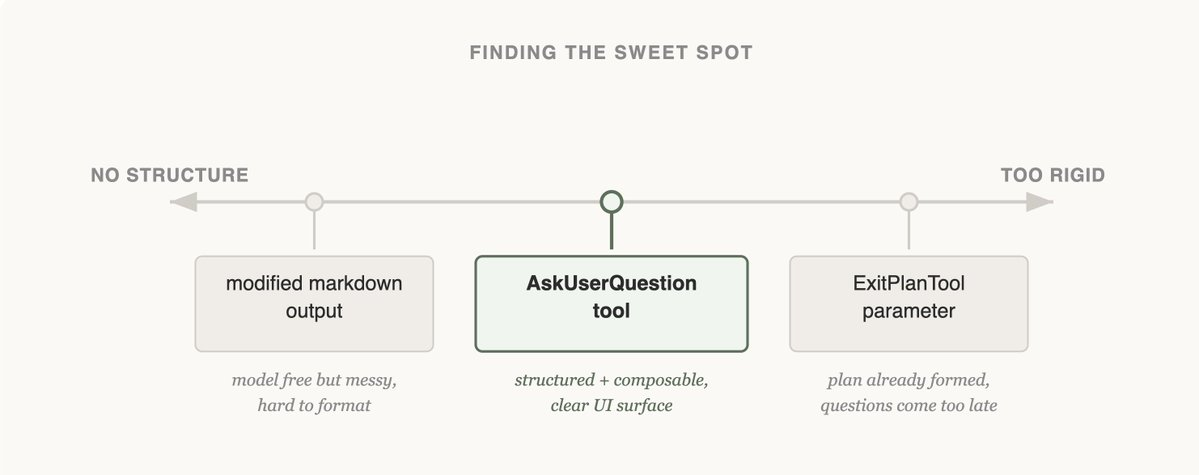
The first approach we tried was adding a parameter to the ExitPlanTool to have an array of questions alongside the plan. This was the easiest fix to implement, but it confused Claude because we were simultaneously asking for a plan and a set of questions about the plan. What if the user’s answers conflicted with what the plan said? Would Claude need to call the ExitPlanTool twice? We knew this tactic wouldn’t work, so we went back to the drawing board. (You can read more about why we made an ExitPlanTool in our post on prompt caching)
Next, we tried updating Claude’s output instructions to serve a slightly modified markdown format that it could use to ask questions. For example, we could ask it to output a list of bullet point questions with alternatives in brackets. We could then parse and format that question as UI for the user.
Claude could usually produce this format, but not reliably. It would append extra sentences, drop options, or abandon the structure altogether. Onto the next approach.
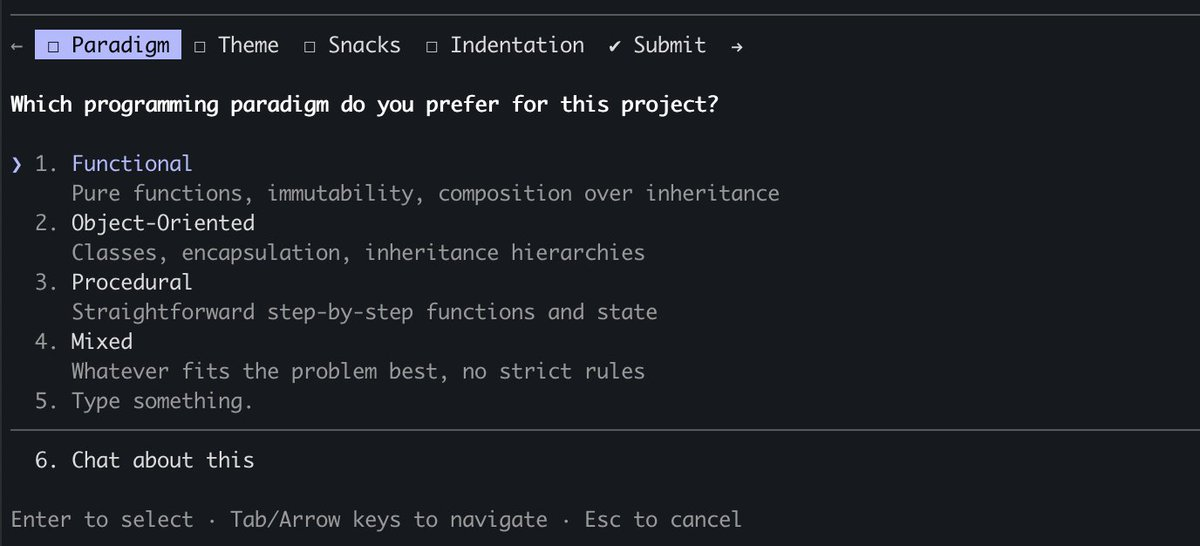
Finally, we landed on creating a tool that Claude could call at any point, but it was particularly prompted to do so during plan mode. When the tool triggered we would show a modal to display the questions and block the agent's loop until the user answered.
This tool allowed us to prompt Claude for a structured output and it helped us ensure that Claude gave the user multiple options. It also gave users ways to compose this functionality, for example calling it in the Agent SDK or using referring to it in skills.
Most importantly, Claude seemed to like calling this tool and we found its outputs worked well. After all, even the best designed tool doesn’t work if Claude doesn’t understand how to call it.
Is this the final form of elicitation in Claude Code? We doubt it. As Claude gets more capable, the tools that serve it have to evolve too. The next section shows a case where a tool that once helped started getting in the way.
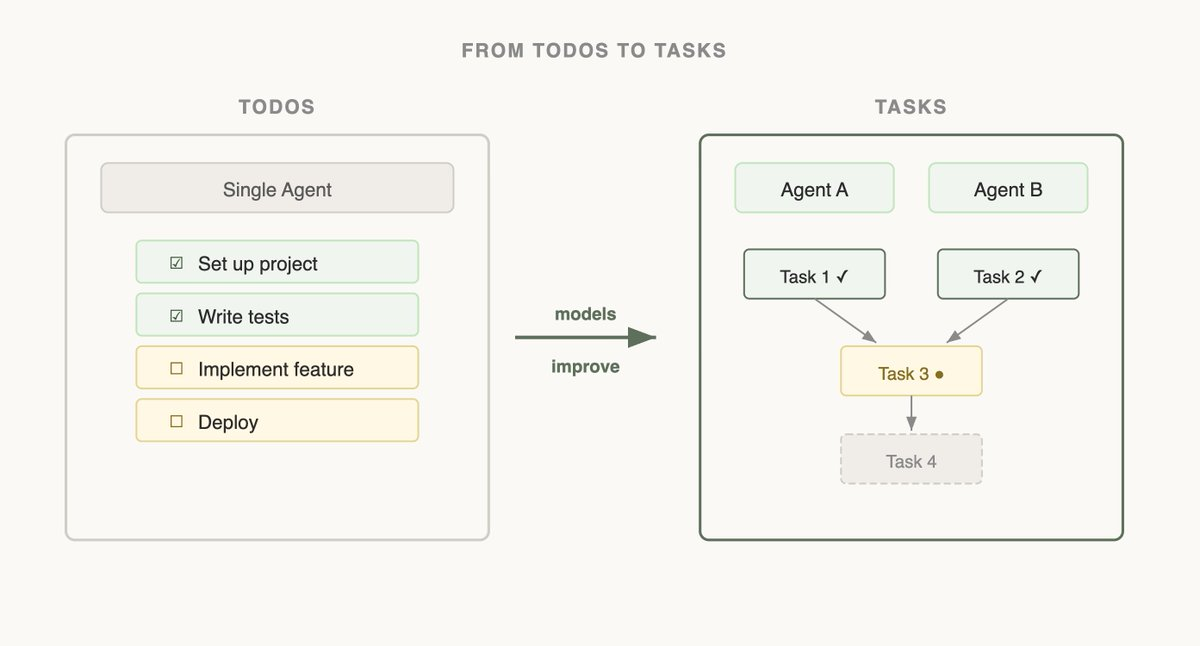
When we first launched Claude Code, we realized that the model needed a todo list to keep it on track. Todos could be written at the start and checked off as the model did work. To do this we gave Claude the TodoWrite tool, which would write or update Todos and display them to the user.
But even then, we often saw Claude forgetting what it had to do. To adapt, we inserted system reminders every 5 turns that reminded Claude of its goal.
As models improved, they found To-do lists limiting. Being sent reminders of the todo list made Claude think that it had to stick to the list instead of modifying it when it realized it needed to change course. We also saw Opus 4.5 also get much better at using subagents, but how could subagents coordinate on a shared todo list?
Seeing this, we replaced the TodoWrite feature with the Task tool . Whereas todos are focused on keeping the model on track, tasks help agents communicate with each other. Tasks could include dependencies, share updates across subagents and the model could alter and delete them.
As model capabilities increase, the tools that your models once needed might now be constraining them. It’s important to constantly revisit previous assumptions on what tools are needed. This is also why it's useful to stick to a small set of models to support that have a fairly similar capabilities profile.
The most consequential tools we've built are the ones that let Claude find its own context.
When Claude Code was first released internally, we used RAG: a vector database would pre-index the codebase, and the harness would retrieve relevant snippets and hand them to Claude before each response.. While RAG was powerful and fast, it required indexing and setup and could be fragile across a host of different environments. Most importantly, Claude was given this context instead of finding the context itself.
But if Claude could search on the web, why couldn’t it also search your codebase? By giving Claude a Grep tool, we could let it search for files and build context itself.
As Claude gets smarter, it becomes increasingly good at building its context when given the right tools.
When we introduced Agent Skills, we formalized the idea of progressive disclosure, which allows agents to incrementally discover relevant context through exploration.
Claude could now read skill files and those files could then reference other files that the model could read recursively. In fact, a common use of skills is to add more search capabilities to Claude like giving it instructions on how to use an API or query a database.
Over the course of a year, Claude went from not really being able to build its own context to being able to do nested search across several layers of files to find the exact context it needed.
Progressive disclosure is now a common technique we use to add new functionality without adding a tool. In the next section, we explain why.
Claude Code currently has ~20 tools, and our team frequently revisits if we need all of them for Claude to be most effective. The bar to add a new tool is high, because this gives the model one more option to think about.
For example, we noticed that Claude did not know enough about how to use Claude Code. If you asked it how to add a MCP or what a slash command did, it would not be able to reply.
We could have put all of this information in the system prompt, but given that users rarely asked about this, it would have added context rot and interfered with Claude Code’s main job: writing code.
Instead, we tried progressive disclosure: we gave Claude a link to its docs that it could load and search when needed. This worked, but Claude would pull large chunks of documentation into context to find an answer the user could have gotten in one sentence.
So we built the Claude Code Guide — a subagent Claude calls whenever a user asks about Claude Code itself. The subagent does the doc-searching in its own context, follows detailed instructions on how to search and what to extract, and hands back only the answer. The main agent's context stays clean.
While this isn’t a perfect solution (Claude can still get confused when you ask it about how to set itself up), we were able to add things to Claude's action space without adding a new tool.
Designing the tools for your models is as much an art as it is a science. It depends heavily on the model you're using, the goal of the agent and the environment it’s operating in.
Our best advice? Experiment often, read your outputs, try new things. And most importantly, try to see like an agent.
Get started with Claude Code today.
About the author: Thariq Shihipar is a member of technical staff at Anthropic, working on Claude Code.
Get the developer newsletter
Product updates, how-tos, community spotlights, and more. Delivered monthly to your inbox.