Maximizing the value of your Claude Code sessions
How to run efficient sessions that get the most value from every token.
TL;DR
- Run
/clearbetween tasks. This prevents prior irrelevant context from being sent back to the model, which can reduce token usage. - Set your model and effort level before you start. Changing either one mid-conversation can bust your prompt cache, which can increase token cost.
- @-mention files instead of naming them. The file gets attached to your message directly, which saves a Read call, or a search if Claude has to go find it.
- Add quiet flags to noisy commands, or run them in a subagent. Command output is added to the conversation just like a file, and stays there for the rest of the session.
- Run
/contextonce in a fresh session. It shows what's loaded (CLAUDE.md, MCP tool definitions), so you can cut out anything unnecessary. /compactbefore you take a break from your keyboard. The prompt cache expires after an hour, and summarizing a conversation is much cheaper while it's still cached.
Maximizing value
Until pretty recently, the tools you wrote code with were a flat fee (or free). Your editor cost the same whether you fixed one test or fifty that afternoon, so an individual task didn't really have a price of its own.
With agentic coding tools like Claude Code, it does. The same completed task can also cost different amounts depending on how you use it.
In one session, Claude reads the test and the file it covers, makes the edit, and is done in a handful of turns. In another, it greps around the repo first, reads a dozen files on its way to the same two, and every one of those turns also drags along everything else that's been read into the conversation since this morning.
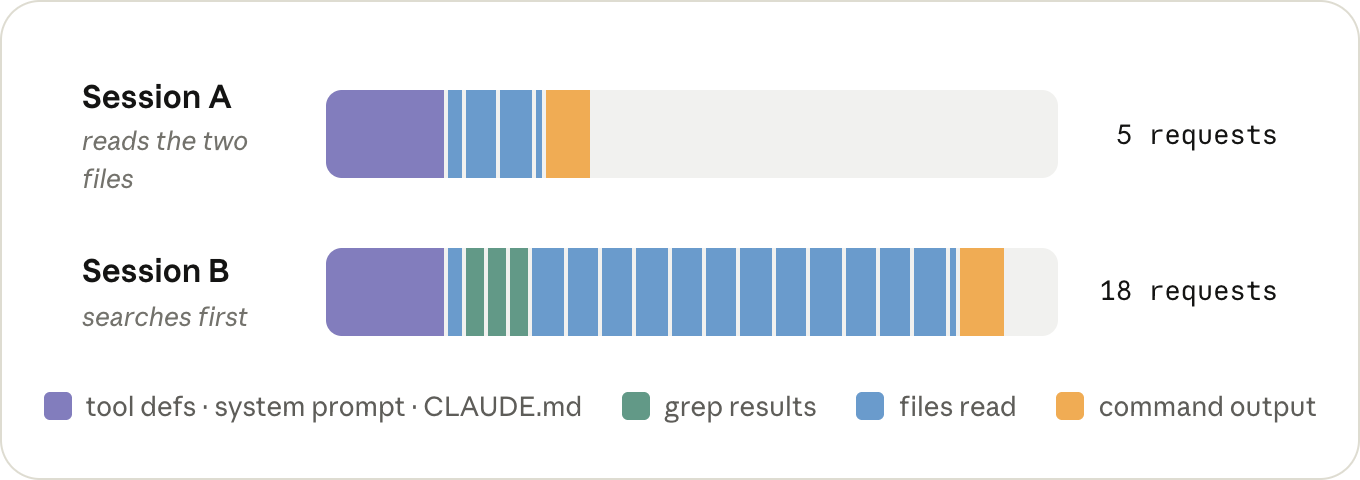
It's the same fix, but you spent a different number of tokens on it, and the whole time the model was also having to think about ten files it didn't need.
Being efficient with tokens doesn't mean using fewer of them overall. It means making sure the ones you do use go towards the thing you actually asked for.
So let's look at what decides the price of a token, then what decides how many of them a session sends, and along the way, what that means for how you run a session.
What decides the price of a token
You're billed per token, but what you're actually paying for is inference: the time it takes a GPU (or a TPU, or whatever the model happens to be running on) to run the model over your tokens.
Three things decide how much of that time a token takes: which model you're running, whether it's an input token (going in) or an output token (coming out), and whether it was cached.
Model
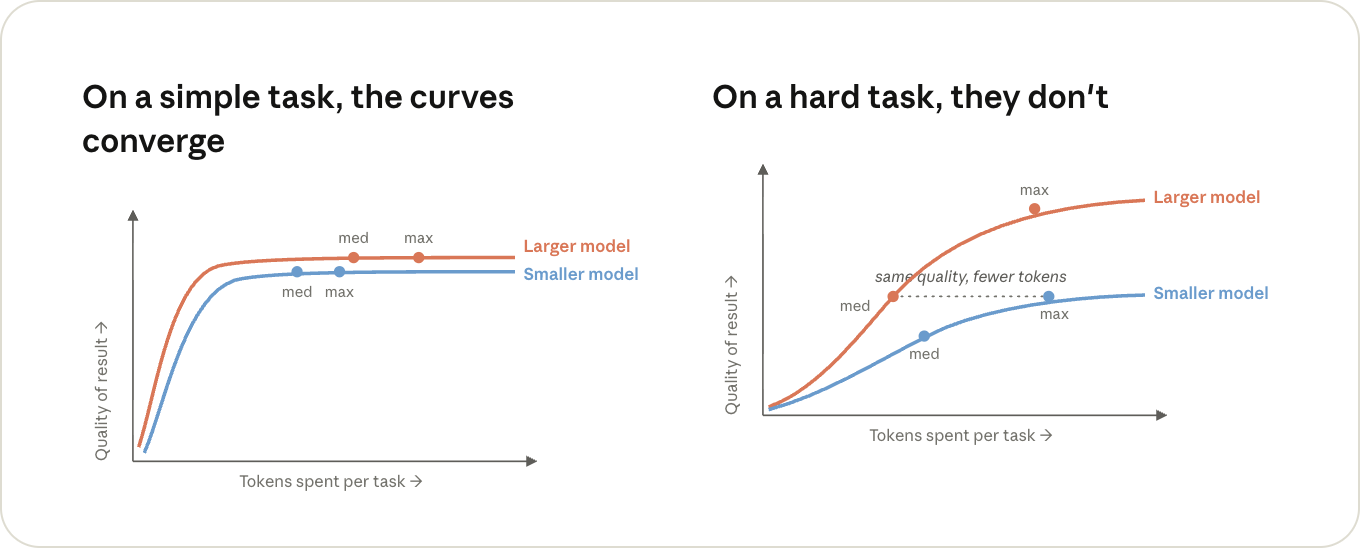
A bigger model does more work on both input and output tokens. Which model is worth it for which kind of work is a topic on its own, and we covered it in Choosing a Claude model and effort level in Claude Code.
For this post, all you need to know is that everything else we're about to cover gets multiplied by the model's price: use a larger model when the problem is genuinely hard or ambiguous, and a smaller one when the work is routine.
Input and output tokens
A request goes through the GPU in two phases, and they cost different amounts.
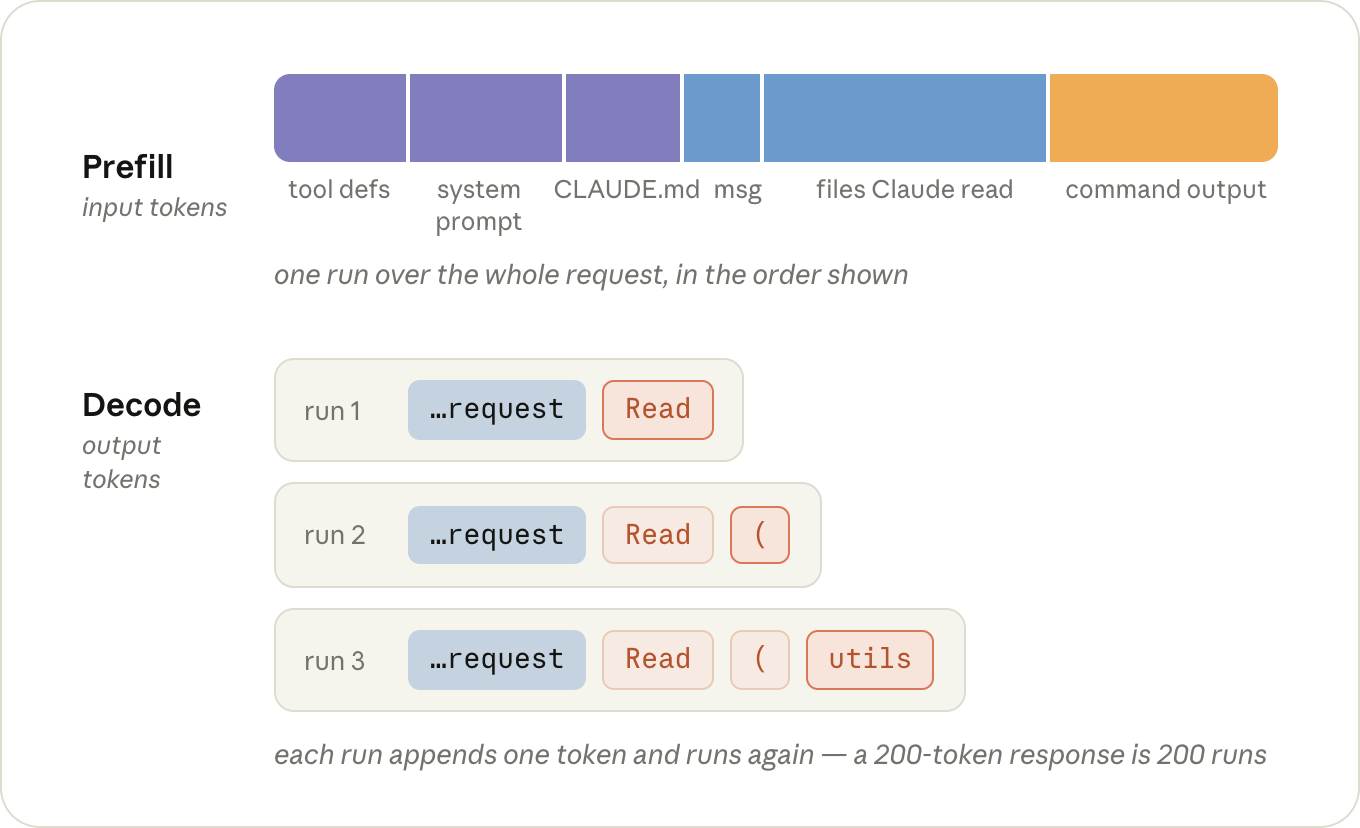
First, during prefill, the model reads your request and context: the system prompt, your CLAUDE.md, your message, and everything that's been added to the conversation since (the files Claude has read and the output of the commands it ran). Those are your input tokens.
Then, during decode, it writes output tokens: its thinking, the tool calls it makes, and the text you see. This happens one token at a time; a 200-token response is 200 runs of the model, one after the other. Per token, decode keeps the GPU busy for a lot longer, which is why output is priced at roughly 5x input.
A lot of the output tokens in a session are thinking tokens, and how much thinking the model does per turn is what the effort level controls. Like the model, the level you pick with /effort sticks around as your default for the next session too.
“Tip: run /model and /effort once in a fresh session to see what you're actually on. Both remember whatever you picked last time, and you want that decision to be deliberate.”
“Tip: if you already know a session is going to be grunt work, MAX_THINKING_TOKENS=0 claude turns thinking off for that one session (except on Fable 5), which is the step below /effort low.”
Prompt caching
If a request starts with exactly the same tokens as a request the server just saw, the state for that shared beginning comes out the same, so the server can keep it around from last time and only prefill whatever comes after it. This is called prompt caching.
Reading from the cache costs 0.1x the input price, because the server loads the state instead of computing it. Writing tokens into the cache costs a bit more than normal input, up to 2x, since the server also has to hold on to the state afterwards. But the write happens once per token, and the 0.1x reads happen on every turn after it.
Claude Code manages the prompt cache on every request, there's nothing to turn on. However you can break it, so it's important to know how to avoid these cost spikes.
Say we type "fix the failing test in utils.test.ts". Here's what Claude Code sends for it:
- Claude Code assembles the first request out of the system prompt (tool definitions included), your
CLAUDE.md, and your message, and sends it off (input tokens). Nothing is in the cache yet, so all of it gets prefilled and written into the cache. - The model can't fix a test it hasn't seen, so it thinks for a moment and responds with a Read call for
utils.test.ts(output tokens). Claude Code reads the file, appends it to the conversation, and sends the whole thing again (input tokens). This time everything from request 1 is read back out of the cache at a tenth of the price, and the only thing prefilled at full price is what's new: the Read call and the file. - Now the model wants the file under test (output). Another Read, another append, and everything goes out again: requests 1 and 2 from the cache, the second file at full price (input).
- The model responds with an Edit (output). Claude Code applies it, appends the result, and sends everything again. Same story: the Edit and its result are new, everything in front of them is a cache read (input).
- The model runs
npm test(output). Claude Code appends the test output and sends everything again, with the test output as the only new part (input). - The tests pass, and the model responds with a short summary (output). No tool call means nothing to append and no request 6, so we're done.
That's five requests for one small fix, and every one of them contained the entire conversation up to that point. A typical turn is lopsided: tens of thousands of tokens going in, a few hundred coming out. But only what's new in that turn gets prefilled at full price.
That's the whole per-turn bill: cache reads on the history, full input price on whatever's new, and the output price on the response.
“This applies on a subscription too. You don't see these prices directly, but the same requests are what draw down your limits.”
The cache has to match from the very start of the request forward, and requests always go out in the same order: tool definitions, then the system prompt, then the conversation (with CLAUDE.md at the front of it).
If anything in that prefix changes, everything behind it gets prefilled again. A tool result appended to the end of the conversation is the ideal case, since nothing is behind it. What throws the cache away is anything that changes the request further towards the front, or changes what the cache is keyed on:
/model: every model has its own cache, so on the next turn the entire conversation gets prefilled again at full price. (This includes opusplan, which switches models every time you go in or out of plan mode.)/effort:the effort level is part of what the cache is keyed on too, so it's the same story. It's why both/modeland/effortask you to confirm when you switch in the middle of a conversation.- Fast mode: also part of the key, and the re-prefill happens at fast mode prices, so if you're going to turn it on, turn it on at the start. (Turning it off again is free, cache-wise.)
/compact: the conversation gets replaced with a shorter one, so nothing in it matches anymore (the system prompt in front of it survives). Writing the summary itself is cheap as long as the old conversation is still in the cache, so it's a lot cheaper before a long break than after one.- Time: every turn resets the clock, but the cache expires after an hour on a subscription or five minutes on an API key (
ENABLE_PROMPT_CACHING_1H=1makes it an hour). Come back later than that, and the next turn prefills the whole conversation again. Resuming an old session almost always does too: the cache is usually gone by then, and the system prompt gets rebuilt at launch anyway.
None of this means you should never switch models or effort. It means there are cheap moments to do it, the start of a session or right after a /clear, and expensive ones, the middle of a long conversation.
“Tip: if the last few turns went somewhere you don't want to keep, /rewind to just before them instead of running /compact. Rewinding only cuts those turns off the end, so everything before them is still cached and it costs nothing. Compacting rewrites the whole conversation, so it always costs something.”
What decides how many tokens a session sends
The main thing to know here is that nothing gets sent just once. Everything that ends up in the conversation, a file Claude read or the output of a command it ran, gets sent again on every turn after it, for the rest of the session.
It's cached, so each of those re-sends is cheap, but cheap isn't nothing, and it's taking up room in the context the model has to think around on every turn too.
That's really the whole cost model of a session: how many tokens end up in the context, how many turns they stay there, and how many contexts you're running at the same time.
What ends up in the context
Part of what's in the context is there before you type anything: the tool definitions, the system prompt, CLAUDE.md, and whatever else gets loaded at startup.
“Tip: run /context in a fresh session to see what's in there before you've typed anything. Keep CLAUDE.md to specific instructions and move workflow-specific ones into skills, which only get loaded when they're used. If there's an MCP server you don't need in this session, turn it off with /mcp.”
Nearly everything else that gets added during the session is tool results: the files Claude reads, and the output of the commands it runs.
How much Claude reads mostly comes down to how much it has to figure out on its own. If you say "the tests are failing", it first has to find out which tests: a grep or two, a few files opened to see which one is relevant, and all of those results stay in the context long after they've stopped being useful.
"Fix the failing test in utils.test.ts" skips the searching and costs one Read call for the file, and "Fix the failing test in @utils.test.ts" doesn't cost the Read call either.
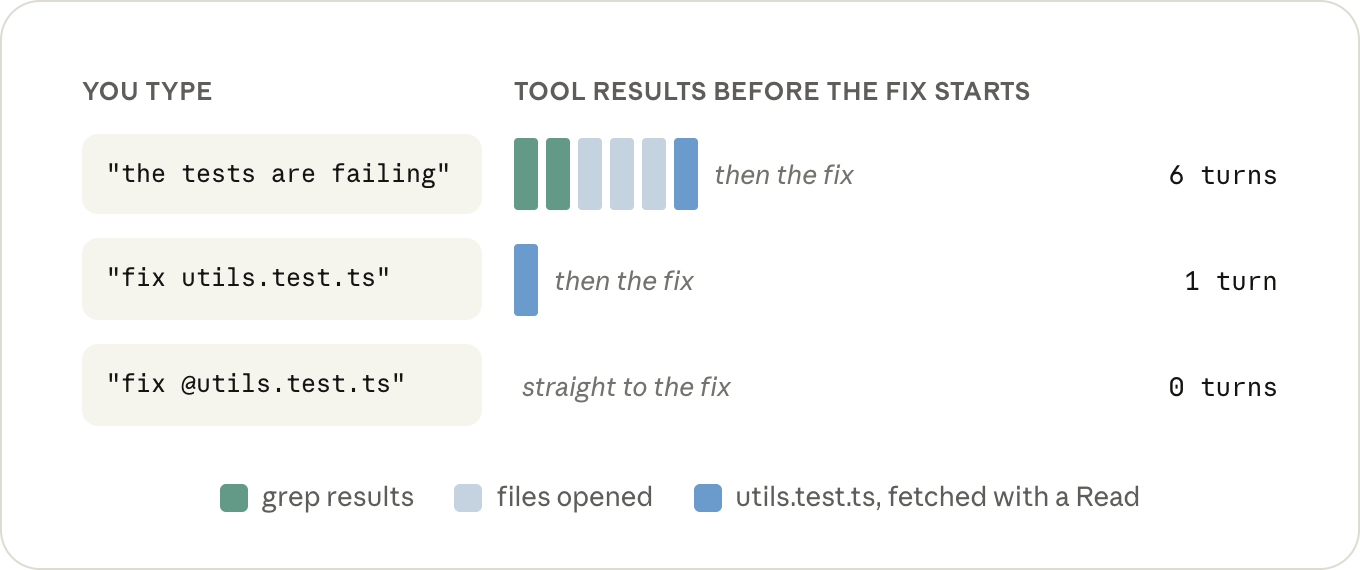
“Tip: when you're referring to a file, @-mention it instead of typing the path. Claude Code attaches the file to your message before anything gets sent, so it's in the very first request and there's no Read call for it. The file itself takes up the same room in the context either way, so you only need to mention it once per conversation: it stays there, and @-mentioning it again on a later turn generally attaches a second copy.”
The other thing that fills up the context is the output of the commands Claude runs. Every time it runs your tests, a build, or a git log, whatever that prints gets appended to the conversation just like a file it read, and stays there for the same number of turns.
Really big outputs are actually fine: after 30,000 characters Claude Code writes the output to a file and only puts a short preview and the path in the conversation (BASH_MAX_OUTPUT_LENGTH if you want to change it).
The problem is everything under that. A test runner that prints 400 passing tests one line at a time comes in under the limit, and those 400 lines are now part of every remaining turn.
Claude will often take care of this for you with flags and tail, and if you'd rather not leave it up to Claude, there's a small hook in the docs that rewrites noisy commands before they run so only the lines that matter come back.
“Tip: put the two or three commands you run all day in CLAUDE.md, quiet flags included, the way you'd type them yourself ("run a single test file with npx vitest run <file> --reporter=dot"). It's a small addition, but it saves a turn and a few hundred lines of output in every session after it.”
How many turns it stays there
One long session costs more than the same work spread over a few short ones, and by more than you'd think, because turn 40 is also re-reading the 39 turns before it. You want the context in your session to be short and relevant, so don't carry one task's context into the next: /clear when you start something new, and /compact when the earlier part of the same task is done.
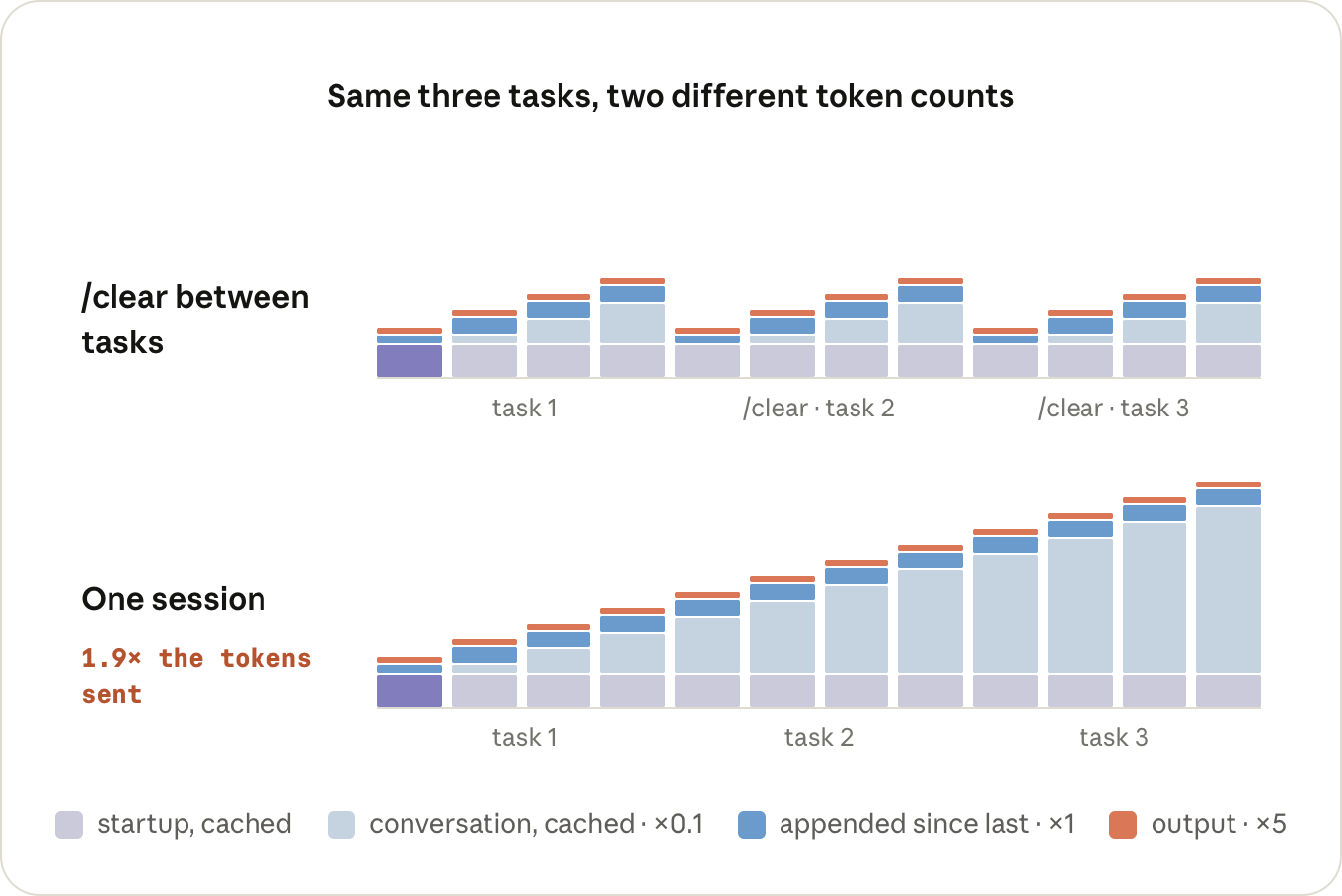
“Tip: /rename before you /clear if you'll want the session back later. When you /compact, tell it what to keep, or put a "Compact instructions" section in CLAUDE.md if it's always the same thing. And if you're on a 1M model and would rather have the auto-compact safety net where it used to be, /autocompact 200k puts it back (needs Claude Code v2.1.221+).”
Keep an eye on turns that happen when you're not typing, too. A /loop fires as a full turn in the session you set it up in, carrying that whole conversation with it every time, and if it's been more than an hour since the last turn, it's a cache miss on top. Start a fresh session in another terminal and run the loop from there.
Subagents
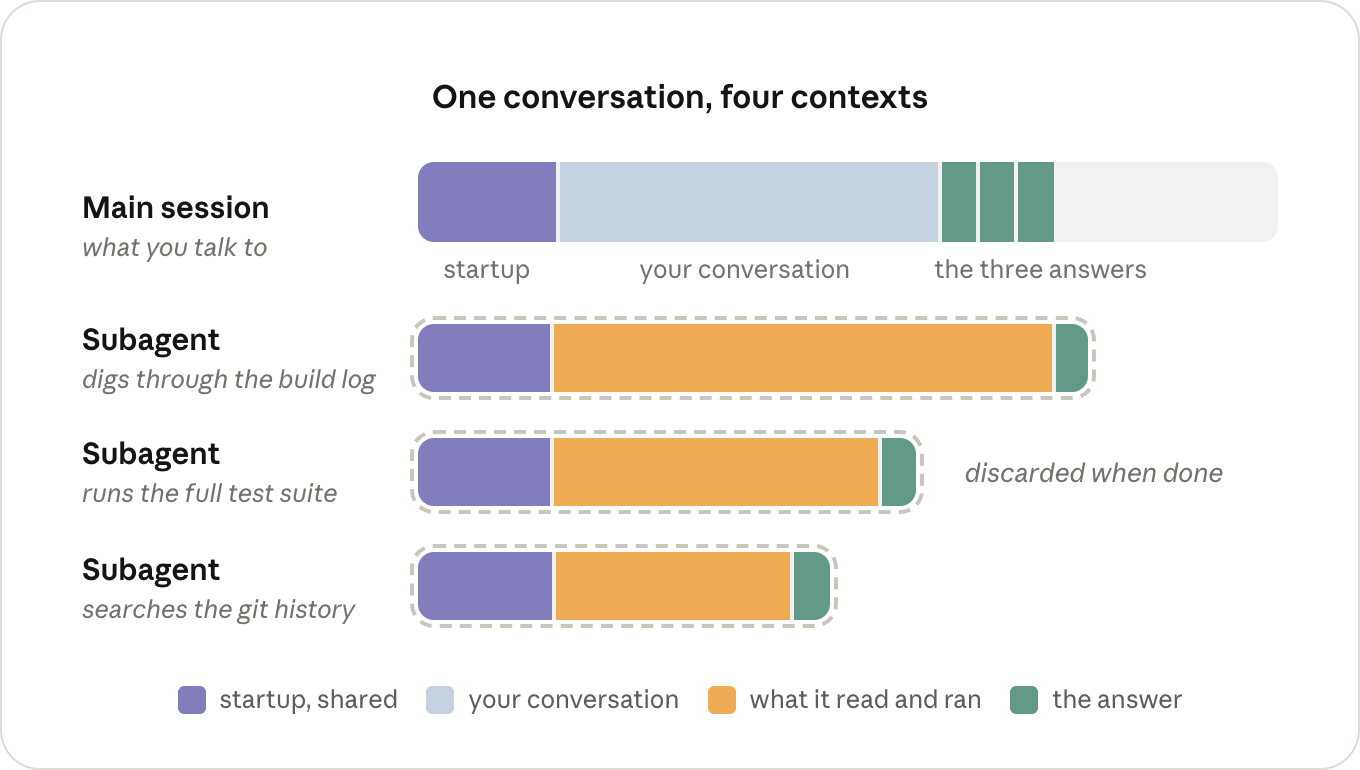
The other way to keep something out of your context is to have it happen in a different one, which is what subagents are for. A subagent gets its own context window, with its own system prompt, the tools, and your CLAUDE.md, but not your conversation. It runs its own turns, and the only thing that comes back to the main session is its answer. Everything else is thrown away once it's done.
The downside of not having your conversation is that a subagent sometimes has to re-read things the main session already had, and it's paying for its own turns while it does. For a small job it's just overhead.
It pays off when a job produces a lot of output you don't need to keep, like going through a log. Claude will often reach for one on its own for that kind of thing, and you can ask for one directly when it doesn't ("go through this log in a subagent"). Just keep in mind that the main session only gets back what the subagent chose to report.
“Tip: if there's a noisy job you hand off over and over, give it a subagent definition of its own with model: haiku (or sonnet). Otherwise it runs on whatever your main session is running on.”
Where to look first
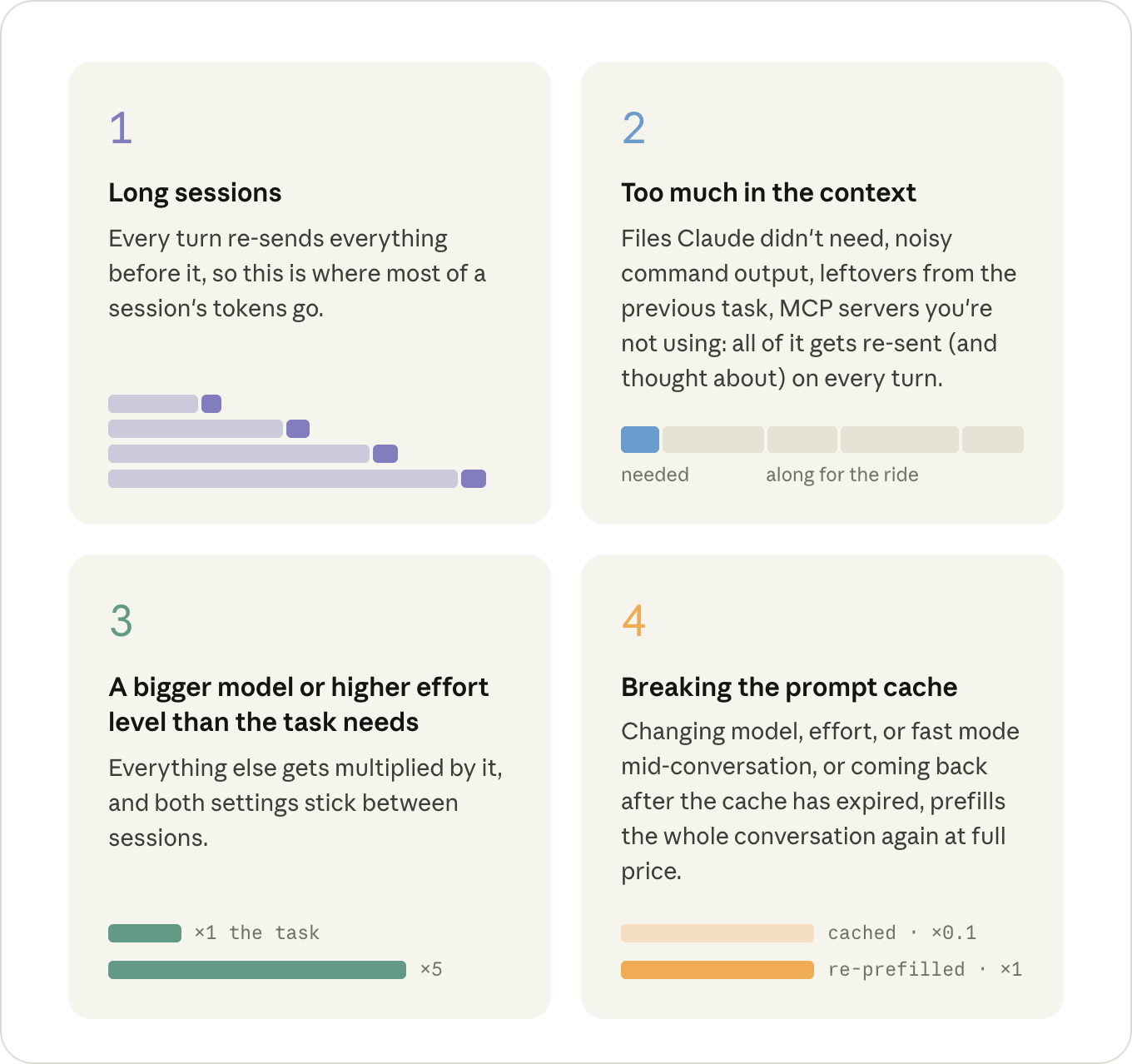
Of everything above, four things are worth keeping an eye on, roughly in order of how much they cost: