How an Anthropic BDR in Japan runs his day with Claude Managed Agents
How one business development representative clears his inbound queue and drafts bilingual customer emails with Claude Managed Agents and Claude Tag.
As a business development representative on Anthropic's Japan team, my job is to show Japanese companies how Claude can simplify and automate their workflows, but until earlier this year, most of mine were still manual. I was spending a couple of hours each morning routing and qualifying leads, then writing emails in Japanese or English. In the time I had left, I was updating our CRM, often a day or more behind. Now my agents prepare most of that before my day starts, and I review it.
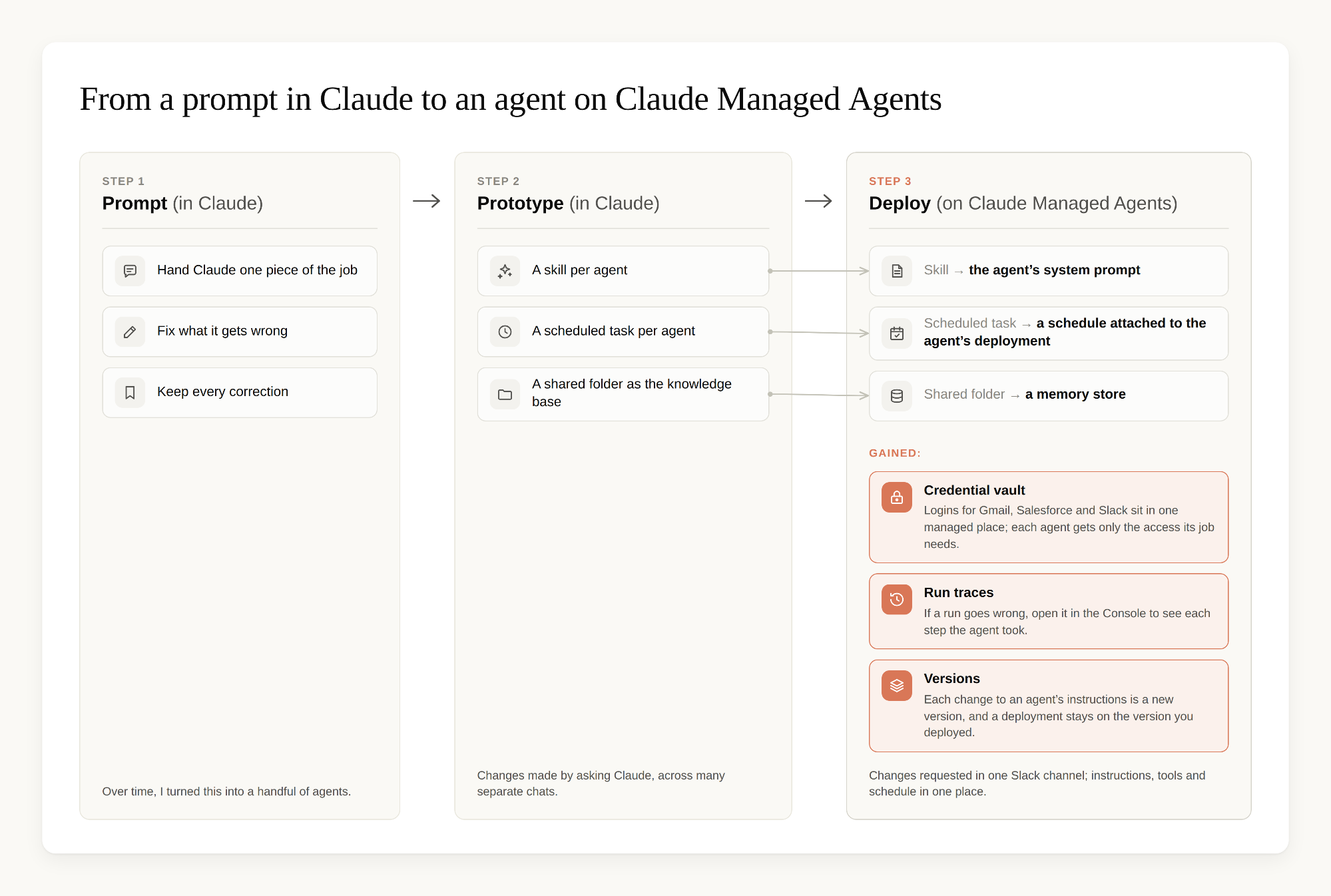
The first Claude-run workflow I built was pretty scrappy, but it did the job. I'd hand Claude one piece of my work at a time, correct what it got wrong, and save those corrections. Over time, that grew into a handful of agents, each covering a different routine.
Word got around quickly, and teammates started asking for my prompts and skills so they could build their own. All I could send them was a zip file with my skills and a few Markdown files from the knowledge base, which they had to upload to Claude and then answer a round of setup questions before anything worked. My own setup was getting harder to keep track of, too. Each agent was a skill, a scheduled task and a shared folder, and I changed them by asking Claude in whatever chat I had open, so the same skill was being edited from lots of different conversations.
I wanted to define each agent once, in one place, and be able to see every change I'd made to it. So I decided to try Claude Managed Agents (opens in new tab) (beta), our managed agent infrastructure on the Claude Platform.
I was hesitant to try it at first. The docs talk about schedules, tools, and credential vaults, and I'm a sales rep, so I assumed Managed Agents was for developers who can build and maintain the necessary infrastructure. I tried it anyway because my agents already existed, and I only had to move them over.
It turned out I didn't need to be a developer. I described each agent's job in plain language, Claude wrote a few short setup scripts, and I ran them from the terminal on my laptop. (If you're starting from scratch, the Console also has a quickstart with ready-made agent templates.) Since then, there has been no infrastructure for me to look after.
In this post, I'll walk through how I designed and prototyped the fleet, why I moved it to Managed Agents, how Claude Tag picks up anything that falls outside the routine, how it all changed my week, and what I'd tell sellers who want to build their own agents to automate manual, repetitive workflows.
Designing my fleet of agents
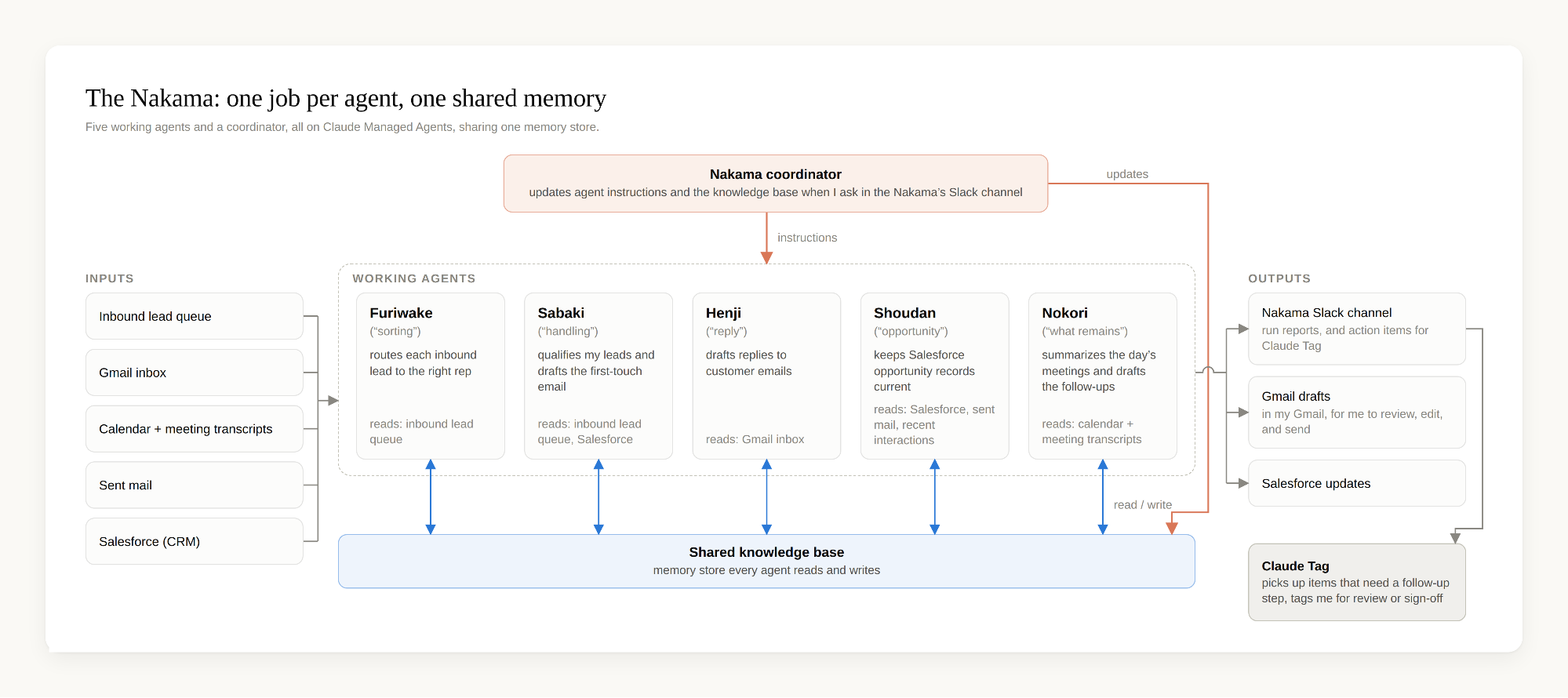
I divided up my workflow across several agents and gave every agent one clear job. A single responsibility keeps each one easy to reason about and easy to track, especially when something is off. I also gave every agent a Japanese name, because they mostly work in Japanese. Together they're called the Nakama, "the crew," or more literally, the companions you work with:
- Furiwake ("sorting") kicks off first: it reads the daily inbound queue and routes each lead to the right rep on the team, balancing the number of leads and the priority of each one and checking who's in that day, so every lead has an owner before any of us start our day. At the end of each run it posts a report to a dedicated Slack channel (every lead in, every lead assigned) so I can track the handoff.
- Sabaki ("handling") triages the leads that are assigned to me: it qualifies each lead, categorizes it against pre-set criteria, takes the defined next step for that category (draft a reply pointing them to to self-serve, craft a customized first email), updates the lead record in Salesforce, and drafts the first-touch email. It sources the draft's contents from the Nakama's shared knowledge base, a memory store (opens in new tab) every agent reads and writes (more on this below).
- Henji ("reply") scans my inbox hourly for customer emails that need a response and prepares a draft reply in Japanese or English, depending on the thread, drawing on the same knowledge base as Sabaki. I can review, edit, and send the draft.
- Shoudan ("opportunity") reads recent customer interactions and pushes updates into Salesforce, so opportunity records stay current without manual data entry.
- Nokori ("what remains") runs at the end of the day: it scans my calendar, reads the attached meeting transcripts, summarizes each meeting, and drafts the follow-ups, again from the same knowledge base.
Each agent runs on a schedule. A sixth agent, the Nakama's coordinator, is the fleet’s operations manager. It updates the agents’ instructions and the shared knowledge base between runs. When I want to change how an agent works, I write what I want in plain language in the Nakama’s Slack channel. Only I can post requests for changes to agents’ instructions and system prompts. The coordinator checks that channel every 15 minutes or so, picks up the request, and makes the update.
Prototyping the fleet in Claude
You don't need Managed Agents to start. I prototyped the whole fleet in Claude first, using the following pieces:
- A skill per agent: the instructions for one job.
- A scheduled task for each skill, so I don’t need to run it manually.
- A shared folder on my laptop as the knowledge base every skill writes its learnings back into: the difference between what it drafted and what I sent, plus anything new it dug up along the way.
On Managed Agents, the skill became the agent's system prompt, the scheduled task became a schedule on the agent's deployment (opens in new tab), and the shared folder became a memory store. I still ask for changes in plain language, but now I do it all in one Slack channel, and each change to an agent's instructions is saved as a new version, so each agent keeps a numbered history of its instructions. I'd suggest starting in Claude and moving your agents to Managed Agents once you have more than you can comfortably keep track of.
Running the fleet on Claude Managed Agents
Three things I got on Managed Agents that mattered most for my workflow:
The agents can run in the background
The agents run on their schedule whether my laptop is open or not, even when it's offline. The schedule is part of each agent's deployment. I could schedule skills in Claude too, but each of those schedules was a task set up in my own app. On Managed Agents, I set the cadence and timezone in the Console, next to the deployed agent's instructions and tools, and I have no cron jobs to maintain on the side. If a run goes wrong, I can open it in the Console and see each step the agent took. And while I'm trying out a change to an agent, the scheduled runs keep using the version that’s deployed, so a half-finished edit doesn't end up in tomorrow's run.
The Nakama shares one memory and learns from my edits
Every agent reads and writes the same memory store (opens in new tab), so any agent can use the others’ learnings. The agents compare the drafts they wrote with the emails I sent, and they save each difference as a note on how I'd phrase it. They also keep whatever new information they dig up while researching an answer, from our internal docs and our official websites. I fix a phrasing once in Henji's drafts, and Sabaki and Nokori stop making the same mistake.
Credentials live in a managed vault with scoped permissions
My agents have access to my email and our Salesforce records, but since these are customer conversations and company records, I wanted that access under control. The credentials live in managed vaults (opens in new tab), which protect credentials agents use to log in to outside services, such as OAuth access and refresh tokens, API keys, and personal access tokens. Each agent’s deployment uses only the vaults its job needs, it never sees the credentials, and I can revoke access in one step.
Handing the next steps to Claude Tag
For most of what the Nakama produces, I only need to read a draft in my inbox and send it, or glance at an updated Salesforce record. But some items need a follow-up step, such as figuring out an upgrade path or a purchasing route, or escalating an issue to another team.
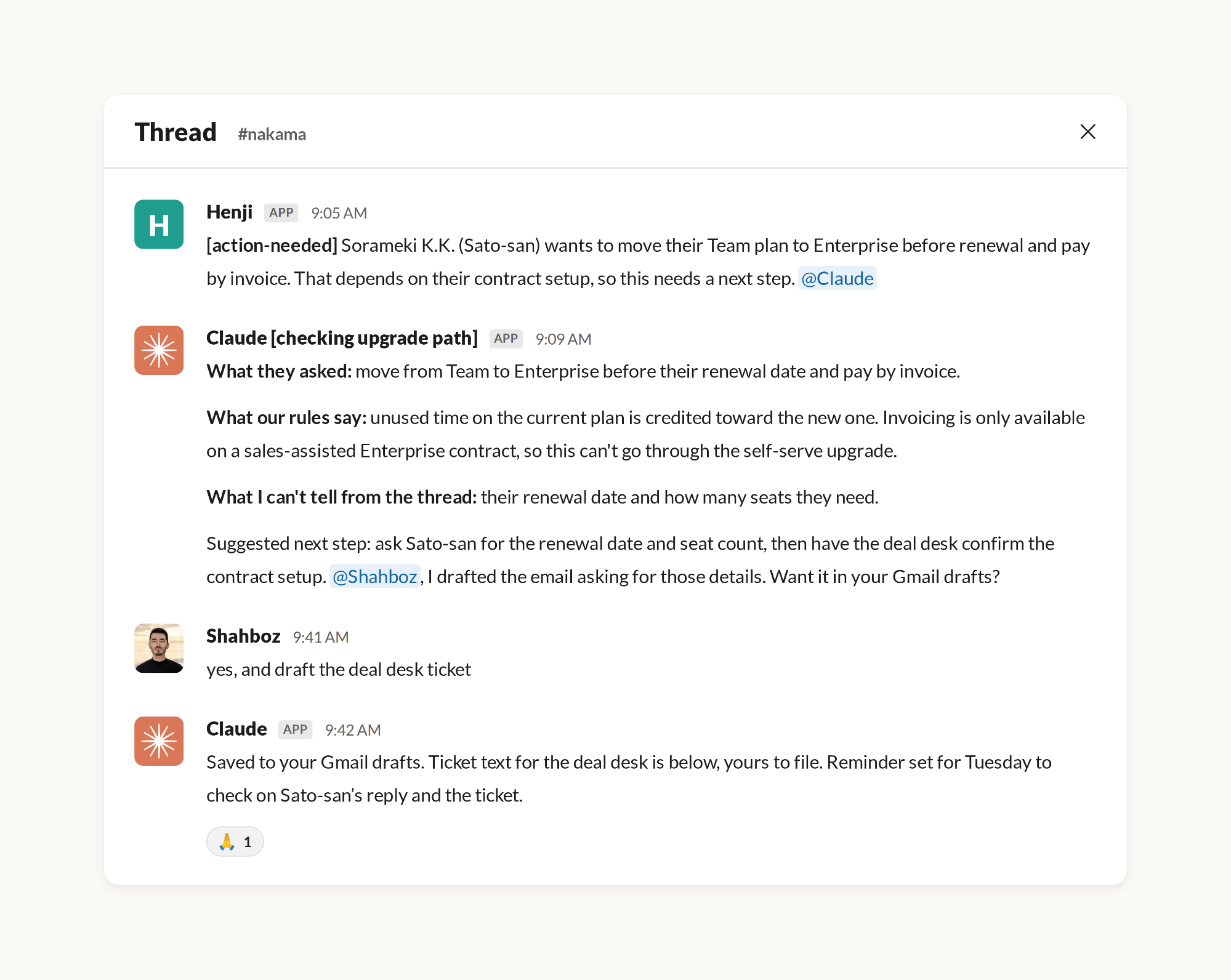
For those, the agents don't stop and wait for me. They hand the item to Claude Tag (opens in new tab) (in beta). Claude Tag is Claude set up as a member of our Slack workspace: anyone in a channel it has joined, a person or one of my agents, can tag @Claude with a request and it picks the request up and works on it in the thread. Once it's configured in your workspace there is nothing new to learn. You tag Claude the way you would a colleague.
In my setup it works like this. An agent posts the action item to the Nakama's Slack channel and tags Claude. Claude reads the thread, checks our rules and the terms that apply, lays out the options, and drafts what's needed. It tags me when a step needs my review or sign-off. When a customer or another team needs to reply first, Claude sets a reminder for itself to check back on a set day. In the thread below, it set a reminder for Tuesday to check whether the customer had replied and whether the deal desk had answered the ticket. When the reminder comes due, Claude checks both and posts where things stand in the same thread. If someone needs a nudge, it drafts the message and tags me to send it.
Claude also posts a morning brief of product and pricing updates. The Nakama coordinator picks up that brief and writes the necessary changes into the shared knowledge base.
What changed in my week
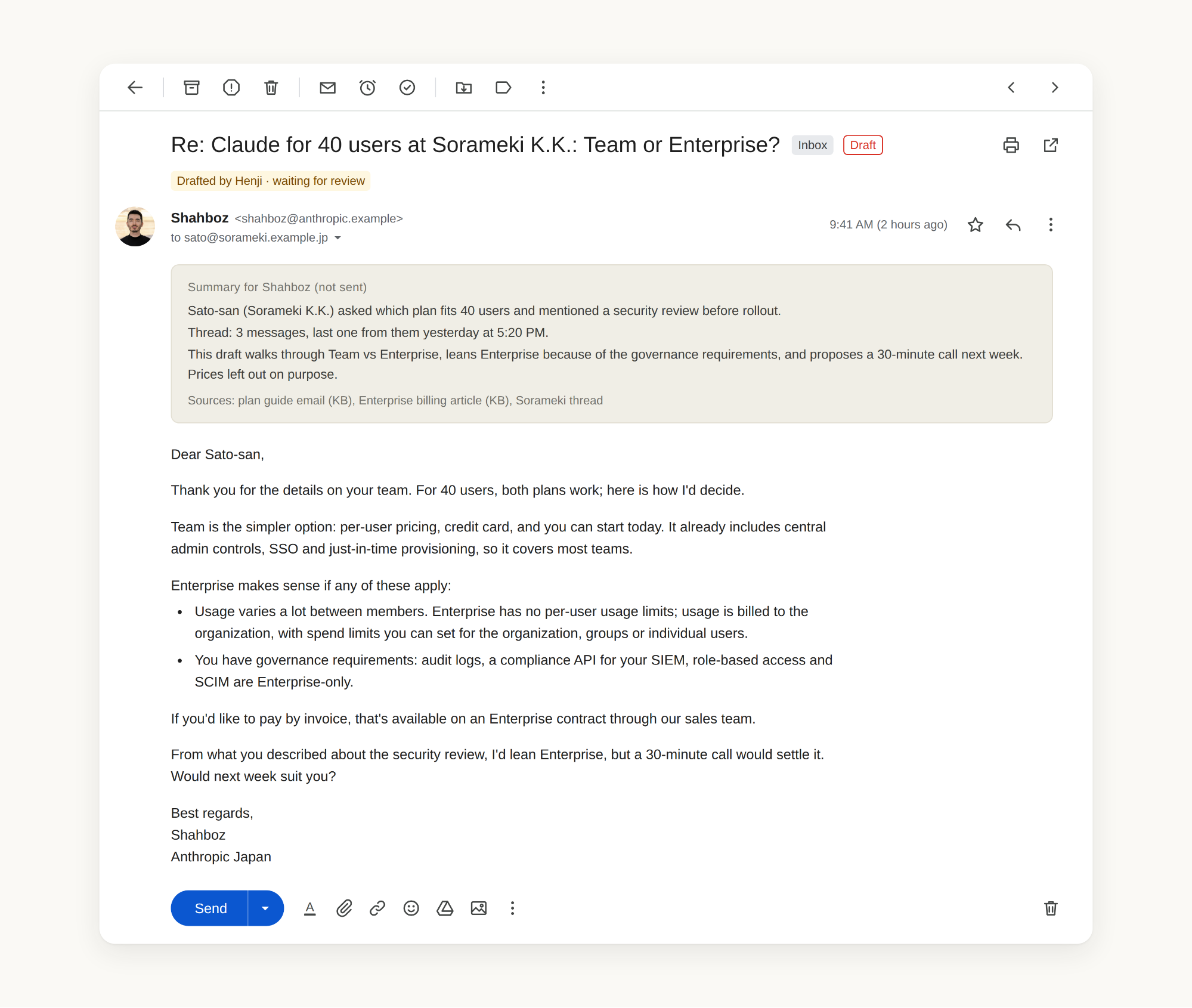
Now that Claude prepares inbound replies and keeps CRM records current (mostly) without my manual input, my role is to review anything that requires human judgment. A written rulebook defines each agent's lane and items like pricing questions, sensitive accounts, or ambiguous asks route to me. Every email draft from Henji, Sabaki, or Nokori arrives with a short summary at the top of what's going on, so I don't have to trace the whole thread to understand the context: I read the summary, confirm, make revisions, and send.
Looking at the weekly log of what the Nakama gets through and counting each task as the time it would have taken me to do manually, the fleet saves me around 60 hours of work. I spend the time that frees up on work that agents can't effectively do (yet): conversations with customers, outbound strategy, cross-functional projects, and helping teammates build their own fleets.
Designing agents to be more efficient
Scheduled agents run every day whether I'm watching or not, so waste can add up, in cost and reliability. Some of the most common mistakes include adding to existing instructions rather than updating them, giving agents more context than they need for their tasks, and running every job on the biggest model at the highest effort level.
Most of what keeps the agents efficient is how I designed the fleet: each agent has one job, so its instructions stay focused on that job; each working agent runs on a schedule, so it wakes up, does its pass, and stops; and the agents share memory, so a correction made once is reused everywhere.
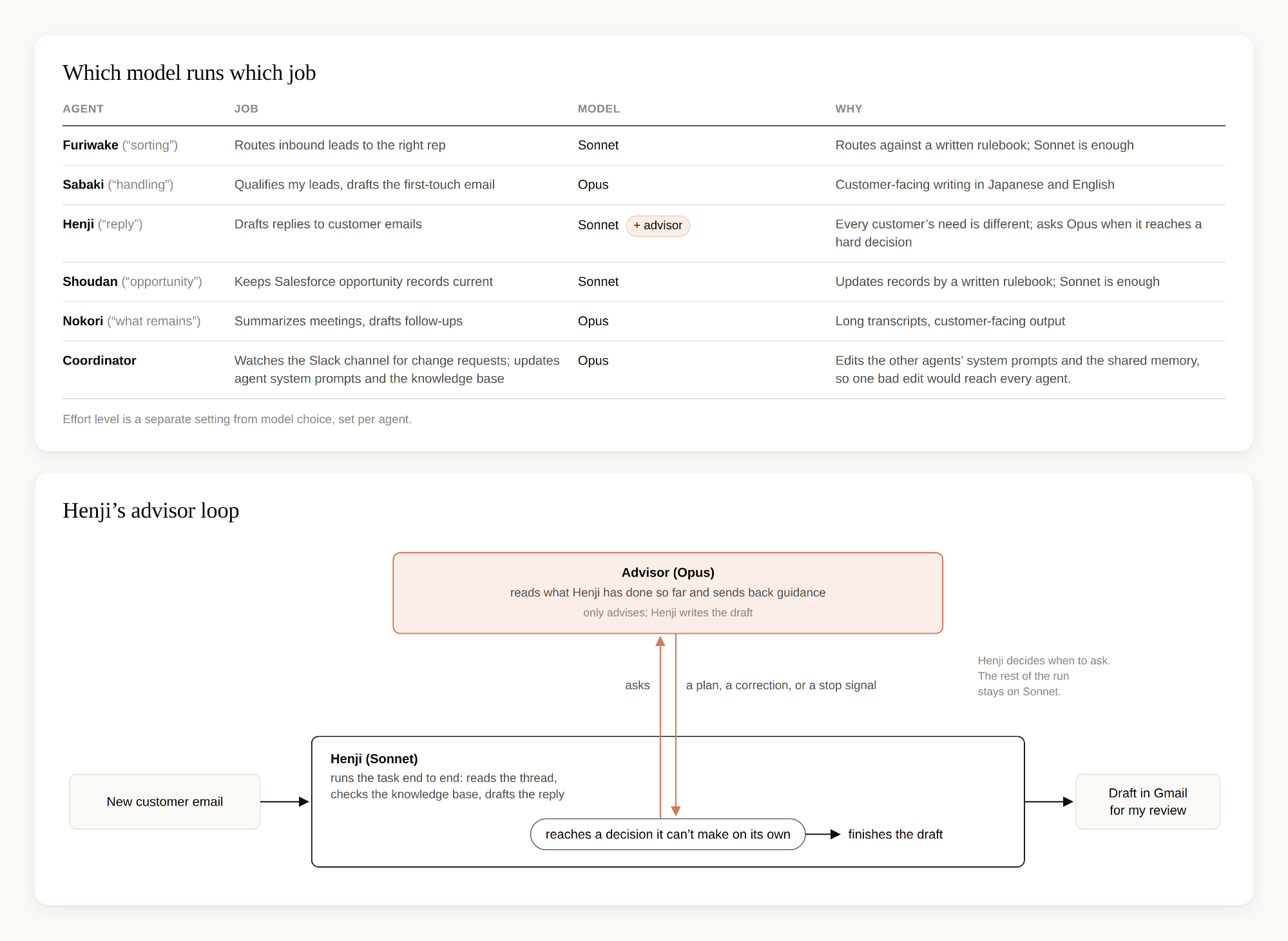
The other big factor is which model each agent runs on. Once an agent's job is well defined, it may not need our most capable model. Furiwake and Shoudan follow a written rulebook, so they run on Sonnet, our smaller model. Sabaki, Nokori and the coordinator run on Opus, our larger model, because their work needs more judgment. The coordinator needs it most, since it edits the other agents' instructions and one bad edit would reach every agent. Henji needs as much judgment as Sabaki, because every customer's email is different, but it also runs more often than any other agent, all through the working day. Running it on Opus every time would be the most expensive option, so I use the advisor strategy (opens in new tab) in Managed Agents: Henji runs on Sonnet, and when it reaches a decision it can't make on its own, it asks Opus for advice. The advisor reads what Henji has done so far and sends back a plan, a correction, or a stop signal, and Henji then finishes the draft for my review. I also set each agent's effort level (how long the model thinks before it answers) separately from its model, and I raise it only where the reasoning is hard, as with Henji's replies.
What I learned
Three things I'd pass on to anyone building their own fleet.
- You don't need a detailed prompt every time. Describe the job once, let Claude draft, fix the draft, and let it keep the fix.
- The knowledge base matters more than the prompt. Every correction and past interaction is saved where all the agents can read it and write to it, so Claude takes its context from there instead of from a longer prompt. It took a few hundred cheap rounds of drafting, fixing, and saving to get the drafts to sound like me.
- Give Claude more room, sooner. At first I kept doing the tasks that I assumed needed me: updating the knowledge base, or editing each agent's instructions by hand. Both worked fine once I let go of them. The agents now write what they learn into the knowledge base themselves, and the coordinator updates the other agents' instructions when I ask in plain English. I had been too cautious with work I could trust the agents to do.