How Anthropic's business development team uses Claude to run inbound and outbound at scale
John Albert, a business development rep at Anthropic, shares how his team uses Claude to research account books, draft customer replies, and address the ad-hoc requests that used to queue behind data teams.
Early in my career in business development, account executives would hand me lists with hundreds of accounts and I’d have to investigate each company, find the right contacts, hunt down emails, and draft outreach. The inbound side had similarly manual and time-consuming workflows.
When I joined Anthropic last summer, I took over the responsibility of managing our sales inbox. I would spend around 5 hours per day manually responding to inbound interest from prospects, often answering the same or similar questions about our products, on top of managing my own book of business.
A lot of that work is now set up as skills and scheduled tasks in Claude Cowork. Personalized customer emails are prepared as drafts that I need to review and customize before sending. My outbound work begins with detailed research that I didn’t need to spend hours compiling.
As a result, my teammates and I spend less time on manual, repetitive work and more time on what matters: helping our customers.
Here’s how Claude Cowork is upleveling the business development function at Anthropic, allowing us to dedicate more time to strategic work, understanding customer problems, and helping educate them on how Claude can solve them.
Automating administrative and repeatable tasks
BDRs sit at the beginning of the sales process, qualifying inbound demand and building outbound pipeline for the business. At Anthropic, those motions now run through Claude Cowork first.
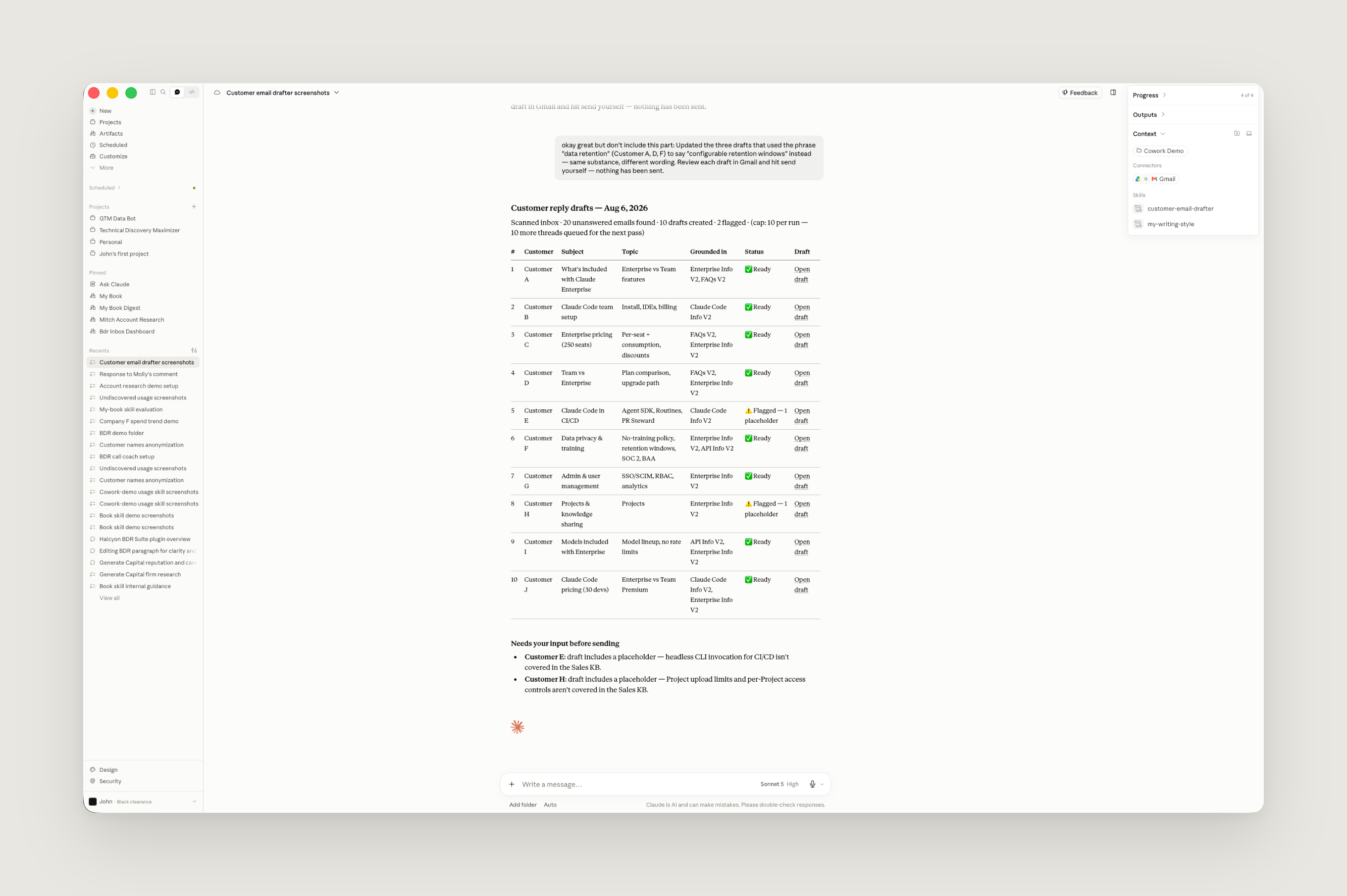
A foundational piece of our inbound setup is a document where I’ve collected the questions we most commonly receive in our sales inbox, along with our best answers to those questions. This document functions as our sales knowledge base, which Claude reads before drafting any replies we send. Claude helped me create that document (I simply pointed it to the relevant sources of information), and now continuously verifies that it is up to date by flagging information that might potentially be stale, which users can validate.
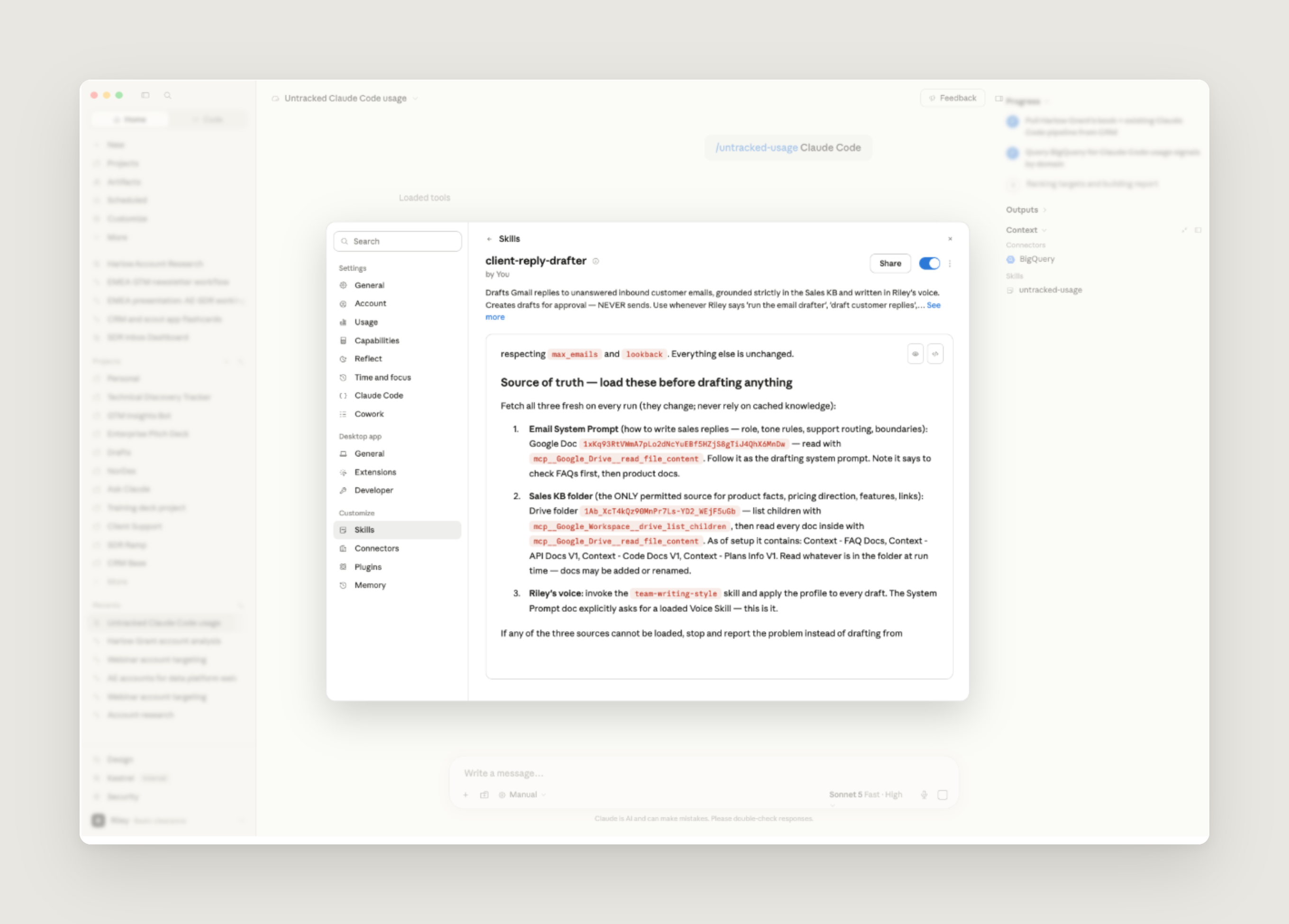
The heaviest workflow built on that document is an inbox skill that runs every hour: it scans a rep's inbox, finds every thread that the rep needs to answer, and drafts a reply for the rep to read, edit, and send. This skill is made of a thin system prompt, the knowledge base as context, and a profile of the rep’s writing style (which each of us also creates using a voice skill that reads through documents, messages, and emails we have written).
I also lean on two lighter skills that help with my administrative workload. Every BDR knows the pain of meeting no-shows and prospects going dark. To address this, I built a skill that watches Gmail and Google Calendar to notify me when that happens, so I can follow up quickly.
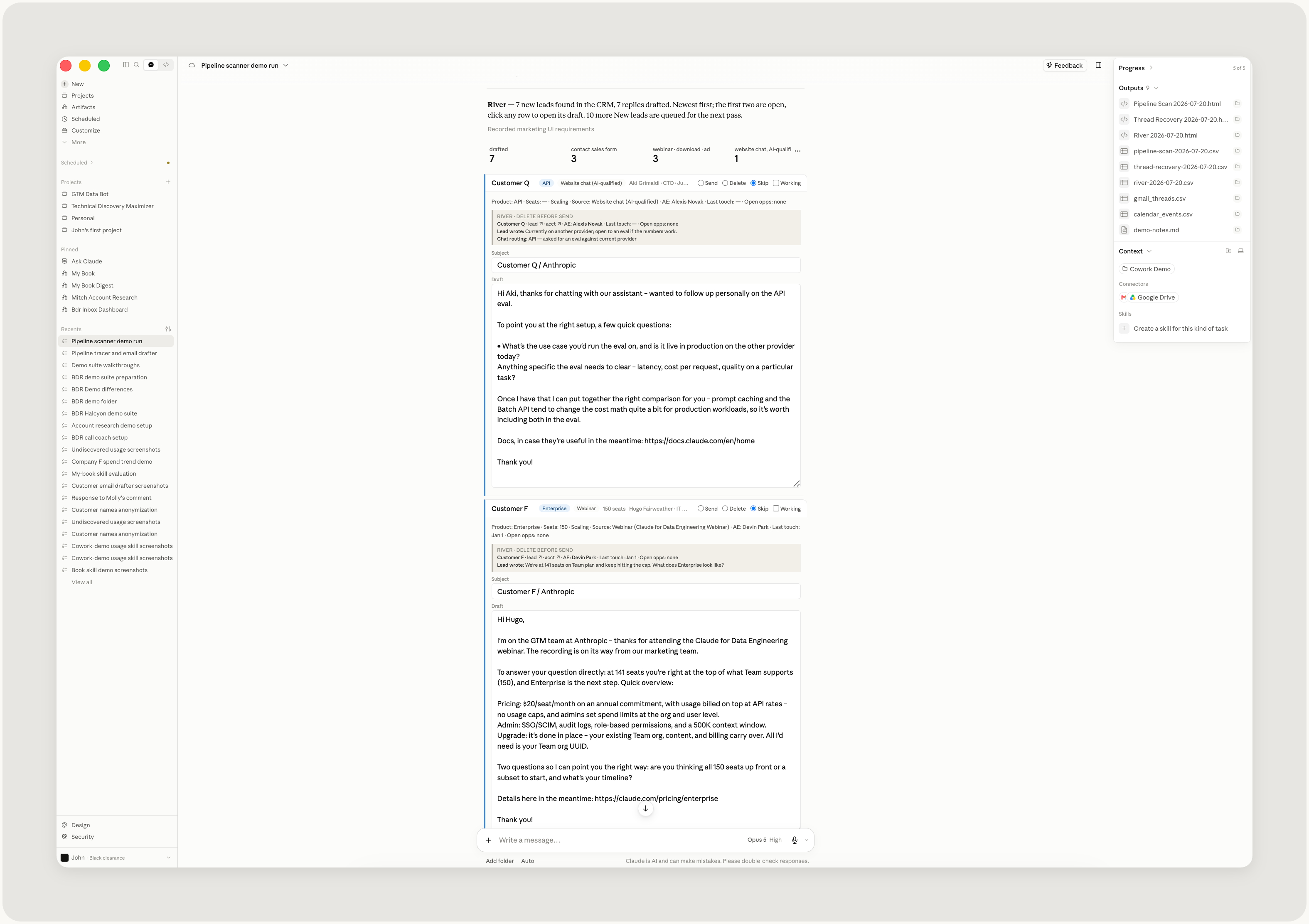
The other skill uses our CRM connector to scan for all new leads and draft a personalized first touch. It runs on a schedule throughout the day to ensure we don’t leave leads waiting.
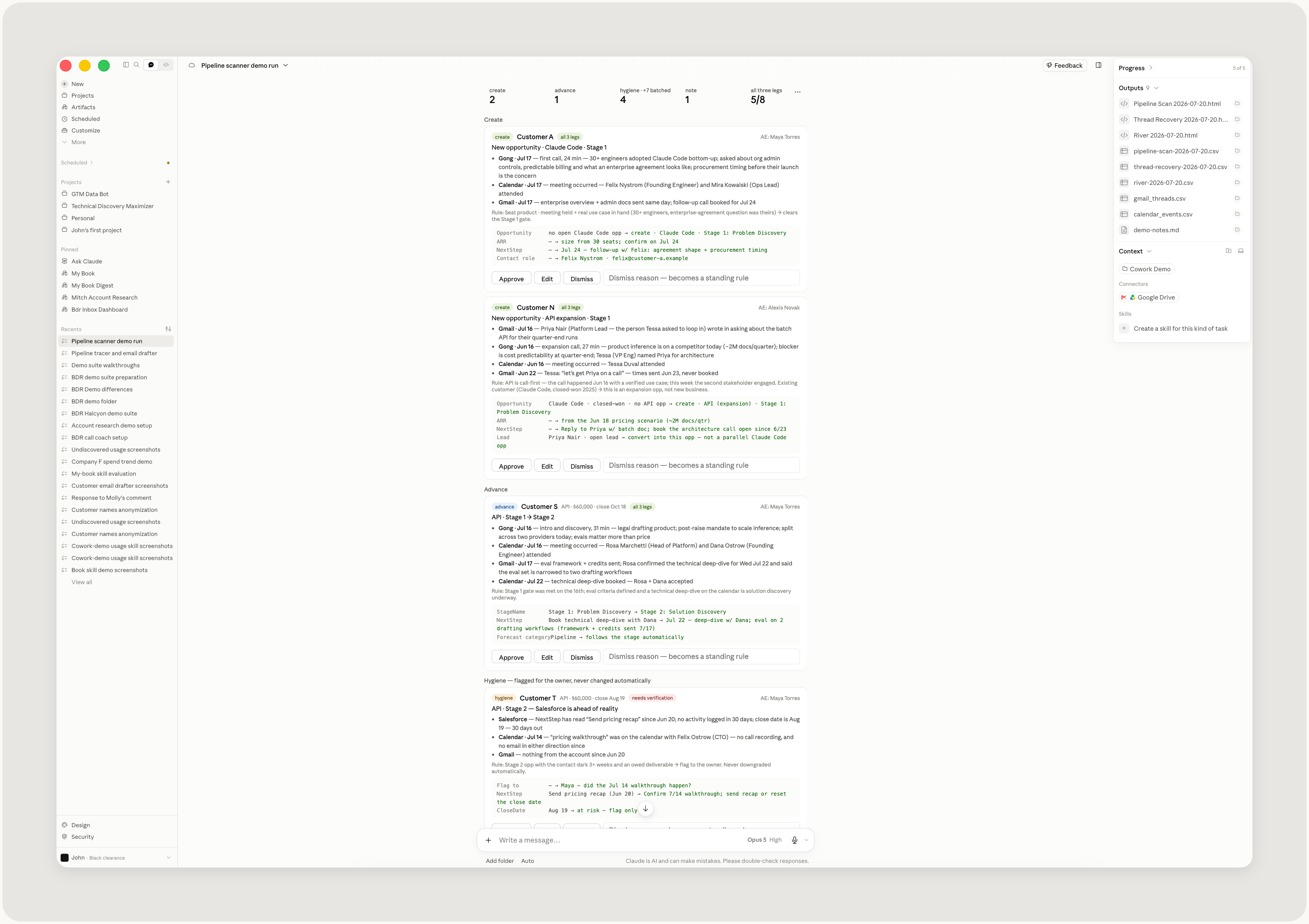
We also have a skill that keeps Salesforce current by reading our internal guidance on opportunity stages and checking it against what's actually happening in Gmail and Gong. If we've met with a customer and moved on to pricing questions, the opportunity should probably progress a stage. Claude proposes each Salesforce update with the evidence behind it and waits for approval. When I edit or reject a proposal, it records the reason why so it doesn’t repeat the mistake.
Optimizing outbound and revenue work
On average, I work upwards of a hundred accounts at any given time. I’m able to cover all these accounts thanks to a skill that runs as a scheduled task overnight. It prospects across my entire book, observing the current state of each account; for example, who are we in touch with, how do they use Claude today, and what signals are relevant. To accomplish this, Claude connects to Salesforce, sales tools like Apollo and Common Room, Gong, and our data warehouse, performs deep research, and validates it against outbound guidance and ICP criteria that our team has curated.
These pieces of the skill add context to help Claude work more like a BDR at Anthropic. In the morning, I open up Claude Cowork to a brief, a score, and an outbound play for each account.
This workflow becomes increasingly useful over time as each BDR can provide feedback on Claude’s results, which then feeds back into the skill. The skill keeps a small memory file and ledger, preventing repetitive or duplicative work.
We use this research in follow-up conversations, so our outreach is tailored and when we talk to customers we're informed on their business and close enough to their problems to have a deeper strategic discussion.
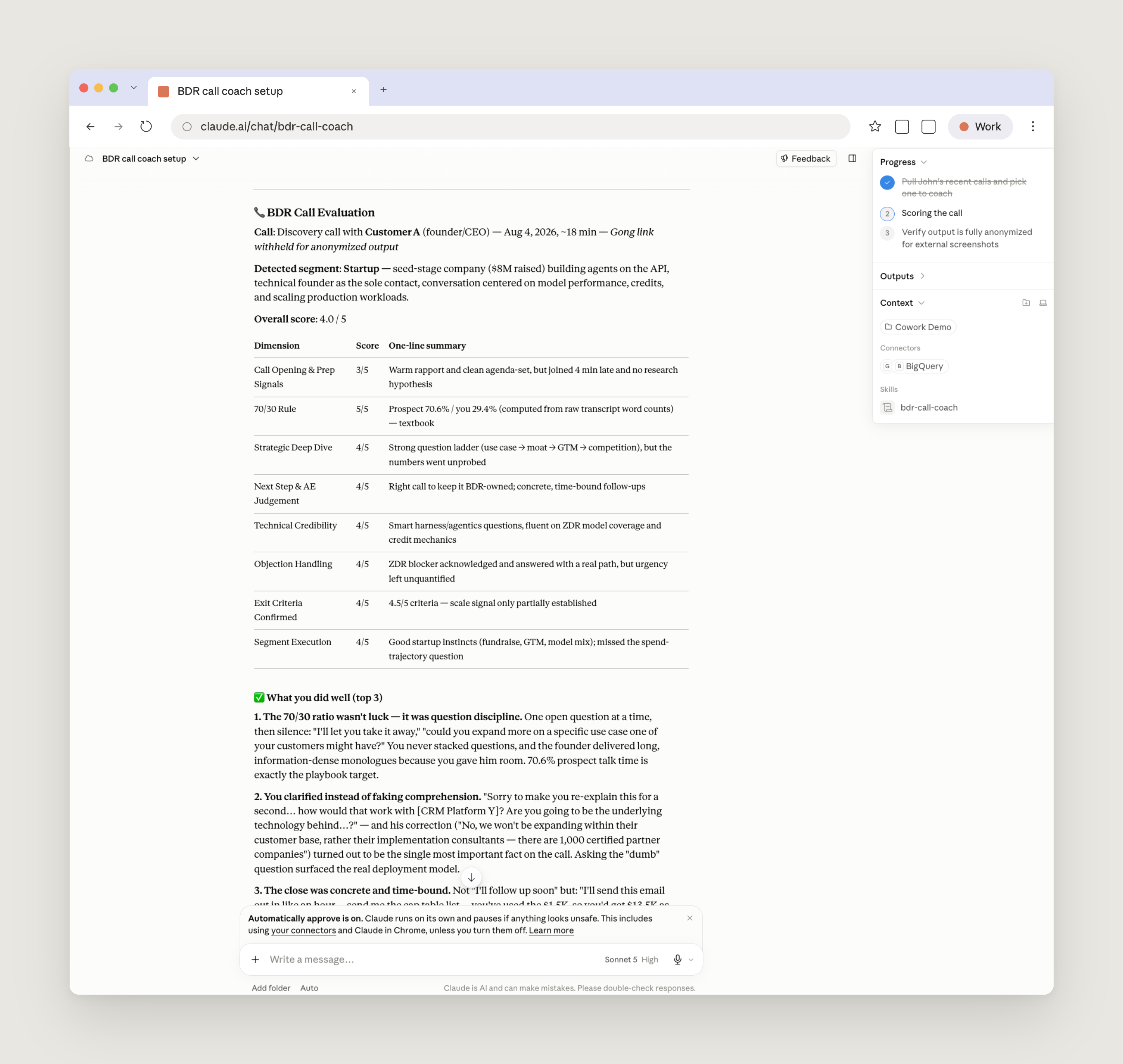
Discovery calls are another part of our outbound motion we are working to improve with Claude. We use a skill that evaluates Gong transcripts against our discovery call playbook and builds a scorecard for each call, with specific feedback based on the conversation. The feedback includes top three things done well, top three areas to improve, an explicit pass or fail score on our criteria, and a single highest-leverage thing to practice next.
Streamlining one-off requests
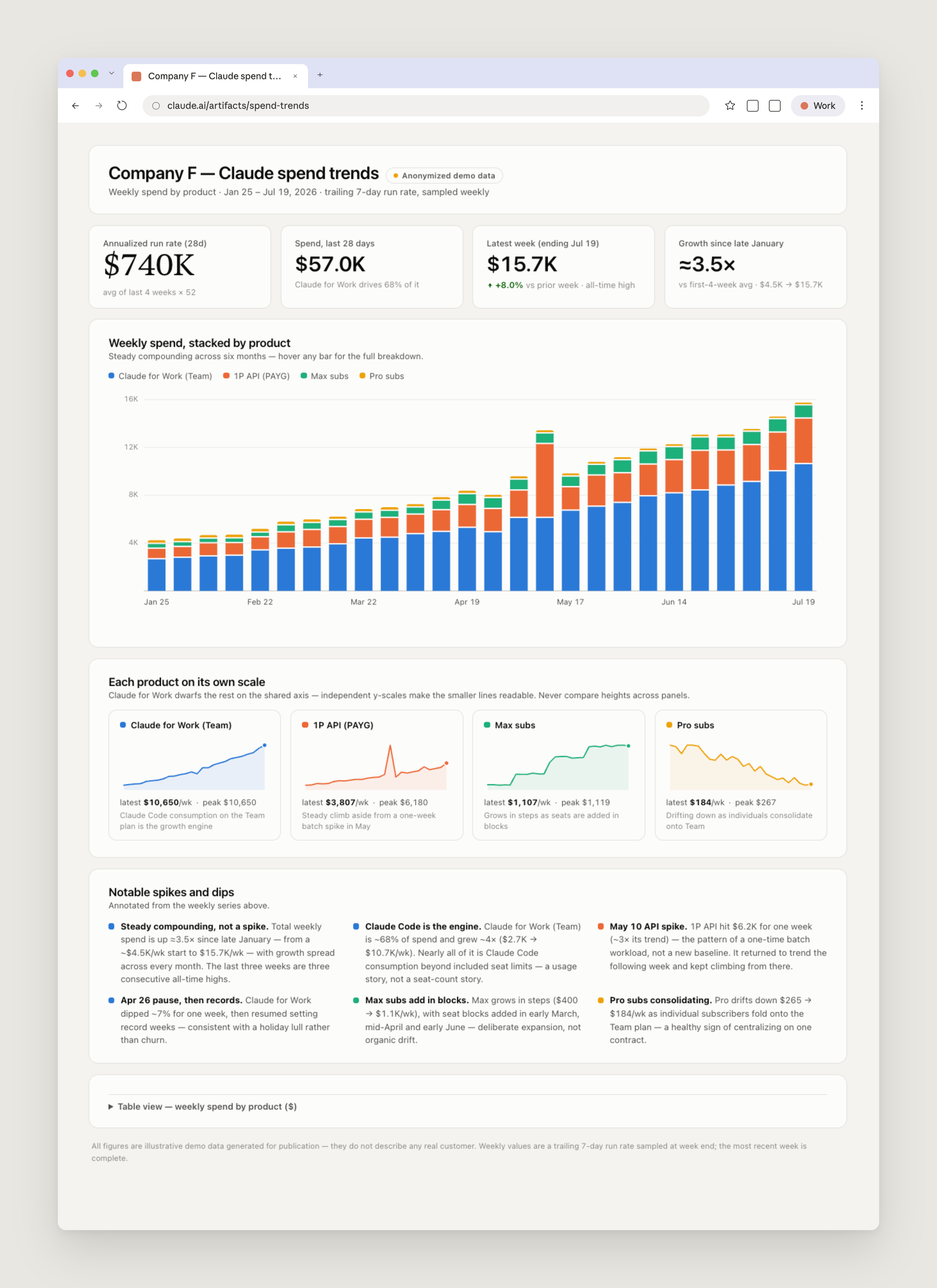
Often, requests come to the BDR team in an ad-hoc manner and Claude makes it possible for us to partner with our AEs in a more strategic way. If an AE is curious about usage trends for a top account, we are a prompt away from providing a legible and descriptive dashboard that highlights the relevant trends.
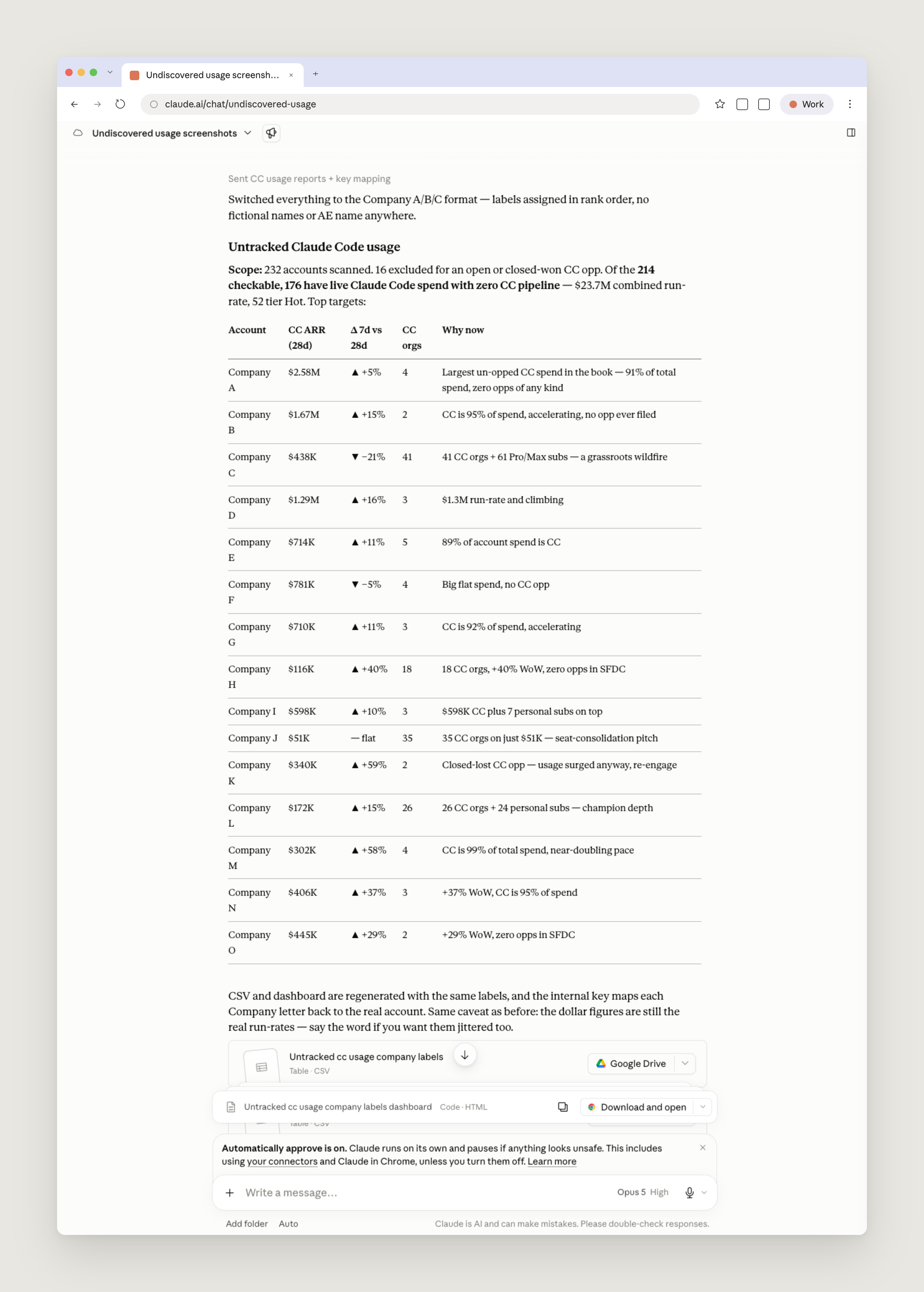
Working with Claude on data analysis and reporting comes into play in outbound work, too. One of my favorite workflows is running an undiscovered usage prompt. It considers an AE’s full book and finds usage signals on the account level where we do not yet have a sales opportunity. Often, this is a great signal for us to begin reaching out and working together with a customer to optimize their usage and experience with Claude.
We also use Claude for event outreach. One of my AEs recently flagged that we have an upcoming Claude Code for Data Engineering webinar and asked if I could find accounts in his book that would be interested in attending. I don’t have a skill for that, but for this type of request a prompt was enough. Claude checked usage data and CRM history across the book, scored each account against our ICP, and flagged the best fits with contacts worth inviting.
Together, these skills, scheduled tasks, and the context we've curated turn Claude into an always-on business development partner.
“The same governed foundations that power BD's reporting are described in how Anthropic enables self-service data analytics with Claude.”
Advice for business development teams on getting started with Claude Cowork
Below, are some tips for business development teams on getting started with Claude Cowork:
- Build the knowledge base before the workflows. Collect the questions your team answers repeatedly, and your best answers, into a single external-facing document. You don't have to write it by hand: point Claude at your relevant product docs and team channels and have it build the first version.
- Give Claude examples of how your team works. Claude drafts against the context you give it. For outbound, this can include examples of messages that worked and your ideal customer profile. Each rep can also have Claude learn their writing style, so drafts arrive sounding like the sender.
- Keep a person on every send. Claude can generate drafts, but we still read, edit, and send them.
- Share skills across the team. Our team keeps its most-used skills in a shared plugin, promoting a skill there once we establish that reps use it consistently in their daily work.
- Make skills general enough to adapt to the whole team’s way of work. Segments, books, and workflows differ across reps, so we keep shared skills general enough to adapt rather than scoped to one person's routine.
- Write feedback back into the skills. When you dismiss a hook or correct a draft, have Claude record the reason in the skill so it doesn’t make the same mistake again.
My best advice? Just start experimenting. The more context and tools you give it, the more you can get done.
Watch John demo these skills during our Claude Cowork for Business Development Representatives webinar.
Get started with Claude Cowork today.
All UI mockups in this article are depicted with synthetic data and do not represent real companies or individuals.