How Anthropic employees use Claude Tag
Producing customer-ready collateral, compiling weekly issue reports, and running legal review, all where the work already happens.
Claude Tag brings Claude into chat tools like Slack, where you can tag @Claude in a thread the way you would a colleague and it picks up the context of the conversation, completes the task, and posts the answer or results back in the thread. It can also follow conversations and draw on available context, its memory, and standing instructions it’s been given to decide when to participate in the chat. Over the past several months, teams at Anthropic have been using Claude Tag to self-serve data analysis in shared channels, work through support tickets, or help find the root cause of tricky bugs.
We’ve assembled more than a dozen use case examples for Claude Tag inspired by our work at Anthropic, along with specific prompts and setup instructions. In this post, we highlight three ways Anthropic employees are making their workflows and processes more efficient with Claude Tag, with the prompts they used, so you can borrow or adapt the ones that best fit your work.
Turning a Slack thread into a polished document
During a recent feature launch, a sales rep asked for non-technical collateral that explains how the feature works to customers and prospects; Hema Thanki, on the product marketing team, turned the Slack thread that followed into a review-ready document in 45 minutes.
That Slack thread ran to more than 15 messages, with multiple people chiming in with suggestions or additional asks, and a touch of tension around what was actually needed and whether the existing technical material was enough. Rather than attempting to clarify ambiguity, Hema tagged Claude in the thread:
@Claude, go through this Slack thread and come up with a one pager that [the requester] is asking for.
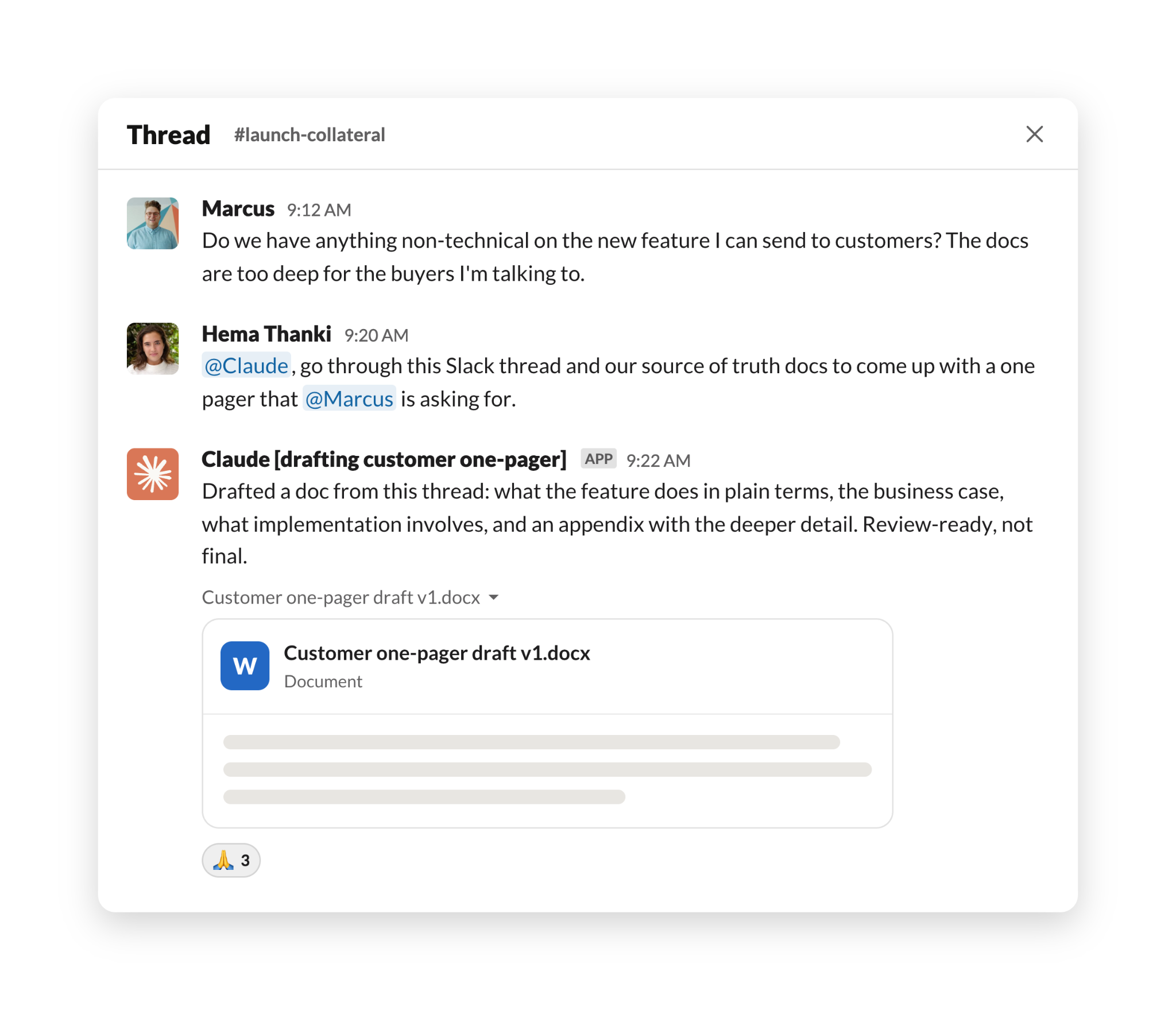
Claude generated a two-page draft in about two minutes, covering what the feature does in plain terms, the business case for it, what implementation involves, and an appendix with more detailed information.
Next, Hema asked Claude to verify its responses:
@Claude, is everything in this doc factual and correct?
Claude sorted the document's claims into ones verified against public documentation and those that were its own framing, which it flagged for product-lead sign-off. Hema supplied two official resources with relevant information, and Claude rewrote one section to match the approved wording in those resources.
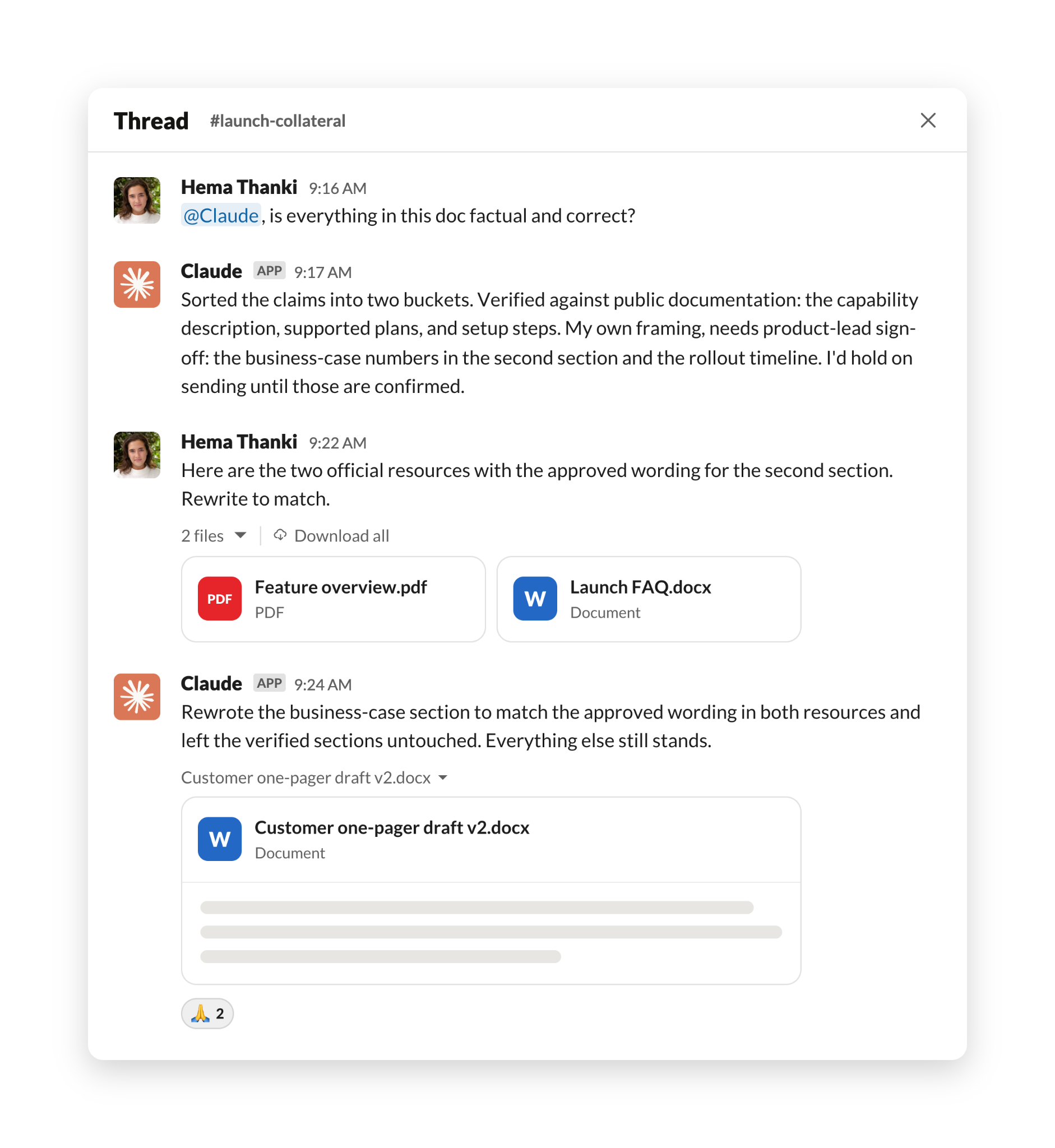
At that point, Hema noticed the truncated thread had skewed the framing, so she pasted in the fuller context. She went back and forth with Claude for a total of four versions. About 45 minutes after the first ask, she shared the document with the feature's product lead for review. Rather than spend hours researching and drafting the document, Hema’s time went to challenging accuracy, supplying sources, and deciding what information to include, all tasks that required human judgment and made the customer asset even stronger.
Beyond generating briefs from Slack threads, Hema also uses Claude Tag across her day to day work. She keeps a private Slack channel with Claude where she makes requests in separate threads, @-mentioning Claude the way she'd tag a colleague. In that channel, Claude reads whatever she pastes or attaches, searches the Slack workspace and public documentation, and works in the background, posting a progress checklist it updates as it goes. Claude’s access is deliberately scoped: it only works from the channels and documents it has been granted access to, and will let her know when it does not have the access to these resources.
Consolidating and following up on requests scattered throughout Slack channels
When a new feature launches, sales reps typically keep track and communicate it to customers they support who have requested that feature. Those requests are communicated via Slack or in a product feedback hub, and can be scattered across months’ worth of history. Steph Soderborg, on the product strategy and operations team, was able to consolidate all asks related to an upcoming feature and directly notify each rep who had asked for it on behalf of a customer, in about 26 minutes.
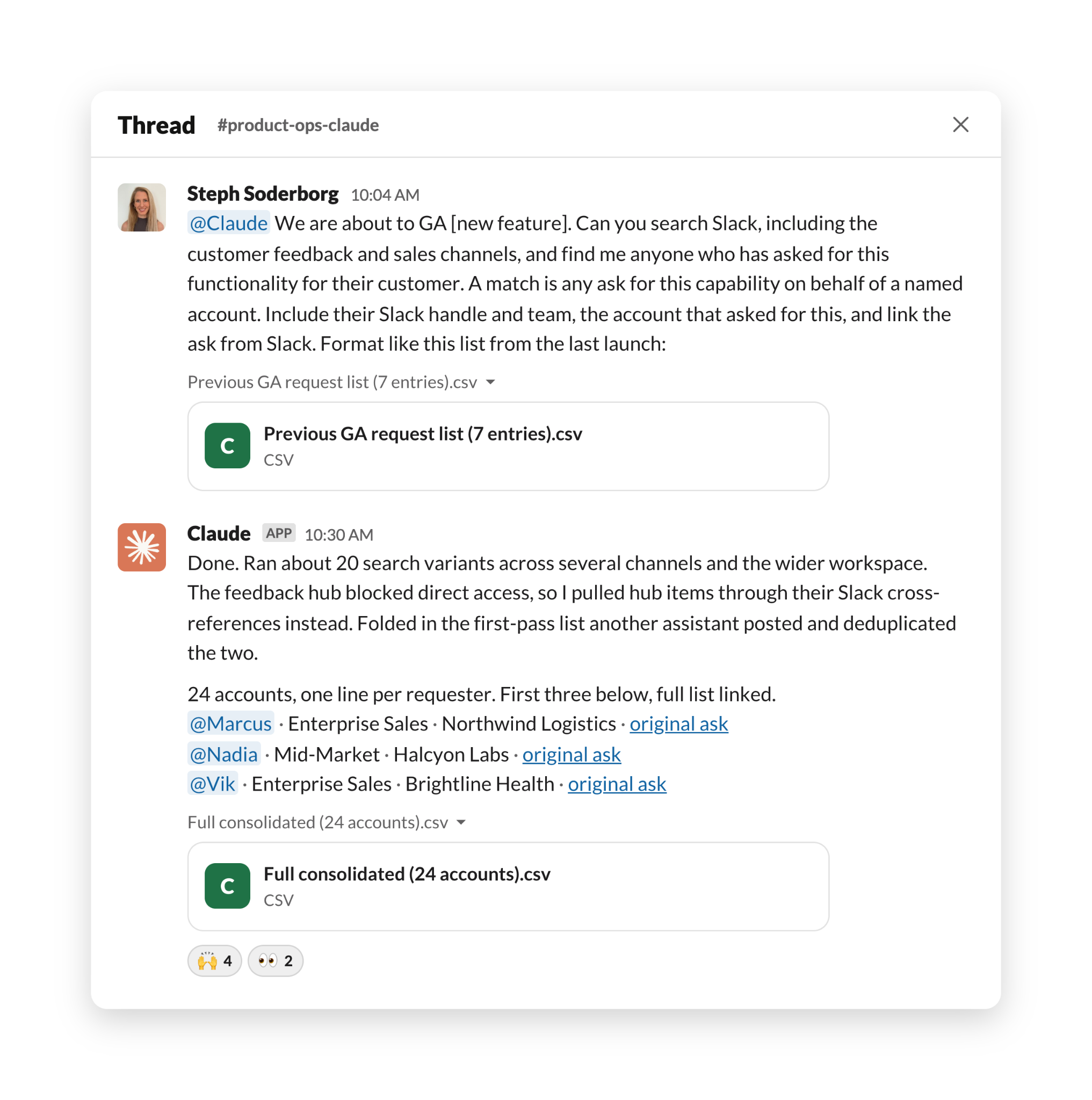
To start, Steph messaged Claude with the search targets, a one-sentence definition of a match, and a pasted example of the output she wanted, a seven-entry list from a previous launch:
@Claude We are about to GA [a new feature]. Can you search Slack ... find me anyone who has asked for this functionality for their customer ... include their Slack handle and team, the account that asked for this, and link the ask from Slack.
Claude ran about 20 search variants across several channels and the wider workspace. The product-feedback hub blocked its direct access, so it surfaced hub items through Slack cross-references instead, and it folded in a first-pass list another internal assistant had posted, deduplicating the two. The consolidated list came back in about 26 minutes and included roughly 24 accounts, with one line per requester containing their Slack handle, team, account, and a link to the original ask.
Steph then put Claude on a bigger consolidation job that she wouldn’t have had the bandwidth to do on her own: she wanted a picture of every product problem enterprise customers had reported in the previous week, including what was broken, what was already fixed, and which, if any, reports pointed at the same underlying issue. She told Claude to read all Slack channels covering incident, escalation, support, and product-feedback, and roughly 50 minutes later Claude posted a write-up, organized by product area, that included 23 issues that were still open and 14 resolved ones, condensed from about 120 raw findings. Each issue included a summary and a link to the source thread. Steph then asked Claude to check its work, and it surfaced 15 more issues.
Steph estimates that combing through, analyzing, and synthesizing this much information would have taken her at least a week of full-time work, or would never have gotten done. Instead, with Claude Tag, she took a few minutes to shape up her ask, and Claude worked in the background.
Steph also works with Claude in a private channel, sending full instructions up front that include where to search, what counts as a match, and usually an example of the output format. Claude searches the workspace, reads the channels it has been invited to, and posts progress updates as it works. When the feedback hub blocks access, Claude attempts to gather related or relevant information via accessible docs and channels, or even asks for access to these channels.
Expediting legal document reviews
Anthropic’s legal team reviews each blog, landing page, email, or any other collateral before it’s publicly released. In the days leading up to a product launch, the marketing team can queue up dozens of different assets for review, on a tight deadline. That’s on top of all other marketing collateral flowing through the review queue, ranging from one-paragraph social copy to 2,500-word blog drafts, planning documents with a dozen-plus tabs, and email series with multiple variants across multiple touchpoints. Molly Villagra, a product counsel on the legal team, created a dedicated Slack channel where Claude Tag examines every marketing asset first, compressing marketing legal review turnaround time from a day (or longer) to 30 minutes per asset.
To request legal review, marketers post a document link in the Slack channel, where Molly, who has no engineering background, has set up specific rules and instructions for Claude. Not only can Claude spot issues for legal (like unsubstantiated marketing claims), but it can also help check factual statements in the marketing content because it has access to the company Slack, an internal knowledge index, and the public web. If there are flags, Claude lists those with specific instructions on how to address them and works directly with the requester to do so. For remaining issues that need legal sign-off, Claude tags the appropriate product counsel, who can quickly review the flagged statements.
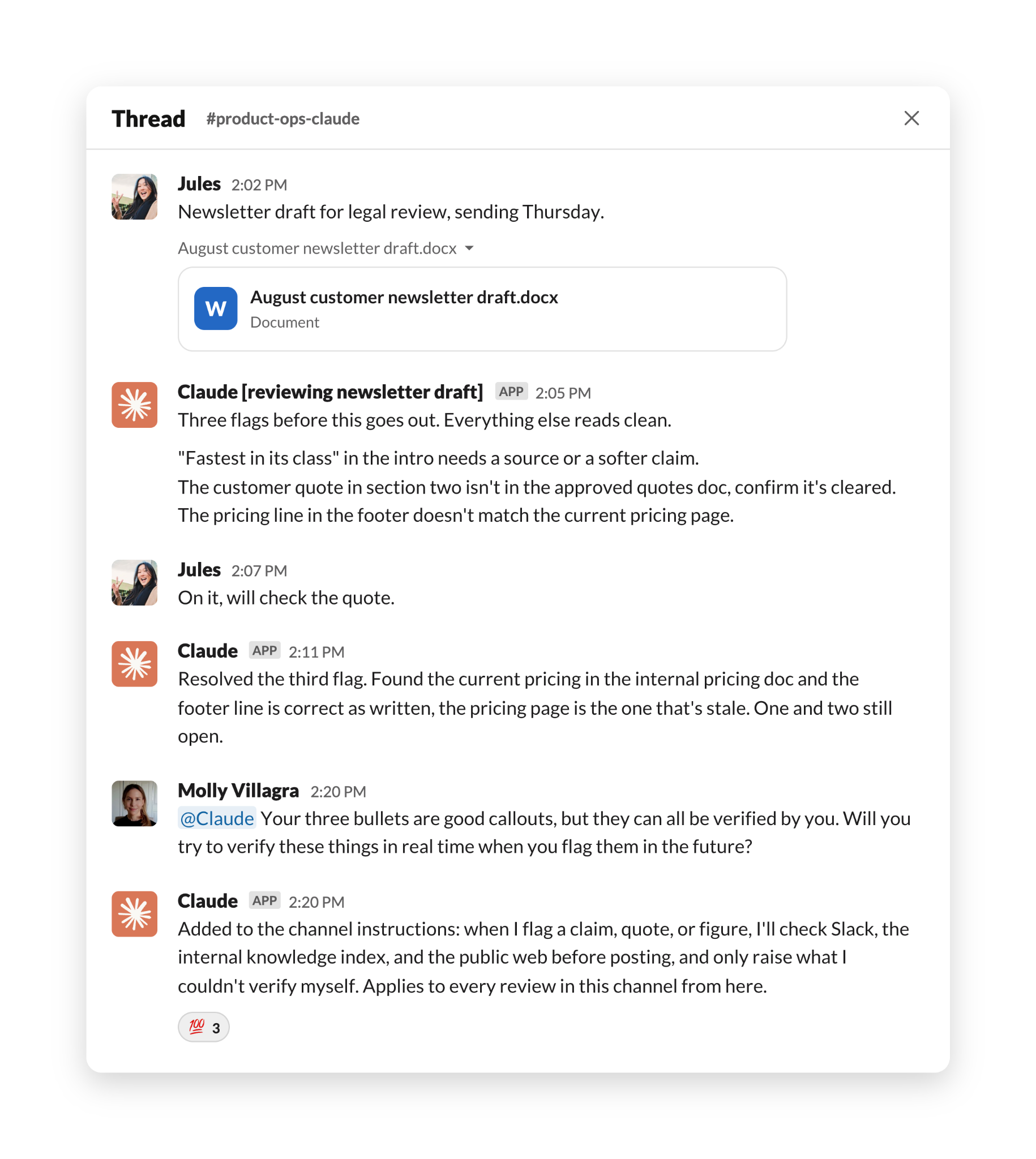
In a recent newsletter review, for example, Claude flagged three key items, then just minutes later, unprompted, resolved one of them after finding the information it needed in internal documents. Molly asked it to make this the default by tagging @Claude in the marketing legal review channel:
Your three bullets are good callouts, but they can all be verified by you. Will you try to verify these things in real time when you flag them in the future?
At Molly’s request, Claude Tag added this new instruction to its set of instructions to follow in all future reviews, allowing it to improve with channel feedback in real time.
This feedback loop inspired Molly to create a new routine, instructing Claude to review the week’s counsel feedback each Friday and propose an update to the shared instructions for her approval.
Each of the workflows we’ve shared above is saving Anthropic employees hours or days of work, and enables projects that simply wouldn’t have happened before. What workflows or projects would your team hand over to Claude first?
Claude Tag, currently in public beta, is available on Team and Enterprise plans, on Anthropic’s first-party service. Set it up for your workspace at claude.ai/admin-settings/claude-tag or learn more at claude.com/docs/claude-tag.
Turnaround times in this post reflect individual employees' experiences with specific tasks; results vary with the task, the tools connected, and how Claude Tag is set up.
All images have been generated to illustrate use cases and do not contain real names or information.