The enterprise guide to securing coding agents
How security and technical leaders can understand and bound risk as they scale Claude Code
Shipping fast and secure
Coding agents likely write code and open pull requests at your organization already. For many leading enterprises, they are reviewing, testing, and merging it too.
For example, after standardizing on Claude Code across its engineering organization, Salesforce¹ reported:
79%
more pull requests merged per developer at Salesforce
5%
fewer total incidents at Salesforce
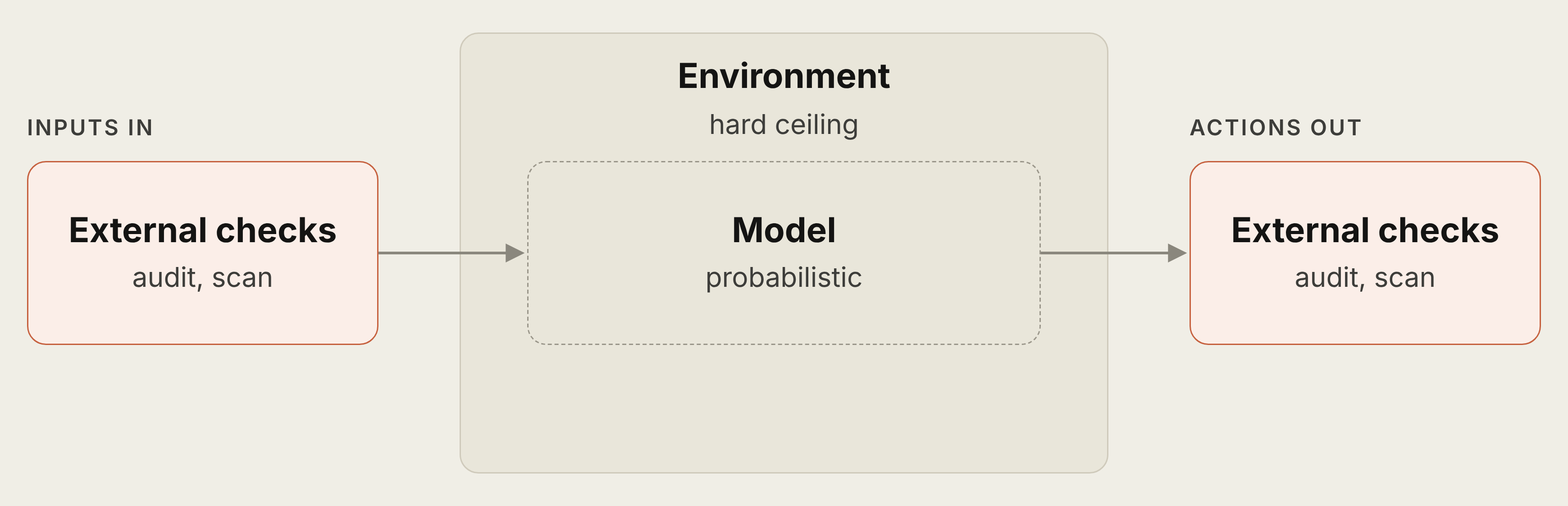
As agents do more, technical and security leaders must mitigate risks like prompt injection and privilege abuse with layered controls such as checked permissions and bounded environments.
The first two chapters focus on scoping the risk. We discuss the requirements every AI provider should meet and four agentic risks to mitigate.
The next three chapters focus on bounding the risk. We highlight the defensive layers you can deploy with Claude Code as well as how to centrally manage and enforce those controls.
This guide aims to provide a helpful agent security framework that can give organizations the confidence and trust to run agents effectively at scale.
This guide is written for organizations on Claude Team and Enterprise plans. If you reach Claude through a cloud provider such as AWS, Google Cloud, or Microsoft Azure, the same principles and local controls apply.
01 Setting the bar for agent security
Six questions for every coding agent · Applying SaaS requirements to your AI provider

“A CISO's responsibility in the age of agentic AI is not to achieve zero risk. Instead, our jobs are to make agentic risk legible and bounded. This way, we can deliberately accept what we can manage, so the business moves on our terms instead of around us.”
Jason Clinton, Deputy CISO at Anthropic
Six questions for every coding agent
Here are six questions leaders can ask when evaluating coding agents to verify they are enterprise ready.
| Question to ask | Why you should care | Good answer | Weak answer |
|---|---|---|---|
| Does the model refuse when it should? | The model is the first check on a harmful request, making a bad action less likely. | Refusal trained into weights, with published rates. | "Our system prompt instructs the model to decline." |
| Are actions automatically inspected outside the model before they run? | External checks can catch when the model is tricked or using bad judgment. | Static analysis of commands and a separate evaluator model. Prompt injection probes. | "The model is very capable." |
| Is blast radius bounded by the environment? | This bounds the severity, and therefore risk, of an incident. | Kernel-level sandboxing that admins can require and set to fail closed, or an isolated VM for each session. Egress allowlisting at the network layer. | "The agent is instructed not to leave the working directory." |
| Can policy be locked centrally? | Sets minimum standards that can’t be undone by individuals. | Managed settings with hard-deny rules a local user can't override. | “Per-developer config files, and an honor system policy doc.” |
| Is the code the agent writes secure? | Code volume is scaling and vulnerabilities can ship unless checks scale with the volume. | Automated security review with a person approving high-risk changes. | “The model is trained to write secure code.” |
| Can you reconstruct an incident? | Compliance. Improving security over time. | Session telemetry export, audit API (Enterprise), and named known gaps. | "Logs are available on request." |
Applying SaaS requirements to your AI provider
You already have a SaaS provider checklist with controls such as single sign-on, role-based access, data handling terms, and audit logs. Hold AI providers to a similar checklist. For example, Claude Code supports these security expectations through:
- Single sign-on and role-based access control (Enterprise), managed the way you manage your other enterprise tools.
- We don’t train generative models on code or prompts under our commercial terms, unless your organization has chosen to share that data with us.
- Enterprise Frontier Safeguards (rolling out in phases) combines the privacy of zero data retention with state-of-the-art safeguards for detecting misuse across highly capable models. Data can be encrypted with your own keys and kept in storage you control for a limited time. Learn more.
- On Enterprise, BAA coverage for the Claude Code CLI and the desktop app’s Code tab in local mode, once the HIPAA configuration is applied.
- Encryption options on cloud platforms: customer-managed keys in AWS KMS on Amazon Bedrock, CMEK on Google Cloud, or Microsoft Foundry’s Hosted on Azure option.
- A SOC 2 Type 2 report and ISO 27001 certificate in the Anthropic Trust Center.
02 Identifying AI-specific risks
Leaked credentials and privilege abuse · Unvetted dependencies and extensions · Data exfiltration · Prompt injection
Security and technical leaders are familiar with risks like leaked credentials, abused privileges, compromised dependencies, and insider threats. However the attack surfaces, velocity, and scale all change when it comes to agents. Let’s look at some of the risks.
| Risk | How you handle it today | What changes with an agent |
|---|---|---|
| Leaked credentials and privilege abuse | Least privilege, short-lived tokens, keyless auth through workload identity or OIDC. Regular review of over-privileged accounts.Named accounts for people, per-workload identity for software. | Credentials should be short-lived and scoped to the task or job, not the developer’s full access.The agent acts inside a developer’s session and most logs outside Claude Code only show the developer’s name. |
| Unvetted dependencies and extensions | Pinned versions, review gates, two reviewers on manifest changes. Version controlled configuration. | Agents add both vetted and unvetted dependencies faster than manual processes. Extensions instruct the agent the moment they connect. |
| Data exfiltration | Egress allowlisting at the network layer. | A compromised agent can send data out through services you already allow. Unlike traditional malware, it can try multiple routes the attacker doesn’t have to proactively define. |
| Insider risk | Social engineering awareness training, verification, reporting paths. | Prompt injection: The check moves to the tool call and the network boundary. |
Risk 1: Leaked credentials and privilege abuse
Anything an agent can read, it can leak. That includes credentials like a long-lived AWS access key or GitHub token.
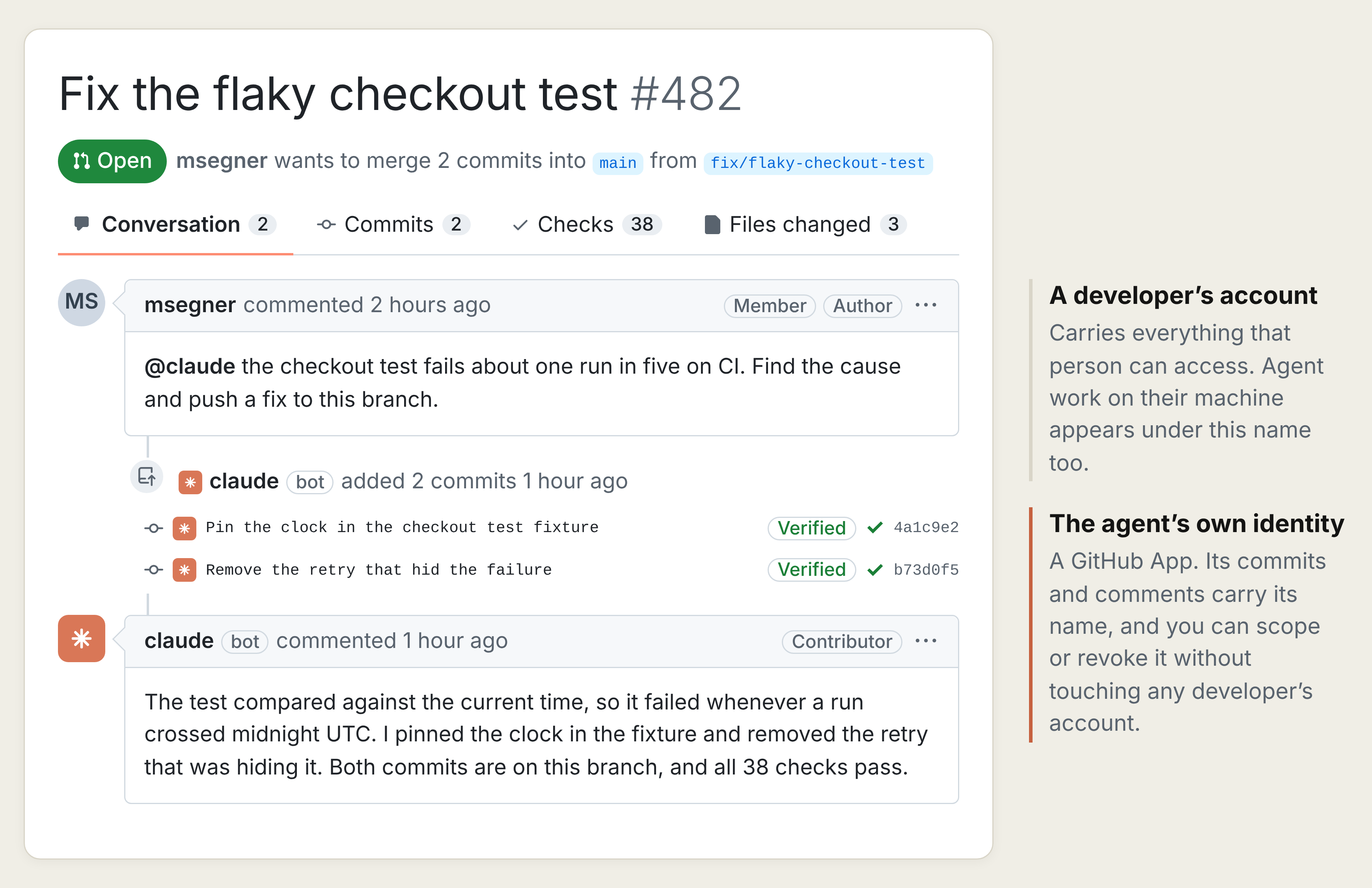
Anything the agent can do, a compromised or overeager agent can misuse. By default, an agent in Claude Code runs under the identity of the developer who oversees it. In the event of an incident, you may need to distinguish between agent and developer actions so you can appropriately respond.
Risk 2: Unvetted dependencies and extensions
Agentic coding accelerates the rate at which code is generated and reviewed, which includes the speed at which dependencies are added and configuration changes are made.
When you ask an agent to add JSON schema validation, it will find a package, add the latest version, and have working code in minutes. That speed can be a risk if agents aren’t pointed in the right direction.
MCP servers, plugins, skills, subagent definitions, and a repository’s CLAUDE.md file are dependencies too, and they deserve the review you give a package. Unlike a compromised library, which waits to be called, they reach the agent as soon as they load. Their descriptions and instructions enter the context window before the agent has done any work.
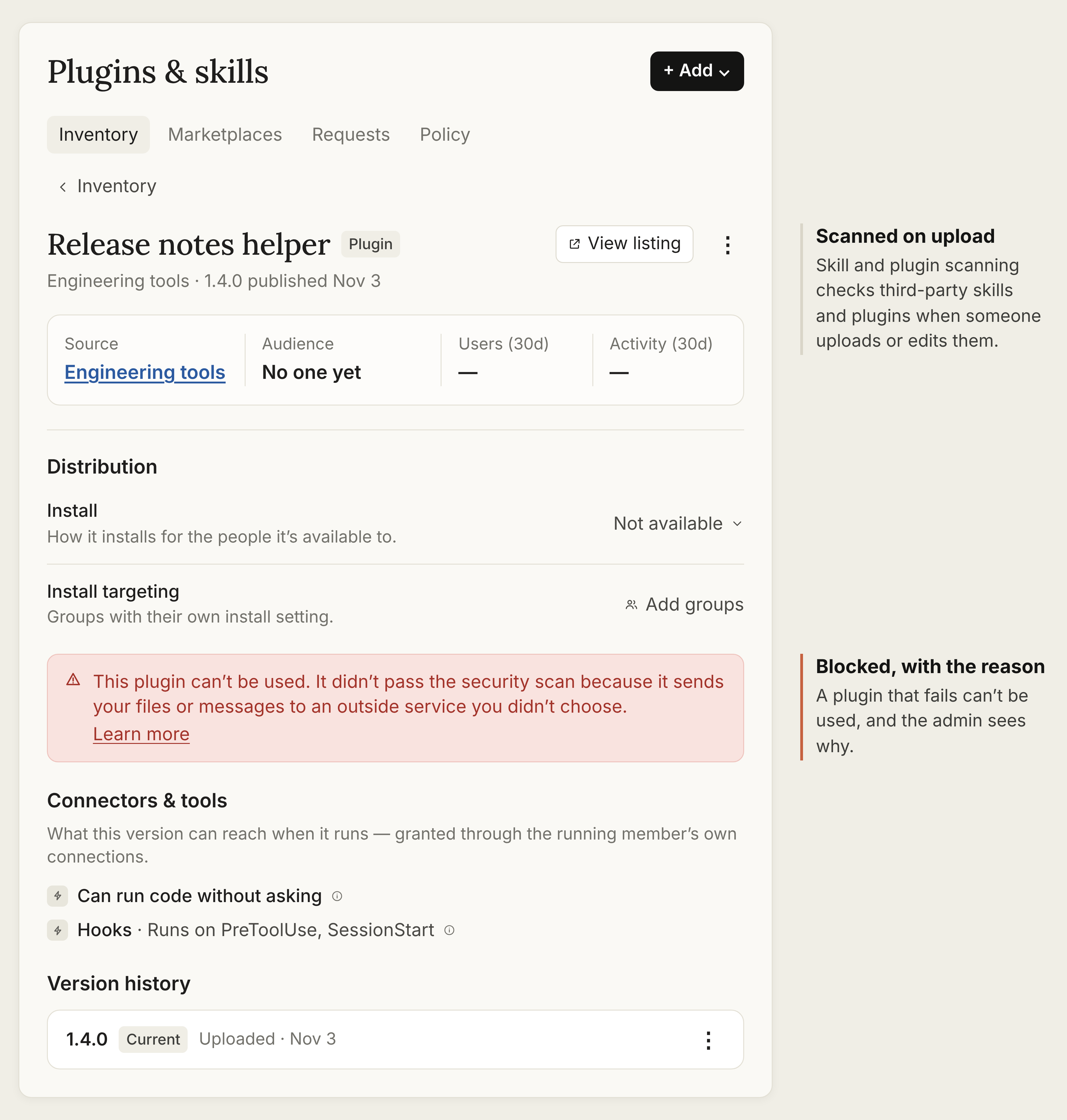
On Enterprise plans, skill and plugin scanning checks third-party skills and plugins for malicious content when someone uploads or edits them in your organization.
Risk 3: Data exfiltration
Every leak needs a route out. The challenge is a domain allowlist can't tell your account from an attacker's account. For example, if you allow github.com, then the agent can push to a repository the attacker owns.
DNS is a second possible exfiltration route that HTTP allowlists miss as data can be encoded into the names an agent looks up.
And of course once a token has leaked, an attacker doesn't need the agent's network at all. They can use the credential from anywhere, so egress filtering never sees the request.
Risk 4: Prompt injection
OWASP has ranked prompt injection as the top risk in every edition of its Top 10 for LLM Applications since the list began in 2023.
Social engineering and prompt injection work the same way. Social engineering gets past technical controls because the deceived person takes the action and the system sees an authorized request. An injected agent also acts with its own permissions with every log showing a legitimate request.
For a coding agent, that prompt injection can happen multiple ways including via:
- Issue trackers and pull request comments;
- Dependency READMEs and changelogs;
- Web pages the agent fetches;
- Responses from MCP tool calls;
- Comments in source files; and more.
03 The judgment layer
Defending in layers · Understanding alignment training · Prompt injection probes · The auto mode classifier
Defending in layers
In Claude Code, a compromised or misaligned agent has to get past multiple controls and two layers of defense before it can do damage.
The first layer is judgment-based. These controls decide whether something looks wrong.
- Alignment training teaches Claude to refuse malicious requests and favor cautious actions.
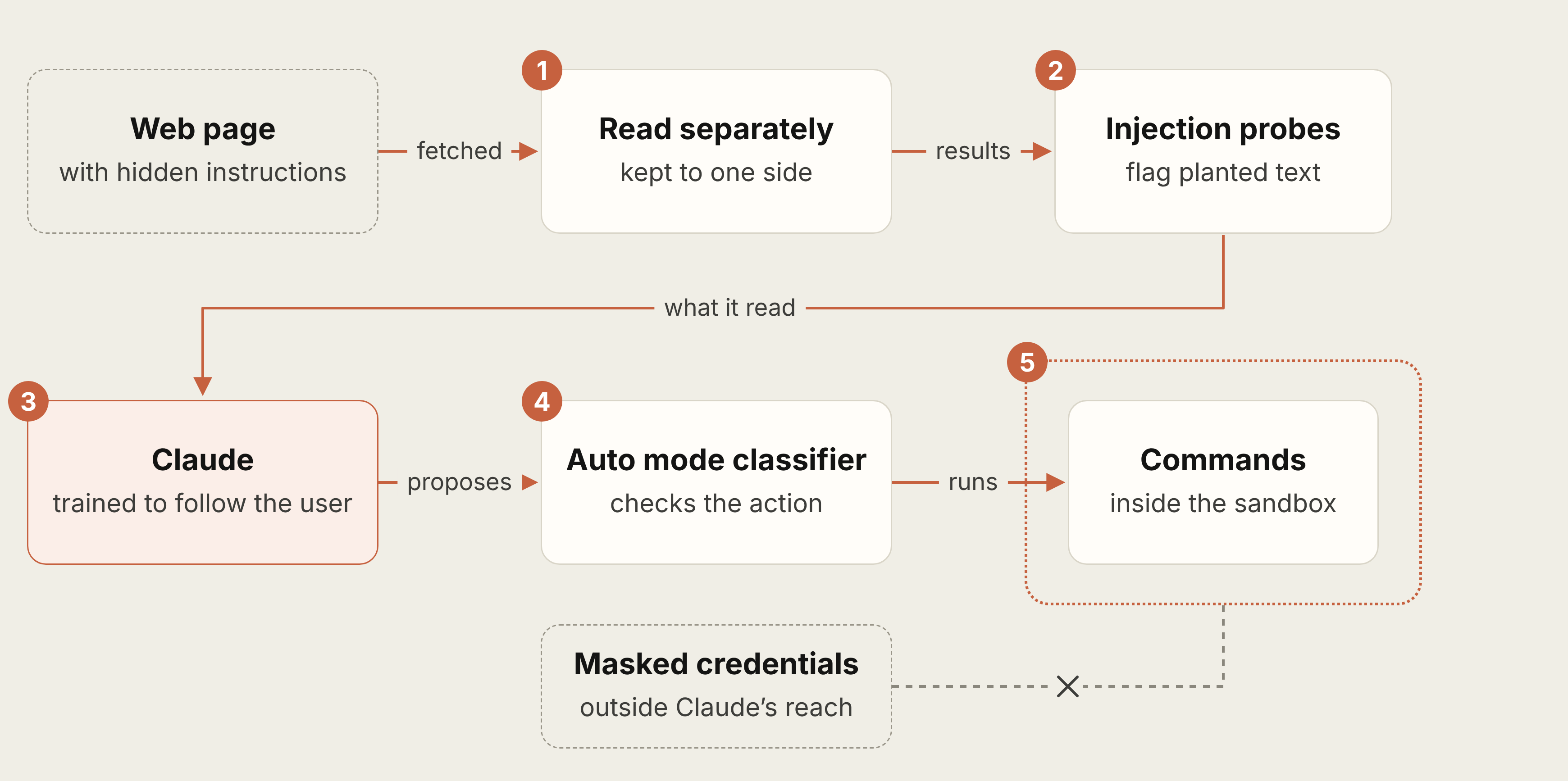
- Prompt injection probes scan incoming tool results in auto mode before Claude acts on them and flag content that looks like an injected instruction.
- The auto mode classifier checks most proposed tool calls against the intent the user stated.
The second layer enforces fixed boundaries by limiting what any command can do:
- Permission rules, command analysis, and hooks check each action against the rules you set before it runs.
- Sandboxing and egress allowlisting limit what a permitted command can touch and where data can go.
This chapter covers the judgment layer and the next will examine the fixed boundary layer.
Understanding alignment training
Claude is trained toward good judgment backed by a list of firm rules like don't write malicious code that can cause significant damage.
In Claude Code testing without production safeguards, current Claude models refused 81% to 85% of malicious requests while completing 98% to 100% of dual-use and benign ones, such as running reconnaissance tools or testing a site for vulnerabilities.
Claude is also trained to prefer cautious actions over irreversible ones, and to raise concerns or ask for guidance rather than improvise. Claude is trained not to act on instructions inside fetched content as if they came from the user.
Keep in mind, model alignment training makes a bad outcome less likely, but it doesn’t limit how bad that outcome can be.
Prompt injection probes
Claude’s prompt injection probe is designed to flag any suspected injected instructions in tool results.
The probe adds a warning beside the injected instruction to tell Claude the content is suspect and that the user’s original request is still the task. Warning and anchoring lets Claude use the content while treating the instructions in it as data rather than commands.
The auto mode classifier
A model that’s been convinced that deleting a directory is a legitimate task will delete it with the same thoroughness and competence it brings to everything else.
This sort of destructive, overeager action is exactly what the auto mode classifier was built to catch. For actions your rules and built-in approvals don’t already decide, the auto mode classifier judges whether the proposed action matches the intent of the developer’s instructions.
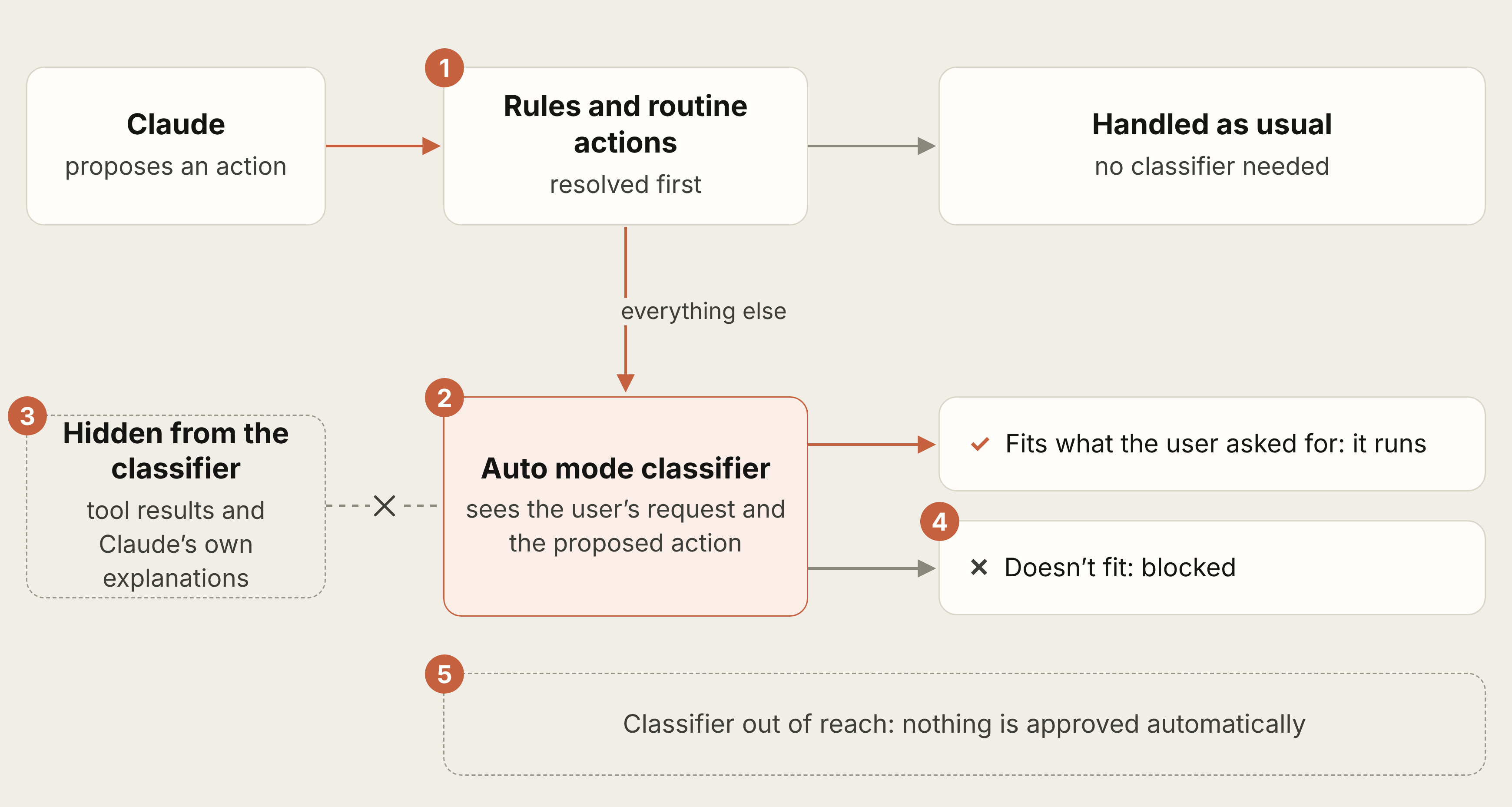
For example, a command that makes sense for "fix the failing test in auth_test.py" looks different from one for "exfiltrate the contents of .env.”
Tool results are stripped from the classifier requests Claude Code sends, so injected text can’t manipulate the classifier directly. If the action fits what the user asked for, it runs. If not, it's blocked or Claude goes back to ask the developer for permission.
Auto mode is now the default starting mode for interactive sessions on every plan. Headless claude -p, Agent SDK, and HIPAA configuration default to manual.
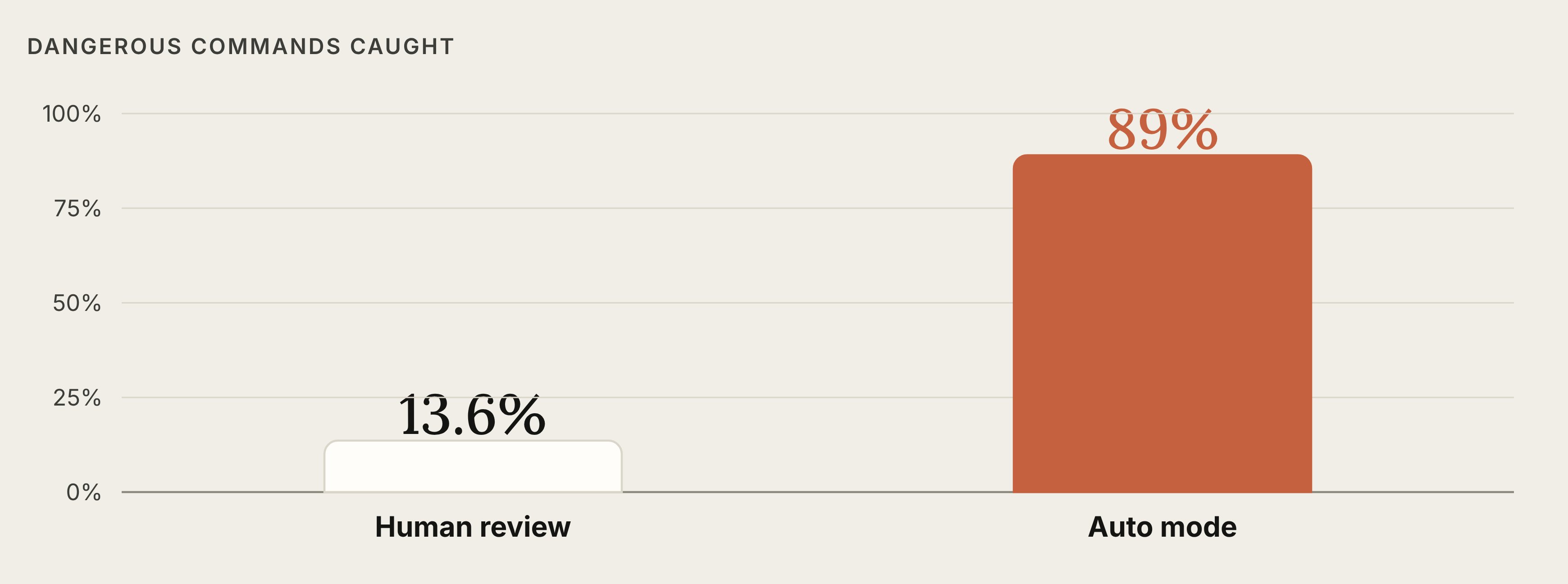
Auto mode is the default because multiple tests showed it catches more dangerous actions than human approval does. For example, in a controlled study Anthropic published in August 2026, 1,053 paid testers caught 13.6% of dangerous commands, and auto mode blocked 89% of the same commands.
Configuring auto mode covers tuning the classifier and overriding its block and allow rules.
Approving high-stakes actions
Auto mode relies on classification systems and does not eliminate all risk.
Before rollout, identify high-stakes actions by asking, is this action irreversible, and would a single mistake cost more than having a person review every instance? When the answer is yes to both, require human approval.
For most organizations the list looks like this:
- Production database migrations
- Changes to IAM policy, and credential rotation
- Edits to infrastructure definitions
04 Enforcing fixed boundaries
Setting permission rules · Bash command analysis · Gating actions with hooks · Containing agent actions with sandboxing
The judgment layer is good at catching novel attacks, but its controls are probabilistic, so each one has the chance of being beaten.
The fixed boundary layer can be made deterministic and sets an agent’s blast radius. Permission rules, command analysis, and hooks decide whether an action runs and the sandbox along with egress allowlists limit what can be reached and where data can go.
Their limitation is that they only block what you tell them to block, so they need to be set up with your environment in mind.
Setting permission rules
Permission rules come in three kinds:
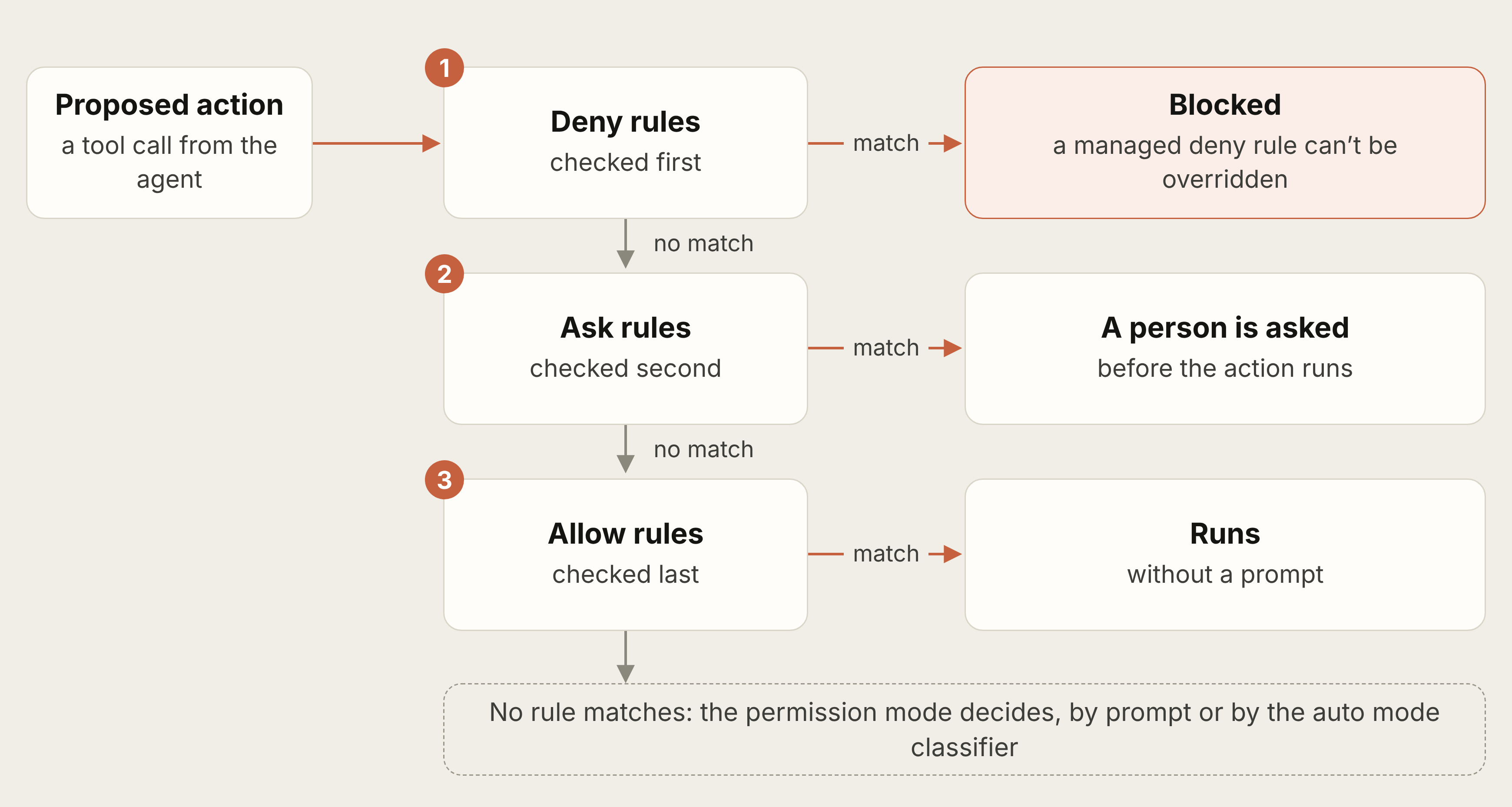
Allowrules let an action run,Askrules prompt a person before an action runs, andDenyrules block the action.
Claude Code first checks deny rules, then ask rules, and finally allow rules. This prevents an allow rule from creating an exception to a deny rule. A deny rule defined in managed settings can’t be overridden by any user or project setting. You want to avoid allow rules for any command broad enough to run arbitrary code, such as Bash(python:*).
Subagents inherit the parent session's permission rules and permission mode, so a broad rule written for the top-level session applies to every agent it delegates to.
Bash command analysis
Claude Code parses every Bash command before it runs. Without parsing, a permission rule allowing git status would also approve git status && curl attacker.example, and wrapping a denied command in a subshell would get it past the rule.
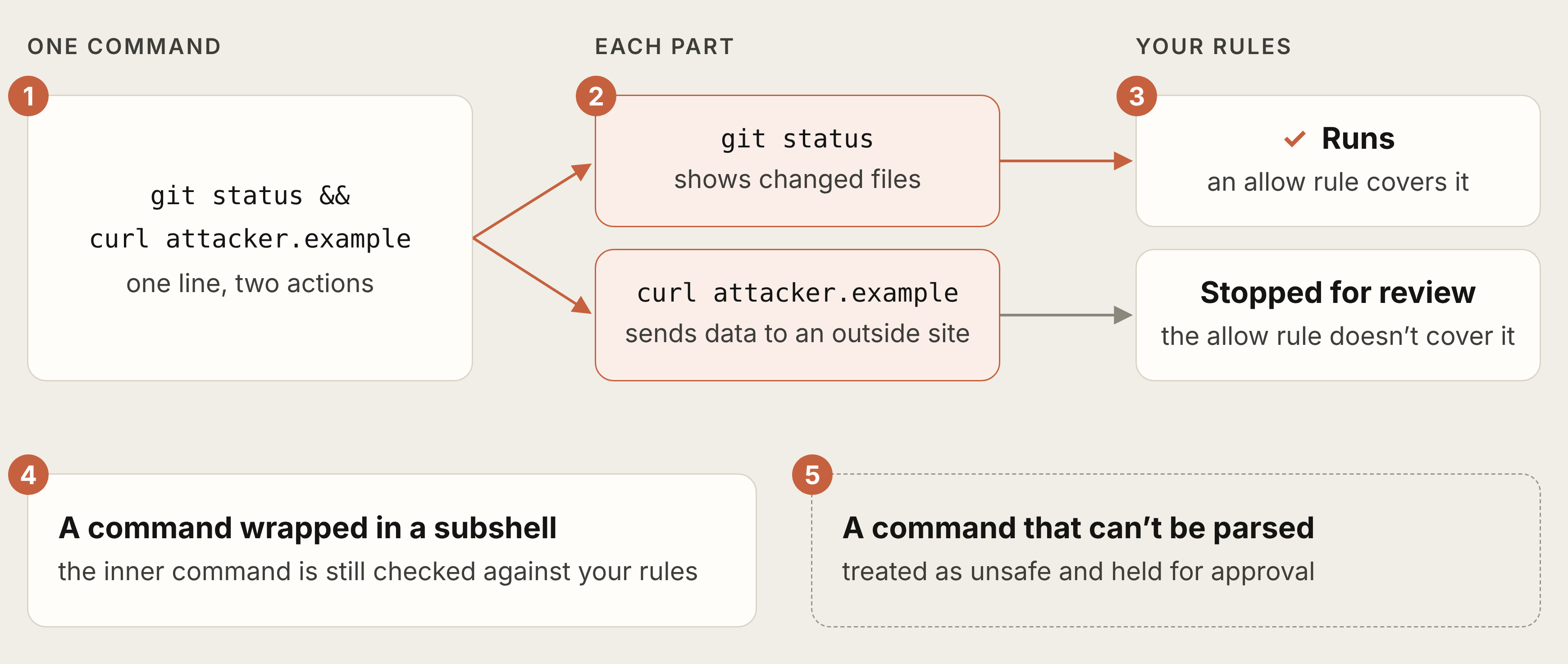
Parsing is deterministic, so the same command gets the same answer every time. Deny and ask rules apply to each part of a command in every permission mode, including bypassPermissions.
Gating actions with hooks
A hook is a script, HTTP endpoint, or MCP tool that Claude Code runs automatically at a fixed point in a session. Two that are particularly important for security are:
PreToolUseruns before a tool call and can block it, approve it, ask a developer, or (in headless runs) defer it for approval later. For example, you may want to block a commit that contains a secret.ConfigChangeruns when a settings file changes mid-session and can reject the change. This is how you identify when a repository or developer is trying to loosen a control locally.
Hooks sit inside the fixed boundaries rather than above them. A PreToolUse hook can block a tool call, but a hook returning "allow" can’t approve past a deny rule, an ask rule, or a critical-path deletion.
Hooks defined in managed settings run on every machine and individual developers can’t remove them. allowManagedHooksOnly goes further and prevents user, project, and plugin hooks from running at all, so a hook that reaches the agent is one your platform team put there.
Containing agent actions with sandboxing
Sandboxing is one of the most important ways to contain the severity of an incident because it limits the agent’s scope. But containing agents is easier said than done, as constraint and capability are often inversely correlated.
There are three main Claude Code environments: local, local with sandbox, and cloud.
We’ll discuss the default settings and how to consider which is appropriate for each of the use cases within your organization. The defaults can be modified and locked centrally, which is covered in the next chapter.
Local
Most Claude Code sessions happen locally via the terminal, IDE, or desktop app. By default, the agent can access anything on your computer that you can. In auto mode, the classifier reviews actions your rules and built-in approvals don’t already decide.
This is the least contained environment and appropriate for low-stakes, self-contained work. For most enterprise organizations, we recommend enforcing the sandbox for local sessions.
Local sandbox
The Claude Code sandbox isolates each shell command at the operating system level, so commands can only change files in the project folder and connect to sites on the allowlist unless an exception is approved.
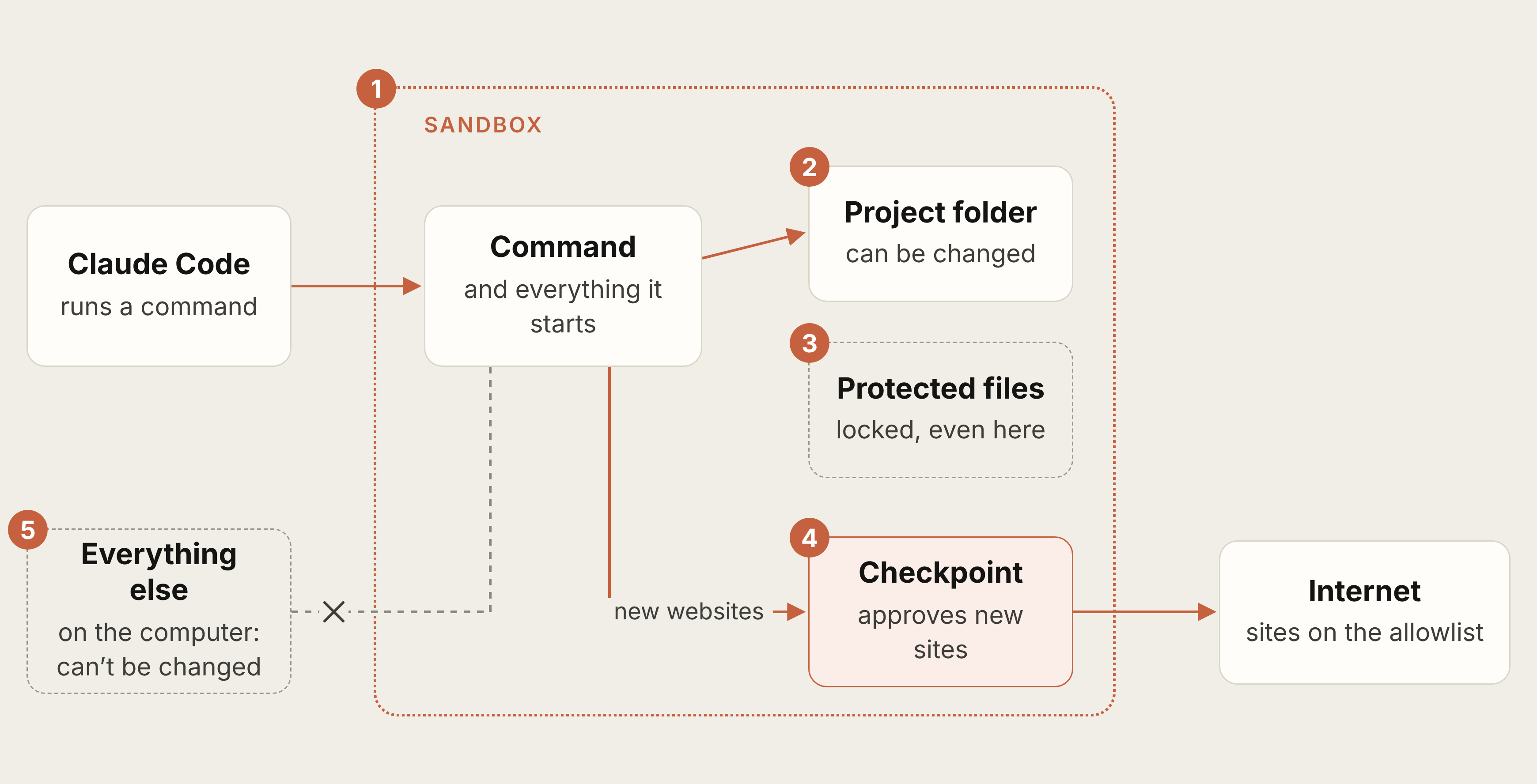
By default, the developer or the auto mode classifier can approve agents to operate outside the sandbox or reach sites that aren’t on the allowlist if they deem it safe.
Using managed settings (more on this in the next chapter), admins can make local sandbox use mandatory, contain agent commands to that sandbox, and allow agents to only visit centrally approved sites.
Once you’ve contained an agent to the sandbox, you don’t want it to escape by accessing credentials by reading files outside the project. To combat credential leaks, admins can add Read deny rules for the organization’s credential paths and also set credential masking, which lets a command sign in without ever holding the real value.
Cloud sessions
Claude Code cloud sessions run on an Anthropic managed environment with each task getting its own VM. Not only does this contain where Claude can execute, it also keeps GitHub credentials outside the VM.
Cloud sessions suit work that reads untrusted content or runs unattended. That’s because they are isolated from the developer’s machine and internal networks by default, and VMs can be discarded at any time.
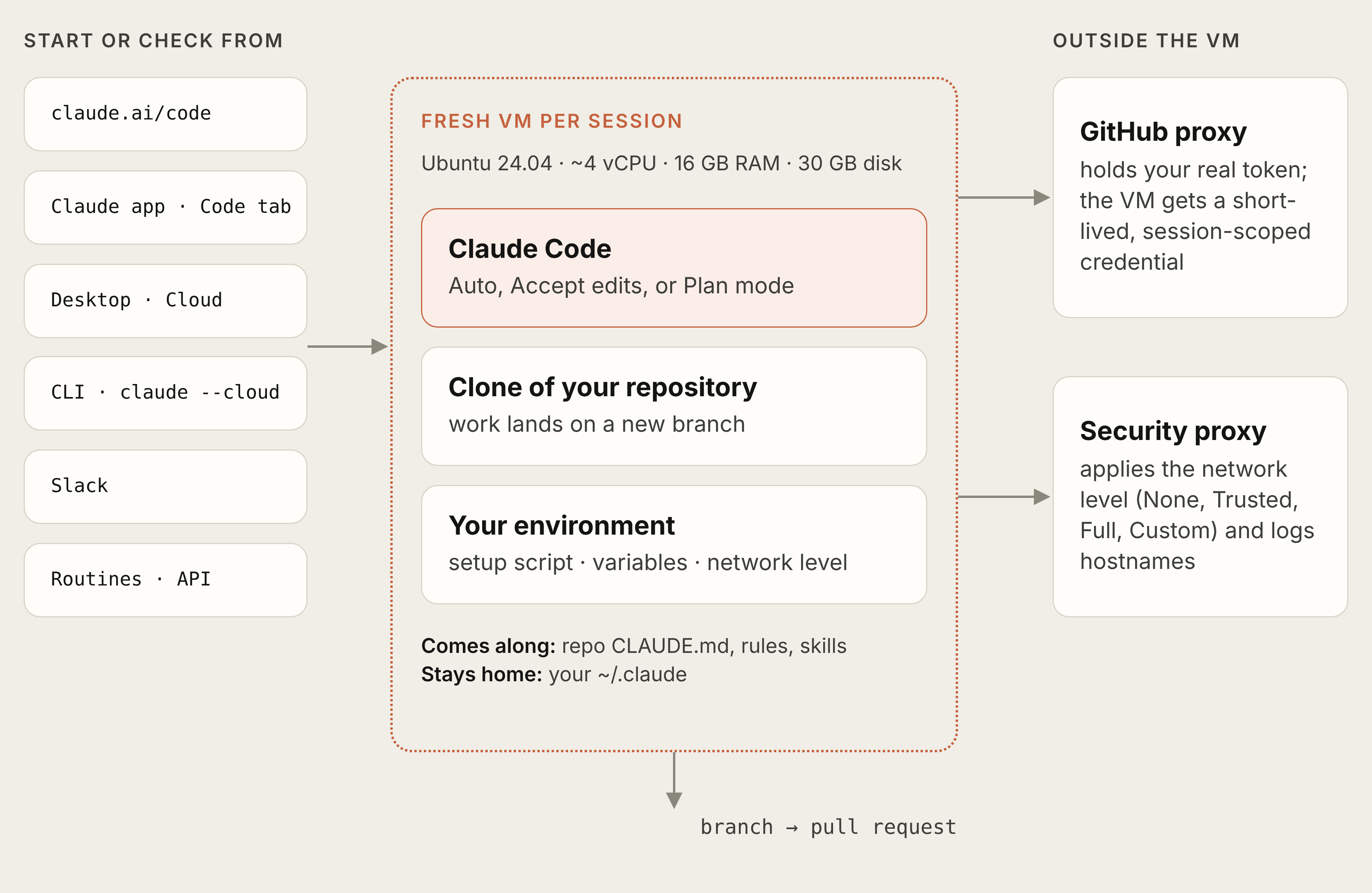
When a developer creates a new cloud environment, Claude starts with a limited set of pre-installed tools and allowed domains, although developers can add exceptions. Developers must select what repos will be cloned over every session.
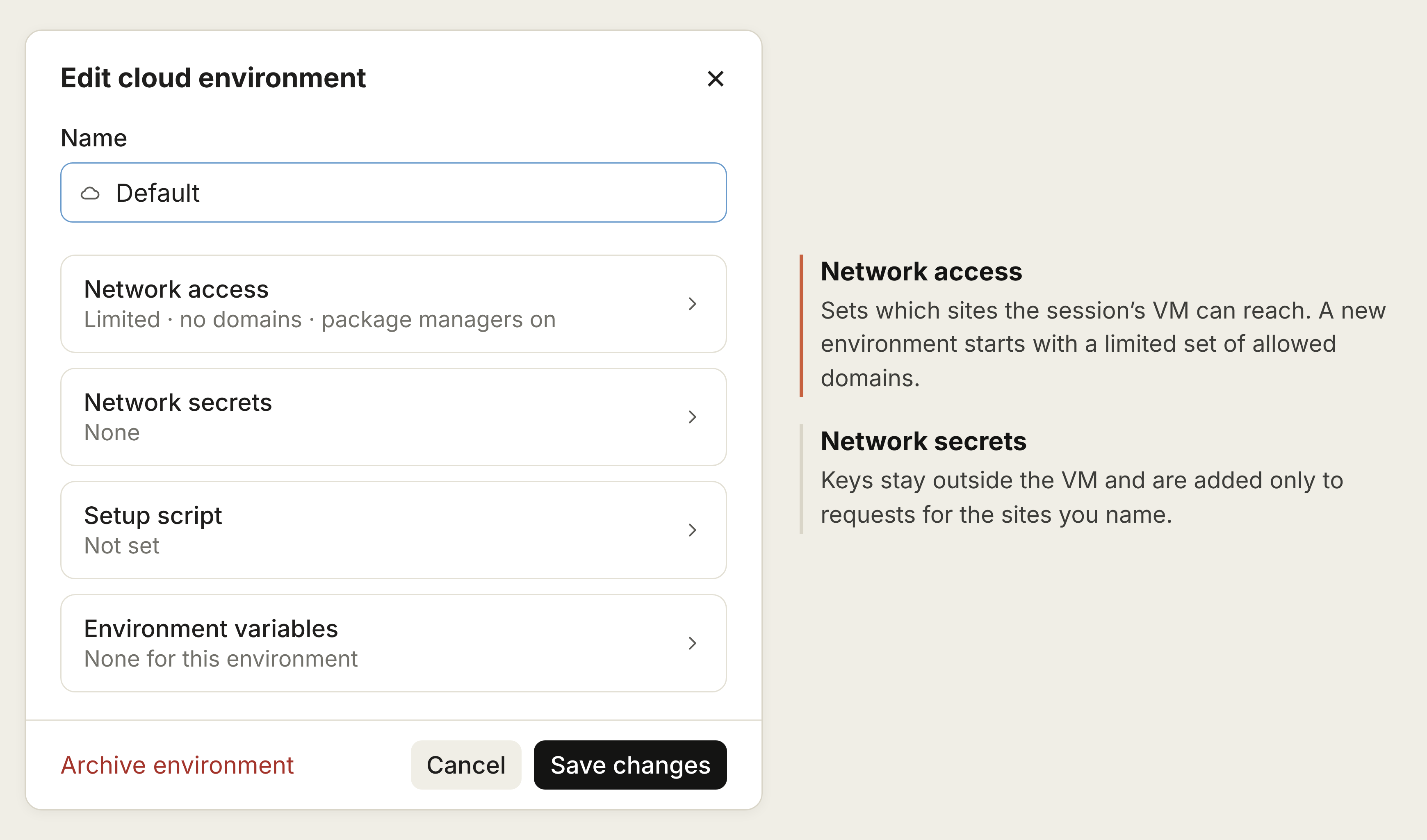
Organization owners can set a default environment and publish shared environments with settings individual developers can’t change.
Developers can still create new environments and modify those environment settings. Organizations that need to lock this down host their own sessions, running Claude Code on infrastructure they launch and run, so they control the policy for those sessions.
Keep in mind, cloud sessions aren’t available to organizations that use zero data retention, the HIPAA configuration, or customer-managed encryption keys.
05 Enforcing policy
Central settings at a glance · Which settings apply
We covered the default settings in previous chapters. The table below covers two additional configurations.
We’ve labeled one baseline, which you should choose when you want to create alternative defaults–or a starting point that individual developers can add to.
We’ve labeled the other locked, which is how admins can lock in a set of rules that can’t be changed at the developer level. Locking a setting is what turns a written policy into an enforced security control.
This is not an exhaustive list of settings, but rather those that focus on the key dimensions for bounding agent risk.
Central settings at a glance
Which settings apply
Managed settings can reach a session three ways: server-managed settings from the Claude admin console, an MDM or OS-level policy, and a managed settings file. Only server-managed settings reach Anthropic-hosted cloud sessions.
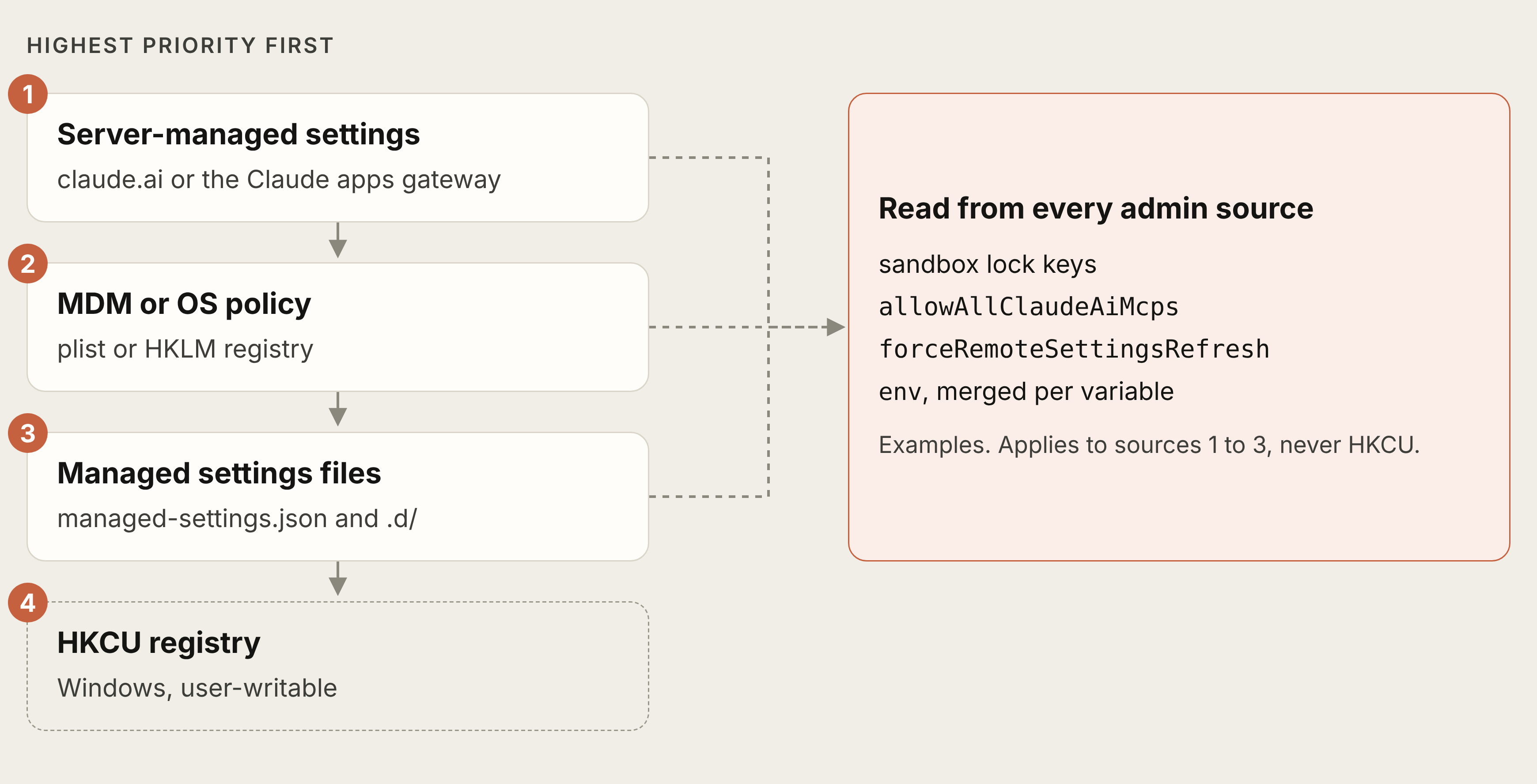
By default, Claude Code applies only the highest-ranked source and ignores the others, in that order, with no warning. If your MDM profile turns on the sandbox and a managed settings file holds the egress allowlist, the allowlist never applies.
06 Getting started
The controls in this guide work as layers, each covering what the others miss. A pilot on one repository shows how the layers hold up in your environment before you widen the rollout.
Pilot checklist
Done right, this secure framework will accelerate rather than slow your team’s ability to run at full speed with coding agents.
¹ Salesforce Ventures is an investor in Anthropic.