More visibility and control over Claude Enterprise for security teams
Claude Enterprise has new security and admin features, including a security center, generally available inference hooks, centralized management, and additional access controls.
To see how Claude is set up, the security center shows how your organization’s Claude settings compare with Anthropic’s recommended configuration. To apply your policies, inference hooks send prompts and tool calls to your data security tools for a check. To manage access, centralized management gives your company one admin console for company-wide settings, and new access controls let you sign members out through the Admin API, manage your IP allowlist yourself, and help prevent shadow IT by blocking personal and other outside Claude accounts in Claude Desktop on managed computers.
We also recently announced an Endpoint Detection and Response (EDR) integration, which runs your organization's sensor inside the unified Claude and Cowork virtual machine on the user's computer.
Security teams need to see how Claude is configured, what it does on company devices, and how data is handled as people work. These features give them that visibility and control.
Security center: review your Claude security settings in one place
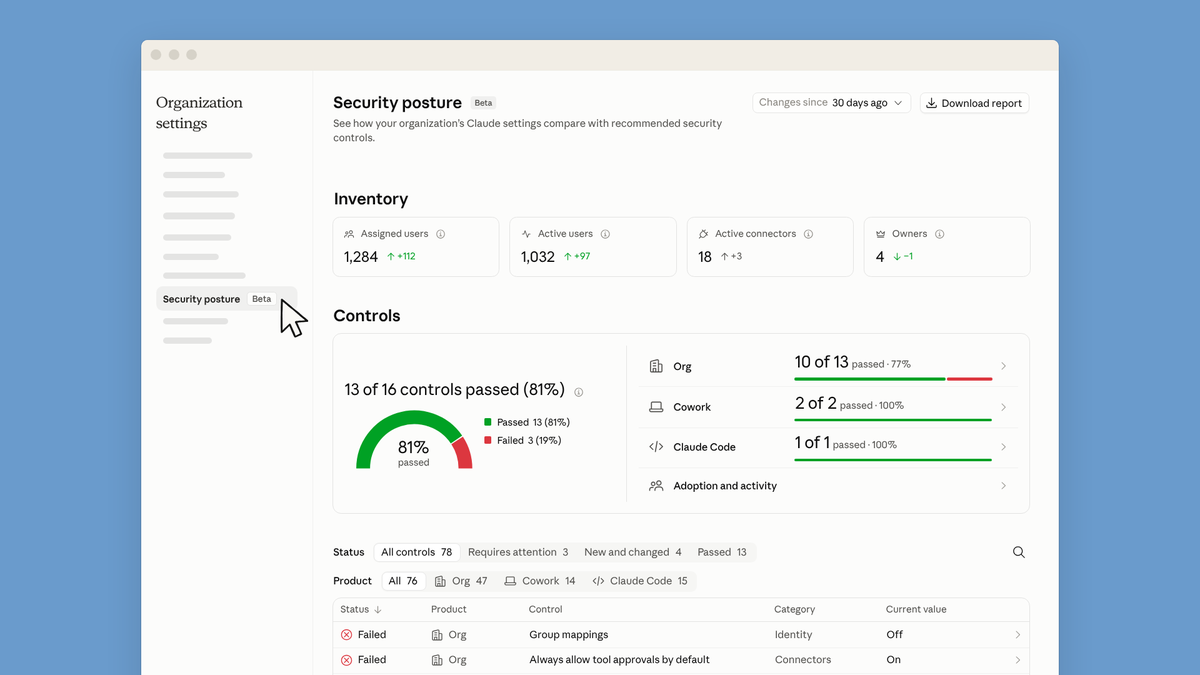
Security teams can review Claude's security settings for chat, Cowork, and Claude Code on one page, instead of setting by setting. The security center is a new page in Organization settings that compares settings with Anthropic's recommended configuration, so your team can see what to change and where to change it.
For each control, the security center shows the current value, the recommended value where there is one, and a link to the setting where you can change it. It also shows which settings are new or recently changed. The security center checks your configuration each time the page loads, so automatically checked controls reflect your current settings. Organizations with the Compliance API can read the same results through it.
Attestations give your admins a shared workspace for security reviews. They can work through the process together once, recording the current state of each control, accepting risks, and flagging issues in one place.
You can download the security center page as a report to share with auditors and relevant stakeholders. The report marks which controls the page checked automatically and which an Owner confirmed. The security center is guidance based on Anthropic's recommendations, not a certification or a guarantee of compliance with any law or standard.
Inference hooks
Inference hooks connect Claude to the data security tools your organization already uses, so your data loss prevention (DLP) and security policies can apply to prompts and tool calls as people work.
There are two kinds of hooks, both now generally available:
- Prompt hooks send prompts from supported Claude products to your security tool for a check.
- Pre-tool-call hooks check tool calls in supported Claude products before they run.
Hooks work with security vendors. Your team keeps the policies it has already written and applies them to Claude.
Centralized management: one console for identity and access across your organization
Centralized management gives your parent organization, which represents your company across its Claude Enterprise and Claude Platform organizations, its own admin console at admin.claude.com. Admins manage company-wide settings there once for the organizations under your parent, instead of from individual organization settings. These settings include single sign-on, directory sync (SCIM), domain verification, groups, and Compliance API keys.
The console shows every organization under the parent in one place and adds two roles. Parent organization owners can manage everything at the parent level, including who holds the owner and admin roles. Parent organization admins can manage everything except those role assignments.
Companies can also connect more than one identity provider, each with its own single sign-on and SCIM configuration. An acquired company can keep its existing provider, or your team can move to a new provider one domain at a time.
Each organization keeps its own members, roles, settings, and organization-level security controls, such as IP allowlisting, tenant restrictions, and session duration. A parent role doesn't grant access inside an organization by default, but Compliance API keys created at the parent can read data across organizations.
Access controls: member sign-out and shadow IT prevention
Security teams can now sign a member out of Claude with a single Admin API call, without removing them from the organization. The call ends that member's sign-in sessions on every browser and device, and apps like Claude Code have to sign in again. It doesn't end API keys, cloud sessions already running, or scheduled routines, and the member can sign in again afterwards.
Enterprise admins can now set up and manage their IP allowlist themselves, without going through Anthropic. An IP allowlist limits access to most Claude products to the IP addresses your organization approves.
Admins can now set the most-used Claude Desktop settings, with no device management push. To help prevent shadow IT, admins can also block personal and other outside Claude accounts in Claude Desktop on managed computers. Owners can also limit which workspace folders people can use with Claude.
Endpoint Detection and Response (EDR) in Cowork and unified Claude
When Cowork and unified Claude work locally, they run shell commands and code in an isolated virtual machine on the user's computer for additional protection. That isolation helps protect the device, and security teams have asked for the same visibility into the virtual machine that they have everywhere else on the endpoint.
Admins can now run their organization's EDR sensor inside the Cowork virtual machine. The sensor reports activity there to the same console your security team already monitors. This covers the virtual machine on the user's computer, not Cowork sessions in the cloud.
Admins set up the integration through device management on macOS and Windows. Each time the virtual machine starts, Claude verifies the sensor package's signature from your EDR vendor before installing it. Sensors run in detection mode: they report activity to your security team and don't block it. The integration works with supported EDR vendors, which are listed in the Help Center.
Getting started
These features are available for Claude Enterprise, with some exceptions during beta listed in the Help Center.
The security center is in beta. Inference hooks, including prompt hooks and pre-tool-call hooks, are generally available. Admins can manage both inference hooks and the security center in Organization settings.
Centralized management is also in beta. To start setup, an admin of any organization under your parent goes to admin.claude.com and proposes the parent organization admins. Admins of the other organizations review and approve, and the last approval completes setup. Setup can't be undone, so identify your parent organization admins before you start.
Signing members out through the Admin API and the self-serve IP allowlist are in beta. Owners can manage Claude Desktop settings in Organization settings, also in beta.
Endpoint detection and response in Cowork is in beta on macOS and Windows for Claude Team and Enterprise, and for the Claude desktop app on Amazon Bedrock, Google Cloud Vertex AI, and Microsoft Foundry, deployed through MDM for supported vendors.