Claude Design now stays on brand for daily work
Update, September 2026: Claude Design now works inside any conversation with Claude, including Claude Code and the Artifacts tab, in beta on paid plans. Slide decks have their own starting point in Claude Slides. Details in the launch post.
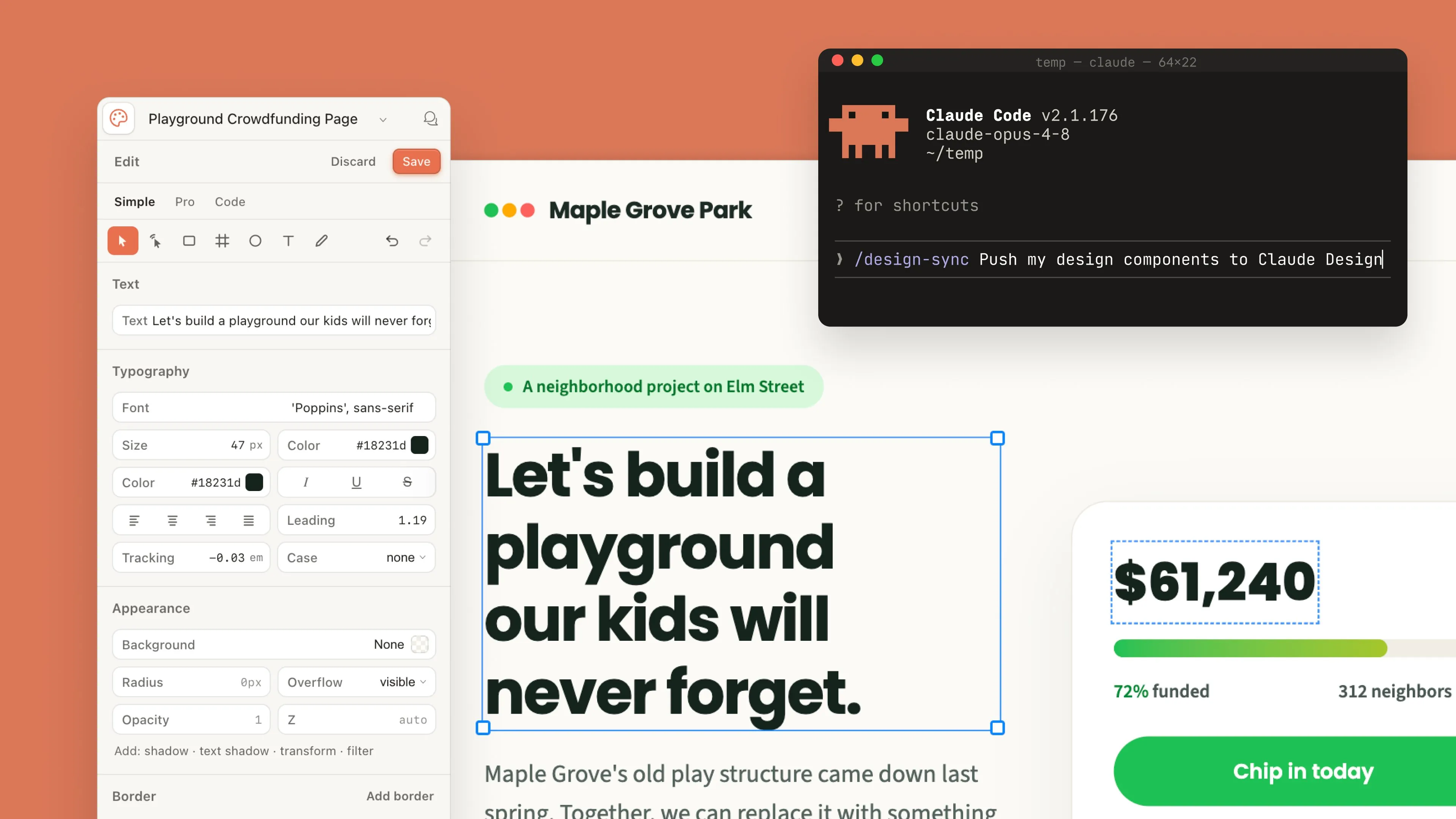
Claude Design now sticks to your design system across projects, works fluidly with Claude Code, lets you edit directly on the canvas, and connects to more tools you already use. It has a new home in the sidebar on the Claude desktop app; https://claude.com/product/design
Our goal remains the same as before: letting you explore more directions than a deadline usually allows and making the handoff to polish or build as easy as possible. That goal now serves a lot more people. Over one million people used Claude Design in its first week, and your feedback is shaping what we build next.
Build with your design system components
We rebuilt the design system import to give you more flexibility and increase precision. Bring in one or several design systems from a GitHub repo, design files, or raw uploads. Claude builds with your components, checks its output against your design system, and makes corrections before you see it. For larger teams, a new admin role can approve one standard system and lock down edits, so the work always matches your company guidelines.
Move between design and code
It's now easier to move between working in Claude Design and Claude Code while keeping your work synced. Use /design-sync to pull in your design system, so everything you build in Claude Design starts from your existing components. When a design is ready to become software, you can hand it off to Claude Code, which continues from your existing work instead of starting over from a screenshot.
Prefer to begin in Claude Code? Ask for a design from your session on desktop or in the terminal, or use /design to create, edit, and sync design projects. Import a design into your codebase, turn your code into a live prototype, or let Claude carry a project all the way through.
“"Claude design gives me the intelligence of frontier models with the functionality & capabilities of tried & true design tools. Anytime I'm working on design directions for Tenex's site, new brand assets, or presentations, Claude Design is the first place I go. The combination of approachable UX with strong taste & design instinct is why it's become a core part of my tech stack. And then the hand-off between Claude Design and Claude Code makes the process of prototype to production seamless." - Alex Lieberman, Cofounder, Morning Brew & Tenex”
Steadier for daily work
Our new editor gives you direct, fine-grained control over every element of your designs. New, rich layout controls let you drag, resize, and align elements. Hundreds of stability fixes make the editor hold up under real use.
Claude Design also now shares usage limits with the rest of your work with Claude, including Claude Code, so most people will get much more headroom to create, and those hitting limits will do so less often.
From the canvas to the tools you use
Export reliably to PDF, PowerPoint, or HTML, or send your work to the apps you already use—the list of connectors includes Adobe, Base44, Canva, Gamma, Lovable, Miro, Replit, Vercel, and Wix.

“Replit and Anthropic share a belief that anyone, anywhere should be able to bring their ideas to life with AI. Our mutual goal is to meet builders wherever ideas begin. The Claude Design MCP integration is a natural next step: builders can now design on-brand apps in Claude Design and build, refine, and ship them in Replit, all in one seamless experience.”

“At Lovable, we believe the people closest to a problem should have the power to solve it themselves. Through our partnership with Claude Design, we're excited to see even more people sketching out solutions for the world around them. Now they can seamlessly bring those ideas to life inside Lovable as production-ready applications.”

“Generating a deck is the easy part now; making it yours has always been the hard part. Connecting Claude Design to Gamma closes that gap, we built this with Anthropic so anything you design in Claude can move straight into Gamma, fully editable, the moment you want to take it further.”

“Wix has always been a home for designers - we're now excited to be taking that one step further with Anthropic. Claude Design connects seamlessly to Wix Headless, giving designers a straight path to Wix's backend infrastructure without leaving their creative process. The design community can now take their UX vision from first sketch to a fully functional, scalable product - exactly the way they imagined it.”

“Adobe’s mission is to empower everyone to create — wherever they choose to work. We're excited to build on our Anthropic collaboration, making it possible for anyone to start their concepts in Claude and use the Adobe for creativity connector to take social posts, presentations, flyers and more from draft to done in Adobe Express. Marketers can also turn an idea from Claude Design into a personalized, on-brand website or email campaign ready to deliver to customers in just a few clicks with Adobe Experience Manager and Adobe Journey Optimizer.”

“Miro is where teams come together to turn ideas into impactful decisions, on a shared canvas built for collaboration. Connecting with Claude Design means a concept can land on that canvas early, ready for the whole team to refine and build on together. It's been great working with Anthropic to make that first step from idea to alignment feel effortless.”

“At Vercel, we're focused on shortening the path from idea to production. That's why we like Claude Design. Designers and developers can take a first concept all the way to a polished, on-brand interface, then push it straight to Vercel to ship.”

“We've loved partnering with Anthropic and seeing how users turn an initial prompt in Claude Design, into real, usable work inside Canva's AI and design platform. Design is deeply human. People don't just want faster ways to create, they want their work to feel personalized and full of intent. Canva brings that layer to the process, helping people move from idea to outcome while staying in control of the design. We're excited to keep building on this.”
Getting started
Claude Design is in beta on paid plans. It's on by default on Pro, Max, and Team plans and off by default on Enterprise, where an admin turns it on in Organization settings > Artifacts for the whole organization or for specific groups. On Team and Enterprise plans, links are shared inside your organization by default. Ask for a design in any conversation with Claude, including Claude Code, start one from the Artifacts tab, or keep using claude.ai/design. Bring in your design system and create. No ideas? Ask for three directions on your next landing page, and pick the one worth refining.