Workflow improvement planner
Turn process pain points into structured improvement plans. Claude helps nonprofits define workflow challenges and design AI-powered solutions that save time and increase capacity.
Ask Claude to create an artifact that results in a comprehensive planning template that guides you through defining your workflow improvement opportunity.
I need help defining a workflow improvement opportunity at my nonprofit. Can you create a detailed artifact that asks me questions to capture all the important context about a process we want to improve?
The artifact should help me think through:
Make this comprehensive enough that when I complete it, it provides me with a file that I can give back to Claude with all the information needed to design a practical solution. Include clear instructions at the end for how to use the completed template with Claude.
Format this as a well-designed artifact that's easy to fill out—with clear sections, fill-in-the-blank areas, and helpful prompts that make sure I don't miss important details.
Upload files so Claude has real context to work with—not just a generic template.

Enable Extended Thinking to help Claude design a more comprehensive and structured planning tool.
Claude produces an artifact with fill-in-the-blank sections covering various aspects of workflow improvement planning. The template includes clear instructions for completion and detailed guidance on how to use your finished document with Claude to design solutions.
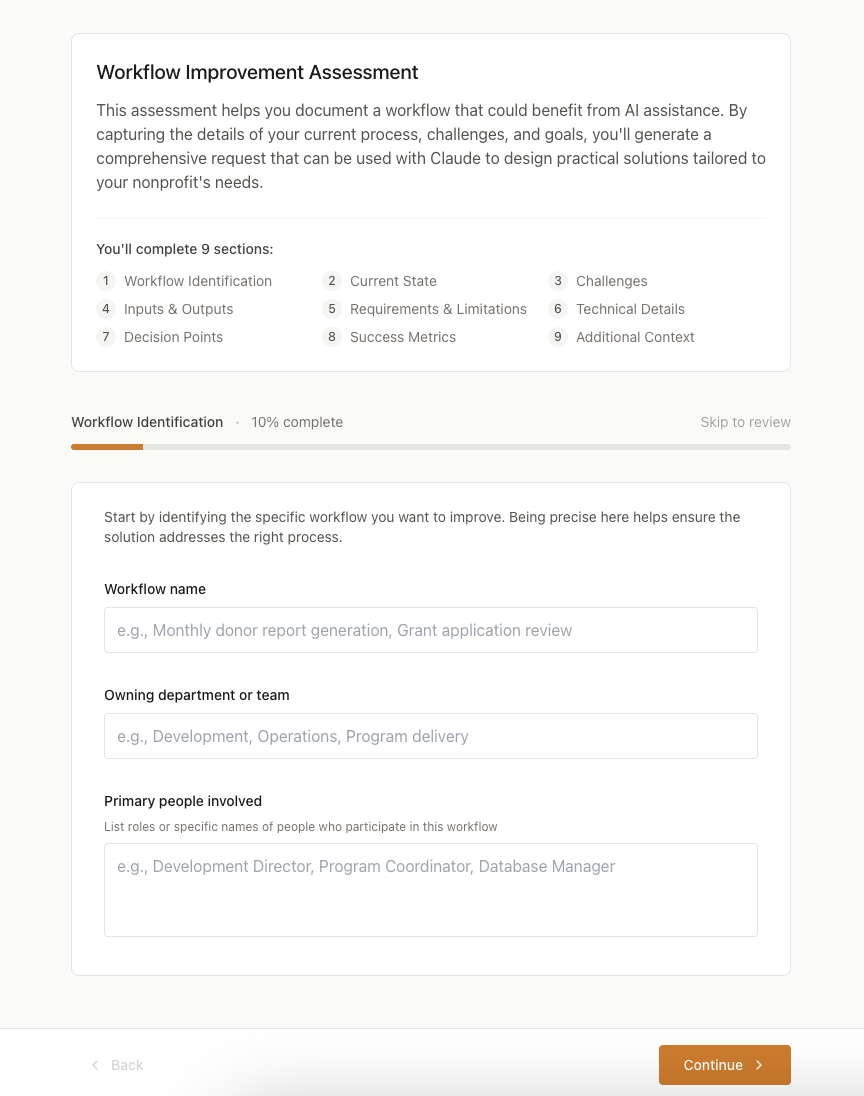
I've recreated the Nonprofit Workflow Improvement Assessment tool! This is a comprehensive multi-step form that helps document workflow improvement opportunities and generates a structured prompt for Claude.
View the Workflow Assessment
The tool includes:
The final section provides a formatted request that captures all the details entered throughout the assessment, ready to be used with Claude for workflow improvement recommendations.
Find out which parts of your process Claude can improve and what features make the most sense for your situation. See what the workflow would look like in practice with examples that match your needs.
I've completed the workflow improvement template. Please review my responses and help me understand: (1) How Claude can specifically address the challenges I've outlined, (2) Which Claude features would be most valuable (Extended Thinking, file creation, MCP connections), (3) A practical step-by-step workflow I can implement, (4) Any templates or examples I'll need.
Receive example prompts you can start using right away, along with any template files that would help. You'll also get instructions for connecting tools and a step-by-step guide to walk you through setup.
Based on the workflow improvement I've defined, create the specific materials I need to implement this: example prompts I'll use, any template files I should have, specific MCP connections to set up, and a step-by-step guide I can follow.
Adjust everything for your real constraints—whether that's free tools only, limited tech expertise on staff, or team members who are new to AI.
The solution you suggested sounds great, but I need to adjust for our reality. We can only use free tools, we don't have technical expertise on staff, and I need this to work for someone with limited AI experience. Can you simplify this and make it more accessible?
When completing the template, don't just say "monthly reports." Specify: "15-page donor report, created by 5th of each month, typically takes development director 8 hours, uses data from 3 different spreadsheets." This specificity helps Claude design solutions that actually match your scale.
The most effective workflow improvements come when Claude can see what you're working with. If you have a sample report (anonymized), a template you currently use, or example data, mention that in the template and upload those files alongside it. Claude designs better solutions when working from real artifacts.
Be honest about what's broken. "Takes forever" isn't helpful, but "requires manually copying 200 donor records from Salesforce into Excel, then reformatting each one" gives Claude specific inefficiency to address. The more candid you are about pain points, the better the solution.
Workflow improvements aren't just about speed. Note where quality suffers ("errors creep in during manual data entry"), where knowledge is trapped ("only Sarah knows how to do this"), where scaling fails ("works for 50 clients but breaks at 100"), or where stress peaks ("always a rush right before board meetings"). These insights lead to better solutions.
If your workflow involves pulling data from Google Drive, coordinating via Gmail, or checking Google Calendar, enable those MCP connections before working with Claude on solutions. This lets Claude design workflows that directly access your systems rather than requiring manual file exports. Visit the MCP directory to see available connections for nonprofit tools.