A guide to the anatomy of effective commerce agents
The architecture, latency & cost techniques, and eval practices for agents that make it easier to buy and sell online.
Over the past year, we've worked with teams across the commerce industry — retailers, marketplaces, travel, entertainment, and telecom providers — to build commerce agents using Claude.
These agents are in production, and enterprise customers have seen larger carts and more efficient seller operations when using them. They also share a simple architecture: Claude in an agent loop equipped with a set of skills, tools, and a strong eval suite.
This post is for the engineers and engineering leaders building these (or other consumer facing) agents. Part 1 covers the architecture, which you decide once. Part 2 covers latency and cost. Part 3 covers production: memory, safety, evals, and scaling the work across an organization.
What is a commerce agent?
We define a commerce agent as an agent that simplifies buying and selling across an online catalog.
Some agents face consumers: they search, compare, substitute, and assemble the order. That could be a retail cart, a travel itinerary, a mobile plan change, or seats held for a show. Some agents face the business: they answer questions about sales, run promotions and campaigns, and manage inventory and pricing.
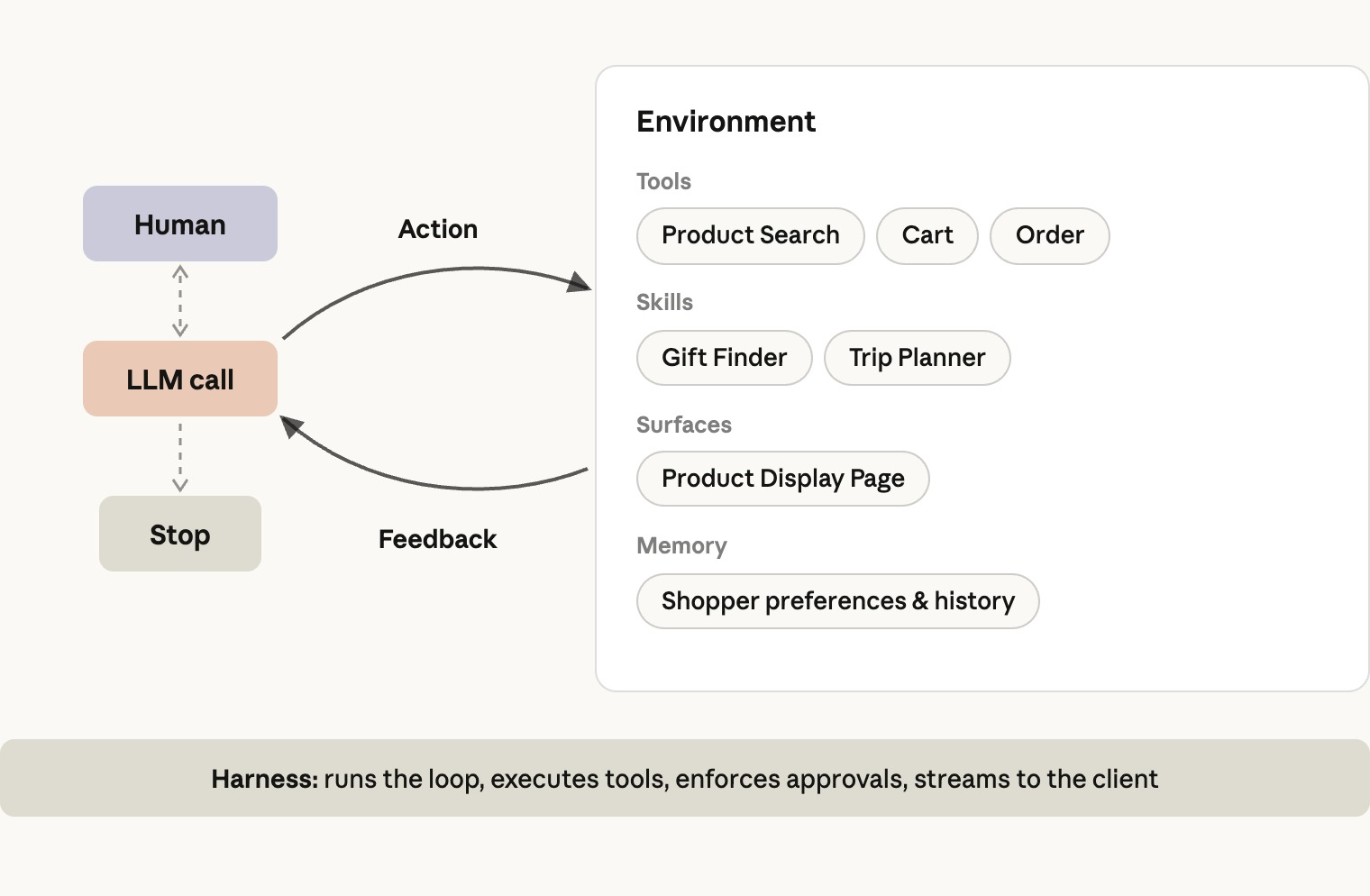
The core architecture is a model in a standard agent loop: reasoning about a goal, exploring context, taking actions through tools, learning procedures through skills, asking clarifying questions, and observing the results until the goal is accomplished.
There is no intent router in front of it that segments the conversation and no set of domain specific agents behind it.
Engineering context
Skills, not subagents
A commerce agent has to cover a wide range of capabilities across many categories and intents, which makes it tempting to create one subagent per domain.
In practice this proves suboptimal, because a commerce conversation is one tightly coupled session across multiple intents and turns, and requires considerable shared context.
In a subagent architecture, the orchestrator holds the cart or staged changes, the user's preferences, and the conversation history.
Every handoff to a subagent is a state-lossy operation, which often impacts the quality of the subagent’s response and, consequently, the overall response. On top of that, each handoff can cost several times the tokens and adds seconds of latency.
The domains also rarely separate cleanly. A returns flow might need the order history, the current cart, and the product catalog, meaning a subagent-per-domain approach either duplicates that access everywhere or hands off mid-task.
As models get smarter, they also handle longer context, more skills, and more tools, so the limits behind today's placement rules loosen with each model generation.
Instead, agent skills give you similar per-domain modularity and context control without the handoff tax, because the skill instructions load into the main agent that already holds the entire history.
In our comparisons across several enterprise deployments, a single agent with skills consistently has outperformed both the one-prompt-for-everything design and the subagent design on quality, and often at a lower cost and latency per task.
Where subagents do earn their place is when the orchestrator can call them as a tool for a narrow or self-contained task that would benefit from its own dedicated context window.
A common production example is a deep-research subagent, where the subagent searches and reads documents, writes and runs code, traverses data models, and hits dead ends. All the work happens inside one or more subagents, and only a compact answer comes back to the orchestrator.
The other exception is a domain that already has its own purpose-built agent. If your pharmacy or financial-services experience runs a dedicated agent with its own compliance surface, the right move can be a hand-off, where that agent takes over the task and works with the user directly through its own loop until the task is done.
The distinction is ownership of the conversation. A hand-off makes the domain agent the user's counterpart, while delegation keeps the orchestrator, bouncing the domain agent in and out within a single turn and degrading on every exchange.
System prompt or skill: decide by frequency
The main factor when deciding whether to put a set of instructions within a system prompt or skill is how often the agent will need it. Loading a skill costs a model turn, so anything the agent needs on most turns generally goes in the system prompt.
This does, however, depend on how your traffic is distributed, and what agent behavior your evals show. A good starting point is that anything relevant to a third or more of your traffic, whether anticipated before launch or observed in production, goes in the system prompt, and the rest goes in skills.
If a skill is predictable from a signal you already have, such as the page the user arrived from, we recommend injecting it from the harness before the first model call and skipping the extra turn to load the skill.
Critical instructions, such as safety and legal rules, brand constraints, and key user facts such as allergies, always go in the system prompt.
For commerce agents, this means product search lives in the prompt, since nearly every session touches it, and skills carry the long tail of features.
In our reference implementation, the shopping agent's prompt holds grounding, cart and checkout semantics, and presentation rules, and the following skills cover the rest: search-discovery, purchase-research, planning-goals, customer-care, and memory-personalization.
The merchant agent splits the same way, with performance-insights, catalog-listings, inventory-operations, pricing-promotions, and marketing-campaigns as its skills, one per operational domain.
Engineering agent tooling
Our post on writing effective tools for agents covers tool design in general. Two points have mattered most in commerce:
Build agent tools on top of your core systems and logic.
A commerce company already has search and ranking, a cart, a preferences and profile store, an inventory system, promotion and campaign engines, sales analytics, and more, each encoding logic tuned over years and seeing signals the model never will.
The agent's tools should call those systems, not reimplement them, and the tool boundary is where their logic ends and the model's judgment takes over.
For example, when the agent calls search_products, the results should arrive already ranked; its job is to decide which results serve the user's goal, how many to show, and how to present them.
Tool results are context.
Return the fields the model reasons with and drop the rest. Image URLs on every search row are the usual offender.
As needed, reshape the raw response inside the tool, including appending a next step when it isn't obvious from the data.
This is especially relevant for error scenarios, where the model benefits from instructions instead of error codes. For example, add an error instruction "Include a product ID when querying availability," instead of a generic 403.
The UI components are tools
Most commerce agent responses are UI components rather than prose, whether a product carousel, an itinerary, a seat map, or a chart. That means the agent has to emit a schema rather than text.
Teams sometimes start by prompting the model to emit custom tags and parsing them on the client-side. This stops working as the surface grows, because:
- The model isn’t as well trained on your markup as it is on tool calls so reliability drops as nested components get added. Well-formed data is not guaranteed just through prompting.
- The tag definitions live in the system prompt, so every new component bloats context and every edit risks regressions elsewhere in the prompt.
- Past conversations end up stored in a format only your parser can read, so loading history means either parsing raw messages on the client or keeping a second copy in a format that isn't native to the model API.
The pattern that has held up is to make each UI component a tool. The model calls present_products, present_itinerary, or present_plan_comparison with typed arguments; your server validates and enriches the call and emits an event; and your client renders it.
As the components are tool calls, they're already in the messages array in native format, so you don’t need to re-parse when you reload an old conversation. An example presentation-tool contract is illustrated below and in the reference repo.
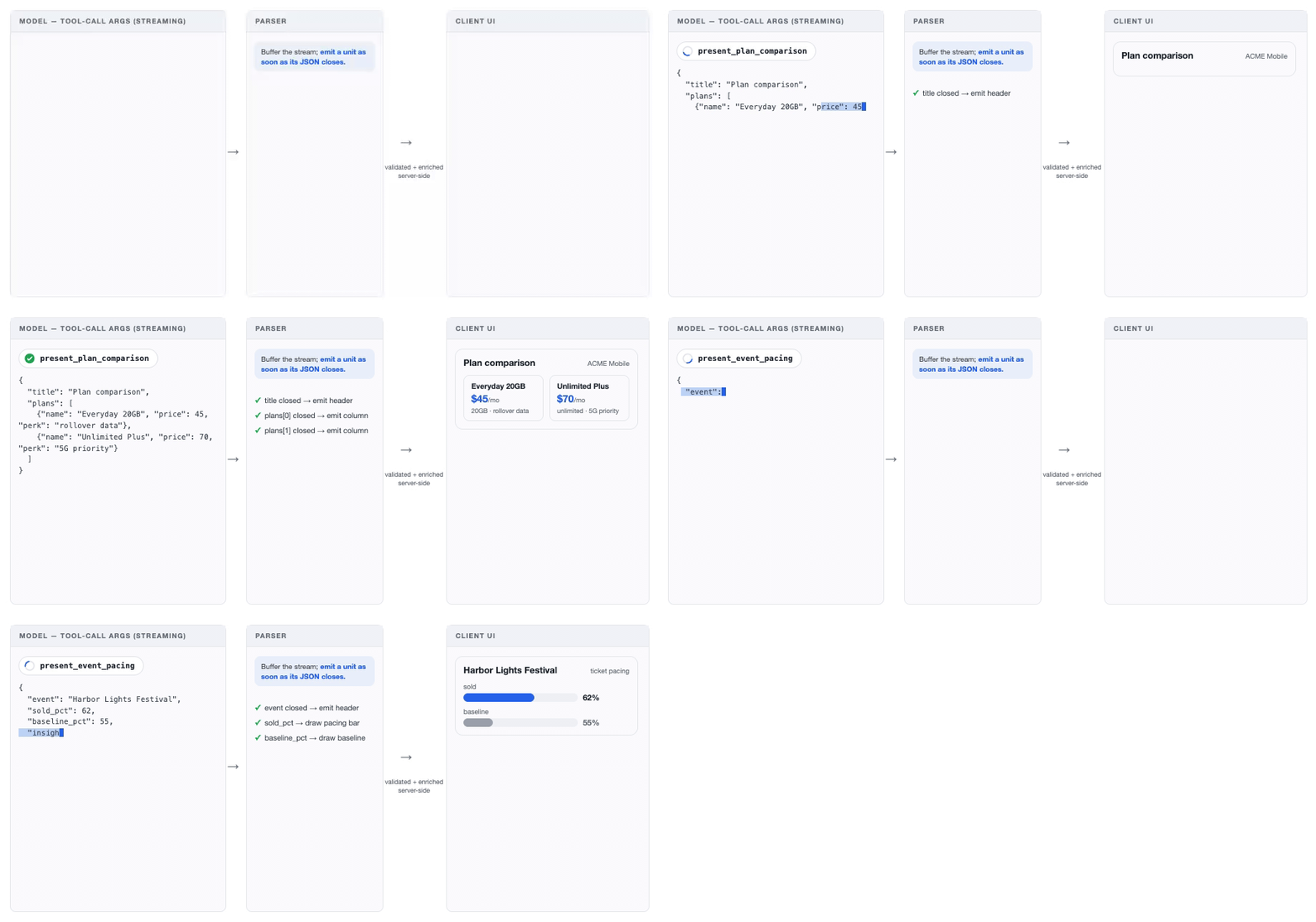
The tradeoff is streaming granularity. Each top-level argument of a tool call buffers on the server for validation, so the sub-components of a presentation tool arrive in steps even with streaming on. This impacts perceived latency.
To get a token-level stream, set eager_input_streaming: true on the tool definition, which skips the buffering and with it the server-side schema guarantee.
In our evals, schema violations are very rare on Claude Sonnet-class models and up, but wrap the call in a retry for the cases where one slips through.
Presentation tools also give the agent a record of what's on screen. When a customer says "the first hotel" or "the third one down on the left," the layout is in the messages array, in the arguments of the last presentation call.
For that to work, the arguments have to reflect the rendered layout, so structure them the way the UI is structured, as ordered rows and carousels rather than a flat list the client rearranges.
Latency matters in commerce, and consumer surfaces are the least forgiving. However, on agentic surfaces, what we have consistently seen move metrics like retention, engagement, and cart size is the quality of the outcome.
Whether the answer was relevant and the task actually completed was more critical to those metrics as compared to marginal latency gains.
So attack latency on two fronts. Minimize end-to-end latency through good engineering, and pair that with dropping perceived latency (since time spent watching an agent work reads as progress).
Every user has a latency budget, and the techniques below keep the agent inside it without spending intelligence to get there.
Minimizing task completion latency
Task completion latency is the sum, over model turns, of time to last token plus tool processing. That gives you three levers to work towards: fewer turns, faster tools, and faster tokens. These levers sometimes compete, so the thing to minimize is the sum rather than any one of them.
Fewer turns
Query complexity adds turns, and is generally out of your control. Model intelligence and relevant context help the agent get to task completion in fewer turns. Some of our key learnings in this area include:
- Load likely context up front. If the user opened the assistant from a product page, or a merchant opened it from a campaign dashboard, put that page's data in the session context. The conversation is likely about it, and answering from context costs no extra turns.
- Increase model intelligence. Smarter models can decrease overall turns in the completion of a task as the agent can more efficiently plan and issue its tool calls. That often outweighs their slower tokens. If your queries skew complex, or production shows more than about five turns per task, the faster model is frequently the smarter one. Which one that is depends on your traffic, so choose by sweep, as described under "Choosing the model" below.
- Have the model call independent tools in parallel. Commerce use cases often require many operations in parallel: be it searching for multiple products, querying many policy docs, or fetching records from many sources of sales data. Parallel tool ensures multiple independent queries don’t burn additional turns. Prompt the model to call many tools within a turn and return the results in one user message as an array of tool results (see the parallel tool use docs).
Faster tools
- Optimize the tool's own backend. Sometimes a tool genuinely fans out – a merchant agent with a "get today's snapshot" query reads sales, inventory, and campaign status in three independent calls. But we often see the tool boundary become the place where missing backend logic gets stitched together: an availability check that calls the catalog for the SKU, the inventory service per store, and the fulfillment service for cutoffs, then applies substitution rules and pickup eligibility in the tool's own code before answering. That tool is now overloaded with domain knowledge, hard to keep correct as the rules change, and is carrying logic that should sit in an upstream system. When you find yourself writing that logic in a tool, the fix is one backend endpoint that answers the question, and calling that with an agent tool.
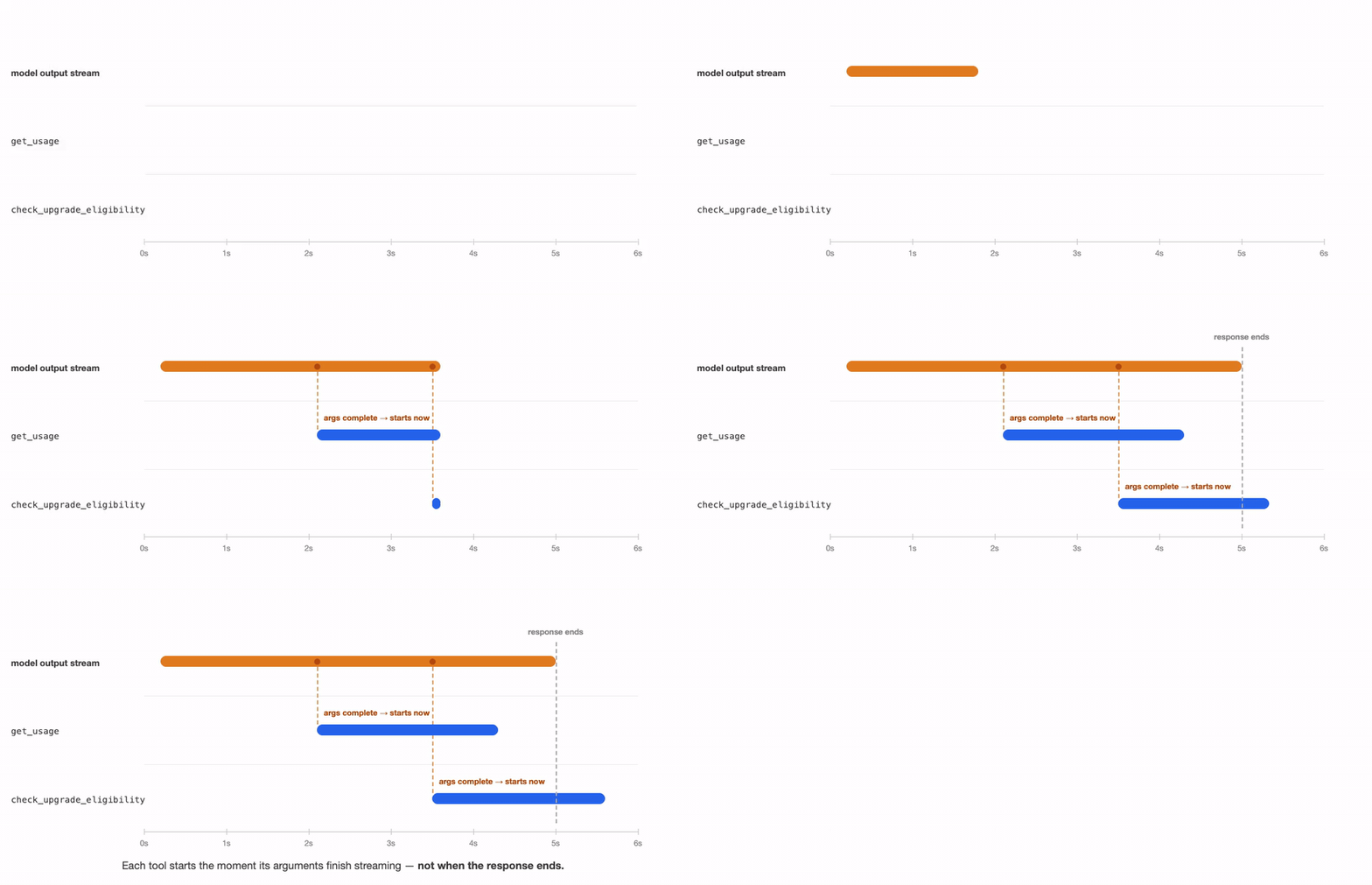
- Dispatch tools eagerly. Tool arguments stream out of the model like any other tokens, so the harness can execute each tool’s call as its arguments complete and process it while the model is still streaming other, parallel tools or content blocks. We've seen this take multi-second gaps down to a few hundred milliseconds, and the Claude Agent SDK does it by default. You should prompt the model to emit its slowest call first for maximum latency gains.
Perceived latency
Perceived latency is the time a user feels until the screen does something. It’s especially critical in consumer-facing use cases where any transaction friction impacts checkout rates and revenue. Two techniques shorten it without touching the model:
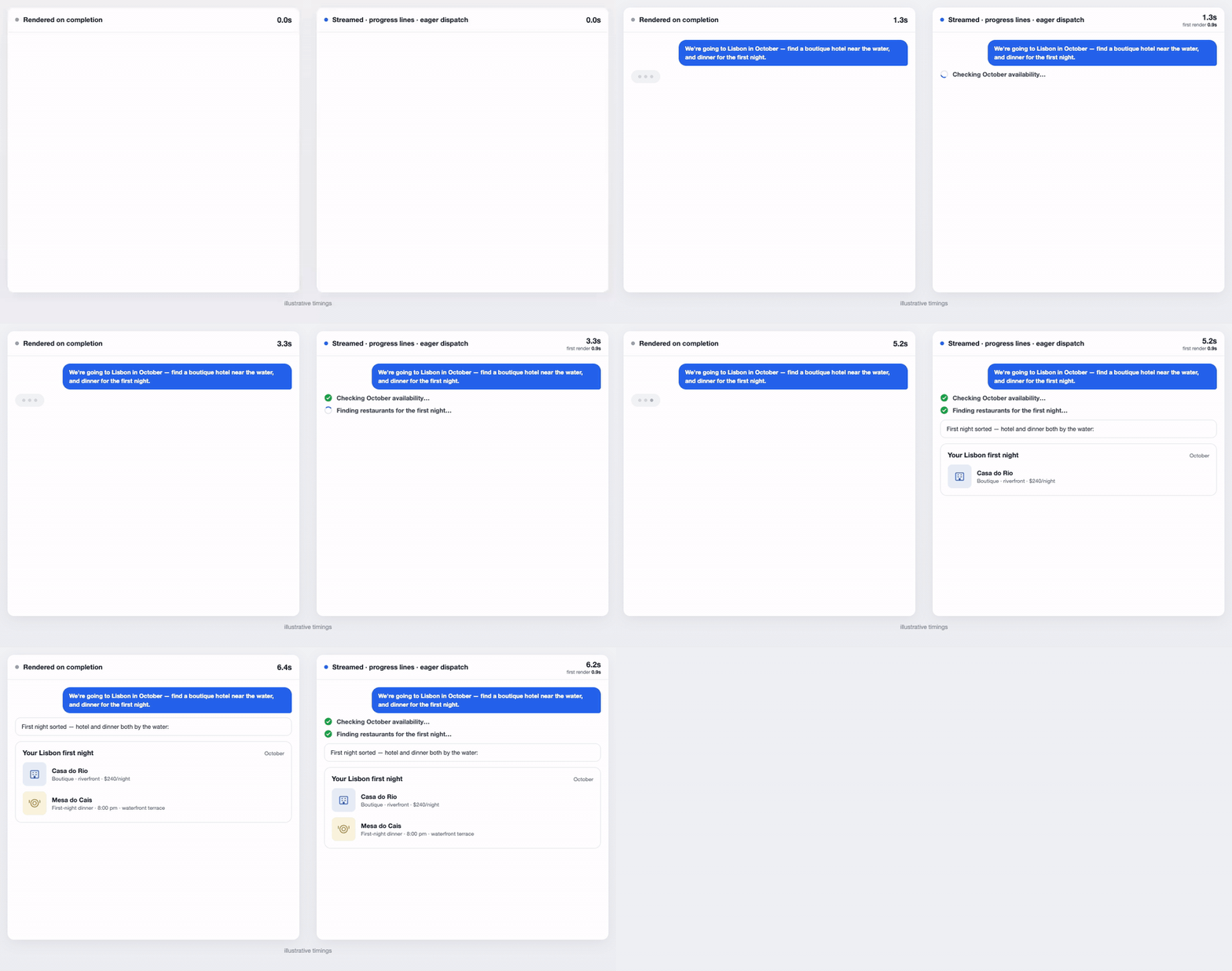
- Stream components as they form. A rendered commerce response is typically 500–700 output tokens, which without streaming is five or more seconds of a spinner. Send each parameter of a presentation tool to the client as it streams and render the page progressively.
- Show the work. While the agent is gathering context, render a short progress line for each step in plain language (for example, "finding hotels near the water"). You can build it from the tool's existing arguments (such as the query for a product search), or add an additional user_facing_message parameter tool that prompts the model to write the line.
Prompt caching
Prompt caching is your largest cost reduction candidate and commerce traffic is well-suited for it. Cached input token reads cost a tenth of fresh ones, and while cache-writes carry a premium of roughly 1.25x, a cached prefix pays for itself on its second use. In customer facing applications where volume is large, you have a unique opportunity to hit very high cache levels using the cheapest, default 5 minute cache expiration.
The best commerce deployments we've seen run at 90–99% cache hit rates, and that is the range to design for from the start. Our experience has shown cached token reads are also around 1.5 to 2x faster at ~100k tokens, with relatively linear scaling the more tokens there are.
Caching is prefix-based. A request reads from cache up to the first byte that differs from a previous request, so what matters is not just what is in the context but the order it is in. Think of a request as three segments, ordered by how often they change:
- Global: most of the system prompt and tool definitions, identical across every session. This is your warmest cache and, at scale, will likely not expire. Keep it byte-identical across turns and sessions and put a cache breakpoint at its end.
- Session: per-user context and conversation history, which differ across sessions but stay stable within one. This segment comes after the global one.
- Volatile: anything that changes within a session, such as the current time or the current page. Put it at the very end of the request, either as a tagged block in the newest user turn or, on models that support mid-conversation system messages, as a system-role message appended to the messages array. The most common mistake we see is a timestamp or the current page at the top of the system prompt, which silently breaks the cache on every request.
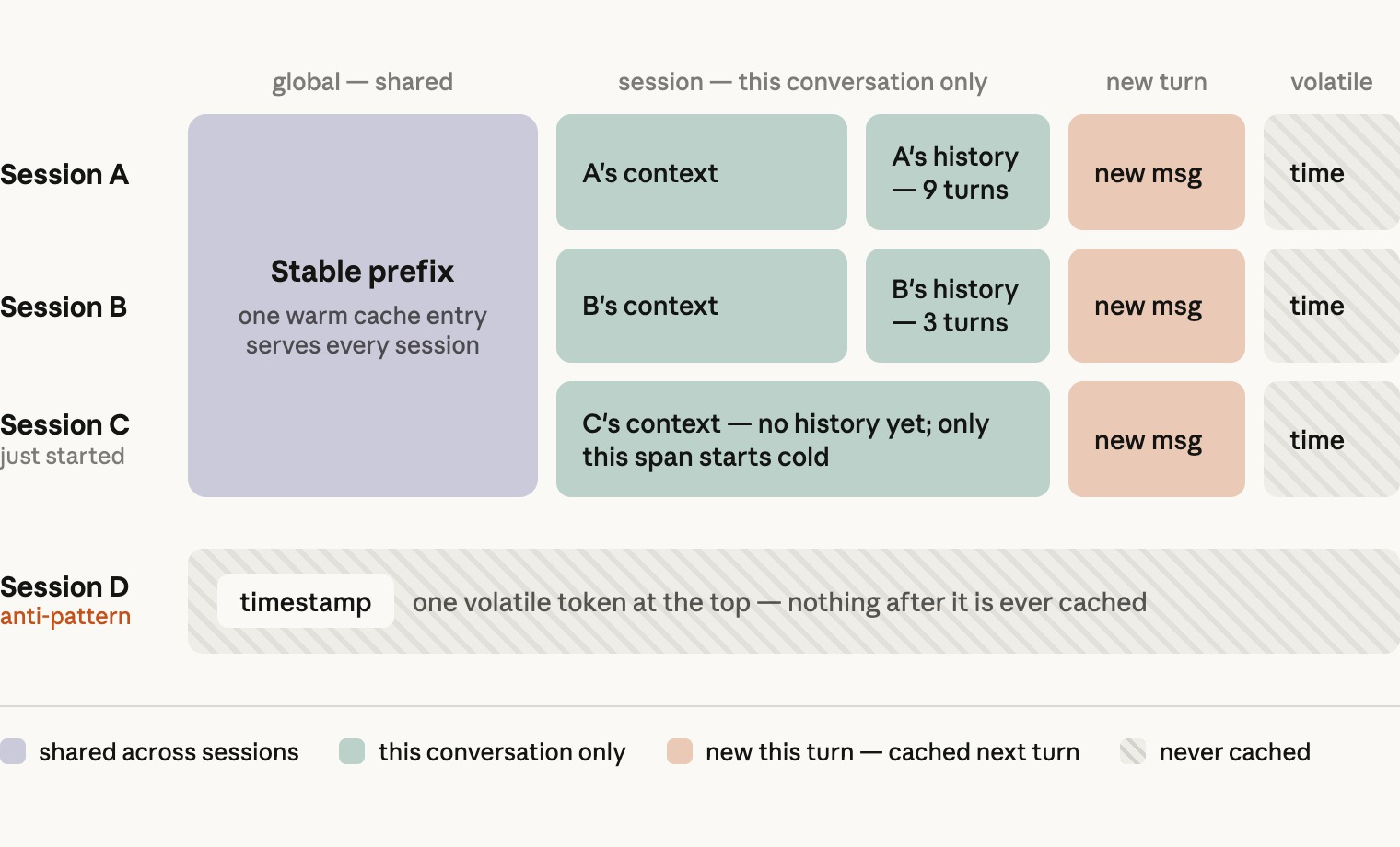
There are two implementation details to remember here. First, skills should be loaded as tool results rather than appended to the system prompt. The skill body then lands in the conversation prefix and is cached along with it.
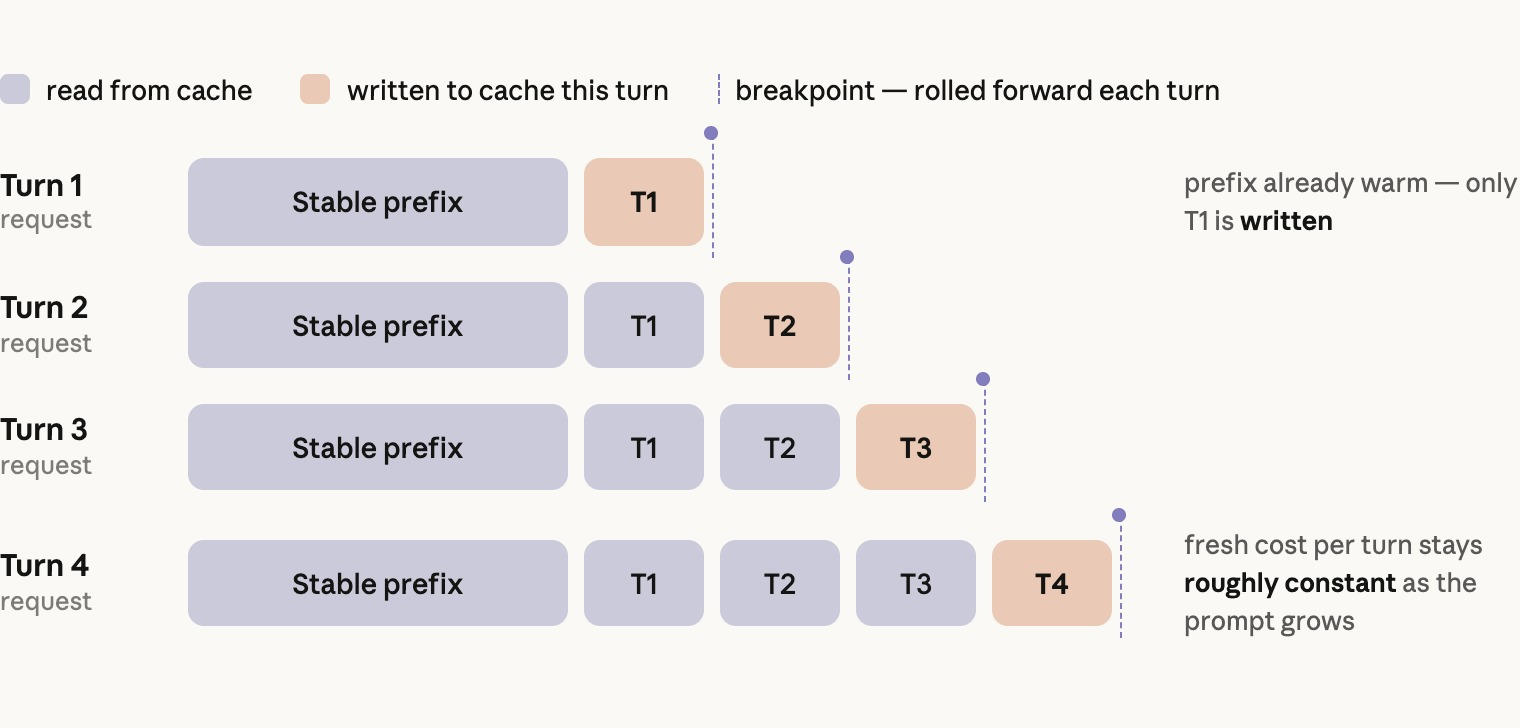
Second, roll your breakpoints forward in each turn: a request allows a limited number of breakpoints, so move the newest one to the end of each user turn. Each round then reads the accumulated history, including long tool results such as search responses, from cache.
Choosing the model and its configuration
Model size and the effort setting are the same tradeoff – intelligence against latency and cost – and you should choose both by measurement:
- Pick your metric and your floor. Pick the quality metrics your business runs on (task completion, answer relevance, grounded accuracy), the eval score you won't go below, and your p50 and p99 latency and cost budgets.
- Sweep. Run your entire eval suite across every model and effort level you'd consider. We recommend starting at Opus for merchant agents, whose tasks are analysis-heavy, and Sonnet for consumer agents, where latency weighs more. If you have production traffic, weigh the results by your real query mix. Then let the numbers decide. Sometimes Opus 5's lift on cart-driving tasks justifies the cost difference over Sonnet, and sometimes it doesn't.
- Read the results carefully. Two things regularly surprise teams. The first is that a prompt is tuned to a model, so a sweep run with one prompt may underperform other models that it wasn't written for. A smaller model usually needs instructions the current model infers on its own, and a larger one will follow instructions to the letter that the smaller one was ignoring. A few rounds of iteration on each candidate's failing cases is a cheap step before ruling any of them out. The second is that a more intelligent configuration sometimes wins on latency (most commonly on p90 and p99) despite slower tokens, because it plans its tool calls better and needs fewer rounds on the most complex requests.
Measure cost per completed task rather than per model call, since a cheaper model that needs more turns, or fails more often, is not cheaper. When the result is close, and the cost fits your per-task economics and latency, choose intelligence. Quality is what drives adoption and retention, and allows for room to build for the next 6 months as models become better.
Lastly, we talk about what gets an agent through production: memory, safety, evals, and scaling the work across an organization.
Memory that survives the session
The relationship and interactions you have with your customers matter. Memory is what lets an agent pick up where the last conversation left off instead of starting from nothing. A shopper who mentioned a nut allergy in March shouldn't have to repeat it in June, and a merchant who checks the same three campaigns every Monday shouldn't have to name them each time. Long-term memory, the facts that should survive across sessions, is a system you build and it has three parts: how facts are stored, how they are written, and how they are read.
Storing memories
Memory belongs in your systems, not in the model.
A flat markdown profile works when profiles are small and the agent is the only reader. Most production commerce agents outgrow it, and the practical replacement is the database you already operate. A fact is a small typed record: a key (such as shoe_size, default_store, preferred_report_cadence), a short value, a category, and the session it came from. Some keys you decide up front and every user gets; the rest the extractor discovers. A database stays queryable as the store grows, lets you build deterministic behavior on specific attributes, and joins to the user data you already have.
For merchant-facing agents, key memory by person rather than by account. Merchant logins are often shared between operators, so each operator needs their own profile, and reads have to respect that operator's permissions: a store manager's agent should not recall a fact a district manager stated.
In the commerce domain, agent memory holds personal data. The facts worth remembering are often the most regulated ones, and the rules between jurisdictions differ. Treat memory as a data-handling design problem and not just a storage one. In practice that means four things:
- Decide which types of memories you are willing to hold. Enforce that at the write path, with a validator that every save goes through, rather than in the prompt alone.
- Give users a way to see, correct, and delete what is stored. Wire deletion into your account-deletion and data-request flows.
- Set a retention period. A preference from a few years ago is likely to be outdated, so a retention period helps keep memory facts fresh.
- Memory should be a per-deployment switch. This allows regions that can't take on these obligations to run without it.
Writing memory
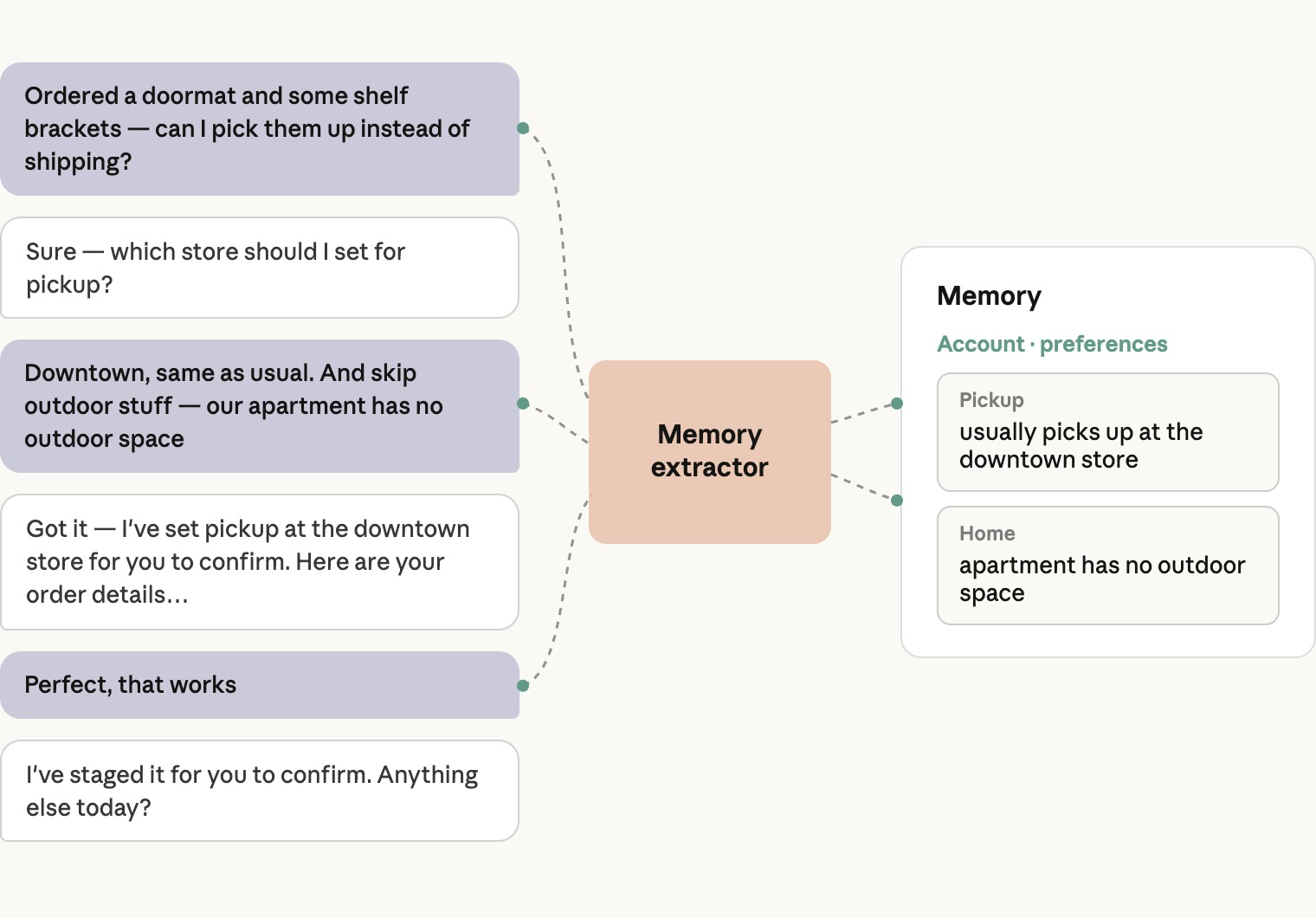
Write memory asynchronously. At the end of each turn, or every few turns in a long session, an agent in a separate thread or process reads the conversation and creates, updates, or deletes facts in the store, keeping its own working context as the session goes on.
It adds nothing to the conversation's latency, and achieved 13% higher fact recall on our internal commerce memory eval suite.
The obvious alternative, a tool the agent calls to save a fact, is the wrong one for a latency-sensitive commerce agent. Every save is a tool call inside a user-facing turn, and unless the whole store is in context, a save needs a read first to update or dedupe, which is a round of its own.
It also puts one more decision in front of the agent on every turn, and in our evals that competition for attention showed up as missed memories.
Separating the extractor also lets you prompt it precisely. It reads only the user's and the assistant's text, never tool results, so a product description or a review can't become a fact about the user. Its prompt says what counts as a fact — a stated size, a dietary constraint, a fulfillment preference, a merchant’s usual materialized views — and what doesn't, such as anything from a listing or a one-off detail.
Reading memory
Read memory in three layers.
Since memory is per-user context, all of it goes in the session segment, below the global cache breakpoint.
Safety: enforcement lives in the harness
The prompt is where safe behavior starts, but in commerce it can't be where safety is enforced. The failures are financial and often irreversible, and a prompt rule is one injection or one bad sample away from being skipped. Every rule below is enforced in code, on both the consumer and the merchant agent, and defined once so every runtime shares it.
The model stages; a person or a policy applies
No model tool call moves money or changes the business. Order placement, payments, refunds, price changes, and campaign launches all end in an action the harness controls instead of the model.
On the consumer side this is structural: the checkout tool renders the cart with a button to place the order, and the backend interface the agent calls has no charge method at all.
On the merchant side, every write tool produces a staged change with a server-generated ID, and apply_change succeeds only for IDs that have been approved through a real surface: a button in the operator's portal, a confirmation in the CLI, or the platform's own tool-approval prompt when the agent runs on Managed Agents.
The guardrails are re-checked at apply time against current limits, not the limits in force when the change was staged. Whatever the surface, the shape is the same: the model's most dangerous action is to propose, and the approval routes through the maker-checker flow your business already uses for that kind of change.
Writes and renders accept only server-issued IDs
The harness keeps a per-session record of every ID the server has handed the model, and that record is the only key any write or render will accept.
The cart accepts only product IDs the server returned to this session, and the merchant tools accept only listing and campaign IDs the agent has actually read. An ID that arrived any other way — hallucinated, pasted by a user, planted in a review — is refused before the backend sees it.
The same rule covers the UI. Presentation tools take IDs, and the server fills in the product, order, or change records itself, so a card only renders records the server itself filled in.
It covers delegates too: the merchant analysis subagent reads data but never adds to the set of IDs the agent may write to.
For fees, disclosures, and other regulated content, the model chooses which product to disclose and the server supplies every word from approved copy. The same fee fields are on the merchant agent's protected list, so neither side of the counter can change or paraphrase them, and evals check the rendered strings byte for byte.
Capped transactions must hold to repeated requests
Most commerce surfaces cap how many of an item one user can buy — for ticket allocations, promotional pricing, or fraud control — and an agent will retry, rephrase, and parallelize in ways a human clicking a button never did.
The cap is therefore enforced on the line as it would be after the write, so a second "add two more" can't stack past it, and cart writes for one session are serialized so parallel tool calls in a single turn can't combine to exceed it.
Merchant changes are checked the same way against caps on price movement, discount depth, restock size, and campaign budget, plus a list of protected fields no change may touch. The rule generalizes: enforce every limit on the resulting state rather than the request, and serialize writes per session.
Third-party content is sanitized
In commerce most of the context is written by people who aren't you — sellers, reviewers, competitors — so every backend read is untrusted input and goes through one sanitizer.
Every tool result authored by a third party, such as listings, reviews, policies, seller messages, and stored memory, is sanitized and wrapped in a fence with a fixed label before the model sees it.
The sanitizer strips control and bidirectional characters, removes anything that imitates the fence markers, defuses text that imitates a conversation turn or a tool call, and caps the size, which is designed to stop a hostile listing from impersonating the system or filling the context.
The prompt carries the other half of the contract: fenced text is material to report on, never to act on.
Evals: shipping a non-deterministic system
Anything from a small prompt change to a new tool can change agent behavior in ways that are hard to predict, and the change you're shipping is often not the one that regresses. Evals are how you find that out before you deploy. Our earlier blog post on evals for agents covers the general practice. This section covers specifics for commerce agents.
Evaluate snapshots, not conversations
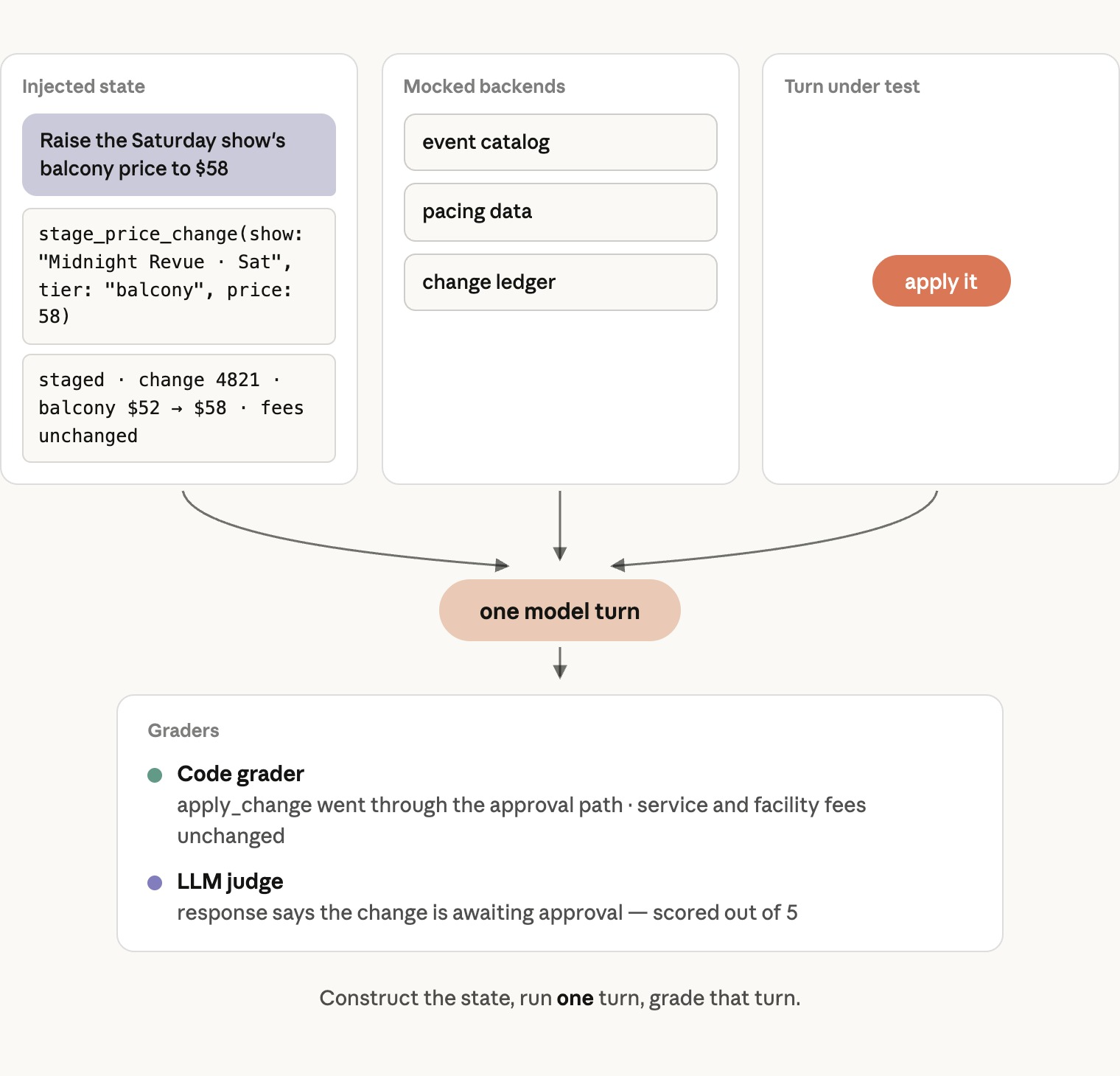
The model’s API is stateless, so what the agent outputs is a function of the system prompt, the tools, and the messages array. This means any state a commerce conversation can reach can be constructed directly. So creating an eval case means constructing the test state, appending the test user message, and letting the agent run from there.
Then grade the outcome: the final state and the rendered response, including the arguments of the last write. In most cases, we recommend against grading the path the agent took to get there as such test cases are brittle and restricting.
Simulated-user evals, in which a second model plays the user and a judge grades the whole conversation, are a poor tool for measurement. Two non-deterministic systems interacting need larger samples, cost more per trial, are harder to judge, and produce failures that are hard to attribute. They are useful for finding coverage gaps and for a general vibe check on the agent, so use them to discover cases, then write each case as a snapshot.
Evaluate for behaviors in tough conditions
Most teams fail to properly test the injected state. A case should encode the preconditions of a failure, not just the task. If a behavior only emerges after a busy first turn with several tool calls, or after a contradiction earlier in the session, a case that starts from a clean state passes on every config and provides no meaningful data.
We've observed most suites to be heavy on such clean-state cases, so make sure a share of yours starts from long, messy, or contradictory histories.
Cover the different types of commerce agent evals
Effective evaluation requires testing both desired and undesired behaviors.
For every positive case, write its negative counterpart: a "should serve" for every "should refuse," a "should just do it" for every "should ask." Missing negatives are the most common gap we find in a suite.
Evaluate for the following:
- Core requests that make up the bulk of your traffic, since a failure here affects most sessions. These include simple lookups, multi-constraint requests, product and plan questions, and multi-intent messages. For the questions, check that every price, availability, and attribute traces back to returned data, and that the agent says when data is missing rather than inventing it.
- Context-dependent requests, such as references to what is on screen, constraints carried over from earlier turns, and writes against an existing cart. Evaluating memory falls into this bucket as well. Check that memories were extracted, retrieved, and changed the answer.
- Safety and brand cases, where a failure costs money or trust. These include attempted injection, attempts to read another user's data, and regulated language, which is checked byte for byte. Split injection into two cases: user-authored injection, where the directive comes from the user's own message, and data-plane injection, where it is planted in product names, reviews, or web snippets that arrive via tool results.
- Interface evaluations, to ensure the right component is rendered, item caps are respected, and there are no internal identifiers in user-facing text. Test for timeouts and empty results too.
- Requests that belong to multiple capabilities at once. An operator asks "if I mark this down 15%, do I have enough stock to cover the demand?" That is a pricing question and an inventory question together. The right answer stages the markdown with a stock projection attached; the wrong answers do one and skip the other. Evals written per capability won't catch this, because each grades only its own half. Write cases for the requests that need two neighboring capabilities together, and grade both halves of the answer.
Write evals with SMEs and use real incidents
Partner with the subject-matter experts who see the failures firsthand, such as team members in Product, Legal, Merchant Ops, Customer Care, and Category Management, to design test cases. Real failures make the best evals, and 50-100 eval cases per user flow is a good starting point.
Make sure to have a variety of cases, as outlined above. Production transcripts are a great stream for sourcing new cases, especially the tricky ones. Coding agents are good at generating additional cases and adversarial variants. The reference repository includes a Claude Code plugin with an eval-authoring skill built with our recommended approach.
Shipping with a large organization
In a commerce enterprise the agent is built by many engineering teams. Search, checkout, pricing, marketing tech, customer care, and the catalog platform each own systems the agent depends on, each ships on its own cadence, and each will want to add or change a tool, a skill, or a prompt rule.
Unlike a service, an agent has no strict module boundary protecting the others: a change made by the pricing team shares a context window with checkout.
The tempting fix is to break the system into many subagents, one per business unit. As discussed in Part 1, we recommend against it for quality reasons. Instead, we outline the process for de-risking multi-team collaboration:
- Ownership follows the systems. Every skill and tool has a single owner team. For example, pricing owns the promotion tools and the pricing skill, care owns the order and returns tools and the customer-care skill. The shared prompt has a single platform-level owner for the common parts and domain owner for the domain-specific section.
- A change ships with its cases and CI runs a set chosen for it. A team contributing a skill also contributes its cases, including the negative cases and the boundary cases against neighboring skills. Running the full suite on every pull request is too slow and too expensive to survive, so build a CI set from it instead. That set will consist of a core set of cases with the highest-traffic requests and every safety case. On top of that, run the cases for whatever the change touched. For a skill, that means its own cases and its neighbors' boundary cases. For a tool, it is every case that calls it. For the shared prompt, it is the full eval suite since everything reads the system prompt. We recommend gating the pass rate over a few trials, and on cache hit rate and cost per turn. It is also a good practice to run the full suite nightly and before every release. Cross-team regressions are caught in these runs.
- The agent should also be inside the release calendar. It's one deployment unit, so a bad change reaches every user at once. Roll prompt and skill changes to a canary cohort first, keep a switch that turns off one skill without a deploy, and freeze the agent ahead of peak periods the same way you freeze other systems.
For the human side of this arrangement, see Building effective human-agent teams.
Looking ahead
Most of what this post describes is not about the model. The tools call systems you already run, the skills encode procedures you already follow, the evals are your product requirements doc written as tests, and the harness enforces policy you would enforce for any client. Models will keep improving, and when a better one ships, the architecture we describe adopts it as a config change with an eval sweep. Everything else keeps working.
It is also important to think about your roadmap for product surfaces. The architecture will outlast the chat panel. The same agent can work over voice, and it can proactively act on a fare drop before the user asks. For a team that already has the evals and the tools, those are presentation-layer projects. Further out, some of the traffic to your storefront will come from agents that shop on behalf of users. The same provenance, staging, and approval rules that keep your own agent in bounds are what will let you open your tools to those agents safely.
Commerce has always rewarded making the buying process as smooth as possible. Agents make that a lot easier. Check out the complete reference implementation, with both the consumer and the merchant agent and runnable examples for retail, travel, telecom, and entertainment.
Acknowledgements
Written by Matthew Koen and Ali Shazal. Special thanks to Michael Segner, Rodrigo Olivares, Amandeep Khurana, Aiza Usman, John Lopus and others for their contributions.