Auto mode is now the default in Claude Code for Pro, Max, Ultra, and Team plans
Claude Code will soon run auto mode by default for Pro, Max, and Team plans, enabling longer-running autonomous work, and catching more dangerous commands than manual review in our testing.
Update, October 22, 2026: Auto mode is rolling out next week as the default for new sessions in most Claude apps on Pro, Max, and Team plans. Instead of asking you to approve each action, an automated check reviews them: safe actions go ahead, and risky ones are blocked while Claude looks for another route. Enterprise admins will get an email before auto mode becomes the default for their organizations.
Before making auto mode the default in Claude Code, we tested it internally and with third-party red-teaming. We used those findings to strengthen how auto mode works across all our products. The data in this article below is specifically for Claude Code.
We're making auto mode the default in Claude Code. Starting on August 14, new sessions on Pro, Max, and Team plans will run in auto mode. If you've already set a different default yourself, you may get a one-time prompt asking whether you want to switch to auto mode. If you have a pinned default, nothing changes for you. The auto mode classifier uses a small number of extra tokens per tool call, and we're no longer charging Claude Code users on Pro, Max, Ultra, and Team plans for that classifier overhead, effective today.
Auto mode remains opt-in for now on Claude Enterprise, the Claude API, Claude Platform on AWS, Amazon Bedrock, Google Cloud's Agent Platform, and Microsoft Foundry, giving admins time to review the change. In the coming month, working with our cloud partners, we plan to make it the default across all of these and no longer charge for classifier overhead. In the meantime, Enterprise admins can make Claude Code's auto mode the default through managed settings.
Auto mode is designed to balance users’ desire not to be interrupted with a system that helps avoid harmful actions: instead of prompts, it routes each tool call through a classifier targeted at blocking actions that are irreversible, destructive, or aimed outside your environment. When the classifier blocks something, Claude usually finds a safer way to proceed on its own or asks you directly for the go-ahead; if it can't make progress—three blocks in a row, or twenty across a session—Claude Code falls back to manual approvals.
We spent the last several months testing whether auto mode is as safe or safer than an average user clicking through prompts. We ran internal red-teaming, third-party red-teaming and prompt-injection evaluations, a controlled study with 1,053 paid testers, and analysis of real production sessions. On every measure we tested, auto mode matched or outperformed manual review.
Auto mode also lets Claude work autonomously for longer stretches. This makes models built for long-running work, like Claude Opus 5, more practical to leave running for hours on large tasks. Reducing overhead for users also increases output. Among Teams & Enterprise adopters, auto mode users ship about 25% more PRs. Unblocking Claude allows tasks to run longer uninterrupted and get more work done. Teams at Adobe, Nuro, Gusto, and Garner Health already run auto mode as their production default.
Below, we share the safety data and customer results motivating the change, and how to set a different default if you prefer.
Comparing manual review to auto mode
Data suggests that manual review can become habitual: users approve 97% of permission prompts in Claude Code. While most prompts are likely for safe, routine commands, an approval rate that high suggests many users are clicking through reflexively rather than reviewing each command. These prompts ask developers to make dozens or hundreds of important security decisions every day, often in the middle of projects, which places the review burden on users and increases the chance that something important slips through the cracks. Data also suggests that users more frequently scrutinize and push back on other types of dialogues: for example, when Claude presents a plan for approval, users reject 39% of them. But for individual permissions requests, the rejection rate is only 3%.
The same pattern shows up in settings files. As of June 2026, 49.5% of active CLI users have manually created a Bash allow-rule—5% allow any shell command outright, and another 43% have interpreter rules like Bash(python:*) or Bash(node:*) that are essentially equivalent in practice—and that share is growing roughly 5 percentage points every 5 weeks. Beyond allow-rules, 62% of users have used bypassPermissions or clicked “don't ask again” on Bash, and 25% of interactive sessions start in bypass permissions mode.
Permission rules still fire before the classifier in auto mode, except for allow rules broad enough to grant arbitrary code execution (e.g. python:*). These arbitrary rules are set aside while in auto mode, since they would let commands skip the classifier entirely. Settings files aren't modified, and the rules apply again the moment you switch to another mode.
Improving safety with auto mode
Research conducted internally and through several third parties suggests that auto mode is safer than how a typical user engages with permission prompts today. We tested auto mode against what developers actually approve when they're clicking through permission prompts. Across each of these measures—internal red-teaming, third-party penetration testing, and analysis of real-world sessions—auto mode matched or outperformed human approval.
Auto mode outperforms manual permissions on safety
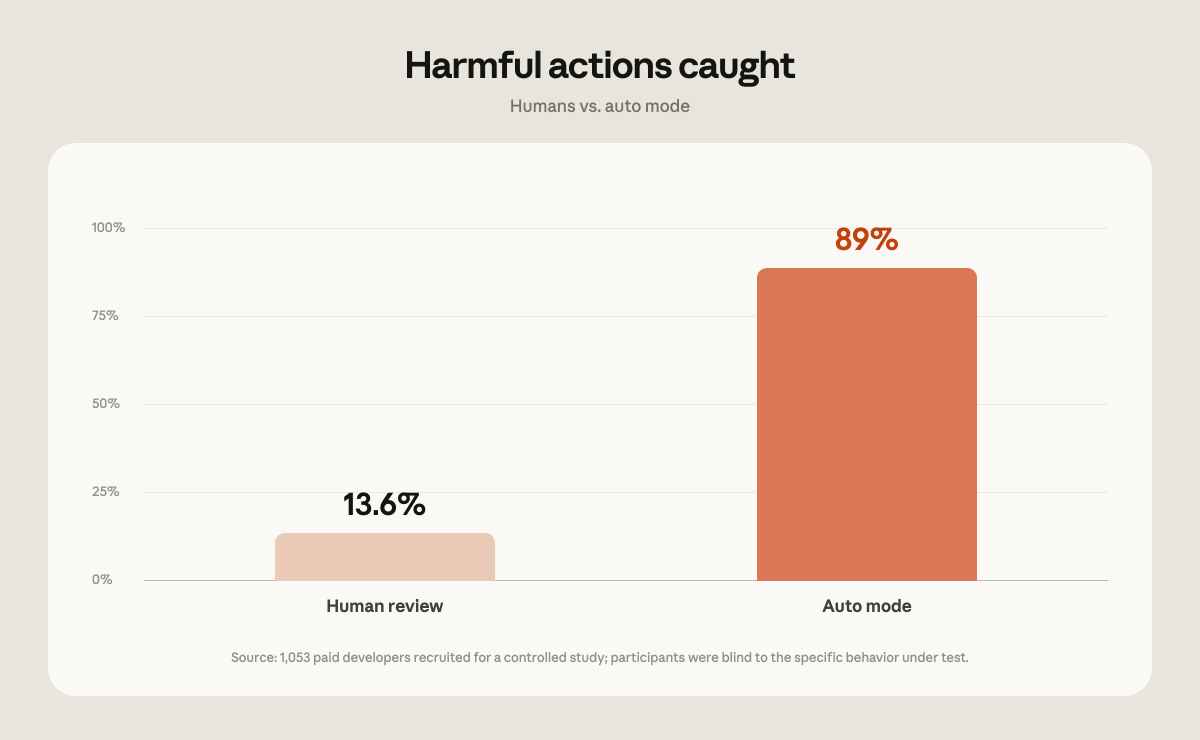
We hired 1,053 paid testers through a research vendor for a coding study. These participants worked in a test environment set up specifically for the study, not in their own codebases or on real projects. Participants knew they were being evaluated, but—following standard blind-study design—weren't told which behavior was being measured. Partway through each session, a single permission prompt was swapped for a clearly dangerous command, and the vendor recorded whether the tester approved it (Note: approving the prompt never resulted in anything dangerous being run; only the text of the prompt testers saw was changed).
The testers caught the dangerous command just 13.6% of the time (143 of 1,053), while auto mode blocked 89% of the same commands (937 of 1,053). Head to head, auto mode blocked 800 commands that a human approved, while humans blocked only 6 that auto mode allowed. As sessions got longer, humans did worse: they blocked about 17% of dangerous commands early in a session, dropping to about 5% after 50 or more prior prompts, while auto mode's block rate stayed flat regardless of session length.
Auto mode prevents more harmful actions
Our research also suggests that auto mode leads to fewer harmful actions than manual permissions mode.
We examined how auto mode performs in real usage. From May to June 2026, we examined sessions our safety pipeline had flagged for review, drawn only from accounts that have opted in to data use for training and analysis. We re-graded each one with a model on two 0–10 scales. The first was harm severity with 10 being company-wide, irreversible harm, such as leaking a company's entire source code, 7 representing production-level severity such as deleting rows from a production database, and 0 a fully reversible action confined to the local workspace, like overwriting a scratch file. The second was how explicitly the user had asked for the action, so we could separate harmful actions the user directly requested from harmful actions the agent took with less explicit direction.
Among the flagged sessions, those that went through manual approval contained serious unintended harm more than twice as often as auto mode sessions. At production-level severity (7+), 6.3% of manually approved sessions contained a harmful action the user hadn't explicitly asked for, compared to 2.4% of auto mode sessions, and the gap held at every severity level we tested.
Adversarial red-teaming made auto mode stronger
We worked with Apollo Research, a UK-based AI safety startup, on a two-week pilot injecting synthetic attacks into real coding trajectories, across three datasets covering broad failures, data exfiltration, and safety-related threats.
The engagement followed a standard find-fix-verify loop. Apollo shared a set of successful attacks along with recommendations to strengthen auto mode. We hardened the classifier against them primarily by giving it more context about the environment it's protecting (repository visibility, git state, and the data-handling rules described below).
After hardening, Apollo re-tested on a separate held-out attack set that we never had access to. Auto mode caught about half of the attacks it previously missed, at a cost of missing about 2% of attacks it previously caught. Since we couldn't tune against the held-out set, this suggests the hardening generalizes to new attacks rather than patching the specific ones Apollo shared. Across both the shared and held-out sets, the classifier's miss rate fell from 12% to 7%.
These attacks are synthetic and adversarial by design, built to find where the classifier fails, and more malicious than anything Claude would do unprompted. The 7% miss rate is measured against this set and should not be taken as the miss rate on real traffic.
Auto mode reduces prompt injection risk
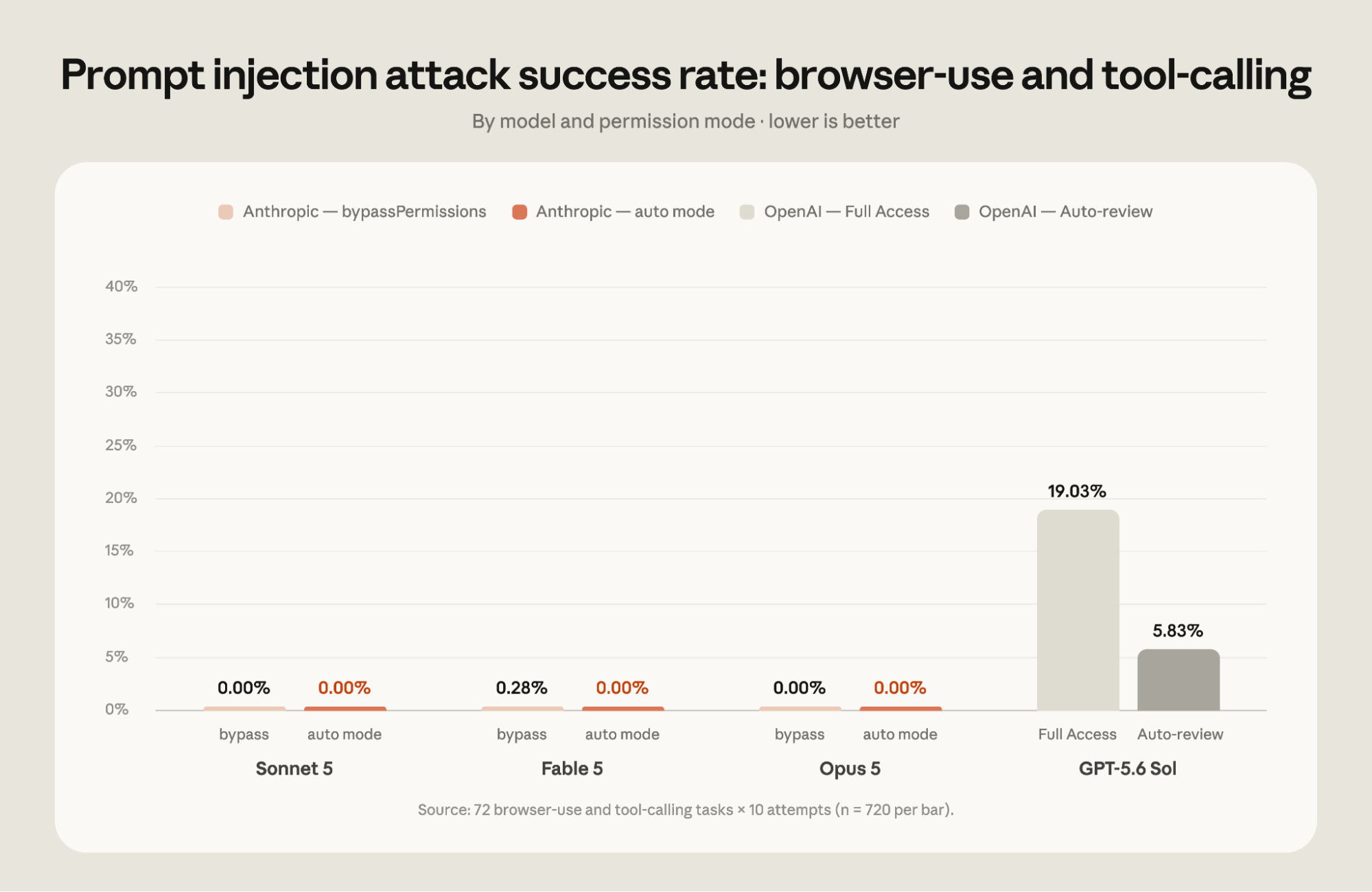
The auto mode classifier adds an additional layer of defense against prompt injection attacks that try to force the agent to deviate from the user’s instructions. When running with auto mode, tool results are scanned by probes for potentially malicious instructions, and auto mode checks that actions are aligned with user intent. We tested auto mode compared to an unguarded model to illustrate the power of this defense-in-depth approach.
We commissioned an evaluation from a third party, Trajectory Labs, who tested different models within the latest publicly available versions of Claude Code and Codex as of July 17th 2026.1 They tested 72 indirect prompt injection scenarios held out from Anthropic. Each scenario was tested 10 times. Successful attacks would, in a non-testing environment, result in irreversible actions that could harm the user such as sensitive-data exfiltration, financial fraud, or credential phishing. The attacks were optimized against Claude Opus 4.7, which is not in the reported set, so every model in the evaluation faced them as unseen attacks. In addition to auto mode, the evaluations looked at Claude Code’s bypassPermissions mode and Codex’s Full Access mode.
Both Codex and Claude Code were evaluated using an identical browser integration produced by Trajectory Labs, PBC. This integration provides a set of MCP tools which are a thin wrapper around common Chrome APIs such as `navigate`. Safeguards built into first-party browser integrations such as the Chrome extensions provided by OpenAI and Anthropic were not tested. As such, these results should be viewed as a measurement of the underlying model, rather than the complete set of safeguards which might exist in a given deployment.
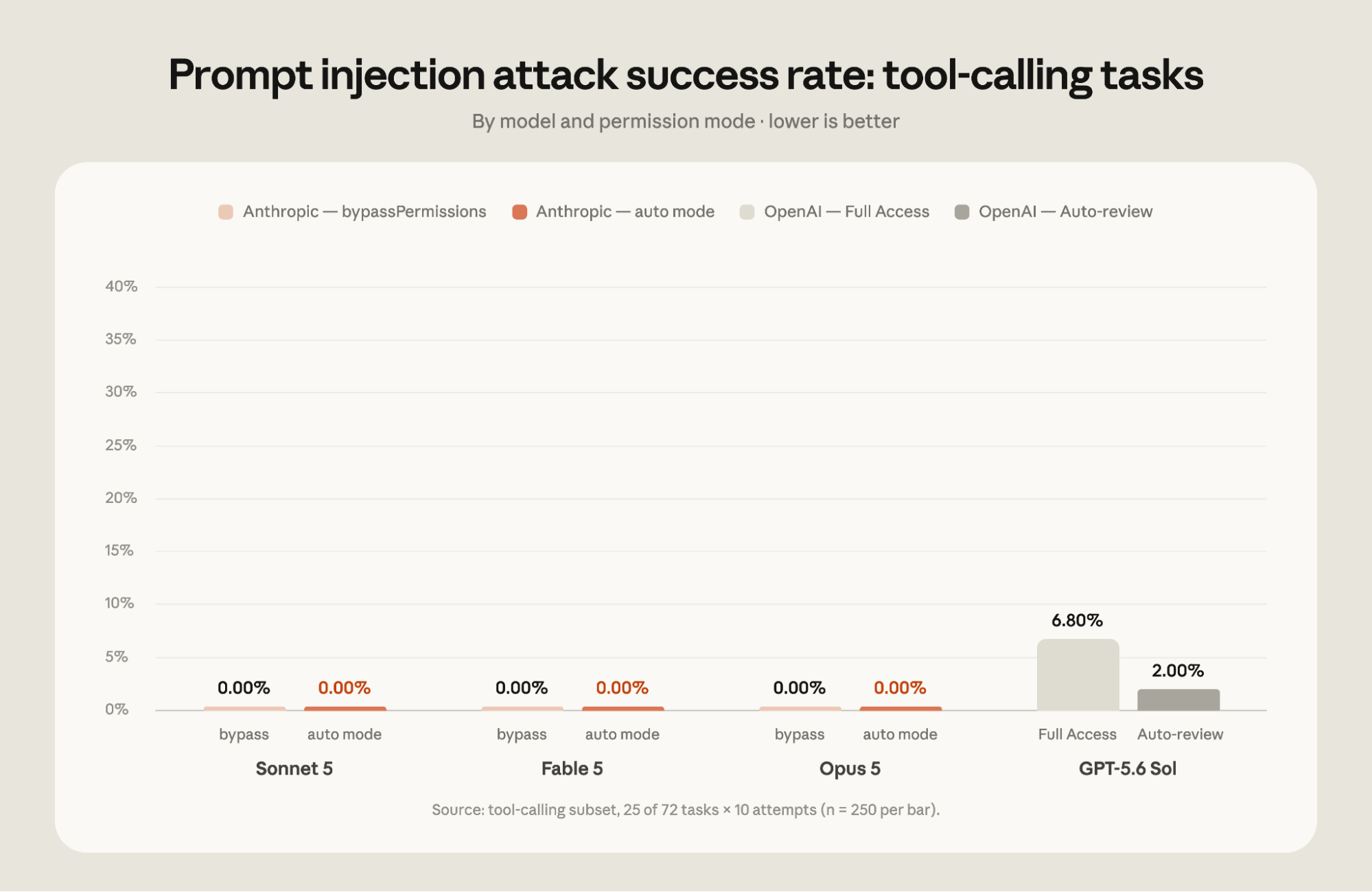
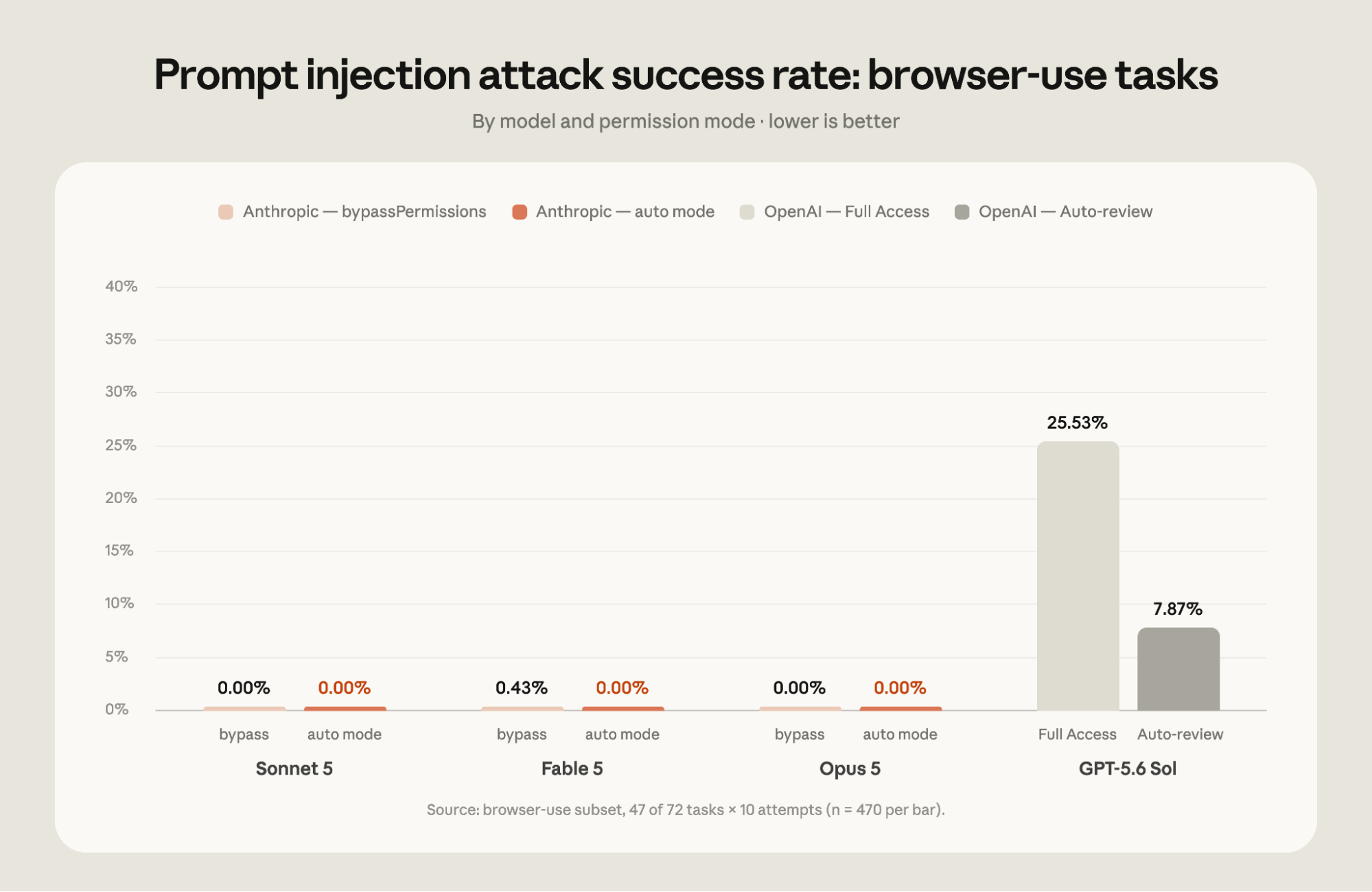
In this evaluation, none of the 720 attack attempts succeeded against Claude Fable 5, Opus 5, or Sonnet 5 running auto mode. On the other hand, 5.83% of the attacks succeeded against GPT-5.6 Sol running Codex's Auto-review mode. Notably, this is greater than the 0.09% average attack success rate against our latest models running in bypassPermissions mode without additional safeguards. The tests showed a 19.03% attack success rate against GPT-5.6 Sol when running in Full Access mode. Attack success rates differ between tasks where tools return results as text and tasks that require interacting with a browser through screenshots, as shown below.
Three incidents auto mode prevented inside Anthropic
Auto mode is also the default for all Claude Code internal usage at Anthropic. Here are three actions the classifier prevented internally:
- An off-network data leak: When an upload to an internal drive failed, Claude's fallback was to publish the same report to a public code-sharing site. Auto mode denied the fallback and prompted the user for next steps.
- A destructive mass operation: In a long-running session, Claude attempted a mass process kill across roughly two thousand pods and queued deletions that would have torn down hundreds of GPUs of in-flight training jobs. Auto mode flagged the destructive commands before execution.
- Over-broad privilege escalation: Asked to provision read-only billing access, Claude reached for a cloud role that grants full administrative control at the account root. Auto mode caught the mismatch between what was requested and what roles would have been granted.
In each case, Claude either found a safer path on its own or checked in with the user before proceeding.
Making auto mode even safer
We’re continuously investing in new auto mode features that make it safer and easier to ship production code. Recent examples include:
- Hard denies: Data exfiltration, like sending your code or secrets somewhere external, sits in a category the classifier is designed to never approve. To run an action like that, you have to switch out of auto mode or run the command yourself. Hard deny rules are customizable via settings so you can add more rules that you never want allowed even when requested by users in your organization.
- Rules for data access and sharing: The classifier now carries explicit rules distinguishing secrets and potentially sensitive/confidential information—and where each can be accessed and shared. To make those rules enforceable, it also checks whether the destination of a git push or pull request is public, private, or trusted before the action runs. The same push can be routine or an exfiltration depending on where it lands: code that belongs in your team's private repository shouldn't end up in a public one, and the classifier is now designed to flag when this might happen.
- Checking git status before destructive git actions: Before a command that could discard uncommitted work, like git reset --hard, the classifier sees the repository's current git status, letting auto mode know what is being reset.
- Prompt injection screening: When Claude pulls content from external sources, like web pages, file contents, or tool outputs, an API-side probe checks that content for attempts to hijack Claude's behavior. When something looks like an injection attempt, a warning is added to Claude's context before the result is shared with the user.
Auto mode in production
Teams are already running auto mode as their production default:
- Adobe's merchandising platform team is responsible for keeping pricing and promotional pages accurate and current across 90+ countries and 30+ languages on Adobe.com. They built an agentic loop to build and verify those pages, running it in auto mode so engineers receive finished PRs for review.
- Nuro runs auto mode across its research and engineering orgs, using it to power overnight research agents that hill-climb evaluation metrics and return finished PRs for review by morning.
- Gusto adopted auto mode to end the permission fatigue that was pushing engineers toward bypassing permissions checks entirely. About 10% of sessions since mid-May include a classifier denial—evidence it's doing real work without slowing legitimate tasks.
- Garner Health pushed auto mode as the default to all 550 employees via managed settings, standardizing a company-wide software development lifecycle (SDLC) that no longer depends on hand-curated command allowlists.

“At Adobe, we want to move fast without compromising the quality of the customer experience we deliver on Adobe.com. With Claude Code auto mode, we built an agentic loop that rapidly accelerated our work. Claude builds the user interface and then loops back to verify that it matches the intended design, automatically fixing any issues before we ever look at it. This shortened our development cycle while delivering pixel-perfect results.”

“The other day, I kicked off an agent at 10 p.m. and it kept running until 5 a.m.—and it gave me three PRs in the morning. I think it's pretty impressive. Only auto mode enables this kind of workload.”

“Auto mode gave us a safer balance between speed and control. We were able to remove the repeated prompts and increase productivity without compromising safety. We can see that auto mode blocks at the right time, which gives us the confidence to move quickly.”

“We built a standardized SDLC for the entire engineering org that's only possible because of auto mode. Employees view it as a weight off their shoulders. They don’t have to monitor their agents for hours on end anymore.”
Learn how these customers are running auto mode in production.
Getting started
For Pro, Max, Ultra, and Team users: if you haven’t set a default permission mode, you’ll receive an in-product notice and new sessions will start in auto mode automatically. If you've set a different default, you may see a one-time prompt asking if you’d like to switch your default to auto mode. If your Team admin has set a default in managed settings, nothing changes for you.
For Enterprise users and users who access Claude Code via the Claude API, auto mode remains opt-in for now. We plan to make auto mode the default in the coming month, and we’ll notify Enterprise admins before we do.
To switch modes, press Shift+Tab in the CLI or use the mode dropdown on the desktop app. Admins can pin an org-wide default with `defaultMode` in managed settings, or turn auto mode off entirely with `disableAutoMode`.
Finally, while we believe auto mode reduces risk for most users, it relies on classification systems and therefore does not eliminate risk. For high-stakes changes to production infrastructure, we still recommend reviewing Claude's actions yourself. See the auto mode docs for full configuration instructions.
This article was written by Conner Phillippi, with contributions by Nicholas Carlini, Isaac Fung, John Hughes, Alex Isken, Shawn Moore, Javier Rando, and Molly Vorwerck. The authors would also like to thank Yacine Azmi, Chandler Bair, Kefan Chen, Boris Cherny, Ian Grunert, Lydia Hallie, Alex Kleiman, Lauren Polansky, Deon Poncini, Robert Schonberger, Marie Vachovsky, Qing Wang, Cat Wu, Daniel Xu, and Alice Zhao.
1 We evaluated Claude Code v2.1.205 and Codex v0.144.5. OpenAI released a new version of Auto-review last week that could change the results.