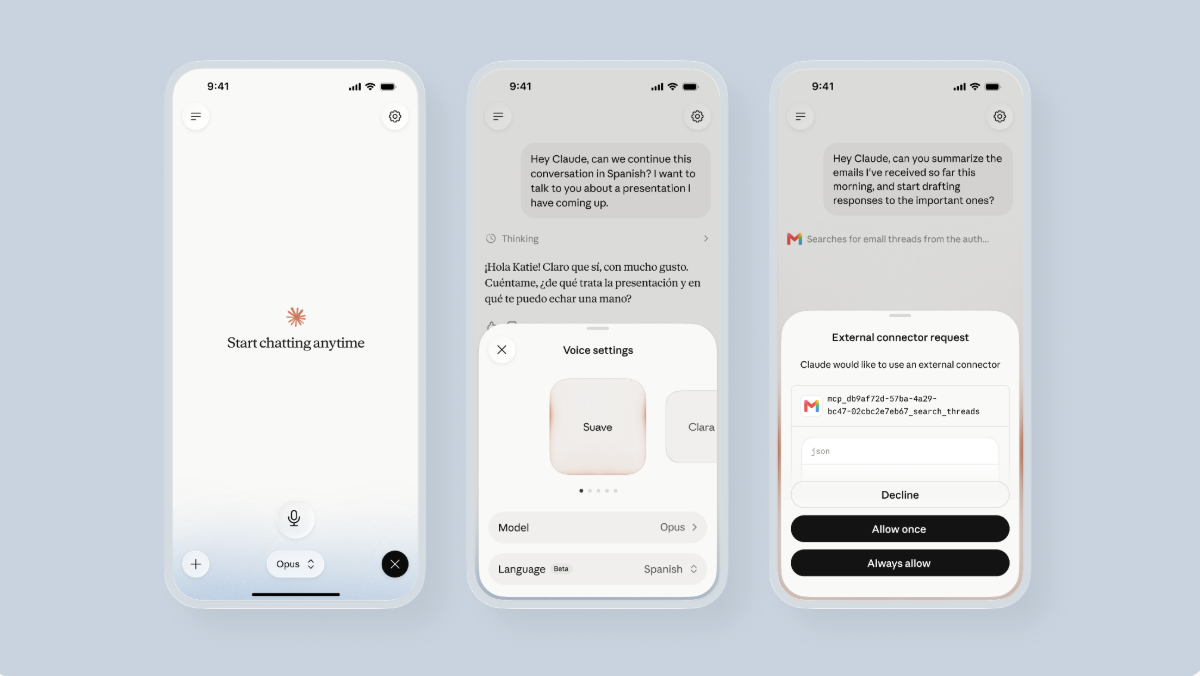
Some problems you can't just talk your way through on your own. You keep circling the same few options. You can't read what someone actually meant. You know something's off but not where. Those are the moments to think out loud with a partner sharp enough to keep up and push back instead of just nodding along. That's voice mode.
Most of the time, though, you already know what you want to say or do, and want to get it done efficiently without reaching for the keyboard. That's dictation.
Claude gives you both, and they're built for different moments. This guide is about telling them apart: dictation gets your words down; voice mode helps you work out what you think.
Dictation: typing with your voice
Dictation is like typing with your voice. You speak, your words become text in the message box, and Claude replies in text the way it always does. It swaps your keyboard for your voice; everything else about the conversation stays the same.
In the desktop app, you press the mic, speak, and send when you're ready. On your phone, you hold the mic while you talk and let go to send.
Voice mode: a spoken conversation
Voice mode is a spoken conversation. You talk, Claude talks back, without ever needing to use the keyboard. You can interrupt Claude mid-sentence when it's heading somewhere you didn't intend. You can ask the next question the moment it occurs to you, the way you would with a person.
At a glance
|
DictationDictation |
Voice modeVoice mode |
| Where to find it |
The mic in the message box. Available across Chat, Cowork, and Code on all surfaces |
Its own button, separate from the dictation mic. Available on Chat across all surfaces |
| What your speech becomes |
Text in your message to Claude |
A two-way spoken conversation |
| When to choose it |
Anything you’d normally type, said faster |
Talking through a judgment call, rehearsing, learning, where you need a smart sounding board to engage with you |
When to reach for which
Start from where you are: if you already know what you want to say or do, use dictation. If you're trying to figure something out or practice, that's voice mode.
Voice mode
Thinking and deciding
- Think something through. Surface your ideas out loud. Claude follows the whole conversation and asks questions that show you what you're missing. Useful in scenarios like weighing a job offer, a business plan, or a decision you can't settle.
- Capture your thoughts before they fade. Talk through what happened in a meeting as it comes back to you, and Claude keeps track of the pieces. The conversation saves like any chat, so you can ask for the decisions and action items later as text.
Practicing and learning
- Prepare for an interview, a negotiation, or a hard conversation. Ask Claude to play the other side and throw you follow-up questions you didn’t prepare for.
- Practice a language. You can hear how something is pronounced and try it yourself in a real back-and-forth. Voice mode works in many languages beyond English.
Working with your email, documents, and tools
- Work through a dense document. Add the doc into the conversation and ask your way through it, from what it says to what's missing to where you'd push back.
- Prepare for a customer call. Ask Claude to brief you from your calendar and CRM. Afterward, talk through how the call went and have Claude draft the notes.
Dictation
- You have a long, messy request in your head. Speaking is faster than typing, and Claude can understand even rough phrasing.
- You need to look over your prompt before it goes to Claude. Your speech becomes text in the message box, where you can edit it before sending.
- You want the response back as text. Work with a plan, a table, or a draft more easily where you can see, copy, or edit it.
Voice mode features
Voice mode just got a major update. If you tried it early on, here's what's different:
- It keeps up with harder questions: On paid plans, voice conversations can now run on more capable Claude models, Opus and Sonnet, in addition to our quicker model, Haiku. You can also switch models mid-conversation as things get more complex using the model picker. The model you already use for text carries over to voice.
- It can reach your daily tools, mid-conversation: On paid plans, Claude can now pull from your connected apps — email, calendar, docs, Slack — without you leaving the conversation. (Searching the web is not new — voice could already do that.) Ask it to catch you up on today's email while you make coffee.
- It speaks many more languages (in beta for languages beyond English): Pick your language in settings, or prompt Claude to make the switch. Claude doesn’t detect your language automatically.
- It remembers: Voice conversations are saved like any other chat, and Claude can draw on memory and your past conversations, so you can pick up where you left off.
Voice mode settings
Voice mode has a few settings of its own:
- Select Claude's listening mode: Go hands-free so Claude listens the whole time and you can speak whenever a thought arrives. Or select push-to-talk so Claude hears you only while you hold the button; letting go sends what you said.
- Change Claude's language: Voice conversations work in many languages beyond English (in beta). Claude doesn't detect your language automatically, so choose it before you start.
- Pick the voice Claude speaks with: Choose the one you like from several options.
- Choose the model behind the conversation (paid plans): Your usual chat model carries over as the default, and you can switch to a more capable model when the conversation calls for it.
Using them together
You can start in one and finish in the other. Think something through in voice mode on a walk, and when you've made up your mind, ask Claude to sum up the plan. The conversation is saved like any other chat, so everything you talked through is there as text when you come back to it. Open it again at your desk and dictate the follow-up.
A few things to know
- Voice mode is available on every plan. It's built first for your phone — iOS and Android — and is also available on the web and in the desktop app.
- In voice mode, paid plans include more capable models and tool connections.
- In a voice mode conversation, you can mute the mic whenever you don't want Claude listening.
- Dictation is available on the web, mobile, and desktop app. It understands many languages as well.
- The dictation button on Cowork is the mic. Currently, voice mode isn't available there.
For more on voice mode, the help center article covers settings and getting setup.
Get started
Next time you're about to type a long message to Claude, try using dictation to speak it instead. And next time you catch yourself wishing you could talk something through, open voice mode and think out loud. If you're unsure which one to use, think about what sort of output you want back. If it's text you can read and reuse, that's dictation. If it's a conversation, that's voice mode. Either way, Claude keeps up as you do your best thinking.