Extending Claude’s capabilities with skills and MCP servers
Learn how skills and MCP work together to build agents that follow your workflows and use external systems and platforms effectively.
Update: We've published Agent Skills as an open standard for cross-platform portability. (December 18, 2025)
Since launching Skills, two of the biggest questions we’ve heard from customers are: "How do skills and MCP work together? When should I use one versus the other?"
Model Context Protocol (MCP) connects Claude to third-party tools, and skills teach Claude how to use them well. When you combine both, you can build agents that follow your team’s workflows, not generic processes that require constant correction.
For example, an MCP connection to Notion lets Claude search your workspace. Add a skill for meeting prep, and Claude knows which pages to pull from, how to format the prep document, and what your team’s standards are for delivering meeting notes. The connection becomes useful instead of just available.
In this article, we break down the relationship between skills and MCP, how to combine them to build agents that follow your workflows to produce consistent outputs, and walk through a few real-world examples of how they work together in practice.
Understanding skills and MCP
You walk into a hardware store looking to fix a broken cabinet. The store has everything you need (wood glue, clamps, replacement hinges) but knowing what items to buy and how to use them is a different problem.
MCP is like having access to the aisles. Skills, meanwhile, are like an employee's expertise. All the inventory in the world won't help if you don't know which items you need or how to use them. A skill is like the helpful employee who walks you through the repair process, points you to the right supplies, and shows you proper technique.
Put more concretely, an MCP server gives Claude access to your external systems, services, and platforms, while skills provide the context Claude needs to use those connections effectively, teaching Claude what to do now that it has this access.
Without the context that skills provide, Claude has to guess at what you want. With a skill, Claude can follow your playbook instead.
Why skills and MCP work well together
MCP handles connectivity: secure, standardized access to external systems. Whether you're connecting to GitHub, Salesforce, Notion, or your own internal APIs, MCP servers give Claude the ability to reach your tools and data.
Skills handle expertise: the domain knowledge and workflow logic that turn raw tool access into reliable outcomes. A skill knows when to query your CRM, what to look for in the results, how to format the output, and which edge cases require different handling.
This separation keeps the architecture composable. A single skill can orchestrate multiple MCP servers, while a single MCP server can support dozens of different skills. Add a new connection, and existing skills can incorporate it. Refine a skill, and it works across all your connected tools.
When you combine skills and MCP, you get:
Clear discovery: Claude stops guessing where to look. A meeting prep skill might specify: check the project page first, then previous meeting notes, then stakeholder profiles. A research skill might say: start with the shared drive, cross-reference against the CRM, then fill gaps with web search. The skill encodes institutional knowledge about which sources matter for which tasks.
Reliable orchestration: Multi-step workflows become predictable. Without a skill, Claude might pull data and format it before checking whether it has everything. Skills define the sequence explicitly, so Claude executes the workflow the same way every time.
Consistent performance: Outputs actually meet standards. Generic results need editing. Skills define what "done" looks like for your team: the right structure, the right level of detail, the right tone for your audience.
Over time, teams build up collections of interrelated skills and connections that give Claude expertise in their specific domain.
Further reading: Tim O'Reilly on what MCP and skills mean for open source AI
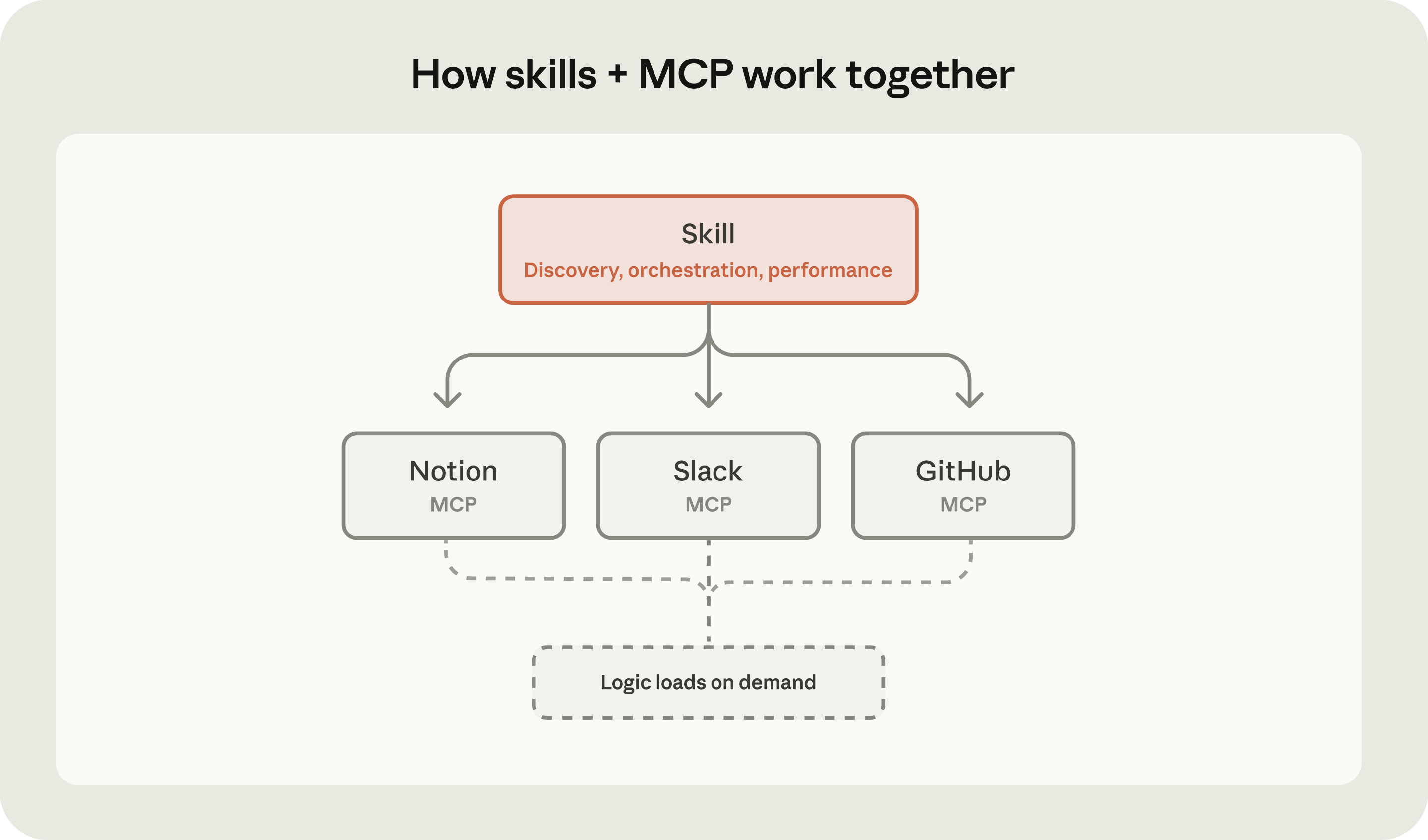
Where skills and MCP may overlap
MCP servers may contain instructions in the form of tool usage hints and prompts for common tasks. This keeps tool-specific knowledge close to the tool. However, these instructions should be kept generic by design.
The rule of thumb: MCP instructions cover how to use the server and its tools correctly. Skill instructions cover how to use them for a given process or in a multiserver workflow.
For example, a Salesforce MCP server might specify query syntax and API formats. A skill would specify which records to check first, how to cross-reference them against Slack conversations for recent context, and how to structure the output for your team's pipeline review.
When combining MCP servers and skills, watch for conflicting instructions. If your MCP server says to return JSON and your skill says to format as markdown tables, Claude has to guess which one is right. Let MCP handle connectivity, and let skills handle presentation, sequencing, and workflow logic.
Further reading: Learn how skills use progressive disclosure to load context on-demand and programmatic tool calling to orchestrate MCP tools efficiently.
Real-world examples of using skills and MCP together
Now let's look at how skills and MCP combine in real workflows. We'll walk through two examples: financial analysts pulling live market data for company valuations, and project managers using Notion's Meeting Intelligence skill for meeting prep.
In both cases, MCP servers provide access to the tools and the skills define what to do with them.
Financial analysis: Automating company valuations skill
Anthropic released a set of pre-built skills for common financial workflows, including comparable company analysis. Comparable company analysis is a standard valuation method. Analysts doing comparable company analysis spend hours pulling financial metrics from multiple sources, applying the same valuation methodology, and formatting outputs to meet compliance standards. It's repetitive, error-prone, and exactly the kind of workflow that benefits from skills and MCP working together.
Skill: Comparable company analysis automates this valuation workflow, pulling data from multiple sources, applying consistent methodology, and formatting outputs to specific standards.
MCP servers: Connections to S&P Capital IQ, Daloopa, and Morningstar for live market data
Workflow:
- Skill identifies which data sources to query (Discovery)
- MCP connections pull live financial data
- Skill applies methodology and formats output (Orchestration)
- Skill validates against compliance requirements (Performance)
Meeting preparation: Notion's Meeting Intelligence skill
Meeting prep is tedious. You need to pull context from multiple places, such as project docs, previous meeting notes, and stakeholder info, then synthesize it into a pre-read and an agenda. It's the kind of multi-step process you end up re-explaining every time.
Skill: Meeting Intelligence defines which pages to search, how to structure outputs, what sections to include
MCP server: Notion connection that searches, reads, and creates pages
Workflow:
- Skill identifies relevant pages to search, including projects, previous meetings, stakeholder info (Discovery)
- MCP connection searches and retrieves content from Notion
- Skill structures two documents: internal pre-read and external agenda (Orchestration)
- MCP connection saves both documents to Notion, organized and linked
- Skill ensures outputs match formatting standards (Performance)
When to use skills vs. MCP
Skills and MCP solve different problems, but deciding which to use for a specific workflow isn't always obvious.
What to use skills for
Skills capture the knowledge that would otherwise live in your head, or that gets re-explained every time someone new joins the team. They work best for:
- Multi-step workflows involving tools: Meeting prep that pulls from multiple sources, then creates structured documents
- Processes where consistency matters: Quarterly financial analyses that must follow the same methodology every time, compliance reviews with mandatory checkpoints
- Domain expertise you want to capture and share: Research methodologies, code review standards, writing guidelines
- Workflows that should survive when team members leave: Institutional knowledge encoded in reusable instructions
What to use MCP servers for
MCP extends what Claude can access and use. Use an MCP when you need:
- Real-time data access: Searching Notion pages, reading Slack messages, querying databases
- Actions in external systems: Creating GitHub issues, updating project management tools, sending notifications
- File operations: Reading from and writing to Google Drive, accessing local filesystems
- API integrations: Connecting to services that don't have native Claude support
If you're explaining how to do something, that's a skill. If you need Claude to access something, that's MCP.
Quick reference table: How skills and MCP differ
| Skills | MCP | |
|---|---|---|
| What it is | Procedural knowledge | Tool connectivity |
| What it does | Teaches Claude how to do something | Gives Claude access to something |
| When it loads | On demand, when relevant | Always available once connected |
| Contains | Instructions, scripts, templates, assets | Tools, resources, prompts |
| Token behavior | Loads on-demand, preserving context | Definitions loaded upfront |
| Best for | Workflows, standards, methodology | Data access, API calls, external actions |
Common questions
Do skills replace MCP?
No. Skills and MCP solve different problems. MCP provides connectivity to external tools and data. Skills provide procedural knowledge for how to use that connectivity effectively. Most powerful workflows use both.
Can one skill use multiple MCP servers?
Yes. A single skill can coordinate multiple MCP servers at once. A technical competitive analysis skill might search Google Drive for internal research, pull competitor repos from GitHub, and gather market data via web search.
Can I build multiple skills for one MCP server?
Yes. A skill can enhance the value you get from a single MCP connection. Notion demonstrates this pattern with separate skills for meeting prep, research, knowledge capture, and spec-to-implementation—check them out here.
Getting started
Ready to build with skills and MCP? Here's how to start:
With skills:
- Enable skills in Settings → Capabilities on claude.ai
- Browse the skills library for pre-built examples
- Read the skills documentation
With MCP:
- Browse MCP servers for your tools
- Read the MCP documentation
- Build your own server with the MCP quick start
Combine both:
- Connect an MCP server, then add a skill that uses it
Related articles
Explore more insights on building with Claude's agentic capabilities.
- Skills explained: How Skills compares to prompts, Projects, MCP, and subagents
- Improving frontend design through Skills
- Equipping agents for the real world with Agent Skills