Professional
Cowork
Cowork

Size a market using your research

With Cowork, ask Claude a market question and get back an analysis with professional deliverables. Claude researches, calculates, and outputs a PowerPoint presentation, Excel workbook with detailed methodology, and Markdown source document with citations.
Try in Claude
  • Author
    Anthropic
  • Category
    Professional
  • Model
    Sonnet 4.5
  • Features
    Cowork
  • Share
    Copy link
    https://claude.com/resources/use-case/size-a-market-using-your-research
1

Describe the task

In Cowork, Claude runs market sizing end-to-end: research, analysis, and formatted deliverables. Feed it existing research or company data as a starting point, or let it work from scratch.

Describe the market you're sizing and specify your outputs: a presentation, an Excel workbook, a source document with citations. Claude handles the methodology and saves finished files to your computer.

I need a market sizing analysis for the enterprise project management software space in North America.

Include TAM/SAM/SOM calculations with your methodology, key market drivers and growth projections, competitive landscape overview, and investment implications.

Output as:

  • Executive PowerPoint (10-12 slides)
  • Excel workbook with detailed calculations
  • Markdown source document with all citations

Source all claims.

Next
Ask Claude
2

Give Claude context

Cowork is a workspace in Claude Desktop where Claude works directly with your local files and saves deliverables to your computer. The more context you provide, the more targeted the analysis.

What to expect: After your initial prompt in Cowork, Claude may ask you questions, like market focus, geographic scope, time horizon, and existing assumptions. It then builds a plan you can review in the sidebar. This helps it produce more targeted, finished analysis with less back-and-forth.

Required context

To get started:

  • Download Claude Desktop and start a Cowork session
  • Select Work in a folder in the chat bar to give Cowork access to your existing research, company data, or templates
  • You can also use the + button to add individual files
No items found.

Optional context

  • Existing research, analyst reports, or internal data to incorporate
  • Company or product context for more tailored SOM calculations
No items found.
3

What Claude creates

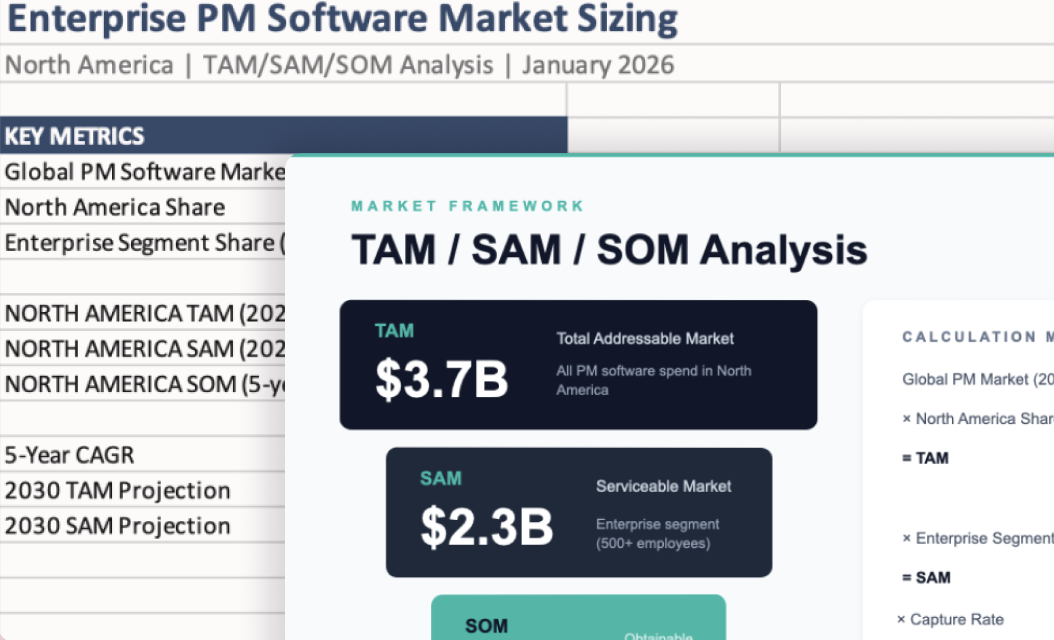
Claude researches the market, applies the TAM/SAM/SOM framework, and generates three coordinated deliverables.

From Claude

I'll research the North American enterprise project management software market.

Done. I've created three files:

1. Enterprise_PM_Market_Sizing.pptx

  • TAM: $12.4B (2024), growing 11.2% annually
  • SAM: $4.8B (enterprise segment)
  • SOM: $720M

2. PM_Market_Calculations.xlsx

  • All calculations with methodology

3. Market_Sizing_Sources.md

  • All data points cited
4

Follow up prompts

Continue the conversation with Claude to refine, expand, or explore further.

Drill into a specific segment

Go deeper on the most attractive market. Focus research on a particular vertical, company size, or geographic sub-market.

"Drill into the mid-market segment (100-500 employees). What's the specific opportunity there and who's winning that space?"

Next
Ask Claude

Build a sensitivity model

Make the calculations interactive. Create an Excel model where you can adjust key assumptions and see how the market size changes.

"Turn the Excel into a sensitivity model. Let me adjust the growth rate, market penetration, and competitive capture assumptions to see different scenarios."

Next
Ask Claude

Generate competitor profiles

Research the competitive landscape in detail. Pull together profiles on the key players with recent moves, positioning, and market share estimates.

"Create detailed competitor profiles for the top 5 players. Include recent product launches, funding, reported revenue if available, and positioning."

Next
Ask Claude
5

Tricks, tips, and troubleshooting

Start another task while this one runs

Cowork handles the full research and formatting loop. Open a new session from the sidebar for other work. You'll see a grey dot in the sidebar when it needs attention.

Review the plan before it runs

Cowork builds a research plan visible in the sidebar. Check that it's covering the right segments, geographies, and frameworks before it starts pulling data.

Triangulate estimates

Cross-check bottom-up calculations against analyst reports. Claude surfaces data; you decide what it means.

Ready to try for yourself?

Give Cowork a market sizing question. Come back to a deck, a model, and sourced documentation ready to present.
Try in Claude
Open artifact in new window