How Anthropic's Growth Marketing team cut ad creation time from 30 minutes to 30 seconds with Claude Code
Austin Lau, growth marketer at Anthropic, shares how he went from never having opened a terminal to building Figma plugins and automated ad generation workflows, without writing a single line of code.
Before Claude Code, Austin Lau had never written a line of code in his life. When the product first launched, he had to Google how to open a terminal on his computer.
"My first reaction when we launched Claude Code was, I have zero idea what this product is for," says Austin, a growth marketer at Anthropic. "As a marketer, it just didn't really click—the use case wasn't obvious to me yet."
But curiosity won out.
An Anthropic colleague had posted a guide in the company’s Slack workspace on how to install Claude Code as a non-technical employee. Austin decided to follow its guidance.
One week later, Austin had built two workflows that fundamentally changed how he works: a Figma plugin that generates ad creative variations with a single click, and a Google Ads copy workflow that helps him brainstorm and refine ad copy, then exports it to upload-ready CSV files. What used to take 30 minutes per ad now takes 30 seconds.
Here's how he did it, and what marketers can learn from his experience using Claude Code.
The problem: Drowning in copy and creative variations
Running performance marketing at scale requires producing a constant stream of fresh creative. Google's responsive search ads alone demand 15 unique headlines. Every few weeks, that copy needs refreshing - all while maintaining brand voice and conveying value propositions.
"The challenging part of this is when you're operating at this level, you need to refresh your copy very, very frequently," Austin explains. "And the copy requirements for Google are less flexible due to the strict character counts."
The old process looked like this: open Google Sheets, brainstorm headlines and descriptions, manually check character counts, copy and paste into Google Ads, and repeat.
For visual ads, the process was even more involved. Austin would open Figma, copy an existing frame multiple times, switch to a Google Doc to grab his headline copy, switch back to Figma to paste the copy in, repeat - all across ten or more variations and multiple aspect ratios.
"All that time adds up very, very quickly," Austin says.
The solutions: Two workflows that eliminated marketing busywork
Using Claude, Austin eventually built two work streams that changed his day-to-day life. But Austin's first project involved building a simple calculator app.
"The very first thing that I actually got Claude to do was make me a very simple calculator app just to see how it would respond," he recalls. "Claude basically created the back end, a little simplistic front end for me. And then it basically told me, "Here's how you actually would run it."
That small experiment changed his perspective on what he could achieve across his work tasks.
Figma plugin for creative variations
Creating ad variations meant endless copying, pasting, and switching between Figma and Google Docs.
So Austin built a Figma plugin with Claude Code, a project that took about 45 minutes to an hour to build, but now saves him nearly 30 minutes every time he updates a large batch of creatives across multiple aspect ratios.
To start, he opened Claude Code and described his problem through a prompt: "Claude, I'm working in Figma. I really want to be able to solve this challenge of this repetitive copy and pasting. Can you help me build a Figma plugin to help me solve my challenge?"
Claude went out and did the research, evaluating how to best build a plugin, what the limitations were, and then started prototyping. After some troubleshooting, Austin had a working plugin installed in Figma.
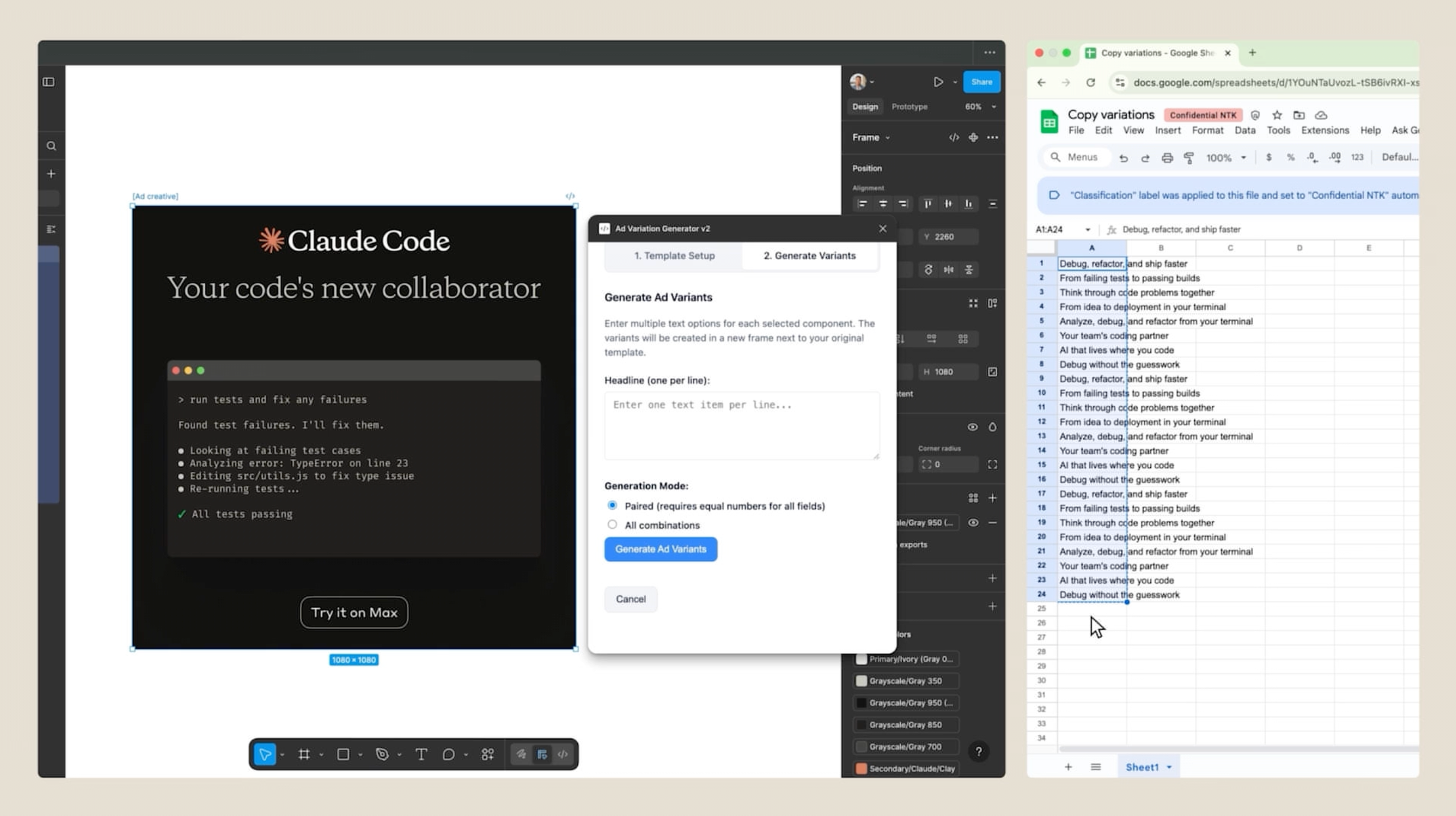
"All I would have to do is specify the frame of the creative, and then copy and paste just once all the different variations and copy that I wanted to update, and with the click of a button, the Figma plugin will create all the different permutations for that single image," Austin explains.
Google Ads copy generation
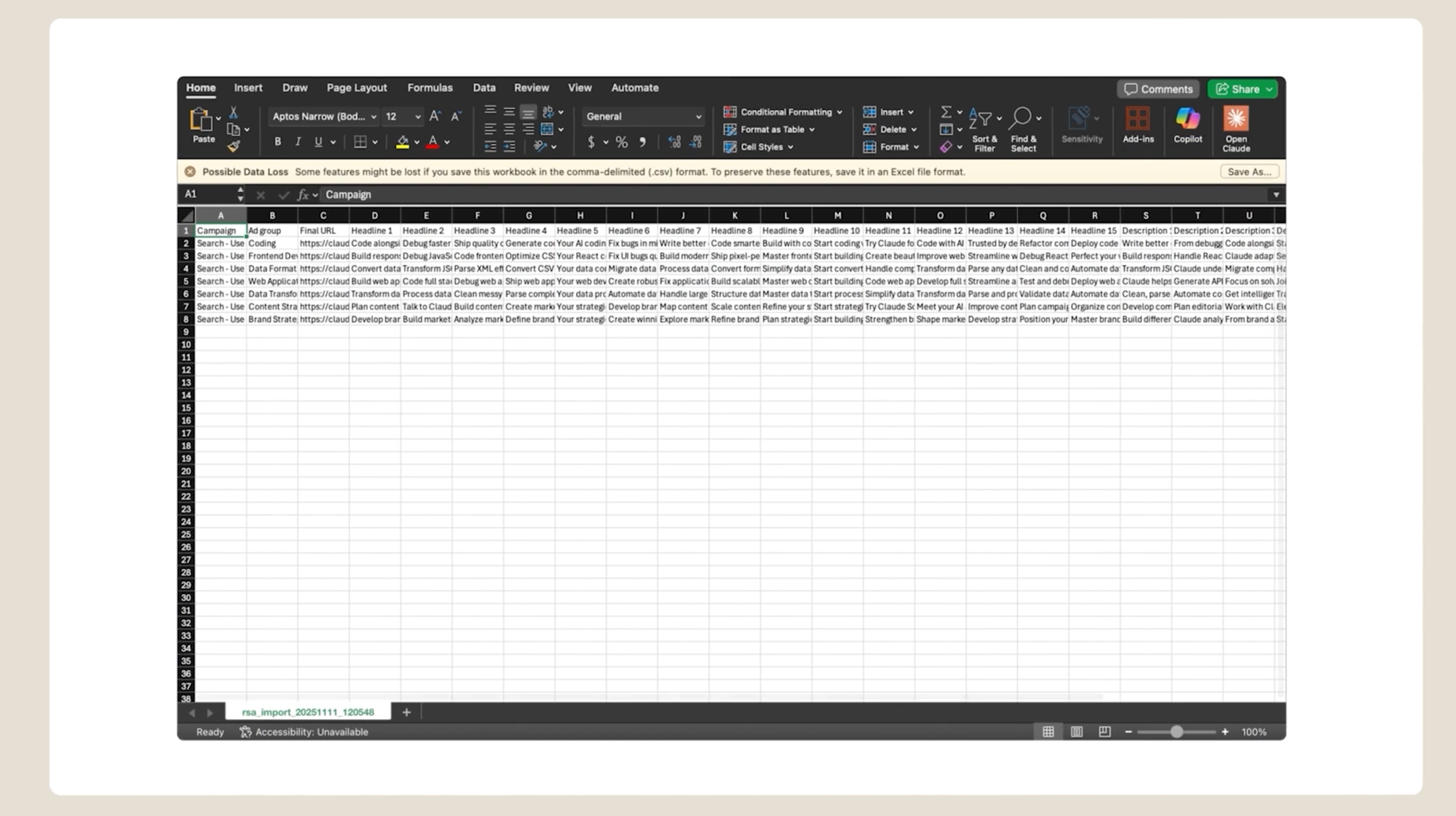
For responsive search ads, Austin built a workflow that helps brainstorm and create upload-ready ad copy using existing campaign and ad performance data to help inform what types of messaging resonates with prospects. This workflow saves hours per week on copy creation and character validation. With the time saved on mechanical tasks, Austin can now run more copy experiments and iterate faster on what actually performs best.
To get started, he types /rsa, a custom slash command he created for responsive search ads, into Claude. Claude Code asks for campaign data, existing copy, and keywords, then cross-references his inputs against Agent Skills he created for Anthropic's brand tone and voice, product accuracy, and Google Ads RSA best practices.
But the output is just a starting point.
"Claude is a great brainstorming partner, but sometimes it doesn't get it right on the first try," Austin explains. "A lot of the work I do is riffing and going back and forth to help refine the copy over time."
That refinement matters because Austin is evaluating each headline against what he knows resonates with Anthropic's audiences. Does the value prop land? Is the tone right? Does it stand out from competitors? Once the copy feels right, Claude Code combines everything into a CSV file ready for upload.
And all of this builds on a human foundation. "All of the copy and examples that we provide Claude were written in partnership with the product marketing and copywriting teams," Austin says. That strong starting point means there's human judgment baked in before Claude even starts brainstorming.
Best practices for building your own workflows
Austin's experience offers practical guidance for marketers - or really anyone without a technical background - looking to build custom tools with Claude Code.
Start with small, repetitive steps
"My advice would be: if you want to try a tool like Claude Code is to just think through, what are the areas of your work that you've identified that are either repetitive or you think could automate, and just start with a very, very small and easy thing,” explains Austin.
For instance, Austin's first project was to build his calculator app to first see how Claude worked.
Let curiosity drive your work
Austin describes himself as "the type of person who, if I'm very curious about something, it gets to the point of almost stubbornness where I have to find out the answer." That persistence is what turned a blank terminal he didn’t know how to interact with into functioning working tools he uses daily.
Talk to Claude like you're explaining a problem to a colleague
"You don't need to know how to code. All you need to know is how to explain your challenge and what you're trying to solve in a very clear, concise manner,” says Austin.
Non-technical employees are already subject matter experts in their own domains. They understand their workflows, feel the friction points, and know exactly what they need from an output. Claude Code gives them the ability to fix any recurring technical problems themselves.
Build on what resources already exist
For the Figma plugin, Austin pointed Claude Code to existing Figma API docs. Using the existing documentation, Claude conducted its own research and built a prototype for Austin to experiment with. A prototype that barely worked was enough to prove the concept Austin had in his mind, eventually leading to a functional product.
The bigger picture
For most of his career, Austin assumed certain things were out of reach. If he needed a tracking pixel installed, he would have to ask an engineer to install it. If he needed a custom workflow built, he would have to file a ticket with support.
"I would say a few years ago, if you had an idea to build something like this workflow, you would probably need a team of engineers to help support you on it," Austin says. "Now, with a tool like Claude Code, as a non-technical marketer, I can actually go out and build these things. So the gap between 'I wish this existed' and 'I can actually build this myself' is actually much smaller than people realize."
He's now demoed his workflows to colleagues and customers and they all have the same reaction: why haven't we done this?
What's next for marketers
Austin sees the role of growth marketer evolving rapidly. "I think growth marketing is going the way of almost like a product manager," Austin says. "We're not only able to execute on campaigns, we're able to actually build products in order to help us achieve our targets."
Austin isn't the only marketer at Anthropic building with Claude. Across the marketing organization, teams are finding similar results:
- Influencer Marketing uses Claude to write scripts for influencers and podcasts, freeing up 100+ hours per month to focus on higher-value work
- Customer Marketing drafts case studies in 30 minutes instead of 2.5 hours, saving 10 hours per week
- Digital Marketing built web development workflows that increased team productivity by 5x year-over-year
- Product Marketing uses Skills and Projects to create launch briefs, saving 5-10 hours per launch
- Partner Marketing built self-serve event enablement for Sales, reducing time spent on trade show prep by 40%
"Most marketers probably approach AI in the same way, where they just see it as a way to help streamline things like writing copy or brainstorming," Austin says. "But they haven't really thought through what are the actual areas that they can truly embed tools like Claude into their workflow."
There’s an opportunity developing for teams that adopt tools like Claude Code to spend less time on repetitive execution and more time on the things that matter to their job.
Get started with Claude Code today. Stay tuned for more stories in the "How Anthropic uses Claude" series.