Prep scattered documents for a compliance audit
Turn a folder of scattered policy documents, contracts, and records into an organized, clearly named collection ready for regulatory review.
In Cowork, Claude processes an entire folder of audit documents at once: policies, procedures, contracts, evidence, scans. It reads each file to understand what it is, so there's no renaming or sorting beforehand.
Your prompt just needs the audit framework and scope. Claude categorizes everything, renames files to match, and flags gaps in your documentation while you move on to something else.
I have 100+ documents for our upcoming SOC 2 audit in this folder. Right now they're scattered with names like "policy_v2_final.docx" and "scan0042.pdf". I need to organize them before the auditors arrive:
Our audit scope covers security, availability, and confidentiality. The audit period is January through December 2024.
Cowork is a workspace in Claude Desktop that works directly with your local files. Point it at your audit folder and it reads everything inside, including PDFs, Word docs, spreadsheets, and scans.
What to expect: After your initial prompt in Cowork, Claude may ask you questions about your audit scope and requirements, then build a plan you can review in the sidebar. This helps it work more independently and produce results closer to finished.
To get started:

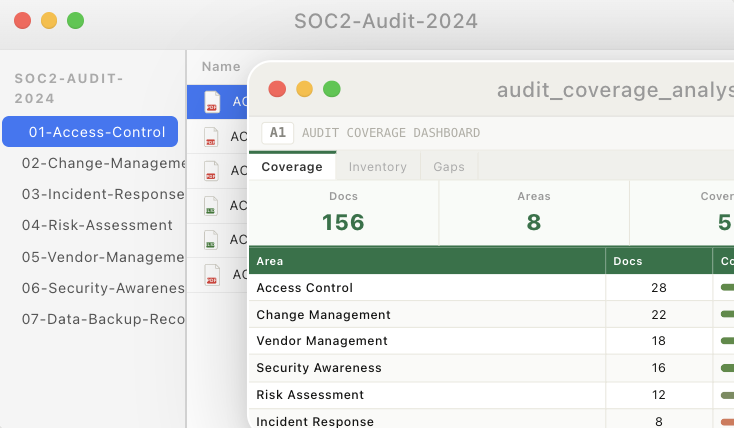
Cowork reviews the entire document folder, produces a rename mapping organized by control area, identifies coverage, and flags potential gaps.
I've reviewed all 156 documents in your audit folder. Here's what I found:
Well covered: Access Control (28), Change Management (22), Vendor Management (18)
May need attention: Incident Response (8), Data Backup & Recovery (6)
Want me to proceed with the reorganization?
Cowork writes files directly to your folder. Instead of copying output from chat, have it create the matrix as an Excel file you can share with auditors.
"Create a spreadsheet in this folder mapping each SOC 2 control to the documents that support it. Include columns for control ID, description, evidence documents, and coverage status."
Use Claude in Chrome for web-based tools. If your change management or incident response evidence lives in Jira, ServiceNow, or another web tool, Cowork can read it directly from the browser.
"I have Jira open with our change management tickets. Pull the last 6 months of change requests and create a summary document showing we follow our change management procedure."
Create a reference doc for your audit conversations. Cowork reads each policy and writes a cheat sheet you can use when auditors ask questions.
"Read our policies folder and create a one-page reference doc. For each policy: what it covers, last updated date, and the 2-3 key requirements I should be able to explain."
Cowork runs locally. Sensitive policies, contracts, and evidence files never leave your computer.
If you have a "to be organized" folder with random scans and downloads, that's exactly where to start. Cowork can make sense of poorly named files from their content.
If you have a control matrix, audit checklist, or framework mapping, include it in the folder. Cowork uses it to categorize documents more accurately.