Reducing cost and improving performance with Claude Platform
Tuning prompt caching, instructions, and effort can reduce Claude's cost without sacrificing application performance.
Tuning prompt caching, instructions, and effort can reduce Claude's cost without sacrificing application performance.
Performance and cost are often viewed as a trade-off: to spend less, you accept worse results. In practice, we've found that many applications using Claude Platform can cut costs without giving up performance with three fixes: maximize the prompt cache hit rate, remove anti-patterns from your prompts when upgrading to frontier Claude models, and calibrate effort to the task. We've put this guidance into the claude-api skill. In this article, we show how Claude Code with the claude-api skill can often find ways to reduce cost while maintaining or improving performance.
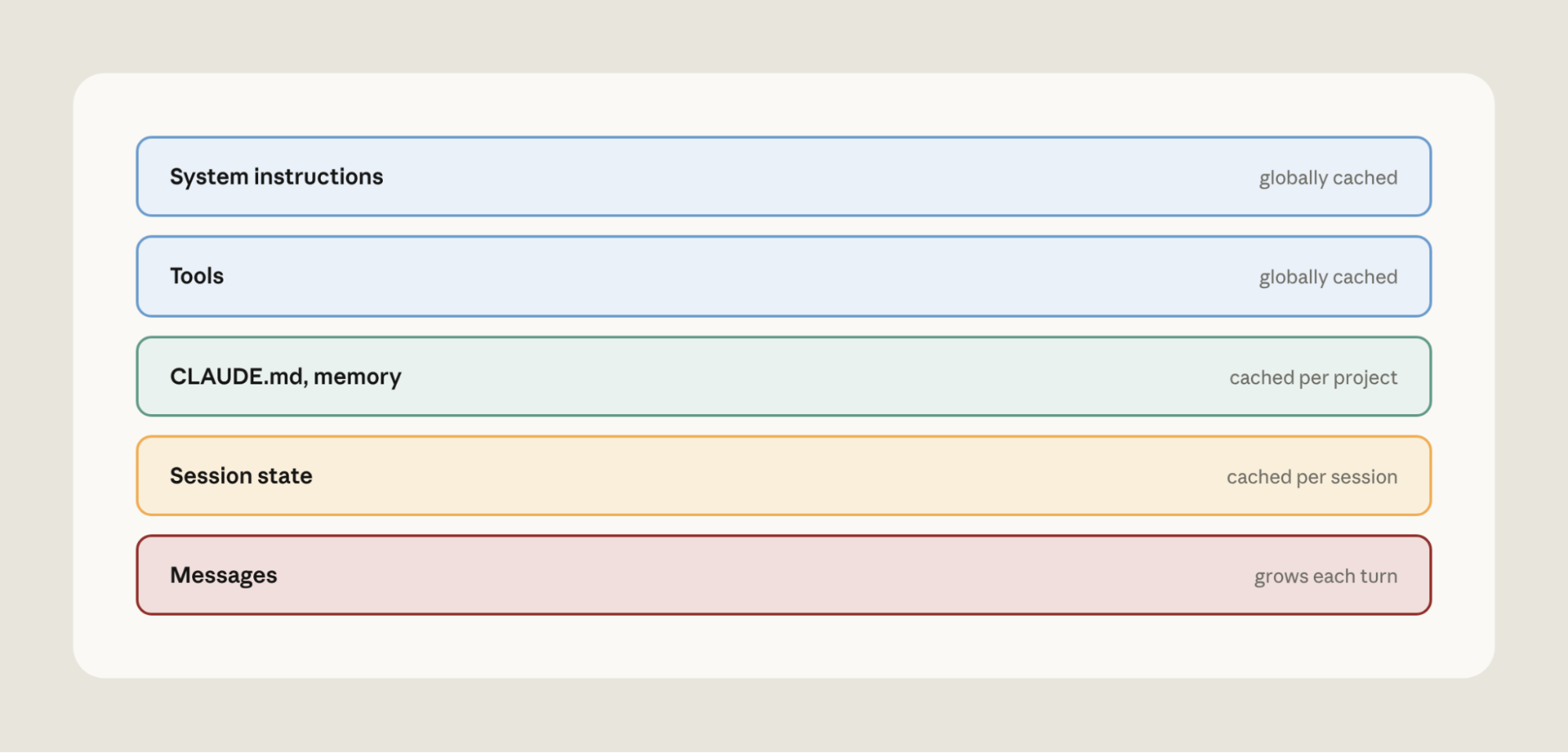
Before Claude generates a response, it first processes your prompt into an internal working state. This step, called prefill, is the expensive part of handling input. Prompt caching saves that state (the key–value, or KV, cache): when a request starts with the same prefix, Claude reads it back instead of recomputing it. Cache reads are billed at a fraction of the full input price.
There are a few practical considerations to ensure effective use of the prompt cache. First, the prompt cache is pinned to a specific model. Second, prompt cache reads must be byte-exact across the prompt prefix. Finally, the prompt cache has a limited time-to-live (TTL).
With these points in mind, there are a few practical tips:
We’ve accumulated a few lessons for prompt cache management:

Monitor your prompt cache hit rate carefully. Claude Console and the cache diagnostics API provide prompt cache diagnostics, including reasons for prompt cache misses (Figure 1) and exactly where two requests diverged.
Monitor your prompt cache hit rate carefully. Claude Console and the cache diagnostics API provide prompt cache diagnostics, including reasons for prompt cache misses (Figure 1) and exactly where two requests diverged.
Prompts can accumulate instructions that patch model weaknesses. These instructions can drift relative to the capabilities of the latest Claude models. Here are common prompting “anti-patterns” that hobble frontier Claude models and can inadvertently increase costs:
We've updated the claude-api skill with a new command that watches out for these anti-patterns. In Claude Code, run /claude-api prompt-audit against your prompts, skills, or tool descriptions. The audit covers anything in your working directory, including application code that calls the Claude API and Claude Code's own configuration (e.g., CLAUDE.md or skills).
For example, we tested a model migration from Opus 4.8 to Opus 5 on a customer support benchmark. We started from a clean prompt and planted one anti-pattern at a time (a retired thinking setting, a pair of contradictory refund rules, a manual scratchpad, "verify twice", "be maximally thorough", and a mandatory six-step procedure), giving six legacy prompts.
We ran each on Opus 4.8, on Opus 5 with only the model ID changed, and on Opus 5 after running /claude-api prompt-audit once per prompt (Figure 3 shows the average across the six).
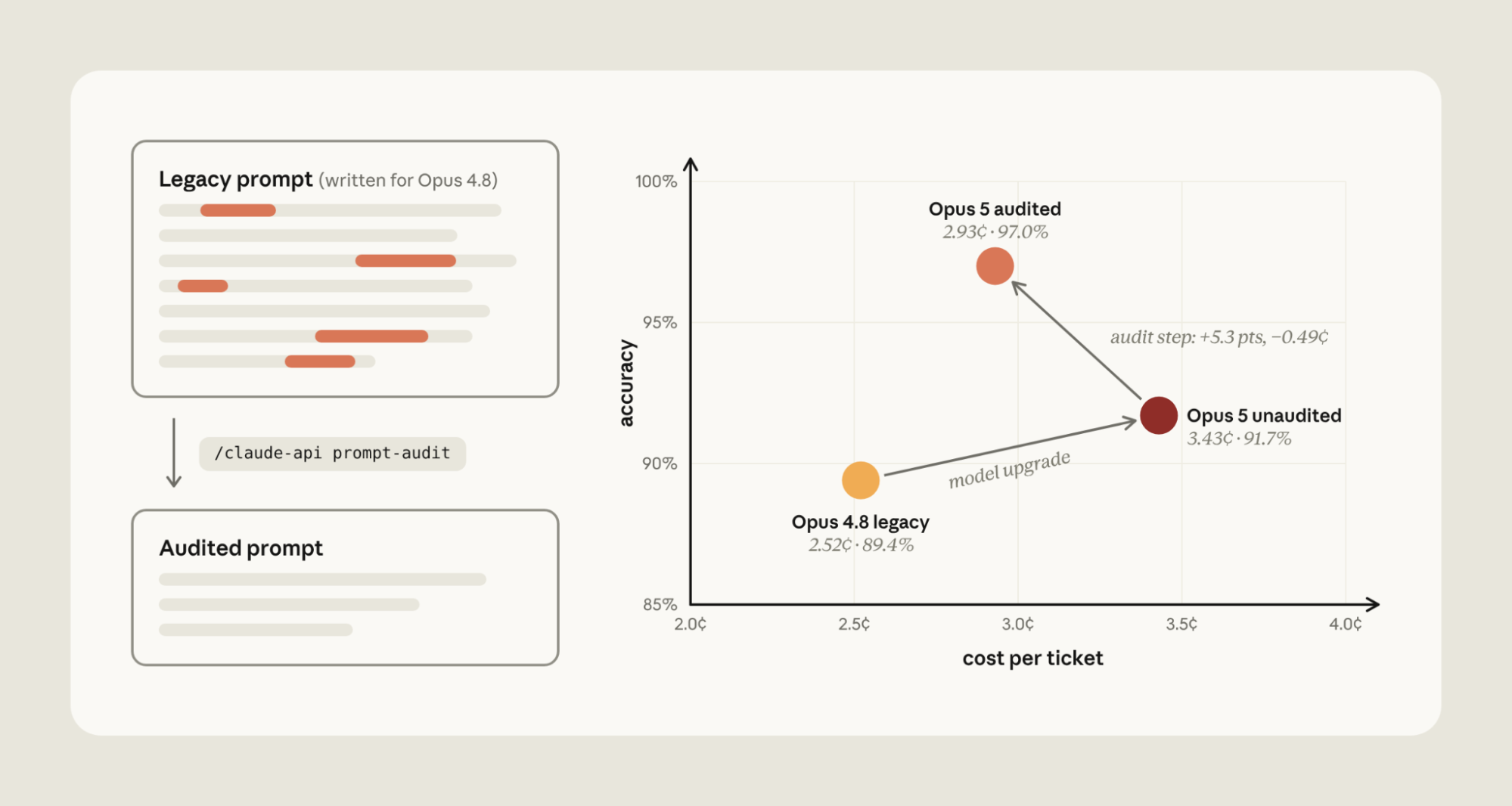
Figure 3 | The effect of prompting anti-patterns during model migration from Opus 4.8 to Opus 5.
With Opus 5, verification rituals ("verify twice") use unnecessary tokens by duplicating order lookup on every refund. Emphasis boosters ("be maximally thorough") became dozens of unneeded knowledge-base searches.
Running /claude-api prompt-audit removed the anti-patterns, decreasing costs by 14.6% and increasing accuracy by 5.3% on average. Cost dropped because extra tool calls and duplicated reasoning were eliminated. Accuracy rose for three reasons. The retired thinking setting made the API reject every routing request outright. The contradictory refund rules led Opus 5 to withhold four refunds it owed while it asked the customer to confirm. And the manual scratchpad collided with Opus 5's built-in thinking: on three tickets it wrote the tool call inside its reasoning and never executed it.
Effort tells Claude “how hard to work.” At low effort Claude generally reaches conclusions faster. At high effort, Claude deliberates, verifies, and explores alternatives before answering.
Cost-versus-performance across effort levels on a single model can vary. For example, Claude Fable 5 scores 11.5% at low effort for $5.35 per task on FrontierCode Diamond (the hardest 50 tasks). At max effort, Fable 5 gets 30.9% for $19.00 per task; changing effort raises the score about 2.7x (+19 points) for about 3.5x the cost (Figure 4).
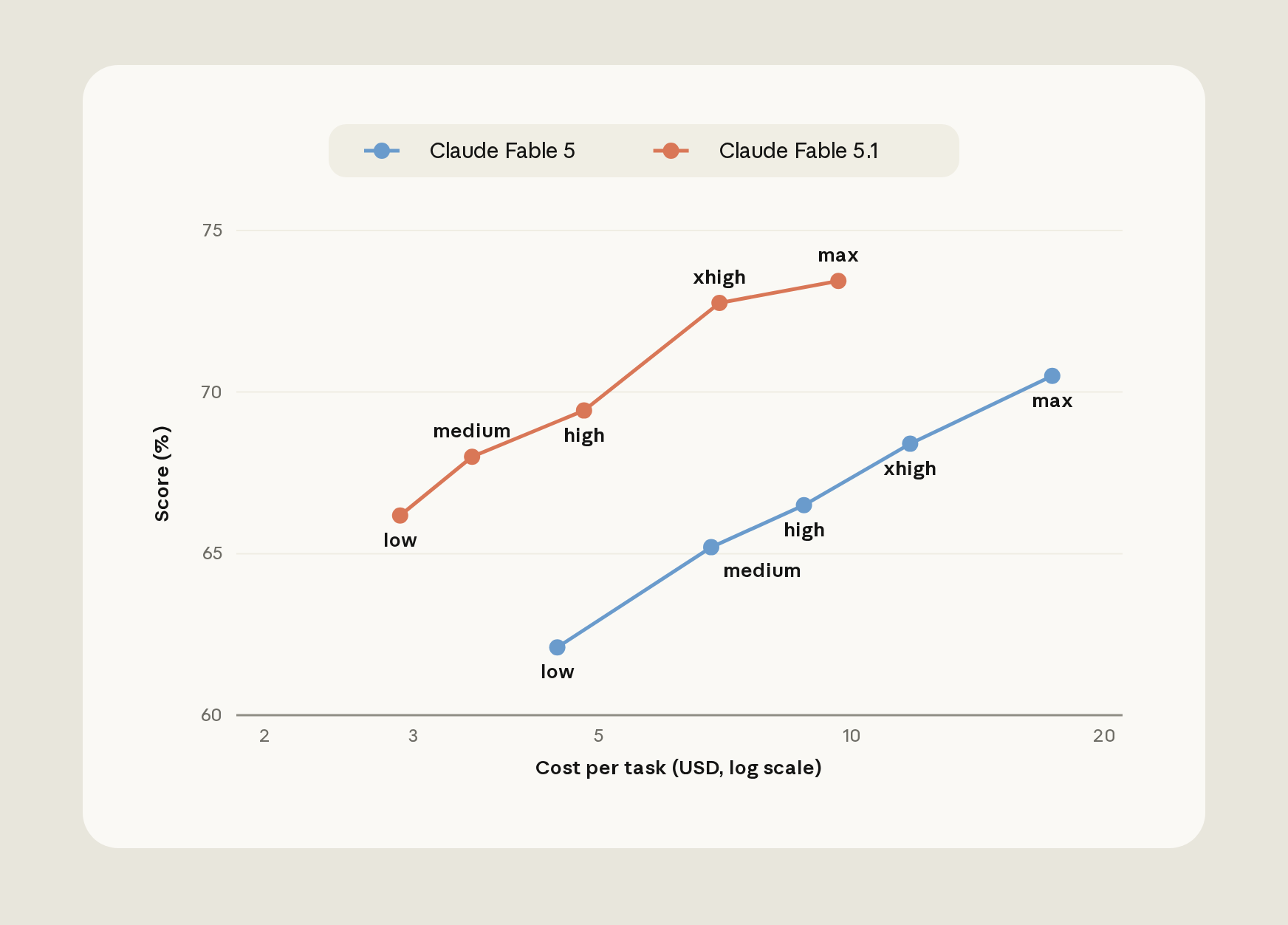
On Claude Fable 5.1, Humanity's Last Exam (without tools) shows a steep curve with a diminishing last step. It scores about 53% at low effort for about $0.30 per question and about 61% at max effort for about $2.23; the last step up to max adds about half a point for 46% more cost. The gain falls inside the benchmark's run-to-run noise, so you pay more for no measurable gain.
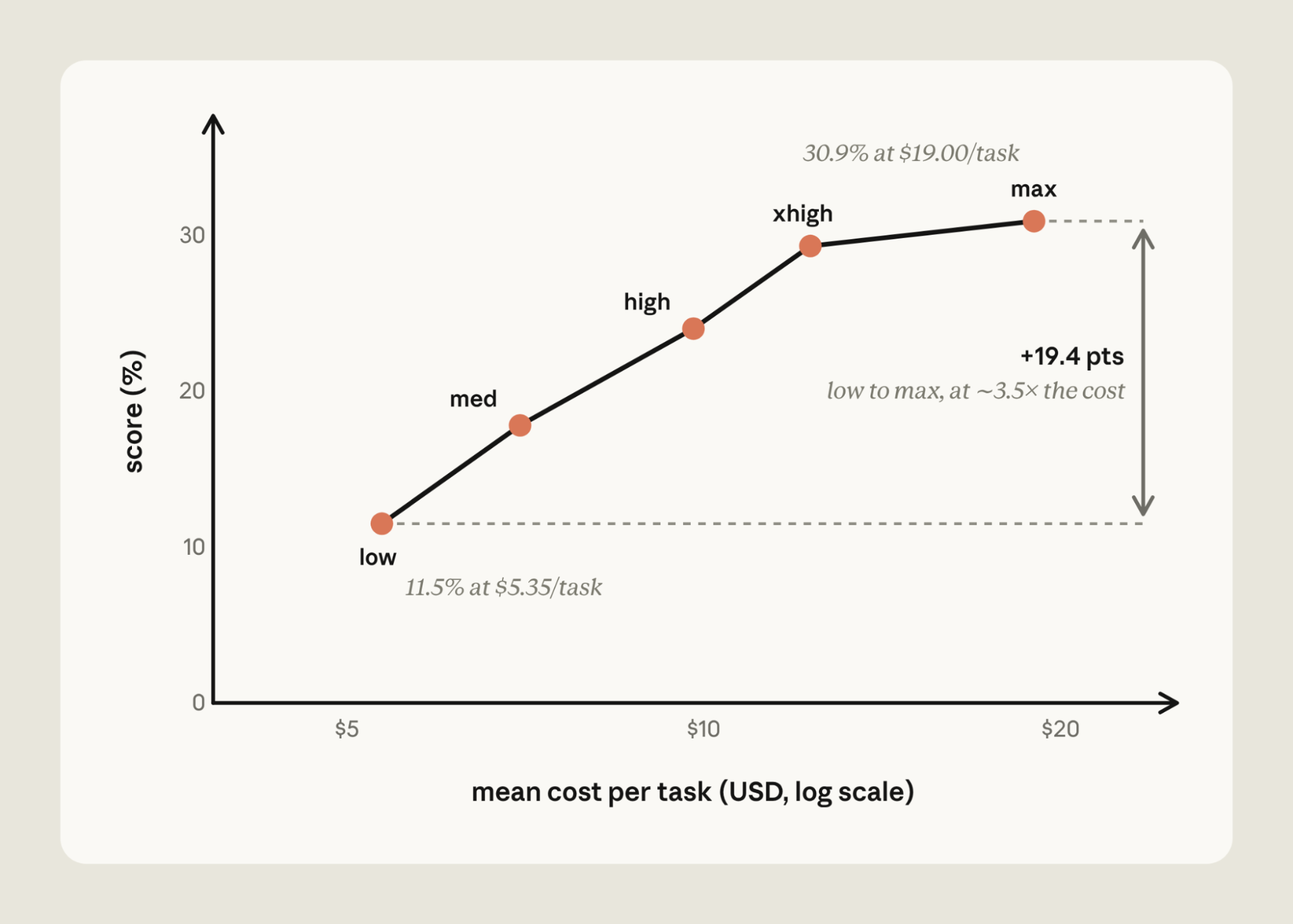
Effort can be miscalibrated in either direction:
There are some useful ways to calibrate effort:
This calibration often involves running an evaluation across models and effort levels. In Claude Code, /claude-api hillclimb performs this search for you: it splits your evaluation into train and test sets, proposes configuration changes, and reads failing train examples to fix what it finds.
We ran it on a customer support benchmark, starting from Opus 4.8 at its default (high) effort. The hillclimber first tried Opus 5 at low effort, applying prompt-audit to remove mandatory tool-call rituals, scratchpad steps, and contradictory rules. That cleared the Opus 4.8 baseline at 98.9% train accuracy and cut cost to 2.6 cents per ticket.
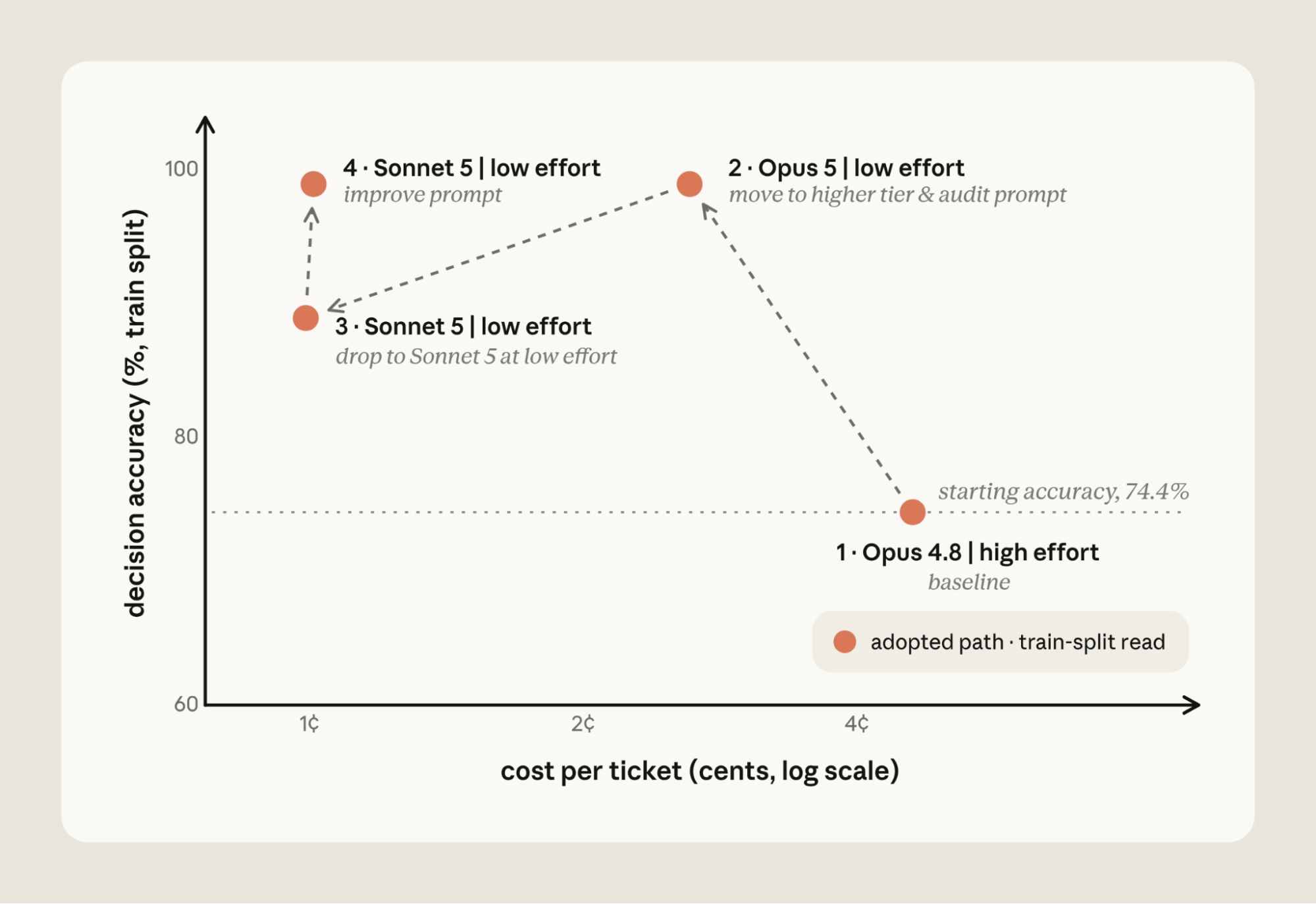
It then stepped down to Sonnet 5 at low effort, which was cheaper still at 1 cent per ticket, but accuracy fell to 88.9%. Reading the failing train tickets, Claude added routing rules and a refund-cap cross-reference to the prompt, bringing Sonnet 5 back to 98.9% at the same cost.
On the 14 held-out tickets the search never saw, the final configuration scored 90.5% against the original setup's 78.6%, at about one fifth the cost.
Prompt caching, instructions, and effort are common levers for reducing cost. Our documentation covers even more. To run a holistic cost audit of application code that uses the Claude API, we've added /claude-api cost-optimize: it profiles where your spend goes, applies cost reductions, and, if you provide an evaluation, shows how savings trade off with performance.
cost-optimize starts by finding where your tokens go: from your organization's usage and cost reports if you have a Claude Admin API key, from the usage object on each API response if your application logs it, or, failing both, by reading your request-building code and estimating.
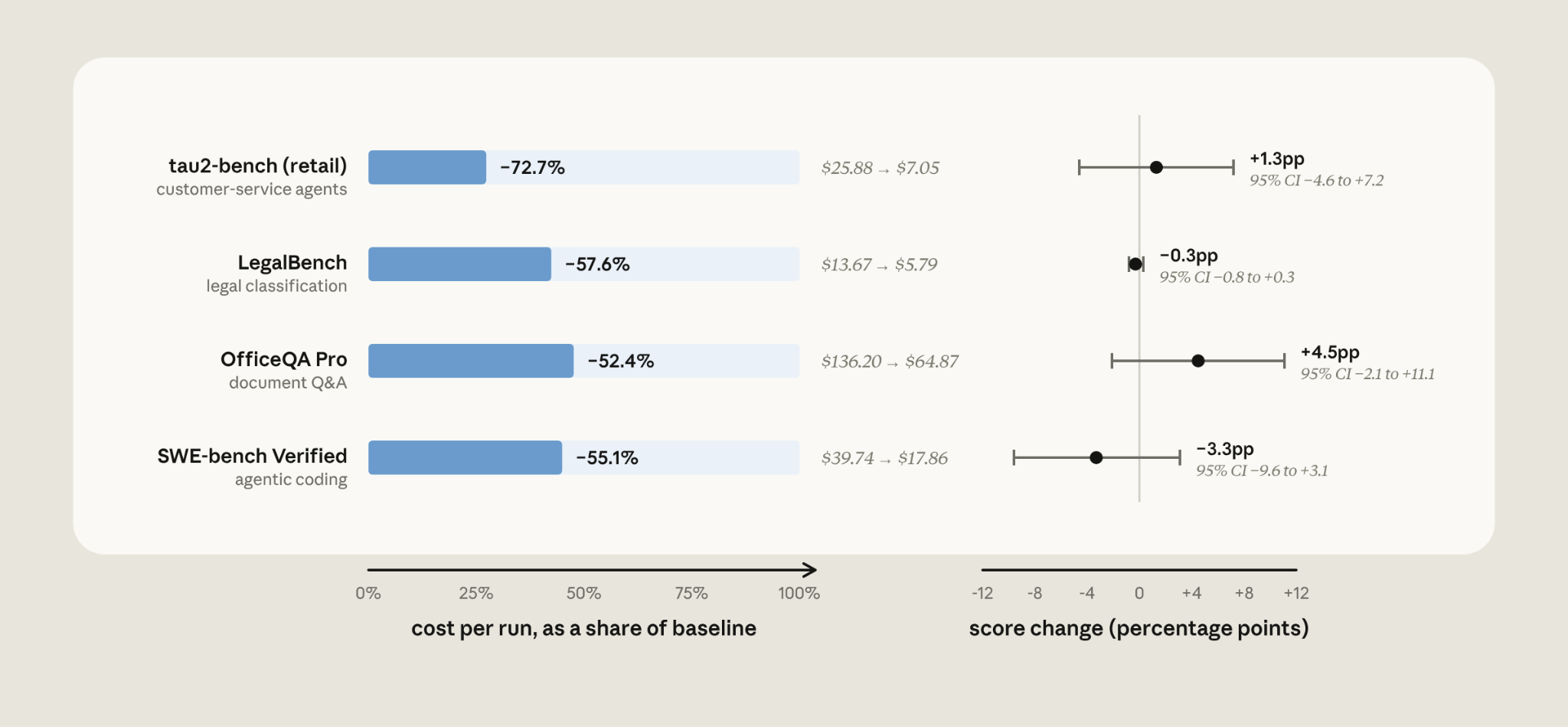
It then ranks the available savings, starting with prompt caching, trimming what each request carries (including a prompt-audit), bounding output, and batching unattended work. If you supply an evaluation, it goes further and computes cost and performance across effort levels and model choices.
We ran this on four public benchmarks, starting with Sonnet 5 as a baseline (Figure 7):
Start with /claude-api prompt-audit when you've migrated to a frontier Claude model and want to check your existing prompts against it. It scans the prompts, skills, and tool descriptions in your working directory. This can be application code that calls the Claude API or Claude Code's configuration (CLAUDE.md, skills). It removes common anti-patterns that hobble frontier models.
Reach for /claude-api cost-optimize when your application uses the Claude API and you want a cost audit. It profiles token spend and then tests different levers: it applies prompt-audit, but also checks for ways to lower cost via prompt caching, batching unattended work, or bounding output. If you provide an evaluation, it measures the effort and model selection trade-offs.
Finally, use /claude-api hillclimb for an iterative search over cost and performance. Given an evaluation, Claude splits it into train and test sets, then proposes updates to your application that aim to reduce cost while maintaining baseline performance. Claude reads the failing train cases to guide the search, and the final configuration is scored on the held-out test set.
To learn more:

Recevez la newsletter des développeurs
Mises à jour de produits, procédures, présentations de la communauté, et plus encore. Envoyée mensuellement dans votre boîte de réception.