
- DataJune 18, 2026
- Tempo di lettura5min
- CondividiCopia link
Claude is built to work the way you work, and in Claude Code you can customize it.
There are seven methods for instructing Claude's behavior: CLAUDE.md files, rules, skills, subagents, hooks, output styles, and appending the system prompt.
Each method controls:
- When an instruction loads into context;
- Whether it persists through long sessions (compaction behavior); and
- How much authority it carries.
The table below provides a quick summary of key differences across each method while the post provides additional detail and decision framework for determining where each of your Claude instructions belongs.
The seven methods for delivering instructions
CLAUDE.md files
CLAUDE.md is a markdown file at the root of your project. It loads into context at session start and stays there for the entire session.
Build commands, directory layout, monorepo structure, coding conventions, and team norms all fit naturally here.
There are two types, and they load differently:
- Always loaded: The first type is a root CLAUDE.md file, either in a shared repository and/or saved locally for your personal preferences specific to a project. All these files load at session start, and won’t get lost or degraded across long sessions. When Claude Code compacts the conversation, it re-reads these files.
- On-demand: CLAUDE.md files in subdirectories below the folder where you initialized the session. For example,
app/api/CLAUDE.mdloads when Claude reads a file underapp/api, not at session start. It shares the compaction behavior of path-scoped rules: gone until that subdirectory is touched again.
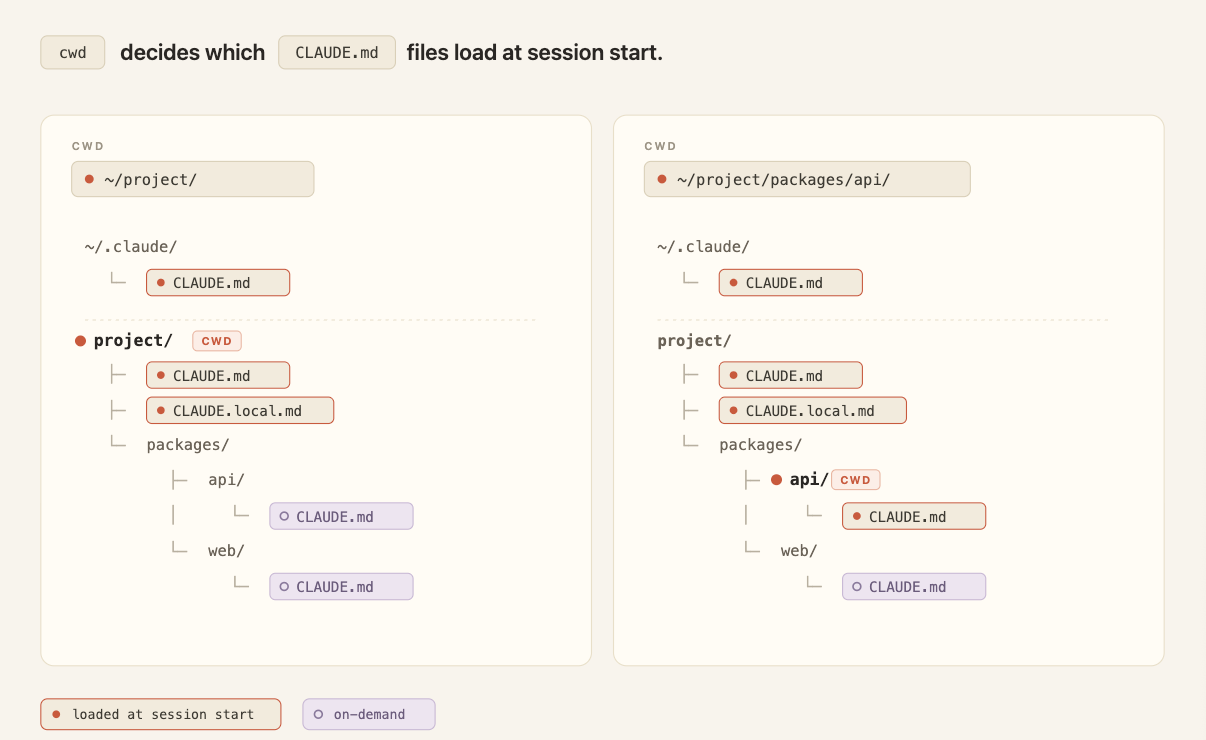
In a shared repository, CLAUDE.md grows the way any unowned config file does: every team appends its own instructions and nothing gets deleted. The cost compounds at scale.
Every line loads into every session for every engineer working in the repo, whether it's relevant to their task or not. This consumes tokens and dilutes adherence to the instructions that actually matter. As the file grows, push team-specific conventions into path-scoped rules and procedures into skills, where they load only when relevant.
Tip: Keep CLAUDE.md under 200 lines, give it an owner, and review changes to it like code. Think of this file as giving Claude an overview of your codebase, or as an index pointing to other files where Claude can find more information as needed.
In monorepos, give each team's directory its own subdirectory CLAUDE.md so teams only load their own conventions, and developers can use the claudeMdExcludes setting to skip files from teams whose code they never touch.
For standards that must apply to every repository in the organization — security policies, compliance requirements — a centrally managed CLAUDE.md can be deployed to developer machines via MDM or config management, and it can't be excluded by individual settings.
More on setting up CLAUDE.md in our blog post, CLAUDE.md files: Customizing Claude Code for your codebase.
In alternativa, leggi la documentazione
eBook

Rules
Rules are markdown files in .claude/rules/ that give Claude specific constraints or conventions.
Unscoped rules behave like CLAUDE.md in that they are always loaded at session start and get re-injected on compaction. This can waste tokens by loading context even when it's not relevant for the task at hand.
Path-scoped rules allow you to load rule instructions only when they are relevant by adding a paths field that controls when they load.
For example: a rule scoped to src/api/** stays out of context during a docs-only session. It would only be loaded whenever Claude reads files within that src/api/ directory.
Here’s what that looks like:
---
paths:
  - "src/api/**"
  - "**/*.handler.ts"
---
All API handlers must validate input with Zod before processing.Tip: A file-specific constraint, like "migrations are append-only," fits best as a rule placed in your paths: frontmatter. Reach for a path scoped rule over a nested CLAUDE.md file when the instruction regards a cross-cutting concern or file that appears in multiple (but not all) corners of the codebase.
Skills
Skills live in .claude/skills/ as folders of instructions, scripts, and resources that Claude loads dynamically. Each skill has a SKILL.md file with a name, description, and body.
Only the name and description load at session start; the full body loads when Claude invokes the skill, either through a slash command (/code-review) or by auto-matching the task.
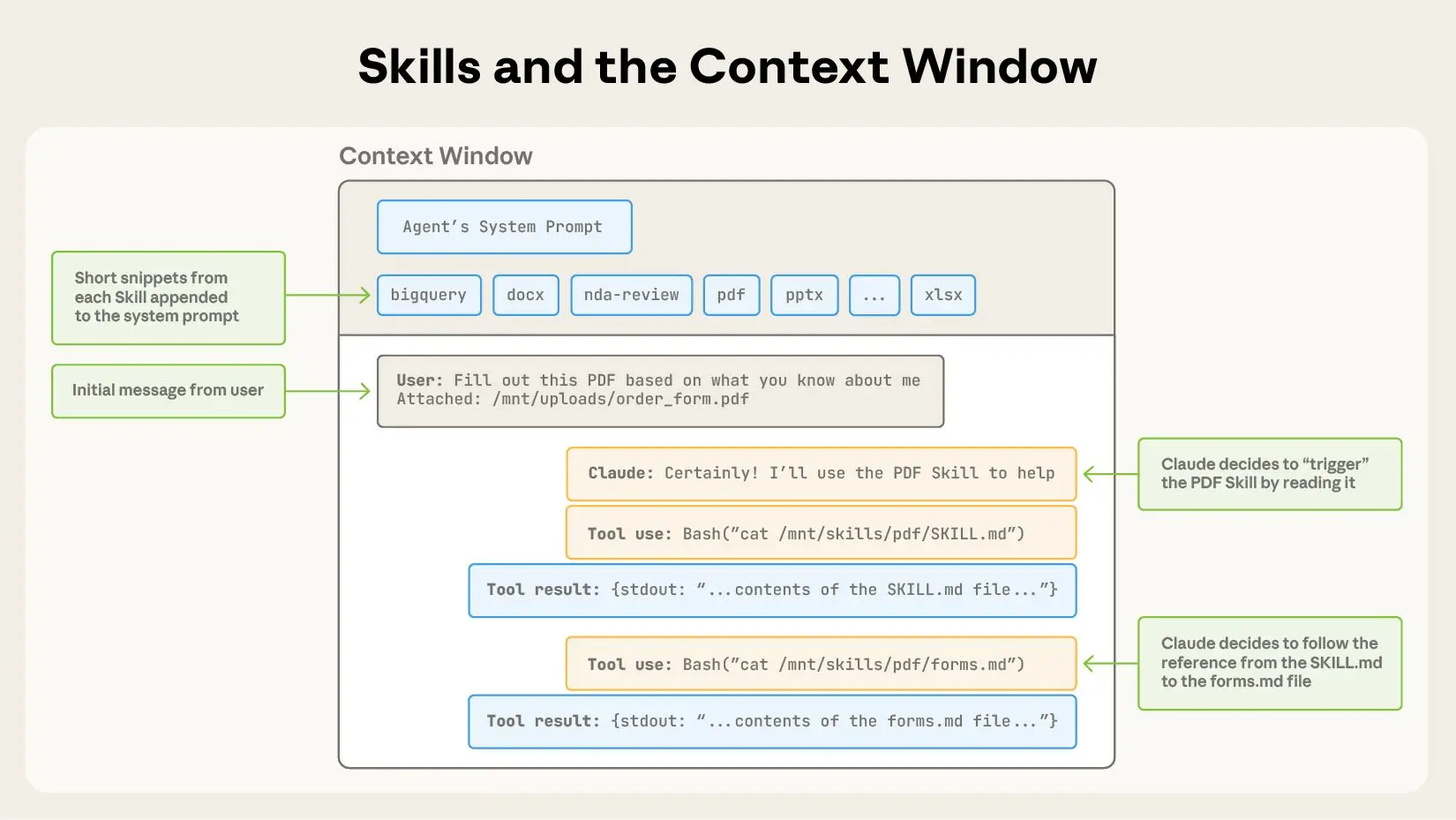
For example, /code-review is a built-in skill that reviews your current diff and reports its findings without editing files. The skill defines the playbook so Claude follows the same structured approach every time you invoke it.
On compaction, Claude Code re-injects invoked skills up to a total budget across all invoked skills. If you’ve invoked many skills during a session, the oldest ones drop first.
Tip: Instructions that are procedural, like deploy workflows, release checklists, or review processes, belong in a skill rather than in CLAUDE.md.
Claude Code ships with skills, but you can also write your own custom skills. Our complete guide to building skills for Claude shows you how.
Subagents
Subagents are markdown files in .claude/agents/ that define isolated assistants for specific side tasks. Each file uses YAML frontmatter (name, description, plus optional fields for model and tool access) followed by a body that becomes that subagent's system prompt.
Subagents are similar to skills in that the name, description, and tool list load at session start, but the larger context within the body of the agent doesn’t auto-invoke. Claude calls them via the Agent tool, passing in a prompt string.
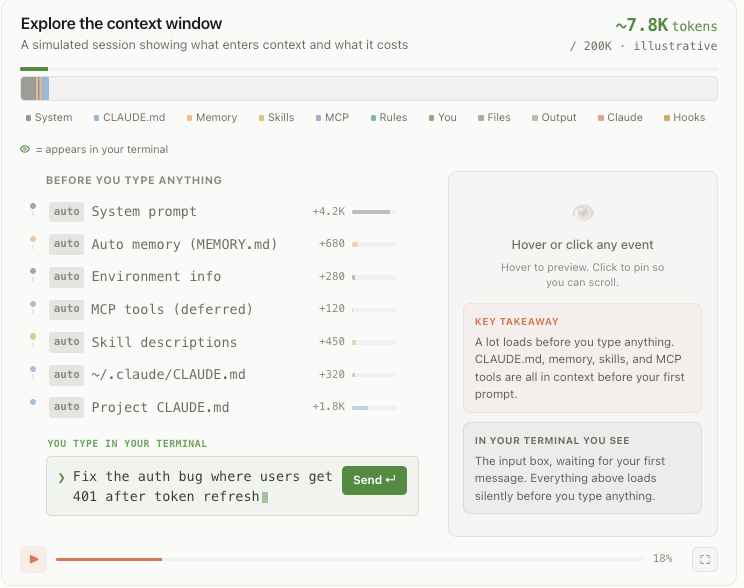
Not only does the larger instructional context within the body of the subagent not auto-invoke, it never enters the parent conversation at all.
The subagent then runs in its own fresh context window, and the only thing that returns to your main session is the subagent’s final message (often the aggregated result of many subtasks) plus metadata.
This pattern scales: subagents can nest up to five levels deep, and dynamic workflows orchestrate tens to hundreds of background agents without requiring you to specify each detail of the subagent architecture. The orchestration plan and intermediate results live in script variables rather than in Claude’s context window, which enables scale without losing instructional fidelity.
Tip: That isolation is one of the main reasons to reach for a subagent instead of a skill. Use a subagent when a side task like deep search, a log analysis pass, or a dependency audit would clutter your main conversation with intermediate results you won't reference again. Use a skill when you want the procedure to play out inside the main thread so you can see and steer each step.
Hooks
Hooks are user-defined commands, HTTP endpoints, or LLM prompts that provide more deterministic control over Claude’s behavior by firing on specific events in Claude’s lifecycle like file edits, tool calls, or session start.
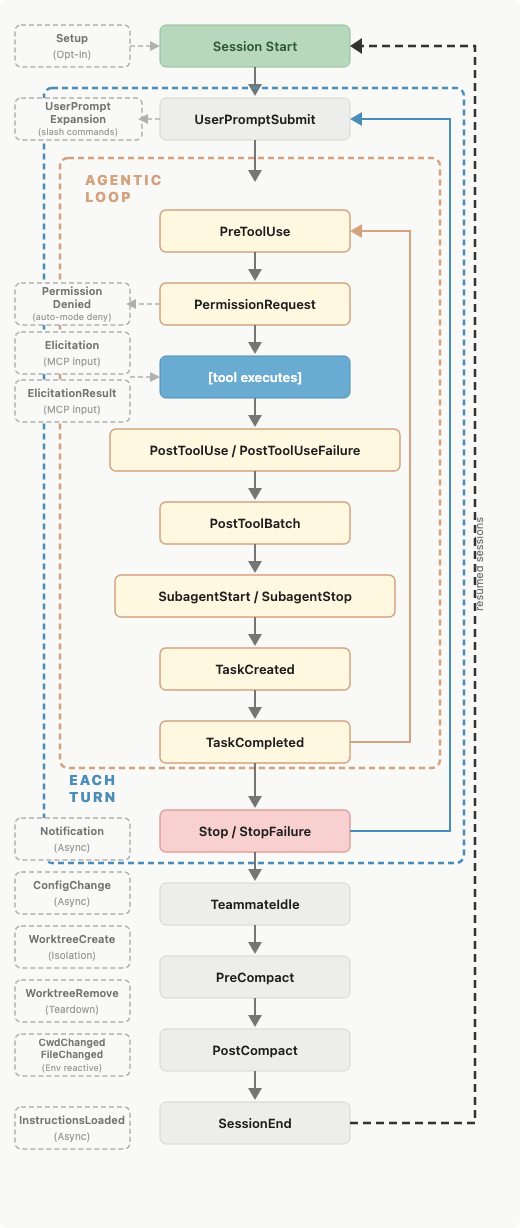
You register hooks in settings.json, managed policy settings, or skill/agent frontmatter.
There are several types of hooks: command, HTTP, mcp_tool, prompt, and agent. All hooks are deterministically triggered. The first three execute deterministically while the latter two, prompt and agent, use Claude’s judgment rather than a set of rules to determine the output.
Hooks have low context costs because the configuration or instruction lives outside the main context window. The harness runs the handler (command, http, mcp_tool) or makes model calls with separate windows (prompt, agent) depending on the hook type.
Some hooks may have the output saved to the main context window. For example, a blocking hook's standard error is saved within context so Claude knows why the call was denied.
But most hooks won’t have the output saved to the main window unless the configuration explicitly returns it. If you backed up your chat history into another file for later reference before compaction using the PreCompact event, Claude wouldn’t know which file had the chat history saved.
This makes these hook types fundamentally different from CLAUDE.md, rules, and skills. You can learn more in our post how to configure hooks.
Tip: Use hooks for anything that should happen deterministically: running linters after edits, posting to Slack on completion, or blocking specific commands before they execute. A PreToolUse hook can inspect any tool call and exit code 2 to deny it.
They have low context cost because they are code that the harness runs rather than instructions to Claude that get loaded into context.
Output styles
Output styles are files in .claude/output-styles/ that inject instructions into the system prompt. They never get compacted, load at the start of every session, and are cached after the first request within a session, meaning they have a moderate context cost.
Because they sit in the system prompt, output styles carry the highest instruction-following weight of any method that we've covered so far and should be used judiciously.
Changes to the output style will replace the default output style (unless you set keep-coding-instructions: true in the style's frontmatter).
In Claude Code, this would remove instructions that tell Claude it is helping users with software engineering tasks and contains other critical default instructions such as:
- How to scope changes;
- When to add or omit code comments;
- What to do about security concerns; and
- Verification habits like running tests before declaring work complete.
By default, a custom output style drops all of this and Claude Code becomes more of a general assistant than a software engineer assistant.
Tip: Before writing a custom output style, check the built-in styles. Proactive, Explanatory, and Learning cover the most common needs (autonomy, teaching mode, collaborative coding) without you having to maintain a style file.
Appending the system prompt
An alternative to modifying output styles is the append-system-prompt flag. Whereas modifying output style files can have large, unintended changes to Claude’s behavior, the append flag is only additive to the original system prompt. It doesn’t modify Claude’s role; it just adds instructions to its default role.
It is also passed at invocation time, and only applies to that invocation, rather than persisted as a file across sessions.
Appending the system prompt can have a higher context cost compared to other methods of passing instructions. It increases input tokens, though prompt caching reduces this cost after the first request in a session. Instructing Claude to use a more verbose or longer style also increases output tokens.
Tip: Appending the system prompt is best for adding specific coding standards, output formatting, or domain-specific knowledge. Keep in mind that appending the system prompt has diminishing returns for adherence. Generally, the more instructions you provide using this method, the less strictly Claude will follow them, particularly if any contradict.
Quick tips for Claude Code customization
If you find yourself doing one of the following, you may want to consider an alternative location for your instructions:
"Every time X, always do Y" in CLAUDE.md. If the behavior should happen reliably, like running prettier after every edit or posting to Slack on completion, use a hook in settings.json instead. The model choosing to run a formatter is different from the formatter running automatically.
“Never do this” in CLAUDE.md. When there's something that absolutely must not happen, an instruction is the wrong tool. Claude will follow the instruction most of the time, but when under pressure, in a long session or an ambiguous situation, or due to a prompt injection in a file accessed as part of the task, the model can fail to follow a prompted rule. A real guardrail needs to be deterministic, and the enforcement methods are hooks and permissions. A PreToolUse hook can inspect a call and exit with code 2 to block it. Managed settings go further: they are admin-deployed, cannot be overridden by a user's local config, and are the only way to enforce a deterministic, organization-wide guardrail.
A 30-line procedure in CLAUDE.md. Procedures belong in skills. CLAUDE.md is for facts Claude should hold all the time: build commands, monorepo layout, team conventions. A deployment runbook or a security review checklist should live in .claude/skills/, where the body loads only when invoked.
An API-specific rule without paths. If a rule only applies to src/api/**, scoping it with paths: keeps it out of context during unrelated work. An unscoped rule is mechanically identical to putting the content in CLAUDE.md: always loaded, always costing tokens.
Writing personal preferences to a project-level CLAUDE.md file. All file-based methods have a user-level counterpart loaded for every Claude Code session regardless of which repo you’re in. Use local files for personal preferences (always use semantic commit messages). Keep project-level files for preferences that are team-wide but specific to a given codebase.
Getting started
You can find more tips and patterns for getting the most out of Claude Code, from configuring your environment to scaling across parallel sessions, in our best practices for Claude Code documentation.
Once you have a few of these working, you can bundle many of them (skills, subagents, hooks, output styles) as a plugin to share a coherent setup across teammates or projects.


Trasforma le operazioni della tua azienda con Claude
Ricevi la newsletter sullo sviluppo
Aggiornamenti sui prodotti, guide utili, informazioni sulla community e molto altro. Ogni mese nella tua e-mail.