AI ネイティブの SDLC プレイブック
AI でソフトウェア開発ライフサイクルを変革する方法を、段階的に説明します。
コードはもはやボトルネックではありません。
組織は 1 年前には想像もできない速度でコードを書くために AI を活用し始めましたが、コードを扱うプロセスはそれと同じペースで変化していません。
多くのエンジニアリングチームが依然として同じ承認基準、レビュー、引き継ぎ、ポリシーを採用しており、Claude Code などのエージェントコーディングソリューションを使用した生産性の向上が滞っています。
ソフトウェア開発ライフサイクル(SDLC)とは、ソフトウェアをアイデアから本番環境に導くプロセスです。 ほとんどの組織は、ソフトウェアの計画、設計、構築、テスト、導入、保守を網羅する同じ 6 つのステージのいずれかのバージョンを実行しています。 従来、各ステージは異なる役割が担当する個別のフェーズでした。 プロダクトマネージャーが要件を書き出し、テクニカルアーキテクトがそれを設計に落とし込み、エンジニアが設計を構築し、規制対象の企業の QA チームが検証し、リリースチームがリリースし、運用が稼働状況を監視します。 文書、チケット、承認書を通じてフェーズを移行します。
従来のソフトウェア開発ライフサイクル(SDLC)は、各ステップで説明責任と管理を確保するために、プロセスが煩雑でした。しかし、従来の SDLC は、最も時間とコストがかかる段階がコードの作成と実装であった時代において、効率を最大化するよう設計されました。しかし、現在ではそうではありません。PRD、見積り手続き、プロダクトセキュリティレビューのすべてが存在し、数週間、数か月、あるいは四半期に及ぶ開発作業において、連携を強制していました。
従来の SDLC では、すべてのステップが人間によって実行されることを想定したコントロールも備えています。 最も価値を創出している組織は、エージェント AI が現在できることに基づいてプロセスを再構築し、同時に人間が常に情報の流れを把握しています。 このガイドでは、SDLC の各段階で Claude を社内で統合することで、お客様との連携からインスピレーションを得て、開発を加速し、プロセスをより迅速に実行できるようにするための Applied AI チームのベストプラクティスについて説明します。
コードがもはやボトルネックではなくなり、開発フェーズが従来の SDLC で可能な速度を上回るようになると、次の 3 つのことが成り立つようになります。
- ボトルネックは、開発フェーズの前後にある工程へと移ります。主に計画、レビュー/テスト、導入であり、依然として人間の速度で実行されます。
- コントロールが現実と一致しておらず、扱いにくくなります。 人間がコードを書いていた頃は、1 行ずつ手作業でレビューすることにも意味がありましたが、エージェントが差分の大部分を書くようになると、その方法では対応しきれません。
- 例外事項については、依然として毎週または毎月開催される会議や委員会を経て処理されるため、ガバナンスコストが増加します。
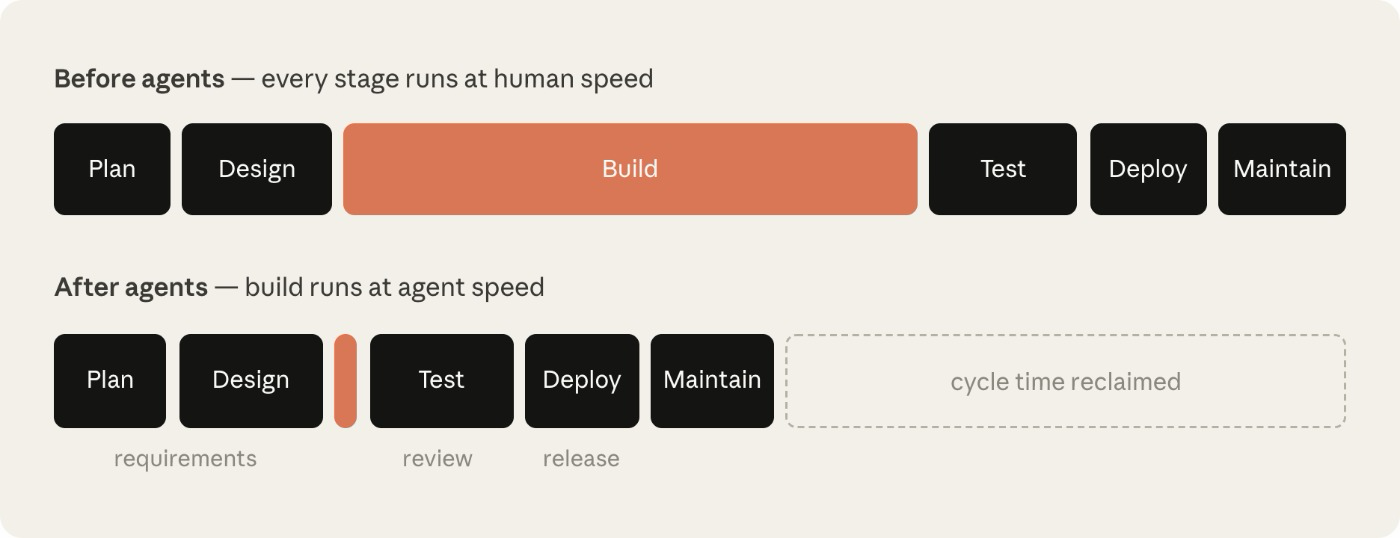
セキュリティのボトルネックを例に考えてみましょう。 セキュリティチームは人による出力に配慮しているため、エージェントがコード出力を倍増させた場合、レビューキューが構築されるか、またはレビューを受けていないコードがリリースされる可能性があります。 規制対象の組織ではどちらの結果も受け入れられないため、セキュリティとポリシーのチェックはエージェントの対応に合わせる必要があります。
エージェント AI の生産性向上をよりよく実現し、その安全性を確保するために、従来の SDLC ライフサイクルでは、実装フェーズが経験したと同じレベルのトランスフォーメーションが必要です。
AI ネイティブの SDLC とは何ですか?
AI ネイティブの SDLC は、従来の管理目標と新しい実施を組み合わせた再考されたプロセスです。 直線的なフローではなく、ループとなり、各ポイントに AI が組み込まれています。 AI ネイティブ SDLC は、自動的な引き継ぎとその後のプレイのトリガーを促進し、従来の SDLC のフェーズ間の手動による煩雑な性質の解消に役立ちます。
このシフトはエージェント SDLC、AI SDLC、単にエージェントのソフトウェア開発とも呼ばれるでしょう。ラベルは異なりますが、説明するものは同じです。
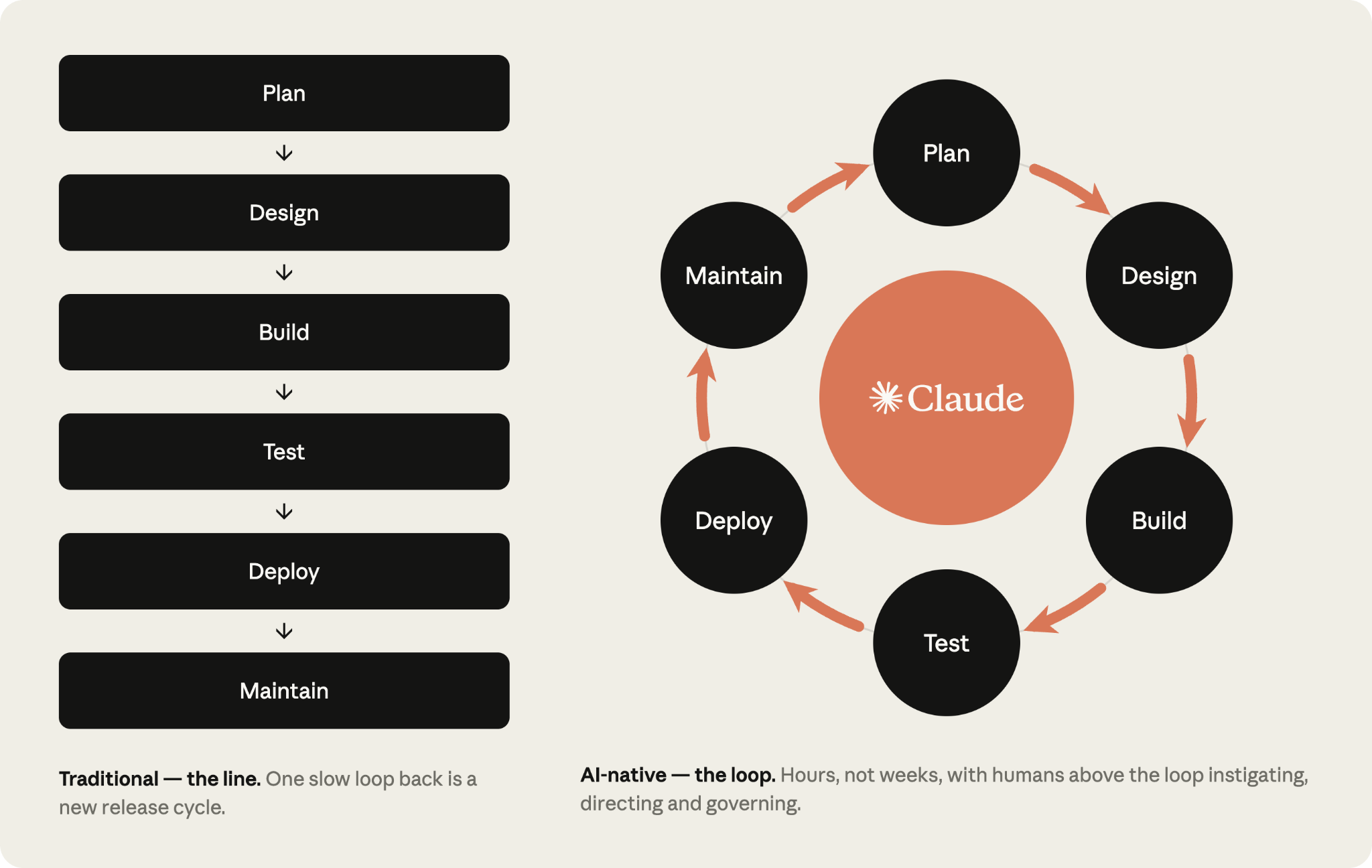
AI ネイティブ SDLC の 6 つのステージでの移行
以下の表は、従来の SDLC と Claude がサポートする AI ネイティブの SDLC の間の分岐点を示しています。 ほとんどの組織はこの 2 つの列のどこかに位置しています。
右側の列を一貫して貫いているのは、確定済みの成果物です。各段階ではバージョン管理(intent.md、spec.md、plan.md、diff とそのテスト、レビュー結果を含む PR 、インシデント記録を含む)に書き込むことで終了し、次のステージではそれを読み込むことから始まります。初期段階では、.md ファイルが主なアーティファクトです。これは、プロダクトオーナーとエージェントが同じファイルを読み取り、操作できるためです。 Build 以降、アーティファクトはコードとそのレコードになります。 コミットの一連の経過は、誰が何を依頼したのか、エージェントが何を作成したのか、誰が承認したのかなどの監査証跡でもあります。
判断が必要なすべての決定には、依然として人間が責任を負います。 エージェントの SDLC の世界では、レビューが必要なアーティファクトとともに、人間の注意点が変化します。
プレイ
プレイはプレイブックの核心であり、6 つの非線形なステージ(計画、設計、構築、テスト、導入、保守)に分類されており、これらがライフサイクル全体を網羅します。
各プレイの内容は以下です。
- 何が変わるのか
- ご利用にあたって
- 実装のための具体的なステップ
- ガバナンスに関する考慮事項
- 機能したかどうかの判断方法
手順はモジュール式であり、組織は独自のニーズに基づいて、異なる時期に異なる段階で優先順位を付けることができます。 各プレイでは「Prerequisites(前提条件)」の項目に依存関係が記載されており、依存関係グラフによってその関係がさらに視覚的に示されています。
段階は、アーティファクトをコミットし、コミットによって次の段階が開始されることで終了します。 承認済みの intent.md が要件と設計を通過し、承認済みの spec.md がプランモードをトリガーし、マージされた PR がパイプラインをトリガーし、本番環境での管理帯域に違反した場合は次の intent.md が書き込まれるため、ループは継続されます。
まず、各ステップを手動でプロンプトを提示し、最終的には承認された各アーティファクトが次のゲートを起動するループです。 各ステージをゼロから始めるのではなく、エージェントが指摘した内容を確認し、人間がゲートに集中します。
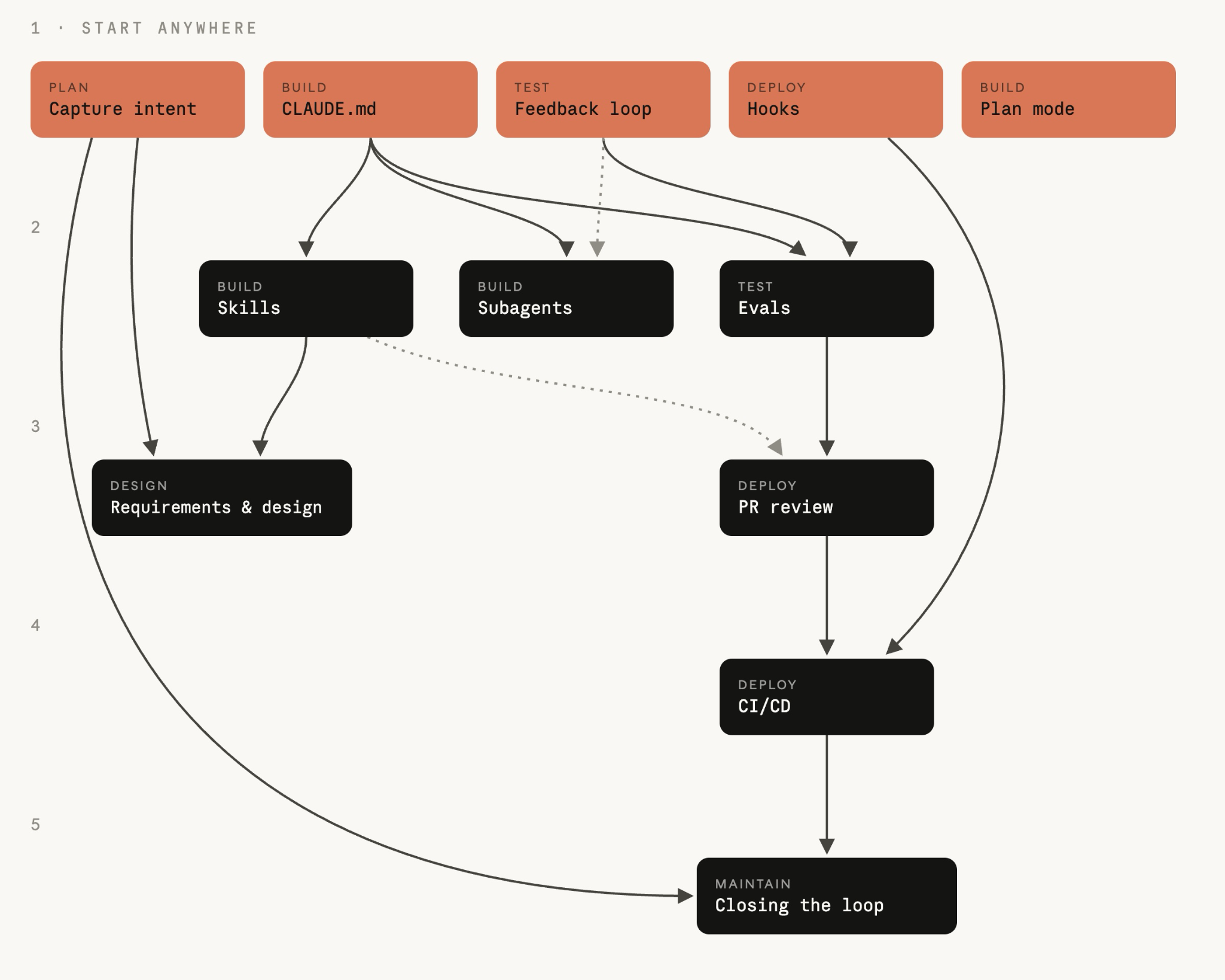
intent.md としてキャプチャ
ソフトウェア開発プロセスのスタートとなる intent.md は、異なるルートを経由して参入する場合があります。 アイデアを思いつき、チケットが提出され、インシデントがアラートで浮上します(ステージ 6:メンテナンスを参照)。
アイデアを思いついたら、Claude とブレインストーミングを行い、マークダウンのプロトスペックを作成します。 従来の SDLC では、同じ人物が製品チームのメンバーと、またはチームの代わりにアイデアを書いてもらうよう説得する必要がありました。
Claude が生成するプロトスペックは、人間が読み取りやすく、バージョン管理されており、次のステージで即座に利用できます。 プロトスペックは intent.md として保存されます。
インテントがイベントトリガーから発生したものかエージェントから発生したものであるかにかかわらず、同じ手順が適用されます。プロダクトオーナーは、エージェントが作成した intent.md をコミットする前にレビューして修正します。
この設定は、プラットフォームまたはエンジニアリングチームが一度限りのタスクです。 多くの貢献者が組織全体から来ているため、テクニカルチームのメンバーがインテントを明確にし、その内容を書ける人を決定する必要があります。
リポジトリが存在すれば、git の経験のないコントリビューターは git を直接使用する必要はありません。 その代わりに、バージョン管理システム(GitHub など)へのコネクタを使用することで、Claude が代わりに claude.ai や Cowork からマークダウンファイルをコミットできます。
実行方法
- 作成者が自分の言葉で問題を Claude に説明します。 作成者は、現在ではできないこと、アイデアに影響を受ける人、より良い仕組みになっていること、範囲外のものなどを説明するかもしれません。 正式な言語は必要ありません。
- アイデアが具体化するまでブレインストーミングを続けます。 Claude は、範囲、ユーザー、制約、成功のあり方など、アナリストが尋ねるような質問をします。
- 組織のテンプレートを使用して、
intent.mdとして結果を記述するよう Claude に依頼します。このテンプレートは、テクニカルチームのメンバーがスキルを設定し、リードが承認するものです。 問題、提案された結果、影響を受けるユーザーとシステム、制約、未解決の質問などを網羅できます。 - Claude が誤解したことはすべて、作成者が修正します。
intent.mdを共有ホームにコミットします。 作成者とタイムスタンプが記録に加わり、プロダクトオーナーがそこからアイデアを拾います。
# Intent: claims status self-service
Author: J. Ortiz (claims operations). Status: draft.

## Problem
Customers phone the contact center to ask where their claim is.
Handlers spend roughly a third of call time on status-only queries.

## Proposed outcome
Customers see claim status, next step and expected date in the portal.

## Affected users and systems
Claims handlers, portal team, claims-core API.

## Constraints
No new PII in the portal session. Existing authentication only.

## Open questions
Do third-party loss adjusters need access too?
ガバナンスに関する考慮事項
その証拠は、コミットされた intent.md であり、そこには作成者、タイムスタンプ、完全な変更履歴が記載されています。 インテントホームの git 履歴に記録されます。 プロダクトオーナーが承認し、承認または却下の決定により、ステージ 2:デザインへの移行が決定されます。これは、マージまたは最終レビューとして記録されます。
要件と設計
プロダクトオーナーの承認を得ると、Claude が承認された intent.md を取得し、要件と設計仕様を作成します。 これは、ブランド、セキュリティ、コンプライアンス、UX に関する組織のスキルに左右されます。
プロダクトオーナーが仕様をレビューしますが、書くわけではありません。 このプロセスの目標は、エンジニアリングチームが計画に沿って取り組める仕様を作成し、懸念事項を特定することです。
フロントエンドの作業が最も分かりやすい例です。 intent.md が承認されると、プロダクトオーナーは intent.mdから Claude Design(ベータ版)でデザインモックを作成し、そのモックを反復的に実行した上で、Claude Code にエクスポートしてビルドします。
実行方法
- プロダクトオーナーが、組織のスキルを活用したセッションを開き、
intent.mdを添付します。 - プロダクトオーナーは、
intent.mdのプロンプトでポイントを指定し、制約を特定し、懸念事項を特定するよう要求します。 最初は手動で実行し、その後、組織レベルのスラッシュコマンドとしてコーディングします。 そこから、インテントホームでintent.mdを受け入れたトリガーとして、マージ時に非対話型のジョブを起動し、組織のスキルを読み込んだ状態でパスを実行し、spec.mdをプルリクエストとしてコミットします(ステージ 5:デプロイの CI/CD プレイ、そのための仕組みを整備します)。 その時点から、プロダクトオーナーが最初に関与するのはレビューです。 - 同じプロダクトオーナーが、このアイデアに照らして仕様をレビューします。 この仕様は、述べられた問題を解決していますか?
intent.mdの未解決の質問に回答されたり、今後も引き継がれたりしますか? - アナリストがエスカレーションするであろう問題点として、最初に解決を図ります。 エンジニアリングが仕様を確認する前に、プロダクトオーナーがポリシーオーナーとそれぞれを解決します。
intent.mdと併せてSpec.mdをコミットします。 ファイルペアには、何が求められ、何が決定されたかを記録します。- プロダクトオーナーが仕様と意図が進展するかどうかを判断し、組織がリスクが高いと分類するものについてはテクニカルリードと相談します。 この決定は常に人間のチームメイトが行っており、仕様に同意することで、Stage 3:構築のプランモードが開始されます。
外観(プロンプト)
Read the attached intent.md and produce a requirements and design spec for integrating it into our existing codebase. Apply the skills available to you so the plan conforms to our brand guidelines, security policies and UX standards. Document the spec fully as spec.md, ready to hand to the engineering team. Describe clearly any areas of concern, especially where you cannot satisfy contradicting policies.ガバナンスに関する考慮事項
数週間後のレビューで発見されるのではなく、仕様書の作成中に現行のポリシーを読み取り、適用されます。 組織のスキルが仕様の制約として適用されます。 仕様、それを生成したプロンプト、および現行のスキルバージョンは、すべてバージョン管理に記録されます。 プロダクトオーナーが仕様を承認し、フラグを立てた懸念事項を特定のポリシーオーナーに伝達します。
デフォルトの開始点としての Claude Code プランモード
エンジニアはプランモードで Claude Code セッションを開始し、Stage 2:デザインで承認済みの spec.md を Claude に渡し、インタビューを依頼し、エンジニアが満足するまで計画を繰り返します。
実行方法
- エンジニアは Claude のプランモードでセッションを開始します。
- エンジニアが Claude に
intent.mdとspec.mdを提供し、変更されるファイル、作業の順序、それを証明するテストを記載した実装計画を依頼します。 - 変更によって何が中断される可能性があるか、最もリスクの高いステップはどれか、その他に Claude が行わない選択肢は何かを尋ねることで、計画を精査します。
- 会話を見たことのないエンジニアでも、その計画書だけをもとに変更を実装できるようになるまで、改善を重ねます。
- 承認済みのプランを
plan.mdとしてコミットします。 プランが監査証跡に反映され、PR レビュープレイ(ステージ 5:デプロイ)で最終的な差異と照合します。 - 計画を承認し、Claude に実装をお任せください。確かな計画であれば、ほとんどの場合実装は 1 回で済みます。
- 実装が計画から外れた場合、同じコミットで
plan.mdを更新します。 2 つの間で同期を強制するために、フックの使用を検討してください。
外観(plan.md)
# Plan: claims status self-service (from intent.md 2026-06-02)

## Files that change
portal/src/claims/StatusPanel.tsx (new), claims-api/routes/status.py,
claims-api/tests/test_status.py

## Order of work
1. Add the status endpoint behind existing auth.
2. Panel against the endpoint.
3. Wire into the portal nav.

## Risks
The claims-core API rate-limits at 50 rps; the panel must cache.

## Proof
test_status.py covers the four claim states; screenshot matches the
approved mock.
ガバナンスに関する考慮事項
デザインレビューは、コードが生成される前に行われます。この段階であれば、方針の変更はまだドキュメントを編集するだけで済みます。プランモードでは、エンジニアが計画を承認するまで Claude がファイルを編集できないため、このプロセス自体が自動的に徹底されます。計画とその改訂版は、誰が承認したかとともに記録されます。 日常的な変更はエンジニアが承認し、組織がリスクが高いと分類するものは、技術リードやアーキテクトが管理します。
自動モードの Claude Code
Claude Code は自動モードでも実行可能です。エンジニアが計画を承認し、承認を得て繰り返し作業を行った後、編集ごとのプロンプトなしに、各変更を適用します。 後続のプレイで整備されるガードレール(最適化された CLAUDE.md、ポリシーを組み込んだスキル、安全でない操作をブロックするフック、Claude が実行できるテストスイート)が成熟するにつれて、日常的な作業では自動承認がデフォルトになります。具体的には、spec.md の仕様が明確で、影響範囲が小さく、コードがすでにテストでカバーされている作業が対象です。
現在、エージェントの編集やアクションのレビューをユーザーが監視するのではなく、より長い自律的なセッション後にアーティファクトのレビューへと移行しています。 ワークツリーで使用される場合、個人やチーム間の並行処理をさらに可能にします。このモードは、SDLC を自律的に実行し、ステージ 6:メンテナンスで説明されているように、ループを閉じるための基本です。
CLAUDE.md
CLAUDE.md は、新規参加者が必要とするコンテキストを Claude に提供します。規則、コマンド、アーキテクチャ、チームが最も頻繁に目にする間違いを網羅しています。 これまで人々の頭の中や Wiki に蓄積されていた知識は、各セッションの開始時にエージェントが読み込むファイルとなり、チーム全体が管理し、エラーが発生したときに繰り返し利用されます。
実行方法
- リポジトリで
/initを実行します。 Claude は、検出した情報から開始情報のCLAUDE.mdを生成します。 - 生成されたファイルを、新規参加者が初日目に必要とするものに絞り込みます。 構築、テスト、lint のコマンド、重要な規約、Claude が誤ってしまうポイントをそのまま保持します。
- リポジトリのルートで
CLAUDE.mdを git にチェックすることで、チーム全体で 1 つのバージョンを共有し、変更内容をコードのようにレビューできます。 - ここで役に立つのが、実践的なルールです。 Claude が 2 回間違いを犯すと、修正内容は
CLAUDE.mdに反映されます。 - セッションの開始時にすべてを Claude が読み込み、古いものであればコンテキストを何の役にも立たないため、1 ページにまとめておく必要があります。
外観(CLAUDE.md)
# Payments service

## Commands
- Build: make build
- Test: make test (unit), make itest (integration, needs docker)
- Lint: make lint (runs in CI; fix before pushing)

## Conventions
- Java 21, Spring Boot 3. No new Lombok.
- Money is always BigDecimal, never double.
- Every endpoint needs an integration test in src/itest.

## Architecture
- api/ holds REST controllers, core/ holds domain logic,
  adapters/ talks to external systems.
- Kafka events are defined in schemas/; never edit generated classes.

## Things Claude gets wrong
- Do not bump dependency versions; the platform team owns them.
- The legacy v1/ package is frozen; changes go in v2/.
ガバナンスに関する考慮事項
CLAUDE.md はバージョン管理されているため、エージェントが取り組む指示をレビューおよび監査が可能です。 チームの慣習はファイルを通じて適用され、変更は git 履歴に記録され、コード所有者は変更内容を PR レビューで承認します。
組織のナレッジとしてのスキル
スキルとは、組織が自らの組織の知識を運用するための方法です。 指示は明確で、バージョン管理されており、広く適用されており、ポリシーが変更された場合には一元的に更新されます。 経験則として、一貫して適用しなければならない組織固有の知識についてはスキルを作成し、CLAUDE.md やプロンプトに記載すべき要素についてはスキルを作成しないようにします。
実行方法
- 現在、一貫して徹底されていない知識を1つ選びます。これは、セキュリティ標準、API 設計の規則、ブランドルールなどです。
- その知識をスキルとして記述します。スキルはフォルダで構成され、そこに含まれる
SKILL.mdのフロントマターにはスキルがいつ発動するかを記載し、本文には実行すべき内容を記載します。エンジニアが、保険契約者の真実の情報源から作成し、Claude を活用しています。 - スキルを
.claude/skills/<name>/のリポジトリに保存し、コードと共にリリースするか、プラグインを通じて組織全体に配布します。 - スキルがトリガーすることをテストします。 関連するタスクをさまざまな方法で行うよう Claude に質問し、毎回スキルの読み込みを確認しましょう。
- ポリシーが変更された場合は、スキルを変更し、ポリシーオーナーに変更の承認を得てください。
- エンジニアは次のセッションで自動的に新バージョンを受け取ります。
外観(.claude/skills/secure-api-review/SKILL.md)
---
name: secure-api-review
description: Apply the API security standard. Use whenever creating or
  modifying an external-facing endpoint, reviewing API code, or
  generating an OpenAPI spec.
---
# Secure API review

When you create or change an API endpoint:
1. Authentication: every endpoint requires the gateway JWT;
   no anonymous routes outside /health.
2. Input validation: validate request bodies against the OpenAPI
   schema and reject unknown fields.
3. Audit: every state-changing endpoint emits an audit event with
   actor, action, entity and timestamp.
4. Data classification: fields tagged pii in the schema must never
   appear in logs or error messages.

Run scripts/check-endpoints.sh and include its output in your summary.
ガバナンスに関する考慮事項
スキルは、アドバイザリーとしての役割ではありますが、コントロールです。これにより、コードの作成中に Claude がポリシーを適用する可能性が高くなり、セッションが遵守を強制するものはありません。 常に保持しなければならないポリシーには、アクションをブロックするフックや、PR でポリシーを再確認するレビュー通過など、スキルを支える決定的な何かが必要です。 スキルによって違反の発生頻度を大幅に減らし、フックによって違反をほぼ不可能にします。スキルの呼び出しはセッショントレースに記録され、ポリシー所有者はコードなどスキルの変更をレビューします。
構築時のガードレールとしてのフック
スキルは助言的な統制手段であり、フックはその背後で機能する決定論的な制御レイヤーです。Claude のアクションのほとんどは、実装時のファイル編集やシェルコマンドであるため、最終的にはフックが最も頻繁に起動するフェーズです。
構築フェーズのフックでは、以下が可能です。
- 生成されたクラスや固定されたパッケージなど、保護されたパスに対する編集をブロックする
- ファイルを編集した後にフォーマッターとリンターを実行し、コードの規約からの逸脱が蓄積しないようにする
- 差分に認証情報が含まれないようにする
例外なく遵守しなければならないポリシーを定めたスキルは、必ずそれを裏付ける仕組みを設けます。一致するアクションごとにフックが実行されるため、構築フェーズのフックは高速で、変更されたファイルに反映される必要があります。 完全なテストスイートなどのより厳しいチェックは、コミットや PR の場で行います。
人間に承認を求めるフックは、Stage 5:デプロイのゲートに属します。ビルド時の承認プロンプトにより、すべてのセッションを並行して実行するクリティカルパスに復帰できるからです。
並列セッションとサブエージェント
1 人のエンジニアが複数の作業を同時に推進できます。
パラレルセッションとは、Claude Code の完全なインスタンスであり、独自の git ワークツリーで個別のタスクを実行します。 それぞれの独立したセッションは互いのことを何も知らず、それらを指揮するエンジニアだけが、すべてのセッションに共通する存在です。
サブエージェントは、独自のコンテキストウィンドウとツールの制限を持つ、単一のセッション内で実行されるヘルパーであり、アプリが期待通りに実行されることを確認するなど、複数のタスクで繰り返されるジョブに適しています。
並列セッションでは、エンジニアが実行できるタスクの数を増やします。一方、サブエージェントは各セッションをそれぞれのタスクに集中させます。 エンジニアの仕事は、すべての管理者を指導し、レビューすることです。
実行方法
- エンジニアは作業を異なるファイルにかかわるタスクに分割し、プランモードプレイ(ステージ 3:構築)のプランに基づいて、作業が独立している部分を把握します。 ファイル共有タスクは、1 つのセッションで順次実行されます。
- 各並行タスクには独自のワークツリーが用意されており、たとえば、あるターミナルでは
claude --worktree feature-authを実行し、別のターミナルではclaude --worktree fix-rate-limitを実行します。ワークツリーは、自体のブランチで独立したチェックアウト機能であり、ファイルでセッションが衝突するのを防ぎます。 - 2〜3 つのセッションから始めるのが妥当です。実質的な上限は、1 人が適切にレビューできる作業の流れの数です。そのため、レビューが追いついている間だけセッションを増やします。
.claude/agents/の markdown ファイルで定義されているように、繰り返し発生するジョブをサブエージェントに変え、各サブエージェントに名前、使用時期の説明、および使用する可能性があるツールを記載します。 具体例としては、メインエージェントの作業完了後に不要な複雑さを取り除くコード簡素化エージェント、アプリを実行して動作を確認する検証エージェント、そしてメインのコンテキストを大量の情報で埋め尽くすことなく、コードベースを調査して結果を報告するリサーチエージェントなどがあります。定義を git に反映することで、チーム全体で共有できます。
外観(.claude/agents/verifier.md)
---
name: verifier
description: Runs the app and checks the change works before the session
  reports done
tools: Bash, Read
---
Start the app with make run. Exercise the changed behavior and the two
nearest neighboring flows. Report what you ran, what you saw, and any
behavior that does not match plan.md. Do not fix anything; report only.
ガバナンスに関する考慮事項
セッションが多いほど出力が増えるため、リポジトリの設定から制御を行う必要があります。 フックと権限設定はすべてのセッションに適用され、セッションが実行した内容は記録され、実行したエンジニアが実行します。
Claude にフィードバックループを提供
テスト、構築、スクリーンショット差分など、自らの作業を常に検証する手段を Claude に提供します。 セッションは自らの作業を確認し、エンジニアが認識する前に自ら修正します。
フィードバックループを検証者サブエージェントと混同しないでください(ステージ 3:構築)。 フィードバック・ループは、タスク全体で、作業と同じくらいの頻度で実行されます。 一方、検証サブエージェントは、セッションが作業が完了したと判断したときに、新しいコンテキストウィンドウを実行することで、最終的なチェックをパッケージ化する方法の 1 つです。 このようにして、コードを生成した前提条件に左右されることはありません。
実行方法
- 今日、作業の検証に一連のコマンドの実行と環境に関する知識が必要なら、それらを「make test」や「npm test」のような単一のターゲットにまとめ、失敗時にはゼロ以外の終了コードを返すようにします。
CLAUDE.mdのコマンドセクションで、各コマンドを正常な出力例と併せて列挙してください。- 目標を述べ、定量化できるものにすることで、Claude がユーザーに確認することなく作業を確認できます。たとえば、「test_status.py のすべてのテストが合格した」、「スクリーンショットが添付されたモックと一致している」、「エンドポイントが新しいフィールドで 200 を返した」などです。
- バグ修正では、まず失敗するテストを書きます。 Claude にバグをテストとして再現して実行し、予想通りの理由で失敗したことを確認してください。 そのテストをコミットします。 その後、テストを編集せずに合格するよう Claude に依頼し、最終ステップのテストファイルフックで制限を適用します。 修正前に存在し、エージェントが書き直せなかったテストが、バグが解決した証拠です。
- UI 作業では、視覚的な確認でループを完結します。 Claude にブラウザやスクリーンショットツールを提供し、モックを提供して、反復処理を任せましょう。 実装、スクリーンショット、比較、調整を行います。 2~3 ラウンドが正常であり、1 ラウンドごとに結果が改善されるはずです。
- 検証を「完了」の一部にします。 指示は
CLAUDE.mdにあります。 タスク完了を報告する前にテストを実行し、出力を表示します。 - 最後に、ループ自体を保護する必要があります。なぜなら、コードを修正するエージェントがそのコードのチェックを弱めることができないからです。 修正タスク中にテストファイルの編集をブロックするフックがこれを行います。 もう一つの方法は、レビューで相違点を確認し、テストに影響を与える変更はすべて却下することです。
外観(CLAUDE.md 検証ブロック)
## Verifying your work

- Build: make build (must finish with "Build succeeded")
- Test: make test (all green; never skip or delete a failing test)
- Lint: make lint (zero warnings)

Run all three before reporting any task complete, and paste the output.
If a test fails, fix the code, not the test.CI での継続的な評価
評価は、ステージゲート QA に相当する AI ネイティブです。 実際には、エージェントの設定が変更されるたびに実行されるスイートを意味します。 新しいモデルが入れ替わったり、プロンプトが書き直されたりすると、評価スイートはエージェントが依然として同じ基準で作業を行っているかどうかを示します。
評価はライブスイートと捉えるべきです。 モデルが改善するにつれて、かつては識別されたケースは認識されなくなり、継続的な監視から生じた新しいケースが追加されなければなりません。
ユースケースによっては、変更があるたびにではなく、一定の頻度でオフラインでこれらの評価を行うことを好むチームもあります。 以下の手順は、継続的な評価を目的としています。
実行方法
- プラットフォームエンジニアは最近の作業から 20~50 の実際のタスクを収集し、期待される / 受け入れられた成果を収集します。
- 各タスクを eval として記述します。つまり、プロンプトに加え、許容できる結果を定義する検証項目(テストの合格、lint のエラーがないこと、動作が変わっていないこと、ポリシーが遵守されていること)を含めます。
- このスイートはスケジュールに従い、
CLAUDE.mdやスキル、フックが変更されると非対話型に動作します。この設定がエージェントを制御し、コードが受ける回帰テストに値するためです。 - 結果に応じてゲート設定が変更されます。 合格率を低下させるスキル変更については、統合前にレビューを受けます。
- 各本番環境のインシデントは、インシデントを担当したチームが作成した評価を受け取り、回帰テストとしてスイートに残ります。
外観(.github/workflows/agent-evals.yml)
name: Agent evals
on:
  pull_request:
    paths: ['CLAUDE.md', '.claude/**']
  schedule:
    - cron: '0 2 * * *'
jobs:
  evals:
    runs-on: ubuntu-latest
    steps:
      - uses: actions/checkout@v4
      - run: npm install -g @anthropic-ai/claude-code
      - name: Run eval suite
        env:
          ANTHROPIC_API_KEY: ${{ secrets.ANTHROPIC_API_KEY }}
        run: |
          for eval in evals/*.json; do
            claude -p "$(jq -r '.prompt' $eval)" \
              --allowedTools "Read,Edit,Bash(make test)" \
              --output-format json > result.json
            ./evals/check.sh "$eval" result.json
          done
ガバナンスに関する考慮事項
評価は、エージェントの出力に追いつく QA へのゲートを提供します。 マージチェック時に合格率のしきい値が適用され、実行結果が時間の経過と比較できるように記録され、設定変更を担当するチームが承認します。
PR レビューループにおける AI
Claude はレビューの作成と受信の両方を担います。 受信した PR を組織のポリシーに照らしてレビューし、自ら PR のレビューコメントに対応します。 これにより、エンジニアは PR レビューで行動に集中でき、要するに意図とリスクの判断に至ります。
実行方法
- マネージド型のコードレビューサービスが、最も迅速に始められる方法です。管理者が有効化し、リポジトリを選択します。 パイプラインを管理する必要がある場合や、API 呼び出しを自社のクラウド契約を通じてルーティングしたい場合には、claude-code-action を使用して独自の CI でレビューを実行します(CI/CD プレイではその配管について説明しています)。
- テクニカルリードは、リポジトリのルートに
REVIEW.mdとしてレビューポリシーを記述し、組織が重視するバグと論理的エラー、セキュリティと脆弱性、仕様へのコンプライアンス(要件プレイのspec.md)、実装計画(プランモードプレイの plan.md)、設計原則に分けています。REVIEW.mdでは、Nit ではなく Important とみなされるものや、スキップするものも定義されています。 - テクニカルリードが人による基準を設定します。 調査結果自体が PR を承認したりブロックしたりすることはありません。ブランチを保護するには、コード所有者からの承認が必要となります。 調査結果をマージするにあたり、プラットフォームエンジニアは、チェック実行時に機械が読み取り可能な集計として公開される重大度カウントを読み取ることができます。
- レビュー者や作成者がレビューコメントに
@claudeをタグ付けすると、Claude がコメントに対応し、修正を送信します。 PR スレッドは、リクエストと変更の両方を記録します。 この修正ループは、claude-code-action を通過します。 マネージド型のサービスでは、@claude レビューにコメントを付けると、代わりに新しいレビューが要求されます。 Claude が開いた PR については、さらに進んで、PR をマージしてもらうようにお願いします。 チームでは、PR に残っている未解決のレビューコメントと失敗しているチェックを一通り確認し、それらに対処して修正をプッシュする処理を、カスタムのスラッシュコマンドにまとめています。PR のすべてのチェックが成功し、コードオーナーの承認だけを待つ状態になるまで、この処理を繰り返します。 - 結果をレビューし、
CLAUDE.mdにフィードバックします。 レビューで 2 回目にエラーを指摘すると、そのレビューの一環としてCLAUDE.mdに修正が反映されます。レビューではCLAUDE.mdが読み込まれるため、次回の PR 以降、エラーが検出されます。 レビューでは、変更によりCLAUDE.mdが古くなった場合にもフラグを立てます。 - 月に一度、テクニカルリードがレビュー者が改善できるように調査結果を評価したり、
REVIEW.mdで Nit のボリュームに上限を設けたりすることで、セットアップを調整します。 生成されたパスや、CI がすでに施行しているものは除外されます。
外観(REVIEW.md)
# Review instructions

## Passes
Run three passes and tag each finding with its pass:
- Bugs: logic errors, broken edge cases, subtle regressions
- Security: injection risks, authentication gaps, PII in logs
- Compliance: the change matches spec.md, plan.md and our design principles

## What Important means here
Reserve Important for findings that would break behavior, leak data
or breach a policy. Style and naming are nits.

## Cap the nits
Report at most five nits per review; summarize the rest as a count.

## Do not report
Generated files under src/gen/ and anything CI already enforces.
ガバナンスに関する考慮事項
コードを書いたエージェントが承認する方法がないため、職務の分離は維持されます。 REVIEW.md のレビューポリシーはすべての PR に適用され、発見事項、修正事項、評価、承認が PR 履歴に記録されるため、PR が監査記録となります。 承認は、調査結果を踏まえたうえで、人間がブランチ保護の仕組みを通じて行います。
本番環境でのこれらの制御の仕組みについては、Anthropic で AI ネイティブの SDLC を確保するをご覧ください。
承認ゲートとしてのフック
構築フェーズでは、ガードレールとしてフックを使用し、人間が関与しないアクションを許可またはブロックします(ステージ 3:構築)。 フックは、特定の人物が承認するまでアクションを一時停止するように指示することもできます。これはリリースゲートに必要なものです。
リリースゲートが最も明確なケースであるため、プレイは Stage 5:デプロイに位置しています。しかし、フックはデプロイ固有のものではなく、Claude が動作する場所で動作します。 たとえば、ステージ 3:構築では変更チケットなしで、フックが移行や infra への編集をブロックしたり、ステージ 4:テストの修正タスク中にはエージェントがテストファイルの編集を停止したりできます。
実行方法
- 変更管理とコンプライアンスを重視するエンジニアリングのリーダーシップが、変更管理の承認、リリース承認、保護されたパスへの編集など、乗り越える必要がある人的な承認ゲートを明確にします。
- プラットフォームエンジニアは各ゲートをフックとして表現します。フックとは、Claude が許可、確認、ブロックを行う前に実行するスクリプトです。
- チームのフックは git の
.claude/settings.jsonに記述され、交渉不可能なフックはプラットフォームまたは IT 管理者が管理する管理設定に記述されます。個々のエンジニアがオフにすることはできません。 - ブロックはそれ自体を説明するべきなので、フックでアクションが停止された場合、その理由と承認までのルートが Claude の出力に表示されます。
外観(.claude/settings.json)
{
    "hooks": {
      "PreToolUse": [
        {
          "matcher": "Bash",
          "hooks": [
            { "type": "command",
              "command": "${CLAUDE_PROJECT_DIR}/.claude/hooks/production-gate.sh" }
          ]
        }
      ]
    }
}
ゲートそのもの(.claude/hooks/production-gate.sh)
#!/bin/bash
# Production deploys require a named release authorization
cmd=$(jq -r '.tool_input.command' < /dev/stdin)
if [[ "$cmd" == *"deploy"* && "$cmd" == *"production"* ]]; then
   if [ -z "$RELEASE_APPROVAL" ]; then
     echo "Production deploys need a release authorization." >&2
     exit 2 # exit 2 blocks the action; the message goes to Claude
   fi
fi
exit 0
ガバナンスに関する考慮事項
フックは承認のゲートです。 ゲート条件は、毎回、全員に対して適用されます。 許可とブロックの決定は、タイムスタンプ付きで記録されます。 このゲートでは、承認済みの変更チケットやリリースマネージャーの承認など、何をもって承認とみなすかも定義します。
CI/CD の統合と導入
CI/CD パイプライン内で Claude Code を非対話型で実行し、長時間稼働するエージェントが安全に動作できるよう、実行環境をサンドボックス化します。MCP 連携を通じてデプロイ機能を利用できるようにし、エージェントが実際にロールバックを必要とする前に、ロールバックの手順をリハーサルしておきます。
実行方法
- プラットフォームエンジニアは、読み取り専用の判断手順から始めます。 パイプラインジョブで
claude -pを使用し、失敗したビルドのトリアージ、不安定なテストの要約、変更履歴の草案を作成します。 - lint の修正、生成されたドキュメントの更新、
@claudeのメンションによるレビューコメントへの対応などのジョブで、既存のゲートの背後にある手順を記述します。 エージェントが書き込むものはすべて、ブランチの保護を通じて PR として届くため、エージェントには main にプッシュするルートがありません。 - 実行はサンドボックス化されています。 エージェントジョブは、ネットワークポリシーに基づくコンテナで実行され、有効期間が短いスコープのトークンを使用し、デフォルトでは本番環境の認証情報は保持しません。
- MCP を通じてデプロイを公開します。 デプロイ、ステータス、ロールバックは環境ごとにツール化されるため、エージェントの導入能力は資格情報を持つシェルスクリプトではなく、許可リストに設定されています。
- 環境ごとに自律性を階層化します。 開発段階では、エージェントが自由にデプロイします。 本番環境では、エージェントがリリースを準備し、リリースマネージャーが承認を行い、フックが本番環境ゲートを適用します。 ステージングはその中間です。
- ロールバックは、パイプラインで最もリハーサルされたパスであり、エージェントが実行できる単一のコマンドであり、ステージングにおいて定期的に実施される必要があります。 ループプレイの終了(ステージ 6:メンテナンス)では、管理範囲に違反したときにロールバックが行われるため、事前に検証する必要があります。
外観(パイプラインステップ)
- name: Triage failed build
  if: failure()
  run: >
    claude -p "Read the build log at out/build.log. Identify the most
    likely cause, say whether the failure looks flaky or real, and write a
    three-line summary for the PR thread." >> triage.md
ガバナンスに関する考慮事項
基本原則は、エージェントが本番環境のゲートまで行動し、通過できない可能性があるということです。 以下のコントロールがこの原則を適用します。
- ブランチ保護により、エージェントが作成したものはすべて PR となり、main ブランチに直接反映する経路はなくなります。
- 本番環境のデプロイフックは、名前の付けられたリリースマネージャーが承認するまで、リリースをブロックします。 非インタラクティブな各実行はエージェント自身のアイデンティティで動作するため、パイプラインログではエージェントの実行内容とそれをトリガーしたエンジニアの実行内容が区別されます。
- 環境ごとの権限レベルは、ゲートまでのエージェントが実行できる範囲を決定します。
メンテナンスとループのクローズ
ここまで、SDLC プロセスの各ステージに Claude を追加する方法について説明しました。各ステージでは初期ステップを人的に開始させる必要があります。 しかし、このステージではループを閉じるために Claude の自律的な実行に重点を移します。
たとえば、継続的に実行される監視エージェントは、バグチケットの送信直後に intent.md を作成し、要件、計画、構築、テスト、レビューのフェーズを通過できます。 ステージ 6:メンテナンスはヘッドレスで実行され、ステージ間で独立した信頼性ゲート、決定的なチェック、または敵対的レビューエージェントが、前ステージの出力を継続するか、または人間にエスカレーションするかを判断します。
ループを閉じる
決定的なスクリプトが本番を監視し、制御帯域に違反したときにClaude を呼び出します。 侵害の監視は、自律的に実行されるループのパターンを示す有用な例であり、ステージの最後にある Claude Tag(パブリックベータ)セクションでは、さまざまなチャネルを介して到着する作業について説明しています。
実行方法
- サービスオーナーやプラットフォームエンジニアは、CI テストの失敗率、導入後の 5xx の発生率、PR サイクル時間など、安定したベースラインを持つ指標を 1 つ選びます。
- 彼らは通常、規則(Western Electric または類似の規則)を伴うローリングウィンドウにわたる平均値と標準偏差の検出スクリプトを書くため、帯域がスローなドリフトやスパイクを捉えられます。 そのスクリプトはバージョン管理され、単体テストも実施されており、検出処理はモデルを一切介さず、完全に決定論的に行われます。
- レスポンス階層は、バージョン管理された設定(以下の
bands.yaml)で定義されています。 1σ ではログのみを記録し、2σ では Claude を読み取り専用で起動して診断を行い、3σ では Claude が動作する可能性があります。ただし、PR をレビューするか、事前承認された Runbook を起動する場合に限られます。 - トリガーレイヤーは、GitHub や GitLab のスケジュールされたワークフロー、既存の監視スタックの webhook、ネットワーク内の Cron ジョブなどです。 Claude は、CI ランナーでの非対話型のステップとして、あるいはサンドボックス化されたコンテナ内の Agent SDK サービスとして、ステートレスで動作します。CI/CD プレイでは、導入とモデルアクセスのオプションを網羅しています。 実行はステートレスかつ非対話型であるため、誰かが開始しなくてもループの開始と終了が可能です。
- エージェントは診断を ステージ 1:プラン 形式で
intent.mdと書き、異常とその証拠、提案された結果、影響を受けたシステム、未解決の質問を網羅します。 そこから、他のすべてのものと同様に、パイプラインを通過します。 - サービスオーナーまたはオンコールエンジニアがキューをトリアージし、製品関連の発見をプロダクトオーナーに伝えます。 今すぐ修正するか、スケジュールを調整するか、却下するかを選択します。却下の判断によって重要度の基準が調整され、不要な通知を減らすことができます。
- 修正がリリースされたら、インシデントの評価を追加し(継続的な評価が行われる)、そのような問題が今後発生しないようにします。
外観(CI テストの失敗率を監視する bands.yaml など)
metric: ci_test_failure_rate
baseline: rolling_30d
rules: western_electric
tiers:
  1sigma: { action: log }
  2sigma: { action: diagnose,
            tools: "Read,Grep,Bash(gh run view *)" }
  3sigma: { action: propose,
            routes: [pull_request, runbook:rollback-deploy] }
ガバナンスに関する考慮事項
階層の境界はバージョン管理された設定から適用され、権限と管理設定により本番環境へのアクセスを拒否します。 呼び出し、発見事項、トリアージの決定は、タイムスタンプ付きで記録されます。 サービスオーナーが結果をトリアージして承認し、結果の変更は通常の PR レビューを通過し、エージェントが実行する予定の実行ブックは事前に承認されています。
例
- CI テストの不合格率が 3sigma を突破すると、エージェントが不適切なテストを隔離するか、リバート PR を開始し、レビューゲートが決定します。
- デプロイ後のレートが 3σ を突破すると、エージェントは既存のロールバックパイプラインをトリガーします。
- PR サイクルがドリフトルールに反すると、エージェントはエンジニアリングリーダー向けのレポートを作成します。レポートでは、このハーネスが本番環境だけでなくプロセス指標でも機能していることを示します。
反復的なコードベーススキャン
セキュリティスキャンは、特定のモデルを用いて、ある時点のコードベースについて評価した結果を示すものであり、その両方が時間とともに古くなります。コードは毎週変化し、モデルの世代が変わるたびに、それ以前のモデルが見逃していた脆弱性が新たに発見されるためです。AI ネイティブの答えは、呼び出しパスに人を介さないスケジュールに沿ってスキャンを実行し、検出された内容を他の変更と同じゲートを介してコードベースに送信することです。
Claude Security は、スケジュールされたスキャンをホスト型で行います。 GitHub リポジトリに接続すると、Anthropic のインフラストラクチャ内の Claude Mythos 5 でスキャンを実行します。各検出結果は報告前に検証され、信頼度評価が付与されます。 提案されたパッチは、ウェブの Claude Code でレビューされ、適用されます。 組織はモデル自体にアクセスすることなく、検出結果を得ることができます。
実行方法
- セキュリティリードはリポジトリを接続し、リポジトリ、サービス、チームごとにプロジェクトを整理するため、最初から調査結果の所有権を明確に把握できます。
- 以前に他のツールや以前のモデルでスキャンされたことのあるリポジトリを含め、最も重要なリポジトリを初回のフルスキャンで実行します。 最初のスキャンを基準として扱います。 最初のスキャンでは、クリーンと見なされたコードが明らかになる可能性があります。
- プロジェクトごとにスケジュールを設定します。 積極的に開発されているサービスにとっては、週次が賢明なデフォルトです。スキャンを対象とするのは、リポジトリが大規模または混在しているディレクトリやブランチです。
- 信頼度評価を把握した結果をトリアージします。 理由を明示して解約すると、解約が記録され、次回の実行時に同じ結果が新しいものとして表示されることはありません。
- 限定された検出結果については、ウェブ上の Claude Code で提案されたパッチを開き、レビューしたうえで、他の変更と同様に、PR レビューゲートを通じて送信します。 修正を提案したエージェントには、承認までのルートがありません。
- アーキテクチャの弱点やサービス間で繰り返されるパターンなど、1 つのパッチよりも広範な問題については、ステージ 1 形式で
intent.mdとして記述し、Plan から始めます。 - 修正が本番環境にリリースされたら、継続的な評価から脆弱性クラスの評価結果をスイートに追加します。そうすることで、エージェントを運用する設定が、その後、そのクラスに対してテストされます。
- 結果を CSV または Markdown でエクスポートするか、webhook を使用することで、組織の既存のトラッカーと監査システムを、監査人がすでに期待している記録システムとして保持できます。
ガバナンスに関する考慮事項
スキャンは組織の管理者による管理下で実行されます。つまり、接続されているリポジトリ、スキャンシートの所有者、使用限度額がすべて一元的に設定されます。 すべての発見には検証結果と信頼度評価があり、すべての却下には理由があるため、スキャン履歴は、発見、修正、意識的に受け入れられた内容の監査記録です。
スキャン自体ではなく、PR レビューゲートやブランチの保護を通じて修正が本番環境に届きます。 Claude Security は、既存の静的分析や依存関係スキャンを強化します。 決定的なチェックは CI に保持され、モデル駆動型のスキャンは、これらのチェックが検出対象ではないコンテキスト依存の脆弱性をカバーします。
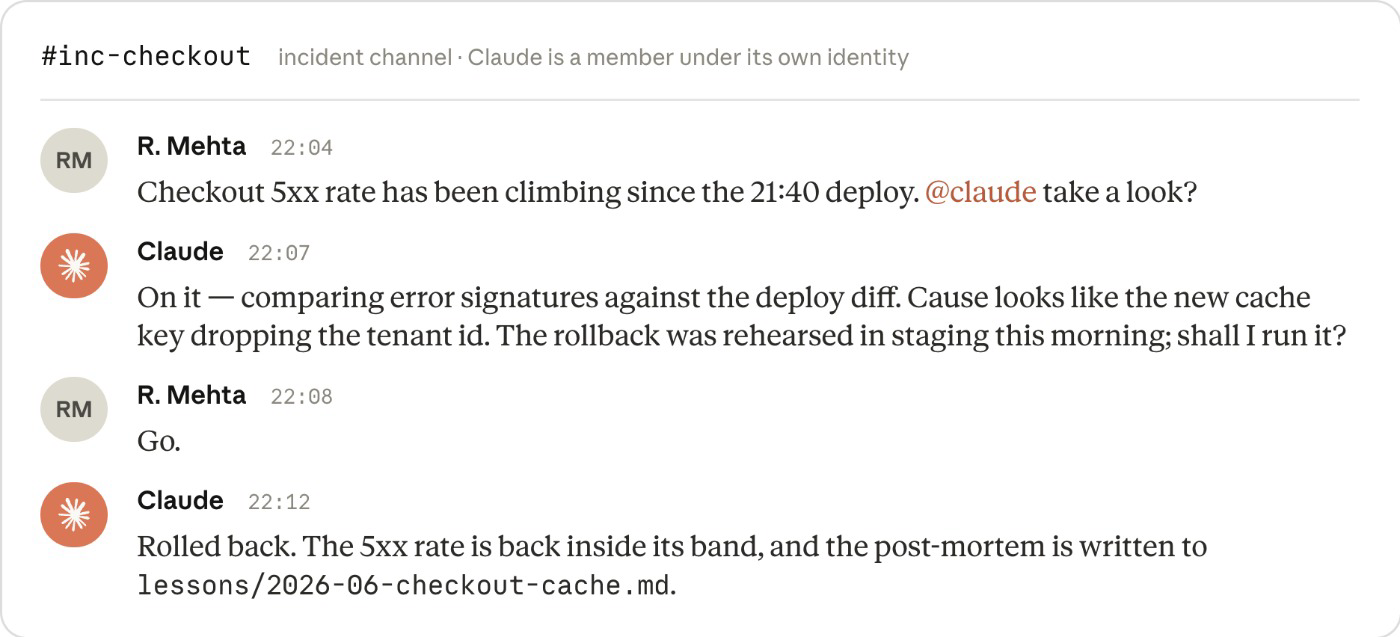
Claude が Claude Tag と対話中
インシデントは、SlackやTeamsなどの職場向けコミュニケーションアプリといった、ほかの手段を通じて発生することもあります。インシデントは、インシデントチャネルで緊急な修正を通知する午後 10 時の Slack メッセージのようなもので、即座に行動できるようになりました。 Claude Tag(現在 Slack でパブリックベータ版が利用可能)により、Claude が独自のアイデンティティでこれらのチャネルのメンバーになるため、新しいインシデントごとに最初のレスポンダーが対応し、レスポンス自体が将来のインシデントに対するループおよびメモリの一部になります。
会話や組織の知識はチャネルに残り、チャネル内の誰でも対応を導き、実行できるようになります。 チームメンバーは誰でも、仮説を検証したり、新しいオプションを検討したり、チャネル履歴を活用してリアルタイムで調査を行うことができ、監査可能性が高まります。 MCP へのアクセスを通じて、Claude は指標がベースラインに戻ったことを確認し、スレッドで確認を行い、バージョン管理されたレッスンファイルに事後分析を書き込み、今後の調査で読み取りやすいようにします。
Claude Tag が引き受ける作業はインシデントだけではありません。 MCP でチケットにタグ付けされたり、チャネルで依頼されたりすると、Claude は同じ方法で作業をトリアージします。 小規模で範囲の広い修正はレビューゲートを通じて PR として届き、より大規模な修正はステージ 1:計画で intent.md として記述され、この時点でループが自律的に機能し始めます。 参考:Anthropic で Claude Tag が CI/CD のオンコール対応をどのように担っているか
締めくくりの考察
モデルとハーネスがより高度化しており、組織はコードの作成方法だけでなく、ソフトウェア開発ライフサイクル全体を変革できるようになりました。
この変革では、人間の判断をプロセスの中心に据え、大規模なエンタープライズ組織のガバナンスや規制要件を考慮しています。
このガイドには、Applied AI チームが日々お客様のために実施している実際のベストプラクティスの多くを統合しています。実用的で実践的なリソースと気づいたことを願っています。
リソースと謝辞
以下のドキュメントは、プラットフォームチームがこれらの制御を設定するために必要なものであり、おおよその順序で提供されます。
このガイドにご協力いただいた Jim Blackhurst、Will Steuk、Jamal Arif に感謝します。このガイドは、彼らの以前の仕事の多くからインスピレーションを得て、構築されています。