
- Datum22.4.2026
- Lesezeit5Min.
- TeilenLink kopieren
Agents are only as useful as the systems they can reach. Teams tend to converge on three approaches for connecting them to external systems—direct API calls, CLIs, and MCP. This post lays out where each fits, why production agents tend to land on MCP, and the patterns for building those integrations effectively.
Connecting agents to external systems
We generally see three paths for connecting agents to external systems: direct API calls, CLIs, and MCP. Each makes sense somewhere, depending on what you're building. The key distinction is whether there's a common layer between agents and services, and how far that layer reaches.
Direct API calls
The agent calls your API directly—either by writing code that issues HTTP requests inside a code-execution sandbox, or through a generic function-calling tool. This is where most teams start, and it works fine for one agent talking to one service, or a small number of integrations that don't need to be reused across agent platforms.
The challenges start to hit at scale. With no common layer between agents and services, each agent–service pair becomes a bespoke integration with its own auth handling, tool descriptions, and edge cases—the M×N integration problem.
Command-line interface (CLI)
The agent runs your command-line tool in a shell. This is fast, lightweight, and leans on pre-existing tooling. It works great for local environments and sandboxed containers—anywhere there's a filesystem and a shell. This provides a common layer, but it’s thin.
CLIs hit hard limits reaching mobile, web, or cloud-hosted platforms that don't expose a container, and auth is handled by the CLI's own mechanism—usually a credential file on disk. This is best suited to quick, permissive integrations in local environments.
Model Context Protocol (MCP)
MCP provides the common layer as a protocol. The agent connects to a server that exposes your system's capabilities, with auth, discovery, and rich semantics standardized. One remote server reaches any compatible client (Claude, ChatGPT, Cursor, VS Code, and more), in any deployment environment.
It requires a little bit more upfront investment. The return is that the integration is portable, and provides the semantics needed for a feature-rich agent integration.
Production agents run in the cloud
Production agents increasingly run in the cloud, so they can scale and operate continuously. The systems they need to reach are cloud-hosted too: where your data lives, work is tracked, and your infrastructure runs. Often these systems are remote and behind auth, where MCP provides the common layer.
We’re already seeing this in adoption. The MCP SDKs recently surpassed 300 million downloads a month, up from 100 million at the start of the year, with strong adoption across enterprises and popular agentic platforms. Millions of people use MCP with Claude every day, and the protocol underpins much of what we've shipped recently, including Claude Cowork, Claude Managed Agents, and channels in Claude Code.
As MCP continues to support production agentic systems, we’re sharing patterns for building these integrations well: from building advanced servers to context-efficient clients, and where skills complement the protocol.
Building effective MCP servers
We have over 200 MCP servers in our directory, used by millions of people every day. From working closely with enterprises and developers building on the protocol, we’ve spotted a handful of design patterns that determine how reliably agents can use a server.
Build remote servers for maximum reach
A remote server is what gives you distribution—it's the only configuration that runs across web, mobile, and cloud-hosted agents, and it's what every major client is optimized to consume. Build remote servers so agents can use your system wherever they run.
Group tools around intent, not endpoints
Fewer, well-described tools consistently outperform exhaustive API mirrors. Don't wrap your API into an MCP server one-to-one—group tools around intent, so the agent can accomplish a task in a couple of calls instead of stitching many primitives together. A single create_issue_from_thread tool beats get_thread + parse_messages + create_issue + link_attachment. See writing effective tools for agents to learn more about the full pattern.
Design for code orchestration when your surface is large
If your service requires hundreds of distinct operations, such as Cloudflare, AWS, or Kubernetes, an intent-grouped toolset likely won't cover it. Instead, expose a thin tool surface that accepts code: the agent writes a short script, your server runs it in a sandbox against your API, and only the result returns. Cloudflare's MCP server is the reference example—two tools (search and execute) cover ~2,500 endpoints in roughly 1K tokens.
Ship rich semantics where they help
MCP Apps is the first official protocol extension and lets a tool return an interactive interface, such as a chart, form, or dashboard, all rendered inline in the chat interface. Servers that ship MCP apps tend to see meaningfully higher adoption and retention than those that return text alone. Use it to put your product's UI in front of agents or end-users at the moment it matters—the extension is supported in Claude.ai, Claude Cowork, and many other top AI tools.
Elicitation lets your server pause mid-tool call to ask the user for input. Form mode sends a simple schema and the client renders a native form—use it to request a missing parameter, confirm a destructive action, or disambiguate options. URL mode hands the user to a browser—use it to complete downstream OAuth, take a payment, or collect any credential that should never transit the MCP client. Both keep the user in the flow instead of sending them to a settings page. Form mode is supported broadly; URL mode is supported in Claude Code, with more clients in progress.
Lean on standardized auth
Standardized auth makes MCP practical for cloud-hosted agents. If your server requires OAuth, the latest MCP spec supports CIMD (Client ID Metadata Documents) for client registration—it gives users a fast first-time auth flow and far fewer surprise re-auth prompts. This is our recommended approach for auth, the capability is supported in MCP SDKs, Claude.ai, and Claude Code, and is being broadly adopted across the industry.
Once a user has authorized, the next question is how a cloud-hosted agent holds and reuses those tokens at runtime. Vaults in Claude Managed Agents covers this: register a user's OAuth tokens once, reference the vault by ID at session creation, and the platform injects the right credentials into each MCP connection and refreshes them on your behalf—no secret store to build, no tokens to pass around per call.
Making MCP clients more context-efficient
MCP standardizes how AI agents (clients) connect to and work with tools and data sources they need (servers). The server securely exposes a range of capabilities, while the client orchestrates them and manages context. If you’re building an MCP client, make it context-efficient with patterns for progressive disclosure.
Load tool definitions on demand with tool search
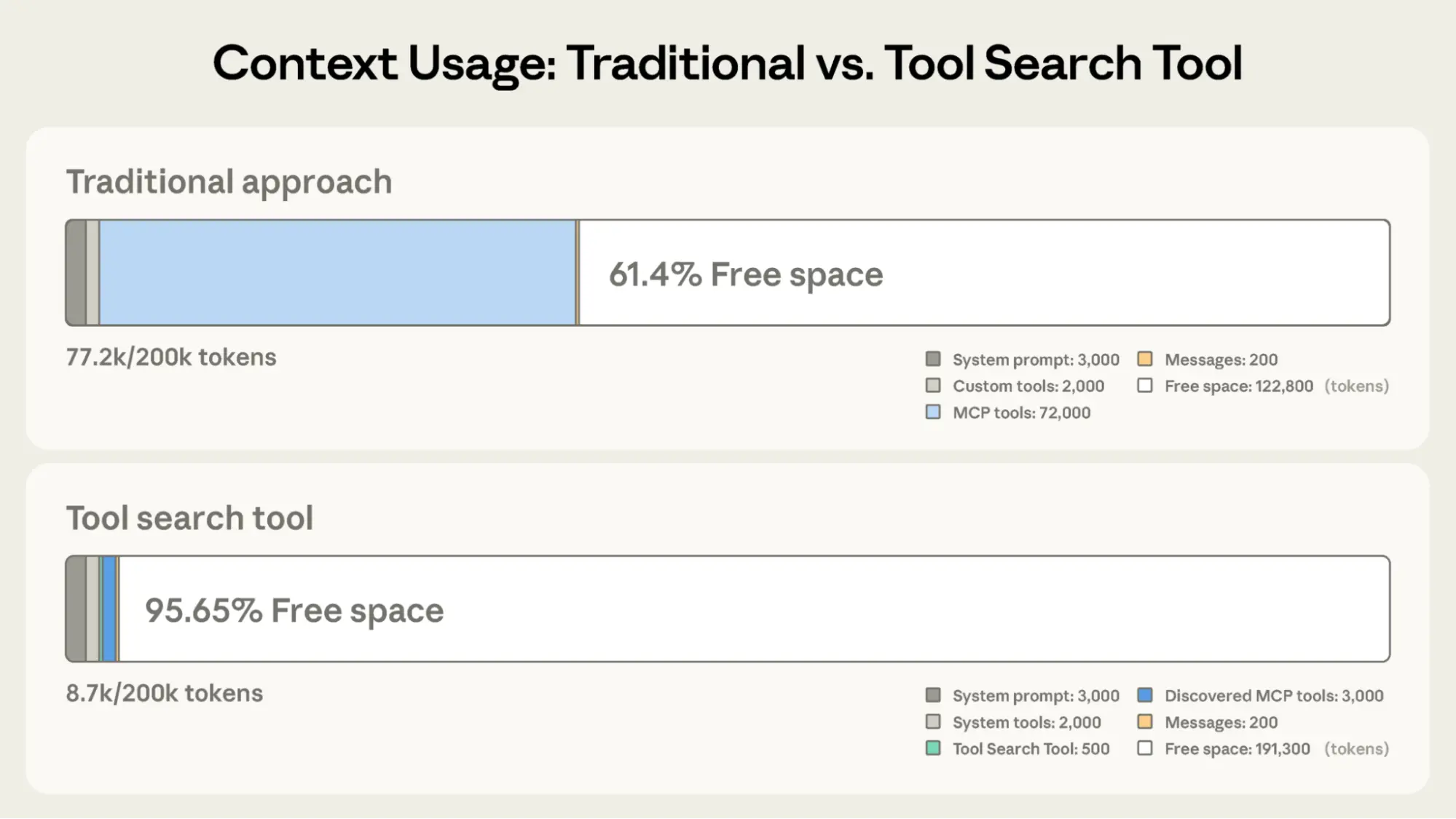
Tool search defers loading all tools into context, rather than loading them upfront. This allows the agent to search the catalog at runtime, pulling in the relevant tools when needed. In our testing, tool search tends to cut tool-definition tokens by 85%+ while maintaining high selection accuracy.
Process tool results in code with programmatic tool calling
Programmatic tool calling processes tool results in a code-execution sandbox, rather than returning them raw to the model. This lets the agent loop, filter, and aggregate across calls in code, with only the final output reaching context. In our testing, this reduces token usage by roughly 37% on complex multi-step workflows.
Together, these patterns compose naturally across multiple servers: leaner context, fewer round-trips, faster responses. See advanced tool use for the full breakdown.
Pairing MCP servers with skills
Skills and MCP are complementary. MCP gives an agent access to tools and data from external systems, while skills teach an agent the procedural knowledge of how to use those tools to accomplish real work. The most capable agents use both, and skills make MCP servers scale beyond a handful of connections. There are two general patterns for combining them:
Bundle skills and MCP servers as a plugin
Plugins for Claude are a useful abstraction that allow developers to bundle skills, MCP servers, hooks, LSP servers, and specialized subagents in one easily-consumable distribution method. Using this approach is the best way to unify multiple context providers with minimal friction.
Combining MCP servers with skills allows Claude to act more like a domain-specialist. Grab your tools via MCP, and give Claude the skills to orchestrate workflows end-to-end. See our data plugin for Cowork as an example, which consists of 10 skills and 8 MCP servers for apps like Snowflake, Databricks, BigQuery, Hex and more.
.png)
Distribute skills from an MCP server
It's increasingly common for providers to publish a skill alongside their MCP server, so the agent gets both the raw capabilities and an opinionated playbook for using them well. Canva, Notion, Sentry, and more do this today in Claude, listing the skill next to their connector in our web directory.
To make that pairing portable across every client, the MCP community is actively working on an extension for delivering skills directly from servers. This way the client inherits the relevant expertise automatically, versioned with the API it depends on. We expect this pattern to see broad adoption as the extension stabilizes.
The compounding layer
We opened with three paths for connecting agents to external systems. In practice, mature integrations will ship all three: the API as the foundation, a CLI for local-first environments, and MCP for cloud-based agents.
As production agents move to the cloud, MCP becomes the critical layer, and it’s the one that compounds. Today, a remote server reaches every compatible client across any deployment environment, with auth, interactivity, and rich semantics handled by the protocol. As more clients adopt the spec and more extensions land in it, that same server gets more capable without you shipping anything new.
When building an integration, if your goal is to have production agents in the cloud reach your system, build an MCP server and make it excellent using the patterns above. Every integration built on MCP strengthens the ecosystem: fewer edge cases to solve alone, fewer bespoke integrations to maintain.
Acknowledgements
Thanks to Den Delimarsky, David Soria Parra, Henry Shi, Felix Rieseberg, Conor Kelly, Molly Vorwerck, Andy Schumeister, Kevin Garcia, Amie Rotherham, Matt Samuels, Angela Jiang, Katelyn Lesse, AJ Rebeiro and Jess Yan for their contributions to this blog.
E-Book





Transformieren Sie mit Claude die Arbeitsweise in Ihrem Unternehmen
Entwickler-Newsletter abonnieren
Neues zu Produkten, Anleitungen, Community-Spotlights und mehr. Monatlich in Ihrem Posteingang.