

- Web Search runs a search-engine query and returns ranked results.
- Web Fetch retrieves the contents of a specific URL.
Web Search
Web Search is a server-side tool executed by your inference provider, not by the desktop app. Availability depends on which provider you’ve configured:
On Microsoft Foundry, Web Search works on both hosting options with no additional configuration. Deployments hosted on Azure support only the basic web search tool version (
web_search_20250305), which is the version Claude Desktop uses; see features not supported when hosted on Azure in the Claude in Microsoft Foundry documentation for what else differs when hosted on Azure. On any provider you can configure the built-in web search to choose the search backend yourself. Once it is configured, the app stops offering provider-side search and routes the model’s search calls to the built-in server. If you want no web search at all, add "WebSearch" to disabledBuiltinTools instead. That entry also blocks the built-in web search tool, so do not combine the two.
The Claude apps gateway passes the web_search tool through to its upstream provider, so Web Search works in Claude Desktop behind that gateway when the upstream is Google Cloud’s Agent Platform, Microsoft Foundry, or the Anthropic API. Claude Desktop can’t see which upstream the gateway routes to and offers the tool regardless, so if the gateway routes any model to Amazon Bedrock, configure the built-in web search, which replaces provider-side search on every route. To turn web search off instead, add "WebSearch" to disabledBuiltinTools in the gateway’s Claude Desktop overlay. That entry also blocks the built-in web search tool if one is configured.
Provider-side search runs on the provider’s infrastructure, so queries and results travel over the same path as model inference and are subject to your provider’s data-handling terms. It needs no additional firewall rules beyond the inference endpoint itself.
coworkEgressAllowedHosts governs client-side egress (Web Fetch and in-sandbox shell network activity). The SDK Web Search tool in the table above executes server-side at your inference provider, so the allowlist does not apply to it. The built-in websearch server under Web search options runs in the desktop app itself, outside the sandbox, and coworkEgressAllowedHosts does not apply to it either. Its search provider’s host (api.search.brave.com, api.tavily.com, api.exa.ai, or the host of your customUrl) does need to be reachable through your perimeter firewall and proxy, and the Egress section of the in-app configuration window lists that host. To let the agent fetch pages it finds via search, add the relevant hosts to coworkEgressAllowedHosts or set it to ["*"]. Adding "WebSearch" to disabledBuiltinTools turns web search off entirely, both provider-side search and the built-in websearch server’s tool.Web search options
If your inference provider supports native search (Google Cloud’s Agent Platform or Microsoft Foundry), that’s the simplest path and no additional configuration is required. Use the built-inwebsearch server when your provider has no native search (Amazon Bedrock or a custom gateway), or with any provider when you want to choose the search backend.
Provider-native search
Google Cloud’s Agent Platform grounding and Microsoft Foundry both execute search inside the model call. There’s nothing to configure in Claude Desktop. Any setup happens on the cloud provider’s side. Amazon Bedrock has no native equivalent (Amazon Bedrock AgentCore is a remote MCP server; see Remote search MCP).Built-in web search
Add the bundledwebsearch server to managedMcpServers. Search runs in the desktop app itself, so it works on every inference provider, including Amazon Bedrock.
You can add it from the in-app configuration window: under Connectors, add a Web search server, choose the search provider, and supply the vendor key as a header or through a headers helper script.
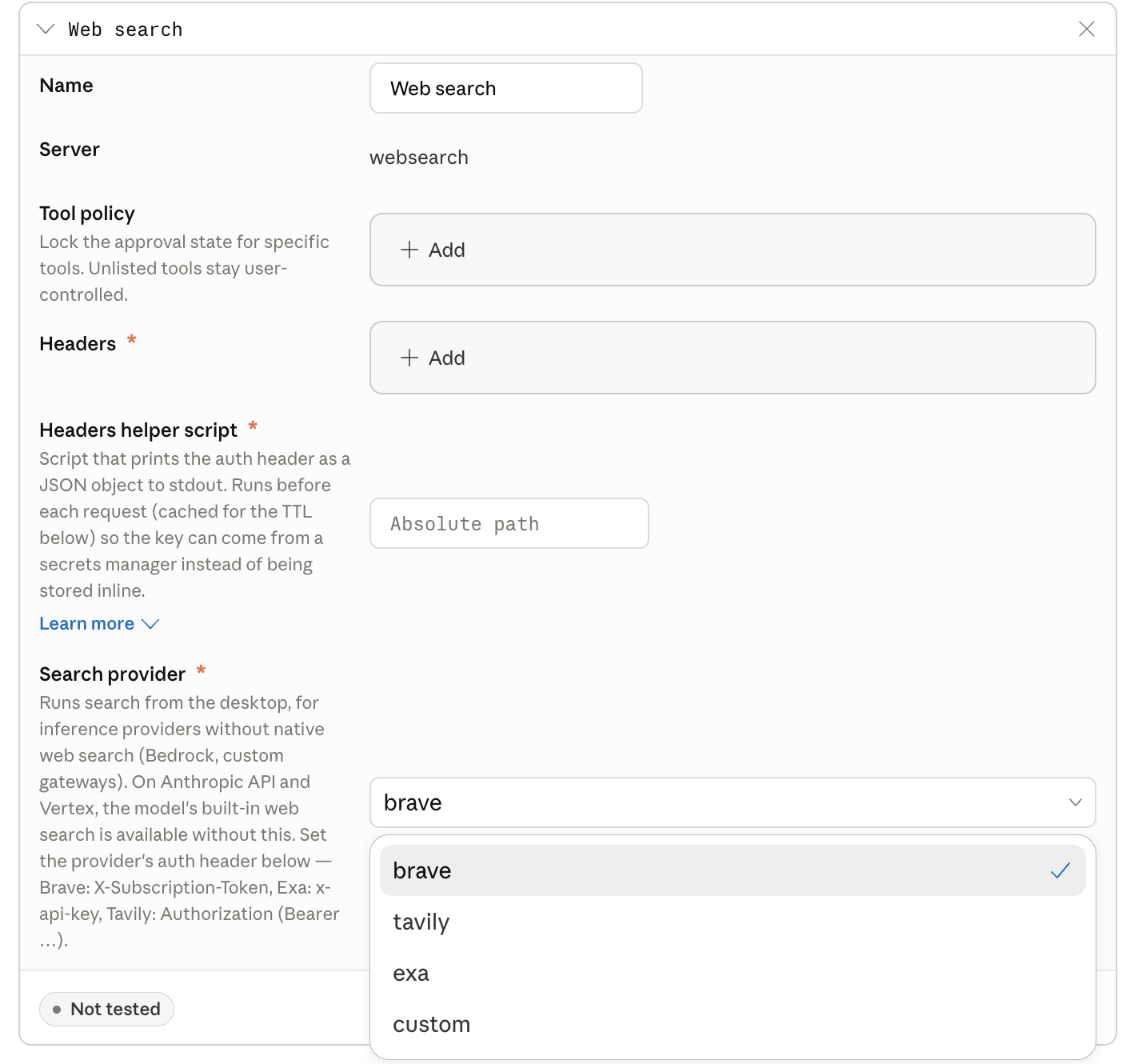
The Web search server in the Connectors section of the in-app configuration window, with the search provider menu open.
provider to a hosted search vendor (brave, tavily, or exa) for the lowest setup, or to custom with customUrl to point at a search server you run.
Hosted vendor:
A hosted-vendor key configured in
headers or returned by headersHelper is the same key on every device, and a local user can extract it. The exposure is limited to billing abuse on that key (it grants no data access). For regulated environments, set spend caps and rotate the key on a schedule, or have headersHelper fetch a per-user key: Tavily and Exa support per-user or per-team keys; see their key-management docs.toolPolicy to "allow" so users aren’t prompted to approve each search. headersHelper is an executable that prints the auth header as a JSON object to stdout; it follows the same execution model as inferenceCredentialHelper (exit 0, stdout read as JSON) but always runs with no arguments, and the output here is a flat header map, not the {token, headers} shape inferenceCredentialHelper uses.
You can use a static
headers object instead if you don’t need a secrets manager.
With provider: "custom", Claude Desktop sends each search as an HTTP POST to customUrl exactly as written (nothing is substituted into the URL), with Content-Type: application/json, any headers from headers and headersHelper, and the body {"q": "<search terms>"}. Your server must answer within 15 seconds with a 2xx status and a JSON body of the form {"results": [{"title": "...", "url": "...", "snippet": "..."}]}. Results without a url are dropped, at most 10 are used, and each snippet is truncated to 600 characters.
Gateway-side search
If your inference gateway can execute search itself, the search key stays server-side and never reaches end-user devices. For LiteLLM proxy server, enablewebsearch_interception in callbacks and configure a search backend in the proxy. The gateway intercepts the model’s web_search_20250305 request, runs the search, and returns results to Claude Desktop.
If your gateway translates between API formats (for example, Anthropic to OpenAI chat completions), note that web_search_20250305 is an Anthropic server tool with no chat-completions equivalent. The translation layer needs to handle it explicitly: run the search when the model requests it and emit server_tool_use and web_search_tool_result blocks in the response. Reach out to your account team for a reference implementation.
Remote search MCP
Connect a search MCP server as a remotemanagedMcpServers entry: either one you host, or Amazon Bedrock AgentCore Gateway with the Web Search target enabled (configure AgentCore for JWT authentication through your identity provider). Whether this stays inside your boundary depends on where the server is hosted; AgentCore is available in commercial AWS regions.
Data handling
Search queries go to whichever backend you configure. In every option, the query is also visible to your inference provider as part of the conversation, because the model emits the search call. For Google Cloud’s Agent Platform and Amazon Bedrock, Anthropic does not receive search queries in any of these options. For Microsoft Foundry, the Anthropic API, or a gateway, the query is part of the conversation content covered under Data handling by provider. To keep the search backend itself inside your network, useprovider: "custom" (or a self-hosted MCP) pointed at a search index that runs inside your boundary.
For audit, each search the model runs is recorded in the Cowork or Code session telemetry sent to your OTLP collector as a tool_result event, whichever option you choose (a WebSearch event for provider-side or gateway-side search, an MCP tool event for the built-in or a remote search server). Add toolDetails to otlpContentCapture to include the tool input, which carries the query text (long values are truncated). The built-in websearch server also emits a builtin_websearch_call event on the desktop application’s own stream with the search provider, query length, result count, duration, and status, never the query text. The app exports that event only when otlpDesktopLogLevel is info or debug, not at the default error level.
If you previously routed inference through a LiteLLM proxy to add search, the built-in
websearch server with provider: "custom" is an alternative that removes the proxy from the search path; gateway-side interception remains a valid choice if you prefer the search key to stay server-side.Web Fetch
In Cowork and Chat, Web Fetch runs in the Claude Desktop main process on the user’s device. The model supplies only the target URL; it cannot set headers, a request body, or credentials. The app checks every fetch, including redirect targets, againstcoworkEgressAllowedHosts before it sends the request. For Code sessions, see How the egress allowlist applies in Code sessions.
Cowork and Chat refuse every fetch while the key is unset or empty. To permit fetches:
Wildcards match one or more leading subdomain labels (
*.example.com matches a.example.com and a.b.example.com, but not example.com). A listed host that many organizations share, such as a cloud provider’s API endpoint, is reachable from the agent’s shell with any account’s credentials. A command can then send data to an account outside your organization.
Your perimeter firewall is a separate, outer layer from
coworkEgressAllowedHosts, so a host allowed by this key still won’t be reachable if your corporate network blocks it. See Telemetry and egress for the distinction.curl or pip install from the agent’s shell), not just the Web Fetch tool. A command-line tool that a plugin adds to the Cowork sandbox can also reach the hosts its plugin declares, whatever the list holds. Claude Desktop’s own connections for inference, sign-in, model discovery, telemetry export, and MCP servers aren’t checked against it and need no entry.
If a shell command or a Claude Code HTTP hook calls your gateway, inference provider, OTLP collector, or api.anthropic.com, add that host. Earlier versions of Claude Desktop added some of these hosts automatically, so when you update, add the ones the agent calls.
In Code sessions, Claude Code’s Web Fetch tool also asks api.anthropic.com whether each domain is on Anthropic’s blocklist before fetching, and refuses the fetch if that lookup cannot complete. If your devices cannot reach api.anthropic.com, or you do not want fetched hostnames sent there, set skipWebFetchPreflight to true. The key requires Claude Desktop 1.37937.0 or later. Cowork sessions do not perform this lookup.
How the egress allowlist applies in Code sessions
In Code sessions, the key reaches Claude Code’s own Web Fetch tool and shell sandbox as managed settings, unless Claude Code managed settings that you deploy separately take precedence:- Web Fetch: each host you list becomes a Claude Code
WebFetchallow rule. The key doesn’t block a fetch to another host. In Auto mode, which new Code sessions start in by default, and in bypass permissions mode, Claude Code doesn’t ask the user before that fetch. For the other modes, see WebFetch tool behavior. - Web Fetch controls: to have the user approve every fetch, set
WebFetchto"ask"inbuiltinToolPolicy, which also applies in Cowork and Chat. To remove the tool, see Disabling web tools. - Shell commands: commands that run in Claude Code’s sandbox reach only the hosts you list. On Windows, and on Linux without Claude Code’s sandbox dependencies, shell commands run unsandboxed and can reach any host your network allows. To keep Code off such devices, see Disabling Code. For SSH hosts, see Sandbox status on the remote host.
Disabling web tools
To remove web tools entirely, add them todisabledBuiltinTools:
coworkEgressAllowedHosts empty, commands in the agent’s sandboxed shell reach no host other than those a plugin declares for its command-line tool. In Code sessions where Claude Code’s sandbox doesn’t run, shell commands can reach any host your network allows.
The agent can still read and write local files, run code against them, and call any MCP servers you’ve provisioned. See the Locked down profile.