



Customize Cowork with plugins

Bundle any skills, connectors, and sub-agents together to turn Claude into a specialist for your role, team, and company.
Built-in browser
Claude can now open sites, fill forms, and finish web tasks in a browser built into Cowork.
Claude Cowork completes tasks you can steer from anywhere. Give it a goal, and it works across your files and tools. You come back to polished work for your review.
Works with a paid plan. Rolling out on web, mobile (beta). Not on a paid plan? Upgrade now
Switch to Claude Cowork when you want to hand off a task. Find it next to Chat.
Works directly in folders and tools you choose, and runs your task to deliver work for review. No need to copy from a chat or paste into files.
Tell Claude what you need, not how. It opens browsers for web tasks and takes over your screen only when it has to. You’re always in control.
Claude shows each step: the files it opens, tools it uses, and choices it makes. Follow along from anywhere, and redirect it if you need to.
Claude Cowork runs on web, desktop, and mobile and is the same Claude, wherever you work. Start at your desk, pick it up on your phone.
Close your laptop, it keeps going. Schedule a task for any cadence, and it runs unattended. You come back to your deck, spreadsheet, or research.
Big projects are split into chunks that run together. While it drafts, it researches and organizes at the same time. You review polished work.
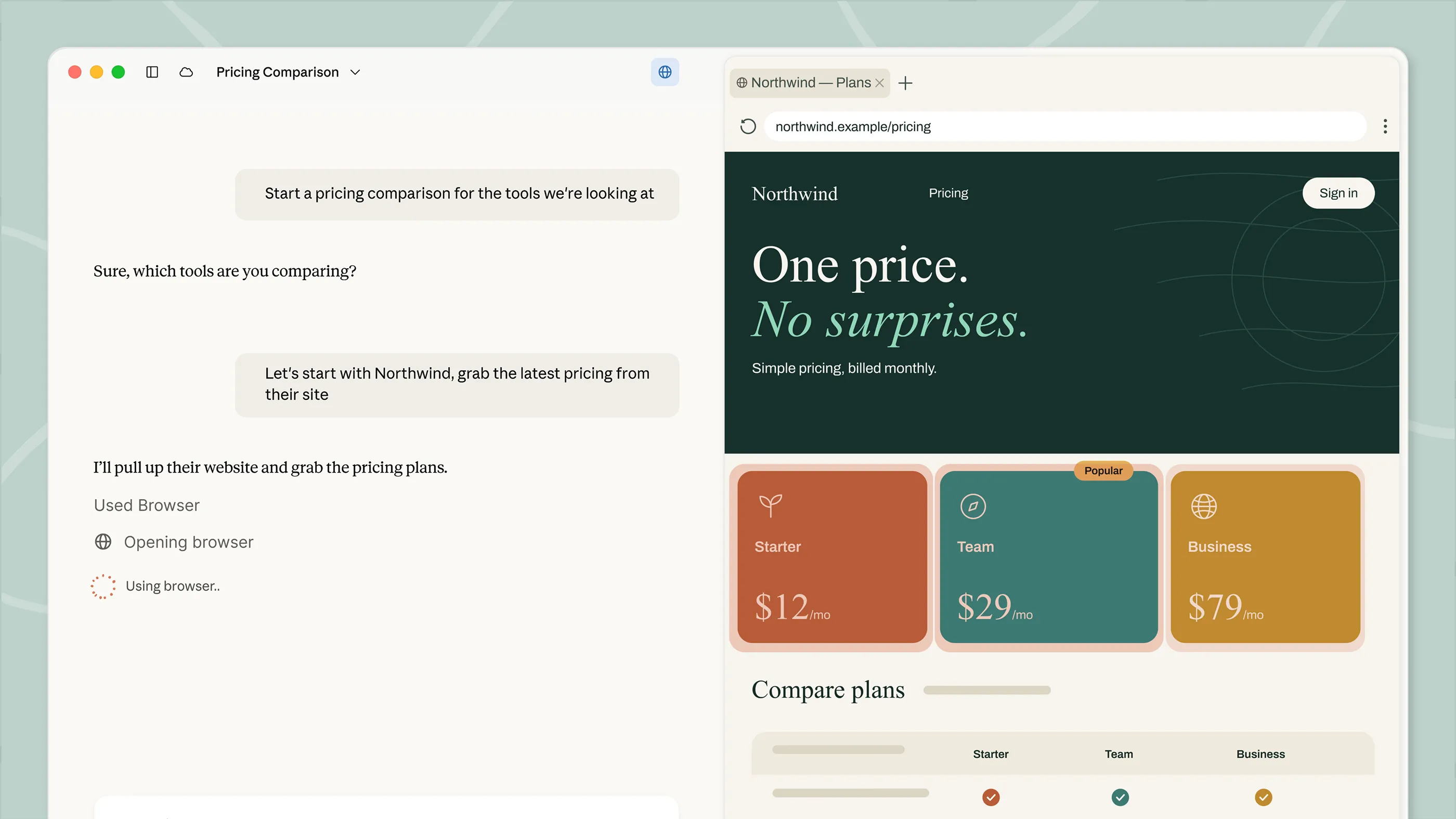
A built-in browser for Cowork
When a task requires opening a site, reading a page, or filling a form, Claude opens a browser in the Cowork side panel instead of yours while you keep working.
Available in the Cowork desktop app on Pro, Max, and Team plans. Enterprise admins manage it in Organization settings → Cowork.
Memo 3 of 12 for Contracts/Inbound · draft v2 (June 30, 2026) · vs Legal/Playbook.docx rev. March 2026 · prepared by Claude, July 9, 2026
Push back hard on two departures (liability cap, one-way indemnity), negotiate two (payment terms, renewal notice), accept one (governing law). Two clauses the playbook doesn't cover — those need you.
§16.4 · Governing law. The contract selects New York; the playbook prefers Delaware but lists New York as an acceptable alternative (playbook §7.4). No action needed.
§12.5 · Ownership of AI-assisted deliverables. The contract assigns Kelmswick all rights in deliverables "produced in whole or part by automated means." The playbook (rev. March 2026) takes no position on AI work-product.
§18.2 · Data localization. Adds UK and Swiss residency requirements; playbook guidance covers EU residency only (playbook §6.1). Whether we can operationally commit is a question for you, not the playbook.
The two high-severity blocks end with language written to be lifted straight into your negotiation email. The other eleven memos in this folder follow the same structure, so the same email skeleton works across the batch.
Reviewed: kelmswick-supply-MSA-v2.docx (14,210 words) against Legal/Playbook.docx rev. March 2026. Clause numbers follow the contract's own numbering.
Hand off first-pass contract review. Point Claude at the folder of inbound agreements and your playbook, and come back to a memo per contract with every departure cited to the clause, and the gaps your playbook doesn't cover marked for you.
Hand off first-pass contract review. Point Claude at the folder of inbound agreements and your playbook, and come back to a memo per contract with every departure cited to the clause, and the gaps your playbook doesn't cover marked for you.
Plugins bundle your tools, knowledge, and workflows into a single install so Claude shows up as a specialist from day one.
Domain knowledge and best practices baked in
Claude connects to the tools you already use
Specialized agents that handle specific tasks end-to-end
Bundle any skills, connectors, and sub-agents together to turn Claude into a specialist for your role, team, and company.
Analyze your existing documents, marketing materials, and conversations to distill your brand's voice into clear, enforceable guidelines.

Speed up contract review, NDA triage, and compliance workflows for in-house legal teams.
Streamline finance workflows: journal entries, reconciliation, financial statements, and variance analysis.

See how Anthropic uses Claude Cowork to gather weekly reviews on a schedule.

Claude Cowork for sales
See how Anthropic uses Claude Cowork to research any account before the first call.

Claude Cowork for legal teams
See how Anthropic uses Claude Cowork to answer questions on past decisions.
Claude Cowork takes real actions on your files and in connected tools. Enterprise admins can configure permissions to customize security according to their needs.
You choose the folders and tools. Claude can't reach anything else. Deleting anything needs your approval.
Enable permissions settings, so Claude shows its plan and waits for your approval before anything significant. Redirect, or stop anytime.
Admins set access by team, manage spend limits, and control tool permissions by department. Activity streams to your SIEM through OpenTelemetry.
Use a Claude account or your own cloud provider: Amazon Bedrock, Google Cloud, or Microsoft Foundry.


“In most AI chat tools, you'd query Slack, then query Databricks, then manually stitch the results together. Cowork can do all of that in a single pass. That's a fundamentally different kind of capability.”


“Cowork helps teams do work at a scale that was hard to justify before. The human role becomes validation, refinement, and decision-making. Not repetitive rework.”


“Our biggest operational pain point wasn't access to information; it was that it was scattered across many tools. Cowork hasn't changed what we do but it has changed how we do it.”


“Now I can write the idea down in Cowork, and Claude will go investigate, build me a document, and I have all the information I need.”


“Cowork gives us the ability to schedule and run tasks even when people are offline, taking busywork off their plates so they can focus on actually being marketers.”
Choose a plan, then start using Claude Cowork.
Claude Cowork is included in your Pro plan. Perfect for quick tasks like organizing a folder or pulling together a short report.
Claude Cowork is included in your Max plan. Great value for everyday use on longer, more complex tasks.
Per month
Even more Claude Cowork included in your Max plan. Best for power users who hand off work throughout the day.
Per month
Claude Cowork and the Slack connector are included in your Team plan standard and premium seats. Includes self-serve seat management and extra usage of the API rates.
Per seat / month. For teams of 2 to 150.
Claude Cowork is included in your Enterprise plan. Admin controls, usage analytics, Analytics API and OpenTelemetry observability available. Cowork activity is not yet captured in audit logs or Compliance API.
Usage limits apply. Prices shown don’t include applicable tax. Price and plans are subject to change at Anthropic's discretion.
Usage limits apply. Price and plans are subject to change at Anthropic's discretion.
Cowork is where you hand Claude real work. It runs on desktop, with web and mobile in beta. Claude works in the files and tools you choose and completes multi-step tasks from start to finish. You define the goal. Claude figures out how to get there.
In regular chat, Claude responds to your messages but can't access your files directly. In Cowork, Claude has permission to read, edit, and create files in folders you specify—so it can actually complete tasks rather than just describe how to do them.
Claude Code is built for software engineering — writing, debugging, and shipping code. It's available in the terminal, in the desktop app, in IDEs like VS Code and JetBrains, and via Claude Tag.
Cowork is built for non-coding knowledge work — research, analysis, document creation, and other multi-step tasks. It uses the same agentic approach as Claude Code.
Yes. Start a task from your phone, and Claude keeps working in the cloud even when your laptop is closed. Check in, redirect, or review the result from anywhere. Available in Pro, Max, and Team plans automatically. Enterprise plans can opt in.
Computer use lets Claude interact directly with your screen to open apps, navigate your browser, or run tools. Claude reaches for your connectors and integrations first, falls back to your browser when needed, and only uses your screen as a last resort. This matters because using a direct integration is faster and more precise than navigating through the screen.
When Claude does interact with your screen, it asks permission before accessing each application. You see what it's doing and can stop it at any step. Computer use is in research preview for both Cowork and Claude Code.
Cowork can understand the following file types:
You can also use Connectors to view additional files.
Yes, agentic tasks consume more capacity than regular chat. Claude coordinates multiple sub-agents and tool calls to complete complex work.
Yes. Admins can toggle Claude Cowork off for their organization anytime in Admin Settings. Manage Cowork access across teams with role-based access controls.
No. Cowork runs on web and mobile in beta.
The desktop app adds what web and mobile can't reach: the folders and applications on your own computer. If that's where your work lives, start there.
This article explains how to use Claude Cowork to bring Claude Code's agentic capabilities to Claude Desktop for knowledge work beyond coding.
Download the desktop app and hand off your first task in minutes.