

inferenceProvider to gateway and supply the base URL and credentials described below.
The gateway must implement the Anthropic Messages API:
POST /v1/messageswith streaming and tool use is required.GET /v1/modelsis optional. If the gateway implements it, Claude Desktop on 3P auto-discovers available models; if not, setinferenceModelsexplicitly.
cache_control breakpoints with each turn so that the provider can reuse the tool definitions, system prompt, and earlier turns of the conversation instead of reprocessing them. A gateway that forwards these fields, or translates them for its upstream provider, keeps that behavior. A gateway that strips cache_control, or that changes the system prompt or tool list from one request to the next, makes the provider reprocess the whole conversation on every turn at full input-token cost and higher latency. To verify, check the usage fields your gateway returns or logs for Claude Desktop traffic: after the first request of a session, cache_read_input_tokens should be well above zero on most requests. If it is zero on every request, review the gateway’s request transformation and caching settings for the route that serves Claude models.
In each response’s usage, return the provider’s cache_creation object with its ephemeral_5m_input_tokens and ephemeral_1h_input_tokens fields. Without that object, the API request event in your OpenTelemetry export reports 0 for both cache_creation_5m_tokens and cache_creation_1h_tokens.
Choose an authentication approach
Prepare devices
Static API key
No per-device preparation is required. Generate an API key in your gateway and place it in the managed configuration asinferenceGatewayApiKey (see Configure the app).
Single sign-on with your identity provider
Instead of distributing a shared gateway API key, you can have each user sign in with their own work account. The first time a user opens Claude Desktop, the app opens their browser to your organization’s normal sign-in page (Microsoft Entra ID, Okta, or any OpenID Connect provider). After they sign in, the app sends a per-user token to your gateway on every request, and your gateway checks that token to confirm who the user is. This gives you per-user attribution in your gateway logs, lets your identity provider enforce MFA and conditional access, and means there is no long-lived credential to distribute or rotate. You need three things in place:- An LLM gateway that can validate JSON Web Tokens (LiteLLM, Kong, Envoy, and Azure API Management all support this)
- Admin access to your identity provider to register a new application
- A way to push managed configuration to user devices (your existing MDM)
Set up single sign-on
1
Register an application in Entra ID
In the Microsoft Entra admin center, go to Identity → Applications → App registrations and select New registration. Give it a name such as A few details that matter here: use
Claude Desktop gateway, choose Accounts in this organizational directory only, and select Register.On the overview page, copy the Application (client) ID and Directory (tenant) ID. You will use both in the next two steps.Open the Authentication blade, select Add a platform, and choose Mobile and desktop applications. Under Custom redirect URIs, add exactly:127.0.0.1 (not localhost), include the /callback path, and add it under the Mobile and desktop applications platform specifically. That platform is the only one Entra allows to use any local port, which the app needs because it picks a free port at sign-in time. You do not need a client secret or any additional API permissions.2
Configure your gateway to validate the token
Tell your gateway to accept the bearer token only if it was issued by your tenant for this application. In LiteLLM that looks like:Replace
YOUR_TENANT_ID and YOUR_CLIENT_ID with the values from step 1.For Kong, Envoy, or Azure API Management, configure the equivalent JWT validation policy with the same JWKS URL and audience.3
Configure in the app
Open the in-app configuration window (Developer → Configure Third-Party Inference…). In the Connection section, set Inference provider to Gateway and Credential kind to Interactive sign-in. This hides the API-key field and reveals Gateway SSO IdP (OIDC):
Then click Export to produce a
.mobileconfig (macOS) or .reg (Windows) file for your MDM. See Deploy with MDM for the export and deployment workflow.When a user next opens Claude Desktop, they see a Sign in with your organization button. Clicking it opens their browser to your Entra sign-in page; once they approve, they return to the app and can start working. The app keeps them signed in and refreshes the token in the background. If the session is revoked or expires under your tenant’s policy, the app shows a Sign in again prompt; clicking it reopens the sign-in page in the browser.Using Okta instead
In the Okta Admin Console, create a Native application with the Authorization Code and Refresh Token grant types. Okta requires the redirect URI to match exactly, including the port, so pick a fixed port (for example53180), register http://127.0.0.1:53180/callback, and set that same port in Gateway SSO IdP (OIDC):
Use the issuer value, not the Metadata URI. Okta’s admin console shows the metadata URI (ending in
/.well-known/openid-configuration) prominently — that is the discovery document the app fetches from the issuer, not the issuer itself. If you are unsure, open the metadata URI in a browser and copy the "issuer" field from the JSON response. For a custom Okta authorization server the issuer is https://YOUR_ORG.okta.com/oauth2/AUTH_SERVER_ID.https://YOUR_ORG.okta.com/oauth2/v1/keys with audience set to the Okta client ID.
Map users at the gateway
Claude Desktop forwards the identity provider’s token to your gateway verbatim — it does not add, remove, or rewrite any claims. With the default scopes (openid profile email offline_access), the ID token your gateway receives contains the standard OIDC sub, email, and name claims, plus whatever your provider includes for the profile scope. You can confirm exactly what is present by base64-decoding the middle segment of the Authorization: Bearer value your gateway receives.
Key the gateway’s user record on the provider’s immutable user ID rather than email, so the record survives email or name changes:
If your gateway has no existing user records to preserve, the simplest setup is to auto-provision on first sign-in. For LiteLLM, extend the validation block from step 2:
groups claim for team-level budgets), add them on your identity provider’s authorization server — they pass through to the gateway unchanged. To request a non-default scope, set scopes in inferenceGatewayOidc (see Single sign-on configuration keys).
Refresh tokens and session lifetime
Silent token refresh requires a refresh token from your identity provider, which in turn requires theoffline_access scope on the authorization request. Whether Claude Desktop sends that scope depends on how you set scopes and bearerTokenType:
scopesleft unset — the default (openid profile email offline_access) includesoffline_access, so a refresh token is issued.bearerTokenType: "access_token"— Claude Desktop automatically appendsoffline_accessto whateverscopesvalue you supply, unlessappendOfflineAccessis set tofalse.bearerTokenType: "id_token"(the default) withscopesset explicitly — Claude Desktop does not addoffline_accessfor you. Include it in yourscopesvalue if you want silent refresh; without it, users are prompted to sign in again each time the ID token expires (commonly about one hour).
offline_access signals that the client may use the refresh token while the user is not present, and the provider must obtain consent for it. Claude Desktop therefore does not add this scope to an administrator-supplied scopes value in the default mode, so that requesting offline access remains an explicit choice.
Authorization servers that reject offline_access. Standard OIDC providers (Entra ID, Okta, Auth0) accept offline_access and require it to issue a refresh token, so keep the automatic append. If your authorization server rejects offline_access with an invalid_scope error, set appendOfflineAccess to false and include your provider’s own refresh-token scope in scopes.
Refresh tokens govern whether users are re-prompted to sign in, not how long a sign-in may stay valid. To cap the sign-in lifetime under your identity provider’s session policy, set inferenceSessionLifetimeSec; Claude Desktop shows a re-authenticate banner before the session expires.
Configure the app
Open the in-app configuration window (Developer → Configure Third-Party Inference…). In the Connection section, set Inference provider to Gateway, then fill in the Gateway credentials card:
Then click Export to produce a
.mobileconfig (macOS) or .reg (Windows) file for your MDM. See Deploy with MDM for the export and deployment workflow.
Configuration keys
Entry labels says what each label means.inferenceGatewayBaseUrl
string
Since 1.2581.0
Gateway base URL. Full URL of the inference gateway endpoint.
inferenceGatewayApiKey
string
Since 1.2581.0
Gateway API key. API key for the configured inference gateway.
inferenceGatewayAuthScheme
enum
Default: bearer
Since 1.3036.0
Gateway auth scheme. How the gateway credential is sent on the wire (Authorization: Bearer vs x-api-key header).
One of: bearer (default), x-api-key
inferenceGatewayOidcAuthFlow
enum
Since 1.25927.0
Gateway sign-in flow. How the IdP sign-in runs: system browser (default) or the OS Microsoft Entra broker.
One of: browser, broker
More detail
More detail
browser: register the redirect URIhttp://127.0.0.1:<port>/callbackwith your identity provider (for Entra,http://127.0.0.1/callback).broker: uses Web Account Manager on Windows or Company Portal on macOS, and does not work on Linux. It can satisfy Conditional Access policies that require a compliant or managed device, or token protection.
broker needs Microsoft Entra ID, with the issuer in inferenceGatewayOidc set to https://login.microsoftonline.com/{tenant-id}/v2.0. Add the redirect URIs listed under Register the Entra ID application.inferenceGatewayOidc
object
Since 1.6889.0
Gateway SSO IdP (OIDC). External IdP for gateway sign-in. The user’s token from this issuer is sent to the gateway as the Bearer credential.
More detail
More detail
Used with
inferenceCredentialKind set to interactive. Leave it unset for a gateway that runs its own sign-in and serves <baseUrl>/.well-known/oauth-authorization-server.Your gateway must check the token’s audience (aud). Otherwise it accepts any token from your tenant.Register the redirect URI given under inferenceGatewayOidcAuthFlow.Child attributes (11)
Child attributes (11)
string
required
OAuth client ID of the desktop app registration at your identity provider (public client, PKCE).
string
HTTPS issuer with OIDC discovery. Set this, or set the authorization and token URLs instead.
string
HTTPS authorization endpoint. Used with the token URL when no issuer is set.
string
HTTPS token endpoint. Used with the authorization URL when no issuer is set.
enum
default:"id_token"
Which token to send as the bearer. Use access token for a gateway or proxy that validates as an OAuth resource server.One of:
id_token (default), access_tokenMore detail
More detail
An ID token’s audience (
aud) is clientId. An access token’s audience must be your gateway or proxy.With Entra ID the scopes decide the audience, so add the gateway’s API scope to scopes, such as api://<gateway-app-id>/.default.string
Space-separated scopes. Access-token mode needs the gateway or proxy API scope, and adds offline_access unless Append offline_access is off.
More detail
More detail
In ID-token mode,
offline_access is not added to scopes that you set. Include it yourself, or users sign in again each time the token expires.boolean
default:"true"
In access-token mode, add offline_access to scopes so the identity provider returns a refresh token for silent refresh.
More detail
More detail
Turn off only if your authorization server rejects
offline_access as an unknown scope. Then add the server’s own refresh-token scope to scopes.string
Access-token audience of the gateway or proxy: an https URL or an AD FS relying-party identifier. Leave unset for Entra ID.
More detail
More detail
Use it only with
bearerTokenType set to access_token, and only if your identity provider supports RFC 8707. Changing it signs users in again.For AD FS, enter one of the relying-party trust’s identifiers. A value with no scheme is sent as https://<value>, so a plain name or GUID does not match. Add an https://… or urn:… identifier to the trust and enter that.integer
Fixed loopback port for the sign-in redirect. Leave unset to use a free port each time.
enum
Use localhost only if your IdP’s registered redirect URI specifies it.One of:
127.0.0.1, localhoststring
Space-separated hostnames also accepted as the referrer of the sign-in callback, besides the authorization URL’s host.
More detail
More detail
If a callback is rejected for a referrer mismatch, the app log names the rejected host. Add that hostname here.
inferenceIdpAuthFlow
enum
Since 2.7032.0
Identity provider sign-in flow. How the identity-provider sign-in runs: system browser (default) or the OS Microsoft Entra broker.
One of: browser, broker
More detail
More detail
browser: register the redirect URIhttp://127.0.0.1:<port>/callbackwith your identity provider (for Entra,http://127.0.0.1/callback).broker: uses Web Account Manager on Windows or Company Portal on macOS, and does not work on Linux. It can satisfy Conditional Access policies that require a compliant or managed device, or token protection.
broker needs Microsoft Entra ID, with the issuer in inferenceIdpOidc set to https://login.microsoftonline.com/{tenant-id}/v2.0. Add the redirect URIs listed under Register the Entra ID application.inferenceIdpOidc
object
Since 2.7032.0
Identity provider (OIDC). Your organization’s OpenID Connect identity provider. The user’s token is sent as the Bearer credential to the gateway or the Bedrock proxy.
More detail
More detail
Used when
inferenceCredentialKind is external-idp. Register the redirect URI given under inferenceIdpAuthFlow with your identity provider.Your gateway or proxy must check the token’s audience (aud). Otherwise it accepts any token from your tenant.On Bedrock, set inferenceBedrockBaseUrl to a proxy that checks the token, because Amazon Bedrock itself does not accept it. Also list your models in inferenceModels.Child attributes (11)
Child attributes (11)
string
required
OAuth client ID of the desktop app registration at your identity provider (public client, PKCE).
string
HTTPS issuer with OIDC discovery. Set this, or set the authorization and token URLs instead.
string
HTTPS authorization endpoint. Used with the token URL when no issuer is set.
string
HTTPS token endpoint. Used with the authorization URL when no issuer is set.
enum
default:"id_token"
Which token to send as the bearer. Use access token for a gateway or proxy that validates as an OAuth resource server.One of:
id_token (default), access_tokenMore detail
More detail
An ID token’s audience (
aud) is clientId. An access token’s audience must be your gateway or proxy.With Entra ID the scopes decide the audience, so add the gateway’s API scope to scopes, such as api://<gateway-app-id>/.default.string
Space-separated scopes. Access-token mode needs the gateway or proxy API scope, and adds offline_access unless Append offline_access is off.
More detail
More detail
In ID-token mode,
offline_access is not added to scopes that you set. Include it yourself, or users sign in again each time the token expires.boolean
default:"true"
In access-token mode, add offline_access to scopes so the identity provider returns a refresh token for silent refresh.
More detail
More detail
Turn off only if your authorization server rejects
offline_access as an unknown scope. Then add the server’s own refresh-token scope to scopes.string
Access-token audience of the gateway or proxy: an https URL or an AD FS relying-party identifier. Leave unset for Entra ID.
More detail
More detail
Use it only with
bearerTokenType set to access_token, and only if your identity provider supports RFC 8707. Changing it signs users in again.For AD FS, enter one of the relying-party trust’s identifiers. A value with no scheme is sent as https://<value>, so a plain name or GUID does not match. Add an https://… or urn:… identifier to the trust and enter that.integer
Fixed loopback port for the sign-in redirect. Leave unset to use a free port each time.
enum
Use localhost only if your IdP’s registered redirect URI specifies it.One of:
127.0.0.1, localhoststring
Space-separated hostnames also accepted as the referrer of the sign-in callback, besides the authorization URL’s host.
More detail
More detail
If a callback is rejected for a referrer mismatch, the app log names the rejected host. Add that hostname here.
inferenceStreamIdleTimeoutSec
integer
Range: 300–1,800
Since 1.44121.1
Stream idle timeout. Extra seconds to wait for model output on a streaming response that is sending only keep-alive pings. Gateway provider only. Default 300.
More detail
More detail
With pings arriving (SSE
ping events or : comment lines), sessions accept at least about five minutes of them, then wait this many seconds more. With no pings, a silent response still fails after about 5 minutes whatever this value, so make the gateway send them.While this key is set, it takes priority over CLAUDE_STREAM_IDLE_TIMEOUT_MS in Claude Code’s managed settings for sessions the app starts.To send additional HTTP headers on every inference request (tenant routing, org IDs, and similar), set
inferenceCustomHeaders. It applies to all providers, not just gateways.
Single sign-on configuration keys
Single sign-on is enabled by settinginferenceCredentialKind to interactive and supplying inferenceGatewayOidc. interactive alone (without inferenceGatewayOidc) selects a different mode where the gateway itself acts as the authorization server.
From Claude Desktop 2.7032.0, inferenceCredentialKind: "external-idp" with inferenceIdpOidc and inferenceIdpAuthFlow, the keys Amazon Bedrock identity provider sign-in uses, is an equivalent spelling of this configuration; interactive with inferenceGatewayOidc keeps working, so keep it until every device runs 2.7032.0 or later.
The
inferenceGatewayOidc value is one JSON object with these fields:
* Either
issuer, or both authorizationUrl and tokenUrl, is required.
In a macOS .mobileconfig payload (Okta example):
inferenceGatewayAuthScheme: "sso" to select this mode. That value is deprecated, so set inferenceCredentialKind: "interactive" instead. The configuration changelog says which app versions read the deprecated value.
Models
WheninferenceModels is unset, Claude Desktop on 3P populates the model picker from your gateway’s GET /v1/models response. Auto-discovery shows only models whose IDs are recognizably Claude. Set inferenceModels to replace discovery with an explicit list. Use the model IDs your gateway expects (for example bedrock/us.anthropic.claude-opus-5 for a LiteLLM-style routing prefix).
If your gateway serves Claude models under routing aliases, list each alias in inferenceModels and set behavesAs on its entry to the ID of the Claude model it routes to, such as claude-sonnet-5. For an alias without a model version, users then get that model’s Effort control, and sessions assume that model’s context window. Requires Claude Desktop 4.29.0 or later. For an alias that contains a model version, see Map an unrecognized model ID to a Claude model.
Your gateway can mark which Claude tier a model serves by returning an anthropic_family_tier field (a tier name such as sonnet or opus) on that model object in its /v1/models response, optionally with is_family_default: true when several models map to the same tier. The app uses the marked model when it needs that tier, for example to resolve a bare sonnet alias. The app also reads other optional fields on each model object. display_name sets the picker label when the app cannot derive one from the model ID. description adds a one-line description beneath the label (Claude Desktop 1.49585.0 or later). supports_1m: true, or a max_input_tokens value of 1,000,000 or more, marks a discovered model as supporting the 1M-token context window, as supports1m does on an inferenceModels entry.
If your gateway doesn’t implement GET /v1/models, give every inferenceModels entry the full model ID your gateway accepts. When every entry is a full model ID, the app skips the /v1/models call automatically. A bare tier alias such as sonnet can’t be resolved without discovery, so a list that contains one keeps discovery on. On earlier app versions that don’t skip the call automatically, also set modelDiscoveryEnabled to false. If discovery stays on, a gateway that answers the call with an error makes the app fall back to the inferenceModels list immediately. A gateway that accepts the call and hangs delays the model list by up to 10 seconds at launch.
A session assumes 200K tokens for a model ID it doesn’t recognize as having a native 1M context window (see Context window and compaction). If your deployment supports the 1M-token context window for that model, set supports1m: true on its entry:
supports1m on models you have confirmed against your deployment. The Models section of the configuration reference documents the remaining entry fields, including display labels and tier mapping.
To show a model as one entry, add prefer1m: true next to supports1m on its entry, or use modelPrefer1mContext, as described under Model list and default model.
Context window and compaction
Cowork and Code sessions keep a long conversation within the model’s context window by compacting it. To compact, the session sends one request that asks the model to summarize the conversation so far, then continues from the summary. Through a gateway, a session can’t read the model’s real context window from the provider, so it assumes one from the model ID and the picker entry:- Standard entry: 1M tokens for a model the session recognizes as having a native 1M context window, as listed under the context window behind a gateway in the Claude Code documentation, and 200K tokens for every other model ID, including an ID the session doesn’t recognize whose
inferenceModelsentry doesn’t setbehavesAs. On Claude Desktop versions earlier than 2.19675.0, a session assumes 200K tokens on this entry for every model. - 1M context window entry, or the single entry from
prefer1mormodelPrefer1mContext: 1M tokens, regardless of the model ID.
On a response that delivers only keep-alive pings, a session accepts about five minutes of pings and then waits
inferenceStreamIdleTimeoutSec seconds more for model output (300 by default, so about ten minutes in all). Raise that key if your provider needs longer than that before its first output on a large request.
MCP tool search
MCP tool search loads MCP tool schemas on demand instead of inlining every schema into the context window. It reduces context pressure when many MCP tools are configured (sessions that otherwise compact every turn or two). On gateway deployments, Claude Desktop turns tool search off by default, along with Claude Code’s other experimental beta features, because strict gateways reject the experimentalanthropic-beta request headers and request fields those features add. The same applies to Microsoft Foundry deployments and to any provider configured with a custom base URL. Setting the ENABLE_TOOL_SEARCH environment variable to true does not lift this suppression. To turn tool search on for these deployments, set the toolSearchEnabled configuration key. Requires app version 1.21459.0 or later.
On Claude API, Google Cloud’s Agent Platform, Amazon Bedrock, and Amazon Bedrock Mantle deployments with no custom base URL, tool search is on by default from Claude Desktop 1.49585.0 and toolSearchEnabled is not needed. These versions leave Claude Code’s experimental beta features on for those providers, as terminal Claude Code does (on Google Cloud’s Agent Platform, tool search applies to Claude 4.5 and newer models). To turn tool search off on these deployments, set ENABLE_TOOL_SEARCH to false in the env block of OS-level Claude Code managed settings, with parentSettingsBehavior set to merge. On earlier app versions these providers also have tool search off by default, and toolSearchEnabled turns it on.
Block requests at a spend limit
To show users your own message when your gateway blocks them at a budget or spend limit, return HTTP402 with the message in a Messages API error body:
402. Once your gateway accepts requests again, the user’s next message in the same session goes through.
Cowork, Chat, and Code show a Billing issue card, with your message below the app’s own explanation.
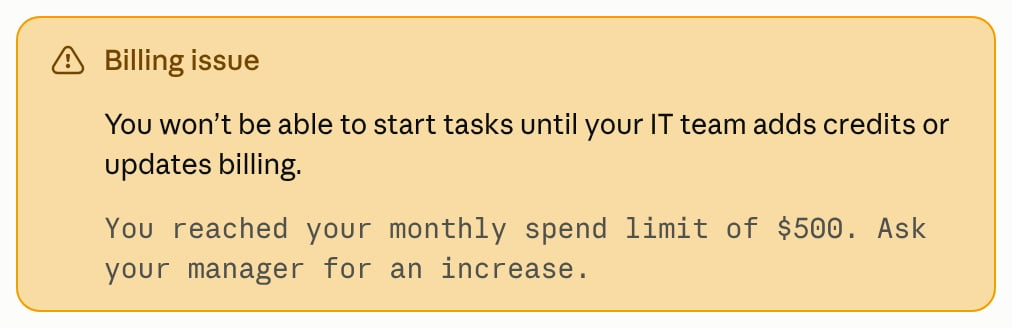
The Billing issue card in Cowork, with an example gateway message in monospace.
The Billing issue card in Cowork and Chat requires Claude Desktop 4.4212.0 or later. In earlier versions, both show your message in a Something went wrong card with a Try again button.
Write the spend limit message
Keeperror.message short and say who can raise the limit. The Billing issue card shows your message as plain text, so a URL or email address in it isn’t clickable. To give users a clickable HTTPS link, set linkUrl on the banner, the notice across the top of the app window.
Avoid phrases from the app’s own error messages, such as “usage limit”, “hit your limit”, “hit your monthly limit”, “out of usage”, and “credit balance is too low”. If your message contains one, the app can show its own card or text instead.
Other status codes at a spend limit
With these status codes, users see a general error or a card about a different problem, and Code’s card hides or drops your message.429: Claude Desktop can retry for about three minutes or longer before it shows an error, unless the response carriesx-should-retry: false. Code then shows Server is temporarily limiting requests.401or403: Code shows a card about credentials, sign-in, or permissions.400: Code shows Invalid request.
Warn users before the spend limit
To tell users where they stand before your gateway blocks them, show one line of text in one of these places:- Across the top of the app window: set the
bannerconfiguration key to show a one-line notice. If you serve configuration per user, for example from a bootstrap server, each user’s notice can show their own figure, such as “You have used 82% of your monthly budget.” - Above the message box: set up a status line. Claude Desktop runs a program that you install on the user’s device and shows the line it prints.
Troubleshoot
gateway SSO: server does not advertise device_authorization_endpoint — The app could not read your inferenceGatewayOidc value, so it fell back to treating the gateway itself as the sign-in server. Almost always this means the value is missing or not valid JSON, for example because it was written as separate dotted keys instead of one inferenceGatewayOidc value. Re-export from the in-app configuration window, or copy the .mobileconfig snippet above.
OIDC discovery failed (HTTP 404) or (HTTP 405) — The issuer value is not the issuer base URL. Most often the metadata URI (ending in /.well-known/openid-configuration) was pasted instead, which doubles the path. Remove that suffix so issuer is just https://YOUR_ORG.okta.com (or the equivalent for your provider).
no credential configured for provider "gateway": set inferenceCredentialKind or one of the credential fields. inferenceCredentialKind: "interactive" isn’t present in the configuration Claude Desktop is using. Add it where Claude Desktop gets its configuration:
- A managed profile that doesn’t set
bootstrapUrl: add the key to the profile you push to devices. - A bootstrap server: return the key in the response, then quit and reopen Claude Desktop. A copy of the key in the managed profile has no effect. A message that also includes
bootstrap response failed validationcomes from this case.
inferenceGatewayAuthScheme: "sso" in place of this key. Upgrade the gateway to the current Claude Code version, then quit and reopen Claude Desktop. Or update Claude Desktop to a version that reads inferenceGatewayAuthScheme: "sso".
Browser shows “Connected” but the app reports the sign-in failed, or Token exchange failed (HTTP 401) — The browser step succeeded, but the identity provider rejected the follow-up token request. This usually means the IdP application is registered as a confidential (Web) client, which expects a client secret. Claude is a public PKCE client and doesn’t send one. Register a public/native client instead: Native Application in Okta, or the Mobile and desktop applications platform in Entra ID. Application type generally can’t be changed after creation, so you may need to create a new one.
Google Workspace can be used as the identity provider, but in the default
id_token mode Google does not issue a fresh ID token on background refresh, so users are prompted to sign in again roughly once an hour. Setting bearerTokenType to access_token avoids this. Entra ID and Okta are not affected in either mode.GET /v1/models response and your inferenceModels list (see Models). When /v1/models is unreachable or returns an error, the picker falls back to the inferenceModels list; if that list is empty, so is the picker.
Chat conversations and Cowork tasks fail with SSL certificate verification failed (UNABLE_TO_VERIFY_LEAF_SIGNATURE). Claude Code, which runs these sessions, couldn’t find the certificate authority (CA) that issued your gateway’s certificate. A gateway that doesn’t send its intermediate certificate and a private CA that the device doesn’t trust can both produce this message. A passing connection test in the app doesn’t rule out a missing intermediate certificate, because the app can fetch one itself and Claude Code can’t.
To see which certificates your gateway sends, run this command in a terminal on a machine that connects to the gateway directly. Use your gateway’s host name in place of llm-gateway.example.corp:
supports1m takes effect only when the entry’s name matches the model ID the picker uses. Setting it on a bare alias (for example sonnet) while discovery returns full model IDs produces no match. Set supports1m on an entry whose name is the exact ID your gateway’s /v1/models endpoint returns. With prefer1m or modelPrefer1mContext set, a model whose name matches has one entry and no 1M context window label.
Your context window is full in a Code session, or Couldn’t compact this conversation to free up space. Try again, or start a new session. in a Cowork session. The app shows these when Claude Code reports Prompt is too long · automatic compaction failed: …, meaning a session tried to compact the conversation and the summary request failed. On Claude Desktop versions earlier than 2.37337, a Cowork session shows This conversation is too long to continue. Start a new session, or remove some tools to free up space. for the same failure. The conversation isn’t lost. After you fix the cause, the user’s next message in the same session retries compaction. The error the summary request returned is in the gateway’s logs as the response to the session’s last POST /v1/messages request before the failure. Match it to a cause as follows.
- A timeout,
504, or524: a proxy or load balancer on the route closed the summary response before it finished. See the streaming requirement in Context window and compaction. 401,402, or403: the gateway credential expired, or the gateway’s quota for the user is spent. Have the user sign in again or issue a new key, or raise the quota.API returned an empty or malformed response: after certain streaming failures, such as a stream that stops partway, Claude Code sends the summary request again with thestreamfield set tofalse. This message means that the non-streaming request got a success status but a body that wasn’t a Messages API response, for example an empty body, an HTML page, a stream of server-sent events, or JSON in another format. Find that request in the gateway’s logs and check what the gateway returned for it. If the request isn’t in the logs, something in front of the gateway, such as a proxy, firewall, or sign-in page, answered it.400with your gateway’s own error text: the gateway rejected the summary request itself, for example on a request-size or token limit of its own. Raise or remove that limit for these requests.
Prompt is too long without automatic compaction failed, or your gateway’s own request-too-large error shown in the session, check the usage and error-forwarding requirements in Context window and compaction first. Prompt is too long in the Claude Code error reference covers the other causes.