Harnessing Claude’s intelligence
Building applications that balance intelligence, latency, and cost.
Building applications that balance intelligence, latency, and cost.
One of Anthropic’s co-founders, Chris Olah, says that generative AI systems like Claude are grown more than they are built. Researchers set the conditions to direct growth, but the exact structure or capabilities that emerge aren’t always predictable.
This creates a challenge for building with Claude: agent harnesses encode assumptions about what Claude can’t do on its own, but those assumptions grow stale as Claude gets more capable. Even lessons shared in articles like this deserve frequent revisiting.
In this article, we share three patterns that teams should use when building applications that keep pace with Claude’s evolving intelligence while balancing latency and cost: use what it already knows, ask what you can stop doing, and carefully set boundaries with the agent harness.
We suggest building applications using tools that Claude understands well.
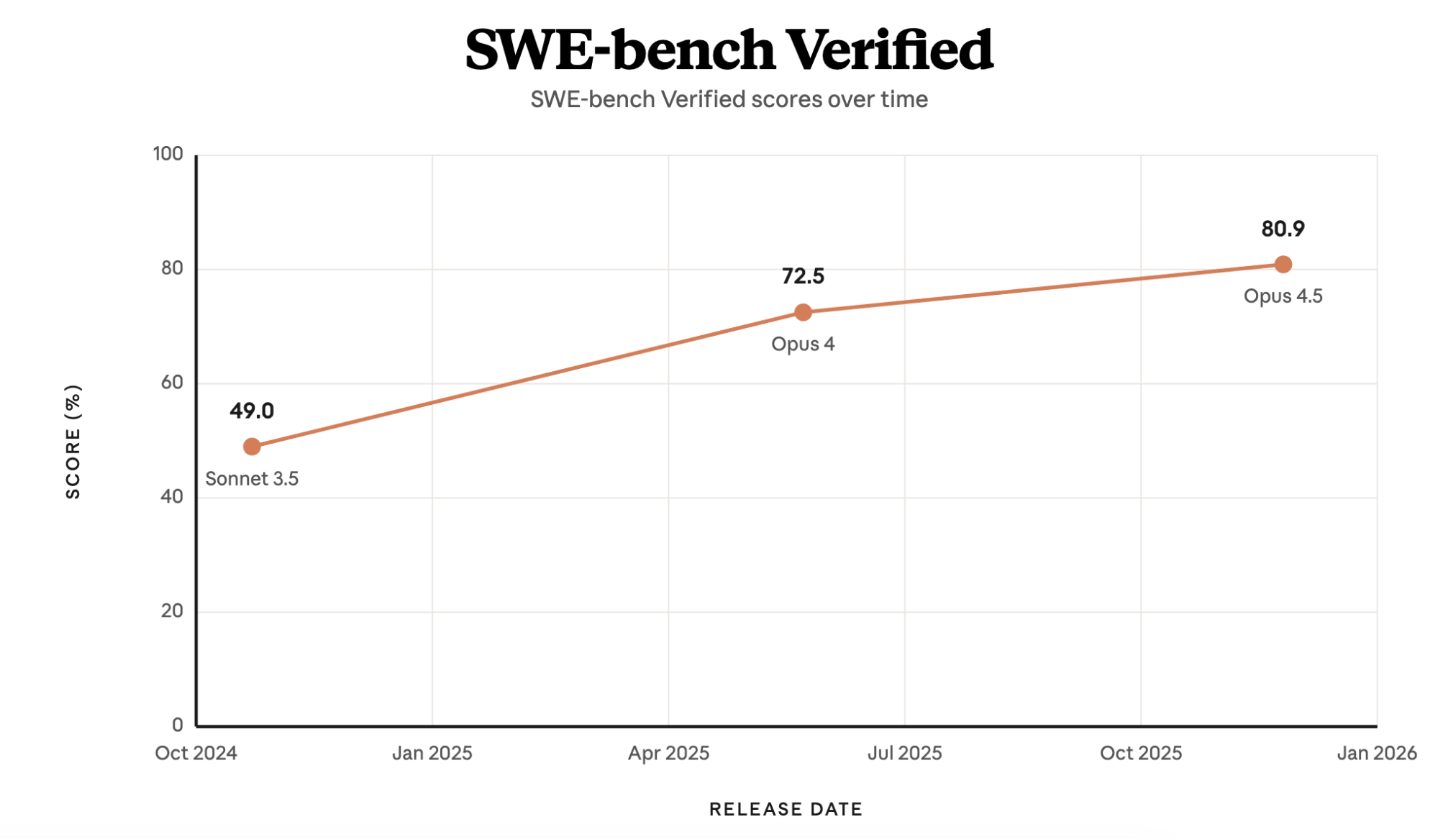
In late 2024, Claude 3.5 Sonnet reached 49% on SWE-bench Verified—then state of the art—with only a bash tool and a text editor tool for viewing, creating, and editing files. Claude Code is grounded in these same tools. Bash wasn’t designed for building agents, but it's a tool that Claude knows how to use and gets better at using over time.
We've seen Claude compose these general tools into patterns that solve different problems. For instance, Agent Skills, programmatic tool calling, and the memory tool are all built from the bash and text editor tools.
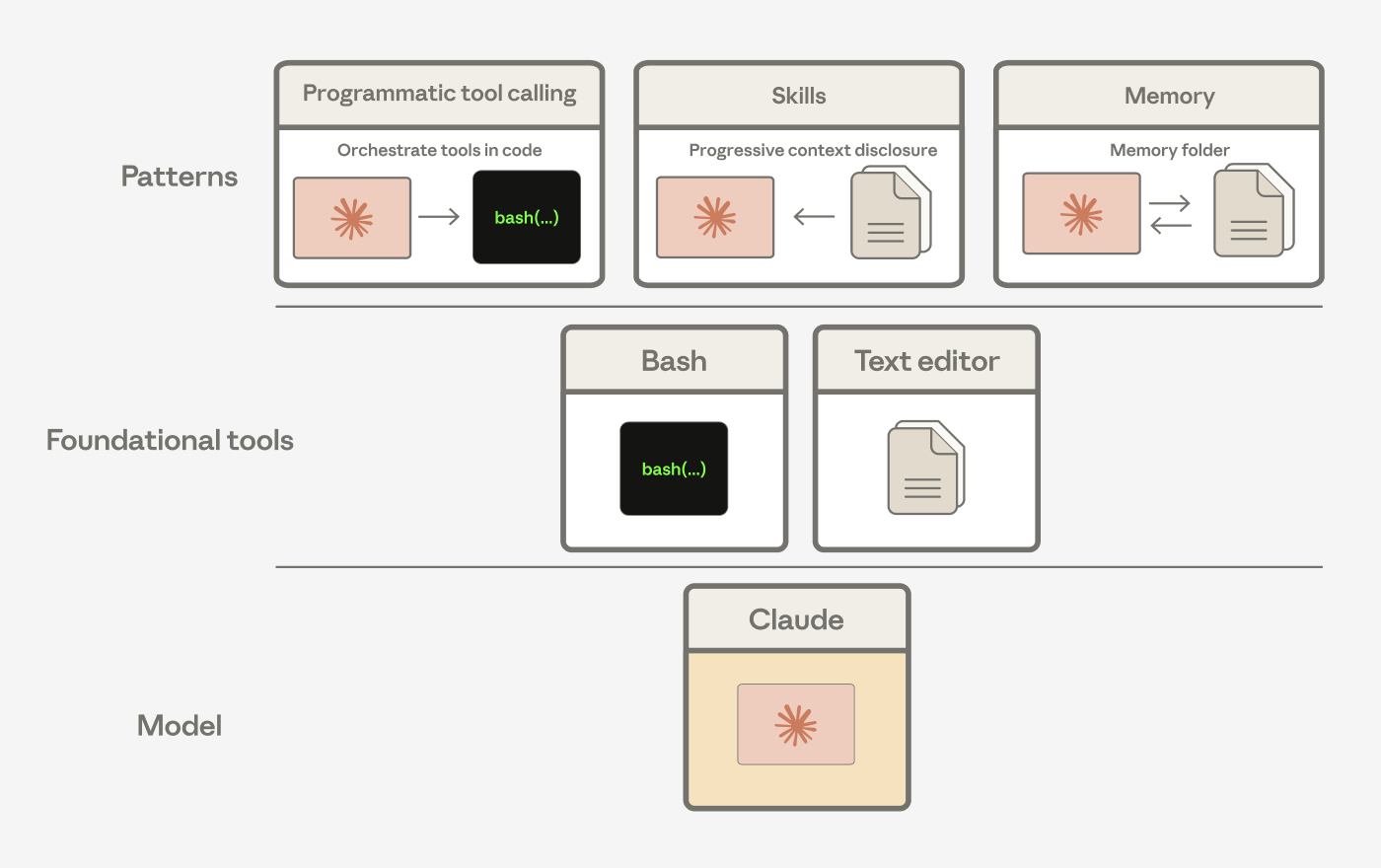
Agent harnesses encode assumptions about what Claude can’t do on its own. As Claude gets more capable, those assumptions should be tested.
Let Claude orchestrate its own actions
A common assumption is that every tool result should flow back through Claude’s context window to inform the next action. Processing tool results in tokens can be slow, costly, and unnecessary if it only needs to be passed to the next tool or if Claude only cares about a small slice of the output.
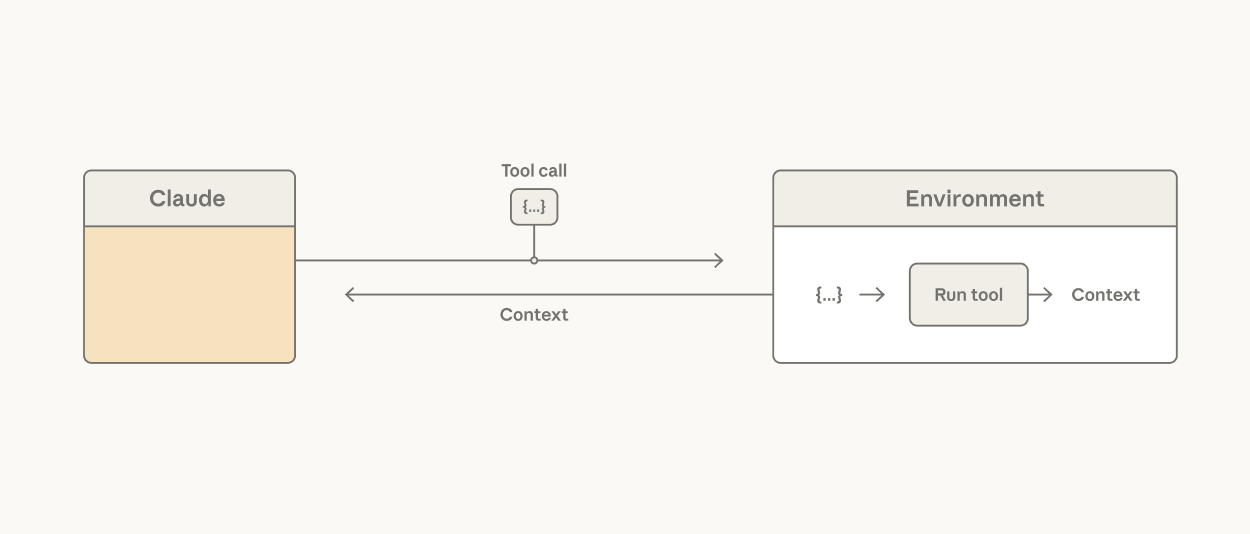
Consider reading a large table to reason about a single column: the whole table lands in context and Claude pays the token cost for every row it doesn't need. It’s possible to tackle this in tool design, using hard-coded filters. But this does not address the fact that the agent harness is making an orchestration decision that Claude is better positioned to make.
Giving Claude a code execution tool (e.g., bash tool or language-specific REPL) addresses this: it allows Claude to write code to express tool calls and the logic between them. Rather than the harness deciding that every tool call result is processed as tokens, Claude decides what results to pass through, filter, or pipe into the next call without touching the context window. Only the output of code execution reaches Claude’s context window.
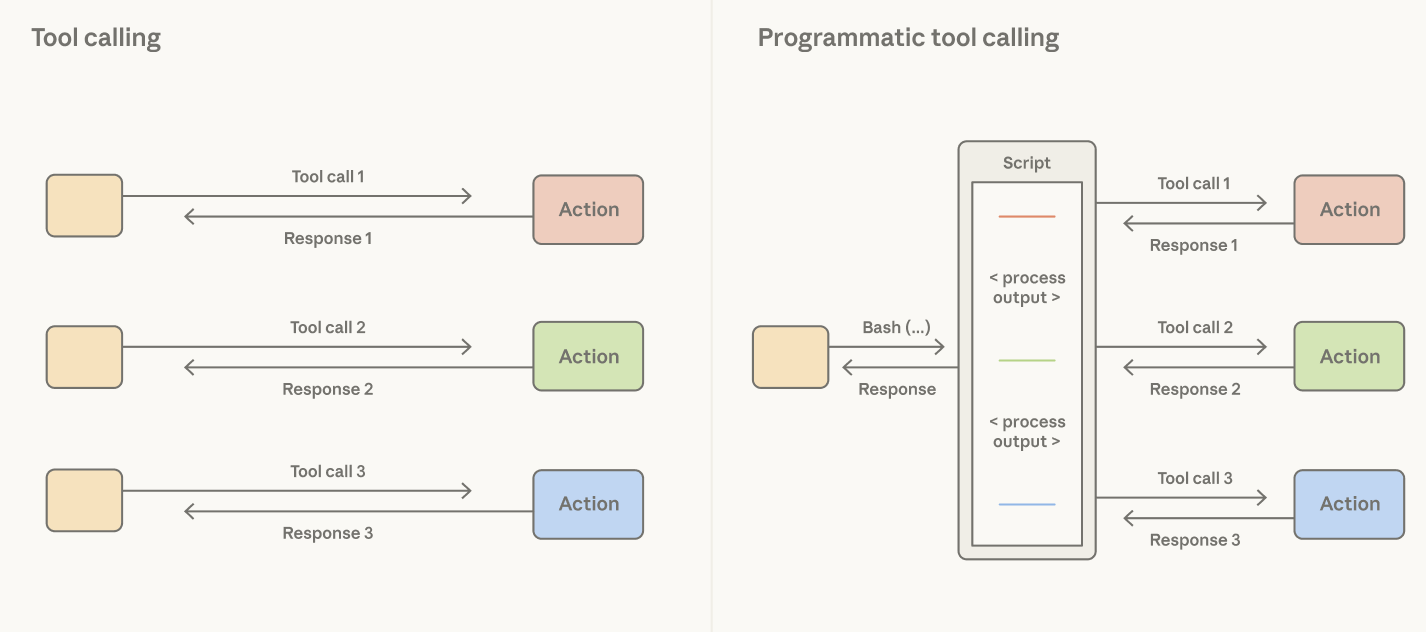
The orchestration decision moves from the harness to the model. Since code is a general way for Claude to orchestrate actions, a strong coding model is also a strong general agent. Claude shows strong performance on non-coding evals using this pattern: on BrowseComp, a benchmark that tests the ability of agents to browse the web, giving Opus 4.6 the ability to filter its own tool outputs brought accuracy from 45.3% to 61.6%.
Let Claude manage its own context
Task-specific context steers Claude’s use of general tools like bash and the text editor tool. A common assumption is that system prompts should be hand-crafted with task-specific instructions. The problem is that pre-loading prompts with instructions does not scale across many tasks: every token added depletes Claude’s attention budget and it is wasteful to pre-load context with rarely used instructions.
Giving Claude the ability to access skills addresses this: the YAML frontmatter of each skill is a short description pre-loaded into the context window, providing an overview of the skill contents. The full skill can be progressively disclosed by Claude calling a read file tool if a task calls for it.
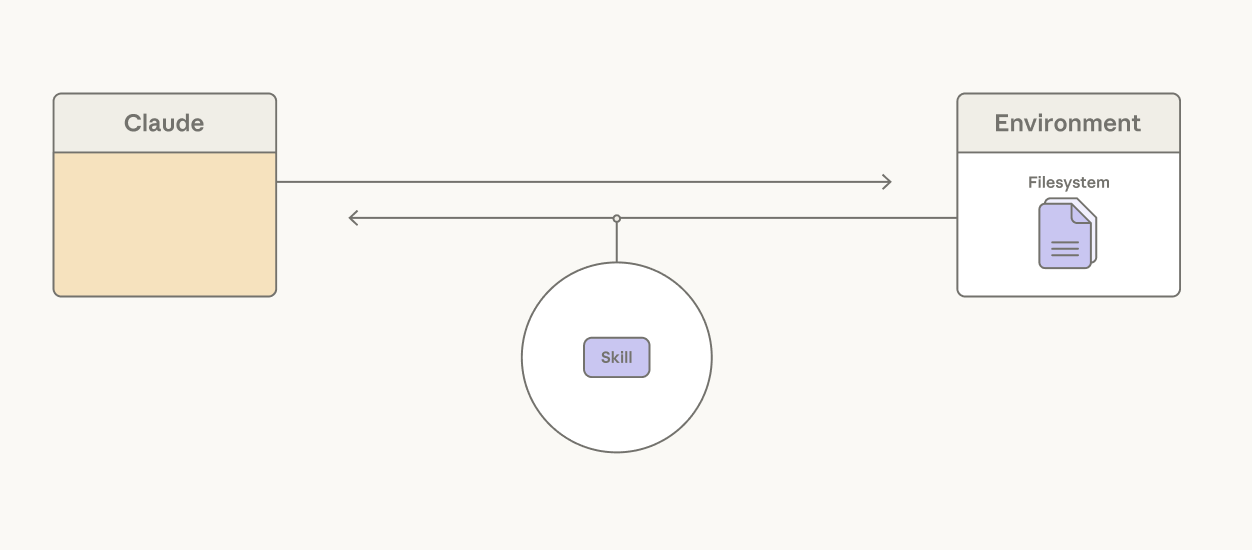
While skills give Claude the freedom to assemble its own context window, context editing is the inverse, providing a way to selectively remove context that’s become stale or irrelevant, such as old tool results or thinking blocks.
With subagents, Claude is getting better at knowing when to fork into a fresh context window to isolate work on a specific task. With Opus 4.6, the ability to spawn subagents improved results on BrowseComp by 2.8% over the best single-agent runs.
Let Claude persist its own context
Long-running agents can exceed the limit of a single context window. A common assumption is that memory systems should rely on retrieval infrastructure around the model. Much of our work has focused on giving Claude simple ways to choose for itself what content to persist.
For example, compaction lets Claude summarize its past context in order to maintain continuity on long-horizon tasks. Over several releases, Claude has gotten better at choosing what to remember. On BrowseComp, for example, an agentic search task, Sonnet 4.5 stayed flat at 43% regardless of the compaction budget we gave it. Yet Opus 4.5 scaled to 68% and Opus 4.6 reached 84% with the same setup.
A memory folder is another approach, allowing Claude to write context to files and later read them as needed. We’ve seen Claude use this for agentic search. On BrowseComp-Plus, giving Sonnet 4.5 a memory folder lifted accuracy from 60.4% to 67.2%.
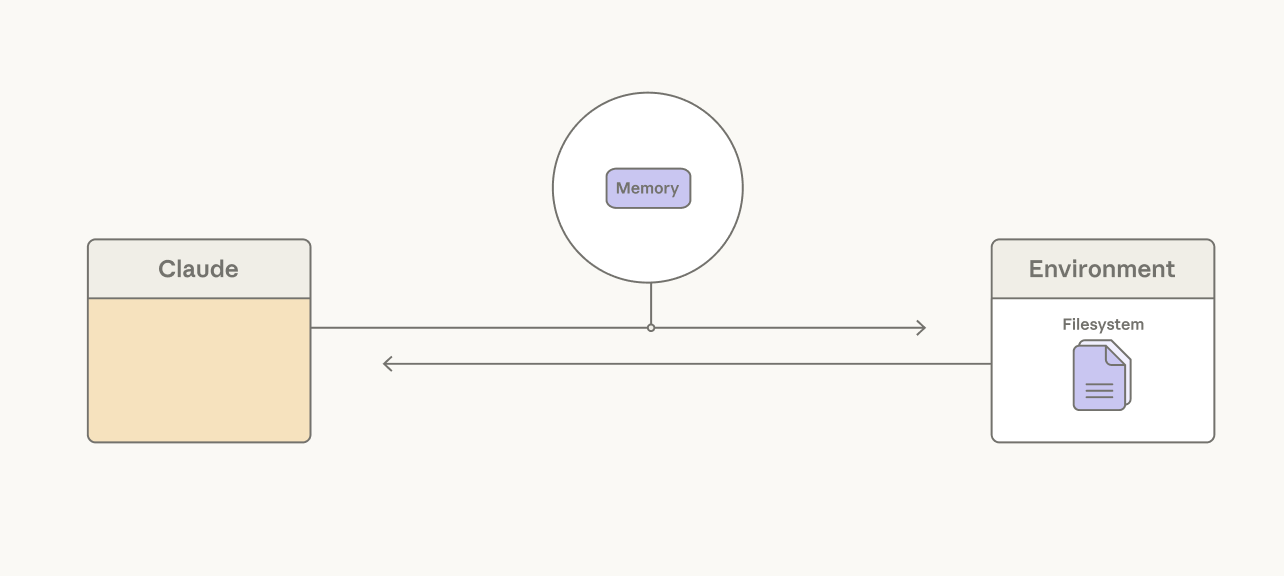
Long-horizon games, such as Pokémon, are an example of Claude’s improved ability to use a memory folder. Sonnet 3.5 treated memory as a transcript, writing down what non-player characters (NPCs) said rather than what mattered. After 14,000 steps it had 31 files—including two near-duplicates about caterpillar Pokémon—and was still in the second town:
caterpie_weedle_info:
- Caterpie and Weedle are both caterpillar Pokémon.
- Caterpie is a caterpillar Pokémon that does not have poison.
- Weedle is a caterpillar Pokémon that does have poison.
- This information is crucial for future encounters and battles.
- If our Pokémon get poisoned, we should seek healing at a Pokémon
  Center as soon as possible.
Later models wrote tactical notes. Opus 4.6, at the same step count, had 10 files organized into directories, three gym badges, and a learnings file distilled from its own failures:
/gameplay/learnings.md:
- Bellsprout Sleep+Wrap combo: KO FAST with BITE before Sleep
  Powder lands. Don't let it set up!
- Gen 1 Bag Limit: 20 items max. Toss unneeded TMs before dungeons.
- Spin tile mazes: Different entry y-positions lead to DIFFERENT
  destinations. Try ALL entries and chain through multiple pockets.
- B1F y=16 wall CONFIRMED SOLID at ALL x=9-28 (step 14557)Agent harnesses provide structure around Claude to enforce UX, cost, or security.
Design context to maximize cache hits
The Messages API is stateless. Claude cannot see the conversation history of prior turns. This means that the agent harness needs to package new context alongside all past actions, tool descriptions, and instructions for Claude at each turn.
Prompts can be cached based on set breakpoints. In other words, the Claude API writes context up until a breakpoint to the cache and checks whether the context matches any prior cache entries.
Since cached tokens are 10% the cost of base input tokens, here are a few principles in the agent harness help maximize cache hits:
Use declarative tools for UX, observability, or security boundaries
Claude doesn't necessarily know an application's security boundary or UX surface. Claude emits tool calls, which are handled by the harness. A bash tool gives Claude broad programmatic leverage to perform actions, but it gives the harness only a command string—the same shape for every action. Promoting actions to dedicated tools gives the harness an action-specific hook with typed arguments it can intercept, gate, render, or audit.
Actions that require a security boundary are natural candidates for dedicated tools. Reversibility is often a good criterion, and hard-to-reverse actions such as external API calls can be gated by user confirmation. Write tools like edit can include a staleness check so Claude doesn't overwrite a file that changed since it was last read.
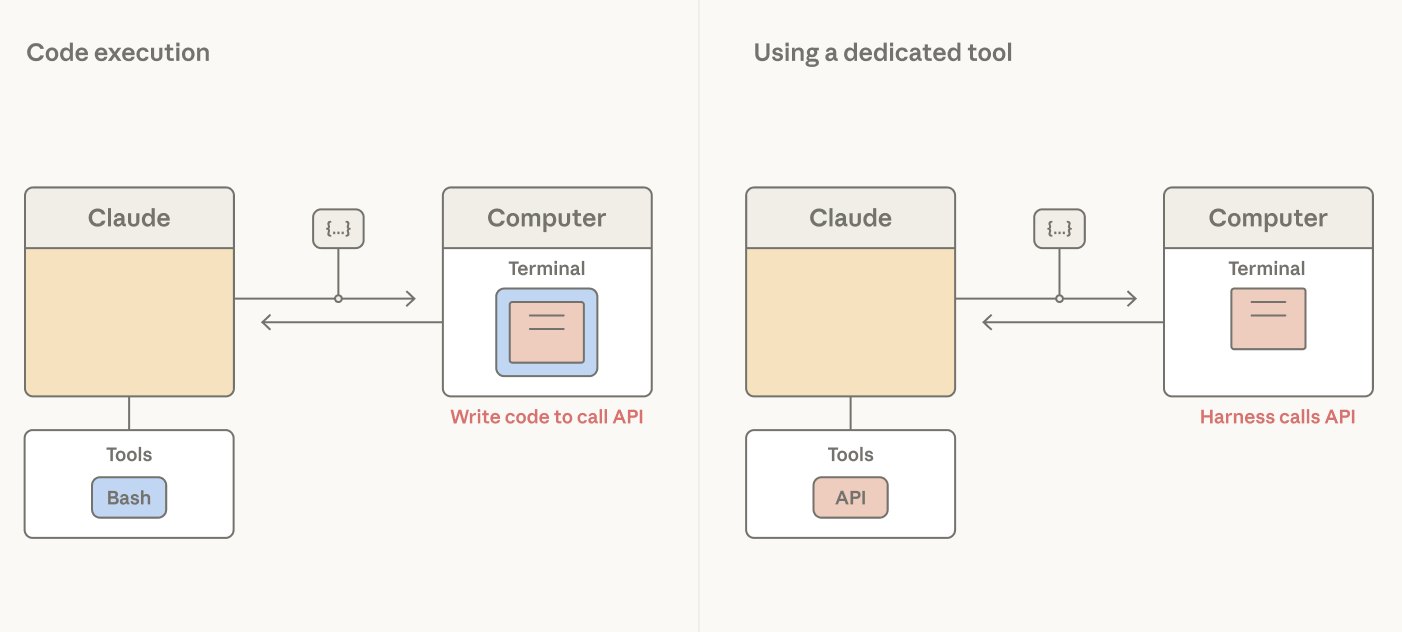
Tools are also useful when an action needs to be presented to a user. For example, they can be rendered as a modal to display a question clearly to the user, give the user multiple options, or block the agent loop until a user provides feedback.
Finally, tools are useful for observability. When the action is a typed tool, the harness gets structured arguments it can log, trace, and replay.
The decision to promote actions to tools should be continually re-evaluated. For example, Claude Code's auto-mode (in research mode at the time of publication) provides a security boundary around the bash tool: it has a second Claude read the command string and judge whether it's safe. This pattern can limit the need for dedicated tools, and should only be used for tasks where users trust the general direction. Dedicated tools can still earn their place for certain high-stakes actions.
The frontier of Claude’s intelligence is always changing. Assumptions about what Claude can’t do need to be re-tested with each step change in its capability.
We see this pattern repeat itself. In an agent we built for long-horizon tasks, Sonnet 4.5 would wrap up prematurely as it sensed the context limit approaching. We added resets to clear the context window in order to address this "context anxiety." With Opus 4.5, the behavior was gone. The context resets we built to compensate had become dead weight in the agent harness.
Removing this dead weight is important because it can bottleneck Claude’s performance. Over time, the structure or boundaries in our applications should be pruned based the question: what can I stop doing?
To use all tools and patterns discussed here, check out our claude-api skill.
Written by Lance Martin, member of technical staff on the Claude Platform team. Special thanks to Thariq Shihipar, Barry Zhang, Mike Lambert, David Hershey, and Daliang Li for helpful discussion on the topics covered. Thanks to Lydia Hallie, Lexi Ross, Katelyn Lesse, Andy Schumeister, Rebecca Hiscott, Jake Eaton, Pedram Navid, and Molly Vorwerck for their editorial review and feedback.

Claude와 함께 조직의 운영 방식을 혁신하세요
개발자 뉴스레터 구독
제품 업데이트, 사용 방법, 커뮤니티 스포트라이트 등 다양한 소식을 전해드립니다. 매달 이메일로 이 소식을 받아보세요.