

- Web Search runs a search-engine query and returns ranked results.
- Web Fetch retrieves the contents of a specific URL.
Web Search
Web Search is a server-side tool executed by your inference provider, not by the desktop app. Availability depends on which provider you’ve configured:
Because the search runs on the provider’s infrastructure, queries and results travel over the same path as model inference and are subject to your provider’s data-handling terms. No additional firewall rules are needed beyond the inference endpoint itself.
coworkEgressAllowedHosts governs client-side egress (Web Fetch and in-sandbox shell network activity). The SDK Web Search tool in the table above executes server-side at your inference provider, so the allowlist does not apply to it. The built-in websearch server under Web search options runs in the desktop app and does count as client-side egress. To let the agent fetch pages it finds via search, add the relevant hosts to coworkEgressAllowedHosts or set it to ["*"]. To disable provider-side search, add "WebSearch" to disabledBuiltinTools.Web search options
If your inference provider supports native search (Google Cloud’s Agent Platform, Microsoft Foundry), that’s the simplest path and no additional configuration is required. For Amazon Bedrock or a custom gateway, or whenever you want to choose the search backend, use the built-inwebsearch server.
Provider-native search
Google Cloud’s Agent Platform grounding and Microsoft Foundry execute search inside the model call. There’s nothing to configure in Claude Desktop; enable search on the cloud provider’s side. Amazon Bedrock has no native equivalent (Amazon Bedrock AgentCore is a remote MCP server; see Remote search MCP).Built-in web search
Add the bundledwebsearch server to managedMcpServers. Search runs in the desktop app itself, so it works on every inference provider, including Amazon Bedrock.
You can add it from the in-app configuration window: under Connectors & extensions, add a Web search server, choose the search provider, and supply the vendor key as a header or through a headers helper script.
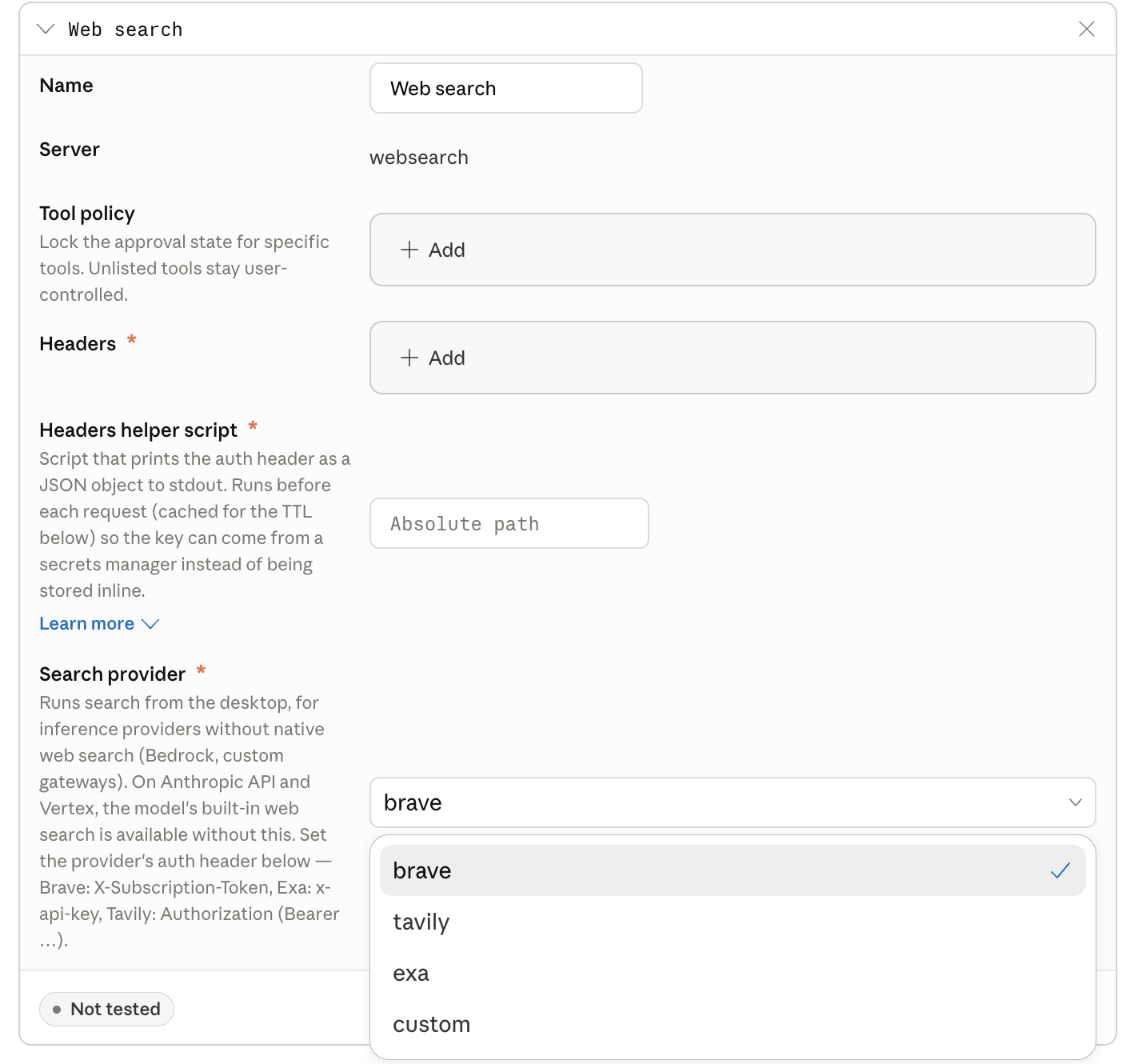
The Web search server in the Connectors & extensions section of the in-app configuration window, with the search provider menu open.
provider to a hosted search vendor (brave, tavily, or exa) for the lowest setup, or to custom with customUrl to point at a search server you run.
Hosted vendor:
A hosted-vendor key configured in
headers or returned by headersHelper is the same key on every device, and a local user can extract it. The exposure is limited to billing abuse on that key (it grants no data access). For regulated environments, set spend caps and rotate the key on a schedule, or have headersHelper fetch a per-user key: Tavily and Exa support per-user or per-team keys; see their key-management docs.toolPolicy to "allow" so users aren’t prompted to approve each search. headersHelper is an executable that prints the auth header as a JSON object to stdout; it follows the same execution model as inferenceCredentialHelper (run with no arguments, exit 0, stdout read as JSON), but the output here is a flat header map, not the {token, headers} shape inferenceCredentialHelper uses.
You can use a static
headers object instead if you don’t need a secrets manager.
Gateway-side search
If your inference gateway can execute search itself, the search key stays server-side and never reaches end-user devices. For LiteLLM proxy server, enablewebsearch_interception in callbacks and configure a search backend in the proxy. The gateway intercepts the model’s web_search_20250305 request, runs the search, and returns results to Claude Desktop.
If your gateway translates between API formats (for example, Anthropic to OpenAI chat completions), note that web_search_20250305 is an Anthropic server tool with no chat-completions equivalent. The translation layer needs to handle it explicitly: run the search when the model requests it and emit server_tool_use and web_search_tool_result blocks in the response. Reach out to your account team for a reference implementation.
Remote search MCP
Connect a search MCP server as a remotemanagedMcpServers entry: either one you host, or Amazon Bedrock AgentCore Gateway with the Web Search target enabled (configure AgentCore for JWT authentication through your identity provider). Whether this stays inside your boundary depends on where the server is hosted; AgentCore is available in commercial AWS regions.
Data handling
Search queries go to whichever backend you configure. In every option, the query is also visible to your inference provider as part of the conversation, because the model emits the search call. Anthropic does not receive search queries in any third-party configuration. For audit, the desktop app emits search events to your OTLP collector regardless of which option you choose; addtoolDetails to otlpContentCapture to capture the query text. To keep queries entirely inside your network, use provider: "custom" (or a self-hosted MCP) pointed at a search index that itself runs inside your boundary.
If you previously routed inference through a LiteLLM proxy to add search, the built-in
websearch server with provider: "custom" is an alternative that removes the proxy from the search path; gateway-side interception remains a valid choice if you prefer the search key to stay server-side.Web Fetch
Web Fetch runs in the Claude Desktop main process on the user’s device. The model supplies only the target URL; it cannot set headers, a request body, or credentials. Every fetch, including redirect targets, is checked againstcoworkEgressAllowedHosts before the request is sent.
By default, the sandbox can reach only your inference provider’s endpoint, so Web Fetch will fail for any other host unless you’ve allowed it. To permit fetches:
Wildcards match one or more leading subdomain labels (
*.example.com matches a.example.com and a.b.example.com, but not example.com).
coworkEgressAllowedHosts controls what the agent’s tools can reach. Your perimeter firewall is a separate, outer layer, so a host allowed by this key still won’t be reachable if your corporate network blocks it. See Telemetry and egress for the distinction.curl or pip install from the agent’s shell), not just the Web Fetch tool.
Disabling web tools
To remove web tools entirely, add them todisabledBuiltinTools:
coworkEgressAllowedHosts empty, the agent has no path to the public internet from inside the sandbox. It can still read and write local files, run code against them, and call any MCP servers you’ve provisioned. See the Locked down profile.