> ## Documentation Index
> Fetch the complete documentation index at: https://claude.com/docs/llms.txt
> Use this file to discover all available pages before exploring further.
# MCP, plugins, skills, and hooks
> Extend Claude Desktop on 3P with connectors, plugin marketplaces, organization plugins, skills, and hooks for administrators and end users
Claude Desktop on third-party (3P) supports the same extensibility model as standard Claude Desktop ([MCP connectors](/connectors/overview), [skills](/skills/overview), and [plugins](/plugins/overview)), with the key difference that administrators provision them through managed configuration and the filesystem rather than the claude.ai admin console.
There are three layers, in order of precedence:
| Layer | Provisioned by | Delivered via |
| -------------------- | -------------- | -------------------------------------------------------------------------------------------------------------------------------------------------------- |
| Managed MCP servers | Admin | `managedMcpServers` configuration key |
| Organization plugins | Admin | A [plugin marketplace](#plugin-marketplaces-admin) git repository (recommended) or a [system-wide directory](#organization-plugins-admin) on each device |
| User extensions | End user | In-app Connectors and Plugins UI |
Admins can disable the user layer entirely; see [Controlling user extensions](#controlling-user-extensions).
## Managed MCP servers (admin)
Use the `managedMcpServers` configuration key to deploy MCP servers (remote HTTP/SSE or local stdio command) to every device. These appear in the user's connector list automatically, can't be removed by the user, and support per-tool policy locks (`allow` / `ask` / `blocked`).
The **Connectors & extensions** section of the [in-app configuration window](/third-party/claude-desktop/in-app-configuration) provides a form for each server: name, per-tool policy, headers or a headers helper script, transport, and URL.
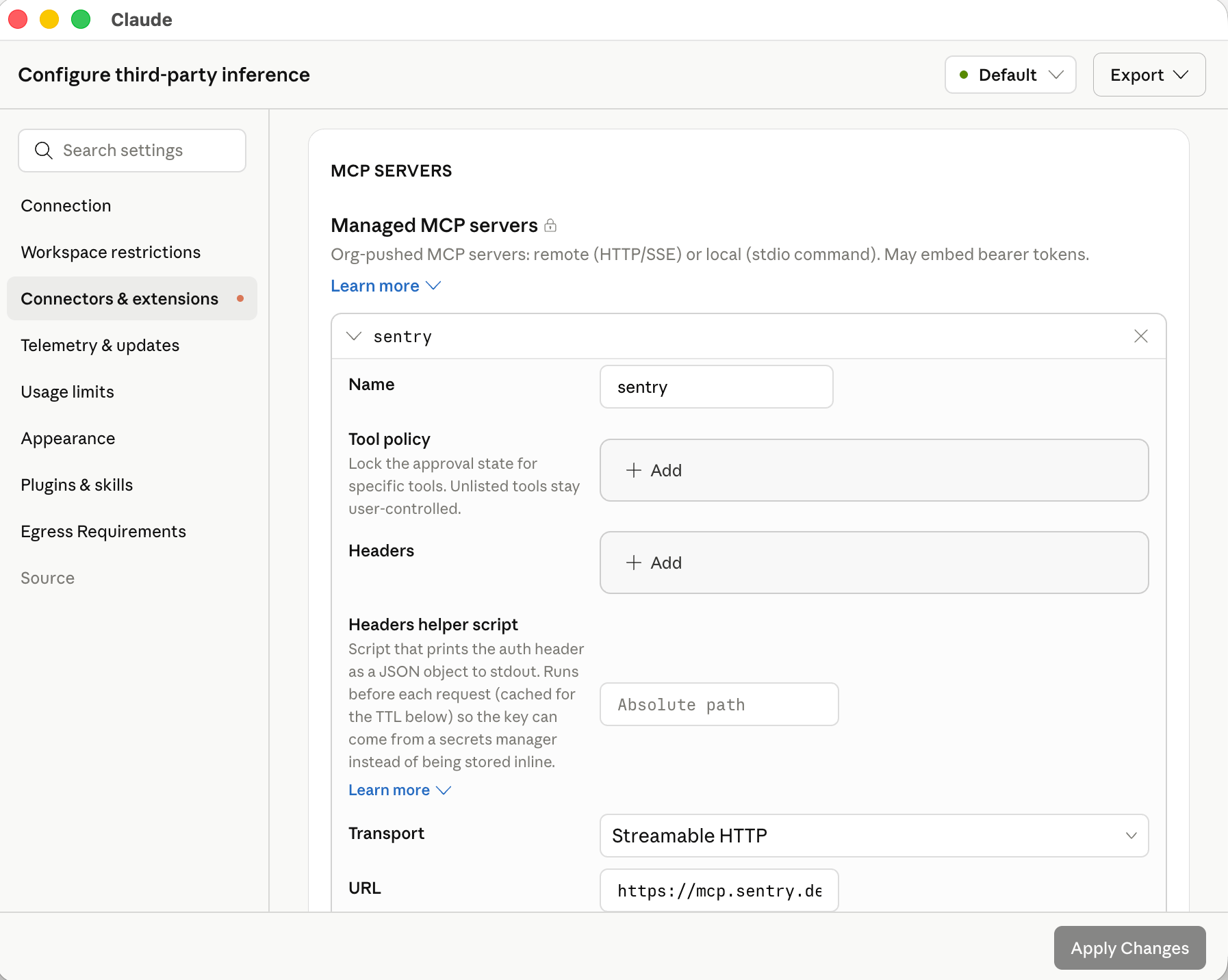 In the exported configuration, each server is one entry in the `managedMcpServers` array:
```json theme={null}
[
{
"name": "internal-search",
"url": "https://mcp.example.corp",
"oauth": true,
"toolPolicy": { "search": "allow", "delete_document": "blocked" }
},
{
"name": "ticketing",
"url": "https://tickets.example.corp/mcp",
"headersHelper": "/usr/local/bin/corp-sso-token",
"headersHelperTtlSec": 900
}
]
```
See the [`managedMcpServers` schema](/third-party/claude-desktop/configuration#managedmcpservers) in the configuration reference for every field, including static headers, OAuth, and the headers-helper executable for short-lived tokens.
In the in-app configuration window, each server you add under **Connectors & extensions** has a **Test this connection** button that runs a live MCP `initialize` and `tools/list` against the server using the headers or OAuth settings you've entered, then shows the round-trip latency, the discovered tool list, or the error returned. Use it to validate reachability and credentials before exporting the configuration.
### Supported MCP servers
Any MCP server reachable from the user's device over HTTPS works with Claude Desktop on 3P, including public servers from third parties and internal servers you build and host (including on internal gateways).
The [Claude connector directory](https://claude.com/connectors) is the canonical catalog of vetted servers. **Every connector in the directory that is not labeled "Made by Anthropic" is accessible in Claude Desktop on 3P** and can be deployed via `managedMcpServers` or installed by users. Connectors labeled "Made by Anthropic" are hosted on Anthropic infrastructure and are available only in standard Claude Desktop.
### Productivity suites
Google Workspace and Microsoft 365 each have a dedicated setup path:
Gmail, Calendar, Drive, Docs, and more via Google's own Workspace MCP servers. See [Google's setup guide](https://developers.google.com/workspace/guides/configure-mcp-servers) to get started.
Outlook, OneDrive, SharePoint, and Teams. Requires registering an app in your Entra tenant and an Anthropic allowlist step.
## Plugin marketplaces (admin)
A **plugin marketplace** is a git repository that lists one or more Claude plugins. Claude Desktop clones the repository on each device, shows the plugins under **Settings → Plugins → Organization**, and keeps them in sync with the ref you pin. You control which plugins are available, which install automatically, and which are required.
This is the recommended way to distribute organization plugins. Use the [system-wide directory](#organization-plugins-admin) path instead when end-user devices cannot reach a git server.
Plugin marketplaces are in beta and require Claude Desktop 1.17377.1 or later.
The `allowedPluginMarketplaces` key configures the **Cowork** tab only. The [**Code** tab](/third-party/claude-desktop/code) reads Claude Code's own plugin configuration on the host instead; to deploy a marketplace there, use Claude Code's [`extraKnownMarketplaces` and `strictKnownMarketplaces`](https://code.claude.com/docs/en/plugin-marketplaces#managed-marketplace-restrictions) settings. The same marketplace repository works for both tabs; only the configuration path differs.
### Create the marketplace repository
A marketplace repository contains a `.claude-plugin/marketplace.json` file at its root that lists each plugin and its location. The format is shared with Claude Code; see [Create and distribute a plugin marketplace](https://code.claude.com/docs/en/plugin-marketplaces) for the full schema and walkthrough.
```json .claude-plugin/marketplace.json theme={null}
{
"name": "acme-internal",
"owner": { "name": "Acme IT" },
"plugins": [
{
"name": "expense-policy",
"source": "./plugins/expense-policy",
"description": "Answers questions about Acme travel and expense policy"
}
]
}
```
Put plugin content directly in the marketplace repository with a relative `source` path. Plugins whose `source` points at a different repository are listed in the Organization tab but are not fetched or auto-installed.
The marketplace `name` must match `^[A-Za-z0-9][A-Za-z0-9._-]{0,127}$` and must not be one of the reserved values `unknown`, `org`, or `org-provisioned`.
### Configure the marketplace
You can add marketplaces directly in the [in-app configuration window](/third-party/claude-desktop/in-app-configuration): in the **Plugins & skills** section, click **Add marketplace** and choose **Blank**, **GitHub repo**, or **Git URL**. The form validates the entry against the repository and exports the encoded JSON for you.
In the exported configuration, each server is one entry in the `managedMcpServers` array:
```json theme={null}
[
{
"name": "internal-search",
"url": "https://mcp.example.corp",
"oauth": true,
"toolPolicy": { "search": "allow", "delete_document": "blocked" }
},
{
"name": "ticketing",
"url": "https://tickets.example.corp/mcp",
"headersHelper": "/usr/local/bin/corp-sso-token",
"headersHelperTtlSec": 900
}
]
```
See the [`managedMcpServers` schema](/third-party/claude-desktop/configuration#managedmcpservers) in the configuration reference for every field, including static headers, OAuth, and the headers-helper executable for short-lived tokens.
In the in-app configuration window, each server you add under **Connectors & extensions** has a **Test this connection** button that runs a live MCP `initialize` and `tools/list` against the server using the headers or OAuth settings you've entered, then shows the round-trip latency, the discovered tool list, or the error returned. Use it to validate reachability and credentials before exporting the configuration.
### Supported MCP servers
Any MCP server reachable from the user's device over HTTPS works with Claude Desktop on 3P, including public servers from third parties and internal servers you build and host (including on internal gateways).
The [Claude connector directory](https://claude.com/connectors) is the canonical catalog of vetted servers. **Every connector in the directory that is not labeled "Made by Anthropic" is accessible in Claude Desktop on 3P** and can be deployed via `managedMcpServers` or installed by users. Connectors labeled "Made by Anthropic" are hosted on Anthropic infrastructure and are available only in standard Claude Desktop.
### Productivity suites
Google Workspace and Microsoft 365 each have a dedicated setup path:
Gmail, Calendar, Drive, Docs, and more via Google's own Workspace MCP servers. See [Google's setup guide](https://developers.google.com/workspace/guides/configure-mcp-servers) to get started.
Outlook, OneDrive, SharePoint, and Teams. Requires registering an app in your Entra tenant and an Anthropic allowlist step.
## Plugin marketplaces (admin)
A **plugin marketplace** is a git repository that lists one or more Claude plugins. Claude Desktop clones the repository on each device, shows the plugins under **Settings → Plugins → Organization**, and keeps them in sync with the ref you pin. You control which plugins are available, which install automatically, and which are required.
This is the recommended way to distribute organization plugins. Use the [system-wide directory](#organization-plugins-admin) path instead when end-user devices cannot reach a git server.
Plugin marketplaces are in beta and require Claude Desktop 1.17377.1 or later.
The `allowedPluginMarketplaces` key configures the **Cowork** tab only. The [**Code** tab](/third-party/claude-desktop/code) reads Claude Code's own plugin configuration on the host instead; to deploy a marketplace there, use Claude Code's [`extraKnownMarketplaces` and `strictKnownMarketplaces`](https://code.claude.com/docs/en/plugin-marketplaces#managed-marketplace-restrictions) settings. The same marketplace repository works for both tabs; only the configuration path differs.
### Create the marketplace repository
A marketplace repository contains a `.claude-plugin/marketplace.json` file at its root that lists each plugin and its location. The format is shared with Claude Code; see [Create and distribute a plugin marketplace](https://code.claude.com/docs/en/plugin-marketplaces) for the full schema and walkthrough.
```json .claude-plugin/marketplace.json theme={null}
{
"name": "acme-internal",
"owner": { "name": "Acme IT" },
"plugins": [
{
"name": "expense-policy",
"source": "./plugins/expense-policy",
"description": "Answers questions about Acme travel and expense policy"
}
]
}
```
Put plugin content directly in the marketplace repository with a relative `source` path. Plugins whose `source` points at a different repository are listed in the Organization tab but are not fetched or auto-installed.
The marketplace `name` must match `^[A-Za-z0-9][A-Za-z0-9._-]{0,127}$` and must not be one of the reserved values `unknown`, `org`, or `org-provisioned`.
### Configure the marketplace
You can add marketplaces directly in the [in-app configuration window](/third-party/claude-desktop/in-app-configuration): in the **Plugins & skills** section, click **Add marketplace** and choose **Blank**, **GitHub repo**, or **Git URL**. The form validates the entry against the repository and exports the encoded JSON for you.
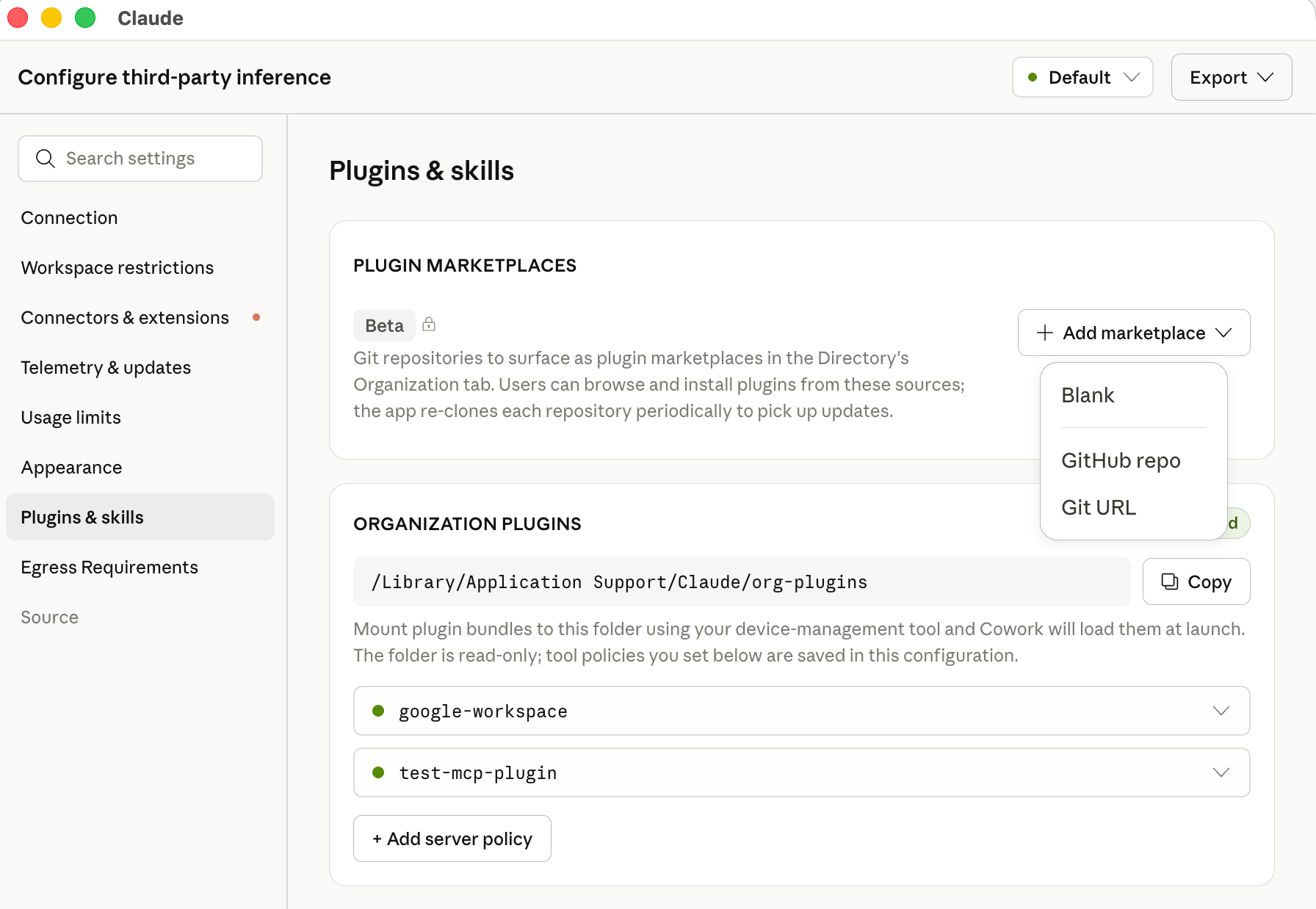 To write the configuration by hand instead, add the repository to the [`allowedPluginMarketplaces`](/third-party/claude-desktop/configuration) configuration key. The key is read from an MDM profile, local configuration, or the [bootstrap server](/third-party/claude-desktop/bootstrap) response. In an MDM profile the value is a JSON array encoded as a string (see [Value types](/third-party/claude-desktop/configuration#value-types)); writing a native plist array instead of a string is the most common reason the Organization tab does not appear. In a local configuration file or the bootstrap response the value is a native JSON array.
```xml .mobileconfig (macOS) theme={null}
allowedPluginMarketplaces
[{"source":"github","repo":"acme-corp/claude-plugins","ref":"a1b2c3d4e5f6a7b8c9d0e1f2a3b4c5d6e7f8a9b0","credentialKind":"userGit","installationPreference":"auto_install"}]
```
On Windows, write the same string to the `allowedPluginMarketplaces` value in the registry policy key your deployment already uses (`HKLM\SOFTWARE\Policies\Claude` for machine policy). Keep the value in the same hive as the rest of your configuration: when machine policy is present, the app ignores user policy entirely; see [Deploy the configuration](/third-party/claude-desktop/mdm#4-deploy-the-configuration) for the exact rule. For GitLab, Bitbucket, or a self-hosted git server, use `"source": "git"` with a full HTTPS `url` instead of `repo`.
| Field | Description |
| ------------------------ | ------------------------------------------------------------------------------------------------------------------------------------------------------------------------------------------ |
| `source` | **Required.** `"github"` (with `repo`) or `"git"` (with `url`). |
| `repo` | GitHub repository in `owner/name` format. |
| `url` | Full HTTPS clone URL. Use a bare URL with no embedded credentials; set `credentialKind` for authentication. |
| `ref` | Branch name, tag name, or full 40-character commit SHA. **Required, and must be a full commit SHA,** when `installationPreference` is `"auto_install"` or `"required"`. |
| `path` | Subdirectory containing `.claude-plugin/marketplace.json` when not at the repository root. |
| `expectedName` | If set, the clone is rejected unless the `name` in `marketplace.json` matches this value exactly, so a change to the manifest name cannot silently replace another configured marketplace. |
| `credentialKind` | `"anonymous"` (default), `"userGit"`, or `"credentialHelper"`. See [Marketplace credentials](#marketplace-credentials). |
| `credentialHelper` | Path to an executable that prints an access token on stdout. Required, and only valid, when `credentialKind` is `"credentialHelper"`. |
| `installationPreference` | `"available"` (default), `"auto_install"`, or `"required"`. See [Marketplace installation preferences](#marketplace-installation-preferences). |
You can configure multiple marketplaces; each appears as its own sub-tab under **Settings → Plugins → Organization**. If an admin-configured marketplace has the same `repo`, `url`, or manifest `name` as one the user added themselves, the admin entry replaces the user's.
### Marketplace installation preferences
| `installationPreference` | Behavior |
| ------------------------ | ------------------------------------------------------------------------------------------------------------------------------------------------------------------------------------------------------------- |
| `"available"` | Plugins appear in the Organization tab for users to install manually. Nothing is installed automatically. |
| `"auto_install"` | Every plugin is installed automatically the first time the pinned `ref` is seen. Users can uninstall individual plugins; when you later change the `ref`, each plugin is installed again at the new revision. |
| `"required"` | Every plugin is installed automatically and re-asserted on every sync. Users cannot uninstall or disable required plugins. |
`"auto_install"` and `"required"` marketplaces must pin `ref` to a full 40-character commit SHA. Claude Desktop refuses to auto-install from a branch or tag name so that the exact plugin content deployed to every device is deterministic and auditable.
### Marketplace credentials
Claude Desktop clones marketplace repositories on the host operating system, outside the Cowork VM. The credential is used only for this clone and is never passed into the VM or exposed to the model.
| `credentialKind` | How it authenticates |
| -------------------- | ------------------------------------------------------------------------------------------------------------------------------------------------------------------------------------------------------------------------------------------------ |
| `"anonymous"` | No credential is sent. Use for public repositories. |
| `"userGit"` | Uses the git credential helpers already configured for the signed-in OS user (for example, `git-credential-manager`, macOS Keychain, or a GitHub CLI credential helper). Use when each user already has read access through their own account. |
| `"credentialHelper"` | Runs the executable at `credentialHelper` and uses its trimmed stdout as the HTTPS password with username `x-access-token`. Follows the same stdout contract as an [inference credential helper](/third-party/claude-desktop/credential-helper). |
Because the clone happens on the host, the repository does not need to be on the [`coworkEgressAllowedHosts`](/third-party/claude-desktop/configuration#coworkegressallowedhosts) allowlist. It does need to be reachable from end-user devices.
### Roll out marketplace updates
To push a new plugin version to your fleet, commit the change to the marketplace repository, update the `ref` in `allowedPluginMarketplaces` to the new commit SHA, and distribute the updated managed configuration. Devices sync to the new revision on the next app launch or plugin settings refresh. To remove a marketplace, delete its entry; Claude Desktop unregisters it and uninstalls its plugins on the next sync.
## Organization plugins (admin)
For most deployments, distribute organization plugins via a [plugin marketplace](#plugin-marketplaces-admin) instead. Marketplaces let you manage plugin content in git and roll out updates by changing a single configuration value, rather than pushing files to every device. Use the directory path below when end-user devices cannot reach a git server.
[Plugins](/plugins/overview) bundle MCP connectors, skills, slash commands, hooks, and sub-agents into a single directory. On this path, admins distribute plugins by placing them in a system-wide directory on each device, typically via the same MDM or software-distribution channel used for the app itself.
### Plugin directory location
| Platform | Path |
| -------- | -------------------------------------------------- |
| macOS | `/Library/Application Support/Claude/org-plugins/` |
| Windows | `C:\Program Files\Claude\org-plugins\` |
On Windows, the directory is under `Program Files` (not `ProgramData`) so that only administrators can create or modify it. Claude Desktop treats the presence of this directory as an admin-provisioned source.
### Plugin structure
Each subdirectory of `org-plugins/` is one plugin. The directory name is the plugin's canonical name.
```text theme={null}
org-plugins/
└── code-reviewer/
├── .claude-plugin/
│ └── plugin.json
├── version.json
├── .mcp.json
├── agents/
│ └── code-reviewer.md
├── commands/
│ └── find-all-bugs.md
└── skills/
└── security-review/
└── SKILL.md
```
| File | Purpose |
| ---------------------------- | -------------------------------------------------------------------------------------------------------------------------------------------------------------------------------------------------------------------------------------------------------------------------------------------------------------------------------------------------------- |
| `.claude-plugin/plugin.json` | **Required.** Plugin manifest (name, description, version). Directories without this file are ignored. |
| `version.json` | `{"version": "1.2.3"}`. When this string changes, Claude Desktop re-syncs the plugin on next launch. Any string change triggers re-sync (there's no semver ordering, so a downgrade is just another version string). If absent, the directory's modification time is used instead. |
| `.mcp.json` | MCP servers bundled with this plugin. A JSON object keyed by server name: `{"mcpServers": {"": {"type": "http", "url": "...", "oauth": true}}}`. Each entry uses `type` (`http` or `sse`), not `transport`, and supports `url`, `headers`, and `oauth` only; `toolPolicy`, `headersHelper`, and `headersHelperTtlSec` are not read from this file. |
| `agents/` | Sub-agent definitions. |
| `commands/` | Slash-command definitions. |
| `skills/` | [Skill](/skills/overview) directories. |
| `hooks/` | Hook definitions that run on agent lifecycle events. |
See the [plugins reference](https://code.claude.com/docs/en/plugins) for the full file format of each component, including the hooks schema.
Symlinks inside a plugin are followed as long as the target resolves to a path inside the plugin directory. Symlinks that point outside the plugin (for example, `skills/foo/SKILL.md → /etc/hosts`) are skipped. A symlinked top-level plugin directory (for example, `org-plugins/my-plugin → /opt/shared/my-plugin`) is also followed.
MCP servers declared in a plugin's `.mcp.json` don't carry a `toolPolicy` field in the plugin file itself. To lock tools on a plugin-delivered server, set [`orgPluginSettings`](/third-party/claude-desktop/configuration#orgpluginsettings) in managed configuration, keyed on the server's `name`.
### Auto-installing organization plugins
By default, organization plugins appear in the user's plugin browser as available to install, and each user opts in. To install a plugin automatically for every user, set `installationPreference` in the plugin's `.claude-plugin/plugin.json`:
```json theme={null}
{
"name": "code-reviewer",
"version": "1.0.0",
"description": "Internal code review assistant",
"installationPreference": "required"
}
```
| Value | Behavior |
| -------------------------- | ----------------------------------------------------------------------------------------------------------------------------------------------------- |
| `"required"` | Installs automatically when the user signs in. The Uninstall action is hidden. If the plugin is removed from disk, it reinstalls on the next sign-in. |
| `"auto_install"` | Installs automatically when the user signs in. Users can uninstall it, and it stays uninstalled for that user. |
| `"available"` (or omitted) | Default. Users install manually from the plugin browser. |
This mirrors the installation preference behavior of remote-managed plugins on claude.ai. Changing a plugin's `installationPreference` takes effect the next time each user signs in.
### Updating organization plugins
To roll out a new version of a plugin:
1. Update the plugin contents in `org-plugins//` via your software-distribution tool
2. Bump the `version` string in `version.json`
3. Users pick up the change on their next app launch
## User extensions
Unless restricted by an admin, end users can add their own extensions through the in-app UI:
* **Plugins:** install plugins (which can bundle skills, hooks, slash commands, and sub-agents) from the Plugins settings page
* **Connectors:** install local desktop extensions (`.mcpb`) from the Connectors settings page
* **Local MCP servers:** add local MCP server processes from **Settings → Developer**, when enabled by the admin
End users cannot add remote MCP servers; remote servers are available only via admin-provisioned `managedMcpServers` or organization plugins. User-added extensions are stored in the user's [local data directory](/third-party/claude-desktop/data-storage) and apply only to that device.
## Controlling user extensions
Admins can restrict or disable each user-extension surface independently via managed configuration:
| Key | Effect when `false` |
| ------------------------------------- | --------------------------------------------------------------------------- |
| `isLocalDevMcpEnabled` | Users cannot add their own local MCP servers from **Settings → Developer**. |
| `isDesktopExtensionEnabled` | Users cannot install local `.mcpb` desktop extensions. |
| `isDesktopExtensionSignatureRequired` | (When `true`) Unsigned `.mcpb` extensions are rejected. |
Setting the first two to `false` restricts MCP servers and connectors to those delivered through `managedMcpServers` and `org-plugins/`. Users can still add their own skills and plugins regardless of these settings. See the [Locked down profile](/third-party/claude-desktop/configuration#recommended-security-profiles) for a complete example.
## Related topics
How extensions and managed settings reach the embedded Claude Code engine.
Configure MCP servers for the standalone Claude Code CLI.
Plugin structure, marketplaces, and management for Claude Code.
Restrict which MCP servers Claude Code users can add.
To write the configuration by hand instead, add the repository to the [`allowedPluginMarketplaces`](/third-party/claude-desktop/configuration) configuration key. The key is read from an MDM profile, local configuration, or the [bootstrap server](/third-party/claude-desktop/bootstrap) response. In an MDM profile the value is a JSON array encoded as a string (see [Value types](/third-party/claude-desktop/configuration#value-types)); writing a native plist array instead of a string is the most common reason the Organization tab does not appear. In a local configuration file or the bootstrap response the value is a native JSON array.
```xml .mobileconfig (macOS) theme={null}
allowedPluginMarketplaces
[{"source":"github","repo":"acme-corp/claude-plugins","ref":"a1b2c3d4e5f6a7b8c9d0e1f2a3b4c5d6e7f8a9b0","credentialKind":"userGit","installationPreference":"auto_install"}]
```
On Windows, write the same string to the `allowedPluginMarketplaces` value in the registry policy key your deployment already uses (`HKLM\SOFTWARE\Policies\Claude` for machine policy). Keep the value in the same hive as the rest of your configuration: when machine policy is present, the app ignores user policy entirely; see [Deploy the configuration](/third-party/claude-desktop/mdm#4-deploy-the-configuration) for the exact rule. For GitLab, Bitbucket, or a self-hosted git server, use `"source": "git"` with a full HTTPS `url` instead of `repo`.
| Field | Description |
| ------------------------ | ------------------------------------------------------------------------------------------------------------------------------------------------------------------------------------------ |
| `source` | **Required.** `"github"` (with `repo`) or `"git"` (with `url`). |
| `repo` | GitHub repository in `owner/name` format. |
| `url` | Full HTTPS clone URL. Use a bare URL with no embedded credentials; set `credentialKind` for authentication. |
| `ref` | Branch name, tag name, or full 40-character commit SHA. **Required, and must be a full commit SHA,** when `installationPreference` is `"auto_install"` or `"required"`. |
| `path` | Subdirectory containing `.claude-plugin/marketplace.json` when not at the repository root. |
| `expectedName` | If set, the clone is rejected unless the `name` in `marketplace.json` matches this value exactly, so a change to the manifest name cannot silently replace another configured marketplace. |
| `credentialKind` | `"anonymous"` (default), `"userGit"`, or `"credentialHelper"`. See [Marketplace credentials](#marketplace-credentials). |
| `credentialHelper` | Path to an executable that prints an access token on stdout. Required, and only valid, when `credentialKind` is `"credentialHelper"`. |
| `installationPreference` | `"available"` (default), `"auto_install"`, or `"required"`. See [Marketplace installation preferences](#marketplace-installation-preferences). |
You can configure multiple marketplaces; each appears as its own sub-tab under **Settings → Plugins → Organization**. If an admin-configured marketplace has the same `repo`, `url`, or manifest `name` as one the user added themselves, the admin entry replaces the user's.
### Marketplace installation preferences
| `installationPreference` | Behavior |
| ------------------------ | ------------------------------------------------------------------------------------------------------------------------------------------------------------------------------------------------------------- |
| `"available"` | Plugins appear in the Organization tab for users to install manually. Nothing is installed automatically. |
| `"auto_install"` | Every plugin is installed automatically the first time the pinned `ref` is seen. Users can uninstall individual plugins; when you later change the `ref`, each plugin is installed again at the new revision. |
| `"required"` | Every plugin is installed automatically and re-asserted on every sync. Users cannot uninstall or disable required plugins. |
`"auto_install"` and `"required"` marketplaces must pin `ref` to a full 40-character commit SHA. Claude Desktop refuses to auto-install from a branch or tag name so that the exact plugin content deployed to every device is deterministic and auditable.
### Marketplace credentials
Claude Desktop clones marketplace repositories on the host operating system, outside the Cowork VM. The credential is used only for this clone and is never passed into the VM or exposed to the model.
| `credentialKind` | How it authenticates |
| -------------------- | ------------------------------------------------------------------------------------------------------------------------------------------------------------------------------------------------------------------------------------------------ |
| `"anonymous"` | No credential is sent. Use for public repositories. |
| `"userGit"` | Uses the git credential helpers already configured for the signed-in OS user (for example, `git-credential-manager`, macOS Keychain, or a GitHub CLI credential helper). Use when each user already has read access through their own account. |
| `"credentialHelper"` | Runs the executable at `credentialHelper` and uses its trimmed stdout as the HTTPS password with username `x-access-token`. Follows the same stdout contract as an [inference credential helper](/third-party/claude-desktop/credential-helper). |
Because the clone happens on the host, the repository does not need to be on the [`coworkEgressAllowedHosts`](/third-party/claude-desktop/configuration#coworkegressallowedhosts) allowlist. It does need to be reachable from end-user devices.
### Roll out marketplace updates
To push a new plugin version to your fleet, commit the change to the marketplace repository, update the `ref` in `allowedPluginMarketplaces` to the new commit SHA, and distribute the updated managed configuration. Devices sync to the new revision on the next app launch or plugin settings refresh. To remove a marketplace, delete its entry; Claude Desktop unregisters it and uninstalls its plugins on the next sync.
## Organization plugins (admin)
For most deployments, distribute organization plugins via a [plugin marketplace](#plugin-marketplaces-admin) instead. Marketplaces let you manage plugin content in git and roll out updates by changing a single configuration value, rather than pushing files to every device. Use the directory path below when end-user devices cannot reach a git server.
[Plugins](/plugins/overview) bundle MCP connectors, skills, slash commands, hooks, and sub-agents into a single directory. On this path, admins distribute plugins by placing them in a system-wide directory on each device, typically via the same MDM or software-distribution channel used for the app itself.
### Plugin directory location
| Platform | Path |
| -------- | -------------------------------------------------- |
| macOS | `/Library/Application Support/Claude/org-plugins/` |
| Windows | `C:\Program Files\Claude\org-plugins\` |
On Windows, the directory is under `Program Files` (not `ProgramData`) so that only administrators can create or modify it. Claude Desktop treats the presence of this directory as an admin-provisioned source.
### Plugin structure
Each subdirectory of `org-plugins/` is one plugin. The directory name is the plugin's canonical name.
```text theme={null}
org-plugins/
└── code-reviewer/
├── .claude-plugin/
│ └── plugin.json
├── version.json
├── .mcp.json
├── agents/
│ └── code-reviewer.md
├── commands/
│ └── find-all-bugs.md
└── skills/
└── security-review/
└── SKILL.md
```
| File | Purpose |
| ---------------------------- | -------------------------------------------------------------------------------------------------------------------------------------------------------------------------------------------------------------------------------------------------------------------------------------------------------------------------------------------------------- |
| `.claude-plugin/plugin.json` | **Required.** Plugin manifest (name, description, version). Directories without this file are ignored. |
| `version.json` | `{"version": "1.2.3"}`. When this string changes, Claude Desktop re-syncs the plugin on next launch. Any string change triggers re-sync (there's no semver ordering, so a downgrade is just another version string). If absent, the directory's modification time is used instead. |
| `.mcp.json` | MCP servers bundled with this plugin. A JSON object keyed by server name: `{"mcpServers": {"": {"type": "http", "url": "...", "oauth": true}}}`. Each entry uses `type` (`http` or `sse`), not `transport`, and supports `url`, `headers`, and `oauth` only; `toolPolicy`, `headersHelper`, and `headersHelperTtlSec` are not read from this file. |
| `agents/` | Sub-agent definitions. |
| `commands/` | Slash-command definitions. |
| `skills/` | [Skill](/skills/overview) directories. |
| `hooks/` | Hook definitions that run on agent lifecycle events. |
See the [plugins reference](https://code.claude.com/docs/en/plugins) for the full file format of each component, including the hooks schema.
Symlinks inside a plugin are followed as long as the target resolves to a path inside the plugin directory. Symlinks that point outside the plugin (for example, `skills/foo/SKILL.md → /etc/hosts`) are skipped. A symlinked top-level plugin directory (for example, `org-plugins/my-plugin → /opt/shared/my-plugin`) is also followed.
MCP servers declared in a plugin's `.mcp.json` don't carry a `toolPolicy` field in the plugin file itself. To lock tools on a plugin-delivered server, set [`orgPluginSettings`](/third-party/claude-desktop/configuration#orgpluginsettings) in managed configuration, keyed on the server's `name`.
### Auto-installing organization plugins
By default, organization plugins appear in the user's plugin browser as available to install, and each user opts in. To install a plugin automatically for every user, set `installationPreference` in the plugin's `.claude-plugin/plugin.json`:
```json theme={null}
{
"name": "code-reviewer",
"version": "1.0.0",
"description": "Internal code review assistant",
"installationPreference": "required"
}
```
| Value | Behavior |
| -------------------------- | ----------------------------------------------------------------------------------------------------------------------------------------------------- |
| `"required"` | Installs automatically when the user signs in. The Uninstall action is hidden. If the plugin is removed from disk, it reinstalls on the next sign-in. |
| `"auto_install"` | Installs automatically when the user signs in. Users can uninstall it, and it stays uninstalled for that user. |
| `"available"` (or omitted) | Default. Users install manually from the plugin browser. |
This mirrors the installation preference behavior of remote-managed plugins on claude.ai. Changing a plugin's `installationPreference` takes effect the next time each user signs in.
### Updating organization plugins
To roll out a new version of a plugin:
1. Update the plugin contents in `org-plugins//` via your software-distribution tool
2. Bump the `version` string in `version.json`
3. Users pick up the change on their next app launch
## User extensions
Unless restricted by an admin, end users can add their own extensions through the in-app UI:
* **Plugins:** install plugins (which can bundle skills, hooks, slash commands, and sub-agents) from the Plugins settings page
* **Connectors:** install local desktop extensions (`.mcpb`) from the Connectors settings page
* **Local MCP servers:** add local MCP server processes from **Settings → Developer**, when enabled by the admin
End users cannot add remote MCP servers; remote servers are available only via admin-provisioned `managedMcpServers` or organization plugins. User-added extensions are stored in the user's [local data directory](/third-party/claude-desktop/data-storage) and apply only to that device.
## Controlling user extensions
Admins can restrict or disable each user-extension surface independently via managed configuration:
| Key | Effect when `false` |
| ------------------------------------- | --------------------------------------------------------------------------- |
| `isLocalDevMcpEnabled` | Users cannot add their own local MCP servers from **Settings → Developer**. |
| `isDesktopExtensionEnabled` | Users cannot install local `.mcpb` desktop extensions. |
| `isDesktopExtensionSignatureRequired` | (When `true`) Unsigned `.mcpb` extensions are rejected. |
Setting the first two to `false` restricts MCP servers and connectors to those delivered through `managedMcpServers` and `org-plugins/`. Users can still add their own skills and plugins regardless of these settings. See the [Locked down profile](/third-party/claude-desktop/configuration#recommended-security-profiles) for a complete example.
## Related topics
How extensions and managed settings reach the embedded Claude Code engine.
Configure MCP servers for the standalone Claude Code CLI.
Plugin structure, marketplaces, and management for Claude Code.
Restrict which MCP servers Claude Code users can add.