> ## Documentation Index
> Fetch the complete documentation index at: https://claude.com/docs/llms.txt
> Use this file to discover all available pages before exploring further.
# Data storage and retention
> Where Claude for M365 stores chat history, skills, and credentials on each user's device, why reinstalling or switching add-ins keeps that data, and how long it is kept.
Claude for M365 stores chat history, uploaded skills, connector registrations,
and sign-in credentials on each user's own device, in the browser storage of
the webview that Office provides. Anthropic holds no copy of this data, and
nothing syncs between devices or browsers.
A device that is rebuilt, reimaged, or handed to someone else loses this data
unless you export it first.
## Every Claude add-in shares one store
Users run more than one Claude add-in over time: the per-app store listings, an
enterprise sideload, or a custom manifest that points the add-in at your own
cloud. All of them are served from `https://pivot.claude.ai`, and browser
storage is keyed to that address. They
therefore read and write the same store on a given device.
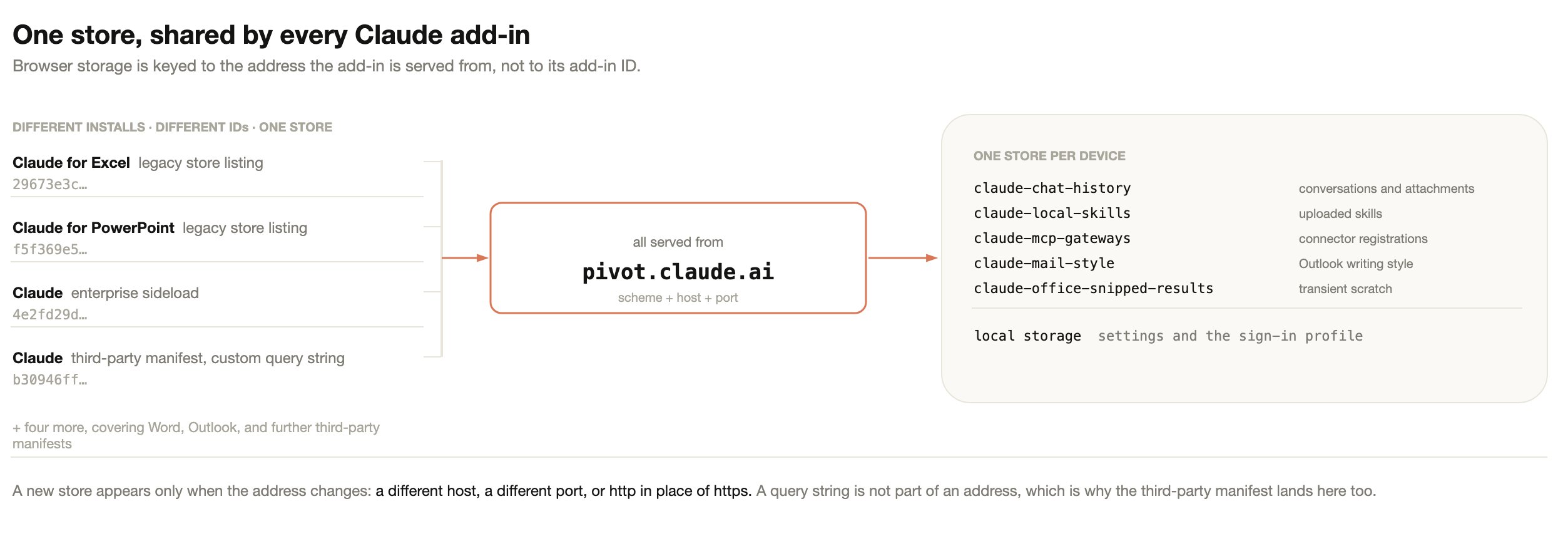 The reason is the ordinary web rule. Office reads the manifest, finds the
`` URL, and opens it in an embedded browser. From that point the
browser behaves as any browser does: it hands storage to the page's address,
meaning its scheme, host, and port. The add-in's ID, version, and display name
never enter the lookup, so a manifest is closer to a bookmark than to a
container. Deleting a bookmark does not delete the site's cookies.
Two consequences follow:
* A query string is not part of an address. A third-party manifest is built for
one organization and carries that organization's configuration in a query
string, so no two are alike. All of them still land in the same store as every
other install.
* Changing the address does create a new, empty store. Serving the add-in from a
different host, a different port, or over `http` instead of `https` gives it
somewhere else to read and write. The previous store still exists, but nothing
reads it.
The table below gives the result for each change users and administrators
actually make.
| Change | Result |
| ------------------------------------------------------------------------------ | --------------------------------------------------------------------------------------------------------------------------------------------------------------------------- |
| Uninstall and reinstall the same add-in | Data intact |
| Move to a different store listing, or to one published with a new ID | Data intact. A new listing means a new add-in ID, not new storage |
| Move from a sideloaded manifest to a store listing, or the reverse | Data intact |
| Swap the standard manifest for the custom third-party manifest, or the reverse | Storage intact, but the history list changes, because the connection mode change is an identity change. See [what chat history is keyed to](#what-chat-history-is-keyed-to) |
| Run a store install and a sideloaded manifest at the same time | Shared storage. Two entries in Office, one history. Remove one to avoid confusion |
| Bump the manifest version, or issue a new ID to clear an Admin Center cache | Data intact |
| Serve the add-in from a different host or port, or over `http` | A new empty store |
| Rebuild, reimage, or wipe the profile on the device | Data destroyed. Export first |
## What Claude for M365 stores
The add-in uses five IndexedDB databases and one local storage store, all inside
the signed-in user's operating system profile. The table below lists each one
and what it is scoped to.
| Store | Contents | Scoped to |
| ------------------------------- | --------------------------------------------------------------------------------- | ------------------------------------------------ |
| `claude-chat-history` | Conversation transcripts, titles, timestamps, and the contents of attached files | One user, one organization, one Office app |
| `claude-local-skills` | Skills the user uploaded, including any templates bundled with them | The device profile, not the individual user |
| `claude-mcp-gateways` | Client registrations for connectors the user has authorized | The connector's address, not the individual user |
| `claude-mail-style` | Claude for Outlook only: learned writing style, draft preferences, and scratchpad | One user |
| `claude-office-snipped-results` | Working scratch for long conversations, cleared at the start of every session | Nothing, transient |
| Local storage | Settings, onboarding and terms flags, and the active sign-in profile | The browser profile |
Conversations and the Outlook writing style guide are scoped to the
individual user. Uploaded skills and connector registrations are scoped to the
storage location instead, so anyone who reaches the same store shares them. The
Windows and macOS sections below describe what splits a store on each platform.
This only applies where people share a single operating system account. That
arrangement already shares the browser profile, saved sessions, and local files
between them, so the guidance is the same as for any browser-based tool: give
each person their own operating system account.
Claude for M365 also writes one value into the Office document itself: an opaque
identifier that lets the add-in recognize the same file after a rename or a Save
As. It holds no user information and no conversation content, and it travels
with the file if the document is shared.
## Sign-in and credentials
Every store above holds only content, with one exception. Local storage also
holds the signed-in user's identity: the credential the add-in presents to the
model endpoint you configured. Cloud provider sign-ins use short-lived tokens
that the add-in renews automatically. A gateway token or API key that you
configure yourself is held until you change it.
This sits in the browser profile unencrypted, in the same way a saved web
session does. The boundary protecting it is the operating system account:
another account on the same machine cannot read it, and disk encryption covers
the device at rest. Where the deployment signs in to a cloud provider, the
credential is obtained on the device and used from the device. A gateway token
or API key that you issue centrally is distributed to every user's device, so
treat it as you would any other shared secret.
An export of a user's add-in data contains these credentials as well as
conversation text, because the export copies local storage. Treat an export
folder as a secret, or delete the local storage folder from it before the export
leaves the device. A rebuilt machine signs in again regardless.
## Where the data sits on Windows
On Windows the store is split by signed-in Office account. Local storage is one
database for the whole browser profile rather than one per address, which is the
main difference from macOS.
The reason is the ordinary web rule. Office reads the manifest, finds the
`` URL, and opens it in an embedded browser. From that point the
browser behaves as any browser does: it hands storage to the page's address,
meaning its scheme, host, and port. The add-in's ID, version, and display name
never enter the lookup, so a manifest is closer to a bookmark than to a
container. Deleting a bookmark does not delete the site's cookies.
Two consequences follow:
* A query string is not part of an address. A third-party manifest is built for
one organization and carries that organization's configuration in a query
string, so no two are alike. All of them still land in the same store as every
other install.
* Changing the address does create a new, empty store. Serving the add-in from a
different host, a different port, or over `http` instead of `https` gives it
somewhere else to read and write. The previous store still exists, but nothing
reads it.
The table below gives the result for each change users and administrators
actually make.
| Change | Result |
| ------------------------------------------------------------------------------ | --------------------------------------------------------------------------------------------------------------------------------------------------------------------------- |
| Uninstall and reinstall the same add-in | Data intact |
| Move to a different store listing, or to one published with a new ID | Data intact. A new listing means a new add-in ID, not new storage |
| Move from a sideloaded manifest to a store listing, or the reverse | Data intact |
| Swap the standard manifest for the custom third-party manifest, or the reverse | Storage intact, but the history list changes, because the connection mode change is an identity change. See [what chat history is keyed to](#what-chat-history-is-keyed-to) |
| Run a store install and a sideloaded manifest at the same time | Shared storage. Two entries in Office, one history. Remove one to avoid confusion |
| Bump the manifest version, or issue a new ID to clear an Admin Center cache | Data intact |
| Serve the add-in from a different host or port, or over `http` | A new empty store |
| Rebuild, reimage, or wipe the profile on the device | Data destroyed. Export first |
## What Claude for M365 stores
The add-in uses five IndexedDB databases and one local storage store, all inside
the signed-in user's operating system profile. The table below lists each one
and what it is scoped to.
| Store | Contents | Scoped to |
| ------------------------------- | --------------------------------------------------------------------------------- | ------------------------------------------------ |
| `claude-chat-history` | Conversation transcripts, titles, timestamps, and the contents of attached files | One user, one organization, one Office app |
| `claude-local-skills` | Skills the user uploaded, including any templates bundled with them | The device profile, not the individual user |
| `claude-mcp-gateways` | Client registrations for connectors the user has authorized | The connector's address, not the individual user |
| `claude-mail-style` | Claude for Outlook only: learned writing style, draft preferences, and scratchpad | One user |
| `claude-office-snipped-results` | Working scratch for long conversations, cleared at the start of every session | Nothing, transient |
| Local storage | Settings, onboarding and terms flags, and the active sign-in profile | The browser profile |
Conversations and the Outlook writing style guide are scoped to the
individual user. Uploaded skills and connector registrations are scoped to the
storage location instead, so anyone who reaches the same store shares them. The
Windows and macOS sections below describe what splits a store on each platform.
This only applies where people share a single operating system account. That
arrangement already shares the browser profile, saved sessions, and local files
between them, so the guidance is the same as for any browser-based tool: give
each person their own operating system account.
Claude for M365 also writes one value into the Office document itself: an opaque
identifier that lets the add-in recognize the same file after a rename or a Save
As. It holds no user information and no conversation content, and it travels
with the file if the document is shared.
## Sign-in and credentials
Every store above holds only content, with one exception. Local storage also
holds the signed-in user's identity: the credential the add-in presents to the
model endpoint you configured. Cloud provider sign-ins use short-lived tokens
that the add-in renews automatically. A gateway token or API key that you
configure yourself is held until you change it.
This sits in the browser profile unencrypted, in the same way a saved web
session does. The boundary protecting it is the operating system account:
another account on the same machine cannot read it, and disk encryption covers
the device at rest. Where the deployment signs in to a cloud provider, the
credential is obtained on the device and used from the device. A gateway token
or API key that you issue centrally is distributed to every user's device, so
treat it as you would any other shared secret.
An export of a user's add-in data contains these credentials as well as
conversation text, because the export copies local storage. Treat an export
folder as a secret, or delete the local storage folder from it before the export
leaves the device. A rebuilt machine signs in again regardless.
## Where the data sits on Windows
On Windows the store is split by signed-in Office account. Local storage is one
database for the whole browser profile rather than one per address, which is the
main difference from macOS.
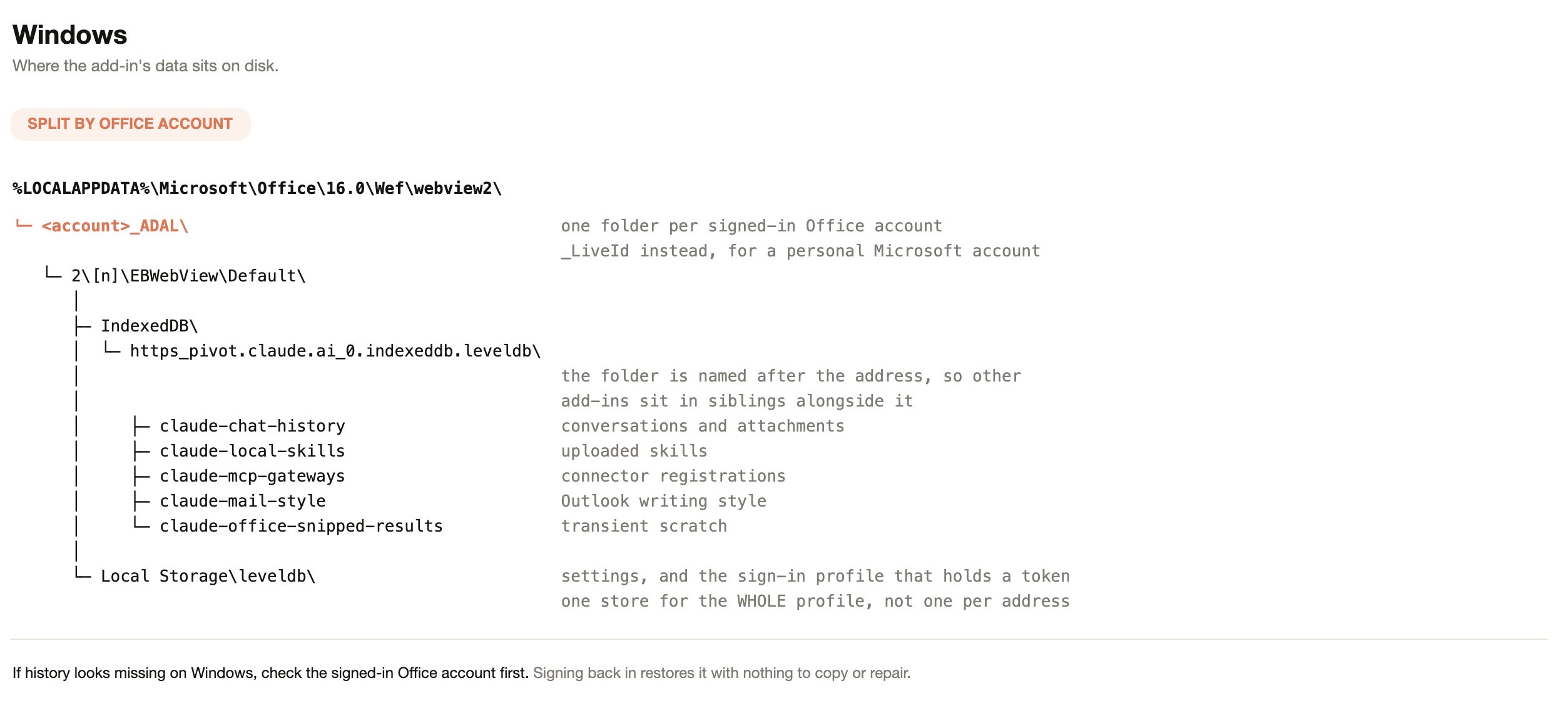 If chat history looks missing on Windows, check the signed-in Office account
before anything else. Signing back in to the original account restores the
history with nothing to copy or repair.
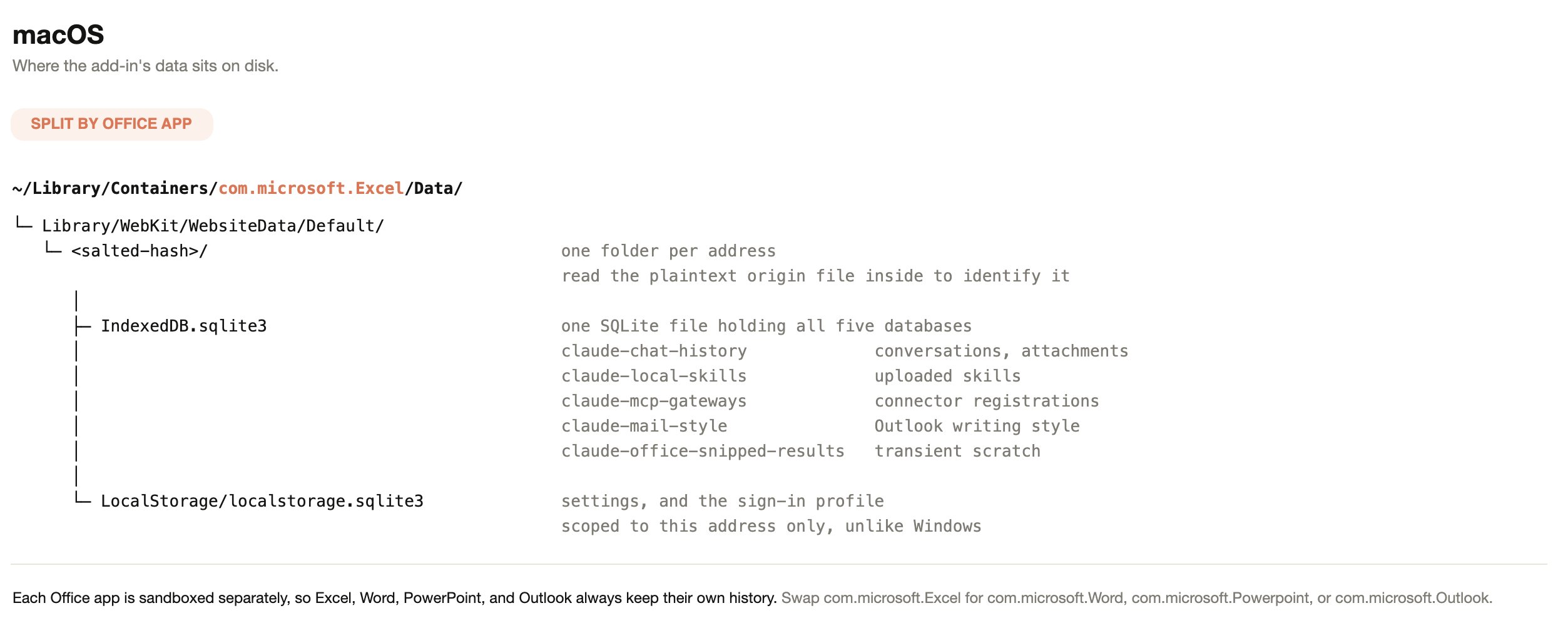
## Where the data sits on macOS
On macOS the store is split by Office app instead. Each app runs in its own
sandbox container, so Excel, Word, PowerPoint, and Outlook always keep separate
histories, and local storage sits inside the folder for a single address.
If chat history looks missing on Windows, check the signed-in Office account
before anything else. Signing back in to the original account restores the
history with nothing to copy or repair.
## Where the data sits on macOS
On macOS the store is split by Office app instead. Each app runs in its own
sandbox container, so Excel, Word, PowerPoint, and Outlook always keep separate
histories, and local storage sits inside the folder for a single address.
 Office on the web behaves differently again. The add-in runs in a cross-origin
frame, so browsers treat its storage as third-party. Tracking prevention,
policies that block third-party cookies, and similar controls partition or evict
it. Browsers evict third-party storage on their own schedule, so treat chat
history on Office on the web as temporary.
## What chat history is keyed to
Sharing a store is not the same as sharing a history list. Each conversation is
stored against a user identity, an organization, and the Office app it was
created in. The list shows only the conversations that match all three for the
session in use.
When users sign in with a Claude account, that account is the identity. In
third-party platform deployments there is no Claude account, so the identity
comes from the Microsoft Entra ID sign-in already present in Office, as a
one-way hash of the directory object ID. Nothing about the user is stored in
readable form, and the hash is not sent to Anthropic.
Office builds without support for nested app authentication cannot supply the
Entra ID sign-in the add-in reads. On those builds Claude for M365 falls back to
a per-installation identifier. Conversations still persist on that device; they
are tied to the installation rather than to the directory account.
The table below gives the result for each case.
| Situation | Result |
| --------------------------------------------------------------------------------------------------- | ---------------------------------------------------------------------------------------------------------------------------------------------------------------------------------------- |
| A user signs out of Claude and signs back in | The same conversations. Signing out does not change the identity |
| A different person signs in to Office on that device | They see their own conversations, not the previous user's. On Office builds that fall back to a per-installation identifier, both people resolve to the same identity and share one list |
| The same person opens the add-in on a second device | No conversations. Storage is per device and does not sync |
| A user's organization changes, such as joining or leaving a team plan | Earlier conversations stop appearing. They remain on disk under the previous organization |
| A deployment moves between a Claude account sign-in and a third-party platform, in either direction | Earlier conversations stop appearing. They remain on disk under the previous identity, and the add-in has no path to reach them |
Changing connection mode is not a data loss event, because nothing is deleted,
but it is an identity change and the history list follows the identity.
One store derives identity differently from chat history. The Outlook writing
style guide has no per-installation fallback. On Office builds where the Entra
ID identity cannot be read, it falls back to a single shared key, so one learned
writing style is shared by everyone using that browser profile.
## Data retention
Claude for M365 bounds local storage in two ways, and users can clear it
themselves at any time.
| Store | Retention |
| ------------------------------- | -------------------------------------------------------------------------------------------------------------------------- |
| `claude-chat-history` | The 50 most recent conversations per user, per organization, per Office app. Older conversations are deleted automatically |
| Any store | When the browser profile runs out of storage quota, the oldest conversations are deleted to make room |
| `claude-office-snipped-results` | Cleared at the start of every session |
| Everything else | Kept until the user deletes it or the browser profile is wiped |
Users clear their own conversations from the add-in's settings. Under "Chat
history", "Delete all" removes every saved conversation for that user in that
Office app and starts a new chat.
There is no expiry by age and no administrator-configurable retention window.
Claude for M365 also does not inherit custom data retention settings configured
for your organization. If your policy requires a retention limit on this data,
the practical control is the device profile lifecycle, such as roaming-profile
cleanup or reimaging, rather than a setting in the add-in.
## What leaves the device
The table below covers each category and its destination, so you can scope a
review to the paths that carry content off the endpoint.
| Data | Where it goes |
| ------------------------------------------------------------------------------------------- | ------------------------------------------------------------------------------------------------------------------------------------------------------------------------------------------------------------------------- |
| Conversation text, attachments, and the document content Claude is asked to work with | The model endpoint your deployment is configured for. In third-party platform deployments that is your own Vertex AI, Bedrock, Azure, or gateway endpoint |
| Chat history, uploaded skills, connector registrations, and the Outlook writing style guide | Nowhere. Local only, no sync, no server-side backup |
| Sign-in credentials | Only to the identity provider they belong to |
| Usage telemetry sent to Anthropic | Counts, durations, and error categories. Anthropic's collector is allowlist-filtered, so it excludes conversation text, document contents, file names, and the names of your connectors and their tools |
| Telemetry sent to a custom OpenTelemetry collector you configure | The full audit trail, including prompt content and tool inputs and outputs. That path bypasses the allowlist filter by design. See [Audit and observability](/docs/office-agents/enterprise-readiness#audit-and-observability) |
## Export a user's data before a device is rebuilt
The `claude-for-msft-365-install` plugin includes read-only export scripts for
macOS and Windows. They read Office's storage and write only to the folder you
name, and running them with no arguments reports what was found without copying
anything. See
[Deploy the add-in for your organization](/docs/office-agents/third-party-platforms#deploy-the-add-in-for-your-organization)
for installation, then run `/claude-for-msft-365-install:export-data`.
Export before any of the following:
* A device is rebuilt, reimaged, or handed to another person.
* Anyone clears the Office add-in cache on Windows. The storage sits inside the
same `Wef` folder as the manifest cache, so deleting that folder destroys chat
history along with the manifest.
* Roaming-profile or FSLogix cleanup runs against the user's profile.
* A browser policy such as `ClearBrowsingDataOnExit` is applied to the device.
## Related
The pages below cover the deployment and security topics that reference this
data.
* [Security, admin auditability, and analytics](/docs/office-agents/enterprise-readiness)
* [Use Claude for M365 with third-party platforms](/docs/office-agents/third-party-platforms)
Office on the web behaves differently again. The add-in runs in a cross-origin
frame, so browsers treat its storage as third-party. Tracking prevention,
policies that block third-party cookies, and similar controls partition or evict
it. Browsers evict third-party storage on their own schedule, so treat chat
history on Office on the web as temporary.
## What chat history is keyed to
Sharing a store is not the same as sharing a history list. Each conversation is
stored against a user identity, an organization, and the Office app it was
created in. The list shows only the conversations that match all three for the
session in use.
When users sign in with a Claude account, that account is the identity. In
third-party platform deployments there is no Claude account, so the identity
comes from the Microsoft Entra ID sign-in already present in Office, as a
one-way hash of the directory object ID. Nothing about the user is stored in
readable form, and the hash is not sent to Anthropic.
Office builds without support for nested app authentication cannot supply the
Entra ID sign-in the add-in reads. On those builds Claude for M365 falls back to
a per-installation identifier. Conversations still persist on that device; they
are tied to the installation rather than to the directory account.
The table below gives the result for each case.
| Situation | Result |
| --------------------------------------------------------------------------------------------------- | ---------------------------------------------------------------------------------------------------------------------------------------------------------------------------------------- |
| A user signs out of Claude and signs back in | The same conversations. Signing out does not change the identity |
| A different person signs in to Office on that device | They see their own conversations, not the previous user's. On Office builds that fall back to a per-installation identifier, both people resolve to the same identity and share one list |
| The same person opens the add-in on a second device | No conversations. Storage is per device and does not sync |
| A user's organization changes, such as joining or leaving a team plan | Earlier conversations stop appearing. They remain on disk under the previous organization |
| A deployment moves between a Claude account sign-in and a third-party platform, in either direction | Earlier conversations stop appearing. They remain on disk under the previous identity, and the add-in has no path to reach them |
Changing connection mode is not a data loss event, because nothing is deleted,
but it is an identity change and the history list follows the identity.
One store derives identity differently from chat history. The Outlook writing
style guide has no per-installation fallback. On Office builds where the Entra
ID identity cannot be read, it falls back to a single shared key, so one learned
writing style is shared by everyone using that browser profile.
## Data retention
Claude for M365 bounds local storage in two ways, and users can clear it
themselves at any time.
| Store | Retention |
| ------------------------------- | -------------------------------------------------------------------------------------------------------------------------- |
| `claude-chat-history` | The 50 most recent conversations per user, per organization, per Office app. Older conversations are deleted automatically |
| Any store | When the browser profile runs out of storage quota, the oldest conversations are deleted to make room |
| `claude-office-snipped-results` | Cleared at the start of every session |
| Everything else | Kept until the user deletes it or the browser profile is wiped |
Users clear their own conversations from the add-in's settings. Under "Chat
history", "Delete all" removes every saved conversation for that user in that
Office app and starts a new chat.
There is no expiry by age and no administrator-configurable retention window.
Claude for M365 also does not inherit custom data retention settings configured
for your organization. If your policy requires a retention limit on this data,
the practical control is the device profile lifecycle, such as roaming-profile
cleanup or reimaging, rather than a setting in the add-in.
## What leaves the device
The table below covers each category and its destination, so you can scope a
review to the paths that carry content off the endpoint.
| Data | Where it goes |
| ------------------------------------------------------------------------------------------- | ------------------------------------------------------------------------------------------------------------------------------------------------------------------------------------------------------------------------- |
| Conversation text, attachments, and the document content Claude is asked to work with | The model endpoint your deployment is configured for. In third-party platform deployments that is your own Vertex AI, Bedrock, Azure, or gateway endpoint |
| Chat history, uploaded skills, connector registrations, and the Outlook writing style guide | Nowhere. Local only, no sync, no server-side backup |
| Sign-in credentials | Only to the identity provider they belong to |
| Usage telemetry sent to Anthropic | Counts, durations, and error categories. Anthropic's collector is allowlist-filtered, so it excludes conversation text, document contents, file names, and the names of your connectors and their tools |
| Telemetry sent to a custom OpenTelemetry collector you configure | The full audit trail, including prompt content and tool inputs and outputs. That path bypasses the allowlist filter by design. See [Audit and observability](/docs/office-agents/enterprise-readiness#audit-and-observability) |
## Export a user's data before a device is rebuilt
The `claude-for-msft-365-install` plugin includes read-only export scripts for
macOS and Windows. They read Office's storage and write only to the folder you
name, and running them with no arguments reports what was found without copying
anything. See
[Deploy the add-in for your organization](/docs/office-agents/third-party-platforms#deploy-the-add-in-for-your-organization)
for installation, then run `/claude-for-msft-365-install:export-data`.
Export before any of the following:
* A device is rebuilt, reimaged, or handed to another person.
* Anyone clears the Office add-in cache on Windows. The storage sits inside the
same `Wef` folder as the manifest cache, so deleting that folder destroys chat
history along with the manifest.
* Roaming-profile or FSLogix cleanup runs against the user's profile.
* A browser policy such as `ClearBrowsingDataOnExit` is applied to the device.
## Related
The pages below cover the deployment and security topics that reference this
data.
* [Security, admin auditability, and analytics](/docs/office-agents/enterprise-readiness)
* [Use Claude for M365 with third-party platforms](/docs/office-agents/third-party-platforms)